




업데이트됨 2026년 4월 23일
.NET에서 Microsoft.Extensions.AI로 LLM 통합 간소화
AI는 소프트웨어 개발을 변혁하고 있으나, 대규모 언어 모델(LLM)을 .NET에 통합하는 것은 지금까지 복잡했습니다. 현대에는 OpenAI 기반 PDF 파싱, 데이터 추출 및 콘텐츠 요약을 .NET 애플리케이션에 가져오는 IronPdf.AI로 AI 통합을 더욱 확장하세요.
더 읽어보기

C#에서 String.Join은 배열 또는 컬렉션에서 개별 문자열을 단일 문자열로 결합하기 위한 강력한 문자열 연결 메서드입니다. String.Join 메서드는 최소 두 개의 매개변수를 요구합니다: 문자열 구분 기호 및 결합할 요소의 배열 또는 컬렉션. 구분자는 결과 문자열 내의 모든 요소 사이에 삽입됩니다. 이 기능은 쉼표, 공백, 또는 사용자 정의 문자와 같은 특정 구분자로 여러 문자열을 연결해야 할 때 유용합니다. 이 기사에서는 String.Join 메서드를 다루고 IronPDF 라이브러리의 기능을 탐구할 것입니다.
String.Join 메서드는 다양한 요구에 맞게 설계된 여러 가지 오버로드와 함께 C#에 제공됩니다. 가장 일반적으로 사용되는 구문은 다음과 같습니다:
public static string Join(string separator, params string[] value);
public static string Join(string separator, IEnumerable<string> values);
public static string Join<t>(string separator, IEnumerable<t> values);
public static string Join(string separator, params object[] values);
public static string Join(string separator, string[] value, int startIndex, int count);Public Shared Function Join(separator As String, ParamArray value As String()) As String
End Function
Public Shared Function Join(separator As String, values As IEnumerable(Of String)) As String
End Function
Public Shared Function Join(Of T)(separator As String, values As IEnumerable(Of T)) As String
End Function
Public Shared Function Join(separator As String, ParamArray values As Object()) As String
End Function
Public Shared Function Join(separator As String, value As String(), startIndex As Integer, count As Integer) As String
End Function각 오버로드는 문자열이나 객체를 함께 결합하는 방식에 대한 유연성을 허용합니다. 오버로드의 선택은 연결하려는 요소의 데이터 유형과 배열, 컬렉션, 또는 다양한 객체 유형의 조합을 사용하는지에 따라 다릅니다.
String.Join의 매개변수를 이해하는 것은 효과적인 사용에 필수적입니다:
IEnumerable<string> 또는 IEnumerable 컬렉션입니다. 이는 더 복잡한 유형을 연결하기 위해 해당 요소들의 ToString 메서드를 호출할 수 있게 합니다.이러한 매개변수를 활용하여 문자열을 조인하는 방식을 미세 조정하고, 요소의 포함을 제어하며, 구분자의 배치를 관리할 수 있습니다.
String.Join 메서드를 사용하는 간단한 예제를 보십시오. 문자열을 쉼표로 구분자로 하여 연결하려는 문자열 배열이 있다고 가정해 보십시오:
public static void Main()
{
    string[] array = new string[] { "apple", "banana", "cherry" };
    string result = String.Join(", ", array);
    Console.WriteLine(result);
}Public Shared Sub Main()
Dim array() As String = { "apple", "banana", "cherry" }
Dim result As String = String.Join(", ", array)
Console.WriteLine(result)
End Sub위 예제에서 출력은 다음과 같습니다:
apple, banana, cherry여기서 String.Join은 두 개의 매개변수를 받습니다: 첫 번째는 구분 문자열로 쉼표와 공백 (', ')이며, 두 번째는 연결할 문자열 배열입니다. 반환 문자열은 지정된 구분자로 나누어진 배열의 모든 요소로 구성된 연결된 단일 문자열입니다.
String.Join은 string 외의 유형의 배열도 조인할 수 있습니다. 예를 들어, 정수 배열이 있고 그들의 문자열 표현을 연결하고자 할 때, 쉽게 할 수 있습니다:
public static void Main()
{
    int[] numbers = new int[] { 1, 2, 3 };
    string result = String.Join(", ", numbers);
    Console.WriteLine(result);
}Public Shared Sub Main()
Dim numbers() As Integer = { 1, 2, 3 }
Dim result As String = String.Join(", ", numbers)
Console.WriteLine(result)
End Sub이 코드는 다음과 같은 출력을 생성합니다:
1, 2, 3메서드는 배열의 각 요소에 대해 자동으로 ToString 메서드를 호출하여 문자열로 변환한 후 연결합니다. 이는 다양한 데이터 유형을 처리하는 String.Join의 다재다능함을 보여줍니다.
String.Join 외에도 C#의 여러 문자열 조작 방법은 다양한 상황에 유용합니다:
String.Concat은 구분자를 사용하지 않고 객체 배열의 요소나 문자열 배열의 문자열을 연결하는 데 사용됩니다. 구분자를 요소 사이에 삽입할 필요가 없을 때 String.Join보다 더 간단합니다.
string concatenatedString = String.Concat("Hello", " ", "World");
// Output: "Hello World"Dim concatenatedString As String = String.Concat("Hello", " ", "World")
' Output: "Hello World"String.Split 메서드는 하나 이상의 구분 기호를 기반으로 한 문자열을 문자열 배열로 나누어 String.Join의 반대 작업을 수행합니다.
string[] words = "Hello World from C#".Split(' ');
// Output: ["Hello", "World", "from", "C#"]Dim words() As String = "Hello World from C#".Split(" "c)
' Output: ["Hello", "World", "from", "C#"]String.Replace는 문자열에서 지정된 하위 문자열이나 문자의 모든 발생을 다른 하위 문자열이나 문자로 대체하는 데 사용됩니다. 문자열의 특정 부분을 수정하는 데 도움이 됩니다.
string replacedString = "Hello World".Replace("World", "C#");
// Output: "Hello C#"Dim replacedString As String = "Hello World".Replace("World", "C#")
' Output: "Hello C#"이 메서드는 문자열에서 모든 시작과 끝의 공백 또는 지정된 문자를 제거하는 데 사용됩니다. Trim은 시작과 끝의 공백을 모두 제거하고, String.TrimStart와 String.TrimEnd는 각각 문자열의 시작이나 끝에서 이를 제거합니다.
string trimmedString = " Hello World ".Trim();
// Output: "Hello World"Dim trimmedString As String = " Hello World ".Trim()
' Output: "Hello World"이 각각의 메서드는 문자열 조작의 영역에서 특정 용도를 가지고 있습니다. 개발자가 String.Join이 제공하는 기능을 보완하여 문자열을 다재다능하고 효율적으로 처리할 수 있게 해줍니다.
Explore IronPDF's Integration for PDF Management는 .NET 개발자를 위해 설계된 종합적인 라이브러리로 C# 애플리케이션 내에서 PDF 문서의 생성, 조작 및 렌더링을 용이하게 합니다. IronPDF는 개발자가 HTML 출처나 이미지 또는 텍스트에서 직접 PDF 문서를 생성하는 데 도움을 줍니다.
String.Join은 IronPDF 작업 시 특히 유용할 수 있습니다. 예를 들어, 개발자는 여러 문자열을 연결하는 데 String.Join을 사용하여 HTML 라인이나 단락을 단일 문자열로 결합할 수 있습니다. 이렇게 결합된 문자열은 IronPDF의 기능을 사용하여 쉽게 PDF 문서로 변환될 수 있습니다.
IronPDF는 HTML 콘텐츠를 PDF로 변환하는 데 탁월하며, 원래의 레이아웃과 스타일을 그대로 유지합니다. 이 기능은 보고서, 송장 및 문서화와 같은 웹 기반 콘텐츠에서 PDF를 생성하는 데 특히 유용합니다. HTML 파일, URL 및 HTML 문자열까지 PDF 파일로 변환할 수 있습니다.
using IronPdf;

class Program
{
    static void Main(string[] args)
    {
        var renderer = new ChromePdfRenderer();
        // 1. Convert HTML String to PDF
        var htmlContent = "<h1>Hello, IronPDF!</h1><p>This is a PDF from an HTML string.</p>";
        var pdfFromHtmlString = renderer.RenderHtmlAsPdf(htmlContent);
        pdfFromHtmlString.SaveAs("HTMLStringToPDF.pdf");
        // 2. Convert HTML File to PDF
        var htmlFilePath = "path_to_your_html_file.html"; // Specify the path to your HTML file
        var pdfFromHtmlFile = renderer.RenderHtmlFileAsPdf(htmlFilePath);
        pdfFromHtmlFile.SaveAs("HTMLFileToPDF.pdf");
        // 3. Convert URL to PDF
        var url = "http://ironpdf.com"; // Specify the URL
        var pdfFromUrl = renderer.RenderUrlAsPdf(url);
        pdfFromUrl.SaveAs("URLToPDF.pdf");
    }
}Imports IronPdf
Friend Class Program
Shared Sub Main(ByVal args() As String)
Dim renderer = New ChromePdfRenderer()
' 1. Convert HTML String to PDF
Dim htmlContent = "<h1>Hello, IronPDF!</h1><p>This is a PDF from an HTML string.</p>"
Dim pdfFromHtmlString = renderer.RenderHtmlAsPdf(htmlContent)
pdfFromHtmlString.SaveAs("HTMLStringToPDF.pdf")
' 2. Convert HTML File to PDF
Dim htmlFilePath = "path_to_your_html_file.html" ' Specify the path to your HTML file
Dim pdfFromHtmlFile = renderer.RenderHtmlFileAsPdf(htmlFilePath)
pdfFromHtmlFile.SaveAs("HTMLFileToPDF.pdf")
' 3. Convert URL to PDF
Dim url = "http://ironpdf.com" ' Specify the URL
Dim pdfFromUrl = renderer.RenderUrlAsPdf(url)
pdfFromUrl.SaveAs("URLToPDF.pdf")
End Sub
End Class다음 코드는 IronPDF와 함께 String.Join을 사용하여 여러 문자열로부터 C#에서 PDF 문서를 생성하는 방법을 보여주는 단일 사례입니다:
using IronPdf;
public class PdfGenerationExample
{
    public static void Main()
    {
        License.LicenseKey = "License-Key";
        // Array of strings representing HTML paragraphs
        string[] htmlParagraphs = new string[]
        {
            "<p>This is the first paragraph.</p>",
            "<p>This is the second paragraph.</p>",
            "<p>This is the third paragraph.</p>"
        };
        // Using String.Join to concatenate HTML paragraphs with a newline as separator
        string htmlContent = String.Join("\n", htmlParagraphs);
        // Initialize the HTML to PDF converter
        var renderer = new ChromePdfRenderer();
        // Convert the HTML string to a PDF document
        var pdf = renderer.RenderHtmlAsPdf(htmlContent);
        // Save the PDF to a file
        pdf.SaveAs("Example.pdf");
    }
}Imports Microsoft.VisualBasic
Imports IronPdf
Public Class PdfGenerationExample
Public Shared Sub Main()
License.LicenseKey = "License-Key"
' Array of strings representing HTML paragraphs
Dim htmlParagraphs() As String = { "<p>This is the first paragraph.</p>", "<p>This is the second paragraph.</p>", "<p>This is the third paragraph.</p>" }
' Using String.Join to concatenate HTML paragraphs with a newline as separator
Dim htmlContent As String = String.Join(vbLf, htmlParagraphs)
' Initialize the HTML to PDF converter
Dim renderer = New ChromePdfRenderer()
' Convert the HTML string to a PDF document
Dim pdf = renderer.RenderHtmlAsPdf(htmlContent)
' Save the PDF to a file
pdf.SaveAs("Example.pdf")
End Sub
End Class이 예제에서는 String.Join를 사용하여 HTML 단락 문자열 배열을 줄 바꿈 문자로 구분하여 단일 HTML 문자열로 병합합니다. 이 문자열은 IronPDF의 RenderHtmlAsPdf 메소드를 사용하여 PDF 문서로 변환됩니다.
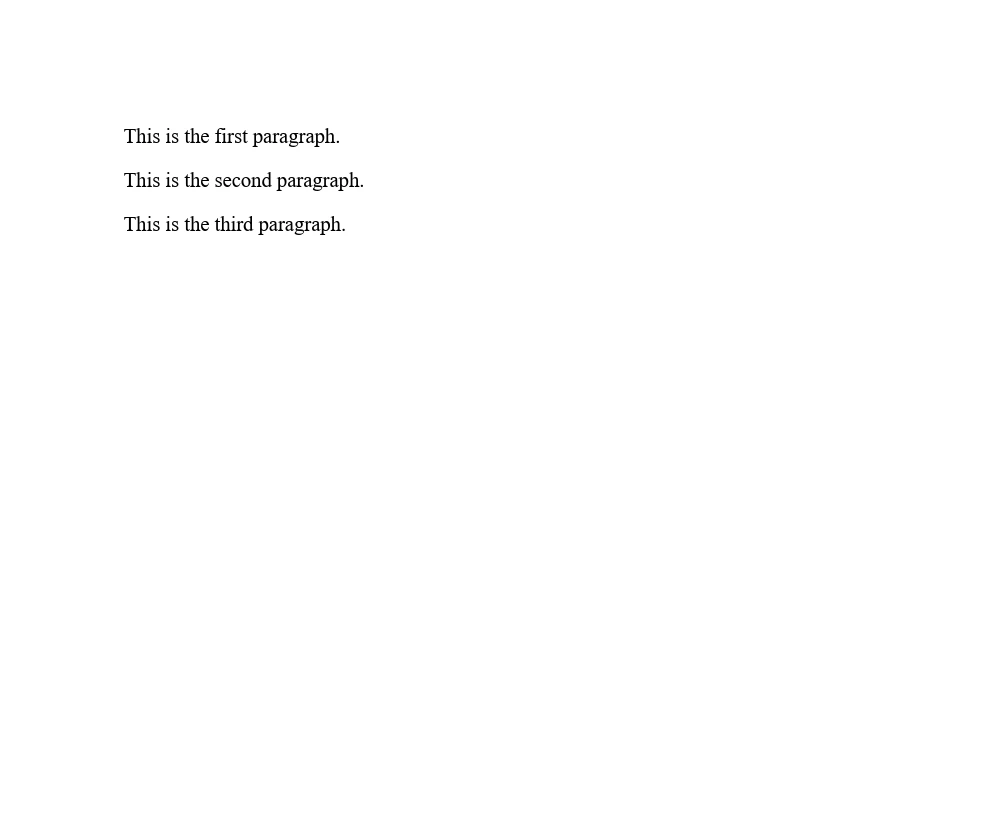
C#의 Join 메소드는 지정된 구분 기호로 문자열 요소를 결합하는 강력하고 효율적인 방법입니다. 파라미터 및 오버로드를 이해함으로써 개발자는 간단한 문자열 배열에서 복잡한 객체 컬렉션까지 다양한 데이터 유형과 시나리오를 처리할 수 있습니다. 적절한 사용법은 코드 단순화뿐만 아니라 최적화된 메모리 관리를 통해 성능도 향상시킵니다.
IronPDF는 개발자에게 다양한 가격 책정 계층에서 시작되는 무료 체험 및 라이선스 옵션을 통해 기능을 탐색할 기회를 제공합니다.

제이콥 멜러는 Iron Software의 최고 기술 책임자(CTO)이자 C# PDF 기술을 개척한 선구적인 엔지니어입니다. Iron Software의 핵심 코드베이스를 최초로 개발한 그는 창립 초기부터 회사의 제품 아키텍처를 설계해 왔으며, CEO인 캐머런 리밍턴과 함께 회사를 NASA, 테슬라, 그리고 전 세계 정부 기관에 서비스를 제공하는 50명 이상의 직원을 보유한 기업으로 성장시켰습니다.



IronPDF는 IRON SUITE 의 일부입니다.
10개의 .NET API 제품, 당신의 사무 문서를 위해











PDF 파일을 HTML처럼 빠르게 변환해야 할 때.


