





업데이트됨 2026년 4월 23일
.NET에서 Microsoft.Extensions.AI로 LLM 통합 간소화
AI는 소프트웨어 개발을 변혁하고 있으나, 대규모 언어 모델(LLM)을 .NET에 통합하는 것은 지금까지 복잡했습니다. 현대에는 OpenAI 기반 PDF 파싱, 데이터 추출 및 콘텐츠 요약을 .NET 애플리케이션에 가져오는 IronPdf.AI로 AI 통합을 더욱 확장하세요.
더 읽어보기

단위 테스트는 개별 소스 코드 단위의 기능을 확인하는 소프트웨어 개발의 중요한 단계입니다. C#에서는 각 컴포넌트나 메서드가 다양한 조건에서 올바르게 작동하는지를 확인합니다. 프로그램의 각 부분을 분리하고 개별 부분이 오류가 없음을 보여주는 단위 테스트는 애플리케이션의 신뢰성에 크게 기여합니다. 이 기사에서는 C# 단위 테스트 프로젝트와 .NET용 IronPDF 라이브러리의 기초를 탐구할 것입니다.
C#에서 단위 테스트를 시작하려면, Visual Studio의 단위 테스트 프로젝트 중 하나를 설정해야 합니다. Visual Studio는 내장된 단위 테스트 프레임워크를 제공하여 시작하기 쉽습니다. 새 프로젝트를 만들 때, C# 카테고리에서 '단위 테스트 프로젝트' 템플릿을 선택하세요. 이 템플릿은 단위 테스트를 작성하고 효율적으로 실행하는 데 필요한 모든 것을 설정합니다.
using Microsoft.VisualStudio.TestTools.UnitTesting;
using System;

namespace Unit_Test_Project_Example
{
    // A simple calculator class with an Add method
    public class Calculator
    {
        public int Add(int a, int b)
        {
            return a + b;
        }
    }

    // A test class to validate the functionality of the Calculator class
    [TestClass]
    public class CalculatorTests
    {
        // A test method to check if the Add method in Calculator returns the correct sum
        [TestMethod]
        public void Add_ShouldReturnCorrectSum()
        {
            // Arrange
            var calculator = new Calculator();

            // Act
            var result = calculator.Add(2, 2);

            // Assert
            Assert.AreEqual(4, result);
        }
    }
}Imports Microsoft.VisualStudio.TestTools.UnitTesting
Imports System
Namespace Unit_Test_Project_Example
' A simple calculator class with an Add method
Public Class Calculator
Public Function Add(ByVal a As Integer, ByVal b As Integer) As Integer
Return a + b
End Function
End Class
' A test class to validate the functionality of the Calculator class
<TestClass>
Public Class CalculatorTests
' A test method to check if the Add method in Calculator returns the correct sum
<TestMethod>
Public Sub Add_ShouldReturnCorrectSum()
' Arrange
Dim calculator As New Calculator()
' Act
Dim result = calculator.Add(2, 2)
' Assert
Assert.AreEqual(4, result)
End Sub
End Class
End Namespace단위 테스트 프로젝트에서는 테스트를 클래스와 메서드로 구성합니다. 테스트 클래스는 함께 실행되어야 하는 단위 테스트 메서드의 컬렉션을 나타냅니다. 각 단위 테스트 메서드는 [TestMethod] 속성으로 장식되어 있으며, 코드의 특정 기능을 테스트하는 로직을 포함합니다. 테스트 클래스 자체는 [TestClass] 속성으로 표시되어 있으며, 테스트 프레임워크에 실행할 테스트가 포함되어 있음을 나타냅니다.
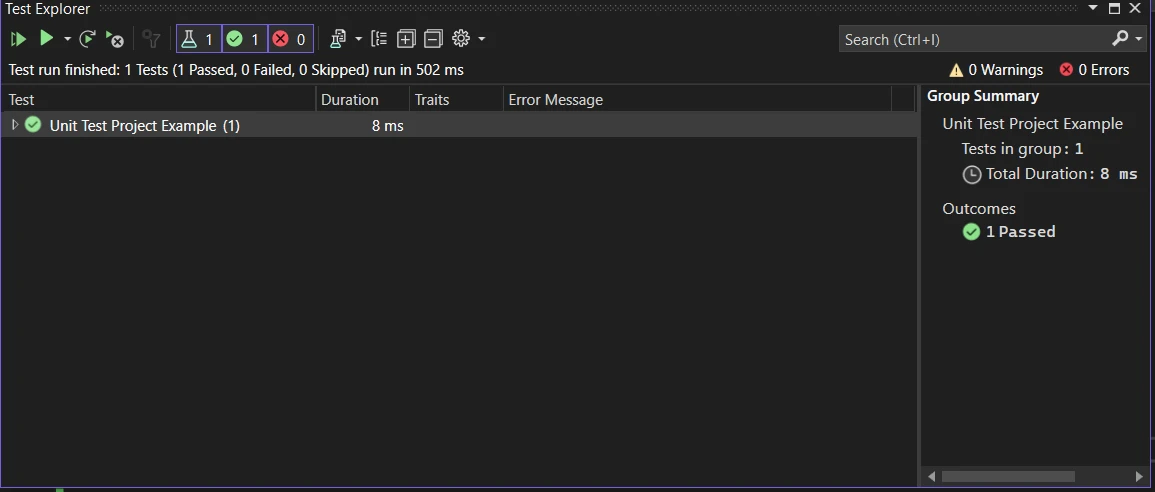
Visual Studio 테스트 탐색기 창은 모든 테스트 메서드를 실행하고 관리하는 중심 허브입니다. 모든 테스트, 선택한 테스트, 또는 개별 테스트를 실행할 수 있습니다. 테스트를 실행한 후, 테스트 탐색기에서는 통과 및 실패한 테스트에 대한 상세 요약을 제공하여 문제를 빠르게 식별하고 해결할 수 있습니다.
실패한 테스트를 신속히 조사하는 것이 필수적입니다. 이는 코드베이스에서 문제의 초기 경고 신호를 제공할 수 있습니다.
단순히 테스트를 작성하고 실행하는 것을 넘어, C#에서 단위 테스트를 마스터하는 것은 몇 가지 고급 기술 및 모범 사례를 이해하는 것을 포함합니다. 이러한 접근 방식은 보다 효율적이고 효과적인 테스트를 작성하는 데 도움을 주며, 애플리케이션이 신뢰할 수 있고 유지 관리가 용이하도록 보장합니다.
대형 테스트 모음을 유지하는 데 있어서는 좋은 조직이 핵심입니다. 테스트 기능별로 논리적으로 그룹화하세요. 테스트 메서드 및 클래스에 설명적인 이름을 사용하여 각각의 테스트가 무엇을 검증하고 있는지를 나타내세요. 이러한 접근 방식은 테스트 모음이 커질수록 테스트를 나중에 찾고 이해하기 쉽게 만듭니다.
테스트하는 코드가 외부 리소스나 애플리케이션의 다른 부분과 상호 작용하는 경우가 종종 있습니다. 그런 경우 Moq나 NSubstitute와 같은 모킹 프레임워크를 사용하여 모의 객체를 생성하세요. 이러한 대체 객체는 실제 객체의 동작을 모방하여 코드가 고립된 상태에서 테스트될 수 있도록 합니다. 의존성 주입은 테스트 중에 실제 의존성을 모의 객체나 스텁으로 대체할 수 있게 해주어 코드의 테스트 가능성을 높여줍니다.
using Microsoft.VisualStudio.TestTools.UnitTesting;
using Moq;

// A sample test class demonstrating the use of mocks
[TestClass]
public class ProductServiceTests
{
    // A test method to verify the GetProductById method of ProductService
    [TestMethod]
    public void GetProductById_ShouldReturnCorrectProduct()
    {
        // Arrange
        var mockRepository = new Mock<IProductRepository>();
        mockRepository.Setup(x => x.FindById(1)).Returns(new Product { Id = 1, Name = "Laptop" });

        ProductService productService = new ProductService(mockRepository.Object);

        // Act
        Product result = productService.GetProductById(1);

        // Assert
        Assert.IsNotNull(result);
        Assert.AreEqual("Laptop", result.Name);
    }
}Imports Microsoft.VisualStudio.TestTools.UnitTesting
Imports Moq
' A sample test class demonstrating the use of mocks
<TestClass>
Public Class ProductServiceTests
' A test method to verify the GetProductById method of ProductService
<TestMethod>
Public Sub GetProductById_ShouldReturnCorrectProduct()
' Arrange
Dim mockRepository = New Mock(Of IProductRepository)()
mockRepository.Setup(Function(x) x.FindById(1)).Returns(New Product With {
.Id = 1,
.Name = "Laptop"
})
Dim productService As New ProductService(mockRepository.Object)
' Act
Dim result As Product = productService.GetProductById(1)
' Assert
Assert.IsNotNull(result)
Assert.AreEqual("Laptop", result.Name)
End Sub
End Class데이터 기반 테스트는 다양한 입력 데이터로 동일한 테스트 메서드를 여러 번 실행할 수 있게 해줍니다. 이 기술은 여러 테스트 메서드를 작성하지 않고도 다양한 입력 및 시나리오를 테스트하는 데 특히 유용합니다. Visual Studio는 인라인 데이터, CSV 파일, 또는 데이터베이스와 같은 다양한 소스로부터 테스트 데이터를 지정하여 데이터 기반 테스트를 지원합니다.
어설션은 테스트 메서드의 핵심이며, 테스트 결과를 검증합니다. 테스트 프레임워크에서 제공하는 다양한 어설션 메서드를 이해하고 이를 적절히 사용하여 예상 값, 예외, 또는 조건을 확인하세요. 올바른 어설션을 사용하면 테스트가 더 명확하고 견고해질 수 있습니다.
지속적 통합 (CI) 파이프라인에 단위 테스트를 통합하세요. 이는 코드베이스에 변경이 있을 때마다 테스트가 자동으로 실행되어 문제를 조기에 찾아내고 수정할 수 있도록 해줍니다. 자동화는 테스트를 자주 그리고 일관되게 실행할 수 있게 해주어 건강한 코드베이스를 유지하는 데 중요합니다.
단위 테스트는 프로덕션 코드와의 일치도에 따라 그 가치를 발휘합니다. 기능 변화가 있을 때 이에 상응하는 단위 테스트에도 반영되도록 하세요. 이러한 실천은 오래된 테스트가 잘못 통과하는 것을 방지하고, 테스트 모음이 애플리케이션의 상태를 정확하게 나타낼 수 있게 해줍니다.
테스트가 실패하면 이는 배우고 개선할 기회를 제공합니다. 실패한 테스트는 예기치 않은 동작, 잘못된 가정, 또는 코드의 복잡하고 오류가 발생하기 쉬운 부분을 드러낼 수 있습니다. 실패한 테스트를 신중히 분석하여 근본 원인을 이해하고, 이러한 통찰을 테스트와 프로덕션 코드 모두를 개선하는 데 사용하세요.
IronPDF .NET용 PDF 개발은 .NET 개발자가 애플리케이션 내에서 PDF 문서를 생성, 조작 및 읽을 수 있도록 설계된 포괄적인 라이브러리입니다. IronPDF는 HTML 코드에서 직접 PDF를 생성, CSS, 이미지, JavaScript를 사용하여 최상의 PDF를 생성할 수 있는 능력으로 알려져 있습니다. Windows, Linux 및 macOS와 같은 다양한 운영 체제뿐만 아니라 Docker 및 Azure, AWS와 같은 클라우드 환경에서 웹 및 데스크톱 애플리케이션, 서비스 등 다양한 .NET 프로젝트 유형 및 애플리케이션 환경을 지원합니다.
IronPDF를 사용하면 HTML, URL 및 전체 웹 페이지를 소스와 매우 흡사한 전문 PDF로 쉽게 변환할 수 있습니다. 보고서, 송장, 또는 웹 콘텐츠 아카이빙에 적합합니다. HTML을 PDF로 변환하는 쉬운 방법을 찾고 있다면, IronPDF가 완벽하게 수행합니다.
using IronPdf;

class Program
{
    static void Main(string[] args)
    {
        var renderer = new ChromePdfRenderer();

        // 1. Convert HTML String to PDF
        var htmlContent = "<h1>Hello, IronPDF!</h1><p>This is a PDF from an HTML string.</p>";
        var pdfFromHtmlString = renderer.RenderHtmlAsPdf(htmlContent);
        pdfFromHtmlString.SaveAs("HTMLStringToPDF.pdf");

        // 2. Convert HTML File to PDF
        var htmlFilePath = "path_to_your_html_file.html"; // Specify the path to your HTML file
        var pdfFromHtmlFile = renderer.RenderHtmlFileAsPdf(htmlFilePath);
        pdfFromHtmlFile.SaveAs("HTMLFileToPDF.pdf");

        // 3. Convert URL to PDF
        var url = "http://ironpdf.com"; // Specify the URL
        var pdfFromUrl = renderer.RenderUrlAsPdf(url);
        pdfFromUrl.SaveAs("URLToPDF.pdf");
    }
}Imports IronPdf
Friend Class Program
Shared Sub Main(ByVal args() As String)
Dim renderer = New ChromePdfRenderer()
' 1. Convert HTML String to PDF
Dim htmlContent = "<h1>Hello, IronPDF!</h1><p>This is a PDF from an HTML string.</p>"
Dim pdfFromHtmlString = renderer.RenderHtmlAsPdf(htmlContent)
pdfFromHtmlString.SaveAs("HTMLStringToPDF.pdf")
' 2. Convert HTML File to PDF
Dim htmlFilePath = "path_to_your_html_file.html" ' Specify the path to your HTML file
Dim pdfFromHtmlFile = renderer.RenderHtmlFileAsPdf(htmlFilePath)
pdfFromHtmlFile.SaveAs("HTMLFileToPDF.pdf")
' 3. Convert URL to PDF
Dim url = "http://ironpdf.com" ' Specify the URL
Dim pdfFromUrl = renderer.RenderUrlAsPdf(url)
pdfFromUrl.SaveAs("URLToPDF.pdf")
End Sub
End Class여기에서 C# 단위 테스트 시나리오에서 IronPDF를 사용하는 예를 들어볼 수 있습니다. HTML 콘텐츠에서 PDF를 생성하는 함수를 테스트하고자 한다고 가정해 보세요. IronPDF를 사용하여 HTML을 PDF로 렌더링하고 테스트의 일부로 PDF의 존재 여부나 내용을 확인할 수 있습니다:
using IronPdf;
using Microsoft.VisualStudio.TestTools.UnitTesting;
using System;
using System.IO;

// A sample test class to verify PDF generation
[TestClass]
public class PdfGenerationTests
{
    // A test method to verify HTML to PDF generation using IronPDF
    [TestMethod]
    public void TestHtmlToPdfGeneration()
    {
        IronPdf.License.LicenseKey = "License-Key"; // Set your IronPDF license key

        var renderer = new ChromePdfRenderer();

        // Render HTML to a PDF
        var pdf = renderer.RenderHtmlAsPdf("<h1>Hello, world!</h1>");

        string filePath = Path.Combine(Path.GetTempPath(), "test.pdf");

        // Save the generated PDF to a file
        pdf.SaveAs(filePath);

        // Assert the PDF file was created successfully
        Assert.IsTrue(File.Exists(filePath), "The generated PDF does not exist.");

        // Additional assertions to verify the PDF content could be added here
        // Clean up generated file
        File.Delete(filePath);
    }
}Imports IronPdf
Imports Microsoft.VisualStudio.TestTools.UnitTesting
Imports System
Imports System.IO
' A sample test class to verify PDF generation
<TestClass>
Public Class PdfGenerationTests
' A test method to verify HTML to PDF generation using IronPDF
<TestMethod>
Public Sub TestHtmlToPdfGeneration()
IronPdf.License.LicenseKey = "License-Key" ' Set your IronPDF license key
Dim renderer = New ChromePdfRenderer()
' Render HTML to a PDF
Dim pdf = renderer.RenderHtmlAsPdf("<h1>Hello, world!</h1>")
Dim filePath As String = Path.Combine(Path.GetTempPath(), "test.pdf")
' Save the generated PDF to a file
pdf.SaveAs(filePath)
' Assert the PDF file was created successfully
Assert.IsTrue(File.Exists(filePath), "The generated PDF does not exist.")
' Additional assertions to verify the PDF content could be added here
' Clean up generated file
File.Delete(filePath)
End Sub
End Class이 예제는 IronPDF를 사용하여 HTML 문자열에서 PDF를 생성하고, 임시 파일로 저장한 후 파일의 존재 여부를 확인하는 간단한 단위 테스트를 보여줍니다.
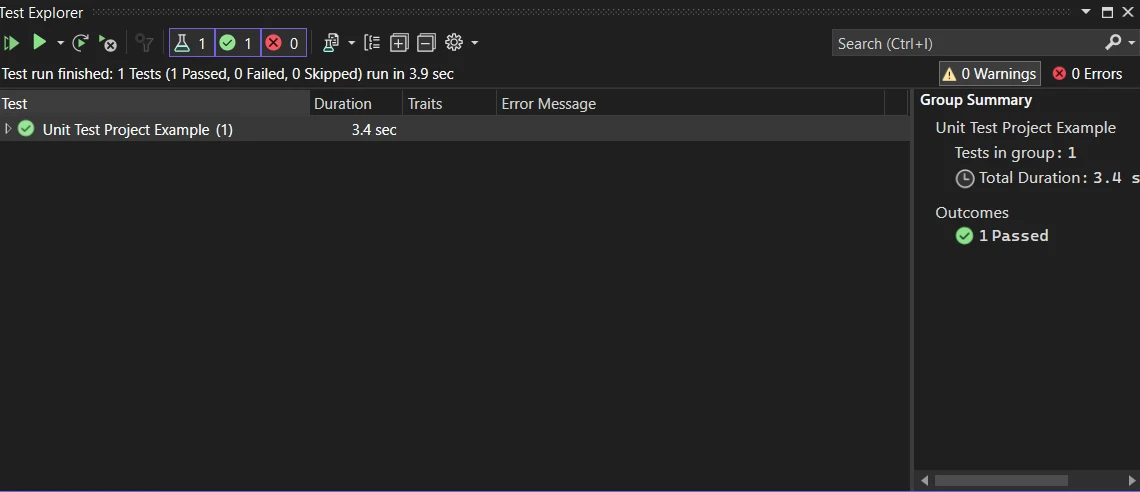
단위 테스트는 소프트웨어 개발 라이프사이클에 없어서는 안 될 부분입니다. 효과적인 테스트를 설정하고 작성하고, Visual Studio의 테스트 탐색기를 통해 실행하며, 코드 커버리지 도구를 사용하여, C# 응용 프로그램이 신뢰할 수 있고 높은 품질 기준을 유지할 수 있도록 보장합니다. 테스트 주도 개발 원칙을 이해하고 적용함으로써 C#에서의 단위 테스트 프로젝트의 품질을 더욱 향상시킬 수 있습니다. 단위 테스트의 목표는 단순히 버그를 찾는 것이 아니라, 응용 프로그램의 견고한 기초를 만들어 업데이트, 디버깅 및 기능 추가를 더 쉽게 만들려는 것입니다. IronPDF 라이선스 옵션 탐색하기, 라이선스 옵션은 $999에서 시작합니다.
제이콥 멜러는 Iron Software의 최고 기술 책임자(CTO)이자 C# PDF 기술을 개척한 선구적인 엔지니어입니다. Iron Software의 핵심 코드베이스를 최초로 개발한 그는 창립 초기부터 회사의 제품 아키텍처를 설계해 왔으며, CEO인 캐머런 리밍턴과 함께 회사를 NASA, 테슬라, 그리고 전 세계 정부 기관에 서비스를 제공하는 50명 이상의 직원을 보유한 기업으로 성장시켰습니다.



IronPDF는 IRON SUITE 의 일부입니다.
10개의 .NET API 제품, 당신의 사무 문서를 위해

PDF 파일을 HTML처럼 빠르게 변환해야 할 때.


