


C# URL Encode (개발자들에게 어떻게 작동하는가)

URL 인코딩과 디코딩은 URL 내에서 데이터를 안전하게 전송하기 위해 C#에서 사용되는 기술입니다. C#에서는 웹 응용 프로그램, API 호출 또는 인터넷을 통해 데이터를 안전하고 신뢰할 수 있게 전송해야 하는 모든 시나리오에서 이러한 작업이 일반적으로 사용됩니다. 이 기사에서는 URL 인코딩 방법과 IronPDF 라이브러리를 탐색할 것입니다.
URL 인코딩 in C
URL을 인코딩하면 문자를 인터넷을 통해 안전하게 보낼 수 있는 형태로 변경하여 오해를 피합니다. 이는 URL이 ASCII 문자 세트를 사용하여 인터넷을 통해 전송될 수 있기 때문입니다. 이 세트의 일부가 아닌 문자 또는 URL에서 특수한 의미를 가지는 문자(예: 공백, 앰퍼샌드 및 등호)는 퍼센트 인코딩을 사용하여 표현해야 합니다(예: 공백은 %20으로 변환됨). C#은 이 작업을 수행할 수있는 내장 메서드를 제공합니다.
URL 디코딩 in C
URL 디코딩은 목적지에 도착했을 때 인코딩된 문자를 원래 상태로 변환합니다. 이는 수신 응용 프로그램이 데이터를 올바르게 이해하고 처리하기 위해 필수적입니다. 디코딩은 퍼센트 인코딩된 문자를 원래의 기호로 다시 변환하여 데이터를 다시 읽고 사용할 수 있게 만듭니다.
C#에서의 인코딩 방법
C#에서는 다른 시나리오에 적합한 다양한 URL 인코딩 방법이 있습니다. 이러한 방법은 주로 System.Web 및 System.Net 네임스페이스 내에서 발견되며, 개발자가 URL을 인코딩하는데 유연성을 제공합니다. 사용 가능한 방법의 간략한 개요는 다음과 같습니다:
- HttpUtility.UrlEncode 메서드 (System.Web): 웹 응용 프로그램에서 URL 인코딩을 위해 가장 일반적으로 사용되는 방법 중 하나입니다. 문자를 퍼센트 인코딩 형식으로 변환하여 문자열을 URL을 통해 전송할 수 있도록 안전하게 만들어줍니다. 특히 ASP.NET 프로젝트에서 쿼리 문자열 및 폼 매개변수를 인코딩하는 데 유용합니다.
- HttpUtility.UrlPathEncode 메서드 (System.Web): UrlEncode와 달리, UrlPathEncode는 URL의 경로 부분을 인코딩하기 위해 특별히 설계되었으며 쿼리 문자열은 그대로 둡니다. 이 메서드는 전체 URL을 인코딩하지 않고 경로 부분만 인코딩하여 URL의 계층적 구조가 보존되도록 보장합니다.
- Uri.EscapeUriString 메서드 (System): 이 메서드는 URI 문자열을 회피하도록 의도되었으며, URI에 허용되지 않는 모든 문자를 퍼센트 인코딩된 형태로 변환합니다. 그러나 URI에서 유효한 문자로 간주되는 슬래시(/) 및 물음표 (?)와 같은 특정 문자는 인코딩하지 않습니다.
- Uri.EscapeDataString 메서드 (System): 이 메서드는 URI의 쿼리 부분에 사용될 문자열을 인코딩하기 위해 설계되었습니다. RFC 3986에서 정의한 예약되지 않은 문자를 제외한 모든 문자를 인코딩하며, EscapeUriString보다 더 공격적으로 데이터를 URL 내에서 안전하게 인코딩할 수 있도록 보장합니다.
위에 설명된 첫 번째 세 가지 인코딩 방법을 이해하고, 코드 예제를 통해 그들이 어떻게 작동하는지 이해해 봅시다.
HttpUtility.UrlEncode 메서드의 코드 예제
using System;
using System.Web;

class Program
{
    static void Main()
    {
        string originalPath = "/api/search/Hello World!";
        string encodedPath = UrlEncode(originalPath);

        Console.WriteLine("Original Path: " + originalPath);
        Console.WriteLine("Encoded Path: " + encodedPath);
    }

    public static string UrlEncode(string originalString)
    {
        return HttpUtility.UrlEncode(originalString);
    }
}
using System;
using System.Web;
class Program
{
static void Main()
{
string originalPath = "/api/search/Hello World!";
string encodedPath = UrlEncode(originalPath);
Console.WriteLine("Original Path: " + originalPath);
Console.WriteLine("Encoded Path: " + encodedPath);
}
public static string UrlEncode(string originalString)
{
return HttpUtility.UrlEncode(originalString);
}
}Imports System
Imports System.Web
Friend Class Program
Shared Sub Main()
Dim originalPath As String = "/api/search/Hello World!"
Dim encodedPath As String = UrlEncode(originalPath)
Console.WriteLine("Original Path: " & originalPath)
Console.WriteLine("Encoded Path: " & encodedPath)
End Sub
Public Shared Function UrlEncode(ByVal originalString As String) As String
Return HttpUtility.UrlEncode(originalString)
End Function
End Class네임스페이스 포함: 코드의 시작 부분에 System.Web 네임스페이스가 포함됩니다.
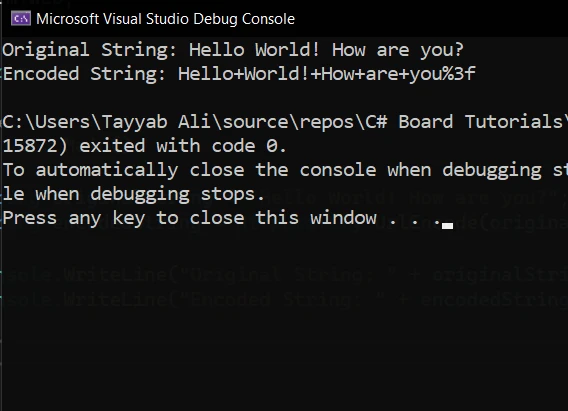
원본 문자열: URL에서 안전한 전송을 위해 인코딩할 문자가 포함된 문자열 변수 originalString을 정의합니다. 여기에는 인코딩 없이 URL에 포함될 경우 잠재적으로 문제를 일으킬 수 있는 공백과 구두점이 포함됩니다.
인코딩: HttpUtility.UrlEncode 메서드가 originalString을 그 인수로 사용하여 호출됩니다. 이 메서드는 문자열을 처리하고 안전하지 않은 문자를 퍼센트 인코딩된 형태로 대체한 새 문자열을 반환합니다. 예를 들어 공백은 %20으로 대체됩니다.
출력: 마지막으로, 프로그램은 원본 및 인코딩된 문자열을 콘솔에 출력합니다.
HttpUtility.UrlPathEncode 메서드의 코드 예제
using System;
using System.Web;

class Program
{
    static void Main()
    {
        // Define the original URL path, which includes spaces.
        string originalPath = "/api/search/Hello World!";

        // Use the HttpUtility.UrlPathEncode method to encode the path.
        string encodedPath = HttpUtility.UrlPathEncode(originalPath);

        // Output the original and encoded paths to the console.
        Console.WriteLine("Original Path: " + originalPath);
        Console.WriteLine("Encoded Path: " + encodedPath);
    }
}
using System;
using System.Web;
class Program
{
static void Main()
{
// Define the original URL path, which includes spaces.
string originalPath = "/api/search/Hello World!";
// Use the HttpUtility.UrlPathEncode method to encode the path.
string encodedPath = HttpUtility.UrlPathEncode(originalPath);
// Output the original and encoded paths to the console.
Console.WriteLine("Original Path: " + originalPath);
Console.WriteLine("Encoded Path: " + encodedPath);
}
}Imports System
Imports System.Web
Friend Class Program
Shared Sub Main()
' Define the original URL path, which includes spaces.
Dim originalPath As String = "/api/search/Hello World!"
' Use the HttpUtility.UrlPathEncode method to encode the path.
Dim encodedPath As String = HttpUtility.UrlPathEncode(originalPath)
' Output the original and encoded paths to the console.
Console.WriteLine("Original Path: " & originalPath)
Console.WriteLine("Encoded Path: " & encodedPath)
End Sub
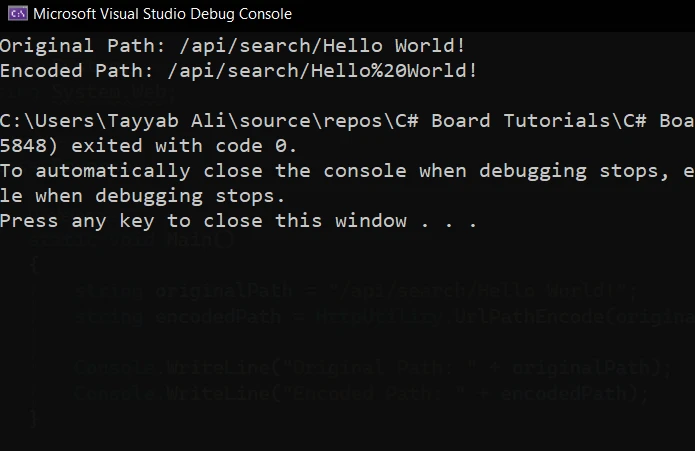
End ClassURL 인코딩에서의 문자 엔티티 동등물: 보이는 과정은 URL 경로의 문자열 값을 변환하여 공백을 웹 호환성을 위한 문자 엔티티 동등물(%20)로 변환합니다. 이는 URL에 실제 공백 문자를 포함할 수 없기 때문에 중요합니다.
문자열 값 및 URL 문자열 처리: originalPath 변수의 문자열 값은 "/api/search/Hello World!"이며, 이는 공백이 포함되기 때문에 인코딩이 필요한 URL 문자열의 전형적인 예입니다.
비록 이 예제가 메서드 오버로드 없이 HttpUtility.UrlPathEncode의 특정 버전을 사용하지만, URL 경로 인코딩을 위한 메서드의 설계 의도를 아는 것이 중요합니다. 개발자는 메소드 오버로드가 존재할 때 이를 인지해야 하며, 이는 다른 유형의 입력을 받거나 추가 기능을 제공하여 메소드를 사용하는 대체 방법을 제공한다.
인코딩 객체와 문자열 URL 변환: 이 문맥에서 인코딩 객체는 HttpUtility.UrlPathEncode 메소드의 작동 내에 포함되어 있으며, 이는 문자열 URL을 받아 인코딩된 형태를 반환한다. 이 메소드는 특수 문자를 적절한 표현으로 인코딩하면서 URL 경로 구조가 손상되지 않도록 보장한다.
인코딩된 경로 출력: 프로그램은 원래 경로에서 인코딩된 경로로의 변환을 보여준다. 이것은 문자열 URL을 웹 전송에 적응시키기 위한 인코딩의 직접적인 예제로, 공백 및 기타 특수 문자가 발생할 수 있는 잠재적 문제를 다룬다.
Uri.EscapeUriString 메소드의 코드 예제
using System;

class Program
{
    static void Main()
    {
        string originalUri = "https://example.com/search?query=Hello World!";
        string escapedUri = Uri.EscapeUriString(originalUri);

        Console.WriteLine("Original URI: " + originalUri);
        Console.WriteLine("Escaped URI: " + escapedUri);
    }
}
using System;
class Program
{
static void Main()
{
string originalUri = "https://example.com/search?query=Hello World!";
string escapedUri = Uri.EscapeUriString(originalUri);
Console.WriteLine("Original URI: " + originalUri);
Console.WriteLine("Escaped URI: " + escapedUri);
}
}Imports System
Friend Class Program
Shared Sub Main()
Dim originalUri As String = "https://example.com/search?query=Hello World!"
Dim escapedUri As String = Uri.EscapeUriString(originalUri)
Console.WriteLine("Original URI: " & originalUri)
Console.WriteLine("Escaped URI: " & escapedUri)
End Sub
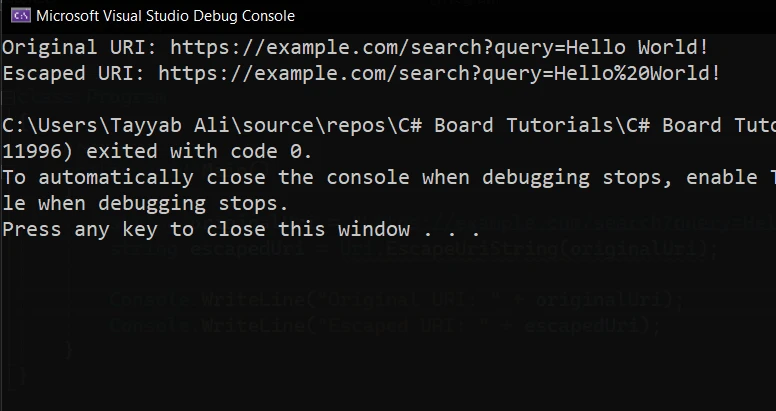
End Class원본 URI: originalUri 변수는 공백 및 특수 문자가 포함된 쿼리 문자열을 포함하는 전체 URI를 나타내는 문자열로 초기화된다. 웹 브라우저와 서버가 URI를 올바르게 처리하도록 하려면 이러한 특수 문자를 '이스케이프'해야 한다.
URI 이스케이프: Uri.EscapeUriString 메소드는 originalUri를 인수로 하여 호출된다. 이 메소드는 URI 문자열을 스캔하여 URI에서 허용되지 않거나 모호성을 초래할 수 있는 문자를 이스케이프한다.
출력: 프로그램은 원래 URI와 이스케이프된 URI를 콘솔에 출력한다.
IronPDF: C# PDF 라이브러리
IronPDF는 .NET 애플리케이션 내에서 PDF 파일을 생성, 편집 및 조작하는 작업을 간소화하는 PDF 라이브러리이다. C# 및 VB.NET과 원활하게 통합되도록 설계된 IronPDF는 개발자에게 HTML이나 텍스트에서 PDF를 생성하는 기능을 제공한다. 인보이스 생성을 자동화하거나, 동적 보고서를 생성하거나, .NET 환경에서 문서를 관리할 때, IronPDF는 사용의 용이함과 포괄적인 기능 세트로 두드러진다.
IronPDF의 하이라이트는 레이아웃 및 스타일을 유지하는 HTML to PDF 변환 기능이다. 이는 보고서, 인보이스 및 문서에 적합한 웹 콘텐츠에서 PDF 생성이 가능하게 한다. HTML 파일, URL 및 HTML 문자열은 손쉽게 PDF로 변환될 수 있다.
using IronPdf;

class Program
{
    static void Main(string[] args)
    {
        var renderer = new ChromePdfRenderer();

        // 1. Convert HTML String to PDF
        var htmlContent = "<h1>Hello, IronPDF!</h1><p>This is a PDF from an HTML string.</p>";
        var pdfFromHtmlString = renderer.RenderHtmlAsPdf(htmlContent);
        pdfFromHtmlString.SaveAs("HTMLStringToPDF.pdf");

        // 2. Convert HTML File to PDF
        var htmlFilePath = "path_to_your_html_file.html"; // Specify the path to your HTML file
        var pdfFromHtmlFile = renderer.RenderHtmlFileAsPdf(htmlFilePath);
        pdfFromHtmlFile.SaveAs("HTMLFileToPDF.pdf");

        // 3. Convert URL to PDF
        var url = "http://ironpdf.com"; // Specify the URL
        var pdfFromUrl = renderer.RenderUrlAsPdf(url);
        pdfFromUrl.SaveAs("URLToPDF.pdf");
    }
}
using IronPdf;
class Program
{
static void Main(string[] args)
{
var renderer = new ChromePdfRenderer();
// 1. Convert HTML String to PDF
var htmlContent = "<h1>Hello, IronPDF!</h1><p>This is a PDF from an HTML string.</p>";
var pdfFromHtmlString = renderer.RenderHtmlAsPdf(htmlContent);
pdfFromHtmlString.SaveAs("HTMLStringToPDF.pdf");
// 2. Convert HTML File to PDF
var htmlFilePath = "path_to_your_html_file.html"; // Specify the path to your HTML file
var pdfFromHtmlFile = renderer.RenderHtmlFileAsPdf(htmlFilePath);
pdfFromHtmlFile.SaveAs("HTMLFileToPDF.pdf");
// 3. Convert URL to PDF
var url = "http://ironpdf.com"; // Specify the URL
var pdfFromUrl = renderer.RenderUrlAsPdf(url);
pdfFromUrl.SaveAs("URLToPDF.pdf");
}
}Imports IronPdf
Friend Class Program
Shared Sub Main(ByVal args() As String)
Dim renderer = New ChromePdfRenderer()
' 1. Convert HTML String to PDF
Dim htmlContent = "<h1>Hello, IronPDF!</h1><p>This is a PDF from an HTML string.</p>"
Dim pdfFromHtmlString = renderer.RenderHtmlAsPdf(htmlContent)
pdfFromHtmlString.SaveAs("HTMLStringToPDF.pdf")
' 2. Convert HTML File to PDF
Dim htmlFilePath = "path_to_your_html_file.html" ' Specify the path to your HTML file
Dim pdfFromHtmlFile = renderer.RenderHtmlFileAsPdf(htmlFilePath)
pdfFromHtmlFile.SaveAs("HTMLFileToPDF.pdf")
' 3. Convert URL to PDF
Dim url = "http://ironpdf.com" ' Specify the URL
Dim pdfFromUrl = renderer.RenderUrlAsPdf(url)
pdfFromUrl.SaveAs("URLToPDF.pdf")
End Sub
End ClassURL 인코딩이 포함된 작동 코드 예제
다음 예제에서는 URL 인코딩과 함께 IronPDF를 사용하여 웹 페이지에서 PDF를 생성하는 방법을 보게 될 것이다. 이 시나리오는 URL이 웹 요청에 올바르게 형식화되도록 인코딩한 다음, IronPDF를 사용하여 해당 URL의 콘텐츠를 PDF 문서로 변환하는 것이다.
IronPDF 라이브러리 설치
먼저 프로젝트에 IronPDF가 설치되어 있는지 확인하라. NuGet 패키지 관리자를 사용하는 경우, 다음 명령을 실행하여 설치할 수 있다:
Install-Package IronPdf
코드 예제
이제 코드를 살펴보자:
using System.Web;
using IronPdf;

class Program
{
    static void Main(string[] args)
    {
        License.LicenseKey = "License-Key"; // Set your IronPDF license key
        string baseUrl = "https://example.com/search";

        // The query parameter with spaces that needs to be encoded
        string query = "Hello World!";

        // Encoding the query parameter to ensure the URL is correctly formatted
        string encodedQuery = HttpUtility.UrlEncode(query);

        // Constructing the full URL with the encoded query parameter
        string fullUrl = $"{baseUrl}?query={encodedQuery}";

        // Initialize the IronPDF HtmlToPdf renderer
        var renderer = new ChromePdfRenderer();

        // Convert the web page at the encoded URL to a PDF document
        var pdf = renderer.RenderUrlAsPdf(fullUrl);

        // Save the PDF to a file
        string filePath = "webpage.pdf";
        pdf.SaveAs(filePath);

        Console.WriteLine($"PDF successfully created from: {fullUrl}");
        Console.WriteLine($"Saved to: {filePath}");
    }
}
using System.Web;
using IronPdf;
class Program
{
static void Main(string[] args)
{
License.LicenseKey = "License-Key"; // Set your IronPDF license key
string baseUrl = "https://example.com/search";
// The query parameter with spaces that needs to be encoded
string query = "Hello World!";
// Encoding the query parameter to ensure the URL is correctly formatted
string encodedQuery = HttpUtility.UrlEncode(query);
// Constructing the full URL with the encoded query parameter
string fullUrl = $"{baseUrl}?query={encodedQuery}";
// Initialize the IronPDF HtmlToPdf renderer
var renderer = new ChromePdfRenderer();
// Convert the web page at the encoded URL to a PDF document
var pdf = renderer.RenderUrlAsPdf(fullUrl);
// Save the PDF to a file
string filePath = "webpage.pdf";
pdf.SaveAs(filePath);
Console.WriteLine($"PDF successfully created from: {fullUrl}");
Console.WriteLine($"Saved to: {filePath}");
}
}Imports System.Web
Imports IronPdf
Friend Class Program
Shared Sub Main(ByVal args() As String)
License.LicenseKey = "License-Key" ' Set your IronPDF license key
Dim baseUrl As String = "https://example.com/search"
' The query parameter with spaces that needs to be encoded
Dim query As String = "Hello World!"
' Encoding the query parameter to ensure the URL is correctly formatted
Dim encodedQuery As String = HttpUtility.UrlEncode(query)
' Constructing the full URL with the encoded query parameter
Dim fullUrl As String = $"{baseUrl}?query={encodedQuery}"
' Initialize the IronPDF HtmlToPdf renderer
Dim renderer = New ChromePdfRenderer()
' Convert the web page at the encoded URL to a PDF document
Dim pdf = renderer.RenderUrlAsPdf(fullUrl)
' Save the PDF to a file
Dim filePath As String = "webpage.pdf"
pdf.SaveAs(filePath)
Console.WriteLine($"PDF successfully created from: {fullUrl}")
Console.WriteLine($"Saved to: {filePath}")
End Sub
End Class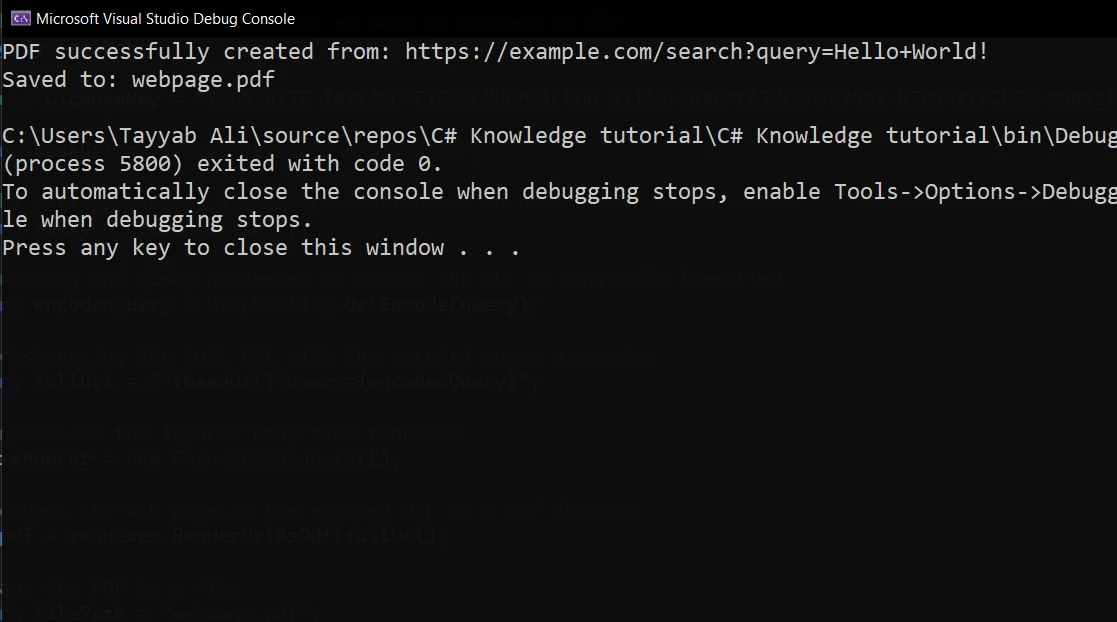
코드 설명
예제는 공백이 포함된 기본 URL과 쿼리 문자열로 시작한다. 쿼리 문자열은 URL 내에서 안전하게 전송되도록 HttpUtility.UrlEncode를 사용하여 인코딩된다. 쿼리가 인코딩된 후, 이를 기본 URL에 추가하여 접근되는 전체 URL을 형성한다.
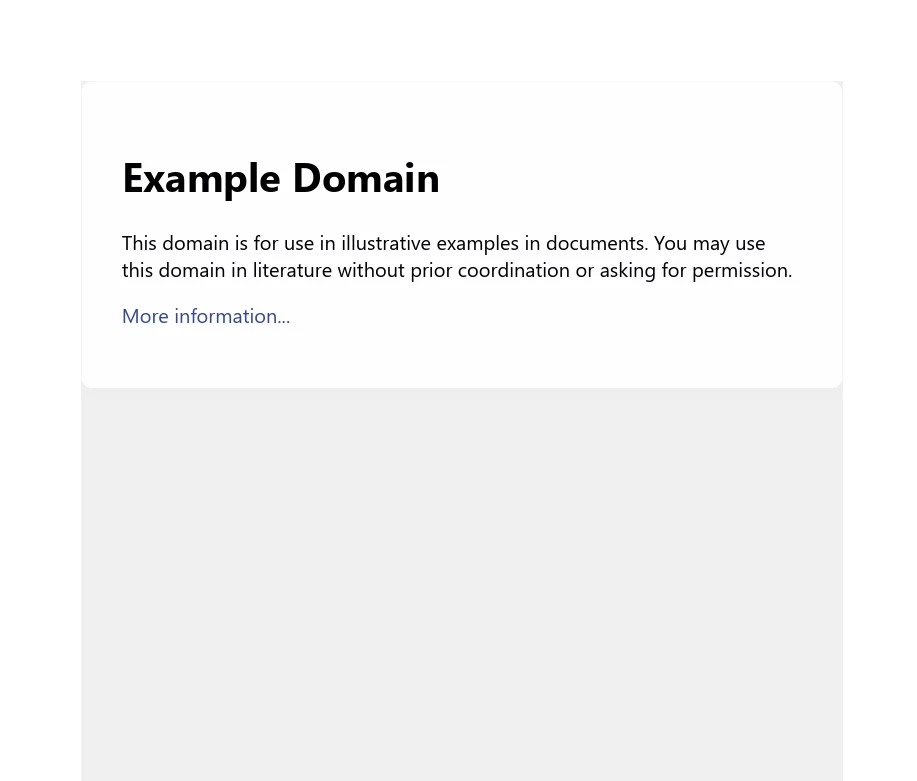
전체적이고 인코딩된 URL이 준비되면, IronPDF의 ChromePdfRenderer를 사용하여 그 URL의 웹 페이지를 가져와 PDF 문서로 변환한다. 이 과정은 ChromePdfRenderer 클래스의 인스턴스를 생성한 후 인코딩된 URL로 RenderUrlAsPdf를 호출하는 것을 포함한다. 마지막으로, 생성된 PDF는 SaveAs 메소드를 사용하여 파일로 저장된다. 결과 파일은 인코딩된 URL을 통해 접근 가능한 웹 페이지 콘텐츠의 PDF 문서이다. 여기 출력된 PDF 파일이 있습니다:
결론
마무리하자면, C#은 인터넷을 통해 데이터를 안전하고 효율적으로 전송할 수 있도록 URL 인코딩 및 디코딩을 위한 강력한 기능을 제공한다. System.Web 및 System.Net 네임스페이스 내의 내장 메소드를 통해, 개발자는 특수 문자의 문제를 방지하기 위해 URL을 인코딩하고 정확한 데이터 해석을 위해 원래 형태로 디코딩할 수 있다.
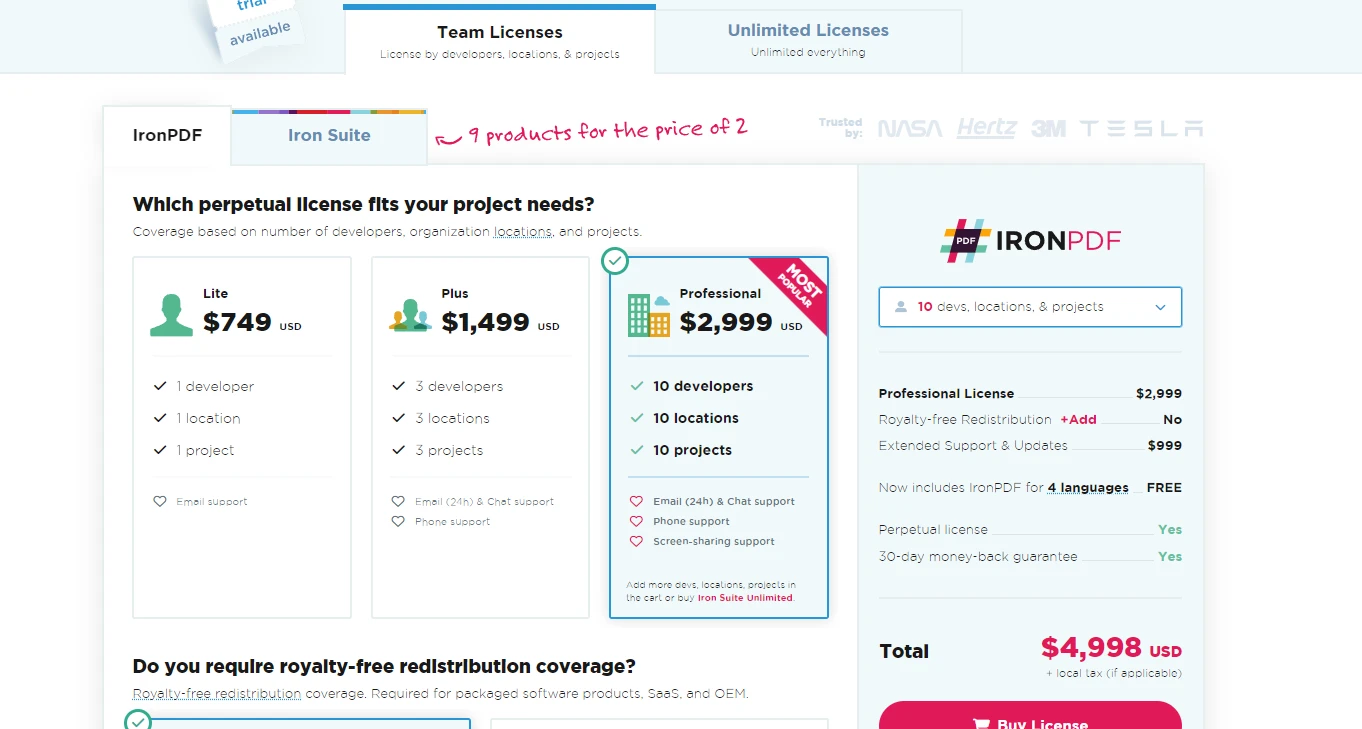
IronPDF 체험판 라이선스 제공을 탐색에 관심이 있는 이들에게는 기능을 직접 평가할 기회를 제공한다. IronPDF를 프로젝트에 통합하기로 결정했다면, 라이선스는 $999에서 시작하여 .NET Framework 내에서 PDF 조작 요구를 충족시키기 위한 포괄적인 기능 세트를 제공합니다.
자주 묻는 질문
C#에서 URL을 어떻게 인코딩할 수 있나요?
C#에서 HttpUtility.UrlEncode 또는 Uri.EscapeDataString과 같은 메서드를 사용하여 URL을 인코딩할 수 있습니다. 이들 메서드는 인터넷 상에서 안전한 전송을 위해 문자를 퍼센트 인코딩 형식으로 변환합니다.
URL 인코딩과 디코딩의 차이점은 무엇인가요?
URL 인코딩은 URL 내에서 안전한 데이터 전송을 위해 특수 문자를 퍼센트 인코딩 형식으로 변환하며, 디코딩은 이러한 인코딩된 문자를 원래 형태로 되돌려 올바른 데이터 해석을 수도 있습니다.
C#을 사용하여 URL에서 PDF를 어떻게 생성하나요?
IronPDF를 사용하여 C#에서 URL을 PDF로 변환할 수 있습니다. IronPDF는 웹 페이지의 콘텐츠를 직접 캡처하고 PDF 문서로 변환할 수 있으며, 정확한 웹 요청을 위한 URL 인코딩 기술을 통합합니다.
URL 인코딩이 웹 애플리케이션에서 중요한 이유는 무엇인가요?
웹 애플리케이션에서 URL 인코딩은 URL에 전달되는 데이터가 안전하고 오류 없이 전송되도록 보장하는 데 중요합니다. 이는 안전하지 않은 문자를 퍼센트 인코딩 형식으로 대체하여 잠재적인 데이터 손실 또는 보안 문제를 방지합니다.
C#에서 PDF 생성 향상을 위해 URL 인코딩을 어떻게 사용할 수 있나요?
PDF를 생성하기 전에 URL 인코딩을 적용하여 문서에 포함된 URL이 올바르게 포맷되고 안전하게 전송되도록 보장할 수 있습니다. IronPDF 같은 라이브러리가 웹 콘텐츠를 PDF로 변환할 때 이러한 URL을 정확하게 처리할 수 있습니다.
C#에서 URL 디코딩을 위한 어떤 메서드가 사용 가능한가요?
C#은 URL 디코딩을 위한 HttpUtility.UrlDecode 및 Uri.UnescapeDataString과 같은 메서드를 제공합니다. 이들 메서드는 인코딩 과정을 되돌려 퍼센트 인코딩 된 문자를 원래 형태로 변환합니다.
URL 인코딩이 API 호출을 어떻게 촉진하나요?
URL 인코딩은 쿼리 매개변수 내의 특수 문자가 안전하게 전송되도록 보장하여 API 호출 중 오류를 방지합니다. 이는 웹 애플리케이션에서 클라이언트와 서버 간에 데이터를 안정적으로 전달하는 데 필수적입니다.
IronPDF가 PDF를 생성할 때 URL 인코딩을 자동으로 처리할 수 있나요?
네, IronPDF는 웹 페이지를 PDF로 변환할 때 URL 인코딩을 자동으로 처리할 수 있습니다. 이는 PDF 생성 과정에서 URL이 올바르게 포맷되고 처리되도록 하여 웹 콘텐츠와의 원활한 통합을 제공합니다.










 무료로 시작하세요
 무료로 시작하세요
 무료 라이브 데모 예약하기





 신용카드나 계정 생성은 필요하지 않습니다.










