푸터 콘텐츠로 바로가기
.NET 도움말

C# Writeline (How It Works For Developers)

What is a Console Window?

The console is a window in the operating system where users may enter text such as a "hello world" string using the computer keyboard in the new or same line and view text output from the computer terminal to interact with the system or a text-based console application. For instance, under the Windows operating system, MS-DOS instructions may be entered into a console known as the Command Prompt window. Applications that read and write characters to the console are supported fundamentally by the Console class. In this article, we are going to use the WriteLine method within static void Main in C#.

How to use C# WriteLine

  1. Create a new C# project.
  2. Make sure the current .NET version has been installed.
  3. Use any one of the write methods.
  4. Display the output based on the requirement.
  5. Run the code.

What is WriteLine?

The console window may be made to show a line of text followed by a newline by using the WriteLine() function. This function is a part of the Console output class, which is a component of the System namespace and offers functions for working with the standard error, input value, and output streams.

  • Console: The standard input, output, and error streams of an application are represented by this C# class, which is found in the System namespace.
  • WriteLine: This function writes a newline character and the provided text or data to the console. It shows the content and then advances the pointer to the start of the following line. The only difference between the WriteLine and the Write method is the new line.

Syntax

Console.WriteLine(); // outputs an empty line
Console.WriteLine(string value); // writes value followed by a newline
Console.WriteLine(string format, params object[] args); // formats output
Console.WriteLine(); // outputs an empty line
Console.WriteLine(string value); // writes value followed by a newline
Console.WriteLine(string format, params object[] args); // formats output
$vbLabelText   $csharpLabel

Parameters

  • value (optional): This is a representation of the data or text that you wish to see on the console. A string, a variable, or a mix of strings and variables may be used.
  • format: A string with format requirements (optional). Placeholders like {0}, {1}, and so forth can be included; they are substituted with the appropriate parameters listed in the args parameter.
  • args (optional): The composite format string arguments in the format parameter that match the placeholders. The placeholders will determine how these parameters are represented within the string.

Functionality

  • Text Output: The Console class is used to display text or other data with the WriteLine() function.
  • Newline: After displaying the material, it automatically appends a newline character (\n). This guarantees that each output after that will begin on a new line in the console.
  • Format string: String interpolation ($""), formatting placeholders ({0}, {1}, etc.), and options for formatting (like {1:C} for currency, {0:D} for the date, etc.) can be used for formatted output.
  • Display Variables: By converting variables to their string representations, WriteLine() can display variables of different data types, including strings, integers, doubles, etc.
  • Overloads for Different Data Types: The function can accept integers, doubles, booleans, characters, objects, etc., as it has several overloads to handle different data types.
  • Special Characters and Escape Sequences: You can use escape sequences for tabs \t, newlines \n, and other special characters.

Concatenation using Console.WriteLine()

In C#, concatenation is the process of joining variables or strings into a single string. Concatenation may be utilized with Console. To see concatenated texts or a combination of strings and variables in the console, use WriteLine().

Here's an example using Console to show concatenation.

namespace ConsoleApp1
{
    internal class Program
    {
        static void Main(string[] args)
        {
            string name = "Jack";
            // Example for concatenating strings and variables using the + operator
            Console.WriteLine("Hello " + name);
            // Using string interpolation to concatenate strings and variables
            Console.WriteLine($"Hello {name}");
            // Using placeholders and formatting to concatenate strings and variables
            Console.WriteLine("Hello {0}", name); // Changed Console.Write to Console.WriteLine for consistency
        }
    }
}
namespace ConsoleApp1
{
    internal class Program
    {
        static void Main(string[] args)
        {
            string name = "Jack";
            // Example for concatenating strings and variables using the + operator
            Console.WriteLine("Hello " + name);
            // Using string interpolation to concatenate strings and variables
            Console.WriteLine($"Hello {name}");
            // Using placeholders and formatting to concatenate strings and variables
            Console.WriteLine("Hello {0}", name); // Changed Console.Write to Console.WriteLine for consistency
        }
    }
}
$vbLabelText   $csharpLabel

In the above example:

  • The + operator, string interpolation ($""), and formatting placeholders like {0}, {1}, etc., are used to concatenate strings and variables.
  • Concatenated strings, variables, and even newlines (\n) for line breaks can all be shown using the system WriteLine() function.
  • Within the Console, there are many methods for concatenating text and variables. In C#, use WriteLine() to send formatted messages or data to the console in the code.

A crucial C# function for console-based input/output tasks is WriteLine(). It is a flexible tool for interaction and communication within console programs because of its capacity to handle several data kinds, apply formatting, and output text or values to the console window.

IronPDF with WriteLine

Install IronPDF

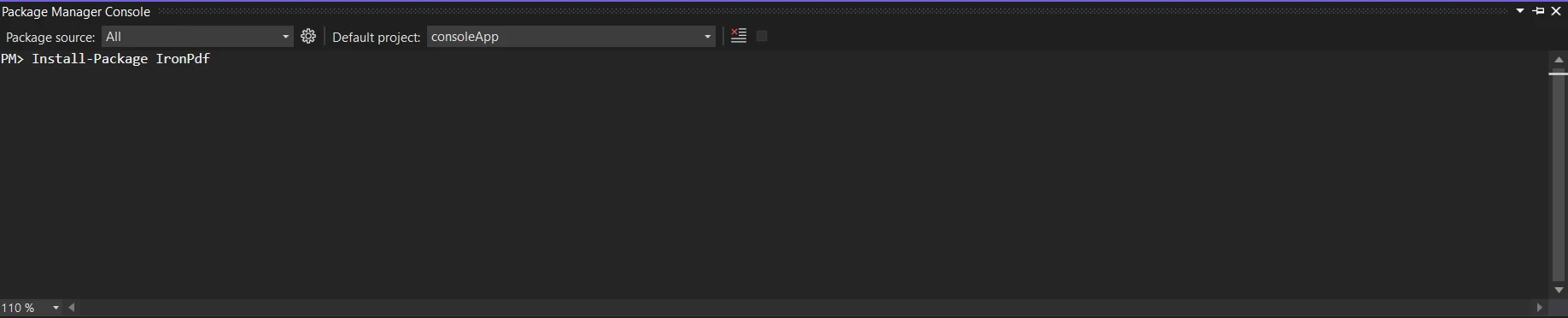
Obtain the IronPDF Library Installation Guide library; it is necessary for the next patch. Enter the subsequent code into the Package Manager to perform this:

Install-Package IronPdf

C# Writeline (How It Works For Developer): Figure 1 - Install IronPDF

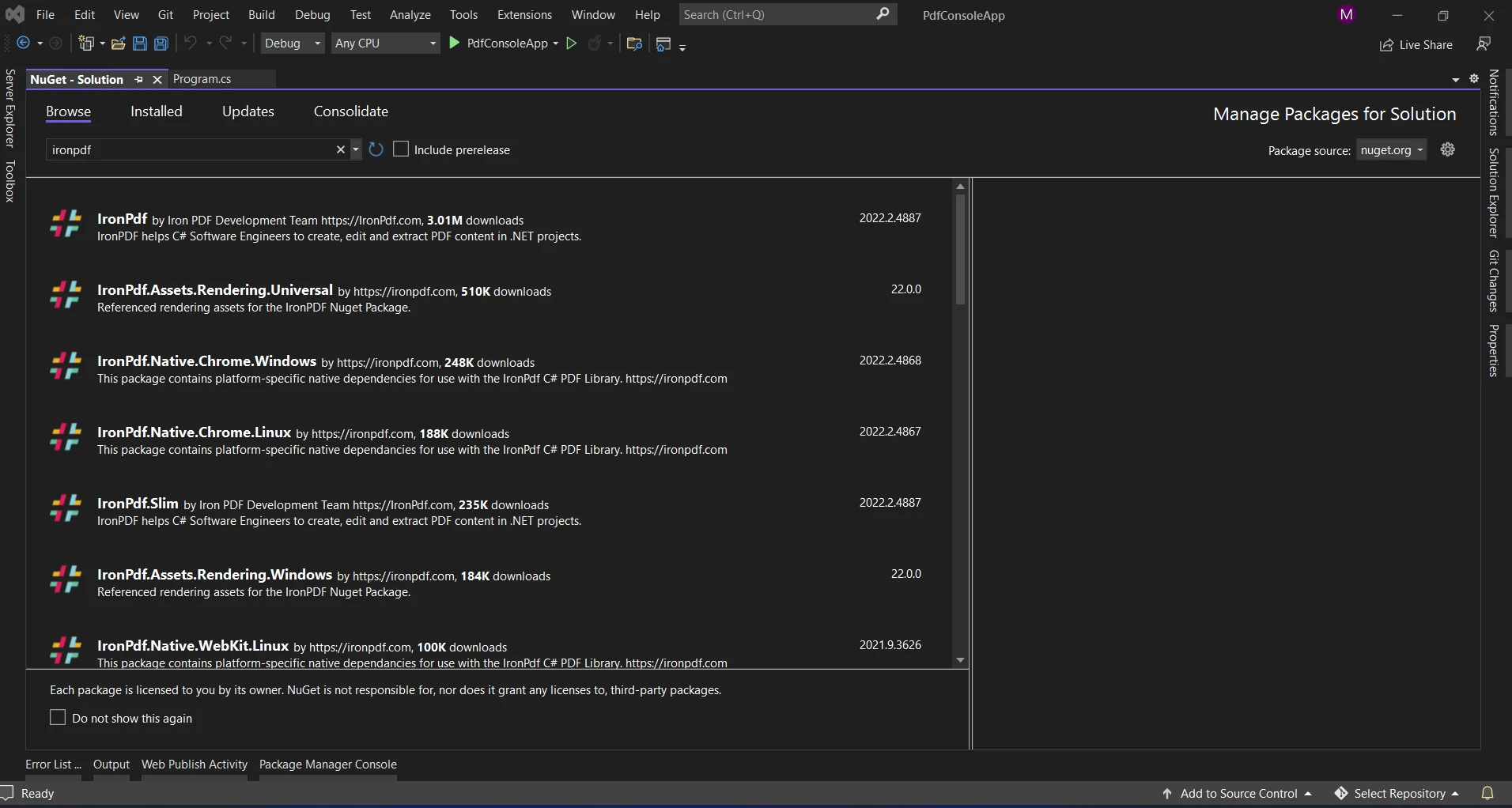
As an alternative, you may look for the package "IronPDF" using the NuGet Package Manager. This list of all the NuGet packages related to IronPDF allows us to select and download the required package.

C# Writeline (How It Works For Developer): Figure 2 - IronPDF Package

WriteLine in IronPDF

The sample code demonstrates how to use the string interpolation function to produce a PDF and display the process status with the WriteLine method. Format strings and alignment specifiers can be concatenated for a single interpolation statement.

using IronPdf;
using System;

namespace ConsoleApp1
{
    internal class Program
    {
        static void Main(string[] args)
        {
            int x = 25;
            var outputStr = $@"square of <b>{x}</b> is <b>{Math.Sqrt(x)}</b>";
            Console.WriteLine($"IronPDF process started at {DateTime.Now:hh:mm:ss:ffff}");
            var pdfCreate = ChromePdfRenderer.StaticRenderHtmlAsPdf(outputStr);
            pdfCreate.SaveAs("demo.pdf");
            Console.WriteLine($"IronPDF process ended at {DateTime.Now:hh:mm:ss:ffff}");
        }
    }
}
using IronPdf;
using System;

namespace ConsoleApp1
{
    internal class Program
    {
        static void Main(string[] args)
        {
            int x = 25;
            var outputStr = $@"square of <b>{x}</b> is <b>{Math.Sqrt(x)}</b>";
            Console.WriteLine($"IronPDF process started at {DateTime.Now:hh:mm:ss:ffff}");
            var pdfCreate = ChromePdfRenderer.StaticRenderHtmlAsPdf(outputStr);
            pdfCreate.SaveAs("demo.pdf");
            Console.WriteLine($"IronPDF process ended at {DateTime.Now:hh:mm:ss:ffff}");
        }
    }
}
$vbLabelText   $csharpLabel

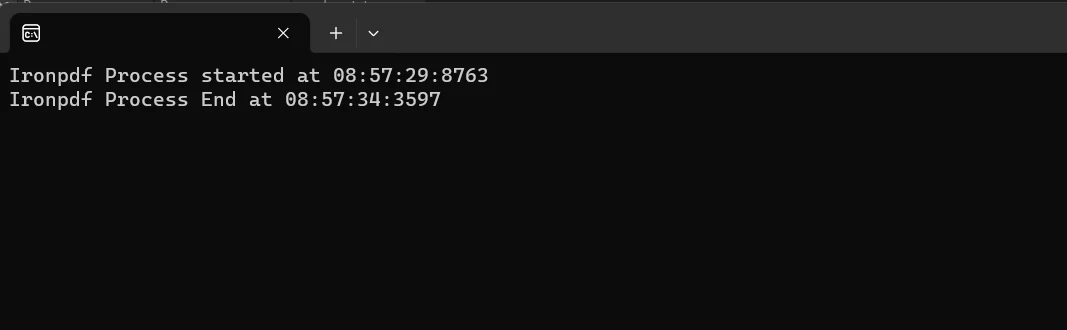
In the above example, we are creating the PDF file. We are monitoring the process status with the help of the WriteLine method that prints the start and end times of the process, formatted using the ToString method.

Console Output:

C# Writeline (How It Works For Developer): Figure 3 - Console Output

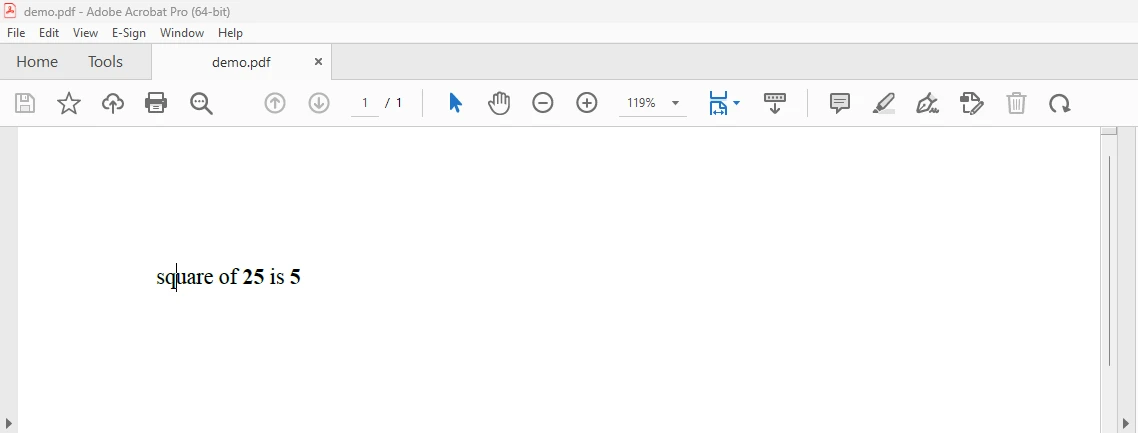
PDF Result:

C# Writeline (How It Works For Developer): Figure 4 - PDF Output

To read more about the IronPDF, refer to the IronPDF Documentation.

Conclusion

In conclusion, the WriteLine function in C# is a vital tool for developers as it is key to the process of writing data objects to the console. Complex output patterns, formatted texts, and a variety of data kinds may all be shown because of their flexibility and simplicity. WriteLine offers a simple way to communicate in the terminal environment, which makes debugging, testing, and user interaction easier.

The IronPDF price starts at a $799 Lite package that includes a permanent license, upgrade options, one year of software maintenance, and a thirty-day money-back guarantee. During the watermarked trial period, users can assess the product in real-world application scenarios for thirty days. To find out more about IronPDF's price, licensing, and trial version, visit the IronPDF Licensing Page. To learn more about Iron Software products, explore Iron Software's Product Overview.

자주 묻는 질문

C# 애플리케이션에서 WriteLine 메서드는 어떻게 사용되나요?

C# 애플리케이션에서 WriteLine 메서드는 Console 클래스의 일부이며 텍스트 뒤에 개행 문자가 오는 텍스트를 콘솔 창에 출력하는 데 사용됩니다. 형식이 지정된 문자열을 지원하며 오버로드를 통해 다양한 데이터 유형을 처리할 수 있습니다. 또한 IronPDF와 함께 사용되어 PDF 생성 중 프로세스 상태 메시지를 표시하여 작업 진행 상황에 대한 통찰력을 제공합니다.

디버깅에 WriteLine 메서드를 사용하면 어떤 이점이 있나요?

WriteLine 메서드는 개발자가 상태 메시지와 변수 값을 콘솔에 출력하여 실행 흐름을 추적하고 코드의 문제를 식별하는 데 도움이 되므로 디버깅에 유용합니다. 또한 IronPDF와 함께 사용하면 PDF 생성 중에 진행률 메시지를 표시하여 프로세스를 모니터링하는 데 도움이 됩니다.

WriteLine 출력에 특수 문자를 포함하려면 어떻게 해야 하나요?

이스케이프 시퀀스를 사용하여 WriteLine 출력에 특수 문자를 포함할 수 있습니다. 예를 들어 '\n'은 줄 바꿈에, '\t'는 탭 공백에 사용됩니다. 이 서식은 구조화된 콘솔 출력을 만드는 데 유용하며, 작업 중 형식이 지정된 상태 메시지를 표시하기 위해 IronPDF를 사용하는 C# 애플리케이션에서 지원됩니다.

WriteLine의 과부하로 인해 기능이 어떻게 향상되나요?

WriteLine 메서드의 오버로드는 정수, 문자열, 부울, 객체 등 다양한 데이터 유형을 허용하여 기능을 향상시킵니다. 이러한 유연성 덕분에 콘솔에 다양한 정보를 더 쉽게 출력할 수 있으며, 특히 PDF 생성 중 다양한 유형의 상태 메시지를 표시하기 위해 IronPDF와 함께 사용할 때 유용합니다.

WriteLine에서 문자열 보간은 어떤 역할을 하나요?

WriteLine의 문자열 보간을 사용하면 개발자가 문자열 리터럴 내에 표현식을 포함할 수 있으므로 동적 메시지를 더 쉽게 구성할 수 있습니다. 이 기능은 PDF 생성 중 상태 메시지와 디버그 출력의 형식을 명확하고 간결하게 지정하는 방법을 제공하므로 C# 애플리케이션과 IronPDF를 사용할 때 유용합니다.

C#에서 프로그래밍 방식으로 PDF를 생성하려면 어떻게 해야 하나요?

C#에서 프로그래밍 방식으로 PDF를 생성하려면 IronPDF 라이브러리를 사용하여 RenderHtmlAsPdf 또는 RenderHtmlFileAsPdf와 같은 메서드를 사용하여 HTML을 PDF로 변환할 수 있습니다. 이러한 메서드를 사용하면 PDF 생성 기능을 콘솔 애플리케이션에 통합하여 문서 처리 워크플로우를 개선할 수 있습니다.

PDF 생성 라이브러리의 설치 및 가격 정보는 어떻게 되나요?

IronPDF와 같은 PDF 생성 라이브러리는 간편한 설치 과정과 다양한 가격 옵션을 제공합니다. 일반적으로 영구 라이선스, 업그레이드 경로 및 1년간의 유지 관리가 포함된 패키지가 있습니다. 사용자가 구매하기 전에 소프트웨어의 기능을 평가할 수 있도록 평가판 기간이 제공되는 경우가 많습니다.

C#에서 WriteLine을 사용한 연결은 어떻게 작동하나요?

C#에서 WriteLine을 사용한 연결에는 문자열과 변수를 하나의 출력 문자열로 결합하는 작업이 포함됩니다. 이 작업은 '+' 연산자, 문자열 보간 또는 서식 지정 자리 표시자를 사용하여 수행할 수 있습니다. 이는 복잡한 출력 메시지를 구성하는 데 중요한 기능으로, 특히 IronPDF를 사용하는 애플리케이션에서 동적 상태 업데이트를 표시할 때 유용합니다.

커티스 차우
기술 문서 작성자

커티스 차우는 칼턴 대학교에서 컴퓨터 과학 학사 학위를 취득했으며, Node.js, TypeScript, JavaScript, React를 전문으로 하는 프론트엔드 개발자입니다. 직관적이고 미적으로 뛰어난 사용자 인터페이스를 만드는 데 열정을 가진 그는 최신 프레임워크를 활용하고, 잘 구성되고 시각적으로 매력적인 매뉴얼을 제작하는 것을 즐깁니다.

커티스는 개발 분야 외에도 사물 인터넷(IoT)에 깊은 관심을 가지고 있으며, 하드웨어와 소프트웨어를 통합하는 혁신적인 방법을 연구합니다. 여가 시간에는 게임을 즐기거나 디스코드 봇을 만들면서 기술에 대한 애정과 창의성을 결합합니다.