푸터 콘텐츠로 바로가기
.NET 도움말

How to use .NET Fiddle in C#

As a .NET Core domain developer, having a reliable online playground site or .NET sandbox website to test and experiment with programs is crucial. That's where .NET Fiddle comes into play. It is an online .NET sandbox/playground allowing programmers to write, compile, share fiddles through Twitter, log notifications, tag, collaborate, and execute in the browser before writing the final program in Microsoft Visual Studio.

The most sophisticated online compiler is Fiddle. You can use it to produce your school homework, ask or answer questions on Stack Overflow, embed examples on your blog, or even develop it using multiple project types like Console or MVC.

Why Fiddle is a Game-Changer for .NET Developers

Fiddle is a potent tool for .NET programmers for several reasons:

  1. It's free to use and requires no installation or setup.
  2. It supports multiple .NET versions, making it easy to test program compatibility across different environments.
  3. It has a user-friendly interface that makes it easy to write, run, and share code snippets with others.

Benefits

Collaborating with other programmers is one of the most significant benefits of using Fiddle. It allows you to share code snippets with other developers, making collaborating on projects and troubleshooting code easy. Additionally, it has a built-in feature enabling you to save and download your code snippets for future use.

Dot NET Fiddle supports multiple .NET versions, which makes it easy to test code compatibility across different environments. This is particularly helpful for developers who work on projects that require compatibility across different versions of .NET. With Fiddle, developers can test their code and ensure that it will work as expected on different versions of .NET.

.NET Fiddle has the ability to save and download code snippets. With this feature, developers can access their code snippets whenever they need them, without having to worry about recreating them from scratch.

Introducing IronPDF

If you're looking for a powerful PDF generation and editing tool, IronPDF for .NET Applications is the perfect answer. IronPDF is a .NET library allowing you to create, edit, sign, and manipulate PDF files in your .NET application. With IronPDF, you can easily add PDF generation and editing capabilities to your .NET projects, saving time and effort.

How IronPDF Relates to Dotnetfiddle

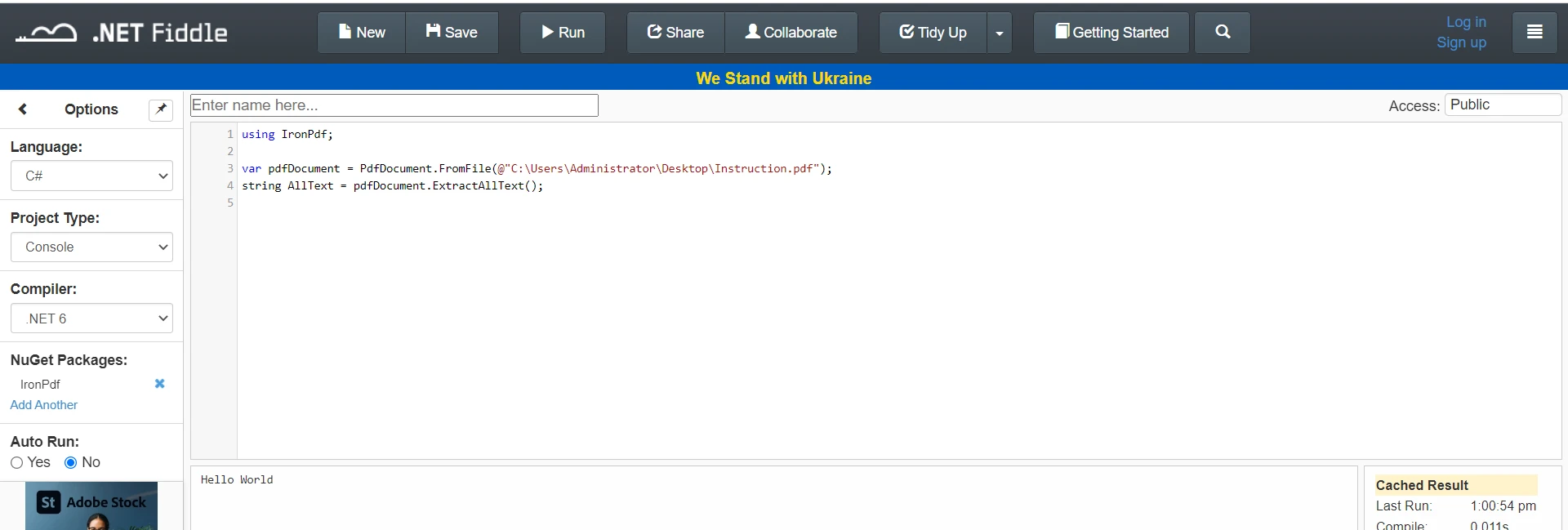
IronPDF is a great tool to use in conjunction with Dot NET Fiddle. With IronPDF, you can generate PDF reports from your Fiddle code snippets and test them in real time. IronPDF allows you to edit and manipulate PDF files, which can be incredibly useful when working with large data sets or complex documents.

How to use .NET Fiddle in C#: Figure 2 - Website

Introducing IronXL and IronOCR

In addition to IronPDF, Iron Software offers two other powerful .NET libraries: IronXL for Excel File Handling and IronOCR for OCR and Barcode Recognition. IronXL is a .NET library for reading and writing Excel files, while IronOCR is a .NET library for OCR (Optical Character Recognition) and barcode recognition. IronXL and IronOCR can be used with .NET Fiddle to add additional functionality and capabilities to your .NET projects.

Conclusion

In conclusion, Dot NET Fiddle is an essential tool for any .NET developer, providing a powerful and user-friendly platform for writing, compiling, and executing .NET code. With its collaboration features and ability to save and download code snippets, Fiddle is an ideal solution for testing and troubleshooting code in real time.

By integrating IronPDF, IronXL, and IronOCR, developers can take their projects to the next level, adding PDF generation and editing, Excel file manipulation, OCR, and barcode recognition capabilities. Overall, .NET Fiddle and Iron Software's suite of .NET libraries provide an excellent solution for developers to streamline their workflows and produce high-quality code.

자주 묻는 질문

.NET Fiddle을 사용하여 PDF 파일을 조작하려면 어떻게 해야 하나요?

IronPDF 라이브러리를 .NET Fiddle과 통합하면 .NET 애플리케이션 내에서 PDF 파일을 생성, 편집 및 관리할 수 있습니다. 이를 통해 브라우저에서 직접 PDF 생성 및 조작을 실시간으로 테스트할 수 있습니다.

.NET Fiddle이 .NET 개발자에게 유용한 도구인 이유는 무엇인가요?

.NET Fiddle은 개발자가 설치 없이도 C# 코드 스니펫을 작성, 컴파일 및 공유할 수 있는 무료 온라인 플랫폼입니다. 여러 .NET 버전을 지원하므로 호환성 테스트와 코드 공유를 통한 협업이 가능합니다.

IronPDF는 어떻게 .NET Fiddle의 기능을 향상시키나요?

IronPDF는 개발자가 코드 스니펫에서 PDF 보고서를 생성하고 편집할 수 있도록 지원하여 .NET Fiddle을 보완합니다. 이 통합을 통해 .NET Fiddle 환경 내에서 PDF 기능을 실시간으로 테스트할 수 있습니다.

.NET Fiddle을 교차 버전 .NET 테스트에 사용할 수 있나요?

예, .NET Fiddle은 여러 .NET 버전을 지원하므로 개발자는 다양한 .NET 환경에서 코드의 호환성을 테스트하고 코드가 예상대로 작동하는지 확인할 수 있습니다.

.NET Fiddle을 사용하여 코드 스니펫을 공유하려면 어떻게 해야 하나요?

.NET Fiddle은 링크나 소셜 미디어를 통해 코드 스니펫을 다른 사람들과 쉽게 공유할 수 있는 플랫폼을 제공하여 원활한 협업과 동료 검토를 촉진합니다.

.NET Fiddle과 함께 사용할 수 있는 Iron Software 제품에는 어떤 것이 있나요?

Iron Software는 IronPDF 외에도 Excel 파일 처리를 위한 IronXL과 OCR 및 바코드 인식을 위한 IronOCR을 제공합니다. 이러한 도구는 .NET Fiddle과 통합하여 다양한 프로젝트에서 기능을 향상시킬 수 있습니다.

.NET Fiddle은 교육용으로 적합한가요?

물론 .NET Fiddle은 훌륭한 교육 도구입니다. 학교 과제를 만들고, 포럼에서 질문하거나 답변하고, 블로그에 코드 예제를 제공하는 데 사용할 수 있습니다.

.NET Fiddle은 어떤 인터페이스 기능을 제공하나요?

.NET Fiddle은 사용자 친화적인 인터페이스를 제공하여 C# 코드 스니펫을 쉽게 작성, 컴파일 및 공유할 수 있습니다. 태그 지정, 알림 로깅, 버전 지원 등의 기능이 포함되어 있습니다.

IronXL 및 IronOCR은 어떻게 .NET Fiddle과 통합되나요?

IronXL 및 IronOCR은 .NET Fiddle과 함께 사용하여 Excel 파일 조작 및 OCR/바코드 인식 기능을 추가함으로써 .NET 프로젝트의 기능을 확장할 수 있습니다.

커티스 차우
기술 문서 작성자

커티스 차우는 칼턴 대학교에서 컴퓨터 과학 학사 학위를 취득했으며, Node.js, TypeScript, JavaScript, React를 전문으로 하는 프론트엔드 개발자입니다. 직관적이고 미적으로 뛰어난 사용자 인터페이스를 만드는 데 열정을 가진 그는 최신 프레임워크를 활용하고, 잘 구성되고 시각적으로 매력적인 매뉴얼을 제작하는 것을 즐깁니다.

커티스는 개발 분야 외에도 사물 인터넷(IoT)에 깊은 관심을 가지고 있으며, 하드웨어와 소프트웨어를 통합하는 혁신적인 방법을 연구합니다. 여가 시간에는 게임을 즐기거나 디스코드 봇을 만들면서 기술에 대한 애정과 창의성을 결합합니다.