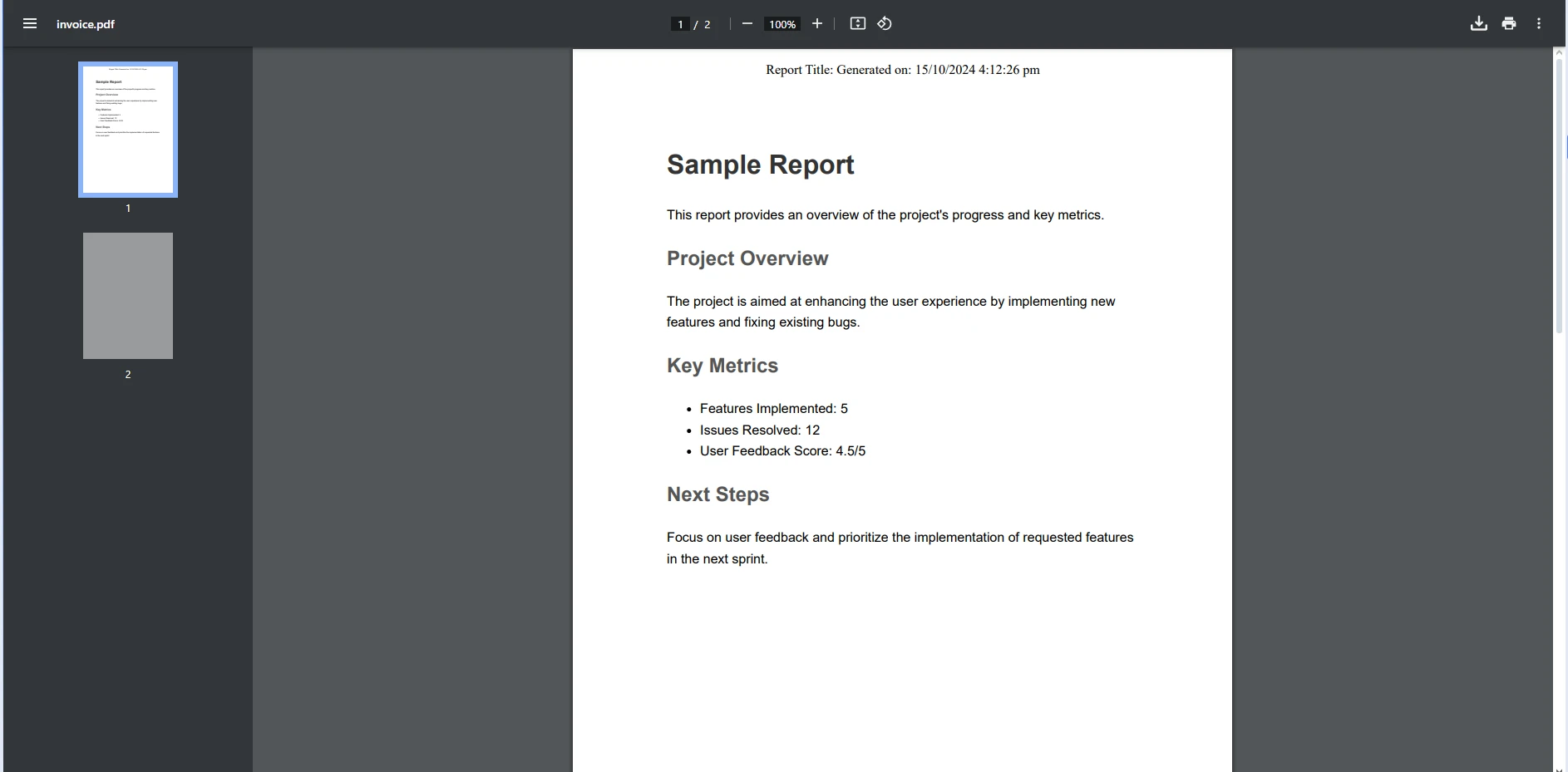
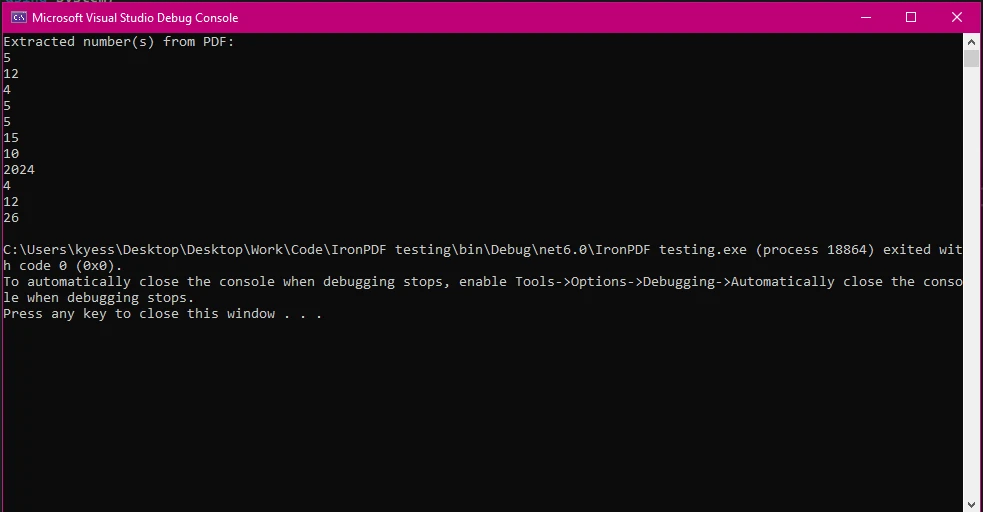
.NET 도움말 How to Convert String to Int in C# (Developer Tutorial) 커티스 차우 업데이트됨:6월 22, 2025 다운로드 IronPDF NuGet 다운로드 DLL 다운로드 윈도우 설치 프로그램 무료 체험 시작하기 LLM용 사본 LLM용 사본 LLM용 마크다운 형식으로 페이지를 복사하세요 ChatGPT에서 열기 ChatGPT에 이 페이지에 대해 문의하세요 제미니에서 열기 제미니에게 이 페이지에 대해 문의하세요 Grok에서 열기 Grok에게 이 페이지에 대해 문의하세요 혼란 속에서 열기 Perplexity에게 이 페이지에 대해 문의하세요 공유하다 페이스북에 공유하기 트위터에 공유하기 LinkedIn에 공유하기 URL 복사 이메일로 기사 보내기 In .NET development, converting between different data types is an essential skill, especially when dealing with common types like strings and integers. One of the most frequent operations you’ll perform is converting a string variable to an integer value. Whether handling numeric strings from user inputs, files, or databases, being able to efficiently convert string variables to integers is crucial. Luckily, C# offers various methods to perform these conversions effectively, thanks to the int.Parse() and int.TryParse() methods. On the other hand, when working with PDFs, the ability to extract and manipulate text data becomes even more important, especially when dealing with documents like invoices, reports, or forms that often contain integer strings. This is where IronPDF comes in—a powerful and easy-to-use library for working with PDFs in .NET. In this article, we’ll walk through both how to convert strings to integers in C#, and how IronPDF can help you handle PDF-related tasks within your .NET projects. Why Convert String to Integer in C#? String-to-integer conversions are a critical step in many applications where numerical data is provided as a string. Here are some common use cases: User Input Handling: When users input numbers through forms or UI elements, the data often comes in as strings. Converting these values to integers is necessary for calculations or further data manipulation. Data from External Sources: When reading data from files, databases, or documents like PDFs, the data is often in string format. Converting these string variables to integers allows for accurate manipulation, validation, and calculations. Performance and Readability: Integer operations are faster than string operations, and keeping data in its intended type makes code more readable and maintainable. Default Value Handling: If an input string does not contain a valid number, you'll need to provide a default value when the conversion fails, ensuring the application continues to run smoothly. Basic Methods for Converting String to Integer in C# There are several ways to convert a string variable to an integer value in C#. The most common approaches include the Parse method, the TryParse method, and the Convert class. Using int.Parse() The int.Parse() method is a straightforward way to convert a string to an integer. However, it assumes that the input string is in the correct format (i.e., a valid number) and will throw a FormatException if the conversion fails. int number = int.Parse("123"); int number = int.Parse("123"); $vbLabelText $csharpLabel Advantages: Simple and direct for valid string inputs. Disadvantages: Throws an exception if the string is not a valid number, which may not be ideal when processing untrusted data (such as user input or data from external files). Using int.TryParse() For safer conversions, the TryParse method is commonly used. It attempts the conversion and returns a boolean value indicating whether the conversion was successful or not. If the conversion fails, it does not throw an exception but simply returns false. The result is stored in an out parameter. bool success = int.TryParse("123", out int result); bool success = int.TryParse("123", out int result); $vbLabelText $csharpLabel Here, success is a boolean value indicating whether the conversion succeeded, and result is the converted integer, stored in the out parameter. Advantages: Handles invalid strings gracefully by returning false instead of throwing exceptions. Ideal for scenarios where you are unsure if the string is a valid number. Disadvantages: Requires an additional check (the boolean result) to confirm whether the conversion succeeded. Using the Convert Class Another way to convert a string variable into an integer value is to use the Convert class. The convert class includes methods that can convert different data types, including strings to integers. int number = Convert.ToInt32("123"); int number = Convert.ToInt32("123"); $vbLabelText $csharpLabel Advantages: The Convert class can handle a wider range of data types beyond just strings and integers. Disadvantages: Like the parse method, if the string variable is not in the correct format, this method throws a FormatException. Handling PDFs in .NET with IronPDF When working with PDFs, you may need to extract and process any integer string embedded in the document. IronPDF simplifies PDF manipulation, allowing you to extract text and numbers seamlessly. This can be especially useful in scenarios where you need to extract and convert invoice numbers, quantities, or other important data. IronPDF Features IronPDF offers a comprehensive set of features for working with PDFs, including: PDF Conversion: IronPDF can convert HTML to PDF, with its full support for modern web standards. You can be assured that IronPDF will consistently return pixel-perfect PDFs from your HTML page or content. IronPDF can also convert PDF files from other formats such as DOCX, images, RTF, and more. PDF Generation: With IronPDF, you can generate PDFs from URLs, ASPX files, or HTML strings. Security Features: With IronPDF, you can always be assured that any sensitive PDF files are secure thanks to its security features. Use IronPDF to encrypt your PDF files, set passwords, and set permissions for your PDF files. PDF Editing Features: With IronPDF you can process existing PDF documents, edit them, and read PDF files with ease. IronPDF offers editing features such as adding headers and footers, stamping text and images onto the PDF pages, adding custom watermarks to the PDF, working with PDF forms, and splitting or merging PDF files. Integration: Seamlessly integrates with ASP.NET and MVC applications. PDF Version Support: Support for PDF versions 1.2-1.7. These features make IronPDF a powerful tool for any application that requires PDF functionality, from simple reports to complex document processing systems. Combining String-to-Int Conversion with PDF Data Extraction Using IronPDF One of the key scenarios where string-to-integer conversion and PDF handling come together is when you need to extract numerical data from PDFs. For example, you may want to extract invoice numbers, order IDs, or quantities from a PDF document, which often come in as strings. In this next example, we will demonstrate how to extract text from a PDF using IronPDF and convert any integer strings into integer values using the TryParse method. Example Code for Extracting Numbers from PDF Text Using IronPDF, you can extract text from a PDF and then convert any numerical strings into integers using int.TryParse(). Here’s how: using System; using System.Text.RegularExpressions; using IronPdf; public static class PdfNumberExtractor { public static void Main(string[] args) { // Load the PDF file PdfDocument pdf = PdfDocument.FromFile("invoice.pdf"); // Extract text from the PDF string extractedText = pdf.ExtractAllText(); // Use regex to extract potential numbers from the text var matches = Regex.Matches(extractedText, @"\d+"); if (matches.Count > 0) { Console.WriteLine("Extracted number(s) from PDF:"); foreach (Match match in matches) { // Try to parse each match as an integer if (int.TryParse(match.Value, out int num)) { Console.WriteLine(num); // If successful, print the number } } } else { Console.WriteLine("Could not find any numbers in the extracted text."); } } } using System; using System.Text.RegularExpressions; using IronPdf; public static class PdfNumberExtractor { public static void Main(string[] args) { // Load the PDF file PdfDocument pdf = PdfDocument.FromFile("invoice.pdf"); // Extract text from the PDF string extractedText = pdf.ExtractAllText(); // Use regex to extract potential numbers from the text var matches = Regex.Matches(extractedText, @"\d+"); if (matches.Count > 0) { Console.WriteLine("Extracted number(s) from PDF:"); foreach (Match match in matches) { // Try to parse each match as an integer if (int.TryParse(match.Value, out int num)) { Console.WriteLine(num); // If successful, print the number } } } else { Console.WriteLine("Could not find any numbers in the extracted text."); } } } $vbLabelText $csharpLabel Input PDF Console Output In this code example, we start by loading the PDF file named "invoice.pdf" and before extracting all of the text from the document using the ExtractAllText() method. To identify potential numbers within the extracted text, the code applies a regular expression (regex) \d+, which matches sequences of digits. The matches are stored, and if any numbers are found, they are displayed on the console. Each match is individually parsed as an integer using int.TryParse(), ensuring only valid numeric values are processed. If no numbers are found, a message is displayed stating that no numbers were extracted. This approach is useful for processing PDFs containing numeric data, such as invoices, where extracting and converting numbers is essential. Use Cases for Converting PDF Data to Integers in Real-World Applications Here are some scenarios where converting extracted PDF text to integers can be valuable: Invoice Processing: Extracting and processing invoice numbers or total amounts for automated billing systems. Order Tracking: Retrieving order IDs or quantities from shipping or order confirmation PDFs. Financial Reporting: Parsing PDFs containing financial reports or transaction logs where numerical data needs to be validated or summarized. Conclusion Converting strings to integers is a fundamental skill in C#, especially when working with external data sources. The int.Parse() and int.TryParse() methods provide flexible ways to handle these conversions, ensuring both simplicity and safety. Meanwhile, IronPDF empowers .NET developers to handle complex PDF workflows with ease. Whether you’re extracting text, creating dynamic reports, or converting PDF data into usable formats, IronPDF is a valuable addition to your development toolkit. Want to try IronPDF for yourself? Start your free trial today and experience how IronPDF can transform the way you handle PDFs in your .NET applications! 자주 묻는 질문 C#에서 문자열을 정수로 변환하려면 어떻게 해야 하나요? C#에서는 직접 변환을 위해 int.Parse() 메서드를 사용하여 문자열을 정수로 변환하거나 성공 여부를 나타내는 부울을 반환하는 안전한 변환을 위해 int.TryParse() 메서드를 사용하여 문자열을 정수로 변환할 수 있습니다. Convert 클래스는 여러 데이터 유형을 처리하는 데에도 사용할 수 있습니다. 문자열이 유효한 숫자인지 확실하지 않은 경우 문자열을 정수로 변환하려면 어떤 방법을 사용해야 하나요? 문자열이 유효한 숫자인지 확실하지 않은 경우, 변환을 시도하고 예외를 던지지 않고 성공 또는 실패를 나타내는 부울을 반환하는 int.TryParse()를 사용해야 합니다. PDF 라이브러리가 PDF 파일에서 숫자를 추출하는 데 도움이 될 수 있나요? 예, IronPDF와 같은 PDF 라이브러리는 PDF 파일에서 텍스트를 추출하는 데 도움이 될 수 있습니다. 텍스트가 추출되면 정규식을 사용하여 숫자 문자열을 찾은 다음 int.TryParse()를 사용하여 정수로 변환할 수 있습니다. .NET 애플리케이션에서 문자열을 정수로 변환하는 일반적인 사용 사례는 무엇인가요? 일반적인 사용 사례로는 청구 시스템, 데이터 분석, 보고서 생성 등의 애플리케이션을 위해 사용자 입력, 파일 또는 데이터베이스에서 숫자 데이터를 처리하는 것이 포함됩니다. C#에서 문자열을 정수로 변환할 때 예외를 처리하는 것이 중요한 이유는 무엇인가요? int.Parse()와 같은 메서드는 입력 문자열이 유효한 정수가 아닌 경우 FormatException을 throw할 수 있으므로 예외 처리는 매우 중요합니다. int.TryParse()를 사용하면 유효하지 않은 형식을 안전하게 처리하여 애플리케이션 충돌을 방지하는 데 도움이 됩니다. .NET에서 PDF의 숫자 데이터를 처리하려면 어떻게 해야 하나요? .NET에서 PDF의 숫자 데이터를 처리하려면 PDF 라이브러리를 사용하여 PDF 파일에서 텍스트를 추출할 수 있습니다. 추출 후에는 int.TryParse()와 같은 메서드를 사용하여 숫자 문자열을 식별하고 정수로 변환할 수 있습니다. PDF 라이브러리는 .NET 개발자에게 어떤 이점을 제공하나요? PDF 라이브러리는 텍스트 및 숫자 데이터가 포함된 문서를 처리하는 데 필수적인 PDF 변환, 생성, 편집 및 보안과 같은 기능을 제공하여 .NET 개발자가 PDF를 쉽게 조작할 수 있는 기능을 제공합니다. 커티스 차우 지금 바로 엔지니어링 팀과 채팅하세요 기술 문서 작성자 커티스 차우는 칼턴 대학교에서 컴퓨터 과학 학사 학위를 취득했으며, Node.js, TypeScript, JavaScript, React를 전문으로 하는 프론트엔드 개발자입니다. 직관적이고 미적으로 뛰어난 사용자 인터페이스를 만드는 데 열정을 가진 그는 최신 프레임워크를 활용하고, 잘 구성되고 시각적으로 매력적인 매뉴얼을 제작하는 것을 즐깁니다. 커티스는 개발 분야 외에도 사물 인터넷(IoT)에 깊은 관심을 가지고 있으며, 하드웨어와 소프트웨어를 통합하는 혁신적인 방법을 연구합니다. 여가 시간에는 게임을 즐기거나 디스코드 봇을 만들면서 기술에 대한 애정과 창의성을 결합합니다. 관련 기사 업데이트됨 12월 11, 2025 Bridging CLI Simplicity & .NET : Using Curl DotNet with IronPDF Jacob Mellor has bridged this gap with CurlDotNet, a library created to bring the familiarity of cURL to the .NET ecosystem. 더 읽어보기 업데이트됨 12월 20, 2025 RandomNumberGenerator C# Using the RandomNumberGenerator C# class can help take your PDF generation and editing projects to the next level 더 읽어보기 업데이트됨 12월 20, 2025 C# String Equals (How it Works for Developers) When combined with a powerful PDF library like IronPDF, switch pattern matching allows you to build smarter, cleaner logic for document processing 더 읽어보기 C# Casting (How It Works For Developers)C# Modulus (How It Works For Developers)
업데이트됨 12월 11, 2025 Bridging CLI Simplicity & .NET : Using Curl DotNet with IronPDF Jacob Mellor has bridged this gap with CurlDotNet, a library created to bring the familiarity of cURL to the .NET ecosystem. 더 읽어보기
업데이트됨 12월 20, 2025 RandomNumberGenerator C# Using the RandomNumberGenerator C# class can help take your PDF generation and editing projects to the next level 더 읽어보기
업데이트됨 12월 20, 2025 C# String Equals (How it Works for Developers) When combined with a powerful PDF library like IronPDF, switch pattern matching allows you to build smarter, cleaner logic for document processing 더 읽어보기