Python으로 작업할 때 리스트 내의 요소를 검색해야 하는 경우가 자주 발생합니다. 특정 요소 값을 찾거나, 항목의 존재 여부를 확인하거나, 리스트 요소의 모든 발생을 찾고자 할 때 Python은 이러한 작업을 효율적으로 수행할 수 있는 여러 가지 기술을 제공합니다. 이 튜토리얼에서는 Python 리스트 내 요소를 찾는 다양한 방법과 설명 코드 예제를 탐색해 볼 것입니다. 또한, Iron Software의 IronPDF Python용 패키지를 사용하여 PDF 문서를 생성하는 방법도 살펴볼 것입니다.
리스트 내 요소 찾기 방법
- 리스트 내 요소를 찾기 위한 Python 파일을 생성합니다.
- 'in' 연산자를 사용하여 요소 존재 여부를 찾습니다.
- 리스트 'index()' 메서드를 사용하여 요소 존재 여부를 찾습니다.
- 리스트 내포를 사용하여 요소 존재 여부를 찾습니다.
- 리스트 내포를 사용하여 중복을 찾습니다.
- 'filter()' 함수를 사용하여 요소 존재 여부를 찾습니다.
- 외부 라이브러리를 사용하여 요소 존재 여부를 찾습니다.
필수 조건
- Python 설치: 로컬 머신에 Python이 설치되어 있는지 확인하거나, python.org를 방문하여 Python 설치 단계를 따릅니다.
- Visual Studio Code: Python을 위한 적어도 하나의 개발 환경을 설치합니다. 이 튜토리얼에서는 Visual Studio Code 편집기를 고려할 것입니다.
1. 'in' 연산자를 사용하여 요소 존재 여부를 찾기
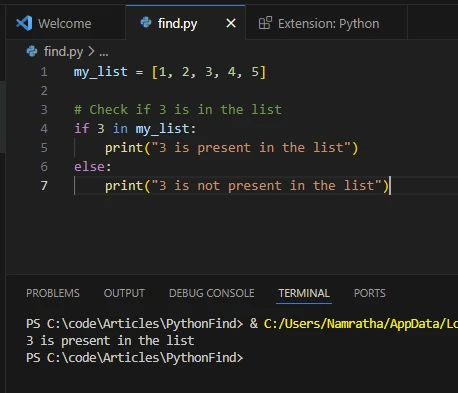
리스트 내의 요소 존재 여부를 확인하는 가장 간단한 방법은 in 연산자를 사용하는 것입니다. 이 연산자는 목록에 요소가 있는 경우 True를 반환하고 그렇지 않으면 False를 반환합니다.
my_list = [1, 2, 3, 4, 5]
# Here, 3 is the target element; check if 3 is present in the list
if 3 in my_list:
    print("3 is present in the list")
else:
    print("3 is not present in the list")
my_list = [1, 2, 3, 4, 5]
# Here, 3 is the target element; check if 3 is present in the list
if 3 in my_list:
    print("3 is present in the list")
else:
    print("3 is not present in the list")
Python
산출
2. 'index()' 메서드를 사용하여 요소 존재 여부를 찾기
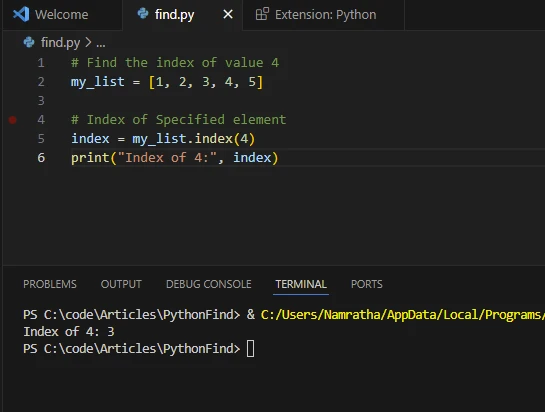
index() 메서드는 목록에서 특정 항목이 처음 발생하는 인덱스를 반환합니다. 값이 없으면 ValueError를 발생시킵니다. 이 방법은 리스트 내 요소의 위치를 알아야 할 때 유용합니다.
my_list = [1, 2, 3, 4, 5]
# Index of specified element
# The index method returns the index of the first occurrence of the element
index = my_list.index(4)
print("Index of 4:", index)
my_list = [1, 2, 3, 4, 5]
# Index of specified element
# The index method returns the index of the first occurrence of the element
index = my_list.index(4)
print("Index of 4:", index)
Python
산출
3. 리스트 내포를 사용하여 요소 존재 여부를 찾기
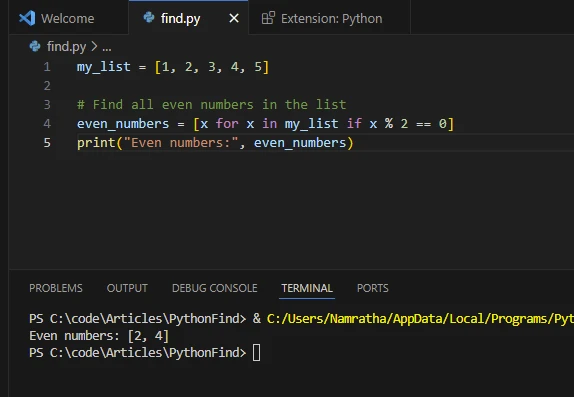
리스트 내포는 특정 조건을 만족하는 요소를 리스트 내에서 찾기 위한 간결한 방법을 제공합니다. 특정 기준에 따라 요소를 필터링하기 위해 조건부 표현식과 함께 사용할 수 있습니다.
my_list = [1, 2, 3, 4, 5]
# Find all even numbers in the list using linear search
even_numbers = [x for x in my_list if x % 2 == 0]
print("Even numbers:", even_numbers)
my_list = [1, 2, 3, 4, 5]
# Find all even numbers in the list using linear search
even_numbers = [x for x in my_list if x % 2 == 0]
print("Even numbers:", even_numbers)
Python
산출
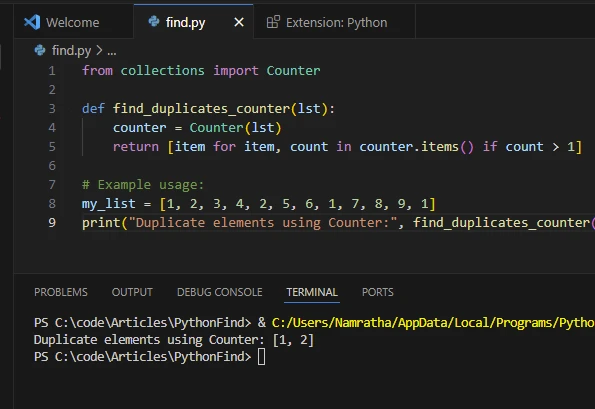
4. 리스트 내포를 사용하여 중복 찾기
다음과 같이 리스트 내포도 중복을 찾는 데 사용할 수 있습니다.
from collections import Counter

def find_duplicates_counter(lst):
    counter = Counter(lst)
    # Return a list of items that appear more than once
    return [item for item, count in counter.items() if count > 1]

# Example usage:
my_list = [1, 2, 3, 4, 2, 5, 6, 1, 7, 8, 9, 1]
# Print the duplicate elements using Counter
print("Duplicate elements using Counter:", find_duplicates_counter(my_list))
from collections import Counter

def find_duplicates_counter(lst):
    counter = Counter(lst)
    # Return a list of items that appear more than once
    return [item for item, count in counter.items() if count > 1]

# Example usage:
my_list = [1, 2, 3, 4, 2, 5, 6, 1, 7, 8, 9, 1]
# Print the duplicate elements using Counter
print("Duplicate elements using Counter:", find_duplicates_counter(my_list))
Python
산출
5. 'filter()' 함수를 사용하여 요소 존재 여부를 찾기
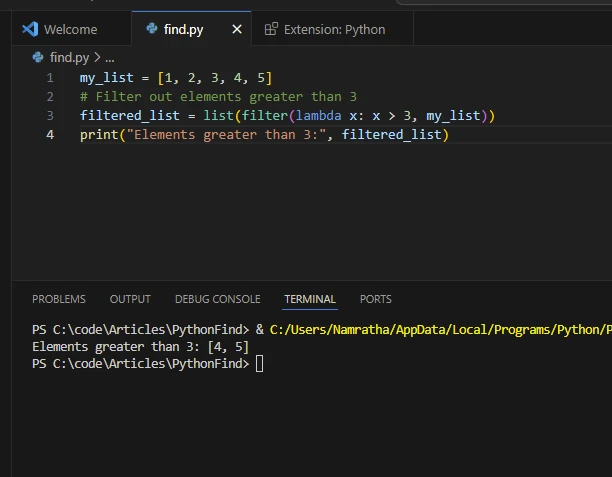
filter() 함수는 목록의 각 요소에 필터링 조건을 적용하고 조건을 만족하는 요소를 포함하는 반복자를 반환합니다. 반복기를 list() 함수를 사용하여 목록으로 변환할 수 있습니다.
my_list = [1, 2, 3, 4, 5]
# Filter out elements greater than 3
filtered_list = list(filter(lambda x: x > 3, my_list))
print("Elements greater than 3:", filtered_list)
my_list = [1, 2, 3, 4, 5]
# Filter out elements greater than 3
filtered_list = list(filter(lambda x: x > 3, my_list))
print("Elements greater than 3:", filtered_list)
Python
산출
6. 외부 라이브러리를 사용하여 요소 존재 여부를 찾기
내장 메서드 이외에, NumPy 및 pandas와 같은 외부 라이브러리를 활용하여 리스트 및 배열에 대한 더 고급 작업을 수행할 수 있습니다. 이 라이브러리는 검색, 필터링 및 데이터 조작을 위한 효율적인 함수를 제공합니다.
NumPy는 수치 계산을 위한 Python 라이브러리입니다. 대규모 다차원 배열 및 행렬에 대한 지원을 제공하며, 이러한 배열을 효율적으로 조작할 수 있는 수학적 함수 모음을 함께 제공합니다. NumPy는 Python에서 과학적 컴퓨팅을 위한 기본 라이브러리이며, 기계 학습, 데이터 분석, 신호 처리 및 계산 과학에서 널리 사용됩니다.
NumPy를 사용하려면 다음 명령어를 사용하여 설치하십시오:
pip install numpy
pip install numpy
SHELL
import numpy as np

my_list = [1, 2, 3, 4, 5]
# Convert list to a NumPy array
arr = np.array(my_list)
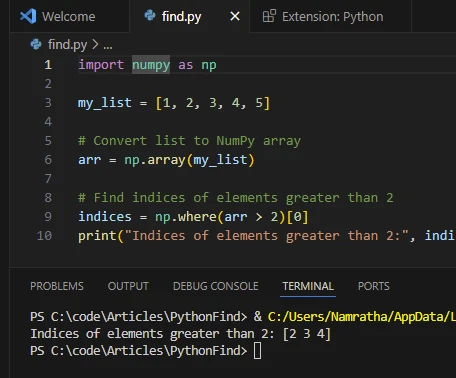
# Find indices of elements greater than 2
indices = np.where(arr > 2)[0]
print("Indices of elements greater than 2:", indices)
import numpy as np

my_list = [1, 2, 3, 4, 5]
# Convert list to a NumPy array
arr = np.array(my_list)
# Find indices of elements greater than 2
indices = np.where(arr > 2)[0]
print("Indices of elements greater than 2:", indices)
Python
산출
실제 사용 사례
다양한 프로그래밍 언어에서의 효율적인 검색은 중요한 실제 응용 프로그램 때문에 필수적입니다:
데이터 분석 및 처리
데이터 분석 작업에서는 대규모 데이터 세트를 목록이나 배열로 처리하는 경우가 많습니다. 특정 데이터 포인트를 찾거나, 이상치를 필터링하거나, 데이터 내의 패턴을 식별하는 것은 목록의 요소를 검색하고 조작하는 일반적인 작업입니다.
데이터베이스 작업
데이터베이스와 작업할 때는 데이터를 쿼리하여 특정 기준과 일치하는 레코드 세트를 자주 검색합니다. 데이터베이스 레코드의 목록은 자주 처리되어 특정 조건에 따라 정보 추출, 필터링, 또는 집계를 수행합니다.
텍스트 처리 및 분석
자연어 처리 작업에서는 텍스트 데이터를 단어 또는 토큰의 목록을 통해 나타내는 경우가 많습니다. 특정 단어의 발생을 찾거나, 패턴을 식별하거나, 텍스트 자료에서 관련 정보를 추출하는 데는 목록의 요소를 검색하고 처리하는 효율적인 방법이 필요합니다.
재고 관리
리스트는 소매 및 공급망 관리 시스템에서 차고 목록을 나타내는 데 자주 사용됩니다. 제품 이름, 카테고리 또는 재고 가용성 같은 속성에 따라 항목을 찾는 것은 재고 추적, 주문 처리, 공급망 최적화에 중요합니다.
전자 상거래 및 추천 시스템
전자 상거래 플랫폼 및 추천 시스템은 제품 목록을 효율적으로 검색 및 필터링하여 사용자에게 개인화된 추천을 제공해야 합니다. 사용자 선호, 탐색 내역 또는 유사성 메트릭에 따라 관련 제품을 찾는 것은 제품 목록의 요소를 검색하고 분석하는 것을 포함합니다.
소셜 미디어 분석
소셜 미디어 플랫폼은 사용자 프로필, 게시물, 댓글, 상호작용과 같은 대량의 데이터를 생성합니다. 소셜 미디어 데이터를 분석하는 데는 게시물 및 댓글 목록에서 특정 사용자, 주제, 해시태그, 또는 트렌드를 검색하는 것이 자주 필요합니다.
과학 컴퓨팅 및 시뮬레이션
과학 컴퓨팅 및 시뮬레이션 애플리케이션에서는 수치 데이터, 시뮬레이션 결과 및 계산 모델을 저장하기 위해 목록을 사용합니다. 대용량 데이터 세트에서 중요한 데이터 포인트를 찾거나 이상치를 식별하거나 특징을 추출하는 것은 과학적 분석 및 시각화 작업에서 필수적입니다.
게임 및 시뮬레이션
게임 개발 및 시뮬레이션 소프트웨어에서는 게임 객체, 캐릭터, 지형 특성 및 시뮬레이션 상태를 나타내기 위해 목록을 사용합니다. 게임 세계에서 객체를 찾거나 충돌을 감지하거나 플레이어 상호작용을 추적하는 것은 목록의 요소를 검색하고 처리하는 것을 종종 포함합니다.
금융 분석 및 거래
금융 애플리케이션 및 알고리즘 거래 시스템은 목록을 사용하여 과거 시장 데이터, 주식 가격 및 거래 신호를 저장합니다. 시장 동향을 분석하거나 거래 기회를 식별하거나 거래 전략을 구현하는 데는 금융 데이터 목록의 요소를 검색하고 처리하는 효율적인 방법이 필요합니다.
이러한 실제 사용 사례는 다양한 도메인 및 애플리케이션에서 목록의 요소를 찾는 것이 얼마나 중요한지를 보여줍니다. 리스트를 검색하고 처리하는 효율적인 알고리즘 및 데이터 구조는 다양한 분야에서 넓은 범위의 계산 작업 및 애플리케이션을 가능하게 하는 데 중요한 역할을 합니다.
IronPDF 소개합니다
Iron Software에서 제작한 IronPDF for Python은 소프트웨어 개발자들에게 Python 3 프로젝트 내에서 PDF 콘텐츠를 생성, 수정 및 추출할 수 있는 강력한 라이브러리입니다. .NET용 IronPDF의 성공과 광범위한 채택을 바탕으로, IronPDF for Python은 그 성공을 물려받습니다.
IronPDF for Python의 주요 기능
- HTML, URL, JavaScript, CSS 및 다양한 이미지 형식에서 PDF 생성
- 헤더/푸터, 서명 및 첨부 파일 포함, PDF에 대한 암호 보호 및 보안 조치 구현
- 포괄적인 멀티스레딩 및 비동기 지원을 통한 성능 향상
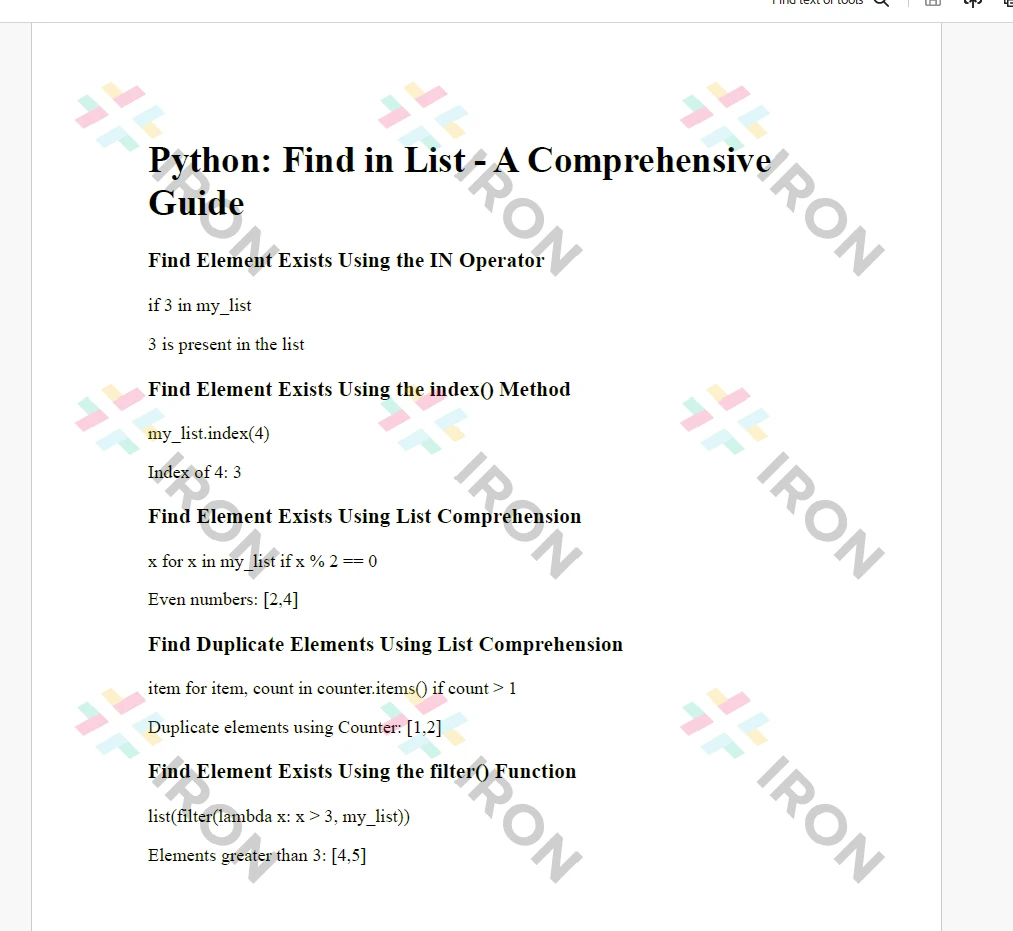
위 예제를 사용하여 PDF 문서를 생성하는 방법을 살펴보겠습니다, Python 'find in list' 요소를 사용하여.
import sys
sys.prefix = r'C:\Users\user1\AppData\Local\Packages\PythonSoftwareFoundation.Python.3.7_qbz5n2kfra8p0\LocalCache\local-packages'
from ironpdf import *

# Instantiate Renderer
renderer = ChromePdfRenderer()

# Prepare HTML content
msg = "<h1>Python: Find in List - A Comprehensive Guide</h1>"
msg += "<h3>Find Element Exists Using the IN Operator</h3>"
msg += "<p>if 3 in my_list</p>"
msg += "<p>3 is present in the list</p>"
msg += "<h3>Find Element Exists Using the index() Method</h3>"
msg += "<p>my_list.index(4)</p>"
msg += "<p>Index of 4: 3</p>"
msg += "<h3>Find Element Exists Using List Comprehension</h3>"
msg += "<p>x for x in my_list if x % 2 == 0</p>"
msg += "<p>Even numbers: [2,4]</p>"
msg += "<h3>Find Duplicate Elements Using List Comprehension</h3>"
msg += "<p>item for item, count in counter.items() if count > 1</p>"
msg += "<p>Duplicate elements using Counter: [1,2]</p>"
msg += "<h3>Find Element Exists Using the filter() Function</h3>"
msg += "<p>list(filter(lambda x: x > 3, my_list))</p>"
msg += "<p>Elements greater than 3: [4,5]</p>"

# Write HTML content to a file
f = open("demo.html", "a")
f.write(msg)
f.close()

# Create a PDF from an existing HTML file using IronPDF for Python
pdf = renderer.RenderHtmlFileAsPdf("demo.html")
# Export to a file
pdf.SaveAs("output.pdf")
import sys
sys.prefix = r'C:\Users\user1\AppData\Local\Packages\PythonSoftwareFoundation.Python.3.7_qbz5n2kfra8p0\LocalCache\local-packages'
from ironpdf import *

# Instantiate Renderer
renderer = ChromePdfRenderer()

# Prepare HTML content
msg = "<h1>Python: Find in List - A Comprehensive Guide</h1>"
msg += "<h3>Find Element Exists Using the IN Operator</h3>"
msg += "<p>if 3 in my_list</p>"
msg += "<p>3 is present in the list</p>"
msg += "<h3>Find Element Exists Using the index() Method</h3>"
msg += "<p>my_list.index(4)</p>"
msg += "<p>Index of 4: 3</p>"
msg += "<h3>Find Element Exists Using List Comprehension</h3>"
msg += "<p>x for x in my_list if x % 2 == 0</p>"
msg += "<p>Even numbers: [2,4]</p>"
msg += "<h3>Find Duplicate Elements Using List Comprehension</h3>"
msg += "<p>item for item, count in counter.items() if count > 1</p>"
msg += "<p>Duplicate elements using Counter: [1,2]</p>"
msg += "<h3>Find Element Exists Using the filter() Function</h3>"
msg += "<p>list(filter(lambda x: x > 3, my_list))</p>"
msg += "<p>Elements greater than 3: [4,5]</p>"

# Write HTML content to a file
f = open("demo.html", "a")
f.write(msg)
f.close()

# Create a PDF from an existing HTML file using IronPDF for Python
pdf = renderer.RenderHtmlFileAsPdf("demo.html")
# Export to a file
pdf.SaveAs("output.pdf")
Python
코드 설명
- 초기화:
ChromePdfRenderer 인스턴스를 생성합니다.
- 콘텐츠 준비: HTML 요소를 사용하여 PDF에 출력할 텍스트 정의.
- PDF 렌더링:
RenderHtmlFileAsPdf를 사용하여 HTML을 PDF로 변환합니다.
- PDF 저장: PDF는 지정된 파일 이름으로 로컬 디스크에 저장됩니다.
출력
라이선스 키가 초기화되지 않았기 때문에 워터마크가 보일 수 있습니다; 유효한 라이선스 키를 사용하면 이것이 제거됩니다.
라이센스 (무료 체험 가능)
IronPDF 라이선스 세부 정보에는 작동을 위한 라이선스 키가 필요합니다. Python 스크립트 시작 부분에 라이선스 키 속성을 설정하여 라이선스 키 또는 체험 키를 적용하십시오:
# Apply your license key
License.LicenseKey = "MyKey"
# Apply your license key
License.LicenseKey = "MyKey"
Python
체험 라이선스 등록 시 개발자를 위한 체험 라이선스가 제공됩니다.
결론
이 튜토리얼에서는 Python 목록에서 요소를 찾는 다양한 방법을 다루었습니다. 특정 요구 사항과 작업의 복잡성에 따라 가장 적합한 접근 방식을 선택할 수 있습니다. 간단한 존재 여부 확인을 위한 in 연산자 사용이든 목록 이해도나 외부 라이브러리를 사용한 더 고급 필터링 작업이든, Python은 목록 조작 작업에서 유연성과 효율성을 제공합니다. Python 프로젝트에서 검색 및 필터링 작업을 효율적으로 처리할 수 있도록 이러한 기술을 실험해 보세요. IronPDF 모듈과 함께 이 기사에서 설명하는 것처럼 개발자는 결과를 PDF 문서로 쉽게 인쇄할 수 있습니다.