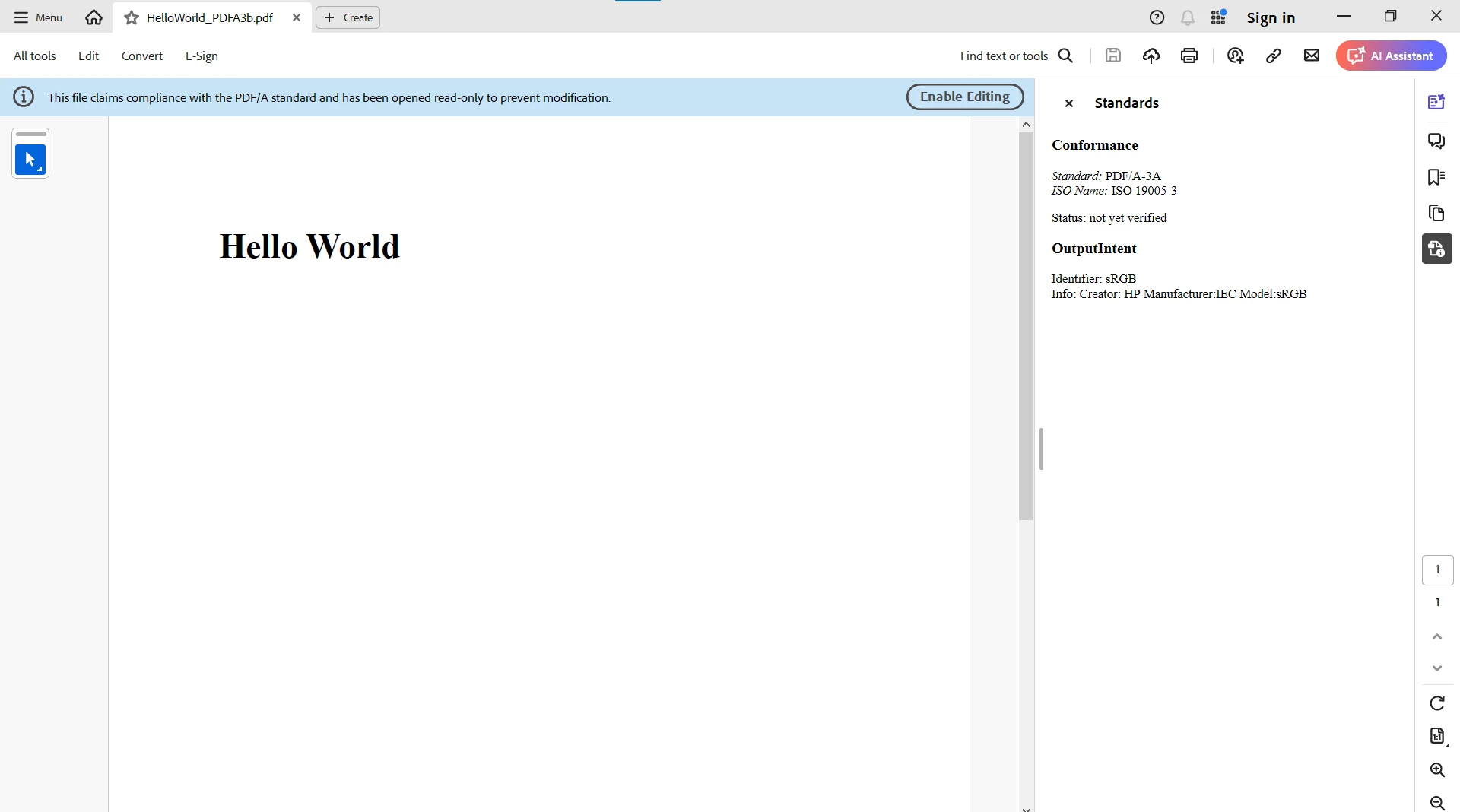
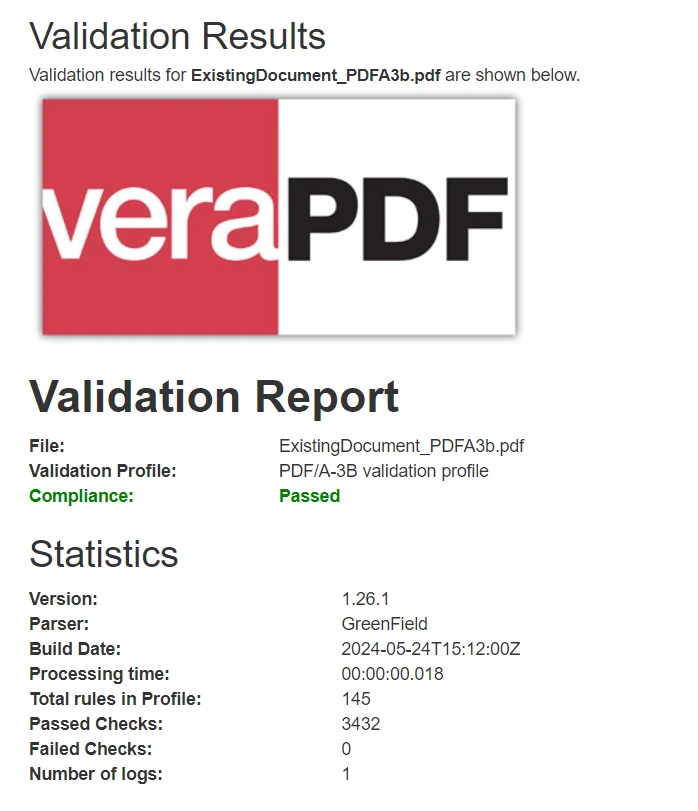
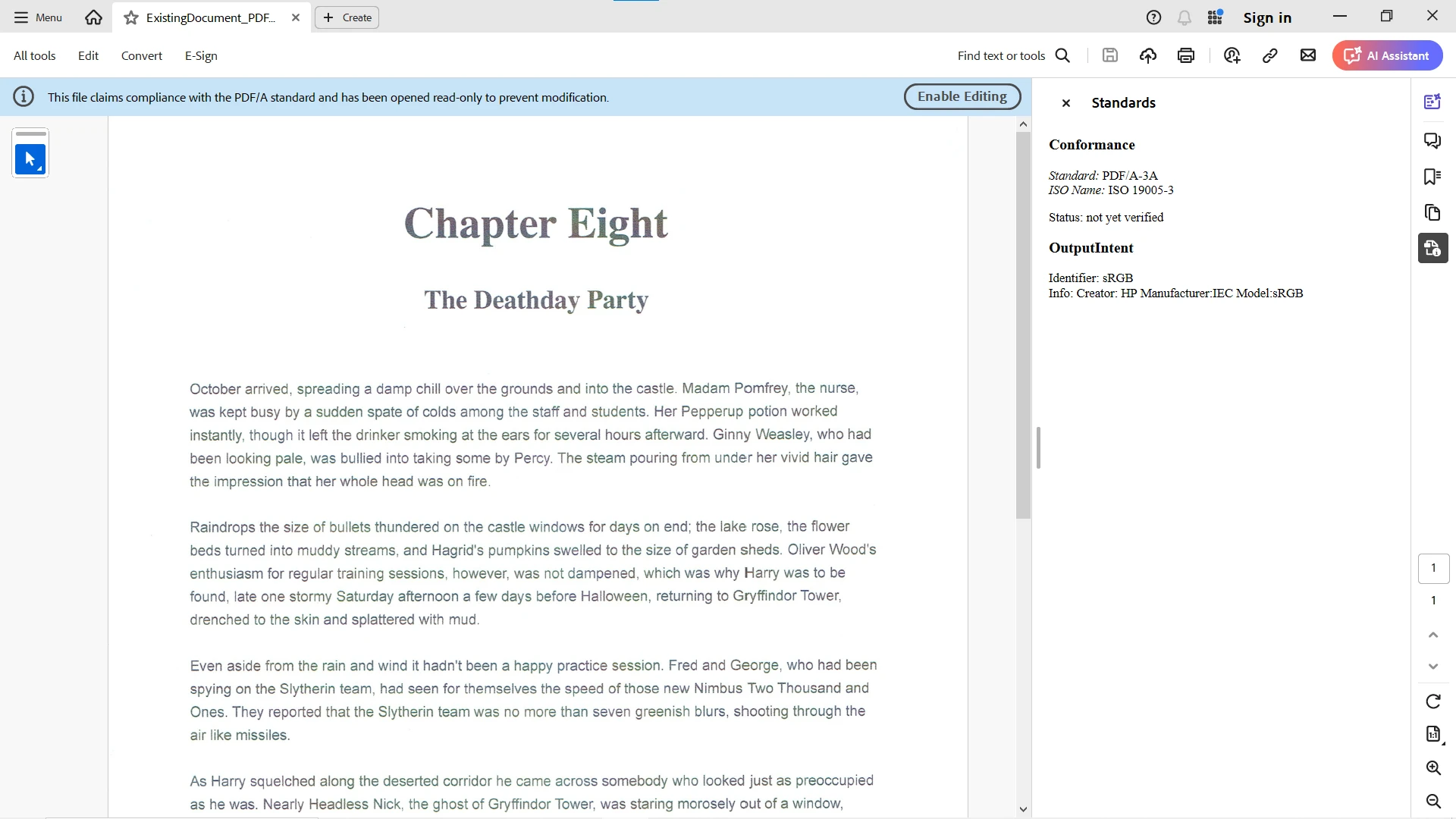
IRONPDF 사용 PDF/A Compliance (How It Works for Developers) 커티스 차우 업데이트됨:7월 28, 2025 다운로드 IronPDF NuGet 다운로드 DLL 다운로드 윈도우 설치 프로그램 무료 체험 시작하기 LLM용 사본 LLM용 사본 LLM용 마크다운 형식으로 페이지를 복사하세요 ChatGPT에서 열기 ChatGPT에 이 페이지에 대해 문의하세요 제미니에서 열기 제미니에게 이 페이지에 대해 문의하세요 Grok에서 열기 Grok에게 이 페이지에 대해 문의하세요 혼란 속에서 열기 Perplexity에게 이 페이지에 대해 문의하세요 공유하다 페이스북에 공유하기 트위터에 공유하기 LinkedIn에 공유하기 URL 복사 이메일로 기사 보내기 Digital documents have taken over physical documents immensely in this digital day and age. Ensuring digital documents are preserved and accessible over the long term is paramount. PDF/A is a standardized version of PDF designed to achieve this task. This article will help you understand what PDF/A compliance is, its accessibility standards, and how to achieve it within electronic documents. What is a PDF/A Document? PDF/A is an ISO-standard version of PDF, which is an internationally recognized format specifically created for archiving documents and long-term preservation. Unlike standard PDF files, PDF/A files are self-contained, which means they include all the information needed to display the document consistently across different platforms and over time. This includes embedded fonts, embedded files, audio and video content, color profiles, and images. Importance of PDF/A Compliance Why do we need PDF/A compliance for digital PDF documents? This is the main question we always ask, and the following are the three main points highlighting its importance and need: Long-Term Accessibility: PDF/A compliance ensures that the documents remain accessible and viewable for decades, regardless of future technological changes. This is the reason long-term archiving is used as future proof for sensitive PDF files. Legal Requirements: Many industries that generate reports in PDF format, such as legal, healthcare, and government, have rules and regulations that mandate the use of PDF/A for document archiving. Consistency: It guarantees that the document's visual appearance and structure remain the same, regardless of the PDF viewers used to view it. PDF/A Conformance Levels There are several conformance levels for the PDF/A standard, each addressing different needs that can be used for conforming documents: PDF/A-1: This is the original standard, based on PDF version 1.4. It has two conformance levels: PDF/A-1a: This ensures both visual integrity and the document’s structure, including tags for better accessibility. This is best suited for legal documents. PDF/A-1b: This sub-level ensures visual integrity but does not require tagging for external document structure. PDF/A-2: This level introduces new features based on PDF version 1.7. It includes support for JPEG2000 compression, transparency effects, and embedding OpenType fonts. It also has two levels of conformance, similar to PDF/A-1. PDF/A-3: This level extends PDF/A-2, allowing the embedding of any file format within the PDF/A document, which is useful for combining related documents, such as including XML files within the PDF. PDF/A-4: The latest standard, aligning with PDF 2.0. It offers new features and improved handling of digital signatures and annotations. How to Achieve PDF/A Compliance? Using the following steps, we can easily make our PDF files PDF/A compliant: Using PDF/A Compliant Software: Many modern PDF creation and editing tools offer options to save documents as PDF/A. Popular software includes Adobe Acrobat, Foxit PhantomPDF, and specialized PDF/A tools like veraPDF. Converting Existing PDFs: Existing PDF documents can be converted to PDF/A using various tools or libraries in specific programming languages. It’s essential to validate and verify the compliance of the converted documents using validation software. Ensuring Compliance During Document Creation: Embedded Fonts: Ensure that all fonts used in the document are embedded. Use Device-Independent Color Spaces: Use color profiles like sRGB or CMYK. Avoid Encryption: PDF/A does not allow encryption, as it can hinder long-term accessibility. Include Metadata: Provide essential metadata such as the document title, author, and keywords. Ensure Self-Containment: Make sure the document includes all necessary components, like images, fonts, and color profiles, within the PDF file. Generating PDF/A Compliant Documents using IronPDF in C# PDF/A compliance is crucial for ensuring the preservation and accessibility of digital documents. IronPDF, developed by Iron Software, is a popular C# library that simplifies the process of creating and converting PDF documents while supporting PDF/A compliance. What is IronPDF? IronPDF is a C# PDF Library designed to generate and manipulate PDF documents. Its primary focus is converting HTML to PDF in a pixel-perfect format using the optimized ChromePdfRenderer. With IronPDF, you can easily convert different formats to PDF, such as XAML, Razor Pages, ASPX Pages, CSHTML, Images, DOCX, RTF, and TIFF. It also supports multi-threading and async methods to generate PDFs in parallel, enhancing performance and productivity. IronPDF is known for its speed, accuracy, ease of use, and cross-platform compatibility. For more details on IronPDF and its features, please visit our documentation page. Installing IronPDF Library To begin PDF conversion to PDF/A, you need to install the IronPDF library in your C# project. You can install this using Visual Studio's NuGet Package Manager. Type the following command in the NuGet Package Manager Console: Install-Package IronPdf Alternatively, you can browse and install IronPDF through NuGet Package Manager for Solutions. Creating PDF/A Compliant Documents To create a PDF/A compliant document, IronPDF provides a ConvertToPdfA method with different options. You can specify the PDF/A version you want to use. The following code example generates a new document from HTML and then uses the ConvertToPdfA method to convert it to PDF/A-3b, and finally saves the file: PDF/A-3b Compliance using IronPdf; // Create a PDF document from HTML var renderer = new ChromePdfRenderer(); var pdf = renderer.RenderHtmlAsPdf("<h1>Hello World</h1>"); // Set PDF/A-3b compliance pdf.ConvertToPdfA(PdfAVersions.PdfA3); // Save the PDF pdf.SaveAs("HelloWorld_PDFA3b.pdf"); using IronPdf; // Create a PDF document from HTML var renderer = new ChromePdfRenderer(); var pdf = renderer.RenderHtmlAsPdf("<h1>Hello World</h1>"); // Set PDF/A-3b compliance pdf.ConvertToPdfA(PdfAVersions.PdfA3); // Save the PDF pdf.SaveAs("HelloWorld_PDFA3b.pdf"); $vbLabelText $csharpLabel For more options and details, please visit this full how-to tutorial on PDF/A compliance on our website. Convert an Existing PDF to PDF/A IronPDF also allows us to convert an existing PDF document to a PDF/A compliant format. We can use the ConvertToPdfA method after opening the file using the FromFile method, but here we'll use the SaveAsPdfA method. This is an easy and direct method of converting the opened file to PDF/A. Notice the second argument in the SaveAsPdfA method specifies the PDF/A version, which is in this case PDF/A-3b: using IronPdf; // Load the existing PDF document var pdf = PdfDocument.FromFile("ExistingDocument.pdf"); // Convert and save as PDF/A-3b pdf.SaveAsPdfA("ExistingDocument_PDFA3b.pdf", PdfAVersions.PdfA3); using IronPdf; // Load the existing PDF document var pdf = PdfDocument.FromFile("ExistingDocument.pdf"); // Convert and save as PDF/A-3b pdf.SaveAsPdfA("ExistingDocument_PDFA3b.pdf", PdfAVersions.PdfA3); $vbLabelText $csharpLabel Validating and Verifying PDF/A Compliance for the Generated Document After generating or converting a PDF file to PDF/A, it’s important to validate its compliance. While IronPDF doesn't provide built-in validation, we can use external tools such as Adobe Acrobat or veraPDF for validation. The ExistingDocument.pdf is a searchable text source PDF which was converted to ExistingDocument_PDFA3b.pdf. Here is the output from veraPDF for its PDF/A compliance: Conclusion PDF/A compliance is essential for organizations and individuals who need to ensure the long-term preservation and accessibility of their digital documents. By understanding the standards and implementing best practices during document creation and conversion, you can achieve PDF/A compliance and safeguard your valuable information for the future. IronPDF provides a straightforward way to generate and convert PDF documents to PDF/A compliant formats using C#. Whether you need PDF/A-3b or PDF/UA-1 compliance, IronPDF simplifies the document archiving and universal accessibility process, making it an excellent choice for C# developers working with PDF documents in their software applications. IronPDF offers a free-trial. Download the library directly from here and give it a try! 자주 묻는 질문 PDF/A란 무엇이며 왜 중요한가요? PDF/A는 전자 문서의 장기 보관을 위해 설계된 PDF의 ISO 표준 버전입니다. 문서가 독립적으로 유지되고 시간이 지나도 일관되게 표시되도록 보장하며, 이는 다양한 산업 분야의 법률 및 접근성 표준에 매우 중요합니다. 개발자가 문서에서 PDF/A 규정을 준수하려면 어떻게 해야 할까요? 개발자는 문서를 PDF/A 형식으로 변환할 수 있는 IronPDF와 같은 호환 소프트웨어를 사용하여 PDF/A 규정을 준수할 수 있습니다. 여기에는 글꼴 삽입, 디바이스 독립적인 색 공간 사용, PDF/A와 호환되지 않는 암호화와 같은 기능 피하기 등이 포함됩니다. PDF/A 적합성에는 어떤 수준이 있나요? PDF/A에는 여러 가지 적합성 수준이 있습니다: PDF/A-1, PDF/A-2, PDF/A-3 및 PDF/A-4. 각 레벨은 투명도, 디지털 서명, 파일 포함 등 다양한 기능을 지원하여 문서 보존에 대한 다양한 요구 사항을 해결합니다. IronPDF는 문서를 PDF/A로 변환하는 데 어떤 도움을 주나요? IronPDF는 기존 PDF 및 기타 형식을 PDF/A로 변환하기 위한 `ConvertToPdfA` 및 `SaveAsPdfA`와 같은 방법을 제공하며, 필요한 구성 요소를 포함하고 PDF/A 표준을 준수하여 규정 준수를 보장합니다. C# 프로젝트에 IronPDF를 설치하는 절차는 어떻게 되나요? IronPDF는 Visual Studio의 NuGet 패키지 관리자를 통해 C# 프로젝트에 설치할 수 있습니다. 설치-패키지 IronPdf` 명령을 실행하여 프로젝트에 추가하면 PDF/A 호환 문서를 만들고 조작할 수 있습니다. PDF 문서가 PDF/A 표준을 준수하는지 확인하려면 어떻게 해야 하나요? PDF/A 규정 준수를 검증하기 위해 veraPDF와 같은 도구를 사용할 수 있습니다. 이 도구는 PDF가 장기 보존 및 접근성을 위해 필요한 ISO 표준을 충족하는지 확인하여 문서가 완벽하게 규정을 준수하는지 확인합니다. PDF/A 규정 준수를 위해 C# 라이브러리를 사용하면 어떤 이점이 있나요? PDF/A 규정 준수를 위해 IronPDF와 같은 C# 라이브러리를 사용하면 사용 편의성, 속도, 정확성, PDF 파일 내에 필요한 구성 요소를 삽입하여 접근성 및 보관 표준을 준수할 수 있는 기능 등 여러 가지 이점을 얻을 수 있습니다. PDF/A-3는 어떤 추가 기능을 지원하나요? PDF/A-3은 PDF/A-2의 모든 기능을 지원하며 PDF/A 문서 내에 모든 파일 형식을 포함할 수 있습니다. 이는 XML과 같은 PDF가 아닌 파일이 포함된 문서 세트에 특히 유용합니다. IronPDF는 PDF/A 호환 문서 생성 및 변환을 위해 .NET 10과 호환되나요? 예. IronPDF는 모든 플랫폼과 프로젝트 유형에서 .NET 10을 완벽하게 지원합니다. 해결 방법 없이도 .NET 10에서 PDF/A 호환 문서를 만들고 변환하는 데 즉시 사용할 수 있습니다. IronPDF는 .NET 10에서 HTML-PDF 렌더링, 글꼴, 메타데이터 포함 및 기타 PDF/A 요구 사항을 지원합니다([ironpdf.com](https://ironpdf.com/?utm_source=openai)) 커티스 차우 지금 바로 엔지니어링 팀과 채팅하세요 기술 문서 작성자 커티스 차우는 칼턴 대학교에서 컴퓨터 과학 학사 학위를 취득했으며, Node.js, TypeScript, JavaScript, React를 전문으로 하는 프론트엔드 개발자입니다. 직관적이고 미적으로 뛰어난 사용자 인터페이스를 만드는 데 열정을 가진 그는 최신 프레임워크를 활용하고, 잘 구성되고 시각적으로 매력적인 매뉴얼을 제작하는 것을 즐깁니다. 커티스는 개발 분야 외에도 사물 인터넷(IoT)에 깊은 관심을 가지고 있으며, 하드웨어와 소프트웨어를 통합하는 혁신적인 방법을 연구합니다. 여가 시간에는 게임을 즐기거나 디스코드 봇을 만들면서 기술에 대한 애정과 창의성을 결합합니다. 관련 기사 업데이트됨 1월 22, 2026 How to Create PDF Documents in .NET with IronPDF: Complete Guide Discover effective methods to create PDF files in C# for developers. Enhance your coding skills and streamline your projects. Read the article now! 더 읽어보기 업데이트됨 1월 21, 2026 How to Merge PDF Files in VB.NET: Complete Tutorial Merge PDF VB NET with IronPDF. Learn to combine multiple PDF files into one document using simple VB.NET code. Step-by-step examples included. 더 읽어보기 업데이트됨 1월 21, 2026 C# PDFWriter Tutorial: Create PDF Documents in .NET Learn to create PDFs efficiently using C# PDFWriter with this step-by-step guide for developers. Read the article to enhance your skills today! 더 읽어보기 How to convert HTML to PDF in ASP .NET using C#PDF to PDFA in C# (Developer Tutorial)

업데이트됨 1월 22, 2026 How to Create PDF Documents in .NET with IronPDF: Complete Guide Discover effective methods to create PDF files in C# for developers. Enhance your coding skills and streamline your projects. Read the article now! 더 읽어보기
업데이트됨 1월 21, 2026 How to Merge PDF Files in VB.NET: Complete Tutorial Merge PDF VB NET with IronPDF. Learn to combine multiple PDF files into one document using simple VB.NET code. Step-by-step examples included. 더 읽어보기
업데이트됨 1월 21, 2026 C# PDFWriter Tutorial: Create PDF Documents in .NET Learn to create PDFs efficiently using C# PDFWriter with this step-by-step guide for developers. Read the article to enhance your skills today! 더 읽어보기