



푸터 콘텐츠로 바로가기
IRONPDF 사용

PDFium in C# Alternatives Using IronPDF

PDFium library is an open-source rendering engine developed by Google specifically for working with Portable Document Format (PDF) files, with or without images, including PNG, etc. However, IronPDF doesn't just use the PDFium rendering interface engine as its source code setup; it also builds on top of it to provide additional functionality, making it easier to write/test project source code without any errors or bugs. IronPDF adds support for converting HTML documents to PDF documents — something that the PDFium .NET SDK does not support out of the box.

IronPDF uses the power of the open-source technology provided by PDFium to provide customers with a comprehensive set of tools needed for developing interactive Microsoft .NET Windows Applications that work with PDF files in some way. This includes converting HTML files into PDF files, splitting or merging PDF pages, extracting text from PDF documents, adding signatures or watermarks to a PDF file, filling out PDF forms, printing PDFs, etc.

IronPDF Creates Better PDF Files than PDFium Does

IronPDF has made significant improvements over PDFium in terms of creating PDFs. While PDFium can create and load basic PDFs, it lacks many features that users expect from a modern PDF document library. IronPDF addresses this shortcoming with an easy-to-use API for creating complex PDFs with headers and footers, page count, page numbers, bookmarks, watermarks, and much more.

IronPDF allows users to define custom paper sizes for PDF rendering. Here's a look at a sample code:

// Create a ChromePdfRenderer instance.
var renderer = new IronPdf.ChromePdfRenderer();

// Set the paper size to custom.
renderer.RenderingOptions.PaperSize = IronPdf.Rendering.PdfPaperSize.Custom;

// Define custom height and width for the PDF.
int height = 5;
int width = 5;

// Assign the custom dimensions to the rendering options.
renderer.RenderingOptions.SetCustomPaperSizeInInches(height, width);
// Create a ChromePdfRenderer instance.
var renderer = new IronPdf.ChromePdfRenderer();

// Set the paper size to custom.
renderer.RenderingOptions.PaperSize = IronPdf.Rendering.PdfPaperSize.Custom;

// Define custom height and width for the PDF.
int height = 5;
int width = 5;

// Assign the custom dimensions to the rendering options.
renderer.RenderingOptions.SetCustomPaperSizeInInches(height, width);
$vbLabelText   $csharpLabel

IronPDF Generates High-Quality Documents Quickly

When it comes to document generation, speed and memory are as important as quality. With IronPDF, you don't have to sacrifice one for the other. You can generate high-quality documents quickly from HTML files within an access directory.

Additional Environment Configurations

Building PDFium projects is not an easy task. It requires adding different modules and data for embedding PDFium. Unlike PDFium, IronPDF does not require any additional environment configuration or external dependencies. Instead, IronPDF includes all the necessary components as part of its core API. All related tools are installed automatically during IronPDF's installation.

Security Enhancements

IronPDF also offers enhancements to the security features in the library. It supports encrypting and decrypting PDF documents. It also provides several options for controlling what users can do with a document once it's been opened, such as printing, copying, and annotating.

Better Support and Documentation

IronPDF offers superior support and documentation compared to PDFium. If you encounter any issues while using IronPDF, our team is always available to assist. The comprehensive documentation, complete with images, makes it easy to start using IronPDF in your .NET applications.

How IronPDF is the Best Solution for Customers' Needs

IronPDF is the best solution for customers' needs because:

  • It integrates easily with any .NET Web Application.
  • It can create PDF files from HTML pages, CSS, and JavaScript files.
  • The IronPDF library is also useful for customers who need to extract data from a PDF document or make changes to an existing document and source code.
  • IronPDF offers excellent customer support and comprehensive documentation to help customers get started quickly.
  • A free trial is also available so customers can try out the library before making a purchase.

Learn more about using IronPDF in .NET applications using the following tutorial to convert HTML to PDF.

How Easy It Is to Use IronPDF

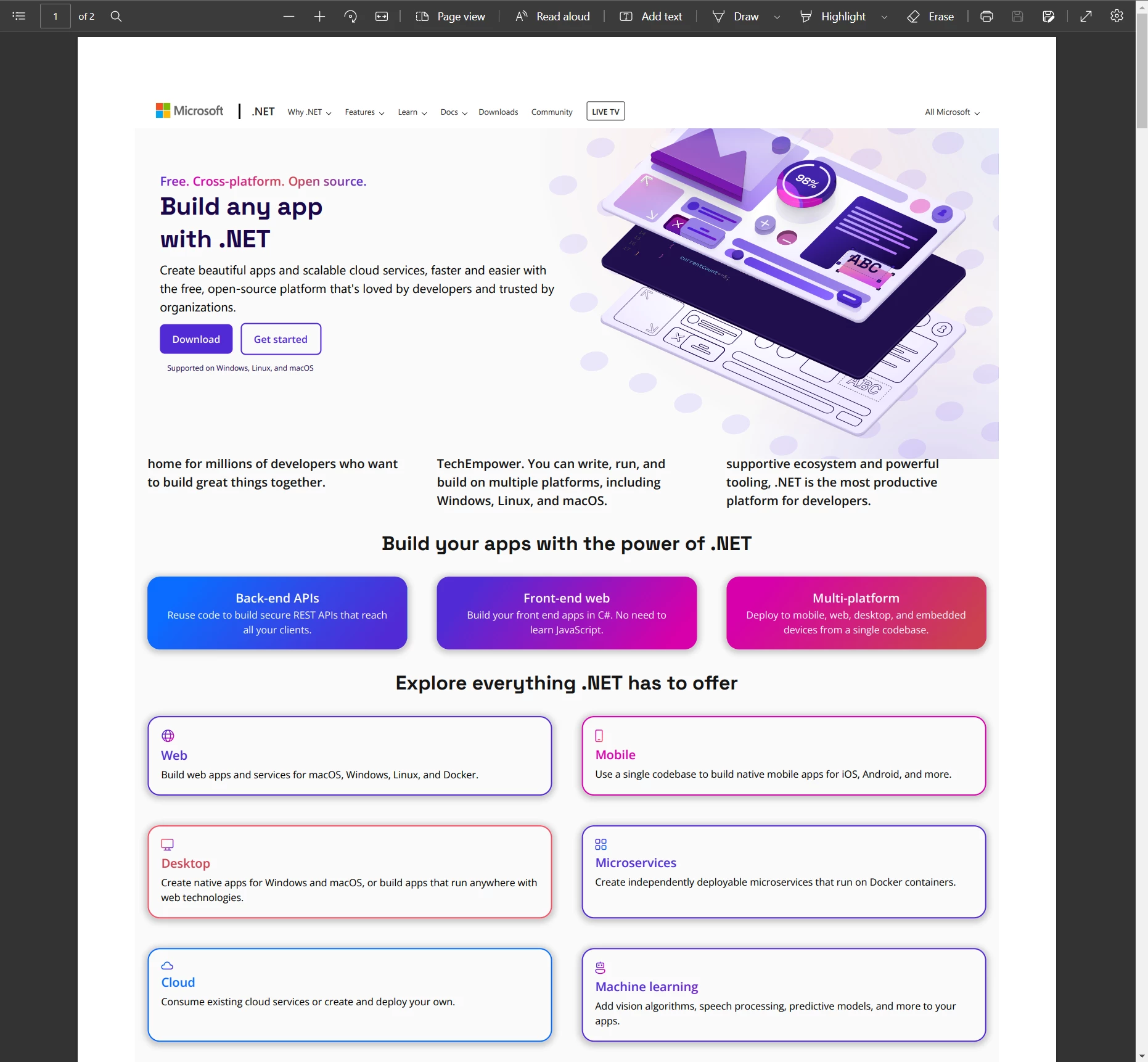
Consider the following demonstration to see just how easy it is to use IronPDF. Suppose you have a URL path that you need to convert to a PDF; the conversion process with IronPDF is straightforward. The class library abstracts all the details of using the underlying IronPDF library. Just add a reference to the IronPDF library or install it using the NuGet Package Manager and call the RenderUrlAsPdf method, passing in the URL path and the path where you want the PDF file to be saved using the SaveAs function. You can easily convert any URL to a PDF doc in just two lines of code.

// Create a ChromePdfRenderer instance and store it in a variable.
var renderer = new ChromePdfRenderer();

// Render the URL as a PDF.
var page = renderer.RenderUrlAsPdf("https://dotnet.microsoft.com/");

// Save the rendered PDF to the specified file path.
page.SaveAs("website.pdf");
// Create a ChromePdfRenderer instance and store it in a variable.
var renderer = new ChromePdfRenderer();

// Render the URL as a PDF.
var page = renderer.RenderUrlAsPdf("https://dotnet.microsoft.com/");

// Save the rendered PDF to the specified file path.
page.SaveAs("website.pdf");
$vbLabelText   $csharpLabel

PDFium in C# Alternatives Using IronPDF, Figure 1: IronPDF Output IronPDF Output

Conclusion

Building on top of the PDFium project has provided customers/developers with a reliable, up-to-date, and feature-rich PDF library. Our customers can be sure that their documents will look great, no matter what device or platform they are being viewed on. They can also take advantage of the powerful features that IronPDF code offers, making it easy for them to create, write, and share PDFs quickly and securely.

IronPDF offers a free trial period, so you can test out the software before making a purchase. Pricing starts at just $799, very affordable compared to other similar PDF rendering software. If you need to purchase multiple licenses, the company offers significant discounts. You can buy five product licenses for the price of just two by purchasing the Iron Suite.

자주 묻는 질문

PDFium이란 무엇이며 .NET 애플리케이션에서 어떻게 사용되나요?

PDFium은 PDF 파일 작업을 위해 Google에서 개발한 오픈 소스 렌더링 엔진입니다. .NET 애플리케이션에서는 향상된 PDF 관리 기능을 제공하기 위해 기능을 확장하는 IronPDF와 같은 라이브러리의 기반 역할을 합니다.

.NET 애플리케이션에서 HTML을 PDF로 변환하려면 어떻게 해야 하나요?

IronPDF는 HTML 문자열을 PDF 문서로 변환하는 RenderHtmlAsPdf와 같은 메서드를 제공합니다. 이는 .NET 애플리케이션에서 HTML을 PDF로 변환하는 통합 프로세스를 간소화합니다.

IronPDF는 PDFium에 비해 어떤 추가 기능을 제공하나요?

IronPDF는 추가 구성 없이도 HTML을 PDF로 변환, PDF 분할 및 병합, 텍스트 추출, 서명 또는 워터마크 추가 등의 기능을 제공하여 PDFium의 기능을 확장합니다.

IronPDF를 사용하여 PDF 문서를 암호화할 수 있나요?

예, IronPDF는 PDF 문서의 암호화 및 암호 해독을 지원하며 인쇄 및 복사와 같은 사용자 권한을 제어할 수 있는 옵션을 제공합니다.

IronPDF는 복잡한 PDF 문서 작성 과정을 어떻게 간소화하나요?

IronPDF는 개발자가 사용자 정의 머리글, 바닥글, 북마크, 페이지 번호와 같은 기능을 사용하여 복잡한 PDF를 쉽게 만들 수 있는 사용자 친화적인 API를 제공하여 .NET 애플리케이션의 생산성을 향상시킵니다.

.NET 애플리케이션에서 IronPDF를 사용하려면 추가 설정이 필요하나요?

아니요, IronPDF는 핵심 API에 필요한 모든 구성 요소를 내장하고 있으므로 표준 PDFium과 달리 추가 구성이나 외부 종속성이 필요하지 않습니다.

IronPDF는 사용자 지정 용지 크기를 지원하나요?

예, IronPDF는 사용자 지정 용지 크기를 지원하므로 개발자가 필요에 따라 PDF 문서의 크기를 지정할 수 있습니다.

개발자가 구매하기 전에 IronPDF를 테스트할 수 있는 옵션에는 어떤 것이 있나요?

IronPDF는 무료 평가판 기간을 제공하여 개발자가 구매하기 전에 .NET 애플리케이션과의 기능 및 통합을 테스트할 수 있습니다.

IronPDF는 URL을 PDF 문서로 변환하는 데 어떤 도움을 주나요?

ChromePdfRenderer 클래스에 있는 IronPDF의 RenderUrlAsPdf 메서드를 사용하면 개발자가 URL의 웹 페이지를 PDF 문서로 직접 변환하여 웹 콘텐츠 보관을 간소화할 수 있습니다.

IronPDF는 어떤 종류의 고객 지원을 제공하나요?

IronPDF는 개발자가 라이브러리의 광범위한 기능을 효과적으로 활용할 수 있도록 포괄적인 문서와 함께 우수한 고객 지원을 제공합니다.

IronPDF는 .NET 10과 완벽하게 호환되며, .NET 10을 타겟팅하면 어떤 이점이 있나요?

예 - IronPDF는 .NET 10과 완벽하게 호환되며 최신 런타임 및 C# 언어 기능을 지원합니다. .NET 10을 타겟팅하면 성능 향상(예: 힙 할당 감소, 배열 인터페이스 방식 가상화), 메모리 사용량 개선, 플랫폼 전반의 향상, Windows, macOS, Linux 및 컨테이너/클라우드 배포 지원 등의 이점을 누릴 수 있습니다. 따라서 PDF 생성 및 조작이 더 빠르고 효율적이며 미래 지향적으로 이루어집니다.

커티스 차우
기술 문서 작성자

커티스 차우는 칼턴 대학교에서 컴퓨터 과학 학사 학위를 취득했으며, Node.js, TypeScript, JavaScript, React를 전문으로 하는 프론트엔드 개발자입니다. 직관적이고 미적으로 뛰어난 사용자 인터페이스를 만드는 데 열정을 가진 그는 최신 프레임워크를 활용하고, 잘 구성되고 시각적으로 매력적인 매뉴얼을 제작하는 것을 즐깁니다.


커티스는 개발 분야 외에도 사물 인터넷(IoT)에 깊은 관심을 가지고 있으며, 하드웨어와 소프트웨어를 통합하는 혁신적인 방법을 연구합니다. 여가 시간에는 게임을 즐기거나 디스코드 봇을 만들면서 기술에 대한 애정과 창의성을 결합합니다.








