푸터 콘텐츠로 바로가기
NODE.JS용 IRONPDF 사용

Node.js의 URL에서 PDF 파일을 다운로드하는 방법

This article will explore the process of downloading PDF documents from URLs using the PDF library known as IronPDF, tailored specifically for Node.js. This library provides a robust solution for handling PDF-related server-side tasks in Node.js applications, streamlining the retrieval and manipulation of PDF documents from remote sources.

IronPDF for Node.js

IronPDF for Node.js is a versatile and powerful PDF library designed to facilitate seamless PDF generation, manipulation, and management within Node.js applications. It offers developers a comprehensive set of features and functionalities to work with PDF documents, making it an indispensable tool for a wide array of web development projects.

Developed specifically for integration with Node.js, IronPDF empowers developers to effortlessly generate PDF files from various data sources, such as HTML, CSS, and images. This allows for dynamic content creation, making it ideal for generating invoices, reports, certificates, or any other documents that require a professional and standardized format.

One of the standout features of IronPDF is its ability to convert HTML content directly to PDF, enabling developers to take advantage of their existing web development skills and libraries. This means you can leverage your proficiency in HTML and CSS to craft visually appealing PDFs without the need for complex manual formatting. Additionally, IronPDF provides functionalities to merge, split, and manipulate existing PDF files, allowing for advanced document organization and customization. It also supports encryption and password protection, enhancing the security of sensitive information within PDFs.

IronPDF Features

  • PDF Generation: Create PDFs effortlessly using HTML, CSS, and images. Tailor content for professional-grade PDFs.
  • HTML to PDF: Convert complex HTML into polished PDFs while maintaining formatting and styling.
  • PDF Editing: Modify and edit existing PDFs to update, correct, or add elements as needed.
  • Merging and Splitting: Combine or separate PDF files for efficient organization and structuring.
  • Printing: Print PDFs directly from Node.js for convenient physical copies.
  • Form Handling: Efficiently fill and extract data from PDF forms to enhance user interaction.
  • Security: Implement encryption and password protection for PDF document security.
  • Text Extraction: Extract text from PDFs for easy content access and data retrieval.
  • Customization: Control PDF layout and styles to achieve a professional and polished look.
  • Cross-Platform: Seamlessly operate on various platforms for consistent performance and functionality.

Installing IronPDF for Node.js

This section will discuss how you can set up the environment and install IronPDF for Node.js.

Before starting, make sure you have Node.js installed on your system.

  1. First, open the Command Prompt (CMD) and create a new Node.js project using the following commands.
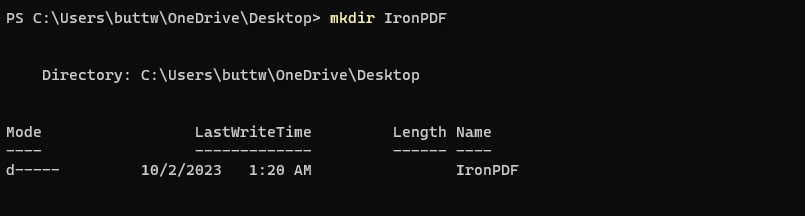
  2. mkdir IronPDF This will create a new directory to set up this demo project.

    How to Download PDF Files From URL in Node.js, Figure 1: Create a new folder for the demo project Create a new folder for the demo project

  3. cd IronPDF This command will navigate to the newly created directory.

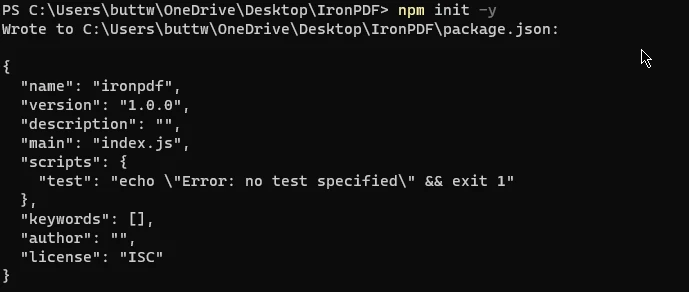
  4. npm init -y This command will create a package.json file, which will store project-related metadata and dependencies.

    How to Download PDF Files From URL in Node.js, Figure 2: Init a Node.js project Init a Node.js project

  5. Once the initial setup is completed, let's install IronPDF using the following command.

    npm install @ironsoftware/ironpdf
    npm install @ironsoftware/ironpdf
    SHELL
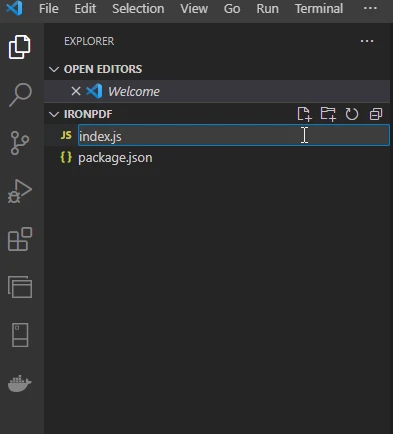
  6. Now open the project in Visual Studio Code and create a new file named "index.js".

    How to Download PDF Files From URL in Node.js, Figure 3: Create an index.js file to start the project Create an index.js file to start the project

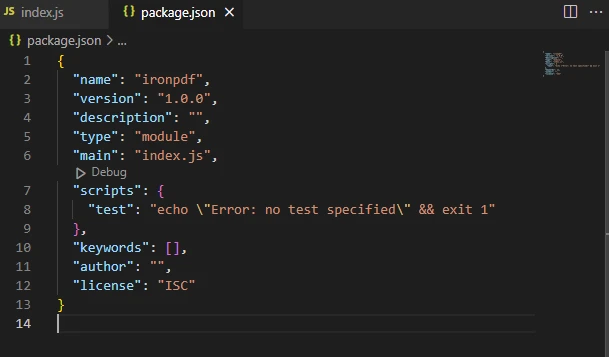
  7. Now open the package.json file and add the following line to specify the module type.

    "type": "module",

    How to Download PDF Files From URL in Node.js, Figure 4: Screenshot of package.json file Screenshot of package.json file

Just like that, IronPDF is installed, and the environment is ready for running the IronPDF code.

Download PDF Files from URL Using IronPDF for Node.js

IronPDF for Node.js provides a powerful feature allowing the rendering of PDFs directly from URLs and subsequently saving them in the local file system. Essentially, it operates as a comprehensive PDF downloader, offering the capabilities of a full-version PDF downloader.

The following code can create and save PDF files from a URL using IronPDF for Node.js.

import { PdfDocument } from "@ironsoftware/ironpdf";

// Asynchronously render and save a PDF from a URL
(async () => {
  try {
    // Define the URL of the web page to be rendered as a PDF
    const url = "https://ironpdf.com/";

    // Render the web URL to a PDF document
    const pdf = await PdfDocument.fromUrl(url);

    // Save the PDF document to a file
    await pdf.saveAs("pdf-from-url.pdf");

    console.log("PDF successfully downloaded and saved as 'pdf-from-url.pdf'");
  } catch (error) {
    console.error("An error occurred while downloading the PDF:", error);
  }
})();
import { PdfDocument } from "@ironsoftware/ironpdf";

// Asynchronously render and save a PDF from a URL
(async () => {
  try {
    // Define the URL of the web page to be rendered as a PDF
    const url = "https://ironpdf.com/";

    // Render the web URL to a PDF document
    const pdf = await PdfDocument.fromUrl(url);

    // Save the PDF document to a file
    await pdf.saveAs("pdf-from-url.pdf");

    console.log("PDF successfully downloaded and saved as 'pdf-from-url.pdf'");
  } catch (error) {
    console.error("An error occurred while downloading the PDF:", error);
  }
})();
JAVASCRIPT

The provided code is a JavaScript program that utilizes the IronPDF for Node.js library to generate a PDF from a specified URL and save it as a PDF file. Let's break down the code step-by-step:

  1. Importing the PdfDocument class from IronPDF:

    import { PdfDocument } from "@ironsoftware/ironpdf";
    import { PdfDocument } from "@ironsoftware/ironpdf";
    JAVASCRIPT

    This line imports the PdfDocument class from the IronPDF library, which is used to work with PDF documents.

  2. Using an asynchronous IIFE (Immediately Invoked Function Expression):

    (async () => { /* Code here */ })();
    (async () => { /* Code here */ })();
    JAVASCRIPT

    This structure defines an immediately invoked function expression that is marked as async, allowing the use of await within the function. It invokes itself immediately after declaration.

  3. Rendering a web URL to PDF:

    const pdf = await PdfDocument.fromUrl("https://ironpdf.com/");
    const pdf = await PdfDocument.fromUrl("https://ironpdf.com/");
    JAVASCRIPT

    This line uses the fromUrl static method of the PdfDocument class to render a web page URL (in this case, "https://ironpdf.com/") as a PDF document.

  4. Exporting the PDF document:

    await pdf.saveAs("pdf-from-url.pdf");
    await pdf.saveAs("pdf-from-url.pdf");
    JAVASCRIPT

    This line uses the saveAs method of the PDF document to save the generated PDF to a file named "pdf-from-url.pdf". The await keyword is used to wait for the save operation to complete.

Overall, this script uses IronPDF to fetch a web URL, render it as a PDF document, and save the downloaded PDF file as a local file with the specified filename "pdf-from-url.pdf". The use of async/await allows for handling the asynchronous nature of PDF generation and file saving.

Output PDF file

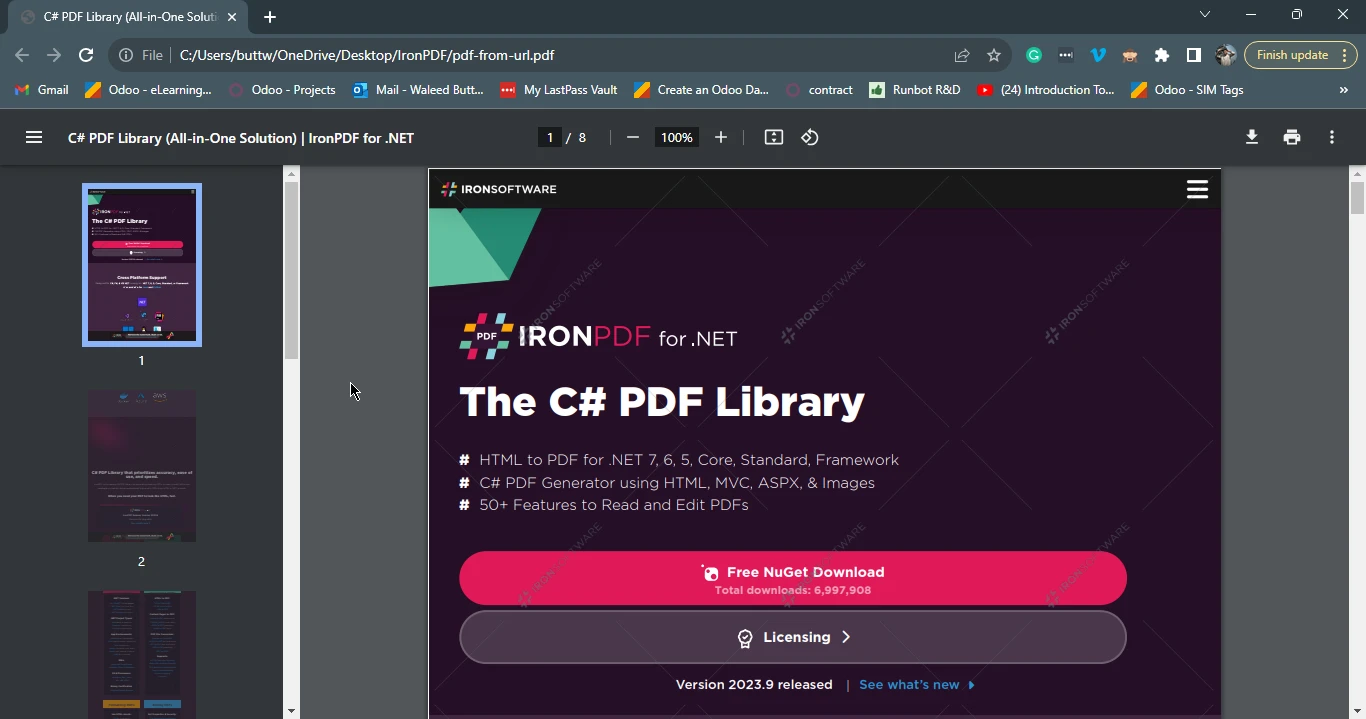
How to Download PDF Files From URL in Node.js, Figure 5: The Output PDF File The Output PDF File

Conclusion

Node.js, with its robust runtime environment for server-side JavaScript, proves to be an ideal choice for a variety of web development tasks. Specifically, the need to download PDF files from designated URLs is a common requirement, and Node.js, when combined with specialized libraries like IronPDF, offers a seamless solution. IronPDF for Node.js empowers developers to effortlessly generate, manipulate, and manage PDF documents, enhancing the integration of critical resources for efficient access in various applications and processes.

By leveraging the features of IronPDF, such as HTML to PDF conversion, PDF editing, merging, splitting, and more, developers can optimize document handling and streamline their web development projects. This functionality enriches Web Applications by facilitating dynamic content creation and ensuring a professional and standardized format for essential documents. Ultimately, IronPDF's integration with Node.js significantly contributes to a smoother and more efficient PDF file handling experience for developers and to download files.

You can install IronPDF for Node.js and find the related code tutorials using the following npm webpage.

IronPDF offers a free trial license here. For more information regarding purchasing a commercial license, please visit their license information page.

자주 묻는 질문

Node.js를 사용하여 URL에서 PDF를 다운로드하려면 어떻게 해야 하나요?

Node.js의 IronPDF를 사용하여 URL에서 PDF를 다운로드하려면 PdfDocument.fromUrl 메서드를 사용하여 웹 페이지를 가져와 PDF 문서로 변환한 다음 saveAs 메서드를 사용하여 로컬에 저장할 수 있습니다.

Node.js에서 PDF를 다운로드하기 위해 IronPDF를 사용하기 위한 전제 조건은 무엇인가요?

IronPDF를 사용하여 Node.js에서 PDF를 다운로드하기 전에 Node.js 프로젝트가 설정되어 있고 npm을 통해 npm install @ironsoftware/ironpdf 명령으로 IronPDF 라이브러리가 설치되어 있는지 확인하세요.

IronPDF는 Node.js 애플리케이션에서 PDF 조작을 처리할 수 있나요?

예, IronPDF는 PDF 파일에서 병합, 분할, 암호화, 텍스트 추출은 물론 양식 처리 및 보안 기능 적용 등 Node.js 애플리케이션에서 다양한 PDF 조작을 처리할 수 있습니다.

IronPDF를 사용하여 웹 페이지를 PDF로 변환할 수 있나요?

예, IronPDF를 사용하면 지정된 URL을 PDF 형식의 문서로 렌더링하는 PdfDocument.fromUrl 메서드를 사용하여 웹 페이지를 PDF로 변환할 수 있습니다.

IronPDF는 PDF 기능으로 웹 애플리케이션을 어떻게 향상시키나요?

IronPDF는 개발자가 PDF 문서를 동적으로 생성하고 관리할 수 있도록 하여 웹 애플리케이션을 향상시키고, HTML에서 PDF 생성, 양식 처리, 보안 조치 추가 등의 기능을 지원하여 문서 처리 및 표준화를 개선합니다.

Node.js의 IronPDF에 대한 평가판이 있나요?

예, IronPDF는 npm을 통해 설치할 수 있는 Node.js용 무료 평가판을 제공합니다. 라이선스에 대한 자세한 내용은 공식 웹사이트에서 확인할 수 있습니다.

IronPDF를 사용하여 URL에서 PDF를 저장하는 기본 예제는 무엇인가요?

기본적인 예는 IronPDF를 가져오고, PdfDocument.fromUrl를 사용하여 URL을 PDF로 변환한 다음, saveAs를 사용하여 PDF를 로컬에 저장하는 것입니다. 이 과정을 통해 웹 URL에서 PDF 문서를 효율적으로 다운로드하고 저장할 수 있습니다.

커티스 차우
기술 문서 작성자

커티스 차우는 칼턴 대학교에서 컴퓨터 과학 학사 학위를 취득했으며, Node.js, TypeScript, JavaScript, React를 전문으로 하는 프론트엔드 개발자입니다. 직관적이고 미적으로 뛰어난 사용자 인터페이스를 만드는 데 열정을 가진 그는 최신 프레임워크를 활용하고, 잘 구성되고 시각적으로 매력적인 매뉴얼을 제작하는 것을 즐깁니다.

커티스는 개발 분야 외에도 사물 인터넷(IoT)에 깊은 관심을 가지고 있으며, 하드웨어와 소프트웨어를 통합하는 혁신적인 방법을 연구합니다. 여가 시간에는 게임을 즐기거나 디스코드 봇을 만들면서 기술에 대한 애정과 창의성을 결합합니다.