Node.js에서 PDF 파일을 읽는 방법
In the ever-evolving world of web development, Node.js has emerged as a powerful platform that allows developers to build scalable and efficient applications. One fascinating aspect of Node.js is its ability to work seamlessly with various libraries and modules, expanding its functionalities. In this article, we will delve into the realm of Node.js PDF reader capabilities, exploring the IronPDF library and how it can be leveraged for handling PDF files.
What is Node.js PDF Reader?
Node.js PDF Reader is a specialized tool designed to facilitate the reading and manipulation of PDF (Portable Document Format) files within the Node.js environment. PDF files are widely used for document sharing due to their consistent formatting across different platforms. Incorporating PDF reading capabilities into Node.js applications opens up a plethora of possibilities, from extracting information to generating dynamic reports.
How to Read PDF Using Node.js PDF Reader?
- Install the Node.js PDF Reader Library.
- Import the required dependencies.
- Open the PDF file using the
PdfDocument.openmethod. - Extract the text from the PDF file using the
extractTextmethod. - Display the extracted text on the console using the
console.logmethod.
2. Introduction to IronPDF for Node.js
IronPDF is a comprehensive library for working with PDF files in the Node.js ecosystem. It provides a range of functionalities, making it a go-to choice for developers who need to interact with PDF documents programmatically. Developed by the Iron Software team, IronPDF stands out for its simplicity and ease of integration into Node.js projects.
2.1. Key Features of IronPDF
- PDF Generation: IronPDF allows developers to create PDF documents from scratch, providing full control over the content, formatting, and layout.
- PDF Parsing: The library enables the extraction of text, images, and other elements from existing PDF files, empowering developers to work with the data stored within these documents.
- PDF Modification: IronPDF supports the modification of existing PDF files, making it possible to add, remove, or update content dynamically.
- PDF Rendering: With IronPDF, developers can render PDF files in various formats, including from images or from HTML, expanding the possibilities for displaying PDF content within web applications.
- Cross-Platform Compatibility: IronPDF is designed to work seamlessly across different operating systems, ensuring consistent behavior regardless of the deployment environment.
2.2. Installing IronPDF
Before diving into the functionalities of IronPDF, it's essential to install the library in your Node.js project. The installation process is straightforward and can be accomplished using the NPM package manager. Open your terminal and run the following command:
npm install @ironsoftware/ironpdfnpm install @ironsoftware/ironpdfThis command installs the IronPDF library and makes it available for use in your Node.js application.
To install the IronPDF engine that is a must for using the IronPDF Library, run the following command in the console:
npm install @ironsoftware/ironpdf-engine-windows-x64npm install @ironsoftware/ironpdf-engine-windows-x643. Reading PDF Files with Node.js and IronPDF
Reading PDF files with Node.js and IronPDF involves a series of straightforward steps, and the provided code example illustrates a concise yet powerful approach to achieve this. The code utilizes the PdfDocument class from the @ironsoftware/ironpdf package to open and extract text from a PDF file. Let's break down the code step by step:
Importing
PdfDocument:import { PdfDocument } from "@ironsoftware/ironpdf";import { PdfDocument } from "@ironsoftware/ironpdf";JAVASCRIPTThe code begins by importing the
PdfDocumentclass from the IronPDF library. This class provides methods for working with PDF documents, such as opening, extracting text, and performing various manipulations.Opening a PDF File:
const pdf = await PdfDocument.open("output.pdf");const pdf = await PdfDocument.open("output.pdf");JAVASCRIPTThe
PdfDocument.openmethod is used to open a PDF file. In this example, the file "output.pdf" is specified. Theawaitkeyword is used because theopenmethod returns a promise. This ensures that the code waits for the PDF to be fully loaded before proceeding to the next steps.Extracting Text from the PDF:
const text = await pdf.extractText();const text = await pdf.extractText();JAVASCRIPTOnce the PDF is opened, the
extractTextmethod is called on thepdfobject. This method asynchronously extracts the text content from the PDF document. The result is stored in thetextvariable.Logging the Extracted Text:
console.log(text);console.log(text);JAVASCRIPTFinally, the extracted text is logged to the console using
console.log. This step is crucial for developers to verify that the text extraction process is successful and to inspect the content extracted from the sample PDF.asyncFunction Wrapper:(async () => { // Code goes here })();(async () => { // Code goes here })();JAVASCRIPTThe entire code is wrapped in an asynchronous function using an immediately-invoked function expression (IIFE) with the
asynckeyword. This allows the use ofawaitinside the function, enabling asynchronous operations such as loading the PDF and extracting text.
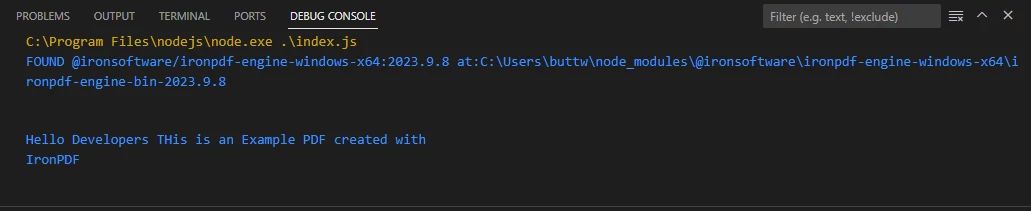
In summary, this code showcases a concise yet effective method for reading PDF files using Node.js and IronPDF. By leveraging the capabilities of the IronPDF library, developers can easily open PDF documents, extract text content, and integrate these functionalities into their Node.js applications.
Extracted text from a sample PDF file
3.1. Reading Password-Protected PDF Files
Reading password-protected PDF files requires addressing the added layer of security that protects the document's content. In such cases, it is crucial to use PDF reading libraries, like IronPDF, that support password authentication.
The process involves providing the correct password during the file opening phase, enabling the decryption of the content within the PDF. This ensures that only authorized users can access and extract information from password-protected PDF files, enhancing the security of sensitive data contained in these documents.
const pdf = await PdfDocument.open("encrypted.pdf", "password");const pdf = await PdfDocument.open("encrypted.pdf", "password");Using the above code, users can read password-protected PDF file content.
3.2. Reading PDF File Metadata
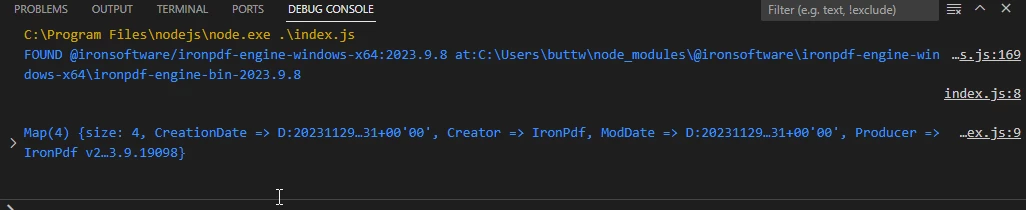
IronPDF for Node.js offers the ability to read PDF file metadata. The code below will demonstrate how to read metadata from a PDF file.
import { PdfDocument } from "@ironsoftware/ironpdf";
(async () => {
// Step 1. Import a PDF
const pdf = await PdfDocument.open("output.pdf");
const metadata = await pdf.getMetadata();
console.log("\n");
console.log(metadata);
})();import { PdfDocument } from "@ironsoftware/ironpdf";
(async () => {
// Step 1. Import a PDF
const pdf = await PdfDocument.open("output.pdf");
const metadata = await pdf.getMetadata();
console.log("\n");
console.log(metadata);
})();Output
Extracted metadata from a sample PDF file
4. Conclusion
In conclusion, Node.js PDF Reader, particularly when utilizing the IronPDF library, opens up a world of possibilities for developers working with PDF files. Whether it's extracting text, images, or dynamically modifying existing documents, IronPDF provides a versatile set of tools for handling PDFs in a Node.js environment. It also supports tabular data and the PDF reader module extracts text entries.
To get started with Node.js PDF Reader and IronPDF, follow the steps outlined in this article. Explore the documentation for more in-depth information and advanced use cases. With the right tools and knowledge, you can enhance your Node.js applications by seamlessly integrating PDF reading capabilities.
Why use IronPDF for Node.js?
- Free Trial: IronPDF for Node.js offers a free trial of IronPDF for Node.js, allowing developers to explore its capabilities before committing. This trial period enables users to evaluate the library's suitability for their specific PDF-related tasks without financial commitment.
- Feature-Rich: IronPDF for Node.js is feature-rich, providing a comprehensive set of functionalities for working with PDF files in Node.js. From PDF generation to text extraction and document modification, the library offers a robust toolkit, making it versatile for a wide range of applications.
- Code Examples and Documentation/Support: IronPDF provides extensive documentation and support, making it easy for developers to integrate and utilize its features. The library comes with detailed Node.js PDF conversion examples, facilitating a smooth learning curve and ensuring that developers have the resources they need for successful implementation.
자주 묻는 질문
Node.js에서 PDF 파일을 읽으려면 어떻게 해야 하나요?
Node.js에서 PDF 파일을 읽으려면 npm을 통해 IronPDF를 설치하여 사용할 수 있습니다. 필요한 종속성을 가져오고 PdfDocument.open 메서드를 활용하여 PDF를 로드합니다. extractText 메서드를 사용하여 텍스트 콘텐츠를 추출하고 결과를 콘솔에 출력합니다.
Node.js에서 PDF 라이브러리를 사용하면 어떤 이점이 있나요?
Node.js에서 IronPDF와 같은 PDF 라이브러리를 사용하면 PDF 생성, 구문 분석 및 수정과 같은 이점을 얻을 수 있습니다. 또한 플랫폼 간 호환성 및 원활한 통합을 비롯한 강력한 PDF 처리 기능을 제공하여 Node.js 애플리케이션을 향상시킵니다.
Node.js 프로젝트에 IronPDF를 설치하려면 어떻게 하나요?
Node.js 프로젝트에 IronPDF를 설치하려면 npm 명령을 사용하세요: npm install @ironsoftware/ironpdf. 또한, 전체 기능을 사용하려면 npm install @ironsoftware/ironpdf-engine-windows-x64로 IronPDF 엔진을 설치하세요.
비밀번호로 보호된 PDF를 Node.js에서 읽을 수 있나요?
예, IronPDF를 사용하면 Node.js에서 비밀번호로 보호된 PDF를 읽을 수 있습니다. PDF를 여는 과정에서 올바른 비밀번호를 입력하면 암호를 해독하고 콘텐츠에 액세스할 수 있습니다.
Node.js를 사용하여 PDF에서 메타데이터를 추출하려면 어떻게 해야 하나요?
Node.js에서 IronPDF를 사용하면 PdfDocument.open로 문서를 열고 getMetadata 메서드를 사용하여 메타데이터 세부 정보를 검색하여 PDF에서 메타데이터를 추출할 수 있습니다.
IronPDF가 Node.js PDF 조작을 위한 인기 있는 선택인 이유는 무엇인가요?
IronPDF는 풍부한 기능, 광범위한 문서 및 지원으로 인해 Node.js 개발자들 사이에서 인기가 높습니다. 무료 평가판을 제공하여 다양한 애플리케이션에 테스트하고 통합할 수 있습니다.
IronPDF는 Node.js 프로젝트에서 플랫폼 간 호환성을 어떻게 보장하나요?
IronPDF는 다양한 운영 체제에서 일관된 성능을 유지하도록 설계되어 배포 플랫폼에 관계없이 Node.js 프로젝트가 안정적으로 작동하도록 보장합니다.
Node.js에서 IronPDF 사용에 대한 더 많은 리소스는 어디에서 찾을 수 있나요?
Node.js에서 IronPDF를 사용하는 더 많은 리소스와 예제를 보려면 공식 Iron Software 웹사이트를 방문하세요. 해당 문서와 튜토리얼에서 PDF 조작에 대한 포괄적인 지침을 확인하세요.