Pliki PDF (Portable Document Format) są integralną częścią wielu różnych środowisk pracy, i często są niezbędne w przypadku takich zadań jak wystawianie faktur czy przygotowywanie dokumentacji produktu. Jednakże, obecnie na rynku dostępnych jest wiele różnych narzędzi PDF, więc jak wiesz, które z nich jest odpowiednie dla Ciebie? Dzisiaj porównamy funkcje, wsparcie i modele licencjonowania bibliotek PDF: PDFreactor i IronPDF.
Przegląd IronPDF i PDFreactor
IronPDF to solidna biblioteka .NET, która jest zaprojektowana jako kompleksowe rozwiązanie do wszystkich zadań związanych z PDF w ekosystemie .NET. Obsługuje HTML, CSS, JavaScript oraz różne formaty obrazów, co czyni go wysoce dostosowanym do aplikacji opartych na webowych. Z szerokim zakresem funkcji, w tym generowaniem, edycją, podpisywaniem i szyfrowaniem PDF, oraz pełną integracją z nowoczesnymi frameworkami .NET, IronPDF jest kompletnym rozwiązaniem PDF dla programistów .NET.
PDFreactor, z kolei, jest profesjonalnym konwerterem HTML do PDF, który wyróżnia się w dostarczaniu wysokiej jakości gotowych do druku PDF-ów, często używanym do konwersji dokumentów takich jak dokumenty z danymi, raporty czy arkusze danych. Jest szczególnie silny w obsłudze złożonych CSS i JavaScript, zapewniając, że otrzymane PDF-y są wierne oryginalnym treściom webowym. Jest wysoko oceniany za zdolność do obsługi złożonych układów i stylizacji z łatwością, co czyni go odpowiednim do publikacji i innych branż wymagających precyzyjnej kontroli nad wyjściem PDF.
IronPDF:
IronPDF obsługuje szeroką gamę platform, gwarantując, że możesz pracować w preferowanym środowisku. Oto rozbicie jego kompatybilności:
-
Wersje .NET:
- C#, VB.NET, F#
- .NET Core (8, 7, 6, 5 i 3.1+)
-
.NET Standard (2.0+)
-
.NET Framework (4.6.2+)
-
Środowiska aplikacji: IronPDF działa w środowiskach w tym Windows, Linux, macOS, Docker, Azure i AWS
-
IDE: Działa z IDE, takimi jak Microsoft Visual Studio i JetBrains Rider & ReSharper
-
OS i Procesory: Wspiera kilka różnych systemów operacyjnych i procesorów, w tym Windows, Mac, Linux, x64, x86, ARM
Więcej informacji znajdziesz na stronie Zgodność IronPDF.
PDFreactor
-
Wersje .NET:
- .NET Core 2.1+
- .NET Framework 4.5+
-
Obsługiwane: HTML5, CSS3, JavaScript, Java, Python, Obraz Docker, Node.js i inne.
-
Systemy operacyjne: Działa w systemach operacyjnych Windows, Linux i macOS, a także w systemach opartych na chmurze, takich jak AWS i Azure.
Porównanie kluczowych funkcji: Funkcjonalność PDF w IronPDF vs. PDFreactor
Funkcje IronPDF
-
Konwersja HTML do PDF: IronPDF obsługuje konwersję HTML do PDF, z pełnym wsparciem dla nowoczesnych standardów webowych, możesz być pewien, że IronPDF konsekwentnie zwróci idealne pikselem PDF-y z treści HTML.
-
Konwersja plików PDF: Potrzebujesz konwertować formaty plików inne niż HTML do PDF? IronPDF obsługuje konwersję wielu różnych formatów plików, w tym; DOCX do PDF, RTF do PDF, obraz do PDF, URL do PDF, a nawet PDF do HTML, wszystko z zachowaniem pożądanej struktury dokumentu.
-
Funkcje bezpieczeństwa: Dzięki IronPDF zawsze masz pewność, że wszelkie poufne pliki PDF są bezpieczne dzięki jego funkcjom bezpieczeństwa. Użyj IronPDF do szyfrowania plików PDF, ustawiania haseł i uprawnień dla plików PDF.
-
Funkcje edytowania PDF: Dzięki IronPDF możesz łatwo edytować pliki PDF. IronPDF oferuje funkcje edycji takie jak dodawanie nagłówków i stópek, stemple tekstowe i obrazówe na stronach PDF, dodawanie niestandardowych znaków wodnych do PDF, praca z formularzami PDF i scałanie plików PDF.
Aby uzyskać szczegółowe informacje o funkcjach oferowanych przez IronPDF, odwiedź Funkcje IronPDF.
Funkcje PDFreactor
-
Konwersja HTML na PDF: Usługa internetowa PDFreactor specjalizuje się w serwerowej konwersji HTML na PDF, zazwyczaj wykorzystywanej do konwersji dynamicznych dokumentów zasilanych danymi (takich jak faktury, formularze, raporty, itp.) oraz do elektronicznej dystrybucji złożonych i wysokiej jakości plików PDF.
-
Wsparcie interaktywne: Dzięki wsparciu JavaScript, PDFreactor obsługuje osadzanie interaktywnych elementów, takich jak przyciski i formularze, które mogą zachować swoją funkcjonalność w PDF.
-
Zaawansowany projekt układu: PDFreactor oferuje zaawansowane funkcje układu i projektowania, takie jak kontrola nad układem strony, obsługa wielu kolumn, dodawanie elementów do PDF, skalowanie i transformacja elementów, dodawanie nagłówków i stopek oraz niestandardowe rozmiary i orientacje stron.
Zgodność z Bootstrapem i nowoczesnymi frameworkami CSS
Podczas generowania plików PDF z nowoczesnych aplikacji internetowych, wsparcie dla Bootstrap i CSS jest kluczowe. Możliwość konwersji stron internetowych stylizowanych za pomocą Bootstrap bez modyfikacji kodu zapewnia spójność projektu i znacząco zmniejsza czas rozwoju.
IronPDF: Pełne wsparcie dla Bootstrap i CSS Framework
- Bootstrap 5: Kompletny silnik układu flexbox, CSS Grid, klasy użytkowe i wszystkie systemy komponentów
- Bootstrap 4: Pełne komponenty kart, elementy nawigacyjne, narzędzia flex i punkty przerwania responsywności
- Tailwind CSS: Wszystkie klasy użytkowe renderują się z dokładnością przeglądarki
- Foundation: Kompletny system siatki i wsparcie dla biblioteki komponentów
- Nowoczesny CSS3: Flexbox, CSS Grid, zmienne zwyczajowe, animacje, przejścia i transformacje
Weryfikacja rzeczywista: IronPDF z powodzeniem renderuje stronę główną Bootstrap i wszystkie oficjalne przykłady z doskonałą dokładnością pikselową.
Przykład kodu: Panel śledzenia zamówień
using IronPdf;

// Set your IronPDF license key
IronPdf.License.LicenseKey = "License-Key goes here";

var renderer = new ChromePdfRenderer();
string bootstrapTracking = @"
<!DOCTYPE html>
<html>
<head>
    <link href='https://cdn.jsdelivr.net/npm/bootstrap@5.3.0/dist/css/bootstrap.min.css' rel='stylesheet'>
</head>
<body>
    <div class='container my-5'>
        <h1 class='mb-4'>Order Tracking - #ORD-2025-0428</h1>

        <div class='row g-4 mb-4'>
            <div class='col-md-4'>
                <div class='card text-center bg-primary text-white h-100'>
                    <div class='card-body'>
                        <h3>Order Placed</h3>
                        <p class='mb-0'>April 20, 2025</p>
                    </div>
                </div>
            </div>
            <div class='col-md-4'>
                <div class='card text-center bg-info text-white h-100'>
                    <div class='card-body'>
                        <h3>Processing</h3>
                        <p class='mb-0'>April 21, 2025</p>
                    </div>
                </div>
            </div>
            <div class='col-md-4'>
                <div class='card text-center bg-light h-100'>
                    <div class='card-body'>
                        <h3 class='text-muted'>Delivered</h3>
                        <p class='mb-0 text-muted'>Est. April 25, 2025</p>
                    </div>
                </div>
            </div>
        </div>

        <div class='card shadow-sm mb-4'>
            <div class='card-header bg-white'>
                <h5 class='mb-0'>Shipping Timeline</h5>
            </div>
            <div class='card-body'>
                <ul class='list-group list-group-flush'>
                    <li class='list-group-item d-flex'>
                        <span class='badge bg-success me-3'>✓</span>
                        <div class='flex-grow-1'>
                            <strong>Order Confirmed</strong>
                            <p class='mb-0 text-muted'>April 20, 2025 at 2:30 PM</p>
                        </div>
                    </li>
                    <li class='list-group-item d-flex'>
                        <span class='badge bg-success me-3'>✓</span>
                        <div class='flex-grow-1'>
                            <strong>Payment Processed</strong>
                            <p class='mb-0 text-muted'>April 20, 2025 at 2:35 PM</p>
                        </div>
                    </li>
                    <li class='list-group-item d-flex'>
                        <span class='badge bg-success me-3'>✓</span>
                        <div class='flex-grow-1'>
                            <strong>Order Shipped</strong>
                            <p class='mb-0 text-muted'>April 21, 2025 at 9:00 AM</p>
                            <small class='text-muted'>Tracking: TRK-9876543210</small>
                        </div>
                    </li>
                    <li class='list-group-item d-flex'>
                        <span class='badge bg-primary me-3'>→</span>
                        <div class='flex-grow-1'>
                            <strong>In Transit</strong>
                            <p class='mb-0 text-primary'>Currently en route to delivery location</p>
                        </div>
                    </li>
                    <li class='list-group-item d-flex'>
                        <span class='badge bg-secondary me-3'>○</span>
                        <div class='flex-grow-1'>
                            <strong>Out for Delivery</strong>
                            <p class='mb-0 text-muted'>Pending</p>
                        </div>
                    </li>
                    <li class='list-group-item d-flex'>
                        <span class='badge bg-secondary me-3'>○</span>
                        <div class='flex-grow-1'>
                            <strong>Delivered</strong>
                            <p class='mb-0 text-muted'>Est. April 25, 2025</p>
                        </div>
                    </li>
                </ul>
            </div>
        </div>

        <div class='card shadow-sm'>
            <div class='card-header bg-primary text-white'>
                <h5 class='mb-0'>Order Details</h5>
            </div>
            <div class='card-body'>
                <div class='table-responsive'>
                    <table class='table mb-0'>
                        <thead class='table-light'>
                            <tr>
                                <th>Item</th>
                                <th>Quantity</th>
                                <th class='text-end'>Price</th>
                            </tr>
                        </thead>
                        <tbody>
                            <tr>
                                <td><strong>Premium Widget Pro</strong></td>
                                <td>2</td>
                                <td class='text-end'>$199.98</td>
                            </tr>
                            <tr>
                                <td><strong>Standard Gadget</strong></td>
                                <td>1</td>
                                <td class='text-end'>$49.99</td>
                            </tr>
                            <tr>
                                <td colspan='2'><strong>Subtotal</strong></td>
                                <td class='text-end'><strong>$249.97</strong></td>
                            </tr>
                            <tr>
                                <td colspan='2'>Shipping</td>
                                <td class='text-end'>$12.50</td>
                            </tr>
                            <tr class='table-primary'>
                                <td colspan='2'><strong>Total</strong></td>
                                <td class='text-end'><strong>$262.47</strong></td>
                            </tr>
                        </tbody>
                    </table>
                </div>
            </div>
        </div>
    </div>
</body>
</html>";

var pdf = renderer.RenderHtmlAsPdf(bootstrapTracking);
pdf.SaveAs("order-tracking.pdf");
using IronPdf;

// Set your IronPDF license key
IronPdf.License.LicenseKey = "License-Key goes here";

var renderer = new ChromePdfRenderer();
string bootstrapTracking = @"
<!DOCTYPE html>
<html>
<head>
    <link href='https://cdn.jsdelivr.net/npm/bootstrap@5.3.0/dist/css/bootstrap.min.css' rel='stylesheet'>
</head>
<body>
    <div class='container my-5'>
        <h1 class='mb-4'>Order Tracking - #ORD-2025-0428</h1>

        <div class='row g-4 mb-4'>
            <div class='col-md-4'>
                <div class='card text-center bg-primary text-white h-100'>
                    <div class='card-body'>
                        <h3>Order Placed</h3>
                        <p class='mb-0'>April 20, 2025</p>
                    </div>
                </div>
            </div>
            <div class='col-md-4'>
                <div class='card text-center bg-info text-white h-100'>
                    <div class='card-body'>
                        <h3>Processing</h3>
                        <p class='mb-0'>April 21, 2025</p>
                    </div>
                </div>
            </div>
            <div class='col-md-4'>
                <div class='card text-center bg-light h-100'>
                    <div class='card-body'>
                        <h3 class='text-muted'>Delivered</h3>
                        <p class='mb-0 text-muted'>Est. April 25, 2025</p>
                    </div>
                </div>
            </div>
        </div>

        <div class='card shadow-sm mb-4'>
            <div class='card-header bg-white'>
                <h5 class='mb-0'>Shipping Timeline</h5>
            </div>
            <div class='card-body'>
                <ul class='list-group list-group-flush'>
                    <li class='list-group-item d-flex'>
                        <span class='badge bg-success me-3'>✓</span>
                        <div class='flex-grow-1'>
                            <strong>Order Confirmed</strong>
                            <p class='mb-0 text-muted'>April 20, 2025 at 2:30 PM</p>
                        </div>
                    </li>
                    <li class='list-group-item d-flex'>
                        <span class='badge bg-success me-3'>✓</span>
                        <div class='flex-grow-1'>
                            <strong>Payment Processed</strong>
                            <p class='mb-0 text-muted'>April 20, 2025 at 2:35 PM</p>
                        </div>
                    </li>
                    <li class='list-group-item d-flex'>
                        <span class='badge bg-success me-3'>✓</span>
                        <div class='flex-grow-1'>
                            <strong>Order Shipped</strong>
                            <p class='mb-0 text-muted'>April 21, 2025 at 9:00 AM</p>
                            <small class='text-muted'>Tracking: TRK-9876543210</small>
                        </div>
                    </li>
                    <li class='list-group-item d-flex'>
                        <span class='badge bg-primary me-3'>→</span>
                        <div class='flex-grow-1'>
                            <strong>In Transit</strong>
                            <p class='mb-0 text-primary'>Currently en route to delivery location</p>
                        </div>
                    </li>
                    <li class='list-group-item d-flex'>
                        <span class='badge bg-secondary me-3'>○</span>
                        <div class='flex-grow-1'>
                            <strong>Out for Delivery</strong>
                            <p class='mb-0 text-muted'>Pending</p>
                        </div>
                    </li>
                    <li class='list-group-item d-flex'>
                        <span class='badge bg-secondary me-3'>○</span>
                        <div class='flex-grow-1'>
                            <strong>Delivered</strong>
                            <p class='mb-0 text-muted'>Est. April 25, 2025</p>
                        </div>
                    </li>
                </ul>
            </div>
        </div>

        <div class='card shadow-sm'>
            <div class='card-header bg-primary text-white'>
                <h5 class='mb-0'>Order Details</h5>
            </div>
            <div class='card-body'>
                <div class='table-responsive'>
                    <table class='table mb-0'>
                        <thead class='table-light'>
                            <tr>
                                <th>Item</th>
                                <th>Quantity</th>
                                <th class='text-end'>Price</th>
                            </tr>
                        </thead>
                        <tbody>
                            <tr>
                                <td><strong>Premium Widget Pro</strong></td>
                                <td>2</td>
                                <td class='text-end'>$199.98</td>
                            </tr>
                            <tr>
                                <td><strong>Standard Gadget</strong></td>
                                <td>1</td>
                                <td class='text-end'>$49.99</td>
                            </tr>
                            <tr>
                                <td colspan='2'><strong>Subtotal</strong></td>
                                <td class='text-end'><strong>$249.97</strong></td>
                            </tr>
                            <tr>
                                <td colspan='2'>Shipping</td>
                                <td class='text-end'>$12.50</td>
                            </tr>
                            <tr class='table-primary'>
                                <td colspan='2'><strong>Total</strong></td>
                                <td class='text-end'><strong>$262.47</strong></td>
                            </tr>
                        </tbody>
                    </table>
                </div>
            </div>
        </div>
    </div>
</body>
</html>";

var pdf = renderer.RenderHtmlAsPdf(bootstrapTracking);
pdf.SaveAs("order-tracking.pdf");
Imports IronPdf
' Set your IronPDF license key
IronPdf.License.LicenseKey = "License-Key goes here"
Dim renderer As New ChromePdfRenderer()
Dim bootstrapTracking As String = "
<!DOCTYPE html>
<html>
<head>
<link href='https://cdn.jsdelivr.net/npm/bootstrap@5.3.0/dist/css/bootstrap.min.css' rel='stylesheet'>
</head>
<body>
<div class='container my-5'>
<h1 class='mb-4'>Order Tracking - #ORD-2025-0428</h1>
<div class='row g-4 mb-4'>
<div class='col-md-4'>
<div class='card text-center bg-primary text-white h-100'>
<div class='card-body'>
<h3>Order Placed</h3>
<p class='mb-0'>April 20, 2025</p>
</div>
</div>
</div>
<div class='col-md-4'>
<div class='card text-center bg-info text-white h-100'>
<div class='card-body'>
<h3>Processing</h3>
<p class='mb-0'>April 21, 2025</p>
</div>
</div>
</div>
<div class='col-md-4'>
<div class='card text-center bg-light h-100'>
<div class='card-body'>
<h3 class='text-muted'>Delivered</h3>
<p class='mb-0 text-muted'>Est. April 25, 2025</p>
</div>
</div>
</div>
</div>
<div class='card shadow-sm mb-4'>
<div class='card-header bg-white'>
<h5 class='mb-0'>Shipping Timeline</h5>
</div>
<div class='card-body'>
<ul class='list-group list-group-flush'>
<li class='list-group-item d-flex'>
<span class='badge bg-success me-3'>✓</span>
<div class='flex-grow-1'>
<strong>Order Confirmed</strong>
<p class='mb-0 text-muted'>April 20, 2025 at 2:30 PM</p>
</div>
</li>
<li class='list-group-item d-flex'>
<span class='badge bg-success me-3'>✓</span>
<div class='flex-grow-1'>
<strong>Payment Processed</strong>
<p class='mb-0 text-muted'>April 20, 2025 at 2:35 PM</p>
</div>
</li>
<li class='list-group-item d-flex'>
<span class='badge bg-success me-3'>✓</span>
<div class='flex-grow-1'>
<strong>Order Shipped</strong>
<p class='mb-0 text-muted'>April 21, 2025 at 9:00 AM</p>
<small class='text-muted'>Tracking: TRK-9876543210</small>
</div>
</li>
<li class='list-group-item d-flex'>
<span class='badge bg-primary me-3'>→</span>
<div class='flex-grow-1'>
<strong>In Transit</strong>
<p class='mb-0 text-primary'>Currently en route to delivery location</p>
</div>
</li>
<li class='list-group-item d-flex'>
<span class='badge bg-secondary me-3'>○</span>
<div class='flex-grow-1'>
<strong>Out for Delivery</strong>
<p class='mb-0 text-muted'>Pending</p>
</div>
</li>
<li class='list-group-item d-flex'>
<span class='badge bg-secondary me-3'>○</span>
<div class='flex-grow-1'>
<strong>Delivered</strong>
<p class='mb-0 text-muted'>Est. April 25, 2025</p>
</div>
</li>
</ul>
</div>
</div>
<div class='card shadow-sm'>
<div class='card-header bg-primary text-white'>
<h5 class='mb-0'>Order Details</h5>
</div>
<div class='card-body'>
<div class='table-responsive'>
<table class='table mb-0'>
<thead class='table-light'>
<tr>
<th>Item</th>
<th>Quantity</th>
<th class='text-end'>Price</th>
</tr>
</thead>
<tbody>
<tr>
<td><strong>Premium Widget Pro</strong></td>
<td>2</td>
<td class='text-end'>$199.98</td>
</tr>
<tr>
<td><strong>Standard Gadget</strong></td>
<td>1</td>
<td class='text-end'>$49.99</td>
</tr>
<tr>
<td colspan='2'><strong>Subtotal</strong></td>
<td class='text-end'><strong>$249.97</strong></td>
</tr>
<tr>
<td colspan='2'>Shipping</td>
<td class='text-end'>$12.50</td>
</tr>
<tr class='table-primary'>
<td colspan='2'><strong>Total</strong></td>
<td class='text-end'><strong>$262.47</strong></td>
</tr>
</tbody>
</table>
</div>
</div>
</div>
</div>
</body>
</html>"
Dim pdf = renderer.RenderHtmlAsPdf(bootstrapTracking)
pdf.SaveAs("order-tracking.pdf")
Imports IronPdf

' Set your IronPDF license key
IronPdf.License.LicenseKey = "License-Key goes here"

Dim renderer As New ChromePdfRenderer()
Dim bootstrapTracking As String = "
<!DOCTYPE html>
<html>
<head>
    <link href='https://cdn.jsdelivr.net/npm/bootstrap@5.3.0/dist/css/bootstrap.min.css' rel='stylesheet'>
</head>
<body>
    <div class='container my-5'>
        <h1 class='mb-4'>Order Tracking - #ORD-2025-0428</h1>

        <div class='row g-4 mb-4'>
            <div class='col-md-4'>
                <div class='card text-center bg-primary text-white h-100'>
                    <div class='card-body'>
                        <h3>Order Placed</h3>
                        <p class='mb-0'>April 20, 2025</p>
                    </div>
                </div>
            </div>
            <div class='col-md-4'>
                <div class='card text-center bg-info text-white h-100'>
                    <div class='card-body'>
                        <h3>Processing</h3>
                        <p class='mb-0'>April 21, 2025</p>
                    </div>
                </div>
            </div>
            <div class='col-md-4'>
                <div class='card text-center bg-light h-100'>
                    <div class='card-body'>
                        <h3 class='text-muted'>Delivered</h3>
                        <p class='mb-0 text-muted'>Est. April 25, 2025</p>
                    </div>
                </div>
            </div>
        </div>

        <div class='card shadow-sm mb-4'>
            <div class='card-header bg-white'>
                <h5 class='mb-0'>Shipping Timeline</h5>
            </div>
            <div class='card-body'>
                <ul class='list-group list-group-flush'>
                    <li class='list-group-item d-flex'>
                        <span class='badge bg-success me-3'>✓</span>
                        <div class='flex-grow-1'>
                            <strong>Order Confirmed</strong>
                            <p class='mb-0 text-muted'>April 20, 2025 at 2:30 PM</p>
                        </div>
                    </li>
                    <li class='list-group-item d-flex'>
                        <span class='badge bg-success me-3'>✓</span>
                        <div class='flex-grow-1'>
                            <strong>Payment Processed</strong>
                            <p class='mb-0 text-muted'>April 20, 2025 at 2:35 PM</p>
                        </div>
                    </li>
                    <li class='list-group-item d-flex'>
                        <span class='badge bg-success me-3'>✓</span>
                        <div class='flex-grow-1'>
                            <strong>Order Shipped</strong>
                            <p class='mb-0 text-muted'>April 21, 2025 at 9:00 AM</p>
                            <small class='text-muted'>Tracking: TRK-9876543210</small>
                        </div>
                    </li>
                    <li class='list-group-item d-flex'>
                        <span class='badge bg-primary me-3'>→</span>
                        <div class='flex-grow-1'>
                            <strong>In Transit</strong>
                            <p class='mb-0 text-primary'>Currently en route to delivery location</p>
                        </div>
                    </li>
                    <li class='list-group-item d-flex'>
                        <span class='badge bg-secondary me-3'>○</span>
                        <div class='flex-grow-1'>
                            <strong>Out for Delivery</strong>
                            <p class='mb-0 text-muted'>Pending</p>
                        </div>
                    </li>
                    <li class='list-group-item d-flex'>
                        <span class='badge bg-secondary me-3'>○</span>
                        <div class='flex-grow-1'>
                            <strong>Delivered</strong>
                            <p class='mb-0 text-muted'>Est. April 25, 2025</p>
                        </div>
                    </li>
                </ul>
            </div>
        </div>

        <div class='card shadow-sm'>
            <div class='card-header bg-primary text-white'>
                <h5 class='mb-0'>Order Details</h5>
            </div>
            <div class='card-body'>
                <div class='table-responsive'>
                    <table class='table mb-0'>
                        <thead class='table-light'>
                            <tr>
                                <th>Item</th>
                                <th>Quantity</th>
                                <th class='text-end'>Price</th>
                            </tr>
                        </thead>
                        <tbody>
                            <tr>
                                <td><strong>Premium Widget Pro</strong></td>
                                <td>2</td>
                                <td class='text-end'>$199.98</td>
                            </tr>
                            <tr>
                                <td><strong>Standard Gadget</strong></td>
                                <td>1</td>
                                <td class='text-end'>$49.99</td>
                            </tr>
                            <tr>
                                <td colspan='2'><strong>Subtotal</strong></td>
                                <td class='text-end'><strong>$249.97</strong></td>
                            </tr>
                            <tr>
                                <td colspan='2'>Shipping</td>
                                <td class='text-end'>$12.50</td>
                            </tr>
                            <tr class='table-primary'>
                                <td colspan='2'><strong>Total</strong></td>
                                <td class='text-end'><strong>$262.47</strong></td>
                            </tr>
                        </tbody>
                    </table>
                </div>
            </div>
        </div>
    </div>
</body>
</html>"

Dim pdf = renderer.RenderHtmlAsPdf(bootstrapTracking)
pdf.SaveAs("order-tracking.pdf")
Wynik: Profesjonalny PDF śledzenia zamówień z systemem siatki Bootstrapa 5, komponentami kart, odznakami, grupami list, responsywnymi tabelami i układami flexbox — wszystko renderowane z idealną dokładnością kolorów i odstępów.
PDFreactor: Dobre wsparcie Bootstrap z zależnością Javy
PDFreactor używa silnika Prince XML, który oferuje solidne wsparcie Bootstrap, ale wiąże się z pewnymi rozważaniami architektonicznymi:
- Dobre wsparcie Bootstrap 4/5: Prince XML dobrze radzi sobie z nowoczesnymi frameworkami
- Wymóg Java: PDFreactor działa w Javie, co dodaje złożoności wdrożeniowej dla aplikacji .NET
- Architektura serwerowa: Wymaga dedykowanej infrastruktury serwerowej
- Model licencjonowania: Licencjonowanie na serwer, a nie na dewelopera
Wpływ na rozwój: Chociaż PDFreactor skutecznie obsługuje Bootstrap, zależność od Javy i wymagania serwerowe dodają złożoności operacyjnej dla zespołów .NET, wymagając dodatkowego zarządzania infrastrukturą i koordynacji międzyplatformowej.
Dla kompleksowego przewodnika po frameworku Bootstrap i możliwościach renderowania CSS3, zobacz Przewodnik Bootstrap & Flexbox CSS.
Porównanie kluczowych funkcji między IronPDF a PDFreactor
Przyjrzyjmy się teraz bliżej niektórym typowym przypadkom użycia, z którymi możesz się spotkać, pracując z plikami PDF. W tej sekcji bierzemy te przypadki użycia i porównujemy, jak IronPDF i PDFreactor sobie z nimi radzą.
Konwersja HTML do PDF
IronPDF:
using IronPdf;

// Enable local disk access or cross-origin requests
Installation.EnableWebSecurity = true;

// Instantiate Renderer
var renderer = new ChromePdfRenderer();

// Create a PDF from an HTML string using C#
var pdf = renderer.RenderHtmlAsPdf("<h1>Hello World</h1>");

// Export to a file or Stream
pdf.SaveAs("output.pdf");

// Advanced Example with HTML Assets
// Load external html assets: images, CSS and JavaScript.
// An optional BasePath 'c:\site\assets\' is set as the file location to load assets from
var myAdvancedPdf = renderer.RenderHtmlAsPdf("<img src='icons/iron.png'>", @"c:\site\assets\");
myAdvancedPdf.SaveAs("html-with-assets.pdf");
using IronPdf;

// Enable local disk access or cross-origin requests
Installation.EnableWebSecurity = true;

// Instantiate Renderer
var renderer = new ChromePdfRenderer();

// Create a PDF from an HTML string using C#
var pdf = renderer.RenderHtmlAsPdf("<h1>Hello World</h1>");

// Export to a file or Stream
pdf.SaveAs("output.pdf");

// Advanced Example with HTML Assets
// Load external html assets: images, CSS and JavaScript.
// An optional BasePath 'c:\site\assets\' is set as the file location to load assets from
var myAdvancedPdf = renderer.RenderHtmlAsPdf("<img src='icons/iron.png'>", @"c:\site\assets\");
myAdvancedPdf.SaveAs("html-with-assets.pdf");
Imports IronPdf
' Enable local disk access or cross-origin requests
Installation.EnableWebSecurity = True
' Instantiate Renderer
Dim renderer = New ChromePdfRenderer()
' Create a PDF from an HTML string using C#
Dim pdf = renderer.RenderHtmlAsPdf("<h1>Hello World</h1>")
' Export to a file or Stream
pdf.SaveAs("output.pdf")
' Advanced Example with HTML Assets
' Load external html assets: images, CSS and JavaScript.
' An optional BasePath 'c:\site\assets\' is set as the file location to load assets from
Dim myAdvancedPdf = renderer.RenderHtmlAsPdf("<img src='icons/iron.png'>", "c:\site\assets\")
myAdvancedPdf.SaveAs("html-with-assets.pdf")
Imports IronPdf

' Enable local disk access or cross-origin requests
Installation.EnableWebSecurity = True

' Instantiate Renderer
Dim renderer = New ChromePdfRenderer()

' Create a PDF from an HTML string using C#
Dim pdf = renderer.RenderHtmlAsPdf("<h1>Hello World</h1>")

' Export to a file or Stream
pdf.SaveAs("output.pdf")

' Advanced Example with HTML Assets
' Load external html assets: images, CSS and JavaScript.
' An optional BasePath 'c:\site\assets\' is set as the file location to load assets from
Dim myAdvancedPdf = renderer.RenderHtmlAsPdf("<img src='icons/iron.png'>", "c:\site\assets\")
myAdvancedPdf.SaveAs("html-with-assets.pdf")
PDFreactor:
using System.IO;
using RealObjects.PDFreactor.Webservice.Client;

PDFreactor pdfReactor = new PDFreactor("https://cloud.pdfreactor.com/service/rest") {
    Timeout = 0
};
var config = new Configuration
{
    Document = "http://www.pdfreactor.com/product/samples/textbook/textbook.html"
};

Result data = pdfReactor.Convert(config);
BinaryWriter binWriter = new BinaryWriter(new FileStream("test.pdf",
    FileMode.Create,
    FileAccess.Write));
binWriter.Write(data.Document);
binWriter.Close();
using System.IO;
using RealObjects.PDFreactor.Webservice.Client;

PDFreactor pdfReactor = new PDFreactor("https://cloud.pdfreactor.com/service/rest") {
    Timeout = 0
};
var config = new Configuration
{
    Document = "http://www.pdfreactor.com/product/samples/textbook/textbook.html"
};

Result data = pdfReactor.Convert(config);
BinaryWriter binWriter = new BinaryWriter(new FileStream("test.pdf",
    FileMode.Create,
    FileAccess.Write));
binWriter.Write(data.Document);
binWriter.Close();
Imports System.IO
Imports RealObjects.PDFreactor.Webservice.Client
Private pdfReactor As New PDFreactor("https://cloud.pdfreactor.com/service/rest") With {.Timeout = 0}
Private config = New Configuration With {.Document = "http://www.pdfreactor.com/product/samples/textbook/textbook.html"}
Private data As Result = pdfReactor.Convert(config)
Private binWriter As New BinaryWriter(New FileStream("test.pdf", FileMode.Create, FileAccess.Write))
binWriter.Write(data.Document)
binWriter.Close()
Imports System.IO
Imports RealObjects.PDFreactor.Webservice.Client

Private pdfReactor As New PDFreactor("https://cloud.pdfreactor.com/service/rest") With {.Timeout = 0}
Private config = New Configuration With {.Document = "http://www.pdfreactor.com/product/samples/textbook/textbook.html"}

Private data As Result = pdfReactor.Convert(config)
Private binWriter As New BinaryWriter(New FileStream("test.pdf", FileMode.Create, FileAccess.Write))
binWriter.Write(data.Document)
binWriter.Close()
IronPDF zapewnia pliki PDF o wysokiej jakości dzięki wykorzystaniu ChromePdfRenderer i obsłudze nowoczesnych standardów internetowych. Korzystając z IronPDF do konwersji HTML na PDF, będziesz mógł tworzyć idealnie dopracowane PDF-y z dokumentów HTML, stron webowych i innych. Chociaż PDFreactor szczyci się możliwościami konwersji HTML do PDF i zapewnia wysokiej jakości dokumenty PDF, wymaga bardziej ręcznego podejścia, co wiąże się z większą ilością kodu.
Więcej przykładów użycia IronPDF do konwersji HTML na PDF znajdziesz na IronPDF HTML na PDF.
Szyfrowanie dokumentów PDF
IronPDF:
using IronPdf;
using System;

// Open an Encrypted File, alternatively create a new PDF from Html
var pdf = PdfDocument.FromFile("encrypted.pdf", "password");

// Edit file metadata
pdf.MetaData.Author = "Satoshi Nakamoto";
pdf.MetaData.Keywords = "SEO, Friendly";
pdf.MetaData.ModifiedDate = DateTime.Now;

// Edit file security settings
// The following code makes a PDF read only and will disallow copy & paste and printing
pdf.SecuritySettings.RemovePasswordsAndEncryption();
pdf.SecuritySettings.MakePdfDocumentReadOnly("secret-key");
pdf.SecuritySettings.AllowUserAnnotations = false;
pdf.SecuritySettings.AllowUserCopyPasteContent = false;
pdf.SecuritySettings.AllowUserFormData = false;
pdf.SecuritySettings.AllowUserPrinting = IronPdf.Security.PdfPrintSecurity.FullPrintRights;

// Change or set the document encryption password
pdf.Password = "my-password";
pdf.SaveAs("secured.pdf");
using IronPdf;
using System;

// Open an Encrypted File, alternatively create a new PDF from Html
var pdf = PdfDocument.FromFile("encrypted.pdf", "password");

// Edit file metadata
pdf.MetaData.Author = "Satoshi Nakamoto";
pdf.MetaData.Keywords = "SEO, Friendly";
pdf.MetaData.ModifiedDate = DateTime.Now;

// Edit file security settings
// The following code makes a PDF read only and will disallow copy & paste and printing
pdf.SecuritySettings.RemovePasswordsAndEncryption();
pdf.SecuritySettings.MakePdfDocumentReadOnly("secret-key");
pdf.SecuritySettings.AllowUserAnnotations = false;
pdf.SecuritySettings.AllowUserCopyPasteContent = false;
pdf.SecuritySettings.AllowUserFormData = false;
pdf.SecuritySettings.AllowUserPrinting = IronPdf.Security.PdfPrintSecurity.FullPrintRights;

// Change or set the document encryption password
pdf.Password = "my-password";
pdf.SaveAs("secured.pdf");
Imports IronPdf
Imports System
' Open an Encrypted File, alternatively create a new PDF from Html
Private pdf = PdfDocument.FromFile("encrypted.pdf", "password")
' Edit file metadata
pdf.MetaData.Author = "Satoshi Nakamoto"
pdf.MetaData.Keywords = "SEO, Friendly"
pdf.MetaData.ModifiedDate = DateTime.Now
' Edit file security settings
' The following code makes a PDF read only and will disallow copy & paste and printing
pdf.SecuritySettings.RemovePasswordsAndEncryption()
pdf.SecuritySettings.MakePdfDocumentReadOnly("secret-key")
pdf.SecuritySettings.AllowUserAnnotations = False
pdf.SecuritySettings.AllowUserCopyPasteContent = False
pdf.SecuritySettings.AllowUserFormData = False
pdf.SecuritySettings.AllowUserPrinting = IronPdf.Security.PdfPrintSecurity.FullPrintRights
' Change or set the document encryption password
pdf.Password = "my-password"
pdf.SaveAs("secured.pdf")
Imports IronPdf
Imports System

' Open an Encrypted File, alternatively create a new PDF from Html
Private pdf = PdfDocument.FromFile("encrypted.pdf", "password")

' Edit file metadata
pdf.MetaData.Author = "Satoshi Nakamoto"
pdf.MetaData.Keywords = "SEO, Friendly"
pdf.MetaData.ModifiedDate = DateTime.Now

' Edit file security settings
' The following code makes a PDF read only and will disallow copy & paste and printing
pdf.SecuritySettings.RemovePasswordsAndEncryption()
pdf.SecuritySettings.MakePdfDocumentReadOnly("secret-key")
pdf.SecuritySettings.AllowUserAnnotations = False
pdf.SecuritySettings.AllowUserCopyPasteContent = False
pdf.SecuritySettings.AllowUserFormData = False
pdf.SecuritySettings.AllowUserPrinting = IronPdf.Security.PdfPrintSecurity.FullPrintRights

' Change or set the document encryption password
pdf.Password = "my-password"
pdf.SaveAs("secured.pdf")
PDFreactor:
PDFreactor, ze względu na to, że jest znany przede wszystkim jako narzędzie do konwersji HTML na PDF, nie oferuje wbudowanej obsługi szyfrowania plików PDF.
IronPDF upraszcza szyfrowanie plików PDF dzięki przejrzystym metodom w języku C# i oferuje proste, a jednocześnie potężne narzędzie do szyfrowania plików PDF. Dzięki IronPDF będziesz mieć pełną kontrolę nad całym procesem, łącznie z ustawieniami zabezpieczeń. W przypadku PDFreactor konieczne będzie znalezienie biblioteki innej firmy, która obsługuje szyfrowanie plików PDF, ponieważ PDFreactor obecnie nie obsługuje tej funkcji.
Aby uzyskać więcej przykładów szyfrowania, zapoznaj się z poradnikiem IronPDF na ten temat.
Redagowanie treści PDF
IronPDF:
using IronPdf;

PdfDocument pdf = PdfDocument.FromFile("novel.pdf");

// Redact 'are' phrase from all pages
pdf.RedactTextOnAllPages("are");

pdf.SaveAs("redacted.pdf");
using IronPdf;

PdfDocument pdf = PdfDocument.FromFile("novel.pdf");

// Redact 'are' phrase from all pages
pdf.RedactTextOnAllPages("are");

pdf.SaveAs("redacted.pdf");
Imports IronPdf
Private pdf As PdfDocument = PdfDocument.FromFile("novel.pdf")
' Redact 'are' phrase from all pages
pdf.RedactTextOnAllPages("are")
pdf.SaveAs("redacted.pdf")
Imports IronPdf

Private pdf As PdfDocument = PdfDocument.FromFile("novel.pdf")

' Redact 'are' phrase from all pages
pdf.RedactTextOnAllPages("are")

pdf.SaveAs("redacted.pdf")
PDFreactor:
PDFreactor nie obsługuje bezpośrednio funkcji redagowania, ponieważ jego zestaw funkcji skupia się w większym stopniu na generowaniu dokumentów PDF z treści HTML oraz projektowaniu tych plików.
IronPDF oferuje zwięzłe i łatwe w użyciu narzędzie do redagowania, które pozwoli Ci redagować treści w dokumentach PDF za pomocą zaledwie kilku linii kodu. PDFreactor nie oferuje jednak żadnych wbudowanych narzędzi do redagowania.
Podpisywanie plików PDF
IronPDF:
using IronPdf;
using IronPdf.Signing;
using System.Security.Cryptography.X509Certificates;

ChromePdfRenderer renderer = new ChromePdfRenderer();
PdfDocument pdf = renderer.RenderHtmlAsPdf("<h1>foo</h1>");

// Create X509Certificate2 object with X509KeyStorageFlags set to Exportable
X509Certificate2 cert = new X509Certificate2("IronSoftware.pfx", "123456", X509KeyStorageFlags.Exportable);

// Create PdfSignature object
var sig = new PdfSignature(cert);

// Sign PDF document
pdf.Sign(sig);
pdf.SaveAs("signed.pdf");
using IronPdf;
using IronPdf.Signing;
using System.Security.Cryptography.X509Certificates;

ChromePdfRenderer renderer = new ChromePdfRenderer();
PdfDocument pdf = renderer.RenderHtmlAsPdf("<h1>foo</h1>");

// Create X509Certificate2 object with X509KeyStorageFlags set to Exportable
X509Certificate2 cert = new X509Certificate2("IronSoftware.pfx", "123456", X509KeyStorageFlags.Exportable);

// Create PdfSignature object
var sig = new PdfSignature(cert);

// Sign PDF document
pdf.Sign(sig);
pdf.SaveAs("signed.pdf");
Imports IronPdf
Imports IronPdf.Signing
Imports System.Security.Cryptography.X509Certificates
Private renderer As New ChromePdfRenderer()
Private pdf As PdfDocument = renderer.RenderHtmlAsPdf("<h1>foo</h1>")
' Create X509Certificate2 object with X509KeyStorageFlags set to Exportable
Private cert As New X509Certificate2("IronSoftware.pfx", "123456", X509KeyStorageFlags.Exportable)
' Create PdfSignature object
Private sig = New PdfSignature(cert)
' Sign PDF document
pdf.Sign(sig)
pdf.SaveAs("signed.pdf")
Imports IronPdf
Imports IronPdf.Signing
Imports System.Security.Cryptography.X509Certificates

Private renderer As New ChromePdfRenderer()
Private pdf As PdfDocument = renderer.RenderHtmlAsPdf("<h1>foo</h1>")

' Create X509Certificate2 object with X509KeyStorageFlags set to Exportable
Private cert As New X509Certificate2("IronSoftware.pfx", "123456", X509KeyStorageFlags.Exportable)

' Create PdfSignature object
Private sig = New PdfSignature(cert)

' Sign PDF document
pdf.Sign(sig)
pdf.SaveAs("signed.pdf")
PDFreactor:
PDFreactor nie obsługuje bezpośrednio podpisów cyfrowych.
Funkcja podpisu cyfrowego IronPDF zapewnia prosty i łatwy sposób na automatyzację podpisywania plików PDF. Natomiast PDFreactor nie oferuje żadnej obsługi nakładania podpisów cyfrowych na dokumenty PDF.
Aby dowiedzieć się więcej o stosowaniu podpisów cyfrowych w dokumentach PDF za pomocą IronPDF, zapoznaj się z instrukcją obsługi tego narzędzia.
Stosowanie Znaków Wodnych do Stron PDF
IronPDF:
using IronPdf;

// Stamps a Watermark onto a new or existing PDF
var renderer = new ChromePdfRenderer();

var pdf = renderer.RenderUrlAsPdf("https://www.nuget.org/packages/IronPdf/");
pdf.ApplyWatermark("<h2 style='color:red'>SAMPLE</h2>", 30, IronPdf.Editing.VerticalAlignment.Middle, IronPdf.Editing.HorizontalAlignment.Center);

pdf.SaveAs(@"C:\Path\To\Watermarked.pdf");
using IronPdf;

// Stamps a Watermark onto a new or existing PDF
var renderer = new ChromePdfRenderer();

var pdf = renderer.RenderUrlAsPdf("https://www.nuget.org/packages/IronPdf/");
pdf.ApplyWatermark("<h2 style='color:red'>SAMPLE</h2>", 30, IronPdf.Editing.VerticalAlignment.Middle, IronPdf.Editing.HorizontalAlignment.Center);

pdf.SaveAs(@"C:\Path\To\Watermarked.pdf");
Imports IronPdf
' Stamps a Watermark onto a new or existing PDF
Private renderer = New ChromePdfRenderer()
Private pdf = renderer.RenderUrlAsPdf("https://www.nuget.org/packages/IronPdf/")
pdf.ApplyWatermark("<h2 style='color:red'>SAMPLE</h2>", 30, IronPdf.Editing.VerticalAlignment.Middle, IronPdf.Editing.HorizontalAlignment.Center)
pdf.SaveAs("C:\Path\To\Watermarked.pdf")
Imports IronPdf

' Stamps a Watermark onto a new or existing PDF
Private renderer = New ChromePdfRenderer()

Private pdf = renderer.RenderUrlAsPdf("https://www.nuget.org/packages/IronPdf/")
pdf.ApplyWatermark("<h2 style='color:red'>SAMPLE</h2>", 30, IronPdf.Editing.VerticalAlignment.Middle, IronPdf.Editing.HorizontalAlignment.Center)

pdf.SaveAs("C:\Path\To\Watermarked.pdf")
PDFreactor:
PDFreactor nie obsługuje bezpośrednio znaków wodnych.
Wbudowane narzędzie do dodawania znaków wodnych w IronPDF wykorzystuje HTML i CSS, aby zapewnić łatwy sposób nakładania znaków wodnych na strony PDF, dając jednocześnie pełną kontrolę nad całym procesem, a wszystko to przy użyciu zaledwie kilku linii kodu.
Chcesz dowiedzieć się więcej o narzędziu do dodawania znaków wodnych IronPDF? Zapraszamy do zapoznania się z naszym pomocnym przewodnikiem dotyczącym tego narzędzia!
Wstawianie obrazów i tekstu do dokumentów PDF
IronPDF:
using IronPdf;
using IronPdf.Editing;
using System;

ChromePdfRenderer renderer = new ChromePdfRenderer();
PdfDocument pdf = renderer.RenderHtmlAsPdf("<h1>Example HTML Document!</h1>");

// Create text stamper
TextStamper textStamper = new TextStamper()
{
    Text = "Text Stamper!",
    FontFamily = "Bungee Spice",
    UseGoogleFont = true,
    FontSize = 30,
    IsBold = true,
    IsItalic = true,
    VerticalAlignment = VerticalAlignment.Top,
};

// Stamp the text stamper
pdf.ApplyStamp(textStamper);

pdf.SaveAs("stampText.pdf");

// Create image stamper
ImageStamper imageStamper = new ImageStamper(new Uri("/img/svgs/iron-pdf-logo.svg"))
{
    VerticalAlignment = VerticalAlignment.Top,
};

// Stamp the image stamper
pdf.ApplyStamp(imageStamper, 0);

pdf.SaveAs("stampImage.pdf");
using IronPdf;
using IronPdf.Editing;
using System;

ChromePdfRenderer renderer = new ChromePdfRenderer();
PdfDocument pdf = renderer.RenderHtmlAsPdf("<h1>Example HTML Document!</h1>");

// Create text stamper
TextStamper textStamper = new TextStamper()
{
    Text = "Text Stamper!",
    FontFamily = "Bungee Spice",
    UseGoogleFont = true,
    FontSize = 30,
    IsBold = true,
    IsItalic = true,
    VerticalAlignment = VerticalAlignment.Top,
};

// Stamp the text stamper
pdf.ApplyStamp(textStamper);

pdf.SaveAs("stampText.pdf");

// Create image stamper
ImageStamper imageStamper = new ImageStamper(new Uri("/img/svgs/iron-pdf-logo.svg"))
{
    VerticalAlignment = VerticalAlignment.Top,
};

// Stamp the image stamper
pdf.ApplyStamp(imageStamper, 0);

pdf.SaveAs("stampImage.pdf");
Imports IronPdf
Imports IronPdf.Editing
Imports System
Private renderer As New ChromePdfRenderer()
Private pdf As PdfDocument = renderer.RenderHtmlAsPdf("<h1>Example HTML Document!</h1>")
' Create text stamper
Private textStamper As New TextStamper() With {
.Text = "Text Stamper!",
.FontFamily = "Bungee Spice",
.UseGoogleFont = True,
.FontSize = 30,
.IsBold = True,
.IsItalic = True,
.VerticalAlignment = VerticalAlignment.Top
}
' Stamp the text stamper
pdf.ApplyStamp(textStamper)
pdf.SaveAs("stampText.pdf")
' Create image stamper
Dim imageStamper As New ImageStamper(New Uri("/img/svgs/iron-pdf-logo.svg")) With {.VerticalAlignment = VerticalAlignment.Top}
' Stamp the image stamper
pdf.ApplyStamp(imageStamper, 0)
pdf.SaveAs("stampImage.pdf")
Imports IronPdf
Imports IronPdf.Editing
Imports System

Private renderer As New ChromePdfRenderer()
Private pdf As PdfDocument = renderer.RenderHtmlAsPdf("<h1>Example HTML Document!</h1>")

' Create text stamper
Private textStamper As New TextStamper() With {
	.Text = "Text Stamper!",
	.FontFamily = "Bungee Spice",
	.UseGoogleFont = True,
	.FontSize = 30,
	.IsBold = True,
	.IsItalic = True,
	.VerticalAlignment = VerticalAlignment.Top
}

' Stamp the text stamper
pdf.ApplyStamp(textStamper)

pdf.SaveAs("stampText.pdf")

' Create image stamper
Dim imageStamper As New ImageStamper(New Uri("/img/svgs/iron-pdf-logo.svg")) With {.VerticalAlignment = VerticalAlignment.Top}

' Stamp the image stamper
pdf.ApplyStamp(imageStamper, 0)

pdf.SaveAs("stampImage.pdf")
PDFreactor:
PDFreactor nie obsługuje bezpośredniego stemplowania
IronPDF oferuje solidne narzędzie do umieszczania tekstu i obrazów w dokumentach PDF. Dzięki podejściu, które przypomina HTML i CSS, będziesz miał całkowitą kontrolę nad procesem tłoczenia. PDFreactor nie oferuje jednak żadnych wbudowanych narzędzi do stemplowania.
Jeśli chcesz dowiedzieć się więcej o narzędziach IronPDF do umieszczania stempli na obrazach i tekście, koniecznie zajrzyj do naszego poradnika.
Konwersja DOCX na PDF
IronPDF:
using IronPdf;

// Instantiate Renderer
DocxToPdfRenderer renderer = new DocxToPdfRenderer();

// Render from DOCX file
PdfDocument pdf = renderer.RenderDocxAsPdf("Modern-chronological-resume.docx");

// Save the PDF
pdf.SaveAs("pdfFromDocx.pdf");
using IronPdf;

// Instantiate Renderer
DocxToPdfRenderer renderer = new DocxToPdfRenderer();

// Render from DOCX file
PdfDocument pdf = renderer.RenderDocxAsPdf("Modern-chronological-resume.docx");

// Save the PDF
pdf.SaveAs("pdfFromDocx.pdf");
Imports IronPdf
' Instantiate Renderer
Dim renderer As New DocxToPdfRenderer()
' Render from DOCX file
Dim pdf As PdfDocument = renderer.RenderDocxAsPdf("Modern-chronological-resume.docx")
' Save the PDF
pdf.SaveAs("pdfFromDocx.pdf")
Imports IronPdf

' Instantiate Renderer
Dim renderer As New DocxToPdfRenderer()

' Render from DOCX file
Dim pdf As PdfDocument = renderer.RenderDocxAsPdf("Modern-chronological-resume.docx")

' Save the PDF
pdf.SaveAs("pdfFromDocx.pdf")
PDFreactor:
PDFreactor nie obsługuje bezpośredniej konwersji plików DOCX do formatu PDF, ponieważ skupia się głównie na konwersji HTML do PDF.
Korzystając z IronPDF, możesz konwertować pliki DOCX za pomocą jego zwięzłego, łatwego w użyciu narzędzia do konwersji DOCX. Korzystając z PDFreactor, należy zainstalować bibliotekę do konwersji plików DOCX na PDF, ponieważ PDFreactor nie obsługuje tej konwersji.
Aby uzyskać bardziej szczegółowe informacje na temat narzędzia IronPDF do konwersji plików DOCX na PDF, zapoznaj się z pomocnym przewodnikiem użytkownika.
Podsumowanie porównania funkcji
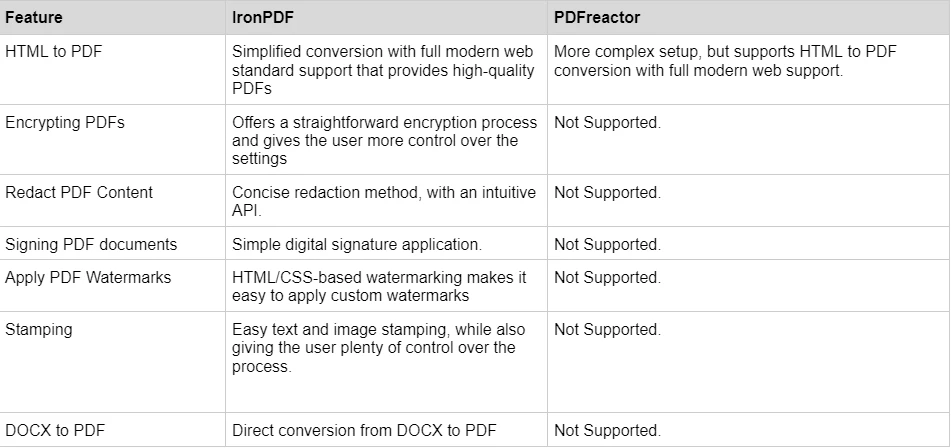
Szczegółowe przykłady kodu można znaleźć na stronie z przykładami kodu IronPDF.
Ceny i licencje: IronPDF vs. PDFreactor
IronPDF
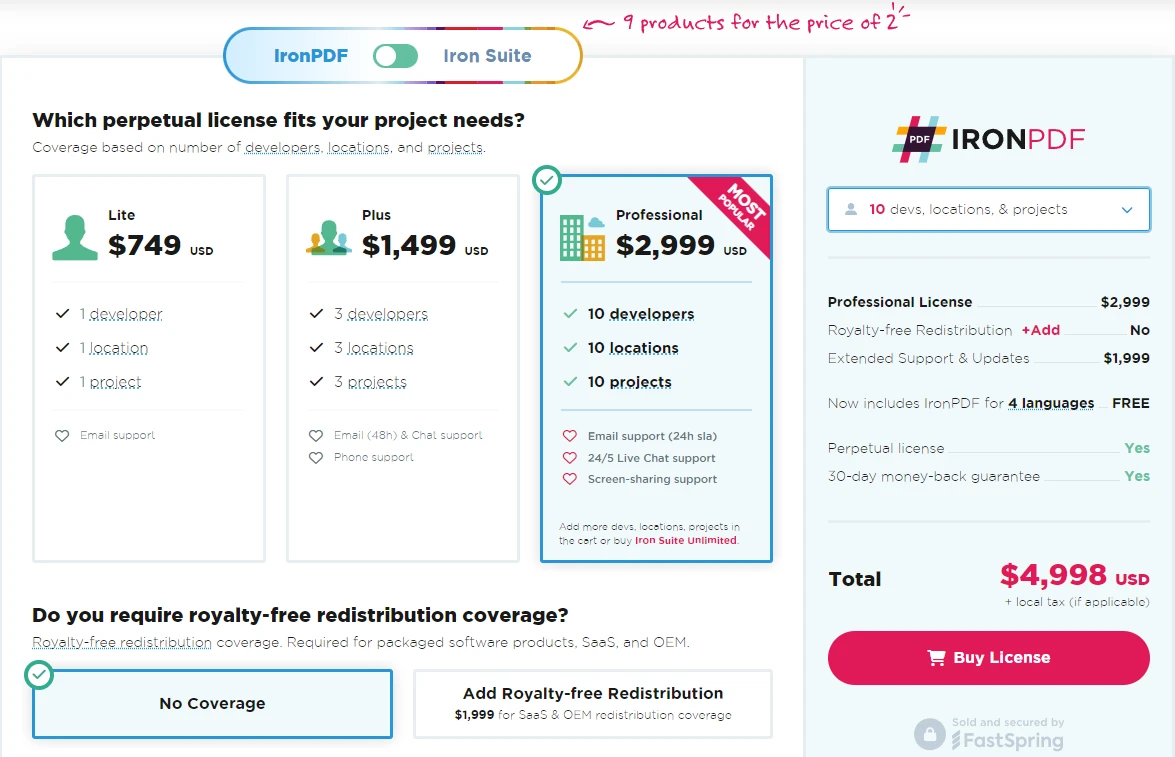
IronPDF posiada różne poziomy i dodatkowe funkcje przy zakupie licencji. Programiści mogą również kupić pakiet Iron Suite, który zapewnia dostęp do wszystkich produktów Iron Software w cenie dwóch. Jeśli nie jesteś gotowy, aby kupić licencję, IronPDF oferuje bezpłatną wersję próbną, która trwa 30 dni.
- Licencje wieczyste: Oferuje szeroką gamę licencji wieczystych w zależności od wielkości zespołu, potrzeb projektu i liczby lokalizacji. Każdy typ licencji zawiera wsparcie e-mailowe.
- Lite License: Ta licencja kosztuje $999 i wspiera jednego dewelopera, jedną lokalizację i jeden projekt.
- Plus License: Wspierająca trzech deweloperów, trzy lokalizacje i trzy projekty, jest to kolejny krok w górę od licencji lite i kosztuje $1,499. Licencja Plus oferuje wsparcie na czacie i wsparcie telefoniczne oprócz podstawowego wsparcia e-mailowego.
- Professional License: Ta licencja jest odpowiednia dla większych zespołów, wspierając dziesięciu deweloperów, dziesięć lokalizacji i dziesięć projektów za $2,399. Oferuje te same kanały wsparcia, co poprzednie poziomy, ale również oferuje wsparcie przy udostępnianiu ekranu.
- Redystrybucja bez oplat licencyjnych: Licencjonowanie IronPDF oferuje również pokrycie redystrybucji bez oplat licencyjnych za dodatkowe $2,399
- Nieprzerwane wsparcie produktu: IronPDF oferuje dostęp do bieżących aktualizacji produktu, aktualizacji funkcji zabezpieczeń i wsparcia zespołu inżynierskiego za either $1,499/rok or jednorazowy zakup $2,399 na pokrycie 5-letnie.
- Iron Suite: Za $2,998 otrzymujesz dostęp do wszystkich produktów Iron Software, w tym IronPDF, IronOCR, IronWord, IronXL, IronBarcode, IronQR, IronZIP, IronPrint i IronWebScraper.
PDFreactor
-
Licencja CPU: Jest to podstawowy koszt za PDFreactor, którego cena wynosi 2950 USD. Obejmuje ona obsługę maksymalnie 4 kodów CPU oraz pierwszy rok wsparcia i konserwacji.
-
Dodatki: Oprócz licencji PDFreactor oferuje dodatki, takie jak: dodatek do wyjścia rastrowego obrazu, roczne rozszerzenie wsparcia i utrzymania oraz aktualizacja licencji CPU.
Dokumentacja i wsparcie: IronPDF vs. PDFreactor
IronPDF
IronPDF doskonale radzi sobie w dostarczaniu obszernej dokumentacji i wsparcia:
- Obszerna dokumentacja: Rozbudowana i przyjazna dla użytkownika dokumentacja obejmująca wszystkie funkcje.
- Wsparcie 24/5: Aktywne wsparcie inżyniera jest dostępne.
- Samouczki wideo: Krok po kroku przewodniki wideo dostępne na YouTube.
- Forum społecznościowe: Zaangażowana społeczność do dodatkowego wsparcia.
- Regularne aktualizacje: Miesięczne aktualizacje produktów zapewniające najnowsze funkcje i poprawki bezpieczeństwa.
Aby uzyskać więcej informacji, zapoznaj się z obszerną dokumentacją IronPDF i odwiedź Kanał YouTube Iron Software.
PDFreactor
- Szczegółowa dokumentacja: Obejmuje wszystkie aspekty konwersji HTML do PDF.
- Wsparcie e-mail: dostępne w przypadku pytań technicznych i dotyczących licencji.
- Fora społecznościowe: Nawiąż kontakt z innymi użytkownikami i programistami.
- Baza wiedzy: Dostęp do artykułów i przewodników dotyczących rozwiązywania problemów.
- Usługi profesjonalne: płatne wsparcie w zakresie złożonych wdrożeń.
Wnioski
Jeśli chodzi o konwersję HTML do PDF, IronPDF i PDFreactor są silnymi konkurentami, obie są w pełni zdolne do tworzenia dokumentów PDF z treści HTML. Jeśli jednak szukasz narzędzia do obsługi plików PDF, które poradzi sobie z bardziej złożonymi zadaniami, takimi jak szyfrowanie, dodawanie znaków wodnych oraz konwersja plików innych niż HTML do formatu PDF, to IronPDF jest narzędziem dla Ciebie.
Dzięki bogatemu zestawowi funkcji, kompatybilności z nowoczesnymi frameworkami .NET Framework oraz doskonałemu wsparciu technicznemu, IronPDF jest potężnym narzędziem, które warto mieć pod ręką. PDFreactor, choć potężny w swojej niszy, nie posiada niektórych zaawansowanych funkcji i elastyczności oferowanych przez IronPDF.
Możesz wypróbować 30-dniową bezpłatną wersję próbną, aby sprawdzić dostępne funkcje.
PDFreactor jest zastrzeżonym znakiem towarowym odpowiedniego właściciela. Ta strona nie jest powiązana z PDFreactor, nie jest przez niego promowana ani sponsorowana. Wszystkie nazwy produktów, logo i marki są własnością ich odpowiednich właścicieli. Porównania mają charakter wyłącznie informacyjny i odzwierciedlają informacje dostępne publicznie w momencie pisania.























