Dodawanie znaków wodnych do PDF to powszechny wymóg dotyczący bezpieczeństwa dokumentów, marki i kontroli wersji. Niezależnie od oznaczenia dokumentów jako poufne, ubrania raportów oficjalnych, czy zapobiegania nieautoryzowanemu powielaniu, znak wodny jest niezbędną funkcją.
W C#, deweloperzy mają do wyboru wiele bibliotek, z IronPDF i PDFSharp jako dwoma z najpopularniejszych opcji. Jednak ich podejścia, łatwość użytkowania, wydajność i struktury licencyjne znacznie się różnią. Ten artykuł zapewnia szczegółowe porównanie między IronPDF a PDFSharp w zakresie dodawania znaków wodnych do istniejących PDF, oferując wgląd w ich funkcje, procesy wdrożenia i możliwości dostosowywania.
Porównanie obejmuje API znaków wodnych obu bibliotek z przykładami kodów działających, dzięki czemu możesz ocenić, która z nich spełnia wymagania Twojego projektu.
Rozumienie znakowania wodnego PDF
Co to jest znak wodny?
Znak wodny to graficzna lub tekstowa nakładka na dokumencie, która służy jako identyfikator, środek odstraszający lub element marki. Znaki wodne mogą być widoczne lub niewidoczne, w zależności od celu, i są ściśle związane z znakami tekstowymi i graficznymi używanymi do adnotacji dokumentów.
Rodzaje znaków wodnych
- Znak wodny tekstowy – Zazwyczaj półprzezroczysta nakładka z wiadomością typu "POUFNE" lub "SZKIC".
- Znak wodny graficzny – Logo, emblemat lub grafika osadzona w dokumencie.
- Znak wodny przezroczysty – Subtelny znak marki, który nie utrudnia czytelności dokumentu.
- Znak wodny wytłoczony – Bardziej wyraźne, pogrubione oznaczenie zapewniające widoczność.
Typowe przypadki użycia
- Bezpieczeństwo i ochrona – Zapobiega nieautoryzowanemu powielaniu przez oznaczenie dokumentów jako własność.
- Branding – Dodaj logotypy firmy lub podpisy, aby zachować spójność marki w dokumentach.
- Kontrola wersji – Oznaczaj wersje robocze, finalne lub rewizje dokumentów.
Czym są IronPDF i PDFSharp?
IronPDF
IronPDF to premium, bogata w funkcje biblioteka .NET zaprojektowana do przyspieszania obsługi PDF, od tworzenia PDF od podstaw po zaawansowane zadania manipulacyjne. Jest szczególnie przydatna dla deweloperów poszukujących łatwego wdrożenia zadań manipulacji PDF, w tym znakowania wodnego.
Najważniejsze cechy:
- Proste i intuicyjne API wymagające minimalnego kodu.
- Obsługuje tekst i znaki wodne graficzne z opcjami dostosowywania.
- Oferuje kontrolę przezroczystości, pozycjonowania i obrotu dla precyzyjnego umiejscowienia.
- Kompatybilna z .NET 6+, .NET Core i .NET Framework.
- Dostępna z modelem licencji wieczystej na długoterminowe użytkowanie.
- Dodatkowe możliwości obejmują adnotacje PDF, konwersję HTML na PDF i podpisy cyfrowe.
PDFSharp
PDFSharp to biblioteka open-source, która pozwala deweloperom na tworzenie, edycję i manipulację PDF w C#. Jeśli obecnie używasz PDFSharp i myślisz o przejściu, przewodnik i dotyczący migracji z PDFSharp do IronPDF przeprowadza przez proces przejścia. Oferuje precyzyjną kontrolę nad operacjami rysowania, choć znakowanie wodne wymaga bardziej ręcznego wdrożenia niż podejście abstrakcyjne IronPDF.
Najważniejsze cechy:
- Wolna i open-source, co czyni ją opłacalną dla projektów z ograniczonym budżetem.
- Zapewnia niskopoziomową kontrolę nad operacjami rysowania na PDF, w tym nad konturami ścieżek graficznych i przezroczystymi ścieżkami graficznymi.
- Obsługuje zarówno tekst, jak i znaki wodne graficzne, ale wymaga dodatkowego kodu do transformacji.
- Działa z .NET Framework i .NET Core (poprzez PDFSharpCore).
- Nie zawiera wbudowanych funkcji znakowania wodnego na wysokim poziomie; deweloperzy implementują funkcje takie jak przezroczystość i rotacja bezpośrednio poprzez API rysowania.
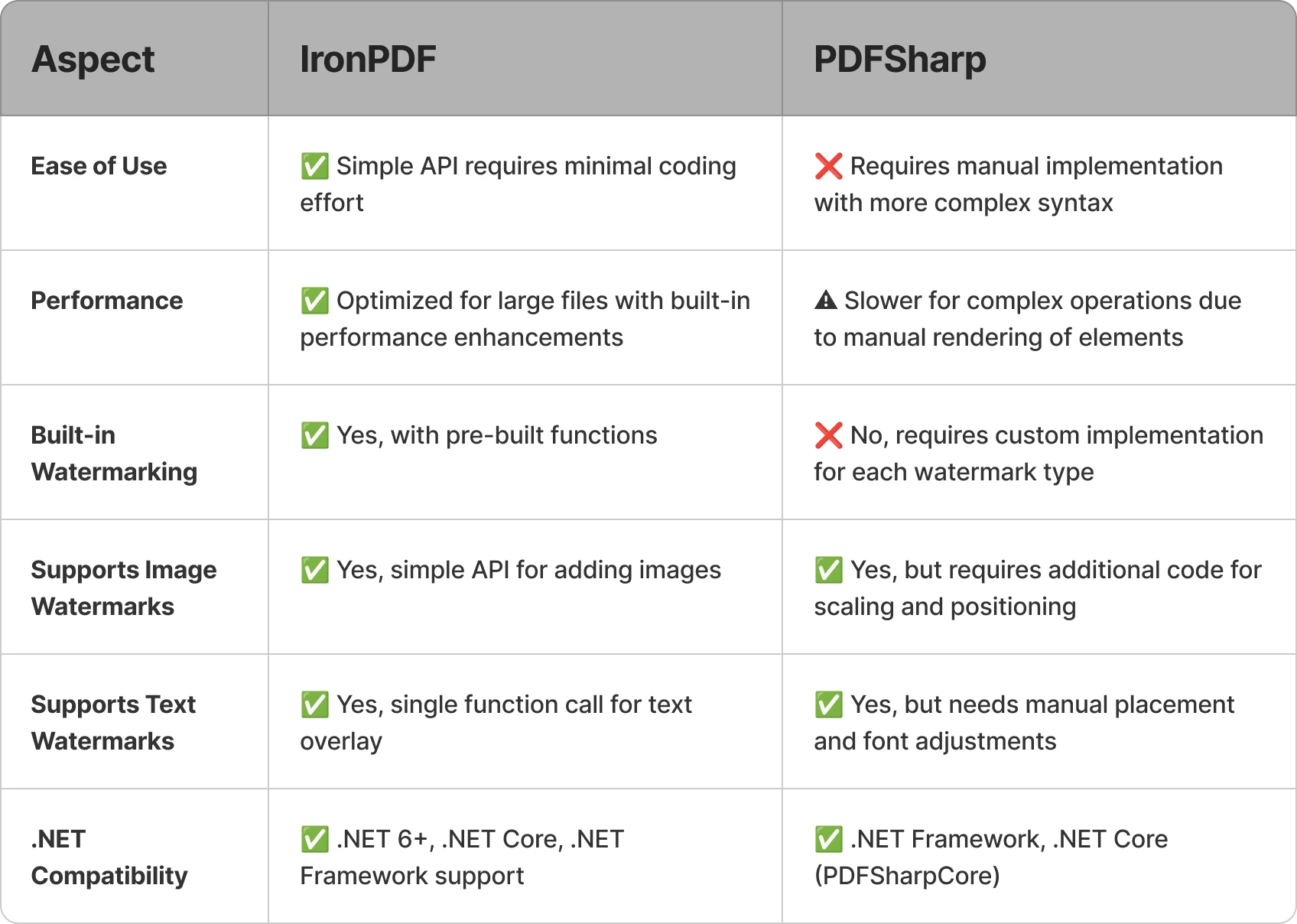
Oto szybkie porównanie, jak obie biblioteki odnoszą się do zadań związanych ze znakowaniem wodnym:
Bezpłatna 30-dniowa wersja próbna IronPDF[trial-license includes the full watermarking API used in the examples below].
Dodawanie Znaku Wodnego za pomocą IronPDF
IronPDF dostarcza API na wysokim poziomie, które umożliwia deweloperom stosowanie znaków wodnych w zaledwie kilku linijkach kodu, bez ręcznych obliczeń współrzędnych lub ustawień potoku graficznego. Ponieważ narzędzie znakowania wodnego IronPDF akceptuje ciągi HTML/CSS - wykorzystując ten sam silnik renderujący oparty na Chromium HTML używany w całej bibliotece - uzyskujesz pełną kontrolę nad stylizacją, pozycjonowaniem i wyglądem za pomocą znanego oznakowania internetowego.
Przykład znaku wodnego tekstowego
using IronPdf;

const string filename = "existing.pdf";
// Load the existing PDF file
PdfDocument pdf = PdfDocument.FromFile(filename);

// Create a simple HTML-based watermark
string watermark = "<h1 style='color:red'>Confidential!</h1>";

// Apply the watermark to the PDF
pdf.ApplyWatermark(watermark);

// Save the updated document with the applied watermark
pdf.SaveAs("watermarked.pdf");
using IronPdf;

const string filename = "existing.pdf";
// Load the existing PDF file
PdfDocument pdf = PdfDocument.FromFile(filename);

// Create a simple HTML-based watermark
string watermark = "<h1 style='color:red'>Confidential!</h1>";

// Apply the watermark to the PDF
pdf.ApplyWatermark(watermark);

// Save the updated document with the applied watermark
pdf.SaveAs("watermarked.pdf");
Imports IronPdf
Private Const filename As String = "existing.pdf"
' Load the existing PDF file
Private pdf As PdfDocument = PdfDocument.FromFile(filename)
' Create a simple HTML-based watermark
Private watermark As String = "<h1 style='color:red'>Confidential!</h1>"
' Apply the watermark to the PDF
pdf.ApplyWatermark(watermark)
' Save the updated document with the applied watermark
pdf.SaveAs("watermarked.pdf")
Imports IronPdf

Private Const filename As String = "existing.pdf"
' Load the existing PDF file
Private pdf As PdfDocument = PdfDocument.FromFile(filename)

' Create a simple HTML-based watermark
Private watermark As String = "<h1 style='color:red'>Confidential!</h1>"

' Apply the watermark to the PDF
pdf.ApplyWatermark(watermark)

' Save the updated document with the applied watermark
pdf.SaveAs("watermarked.pdf")
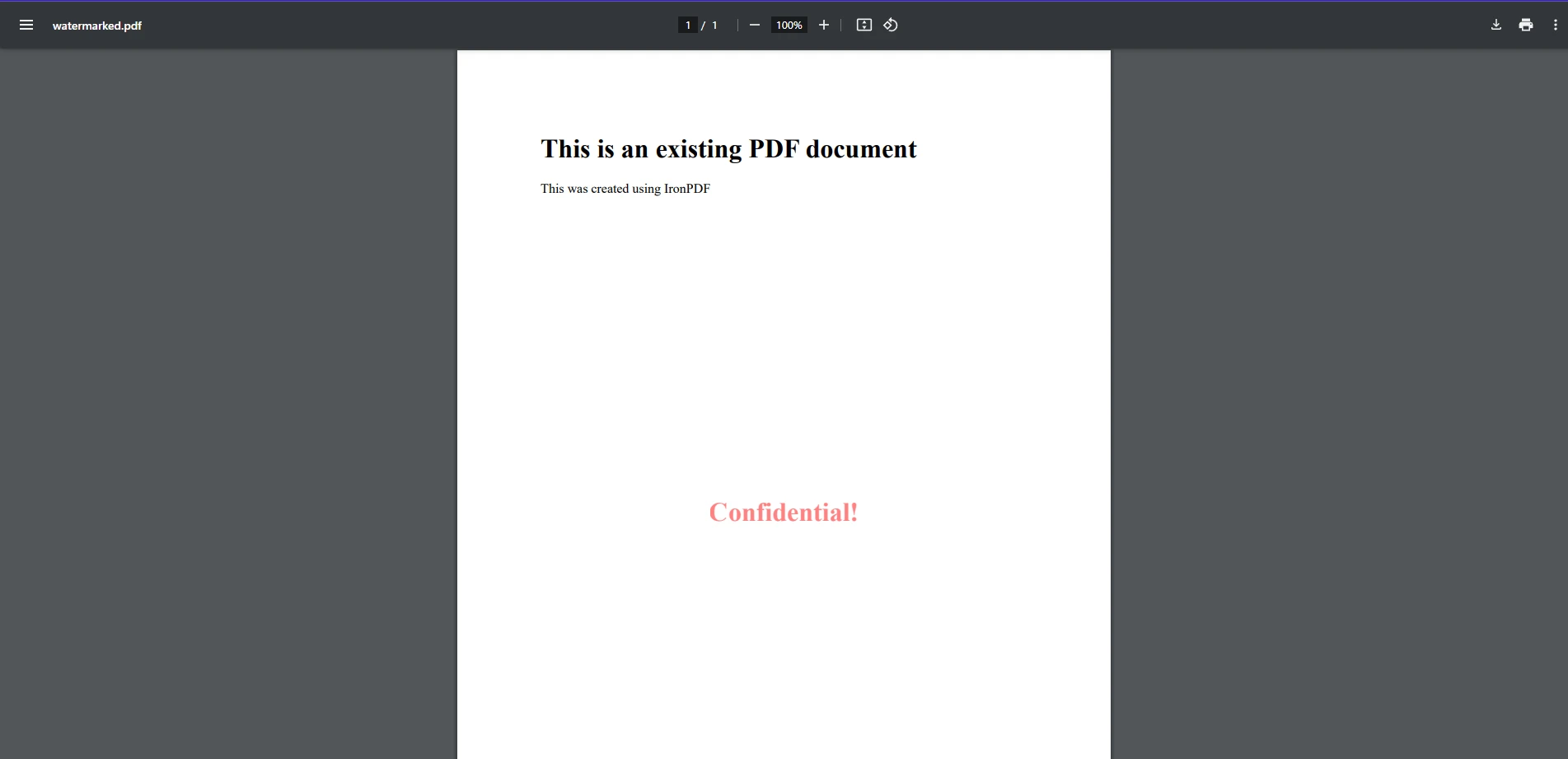
W tym przykładzie kodu widzimy, jak łatwo jest zastosować znak wodny do istniejących plików PDF za pomocą IronPDF. Tutaj, ładujemy istniejący PDF za pomocą metody FromFile. Następnie tworzymy prosty ciąg sformatowany jako element HTML jako znak wodny i stosujemy go do PDF za pomocą ApplyWatermark, podobnie jak przy używaniu HTML do tworzenia PDF od podstaw. Jak pokazano na obrazie wyjściowym, dodano prosty ciąg tekstowy "Confidential" jako znak wodny do naszego PDF.
Przykład znaku wodnego graficznego
using IronPdf;

// Load the PDF document
PdfDocument pdf = PdfDocument.FromFile("existing.pdf");

// Create an HTML-based watermark containing the image
string watermark = "<img src='https://ironsoftware.com/img/products/ironpdf-logo-text-dotnet.svg'>";

// Apply the watermark to the PDF with rotation and opacity
pdf.ApplyWatermark(watermark, rotation: 45, opacity: 80);

// Save the watermarked document
pdf.SaveAs("watermarked.pdf");
using IronPdf;

// Load the PDF document
PdfDocument pdf = PdfDocument.FromFile("existing.pdf");

// Create an HTML-based watermark containing the image
string watermark = "<img src='https://ironsoftware.com/img/products/ironpdf-logo-text-dotnet.svg'>";

// Apply the watermark to the PDF with rotation and opacity
pdf.ApplyWatermark(watermark, rotation: 45, opacity: 80);

// Save the watermarked document
pdf.SaveAs("watermarked.pdf");
Imports IronPdf
' Load the PDF document
Private pdf As PdfDocument = PdfDocument.FromFile("existing.pdf")
' Create an HTML-based watermark containing the image
Private watermark As String = "<img src='https://ironsoftware.com/img/products/ironpdf-logo-text-dotnet.svg'>"
' Apply the watermark to the PDF with rotation and opacity
pdf.ApplyWatermark(watermark, rotation:= 45, opacity:= 80)
' Save the watermarked document
pdf.SaveAs("watermarked.pdf")
Imports IronPdf

' Load the PDF document
Private pdf As PdfDocument = PdfDocument.FromFile("existing.pdf")

' Create an HTML-based watermark containing the image
Private watermark As String = "<img src='https://ironsoftware.com/img/products/ironpdf-logo-text-dotnet.svg'>"

' Apply the watermark to the PDF with rotation and opacity
pdf.ApplyWatermark(watermark, rotation:= 45, opacity:= 80)

' Save the watermarked document
pdf.SaveAs("watermarked.pdf")
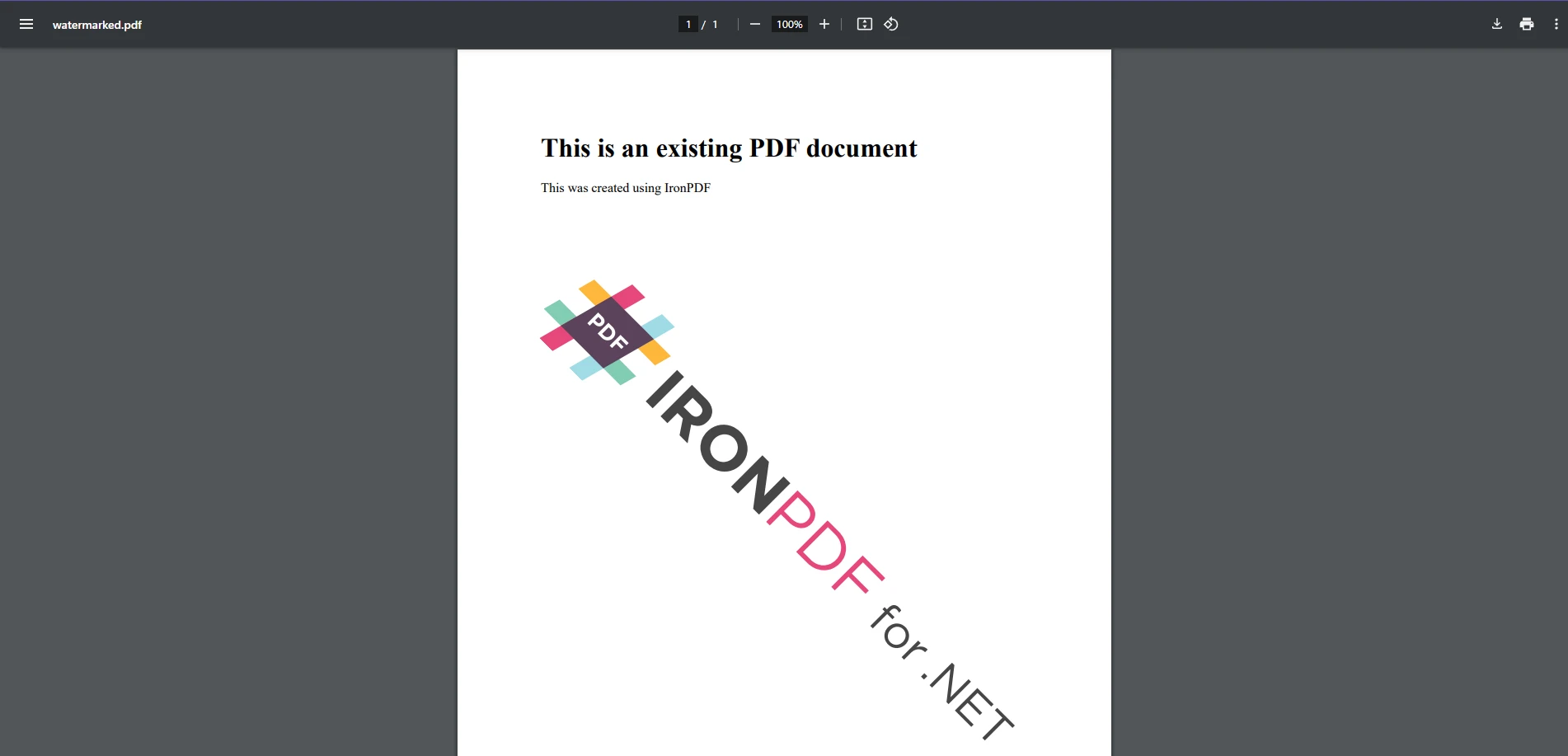
Dodanie obrazu jako znaku wodnego jest tak samo łatwe jak dodanie tekstu, ponieważ oboje używają tej samej metody. Podobnie jak w przypadku przykładu tekstu, tworzymy nową zmienną ciągu znaku wodnego zawierającą tag obrazu HTML wskazujący na URL obrazu i stosujemy go. Tym razem dodajemy dostosowane transformacje obrotu i przezroczystości za pomocą opcji renderowania parametrów IronPDF.
To podejście nakłada znaku wodnego graficznego na określoną pozycję, pozwalając na niestandardowe umiejscowienie i przezroczystość.
Dodawanie Znaku Wodnego za pomocą PDFSharp
PDFSharp wymaga od deweloperów ręcznego renderowania tekstu i obrazów przy użyciu swojego API rysowania GDI+. Aby oznaczyć istniejący plik PDF znakiem wodnym, stwórz obiekt XGraphics do rysowania i zastosuj wymagane treści.
Przykład znaku wodnego tekstowego
using PdfSharp.Pdf;
using PdfSharp.Drawing;
using PdfSharp.Pdf.IO;

const string filename = "existing.pdf";
// Open the PDF document in modify mode
var document = PdfReader.Open(filename, PdfDocumentOpenMode.Modify);

foreach (var page in document.Pages)
{
    // Create an XGraphics object for drawing
    var gfx = XGraphics.FromPdfPage(page);

    // Move the origin to the center of the page for rotation purposes
    gfx.TranslateTransform(page.Width / 2, page.Height / 2);

    // Rotate for diagonal watermark placement
    gfx.RotateTransform(Math.Atan(page.Height / page.Width));

    // Define font and brush for drawing the watermark text
    var font = new XFont("Arial", 40);
    var brush = new XSolidBrush(XColor.FromArgb(128, XColors.Red));  // Semi-transparent red

    // Draw the watermark text centered on the page
    gfx.DrawString("WATERMARK", font, brush, new XPoint(0, 0));
}

// Save modified document
document.Save("watermarked.pdf");
using PdfSharp.Pdf;
using PdfSharp.Drawing;
using PdfSharp.Pdf.IO;

const string filename = "existing.pdf";
// Open the PDF document in modify mode
var document = PdfReader.Open(filename, PdfDocumentOpenMode.Modify);

foreach (var page in document.Pages)
{
    // Create an XGraphics object for drawing
    var gfx = XGraphics.FromPdfPage(page);

    // Move the origin to the center of the page for rotation purposes
    gfx.TranslateTransform(page.Width / 2, page.Height / 2);

    // Rotate for diagonal watermark placement
    gfx.RotateTransform(Math.Atan(page.Height / page.Width));

    // Define font and brush for drawing the watermark text
    var font = new XFont("Arial", 40);
    var brush = new XSolidBrush(XColor.FromArgb(128, XColors.Red));  // Semi-transparent red

    // Draw the watermark text centered on the page
    gfx.DrawString("WATERMARK", font, brush, new XPoint(0, 0));
}

// Save modified document
document.Save("watermarked.pdf");
Imports PdfSharp.Pdf
Imports PdfSharp.Drawing
Imports PdfSharp.Pdf.IO
Private Const filename As String = "existing.pdf"
' Open the PDF document in modify mode
Private document = PdfReader.Open(filename, PdfDocumentOpenMode.Modify)
For Each page In document.Pages
' Create an XGraphics object for drawing
Dim gfx = XGraphics.FromPdfPage(page)
' Move the origin to the center of the page for rotation purposes
gfx.TranslateTransform(page.Width \ 2, page.Height \ 2)
' Rotate for diagonal watermark placement
gfx.RotateTransform(Math.Atan(page.Height \ page.Width))
' Define font and brush for drawing the watermark text
Dim font = New XFont("Arial", 40)
Dim brush = New XSolidBrush(XColor.FromArgb(128, XColors.Red)) ' Semi-transparent red
' Draw the watermark text centered on the page
gfx.DrawString("WATERMARK", font, brush, New XPoint(0, 0))
Next page
' Save modified document
document.Save("watermarked.pdf")
Imports PdfSharp.Pdf
Imports PdfSharp.Drawing
Imports PdfSharp.Pdf.IO

Private Const filename As String = "existing.pdf"
' Open the PDF document in modify mode
Private document = PdfReader.Open(filename, PdfDocumentOpenMode.Modify)

For Each page In document.Pages
	' Create an XGraphics object for drawing
	Dim gfx = XGraphics.FromPdfPage(page)

	' Move the origin to the center of the page for rotation purposes
	gfx.TranslateTransform(page.Width \ 2, page.Height \ 2)

	' Rotate for diagonal watermark placement
	gfx.RotateTransform(Math.Atan(page.Height \ page.Width))

	' Define font and brush for drawing the watermark text
	Dim font = New XFont("Arial", 40)
	Dim brush = New XSolidBrush(XColor.FromArgb(128, XColors.Red)) ' Semi-transparent red

	' Draw the watermark text centered on the page
	gfx.DrawString("WATERMARK", font, brush, New XPoint(0, 0))
Next page

' Save modified document
document.Save("watermarked.pdf")
To wdrożenie rysuje znak wodny na każdej stronie poprzez wyraźne pozycjonowanie bazujące na współrzędnych. Chociaż wolumen wyjściowy jest podobny do przykładu IronPDF, podejście PDFSharp wymaga więcej kodu - znak wodny tekstowy IronPDF wymaga około 4 aktywnych linii w porównaniu do 10 linii PDFSharp, ponieważ PDFSharp deleguje decyzje dotyczące układu (tłumaczenia, rotacji, wyboru czcionki) do dewelopera, a nie abstrahuje ich.
Przykład znaku wodnego graficznego
using PdfSharp.Pdf;
using PdfSharp.Drawing;
using PdfSharp.Pdf.IO;

// Open the existing PDF document in modify mode
var document = PdfReader.Open("sample.pdf", PdfDocumentOpenMode.Modify);

// Load the watermark image
XImage watermark = XImage.FromFile("watermark.png");

foreach (var page in document.Pages)
{
    // Create a graphics object from the page
    XGraphics gfx = XGraphics.FromPdfPage(page);

    // Draw the image watermark at the specified position and size
    gfx.DrawImage(watermark, 50, 100, watermark.PixelWidth / 2, watermark.PixelHeight / 2);
}

// Save the modified PDF document
document.Save("watermarked.pdf");
using PdfSharp.Pdf;
using PdfSharp.Drawing;
using PdfSharp.Pdf.IO;

// Open the existing PDF document in modify mode
var document = PdfReader.Open("sample.pdf", PdfDocumentOpenMode.Modify);

// Load the watermark image
XImage watermark = XImage.FromFile("watermark.png");

foreach (var page in document.Pages)
{
    // Create a graphics object from the page
    XGraphics gfx = XGraphics.FromPdfPage(page);

    // Draw the image watermark at the specified position and size
    gfx.DrawImage(watermark, 50, 100, watermark.PixelWidth / 2, watermark.PixelHeight / 2);
}

// Save the modified PDF document
document.Save("watermarked.pdf");
Imports PdfSharp.Pdf
Imports PdfSharp.Drawing
Imports PdfSharp.Pdf.IO
' Open the existing PDF document in modify mode
Private document = PdfReader.Open("sample.pdf", PdfDocumentOpenMode.Modify)
' Load the watermark image
Private watermark As XImage = XImage.FromFile("watermark.png")
For Each page In document.Pages
' Create a graphics object from the page
Dim gfx As XGraphics = XGraphics.FromPdfPage(page)
' Draw the image watermark at the specified position and size
'INSTANT VB WARNING: Instant VB cannot determine whether both operands of this division are integer types - if they are then you should use the VB integer division operator:
gfx.DrawImage(watermark, 50, 100, watermark.PixelWidth / 2, watermark.PixelHeight / 2)
Next page
' Save the modified PDF document
document.Save("watermarked.pdf")
Imports PdfSharp.Pdf
Imports PdfSharp.Drawing
Imports PdfSharp.Pdf.IO

' Open the existing PDF document in modify mode
Private document = PdfReader.Open("sample.pdf", PdfDocumentOpenMode.Modify)

' Load the watermark image
Private watermark As XImage = XImage.FromFile("watermark.png")

For Each page In document.Pages
	' Create a graphics object from the page
	Dim gfx As XGraphics = XGraphics.FromPdfPage(page)

	' Draw the image watermark at the specified position and size
'INSTANT VB WARNING: Instant VB cannot determine whether both operands of this division are integer types - if they are then you should use the VB integer division operator:
	gfx.DrawImage(watermark, 50, 100, watermark.PixelWidth / 2, watermark.PixelHeight / 2)
Next page

' Save the modified PDF document
document.Save("watermarked.pdf")
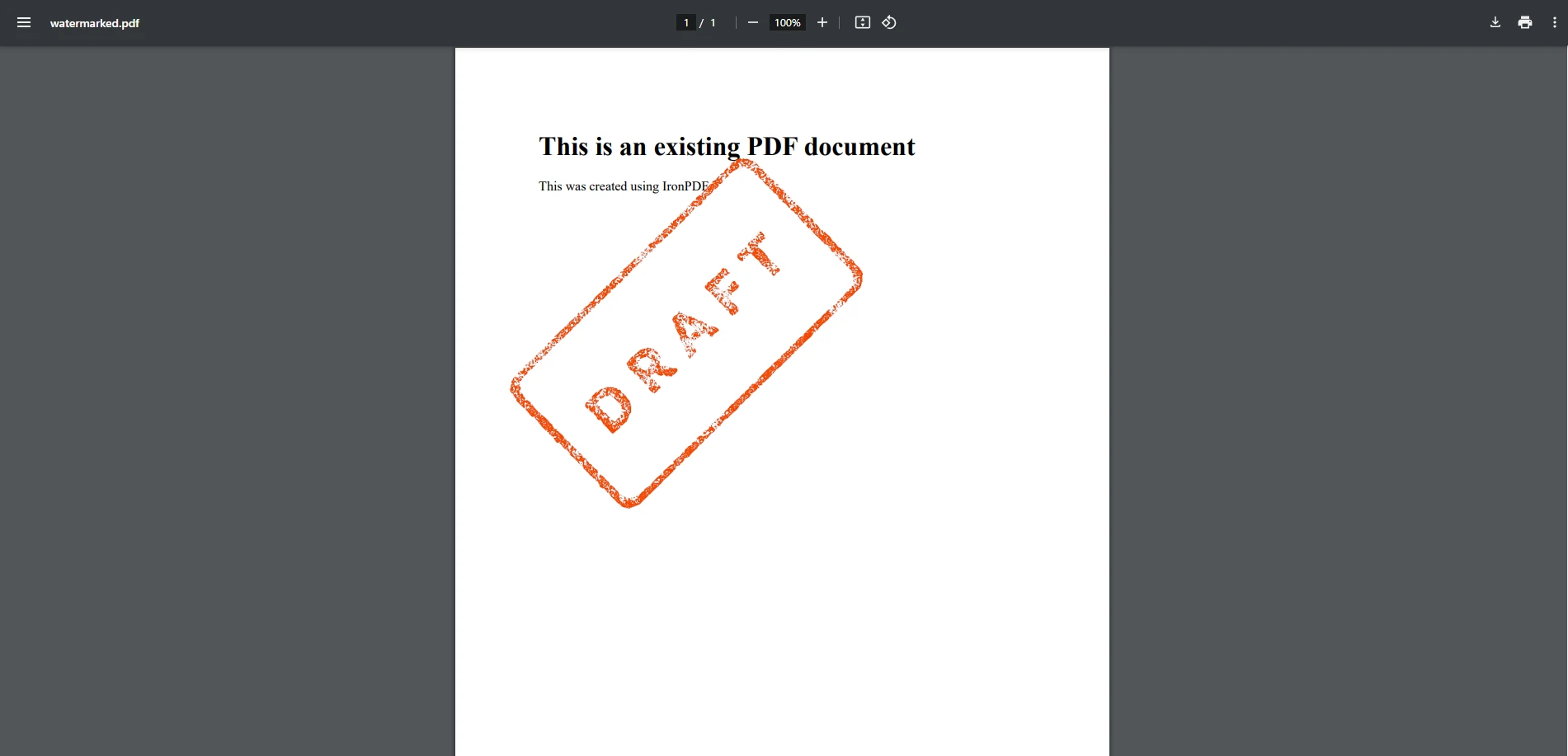
Ta metoda umieszcza znaku wodnego graficznego na stałą pozycję i rozmiar. Obsługa przezroczystości jest poza jednorazową powierzchnią API PDFSharp - deweloperzy, którzy potrzebują kontroli przeźroczystości, zarządzają nią bezpośrednio w ramach potoku XGraphics. Podobnie jak w przypadku przykładu znaku wodnego tekstowego, PDFSharp daje Ci szczegółową kontrolę nad renderowaniem kosztem dodatkowego przygotowania w porównaniu do wyższego poziomu API znakowania wodnego IronPDF.
Jak Porównać IronPDF z PDFSharp w znakowaniu wodnym?
Łatwość użytkowania
- IronPDF: Dostarcza funkcje na wysokim poziomie, które upraszczają znakowanie wodne przy minimalnym kodzie. Abstrahuje skomplikowane operacje, dzięki czemu idealnie nadaje się dla deweloperów, którzy potrzebują szybkiego i skutecznego rozwiązania.
- PDFSharp: Wymaga ręcznej implementacji przy użyciu API graficznego, co zwiększa złożoność i czas rozwoju. Jest lepiej dopasowana do deweloperów, którzy potrzebują kontroli na poziomie szczegółowym nad renderowaniem i są w stanie pracować z dodatkowym kodowaniem.
Wydajność
- IronPDF: Dostarcza jako pojedynczy pakiet NuGet z funkcjami znakowania wodnego, które obsługują przezroczystość, rotację i pozycjonowanie w jednym wywołaniu metody, redukując obciążenie przetwarzania per strona podczas znakowania wodnego wielostronicowych dokumentów. W przypadku procesów na dużą skalę zapoznaj się z przewodnikiem po optymalizacji wydajności IronPDF.
- PDFSharp: Lekki, o niewielkim śladzie zależności. W przypadku złożonych zadań znakowania wodnego, które wymagają wielu transformacji na stronę, deweloperzy mogą wymagać profilowania i optymalizacji logiki rysowania, ponieważ PDFSharp nie współdzieli tych operacji wewnętrznie ani nie buforuje ich.
Opcje dostosowywania
- IronPDF: Wbudowana obsługa dostosowywania krycia, obrotu, pozycjonowania i rozmiaru czcionki. Użytkownicy mogą łatwo dostosowywać ustawienia bez zagłębiania się w skomplikowaną logikę renderowania.
- PDFSharp: Wymaga dodatkowego kodowania w celu obsługi krycia, efektów przezroczystości i transformacji. Choć mocny, wymaga wyższego poziomu dostosowywania od dewelopera, w tym użycia formatu
var do specyficznych zadań renderowania.
Kompatybilność
- IronPDF: W pełni kompatybilny z .NET 6+, .NET Core i .NET Framework, dzięki czemu nadaje się do nowoczesnych i starszych aplikacji.
- PDFSharp: Obsługuje .NET Framework i .NET Core (poprzez PDFSharpCore). Niektóre nowsze funkcje frameworka mogą wykraczać poza jego obecny zakres, w zależności od wybranego portu społecznościowego.
Licencjonowanie i koszty
- IronPDF: produkt komercyjny, który wymaga płatnej licencji, ale obejmuje opcje Licencji wieczystej, obsługę klienta i ciągłe aktualizacje.
- PDFSharp: oprogramowanie typu open source i darmowe, co czyni je opłacalnym rozwiązaniem dla programistów, którzy preferują model licencyjny bez ograniczeń, ale są gotowi samodzielnie zajmować się wsparciem technicznym i aktualizacjami.
Oprócz kosztów licencji, całkowity koszt projektu obejmuje godziny pracy programistów poświęcone na ręczne pozycjonowanie oparte na współrzędnych, niestandardową logikę krycia i obrotu oraz kod rysowania na stronie, który IronPDF obsługuje za pomocą jednego wywołania metody. Dla zespołów oceniających koszty w perspektywie wieloletniego cyklu życia projektu, te godziny poświęcone na wdrożenie i utrzymanie często przewyższają różnicę między licencjami open source a komercyjnymi.
Którą bibliotekę wybrać?
PDFSharp dostarcza solidną niskopoziomową kontrolę rysowania i wywodzi się z wolnej licencji open-source MIT - dwie prawdziwe zalety, które uczyniły z niej podstawowy element wielu projektów .NET. Dla zespołów, które potrzebują wbudowanych funkcji pozycjonowania znaków wodnych, krycia, obracania oraz stylizacji opartej na HTML/CSS jako operacji najwyższej klasy, IronPDF oferuje bardziej kompleksowy interfejs API, który skraca czas wdrożenia. Ostatecznie najlepszy wybór zależy od wymagań projektu, wiedzy programistycznej i dostępnych zasobów.
Wypróbuj IronPDF samodzielnie, pobierając bezpłatną wersję próbną i odkrywając, jak już dziś może ona przenieść Twoje projekty C# PDF na wyższy poziom!
PDFSharp jest zastrzeżonym znakiem towarowym odpowiedniego właściciela. Ta strona nie jest powiązana z PDFSharp, nie jest przez niego promowana ani sponsorowana. Wszystkie nazwy produktów, logo i marki są własnością ich odpowiednich właścicieli. Porównania mają charakter wyłącznie informacyjny i odzwierciedlają informacje dostępne publicznie w momencie pisania.













