W tym samouczku omówimy pętlę "C# foreach", niezbędne narzędzie dla programistów. Pętla foreach upraszcza proces iteracji przez kolekcję, umożliwiając łatwiejsze wykonywanie operacji na każdym elemencie bez martwienia się o szczegóły techniczne. Omówimy znaczenie foreach, jego przypadki użycia oraz sposób implementacji w kodzie C#.
Wprowadzenie do pętli foreach
Pętla foreach jest potężnym narzędziem dla programistów do iteracji przez kolekcje w zwięzły i czytelny sposób. Upraszcza kod i zmniejsza szanse na błędy, ponieważ nie trzeba zarządzać indeksem czy liczbą elementów kolekcji ręcznie. Pod względem czytelności i prostoty, pętla foreach jest często preferowana niż tradycyjna pętla for.
Przypadki użycia foreach obejmują:
- Sumowanie wartości w kolekcji
- Wyszukiwanie elementu w kolekcji
- Modyfikowanie elementów w kolekcji
- Wykonywanie działań na każdym elemencie kolekcji
Zrozumienie kolekcji
Istnieją różne rodzaje kolekcji w C#, które służą do przechowywania grupy elementów w jednym obiekcie. Należą do nich tablice, listy, słowniki i więcej. Pętla foreach to przydatne narzędzie, które można wykorzystać z dowolną kolekcją implementującą interfejs IEnumerable lub IEnumerable<t>.
Niektóre powszechne typy kolekcji to:
- Tablice: Kolekcja elementów o stałej wielkości z tym samym typem danych.
- Listy: Dynamiczna kolekcja elementów o tym samym typie danych.
- Słowniki: Kolekcja par klucz-wartość, gdzie każdy klucz jest unikalny.
Przestrzeń nazw System.Collections.Generic zawiera różne typy do pracy z kolekcjami.
Implementing the foreach statement in C#
Mając podstawowe zrozumienie kolekcji i pętli foreach, zanurzmy się w składnię i zobaczmy, jak działa w C#.
Składnia pętli foreach
foreach (variableType variableName in collection)
{
    // Code to execute for each item
}
foreach (variableType variableName in collection)
{
    // Code to execute for each item
}
For Each variableName As variableType In collection
' Code to execute for each item
Next variableName
For Each variableName As variableType In collection
	' Code to execute for each item
Next variableName
For Each variableName As variableType In collection
	' Code to execute for each item
Next variableName
Tutaj variableType reprezentuje typ danych elementów w kolekcji, variableName to nazwa nadana bieżącemu elementowi w pętli (zmienna pętli), a collection odnosi się do kolekcji, przez którą chcesz przeiterować.
Przykład
Rozważmy przykład, w którym mamy listę liczb całkowitych i chcemy znaleźć sumę wszystkich elementów w tej liście.
using System;
using System.Collections.Generic;

class Program
{
    static void Main()
    {
        // Create a list of integers
        List<int> numbers = new List<int> { 1, 2, 3, 4, 5 };

        // Initialize a variable to store the sum
        int sum = 0;

        // Iterate through the list using foreach loop
        foreach (int number in numbers)
        {
            sum += number;
        }

        // Print the sum
        Console.WriteLine("The sum of the elements is: " + sum);
    }
}
using System;
using System.Collections.Generic;

class Program
{
    static void Main()
    {
        // Create a list of integers
        List<int> numbers = new List<int> { 1, 2, 3, 4, 5 };

        // Initialize a variable to store the sum
        int sum = 0;

        // Iterate through the list using foreach loop
        foreach (int number in numbers)
        {
            sum += number;
        }

        // Print the sum
        Console.WriteLine("The sum of the elements is: " + sum);
    }
}
using System;
using System.Collections.Generic;

class Program
{
    static void Main()
    {
        // Create a list of integers
        List<int> numbers = new List<int> { 1, 2, 3, 4, 5 };

        // Initialize a variable to store the sum
        int sum = 0;

        // Iterate through the list using foreach loop
        foreach (int number in numbers)
        {
            sum += number;
        }

        // Print the sum
        Console.WriteLine("The sum of the elements is: " + sum);
    }
}
Imports System
Imports System.Collections.Generic
Friend Class Program
Shared Sub Main()
' Create a list of integers
Dim numbers As New List(Of Integer) From {1, 2, 3, 4, 5}
' Initialize a variable to store the sum
Dim sum As Integer = 0
' Iterate through the list using foreach loop
For Each number As Integer In numbers
sum += number
Next number
' Print the sum
Console.WriteLine("The sum of the elements is: " & sum)
End Sub
End Class
Imports System
Imports System.Collections.Generic

Friend Class Program
	Shared Sub Main()
		' Create a list of integers
		Dim numbers As New List(Of Integer) From {1, 2, 3, 4, 5}

		' Initialize a variable to store the sum
		Dim sum As Integer = 0

		' Iterate through the list using foreach loop
		For Each number As Integer In numbers
			sum += number
		Next number

		' Print the sum
		Console.WriteLine("The sum of the elements is: " & sum)
	End Sub
End Class
Imports System
Imports System.Collections.Generic

Friend Class Program
	Shared Sub Main()
		' Create a list of integers
		Dim numbers As New List(Of Integer) From {1, 2, 3, 4, 5}

		' Initialize a variable to store the sum
		Dim sum As Integer = 0

		' Iterate through the list using foreach loop
		For Each number As Integer In numbers
			sum += number
		Next number

		' Print the sum
		Console.WriteLine("The sum of the elements is: " & sum)
	End Sub
End Class
Wynik
Po uruchomieniu pętli uzyskujemy następujący wynik.
The sum of the elements is: 15
The sum of the elements is: 15
Text
W powyższym przykładzie najpierw tworzymy listę liczb całkowitych o nazwie numbers i inicjalizujemy zmienną sum, aby przechowywała sumę elementów. Następnie wykorzystujemy pętlę foreach, aby przeiterować przez listę i dodać wartość każdego elementu do sumy. Na koniec wydrukujemy sumę na konsolę. Ta metoda może być również dostosowana do drukowania lub operowania na innych kolekcjach w podobny sposób.
Warianty i najlepsze praktyki
Mając podstawowe zrozumienie sposobu użycia pętli foreach, omówmy niektóre wariacje i najlepsze praktyki.
Iteracja tylko do odczytu: Pętla foreach jest najlepiej dostosowana do iteracji tylko do odczytu, ponieważ modyfikowanie kolekcji w trakcie iteracji może prowadzić do nieoczekiwanych rezultatów lub błędów w czasie wykonywania. Jeśli musisz zmodyfikować kolekcję podczas iteracji, rozważ użycie tradycyjnej pętli for lub stworzenie nowej kolekcji z pożądanymi modyfikacjami.
Użycie słowa kluczowego var: Zamiast jawnie określać typ danych elementów w kolekcji, możesz użyć słowa kluczowego var, aby kompilator wywnioskował typ danych. Może to uczynić kod zwięźlejszym i łatwiejszym w utrzymaniu.
Przykład:
foreach (var number in numbers)
{
    Console.WriteLine(number);
}
foreach (var number in numbers)
{
    Console.WriteLine(number);
}
foreach (var number in numbers)
{
    Console.WriteLine(number);
}
For Each number In numbers
Console.WriteLine(number)
Next number
For Each number In numbers
	Console.WriteLine(number)
Next number
For Each number In numbers
	Console.WriteLine(number)
Next number
Iteracja przez słowniki: Korzystając z pętli foreach do iteracji przez słowniki, będziesz musiał pracować z strukturą KeyValuePair. Ta struktura reprezentuje parę klucz-wartość w słowniku.
Przykład:
Dictionary<string, int> ageDictionary = new Dictionary<string, int>
{
    { "Alice", 30 },
    { "Bob", 25 },
    { "Charlie", 22 }
};

foreach (KeyValuePair<string, int> entry in ageDictionary)
{
    Console.WriteLine($"{entry.Key} is {entry.Value} years old.");
}
Dictionary<string, int> ageDictionary = new Dictionary<string, int>
{
    { "Alice", 30 },
    { "Bob", 25 },
    { "Charlie", 22 }
};

foreach (KeyValuePair<string, int> entry in ageDictionary)
{
    Console.WriteLine($"{entry.Key} is {entry.Value} years old.");
}
Dictionary<string, int> ageDictionary = new Dictionary<string, int>
{
    { "Alice", 30 },
    { "Bob", 25 },
    { "Charlie", 22 }
};

foreach (KeyValuePair<string, int> entry in ageDictionary)
{
    Console.WriteLine($"{entry.Key} is {entry.Value} years old.");
}
Dim ageDictionary As New Dictionary(Of String, Integer) From {
{"Alice", 30},
{"Bob", 25},
{"Charlie", 22}
}
For Each entry As KeyValuePair(Of String, Integer) In ageDictionary
Console.WriteLine($"{entry.Key} is {entry.Value} years old.")
Next entry
Dim ageDictionary As New Dictionary(Of String, Integer) From {
	{"Alice", 30},
	{"Bob", 25},
	{"Charlie", 22}
}

For Each entry As KeyValuePair(Of String, Integer) In ageDictionary
	Console.WriteLine($"{entry.Key} is {entry.Value} years old.")
Next entry
Dim ageDictionary As New Dictionary(Of String, Integer) From {
	{"Alice", 30},
	{"Bob", 25},
	{"Charlie", 22}
}

For Each entry As KeyValuePair(Of String, Integer) In ageDictionary
	Console.WriteLine($"{entry.Key} is {entry.Value} years old.")
Next entry
LINQ i foreach: LINQ (Language Integrated Query) to potężna funkcja w C#, która pozwala na zapytania i manipulowanie danymi w bardziej deklaratywny sposób. Możesz użyć LINQ z pętlą foreach do tworzenia bardziej wyrafinowanego i wydajnego kodu.
Przykład:
using System;
using System.Collections.Generic;
using System.Linq;

class Program
{
    static void Main()
    {
        List<int> numbers = new List<int> { 1, 2, 3, 4, 5 };

        // Use LINQ to filter out even numbers
        var evenNumbers = numbers.Where(n => n % 2 == 0);

        // Iterate through the even numbers using foreach loop
        foreach (var number in evenNumbers)
        {
            Console.WriteLine(number);
        }
    }
}
using System;
using System.Collections.Generic;
using System.Linq;

class Program
{
    static void Main()
    {
        List<int> numbers = new List<int> { 1, 2, 3, 4, 5 };

        // Use LINQ to filter out even numbers
        var evenNumbers = numbers.Where(n => n % 2 == 0);

        // Iterate through the even numbers using foreach loop
        foreach (var number in evenNumbers)
        {
            Console.WriteLine(number);
        }
    }
}
using System;
using System.Collections.Generic;
using System.Linq;

class Program
{
    static void Main()
    {
        List<int> numbers = new List<int> { 1, 2, 3, 4, 5 };

        // Use LINQ to filter out even numbers
        var evenNumbers = numbers.Where(n => n % 2 == 0);

        // Iterate through the even numbers using foreach loop
        foreach (var number in evenNumbers)
        {
            Console.WriteLine(number);
        }
    }
}
Imports System
Imports System.Collections.Generic
Imports System.Linq
Friend Class Program
Shared Sub Main()
Dim numbers As New List(Of Integer) From {1, 2, 3, 4, 5}
' Use LINQ to filter out even numbers
Dim evenNumbers = numbers.Where(Function(n) n Mod 2 = 0)
' Iterate through the even numbers using foreach loop
For Each number In evenNumbers
Console.WriteLine(number)
Next number
End Sub
End Class
Imports System
Imports System.Collections.Generic
Imports System.Linq

Friend Class Program
	Shared Sub Main()
		Dim numbers As New List(Of Integer) From {1, 2, 3, 4, 5}

		' Use LINQ to filter out even numbers
		Dim evenNumbers = numbers.Where(Function(n) n Mod 2 = 0)

		' Iterate through the even numbers using foreach loop
		For Each number In evenNumbers
			Console.WriteLine(number)
		Next number
	End Sub
End Class
Imports System
Imports System.Collections.Generic
Imports System.Linq

Friend Class Program
	Shared Sub Main()
		Dim numbers As New List(Of Integer) From {1, 2, 3, 4, 5}

		' Use LINQ to filter out even numbers
		Dim evenNumbers = numbers.Where(Function(n) n Mod 2 = 0)

		' Iterate through the even numbers using foreach loop
		For Each number In evenNumbers
			Console.WriteLine(number)
		Next number
	End Sub
End Class
Dodawanie funkcjonalności IronPDF do samouczka C# foreach
W tej sekcji rozszerzymy nasz samouczek na temat pętli "C# foreach", wprowadzając IronPDF, popularną bibliotekę do pracy z plikami PDF w C#. Pokażemy, jak używać pętli foreach w połączeniu z IronPDF do generowania raportu PDF na podstawie kolekcji danych.
Wprowadzenie IronPDF
IronPDF to potężna biblioteka do tworzenia, edycji i ekstrakcji treści z plików PDF w C#. Oferuje łatwy w użyciu interfejs API do pracy z dokumentami PDF, co czyni go doskonałym wyborem dla programistów potrzebujących uwzględnić funkcjonalność PDF w swoich aplikacjach.
Niektóre kluczowe funkcje IronPDF obejmują:
- Generowanie plików PDF z HTML, URL i obrazów
- Edycję istniejących dokumentów PDF
- Ekstrakcję tekstu i obrazów z PDF
- Dodawanie adnotacji, pól formularzy i szyfrowania do PDF
Instalacja IronPDF
Aby rozpocząć pracę z IronPDF, trzeba zainstalować pakiet NuGet IronPDF. Możesz to zrobić, postępując zgodnie z instrukcjami w dokumentacji IronPDF.
Generowanie raportu PDF z IronPDF i foreach
W tym przykładzie użyjemy biblioteki IronPDF i pętli foreach, aby stworzyć raport PDF listy produktów, w tym ich nazw i cen.
Najpierw stwórzmy prostą klasę Product, aby reprezentować produkty:
public class Product
{
    public string Name { get; set; }
    public decimal Price { get; set; }

    public Product(string name, decimal price)
    {
        Name = name;
        Price = price;
    }
}
public class Product
{
    public string Name { get; set; }
    public decimal Price { get; set; }

    public Product(string name, decimal price)
    {
        Name = name;
        Price = price;
    }
}
public class Product
{
    public string Name { get; set; }
    public decimal Price { get; set; }

    public Product(string name, decimal price)
    {
        Name = name;
        Price = price;
    }
}
Public Class Product
Public Property Name() As String
Public Property Price() As Decimal
Public Sub New(ByVal name As String, ByVal price As Decimal)
Me.Name = name
Me.Price = price
End Sub
End Class
Public Class Product
	Public Property Name() As String
	Public Property Price() As Decimal

	Public Sub New(ByVal name As String, ByVal price As Decimal)
		Me.Name = name
		Me.Price = price
	End Sub
End Class
Public Class Product
	Public Property Name() As String
	Public Property Price() As Decimal

	Public Sub New(ByVal name As String, ByVal price As Decimal)
		Me.Name = name
		Me.Price = price
	End Sub
End Class
Następnie stwórzmy listę obiektów Product, aby wygenerować raport PDF:
List<Product> products = new List<Product>
{
    new Product("Product A", 29.99m),
    new Product("Product B", 49.99m),
    new Product("Product C", 19.99m),
};
List<Product> products = new List<Product>
{
    new Product("Product A", 29.99m),
    new Product("Product B", 49.99m),
    new Product("Product C", 19.99m),
};
List<Product> products = new List<Product>
{
    new Product("Product A", 29.99m),
    new Product("Product B", 49.99m),
    new Product("Product C", 19.99m),
};
Dim products As New List(Of Product) From {
New Product("Product A", 29.99D),
New Product("Product B", 49.99D),
New Product("Product C", 19.99D)
}
Dim products As New List(Of Product) From {
	New Product("Product A", 29.99D),
	New Product("Product B", 49.99D),
	New Product("Product C", 19.99D)
}
Dim products As New List(Of Product) From {
	New Product("Product A", 29.99D),
	New Product("Product B", 49.99D),
	New Product("Product C", 19.99D)
}
Teraz możemy użyć IronPDF i pętli foreach, aby wygenerować raport PDF zawierający informacje o produktach:
using System;
using System.Collections.Generic;
using IronPdf;
class Program
{
static void Main()
{
// Create a list of products
List<Product> products = new List<Product>
{
new Product("Product A", 29.99m),
new Product("Product B", 49.99m),
new Product("Product C", 19.99m),
};
// Initialize an HTML string to store the report content
string htmlReport = "<table><tr><th>Product Name</th><th>Price</th></tr>";
// Iterate through the list of products using foreach loop
foreach (var product in products)
{
// Add product information to the HTML report
htmlReport += $"<tr><td>{product.Name}</td><td>${product.Price}</td></tr>";
}
// Close the table tag in the HTML report
htmlReport += "</table>";
// Create a new instance of the HtmlToPdf class
var htmlToPdf = new ChromePdfRenderer();
// Generate the PDF from the HTML report
var PDF = htmlToPdf.RenderHtmlAsPdf(htmlReport);
// Save the PDF to a file
PDF.SaveAs("ProductReport.PDF");
// Inform the user that the PDF has been generated
Console.WriteLine("ProductReport.PDF has been generated.");
}
}
using System;
using System.Collections.Generic;
using IronPdf;
class Program
{
static void Main()
{
// Create a list of products
List<Product> products = new List<Product>
{
new Product("Product A", 29.99m),
new Product("Product B", 49.99m),
new Product("Product C", 19.99m),
};
// Initialize an HTML string to store the report content
string htmlReport = "<table><tr><th>Product Name</th><th>Price</th></tr>";
// Iterate through the list of products using foreach loop
foreach (var product in products)
{
// Add product information to the HTML report
htmlReport += $"<tr><td>{product.Name}</td><td>${product.Price}</td></tr>";
}
// Close the table tag in the HTML report
htmlReport += "</table>";
// Create a new instance of the HtmlToPdf class
var htmlToPdf = new ChromePdfRenderer();
// Generate the PDF from the HTML report
var PDF = htmlToPdf.RenderHtmlAsPdf(htmlReport);
// Save the PDF to a file
PDF.SaveAs("ProductReport.PDF");
// Inform the user that the PDF has been generated
Console.WriteLine("ProductReport.PDF has been generated.");
}
}
using System;
using System.Collections.Generic;
using IronPdf;
class Program
{
static void Main()
{
// Create a list of products
List<Product> products = new List<Product>
{
new Product("Product A", 29.99m),
new Product("Product B", 49.99m),
new Product("Product C", 19.99m),
};
// Initialize an HTML string to store the report content
string htmlReport = "<table><tr><th>Product Name</th><th>Price</th></tr>";
// Iterate through the list of products using foreach loop
foreach (var product in products)
{
// Add product information to the HTML report
htmlReport += $"<tr><td>{product.Name}</td><td>${product.Price}</td></tr>";
}
// Close the table tag in the HTML report
htmlReport += "</table>";
// Create a new instance of the HtmlToPdf class
var htmlToPdf = new ChromePdfRenderer();
// Generate the PDF from the HTML report
var PDF = htmlToPdf.RenderHtmlAsPdf(htmlReport);
// Save the PDF to a file
PDF.SaveAs("ProductReport.PDF");
// Inform the user that the PDF has been generated
Console.WriteLine("ProductReport.PDF has been generated.");
}
}Imports System
Imports System.Collections.Generic
Imports IronPdf
Friend Class Program
Shared Sub Main()
' Create a list of products
Dim products As New List(Of Product) From {
	New Product("Product A", 29.99D),
	New Product("Product B", 49.99D),
	New Product("Product C", 19.99D)
}
' Initialize an HTML string to store the report content
Dim htmlReport As String = "<table><tr><th>Product Name</th><th>Price</th></tr>"
' Iterate through the list of products using foreach loop
For Each product In products
' Add product information to the HTML report
htmlReport &= $"<tr><td>{product.Name}</td><td>${product.Price}</td></tr>"
Next product
' Close the table tag in the HTML report
htmlReport &= "</table>"
' Create a new instance of the HtmlToPdf class
Dim htmlToPdf = New ChromePdfRenderer()
' Generate the PDF from the HTML report
Dim PDF = htmlToPdf.RenderHtmlAsPdf(htmlReport)
' Save the PDF to a file
PDF.SaveAs("ProductReport.PDF")
' Inform the user that the PDF has been generated
Console.WriteLine("ProductReport.PDF has been generated.")
End Sub
End Class
Imports System
Imports System.Collections.Generic
Imports IronPdf

Friend Class Program
	Shared Sub Main()
		' Create a list of products
		Dim products As New List(Of Product) From {
			New Product("Product A", 29.99D),
			New Product("Product B", 49.99D),
			New Product("Product C", 19.99D)
		}

		' Initialize an HTML string to store the report content
		Dim htmlReport As String = "<table><tr><th>Product Name</th><th>Price</th></tr>"

		' Iterate through the list of products using foreach loop
		For Each product In products
			' Add product information to the HTML report
			htmlReport &= $"<tr><td>{product.Name}</td><td>${product.Price}</td></tr>"
		Next product

		' Close the table tag in the HTML report
		htmlReport &= "</table>"

		' Create a new instance of the HtmlToPdf class
		Dim htmlToPdf = New ChromePdfRenderer()

		' Generate the PDF from the HTML report
		Dim PDF = htmlToPdf.RenderHtmlAsPdf(htmlReport)

		' Save the PDF to a file
		PDF.SaveAs("ProductReport.PDF")

		' Inform the user that the PDF has been generated
		Console.WriteLine("ProductReport.PDF has been generated.")
	End Sub
End Class
Imports System
Imports System.Collections.Generic
Imports IronPdf

Friend Class Program
	Shared Sub Main()
		' Create a list of products
		Dim products As New List(Of Product) From {
			New Product("Product A", 29.99D),
			New Product("Product B", 49.99D),
			New Product("Product C", 19.99D)
		}

		' Initialize an HTML string to store the report content
		Dim htmlReport As String = "<table><tr><th>Product Name</th><th>Price</th></tr>"

		' Iterate through the list of products using foreach loop
		For Each product In products
			' Add product information to the HTML report
			htmlReport &= $"<tr><td>{product.Name}</td><td>${product.Price}</td></tr>"
		Next product

		' Close the table tag in the HTML report
		htmlReport &= "</table>"

		' Create a new instance of the HtmlToPdf class
		Dim htmlToPdf = New ChromePdfRenderer()

		' Generate the PDF from the HTML report
		Dim PDF = htmlToPdf.RenderHtmlAsPdf(htmlReport)

		' Save the PDF to a file
		PDF.SaveAs("ProductReport.PDF")

		' Inform the user that the PDF has been generated
		Console.WriteLine("ProductReport.PDF has been generated.")
	End Sub
End Class
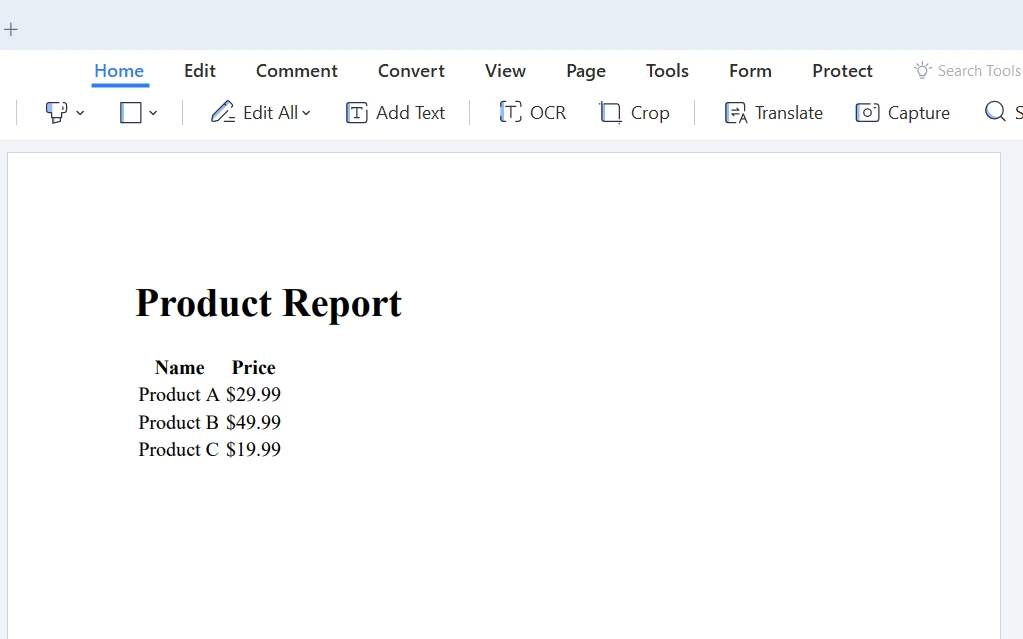
Wnioski
W całym tym samouczku omówiliśmy podstawy pętli "C# foreach", jej znaczenie, zastosowania i jak ją zaimplementować w kodzie. Przedstawiliśmy również IronPDF, potężną bibliotekę do pracy z plikami PDF w C#, i pokazaliśmy, jak używać pętli foreach w połączeniu z IronPDF do generowania raportu PDF na podstawie kolekcji danych.
Kontynuuj naukę i rozwijanie swoich umiejętności, a wkrótce będziesz mógł wykorzystać pełny potencjał pętli foreach i innych funkcji C# do tworzenia solidnych i wydajnych aplikacji. IronPDF oferuje bezpłatną wersję próbną do testowania biblioteki. Jeśli zdecydujesz się go kupić, licencja IronPDF zaczyna się od $999.