


C# For Each(开发者如何使用)

在本教程中,我们将涵盖"C# foreach"循环,这是开发人员的重要工具。 foreach 循环简化了遍历集合的过程,使对每个项目进行操作变得更容易,而无需担心底层细节。 我们将讨论 foreach 的重要性、使用案例,以及如何在您的 C# 代码中实现它。
foreach 循环简介
foreach 循环是开发者用来简洁且可读地遍历集合的强大工具。 它简化了代码并减少了错误的可能性,因为不需要手动管理集合项目的索引或数量。 在可读性和简单性方面,foreach 循环通常比传统的 for 循环更受欢迎。
foreach 的使用案例包括:
- 汇总集合中的值
- 在集合中搜索项目
- 修改集合中的元素
- 对集合中的每个元素执行操作
了解集合
在C#中有不同类型的集合用于将一组项目存储在单个对象中。 这些包括数组、列表、字典等。 foreach 循环是一个有用的工具,可以与任何实现 IEnumerable 或 IEnumerable<t> 接口的集合一起使用。
一些常见的集合类型包括:
- 数组:具有相同数据类型的固定大小的元素集合。
- 列表:具有相同数据类型的动态元素集合。
- 字典:键值对集合,其中每个键都是唯一的。
System.Collections.Generic 命名空间包含了用于集合操作的各种类型。
Implementing the foreach statement in C
现在我们对集合和 foreach 循环有了基本了解,让我们深入了解其语法,并看看它在 C# 中是如何工作的。
foreach 循环的语法
foreach (variableType variableName in collection)
{
    // Code to execute for each item
}
foreach (variableType variableName in collection)
{
// Code to execute for each item
}For Each variableName As variableType In collection
' Code to execute for each item
Next variableName在此,variableType 代表集合中项目的数据类型,variableName 是赋予当前循环项的名称(循环变量),collection 指的是您要遍历的集合。
示例
让我们来看一个例子,我们有一个整数列表,我们想找到列表中所有元素的总和。
using System;
using System.Collections.Generic;

class Program
{
    static void Main()
    {
        // Create a list of integers
        List<int> numbers = new List<int> { 1, 2, 3, 4, 5 };

        // Initialize a variable to store the sum
        int sum = 0;

        // Iterate through the list using foreach loop
        foreach (int number in numbers)
        {
            sum += number;
        }

        // Print the sum
        Console.WriteLine("The sum of the elements is: " + sum);
    }
}
using System;
using System.Collections.Generic;
class Program
{
static void Main()
{
// Create a list of integers
List<int> numbers = new List<int> { 1, 2, 3, 4, 5 };
// Initialize a variable to store the sum
int sum = 0;
// Iterate through the list using foreach loop
foreach (int number in numbers)
{
sum += number;
}
// Print the sum
Console.WriteLine("The sum of the elements is: " + sum);
}
}Imports System
Imports System.Collections.Generic
Friend Class Program
Shared Sub Main()
' Create a list of integers
Dim numbers As New List(Of Integer) From {1, 2, 3, 4, 5}
' Initialize a variable to store the sum
Dim sum As Integer = 0
' Iterate through the list using foreach loop
For Each number As Integer In numbers
sum += number
Next number
' Print the sum
Console.WriteLine("The sum of the elements is: " & sum)
End Sub
End Class输出
当循环执行时,将产生以下输出。
The sum of the elements is: 15在上面的例子中,我们首先创建一个名为 numbers 的整数列表,并初始化一个变量 sum 来存储元素的总和。 然后,我们使用 foreach 循环遍历列表,并将每个元素的值加到总和中。 最后,我们将总和打印到控制台。 此方法还可以适配以类似方式打印或操作其他集合。
变体和最佳实践
现在我们对如何使用 foreach 循环有了基本了解,让我们来讨论一些变体和最佳实践。
只读迭代: foreach 循环最适合用于只读迭代,因为在迭代时修改集合可能导致意外结果或运行时错误。 如果您需要在迭代期间修改集合,请考虑使用传统的 for 循环或创建一个具有所需修改的新集合。
使用 var 关键字: 与其显式指定集合中元素的数据类型,可以使用 var 关键字让编译器推断数据类型。 这可以使代码更简洁和更易于维护。
例:
foreach (var number in numbers)
{
    Console.WriteLine(number);
}
foreach (var number in numbers)
{
Console.WriteLine(number);
}For Each number In numbers
Console.WriteLine(number)
Next number遍历字典: 使用 foreach 循环遍历字典时,您需要处理 KeyValuePair 结构。 此结构表示字典中的键值对。
例:
Dictionary<string, int> ageDictionary = new Dictionary<string, int>
{
    { "Alice", 30 },
    { "Bob", 25 },
    { "Charlie", 22 }
};

foreach (KeyValuePair<string, int> entry in ageDictionary)
{
    Console.WriteLine($"{entry.Key} is {entry.Value} years old.");
}
Dictionary<string, int> ageDictionary = new Dictionary<string, int>
{
{ "Alice", 30 },
{ "Bob", 25 },
{ "Charlie", 22 }
};
foreach (KeyValuePair<string, int> entry in ageDictionary)
{
Console.WriteLine($"{entry.Key} is {entry.Value} years old.");
}Dim ageDictionary As New Dictionary(Of String, Integer) From {
{"Alice", 30},
{"Bob", 25},
{"Charlie", 22}
}
For Each entry As KeyValuePair(Of String, Integer) In ageDictionary
Console.WriteLine($"{entry.Key} is {entry.Value} years old.")
Next entryLINQ 与 foreach: LINQ(语言集成查询)是 C# 中的一项强大功能,它允许您以更声明的方式查询和操作数据。 您可以将 LINQ 与 foreach 循环结合使用,以创建更具表现力和效率的代码。
例:
using System;
using System.Collections.Generic;
using System.Linq;

class Program
{
    static void Main()
    {
        List<int> numbers = new List<int> { 1, 2, 3, 4, 5 };

        // Use LINQ to filter out even numbers
        var evenNumbers = numbers.Where(n => n % 2 == 0);

        // Iterate through the even numbers using foreach loop
        foreach (var number in evenNumbers)
        {
            Console.WriteLine(number);
        }
    }
}
using System;
using System.Collections.Generic;
using System.Linq;
class Program
{
static void Main()
{
List<int> numbers = new List<int> { 1, 2, 3, 4, 5 };
// Use LINQ to filter out even numbers
var evenNumbers = numbers.Where(n => n % 2 == 0);
// Iterate through the even numbers using foreach loop
foreach (var number in evenNumbers)
{
Console.WriteLine(number);
}
}
}Imports System
Imports System.Collections.Generic
Imports System.Linq
Friend Class Program
Shared Sub Main()
Dim numbers As New List(Of Integer) From {1, 2, 3, 4, 5}
' Use LINQ to filter out even numbers
Dim evenNumbers = numbers.Where(Function(n) n Mod 2 = 0)
' Iterate through the even numbers using foreach loop
For Each number In evenNumbers
Console.WriteLine(number)
Next number
End Sub
End Class为 C# foreach 教程添加 IronPDF 功能
在本节中,我们将通过引入IronPDF来扩展我们关于"C# foreach"循环的教程,这是一款流行的用于处理C#中的PDF文件的库。 我们将展示如何将 foreach 循环与 IronPDF 结合使用,以根据数据集合生成 PDF 报告。
IronPDF介绍
IronPDF是一个用于在C#中创建、编辑和提取PDF文件内容的强大库。 它提供了易于使用的API来处理PDF文档,是开发者希望在应用中添加PDF功能的绝佳选择。
IronPDF的一些关键特性包括:
- 从HTML、URL和图像生成PDF
- 编辑现有的PDF文档
- 从PDF中提取文本和图像
- 向PDF添加注释、表单字段和加密
安装 IronPDF
要开始使用IronPDF,你需要安装IronPDF NuGet包。 你可以按照IronPDF文档中的说明进行操作。
使用 IronPDF 和 foreach 生成 PDF 报告
在这个例子中,我们将使用 IronPDF 库和 foreach 循环创建一个包含产品列表、名称和价格的 PDF 报告。
首先,让我们创建一个简单的 Product 类来表示产品:
public class Product
{
    public string Name { get; set; }
    public decimal Price { get; set; }

    public Product(string name, decimal price)
    {
        Name = name;
        Price = price;
    }
}
public class Product
{
public string Name { get; set; }
public decimal Price { get; set; }
public Product(string name, decimal price)
{
Name = name;
Price = price;
}
}Public Class Product
Public Property Name() As String
Public Property Price() As Decimal
Public Sub New(ByVal name As String, ByVal price As Decimal)
Me.Name = name
Me.Price = price
End Sub
End Class接下来,让我们创建一个 Product 对象列表以生成 PDF 报告:
List<Product> products = new List<Product>
{
    new Product("Product A", 29.99m),
    new Product("Product B", 49.99m),
    new Product("Product C", 19.99m),
};
List<Product> products = new List<Product>
{
new Product("Product A", 29.99m),
new Product("Product B", 49.99m),
new Product("Product C", 19.99m),
};Dim products As New List(Of Product) From {
New Product("Product A", 29.99D),
New Product("Product B", 49.99D),
New Product("Product C", 19.99D)
}现在,我们可以使用 IronPDF 和 foreach 循环生成一个包含产品信息的 PDF 报告:
using System;
using System.Collections.Generic;
using IronPdf;
class Program
{
static void Main()
{
// Create a list of products
List<Product> products = new List<Product>
{
    new Product("Product A", 29.99m),
    new Product("Product B", 49.99m),
    new Product("Product C", 19.99m),
};
// Initialize an HTML string to store the report content
string htmlReport = "<table><tr><th>Product Name</th><th>Price</th></tr>";
// Iterate through the list of products using foreach loop
foreach (var product in products)
{
// Add product information to the HTML report
htmlReport += $"<tr><td>{product.Name}</td><td>${product.Price}</td></tr>";
}
// Close the table tag in the HTML report
htmlReport += "</table>";
// Create a new instance of the HtmlToPdf class
var htmlToPdf = new ChromePdfRenderer();
// Generate the PDF from the HTML report
var PDF = htmlToPdf.RenderHtmlAsPdf(htmlReport);
// Save the PDF to a file
PDF.SaveAs("ProductReport.PDF");
// Inform the user that the PDF has been generated
Console.WriteLine("ProductReport.PDF has been generated.");
}
}using System;
using System.Collections.Generic;
using IronPdf;
class Program
{
static void Main()
{
// Create a list of products
List<Product> products = new List<Product>
{
new Product("Product A", 29.99m),
new Product("Product B", 49.99m),
new Product("Product C", 19.99m),
};
// Initialize an HTML string to store the report content
string htmlReport = "<table><tr><th>Product Name</th><th>Price</th></tr>";
// Iterate through the list of products using foreach loop
foreach (var product in products)
{
// Add product information to the HTML report
htmlReport += $"<tr><td>{product.Name}</td><td>${product.Price}</td></tr>";
}
// Close the table tag in the HTML report
htmlReport += "</table>";
// Create a new instance of the HtmlToPdf class
var htmlToPdf = new ChromePdfRenderer();
// Generate the PDF from the HTML report
var PDF = htmlToPdf.RenderHtmlAsPdf(htmlReport);
// Save the PDF to a file
PDF.SaveAs("ProductReport.PDF");
// Inform the user that the PDF has been generated
Console.WriteLine("ProductReport.PDF has been generated.");
}
}Imports System
Imports System.Collections.Generic
Imports IronPdf
Friend Class Program
Shared Sub Main()
' Create a list of products
Dim products As New List(Of Product) From {
	New Product("Product A", 29.99D),
	New Product("Product B", 49.99D),
	New Product("Product C", 19.99D)
}
' Initialize an HTML string to store the report content
Dim htmlReport As String = "<table><tr><th>Product Name</th><th>Price</th></tr>"
' Iterate through the list of products using foreach loop
For Each product In products
' Add product information to the HTML report
htmlReport &= $"<tr><td>{product.Name}</td><td>${product.Price}</td></tr>"
Next product
' Close the table tag in the HTML report
htmlReport &= "</table>"
' Create a new instance of the HtmlToPdf class
Dim htmlToPdf = New ChromePdfRenderer()
' Generate the PDF from the HTML report
Dim PDF = htmlToPdf.RenderHtmlAsPdf(htmlReport)
' Save the PDF to a file
PDF.SaveAs("ProductReport.PDF")
' Inform the user that the PDF has been generated
Console.WriteLine("ProductReport.PDF has been generated.")
End Sub
End Class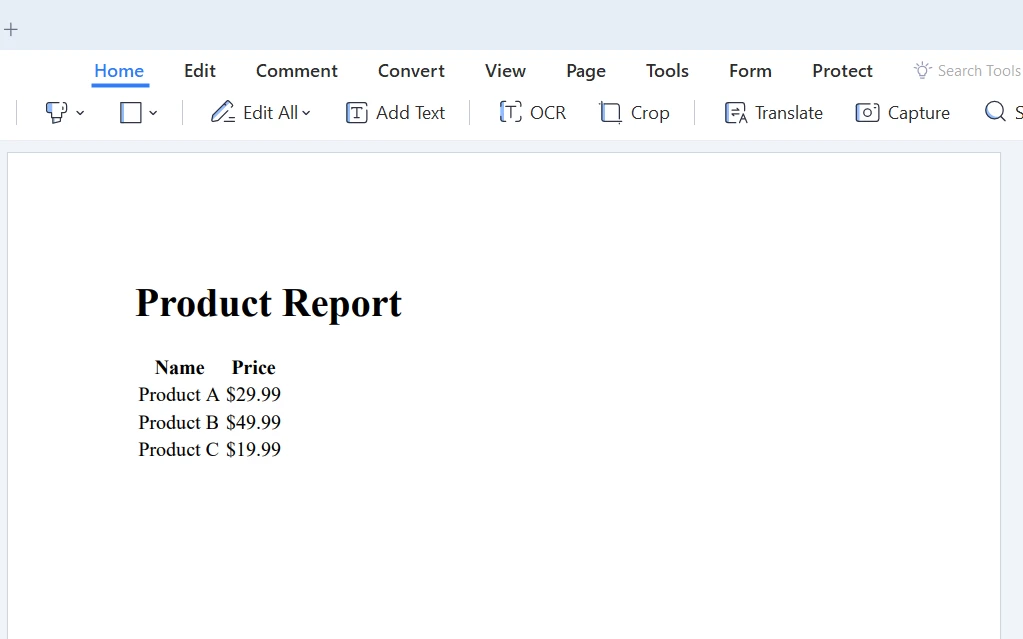
结论
在本教程中,我们探讨了"C# foreach"循环的基础知识、重要性、使用案例以及如何在代码中实现它。 我们还介绍了 IronPDF, 一个用于在 C# 中处理 PDF 文件的强大库,并演示了如何将 foreach 循环与 IronPDF 结合使用,以根据数据集合生成 PDF 报告。
继续学习并提高您的技能,您将很快能够充分利用 foreach 循环和其他 C# 功能来创建强大且高效的应用程序。 IronPDF提供了免费试用以测试库。 如果您决定购买,IronPDF 许可证始于 $999。
常见问题解答
什么是 C# foreach 循环?
C# foreach 循环是一种编程结构,简化了通过数组、列表和字典等集合进行迭代的过程。它允许开发人员以简洁且可读的方式对集合中的每个项目执行操作,而无需管理索引或计数。
如何在 C# 中使用 foreach 循环创建 PDF 报告?
您可以结合使用 foreach 循环和 IronPDF 来生成 PDF 报告。通过迭代数据集合(如产品列表),可以动态创建 HTML 报告字符串,然后使用 IronPDF 的 ChromePdfRenderer 将其转换为 PDF。
C# foreach 循环的使用场景是什么?
foreach 循环的常见使用场景包括对集合中的值进行求和、搜索项目、修改元素以及对集合的每个元素执行操作。
C# 中的 foreach 循环与 for 循环有什么不同?
foreach 循环因其可读性和简洁性而受到偏爱。与 for 循环不同,它不需要手动管理集合的索引或计数。foreach 循环最适合用于只读迭代。
如何在 foreach 循环中使用 var 关键字?
您可以在 foreach 循环中使用 var 关键字,让编译器推断集合中元素的数据类型,使代码更加简洁易于维护。
在使用 foreach 循环时可以修改集合吗?
foreach 循环不适合在迭代过程中修改集合,因为这可能导致运行时错误。如果需要修改,请考虑使用 for 循环或创建新的修改后的集合。
如何在 C# 中使用 foreach 循环处理字典迭代?
在 C# 中,可以通过利用 KeyValuePair 结构同时高效访问键和值来使用 foreach 循环迭代字典。
foreach 循环可以迭代哪些类型的集合?
foreach 循环可以遍历任何实现了 IEnumerable 或 IEnumerable 接口的集合。这包括 C# 中的数组、列表、字典以及其他集合类型。
C# foreach 循环的语法是什么?
C# foreach 循环的语法是:foreach (variableType variableName in collection) { // 对每个项目执行的代码 },其中 variableType 是数据类型,variableName 是循环变量,而 collection 是要迭代的集合。
如何在 C# 项目中安装 PDF 库?
可以通过添加 IronPDF NuGet 包来在 C# 项目中安装 IronPDF。安装说明可以在 IronPDF 文档中找到。










 免费开始
免费开始 免费开始
免费开始 预定免费现场演示
















