using IronPdf;

// Disable local disk access or cross-origin requests
Installation.EnableWebSecurity = true;

// Instantiate Renderer
var renderer = new ChromePdfRenderer();

// Create a PDF from a HTML string using C#
var pdf = renderer.RenderHtmlAsPdf("<h1>Hello World</h1>");

// Export to a file or Stream
pdf.SaveAs("output.pdf");

// Advanced Example with HTML Assets
// Load external html assets: Images, CSS and JavaScript.
// An optional BasePath 'C:\site\assets\' is set as the file location to load assets from
var myAdvancedPdf = renderer.RenderHtmlAsPdf("<img src='icons/iron.png'>", @"C:\site\assets\");
myAdvancedPdf.SaveAs("html-with-assets.pdf");
using IronPdf;// Disable local disk access or cross-origin requestsInstallation.EnableWebSecurity = true;// Instantiate Renderervar renderer = new ChromePdfRenderer();// Create a PDF from a HTML string using C#var pdf = renderer.RenderHtmlAsPdf("<h1>Hello World</h1>");// Export to a file or Streampdf.SaveAs("output.pdf");// Advanced Example with HTML Assets// Load external html assets: Images, CSS and JavaScript.// An optional BasePath 'C:\site\assets\' is set as the file location to load assets fromvar myAdvancedPdf = renderer.RenderHtmlAsPdf("<img src='icons/iron.png'>", @"C:\site\assets\");myAdvancedPdf.SaveAs("html-with-assets.pdf");
PM >Install-Package IronPdf
Install-Package IronPdf
AKTUALNOŚCI DLA PROGRAMISTÓW
Obiekty daty i czasu w języku C# (jak to działa dla programistów)
`DateTime` obiekty w C# sa fundamentalne do pracy z datami i czasami w aplikacjach .NET Framework. Zapewniaja solidny zestaw funkcjonalności do manipulowania, formatowania i porownywania dat i czasow.
Artykul ten ma na celu przedstawienie kompleksowego przegladu obiektow `DateTime` w C#, obejmujacego ich tworzenie, manipulacje, formatowanie oraz typowe przypadki uzycia. Na koncu artykułu zbadamy również, jak [IronPDF](/) od [Iron Software](https://ironsoftware.com/) może generować dokument PDF na biezaco w aplikacjach C#.
## Tworzenie obiektow DateTime
Tworzenie obiektu `DateTime` w C# jest proste. Istnieje kilka konstruktorow dostepnych do inicjalizacji obiektu `DateTime` z roznymi parametrami:
```csharp
// Current date and time
DateTime currentDateTime = DateTime.Now;
// Specific date and time
DateTime specificDateTime = new DateTime(2024, 3, 16, 10, 30, 0);
// Date only
DateTime dateOnly = DateTime.Today;
// Date and time in UTC
DateTime utcDateTime = DateTime.UtcNow;
```
## Manipulacja obiektami `DateTime`
Obiekty `DateTime` zapewniaja rozne metody manipulacji datami i czasami, takie jak dodawanie lub odejmowanie przedzialow czasu, wyciaganie komponentow oraz konwersja miedzy strefami czasowymi.
```csharp
DateTime now = DateTime.Now;
// Adding days
DateTime futureDate = now.AddDays(7);
// Subtracting hours
DateTime pastTime = now.AddHours(-3);
// Getting components
int year = now.Year;
int month = now.Month;
int day = now.Day;
int hour = now.Hour;
int minute = now.Minute;
int second = now.Second;
// Converting between time zones
DateTime utcTime = DateTime.UtcNow;
DateTime localTime = utcTime.ToLocalTime();
```
## Formatowanie obiektow `DateTime`
Obiekty `DateTime` moga byc formatowane do lancuchow znakow uzywajac roznych specyfikatorow formatu, aby przedstawiac je w wymaganym formacie.
```csharp
DateTime dateTime = DateTime.Now;
// Standard date and time format
string standardFormat = dateTime.ToString("G");
// Custom format
string customFormat = dateTime.ToString("dd/MM/yyyy HH:mm:ss");
// Format for sorting
string sortableFormat = dateTime.ToString("yyyy-MM-ddTHH:mm:ss");
```
## Porownywanie obiektow `DateTime`
C# zapewnia standardowe operatory porownania (`<`, `>`, `<=`, `>=`, `==`, `!=`), ktore moga byc uzywane do bezposredniego porownywania dwoch obiektow `DateTime`. Te operatory porownuja podstawowe tiksy obiektow `DateTime`, ktore reprezentuja liczby 100-nanosekundowych przedzialow, jakie uplynely od 1 stycznia 0001 roku, 00:00:00,000 w kalendarzu gregorianskim.
Oto przykład demonstrujacy użycie operatorow porownawczych:
```csharp
DateTime date1 = DateTime.Now;
DateTime date2 = DateTime.Now.AddDays(1);
if (date1 < date2)
{
Console.WriteLine("date1 is earlier than date2.");
}
else if (date1 > date2)
{
Console.WriteLine("date1 is later than date2.");
}
else
{
Console.WriteLine("date1 is equal to date2.");
}
```
### Uzywajac metody `DateTime.Compare` C#
Oprocz operatorow porownania, obiekty `DateTime` rowniez zapewniaja metody do porownywania wartosci wzglednych miedzy tymi obiektami. Te metody oferuja wieksza elastycznosc i czytelnosc w niektorych scenariuszach. Metoda `CompareTo()` porownuje dwa obiekty `DateTime` i zwraca wartosc calkowita wskazujaca, czy jeden jest wczesniejszy, pozniejszy, czy taki sam jak drugi.
```csharp
DateTime date1 = DateTime.Now;
DateTime date2 = DateTime.Now.AddDays(1);
int result = date1.CompareTo(date2);
if (result < 0)
{
Console.WriteLine("date1 is earlier than date2.");
}
else if (result > 0)
{
Console.WriteLine("date1 is later than date2.");
}
else
{
Console.WriteLine("date1 is equal to date2.");
}
```
### Porownywanie obiektow `DateTime` z tolerancja
Aby porownac obiekty `DateTime`, zwlaszcza w przypadku obliczen z udzialem przedzialow czasu, wazne jest uwzglednienie poziomu tolerancji z powodu potencjalnych roznic w precyzji.
Mozna to osiagnac porownujac absolutna roznice miedzy dwoma wartosciami `DateTime` z wstepnie zdefiniowanym progiem tolerancji.
```csharp
class Program
{
public static void Main()
{
DateTime date1 = DateTime.Now;
DateTime date2 = DateTime.Now.AddMilliseconds(10);
TimeSpan tolerance = TimeSpan.FromMilliseconds(5);
bool isEqual = Math.Abs((date1 - date2).TotalMilliseconds) <= tolerance.TotalMilliseconds;
if (isEqual)
{
Console.WriteLine("date1 is considered equal to date2 within the tolerance.");
}
else
{
Console.WriteLine("date1 is not equal to date2 within the tolerance.");
}
}
}
```
### Obsluga stref czasowych i letniego czasu
Obiekty `DateTime` w C# moga reprezentowac zarowno czas lokalny, jak i skoordynowany czas uniwersalny (UTC). Istotne jest aby uwzgledniac konwersje miedzy strefami czasowymi, zwlaszcza przy pracy z aplikacjami globalnymi.
```csharp
DateTime localTime = DateTime.Now;
DateTime utcTime = DateTime.UtcNow;
Console.WriteLine("Local Time: " + localTime);
Console.WriteLine("UTC Time: " + utcTime);
```
## IronPDF to Generate PDF documents in C#
IronPDF od Iron Software to wydajna i łatwa w użyciu biblioteka do generowania dokumentów PDF. Możesz go zainstalować za pomoca menedzera paczek NuGet:
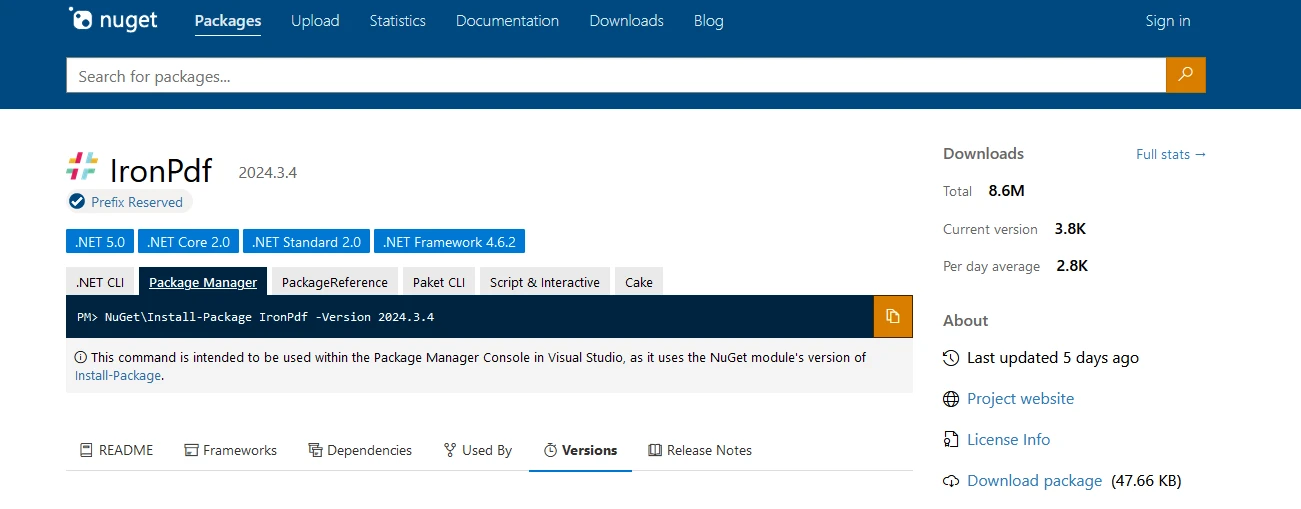
```shell
:InstallCmd dotnet add package IronPdf --version 2024.3.4
```
Lub z Visual Studio, jak pokazano poniżej:

Teraz zanurzmy sie w generowanie PDF, aby zademonstrowac obiekt DateTime.
```csharp
using IronPdf;
class Program
{
static void Main()
{
Console.WriteLine("-----------Iron Software-------------");
// Create a new instance of ChromePdfRenderer
var renderer = new ChromePdfRenderer();
// HTML content for the PDF
var content = "<h1> Iron Software is Awesome </h1> Made with IronPDF!";
content += "<h2>Demo Datetime Objects in C#</h2>";
// Current date and time
content += "<h3>Current date and time</h3>";
DateTime currentDateTime = DateTime.Now;
content += $"<p>Current date and time: {currentDateTime:U}</p>";
Console.WriteLine($"Current date and time: {currentDateTime:U}");
// Specific date and time
content += "<h3>Specific date and time</h3>";
DateTime specificDateTime = new DateTime(2024, 3, 16, 10, 30, 0);
content += $"<p>Specific date and time: {specificDateTime:U}</p>";
Console.WriteLine($"Specific date and time: {specificDateTime:U}");
// Date only
content += "<h3>Date Only</h3>";
DateTime dateOnly = DateTime.Today;
content += $"<p>Date only: {dateOnly:U}</p>";
Console.WriteLine($"Date only: {dateOnly:U}");
// Date and time in UTC
content += "<h3>Date and time in UTC</h3>";
DateTime utcDateTime = DateTime.UtcNow;
content += $"<p>Date and time in UTC: {utcDateTime:U}</p>";
Console.WriteLine($"Date and time in UTC: {utcDateTime:U}");
// Compare dates with Operators
content += "<h3>Compare dates with Operators</h3>";
DateTime date1 = DateTime.Now;
DateTime date2 = DateTime.Now.AddDays(1);
content += $"<p>Compare date1 {date1:d}, date2 {date2:d}: {CompareDates(date1, date2)}</p>";
Console.WriteLine($"Compare date1 {date1:U}, date2 {date2:U}: {CompareDates(date1, date2)}");
// Compare dates with Compare Method
content += "<h3>Compare dates with Compare Method</h3>";
content += $"<p>Compare date1 {date1:d}, date2 {date2:d}: {CompareDatesWithCompare(date1, date2)}</p>";
Console.WriteLine($"Compare date1 {date1:U}, date2 {date2:U}: {CompareDatesWithCompare(date1, date2)}");
// Render the content to PDF
var pdf = renderer.RenderHtmlAsPdf(content);
// Save the PDF to the output file
pdf.SaveAs("outputDate.pdf");
}
// Compare two dates using CompareTo method
public static string CompareDatesWithCompare(DateTime date1, DateTime date2)
{
int result = date1.CompareTo(date2);
string resultString;
if (result < 0)
{
resultString = "date1 is earlier than date2.";
Console.WriteLine(resultString);
}
else if (result > 0)
{
resultString = "date1 is later than date2.";
Console.WriteLine(resultString);
}
else
{
resultString = "date1 is equal to date2.";
Console.WriteLine(resultString);
}
return resultString;
}
// Compare two dates using basic comparison operators
public static string CompareDates(DateTime date1, DateTime date2)
{
string result;
if (CheckLessor(date1, date2))
{
result = "date1 is earlier than date2.";
Console.WriteLine(result);
}
else if (CheckGreater(date1, date2))
{
result = "date1 is later than date2.";
Console.WriteLine(result);
}
else
{
result = "date1 is equal to date2.";
Console.WriteLine(result);
}
return result;
}
// Helper method to check if the first date is greater than the second date
public static bool CheckGreater(DateTime date1, DateTime date2)
{
return date1 > date2;
}
// Helper method to check if the first date is less than the second date
public static bool CheckLessor(DateTime date1, DateTime date2)
{
return date1 < date2;
}
}
```
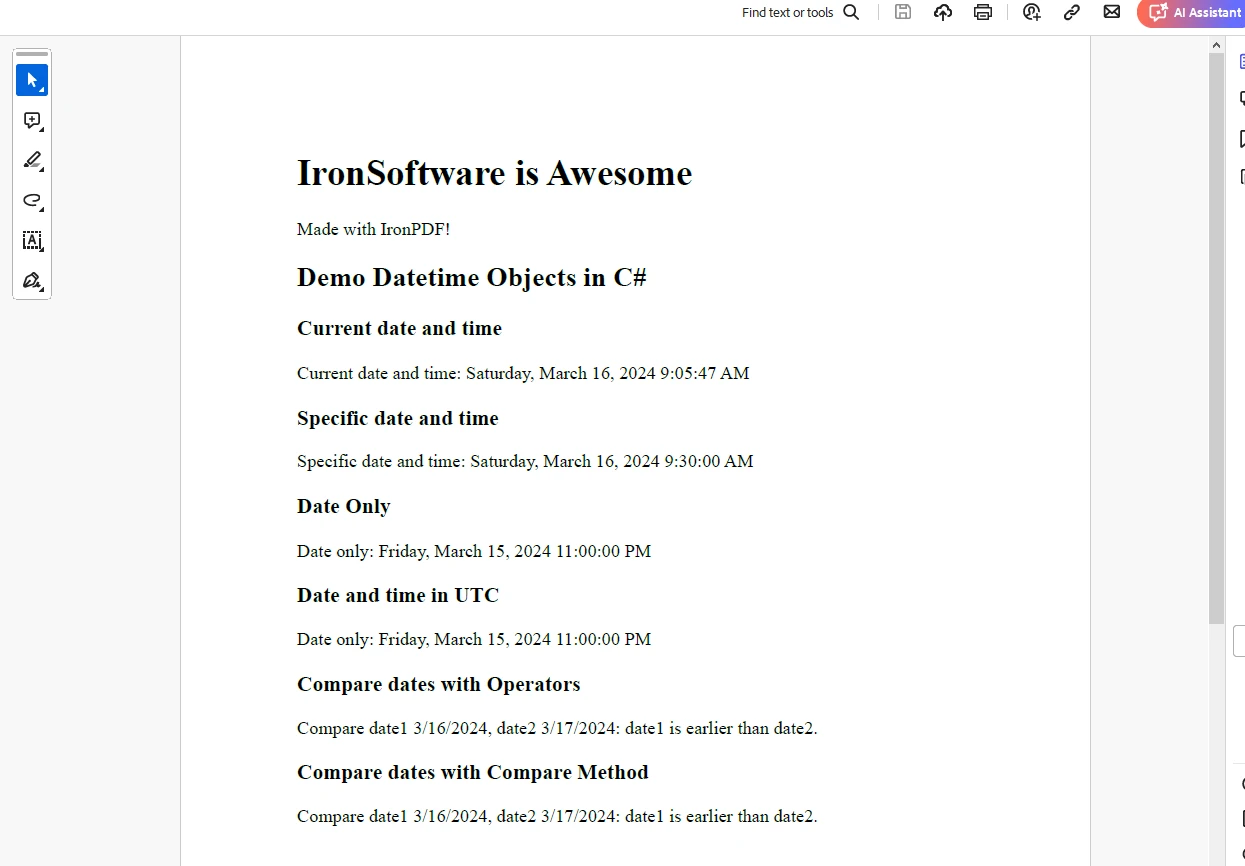
Nastepujace wyjscie pokazuje PDF wygenerowany z obiektami `DateTime`:
## Licencja próbna IronPDF
[IronPDF](trial-license) wymaga licencji próbnej do pełnej funkcjonalności. Podaj ID e-mail, aby wygenerować klucz licencyjny, ktory zostanie dostarczony na Twoj e-mail.
```json
"IronPdf.LicenseKey": "<Your Key>"
```
Umiesc klucz licencyjny w pliku `AppSettings.json`.
## Wnioski
Obiekty `DateTime` w C# zapewniaja potężny sposób pracy z datami i czasami w aplikacjach .NET. Oferuja szeroka game funkcjonalności do tworzenia, manipulowania, formatowania i porownywania wartosci dat i czasow. Zrozumienie, jak efektywnie korzystać z obiektów `DateTime`, jest niezbędne do budowania niezawodnych i dokładnych funkcji dat i godzin w aplikacjach C#.
Dzieki wykorzystaniu możliwości obiektów `DateTime`, programiści mogą zapewnić, że ich aplikacje prawidłowo obsługują daty i czasy, niezależnie od konkretnych wymagań czy scenariuszy, z którymi się spotykają.
Niezależnie od tego, czy chodzi o obliczanie czasu trwania, planowanie zadań czy wyświetlanie dat i godzin użytkownikom, obiekty `DateTime` odgrywają kluczową rolę w wielu aspektach programowania C# związanych z zarządzaniem datami i czasami.
DateTime obiekty w C# sa fundamentalne do pracy z datami i czasami w aplikacjach .NET Framework. Zapewniaja solidny zestaw funkcjonalności do manipulowania, formatowania i porownywania dat i czasow.
Artykul ten ma na celu przedstawienie kompleksowego przegladu obiektow DateTime w C#, obejmujacego ich tworzenie, manipulacje, formatowanie oraz typowe przypadki uzycia. Na koncu artykułu zbadamy również, jak IronPDF od Iron Software może generować dokument PDF na biezaco w aplikacjach C#.
Tworzenie obiektow DateTime
Tworzenie obiektu DateTime w C# jest proste. Istnieje kilka konstruktorow dostepnych do inicjalizacji obiektu DateTime z roznymi parametrami:
// Current date and timeDateTime currentDateTime = DateTime.Now;// Specific date and timeDateTime specificDateTime = new DateTime(2024, 3, 16, 10, 30, 0);// Date onlyDateTime dateOnly = DateTime.Today;// Date and time in UTCDateTime utcDateTime = DateTime.UtcNow;
// Current date and time
DateTime currentDateTime = DateTime.Now;
// Specific date and time
DateTime specificDateTime = new DateTime(2024, 3, 16, 10, 30, 0);
// Date only
DateTime dateOnly = DateTime.Today;
// Date and time in UTC
DateTime utcDateTime = DateTime.UtcNow;
' Current date and timeDim currentDateTime AsDateTime = DateTime.Now' Specific date and timeDim specificDateTime As New DateTime(2024, 3, 16, 10, 30, 0)' Date onlyDim dateOnly AsDateTime = DateTime.Today' Date and time in UTCDim utcDateTime AsDateTime = DateTime.UtcNow
' Current date and time
Dim currentDateTime As DateTime = DateTime.Now
' Specific date and time
Dim specificDateTime As New DateTime(2024, 3, 16, 10, 30, 0)
' Date only
Dim dateOnly As DateTime = DateTime.Today
' Date and time in UTC
Dim utcDateTime As DateTime = DateTime.UtcNow
Manipulacja obiektami DateTime
Obiekty DateTime zapewniaja rozne metody manipulacji datami i czasami, takie jak dodawanie lub odejmowanie przedzialow czasu, wyciaganie komponentow oraz konwersja miedzy strefami czasowymi.
DateTime now = DateTime.Now;// Adding daysDateTime futureDate = now.AddDays(7);// Subtracting hoursDateTime pastTime = now.AddHours(-3);// Getting componentsint year = now.Year;int month = now.Month;int day = now.Day;int hour = now.Hour;int minute = now.Minute;int second = now.Second;// Converting between time zonesDateTime utcTime = DateTime.UtcNow;DateTime localTime = utcTime.ToLocalTime();
DateTime now = DateTime.Now;
// Adding days
DateTime futureDate = now.AddDays(7);
// Subtracting hours
DateTime pastTime = now.AddHours(-3);
// Getting components
int year = now.Year;
int month = now.Month;
int day = now.Day;
int hour = now.Hour;
int minute = now.Minute;
int second = now.Second;
// Converting between time zones
DateTime utcTime = DateTime.UtcNow;
DateTime localTime = utcTime.ToLocalTime();
Dim now AsDateTime = DateTime.Now' Adding daysDim futureDate AsDateTime = now.AddDays(7)' Subtracting hoursDim pastTime AsDateTime = now.AddHours(-3)' Getting componentsDim year AsInteger = now.YearDim month AsInteger = now.MonthDim day AsInteger = now.DayDim hour AsInteger = now.HourDim minute AsInteger = now.MinuteDim second AsInteger = now.Second' Converting between time zonesDim utcTime AsDateTime = DateTime.UtcNowDim localTime AsDateTime = utcTime.ToLocalTime()
Dim now As DateTime = DateTime.Now
' Adding days
Dim futureDate As DateTime = now.AddDays(7)
' Subtracting hours
Dim pastTime As DateTime = now.AddHours(-3)
' Getting components
Dim year As Integer = now.Year
Dim month As Integer = now.Month
Dim day As Integer = now.Day
Dim hour As Integer = now.Hour
Dim minute As Integer = now.Minute
Dim second As Integer = now.Second
' Converting between time zones
Dim utcTime As DateTime = DateTime.UtcNow
Dim localTime As DateTime = utcTime.ToLocalTime()
Formatowanie obiektow DateTime
Obiekty DateTime moga byc formatowane do lancuchow znakow uzywajac roznych specyfikatorow formatu, aby przedstawiac je w wymaganym formacie.
DateTime dateTime = DateTime.Now;// Standard date and time formatstring standardFormat = dateTime.ToString("G");// Custom formatstring customFormat = dateTime.ToString("dd/MM/yyyy HH:mm:ss");// Format for sortingstring sortableFormat = dateTime.ToString("yyyy-MM-ddTHH:mm:ss");
DateTime dateTime = DateTime.Now;
// Standard date and time format
string standardFormat = dateTime.ToString("G");
// Custom format
string customFormat = dateTime.ToString("dd/MM/yyyy HH:mm:ss");
// Format for sorting
string sortableFormat = dateTime.ToString("yyyy-MM-ddTHH:mm:ss");
ImportsSystemDim dateTime AsDateTime = DateTime.Now' Standard date and time formatDim standardFormat AsString = dateTime.ToString("G")' Custom formatDim customFormat AsString = dateTime.ToString("dd/MM/yyyy HH:mm:ss")' Format for sortingDim sortableFormat AsString = dateTime.ToString("yyyy-MM-ddTHH:mm:ss")
Imports System

Dim dateTime As DateTime = DateTime.Now
' Standard date and time format
Dim standardFormat As String = dateTime.ToString("G")
' Custom format
Dim customFormat As String = dateTime.ToString("dd/MM/yyyy HH:mm:ss")
' Format for sorting
Dim sortableFormat As String = dateTime.ToString("yyyy-MM-ddTHH:mm:ss")
Porownywanie obiektow DateTime
C# zapewnia standardowe operatory porownania (<, >, <=, >=, ==, !=), ktore moga byc uzywane do bezposredniego porownywania dwoch obiektow DateTime. Te operatory porownuja podstawowe tiksy obiektow DateTime, ktore reprezentuja liczby 100-nanosekundowych przedzialow, jakie uplynely od 1 stycznia 0001 roku, 00:00:00,000 w kalendarzu gregorianskim.
Oto przykład demonstrujacy użycie operatorow porownawczych:
DateTime date1 = DateTime.Now;DateTime date2 = DateTime.Now.AddDays(1);if (date1 < date2){Console.WriteLine("date1 is earlier than date2.");}else if (date1 > date2){Console.WriteLine("date1 is later than date2.");}else{Console.WriteLine("date1 is equal to date2.");}
DateTime date1 = DateTime.Now;
DateTime date2 = DateTime.Now.AddDays(1);
if (date1 < date2)
{
    Console.WriteLine("date1 is earlier than date2.");
}
else if (date1 > date2)
{
    Console.WriteLine("date1 is later than date2.");
}
else
{
    Console.WriteLine("date1 is equal to date2.");
}
Dim date1 AsDateTime = DateTime.NowDim date2 AsDateTime = DateTime.Now.AddDays(1)If date1 < date2 ThenConsole.WriteLine("date1 is earlier than date2.")ElseIf date1 > date2 ThenConsole.WriteLine("date1 is later than date2.")ElseConsole.WriteLine("date1 is equal to date2.")End If
Dim date1 As DateTime = DateTime.Now
Dim date2 As DateTime = DateTime.Now.AddDays(1)
If date1 < date2 Then
	Console.WriteLine("date1 is earlier than date2.")
ElseIf date1 > date2 Then
	Console.WriteLine("date1 is later than date2.")
Else
	Console.WriteLine("date1 is equal to date2.")
End If
Uzywajac metody DateTime.Compare C#
Oprocz operatorow porownania, obiekty DateTime rowniez zapewniaja metody do porownywania wartosci wzglednych miedzy tymi obiektami. Te metody oferuja wieksza elastycznosc i czytelnosc w niektorych scenariuszach. Metoda CompareTo() porownuje dwa obiekty DateTime i zwraca wartosc calkowita wskazujaca, czy jeden jest wczesniejszy, pozniejszy, czy taki sam jak drugi.
DateTime date1 = DateTime.Now;DateTime date2 = DateTime.Now.AddDays(1);int result = date1.CompareTo(date2);if (result < 0){Console.WriteLine("date1 is earlier than date2.");}else if (result > 0){Console.WriteLine("date1 is later than date2.");}else{Console.WriteLine("date1 is equal to date2.");}
DateTime date1 = DateTime.Now;
DateTime date2 = DateTime.Now.AddDays(1);
int result = date1.CompareTo(date2);
if (result < 0)
{
    Console.WriteLine("date1 is earlier than date2.");
}
else if (result > 0)
{
    Console.WriteLine("date1 is later than date2.");
}
else
{
    Console.WriteLine("date1 is equal to date2.");
}
Dim date1 AsDateTime = DateTime.NowDim date2 AsDateTime = DateTime.Now.AddDays(1)Dim result AsInteger = date1.CompareTo(date2)If result < 0 ThenConsole.WriteLine("date1 is earlier than date2.")ElseIf result > 0 ThenConsole.WriteLine("date1 is later than date2.")ElseConsole.WriteLine("date1 is equal to date2.")End If
Dim date1 As DateTime = DateTime.Now
Dim date2 As DateTime = DateTime.Now.AddDays(1)
Dim result As Integer = date1.CompareTo(date2)
If result < 0 Then
	Console.WriteLine("date1 is earlier than date2.")
ElseIf result > 0 Then
	Console.WriteLine("date1 is later than date2.")
Else
	Console.WriteLine("date1 is equal to date2.")
End If
Porownywanie obiektow DateTime z tolerancja
Aby porownac obiekty DateTime, zwlaszcza w przypadku obliczen z udzialem przedzialow czasu, wazne jest uwzglednienie poziomu tolerancji z powodu potencjalnych roznic w precyzji.
Mozna to osiagnac porownujac absolutna roznice miedzy dwoma wartosciami DateTime z wstepnie zdefiniowanym progiem tolerancji.
class Program{ public static voidMain() { DateTime date1 = DateTime.Now; DateTime date2 = DateTime.Now.AddMilliseconds(10); TimeSpan tolerance = TimeSpan.FromMilliseconds(5); bool isEqual = Math.Abs((date1 - date2).TotalMilliseconds) <= tolerance.TotalMilliseconds; if (isEqual) {Console.WriteLine("date1 is considered equal to date2 within the tolerance."); } else {Console.WriteLine("date1 is not equal to date2 within the tolerance."); } }}
class Program
{
    public static void Main()
    {
        DateTime date1 = DateTime.Now;
        DateTime date2 = DateTime.Now.AddMilliseconds(10);
        TimeSpan tolerance = TimeSpan.FromMilliseconds(5);
        bool isEqual = Math.Abs((date1 - date2).TotalMilliseconds) <= tolerance.TotalMilliseconds;
        if (isEqual)
        {
            Console.WriteLine("date1 is considered equal to date2 within the tolerance.");
        }
        else
        {
            Console.WriteLine("date1 is not equal to date2 within the tolerance.");
        }
    }
}
Friend Class Program PublicShared Sub Main() Dim date1 AsDateTime = DateTime.Now Dim date2 AsDateTime = DateTime.Now.AddMilliseconds(10) Dim tolerance AsTimeSpan = TimeSpan.FromMilliseconds(5) Dim isEqual AsBoolean = Math.Abs((date1.Subtract(date2)).TotalMilliseconds) <= tolerance.TotalMilliseconds If isEqual ThenConsole.WriteLine("date1 is considered equal to date2 within the tolerance.") ElseConsole.WriteLine("date1 is not equal to date2 within the tolerance.") End If End SubEnd Class
Friend Class Program
	Public Shared Sub Main()
		Dim date1 As DateTime = DateTime.Now
		Dim date2 As DateTime = DateTime.Now.AddMilliseconds(10)
		Dim tolerance As TimeSpan = TimeSpan.FromMilliseconds(5)
		Dim isEqual As Boolean = Math.Abs((date1.Subtract(date2)).TotalMilliseconds) <= tolerance.TotalMilliseconds
		If isEqual Then
			Console.WriteLine("date1 is considered equal to date2 within the tolerance.")
		Else
			Console.WriteLine("date1 is not equal to date2 within the tolerance.")
		End If
	End Sub
End Class
Obsluga stref czasowych i letniego czasu
Obiekty DateTime w C# moga reprezentowac zarowno czas lokalny, jak i skoordynowany czas uniwersalny (UTC). Istotne jest aby uwzgledniac konwersje miedzy strefami czasowymi, zwlaszcza przy pracy z aplikacjami globalnymi.
Dim localTime As DateTime = DateTime.Now
Dim utcTime As DateTime = DateTime.UtcNow
Console.WriteLine("Local Time: " & localTime)
Console.WriteLine("UTC Time: " & utcTime)
IronPDF to Generate PDF documents in C#
IronPDF od Iron Software to wydajna i łatwa w użyciu biblioteka do generowania dokumentów PDF. Możesz go zainstalować za pomoca menedzera paczek NuGet:
> dotnet add package IronPdf --version 2024.3.4
dotnet add package IronPdf --version 2024.3.4
Lub z Visual Studio, jak pokazano poniżej:
Teraz zanurzmy sie w generowanie PDF, aby zademonstrowac obiekt DateTime.
using IronPdf;class Program{ static voidMain() {Console.WriteLine("-----------Iron Software-------------"); // Create a new instance of ChromePdfRenderer var renderer = new ChromePdfRenderer(); // HTML content for the PDF var content = "<h1> Iron Software is Awesome </h1> Made with IronPDF!"; content += "<h2>Demo Datetime Objects in C#</h2>"; // Current date and time content += "<h3>Current date and time</h3>"; DateTime currentDateTime = DateTime.Now; content += $"<p>Current date and time: {currentDateTime:U}</p>";Console.WriteLine($"Current date and time: {currentDateTime:U}"); // Specific date and time content += "<h3>Specific date and time</h3>"; DateTime specificDateTime = new DateTime(2024, 3, 16, 10, 30, 0); content += $"<p>Specific date and time: {specificDateTime:U}</p>";Console.WriteLine($"Specific date and time: {specificDateTime:U}"); // Date only content += "<h3>Date Only</h3>"; DateTime dateOnly = DateTime.Today; content += $"<p>Date only: {dateOnly:U}</p>";Console.WriteLine($"Date only: {dateOnly:U}"); // Date and time in UTC content += "<h3>Date and time in UTC</h3>"; DateTime utcDateTime = DateTime.UtcNow; content += $"<p>Date and time in UTC: {utcDateTime:U}</p>";Console.WriteLine($"Date and time in UTC: {utcDateTime:U}"); // Compare dates with Operators content += "<h3>Compare dates with Operators</h3>"; DateTime date1 = DateTime.Now; DateTime date2 = DateTime.Now.AddDays(1); content += $"<p>Compare date1 {date1:d}, date2 {date2:d}: {CompareDates(date1, date2)}</p>";Console.WriteLine($"Compare date1 {date1:U}, date2 {date2:U}: {CompareDates(date1, date2)}"); // Compare dates with Compare Method content += "<h3>Compare dates with Compare Method</h3>"; content += $"<p>Compare date1 {date1:d}, date2 {date2:d}: {CompareDatesWithCompare(date1, date2)}</p>";Console.WriteLine($"Compare date1 {date1:U}, date2 {date2:U}: {CompareDatesWithCompare(date1, date2)}"); // Render the content to PDF var pdf = renderer.RenderHtmlAsPdf(content); // Save the PDF to the output file pdf.SaveAs("outputDate.pdf"); } // Compare two dates using CompareTo method public static stringCompareDatesWithCompare(DateTime date1, DateTime date2) { int result = date1.CompareTo(date2); string resultString; if (result < 0) { resultString = "date1 is earlier than date2.";Console.WriteLine(resultString); } else if (result > 0) { resultString = "date1 is later than date2.";Console.WriteLine(resultString); } else { resultString = "date1 is equal to date2.";Console.WriteLine(resultString); } return resultString; } // Compare two dates using basic comparison operators public static stringCompareDates(DateTime date1, DateTime date2) { string result; if (CheckLessor(date1, date2)) { result = "date1 is earlier than date2.";Console.WriteLine(result); } else if (CheckGreater(date1, date2)) { result = "date1 is later than date2.";Console.WriteLine(result); } else { result = "date1 is equal to date2.";Console.WriteLine(result); } return result; } // Helper method to check if the first date is greater than the second date public static boolCheckGreater(DateTime date1, DateTime date2) { return date1 > date2; } // Helper method to check if the first date is less than the second date public static boolCheckLessor(DateTime date1, DateTime date2) { return date1 < date2; }}
using IronPdf;

class Program
{
    static void Main()
    {
        Console.WriteLine("-----------Iron Software-------------");

        // Create a new instance of ChromePdfRenderer
        var renderer = new ChromePdfRenderer();

        // HTML content for the PDF
        var content = "<h1> Iron Software is Awesome </h1> Made with IronPDF!";
        content += "<h2>Demo Datetime Objects in C#</h2>";

        // Current date and time
        content += "<h3>Current date and time</h3>";
        DateTime currentDateTime = DateTime.Now;
        content += $"<p>Current date and time: {currentDateTime:U}</p>";
        Console.WriteLine($"Current date and time: {currentDateTime:U}");

        // Specific date and time
        content += "<h3>Specific date and time</h3>";
        DateTime specificDateTime = new DateTime(2024, 3, 16, 10, 30, 0);
        content += $"<p>Specific date and time: {specificDateTime:U}</p>";
        Console.WriteLine($"Specific date and time: {specificDateTime:U}");

        // Date only
        content += "<h3>Date Only</h3>";
        DateTime dateOnly = DateTime.Today;
        content += $"<p>Date only: {dateOnly:U}</p>";
        Console.WriteLine($"Date only: {dateOnly:U}");

        // Date and time in UTC
        content += "<h3>Date and time in UTC</h3>";
        DateTime utcDateTime = DateTime.UtcNow;
        content += $"<p>Date and time in UTC: {utcDateTime:U}</p>";
        Console.WriteLine($"Date and time in UTC: {utcDateTime:U}");

        // Compare dates with Operators
        content += "<h3>Compare dates with Operators</h3>";
        DateTime date1 = DateTime.Now;
        DateTime date2 = DateTime.Now.AddDays(1);
        content += $"<p>Compare date1 {date1:d}, date2 {date2:d}: {CompareDates(date1, date2)}</p>";
        Console.WriteLine($"Compare date1 {date1:U}, date2 {date2:U}: {CompareDates(date1, date2)}");

        // Compare dates with Compare Method
        content += "<h3>Compare dates with Compare Method</h3>";
        content += $"<p>Compare date1 {date1:d}, date2 {date2:d}: {CompareDatesWithCompare(date1, date2)}</p>";
        Console.WriteLine($"Compare date1 {date1:U}, date2 {date2:U}: {CompareDatesWithCompare(date1, date2)}");

        // Render the content to PDF
        var pdf = renderer.RenderHtmlAsPdf(content);

        // Save the PDF to the output file
        pdf.SaveAs("outputDate.pdf");
    }

    // Compare two dates using CompareTo method
    public static string CompareDatesWithCompare(DateTime date1, DateTime date2)
    {
        int result = date1.CompareTo(date2);
        string resultString;
        if (result < 0)
        {
            resultString = "date1 is earlier than date2.";
            Console.WriteLine(resultString);
        }
        else if (result > 0)
        {
            resultString = "date1 is later than date2.";
            Console.WriteLine(resultString);
        }
        else
        {
            resultString = "date1 is equal to date2.";
            Console.WriteLine(resultString);
        }
        return resultString;
    }

    // Compare two dates using basic comparison operators
    public static string CompareDates(DateTime date1, DateTime date2)
    {
        string result;
        if (CheckLessor(date1, date2))
        {
            result = "date1 is earlier than date2.";
            Console.WriteLine(result);
        }
        else if (CheckGreater(date1, date2))
        {
            result = "date1 is later than date2.";
            Console.WriteLine(result);
        }
        else
        {
            result = "date1 is equal to date2.";
            Console.WriteLine(result);
        }
        return result;
    }

    // Helper method to check if the first date is greater than the second date
    public static bool CheckGreater(DateTime date1, DateTime date2)
    {
        return date1 > date2;
    }

    // Helper method to check if the first date is less than the second date
    public static bool CheckLessor(DateTime date1, DateTime date2)
    {
        return date1 < date2;
    }
}
ImportsIronPdfClass ProgramShared Sub Main()Console.WriteLine("-----------Iron Software-------------") ' Create a new instance of ChromePdfRenderer Dim renderer = New ChromePdfRenderer() ' HTML content for the PDF Dim content = "<h1> Iron Software is Awesome </h1> Made with IronPDF!" content += "<h2>Demo Datetime Objects in C#</h2>" ' Current date and time content += "<h3>Current date and time</h3>" Dim currentDateTime AsDateTime = DateTime.Now content += $"<p>Current date and time: {currentDateTime:U}</p>"Console.WriteLine($"Current date and time: {currentDateTime:U}") ' Specific date and time content += "<h3>Specific date and time</h3>" Dim specificDateTime As New DateTime(2024, 3, 16, 10, 30, 0) content += $"<p>Specific date and time: {specificDateTime:U}</p>"Console.WriteLine($"Specific date and time: {specificDateTime:U}") ' Date only content += "<h3>Date Only</h3>" Dim dateOnly AsDateTime = DateTime.Today content += $"<p>Date only: {dateOnly:U}</p>"Console.WriteLine($"Date only: {dateOnly:U}") ' Date and time in UTC content += "<h3>Date and time in UTC</h3>" Dim utcDateTime AsDateTime = DateTime.UtcNow content += $"<p>Date and time in UTC: {utcDateTime:U}</p>"Console.WriteLine($"Date and time in UTC: {utcDateTime:U}") ' Compare dates with Operators content += "<h3>Compare dates with Operators</h3>" Dim date1 AsDateTime = DateTime.Now Dim date2 AsDateTime = DateTime.Now.AddDays(1) content += $"<p>Compare date1 {date1:d}, date2 {date2:d}: {CompareDates(date1, date2)}</p>"Console.WriteLine($"Compare date1 {date1:U}, date2 {date2:U}: {CompareDates(date1, date2)}") ' Compare dates with Compare Method content += "<h3>Compare dates with Compare Method</h3>" content += $"<p>Compare date1 {date1:d}, date2 {date2:d}: {CompareDatesWithCompare(date1, date2)}</p>"Console.WriteLine($"Compare date1 {date1:U}, date2 {date2:U}: {CompareDatesWithCompare(date1, date2)}") ' Render the content to PDF Dim pdf = renderer.RenderHtmlAsPdf(content) ' Save the PDF to the output file pdf.SaveAs("outputDate.pdf") End Sub ' Compare two dates using CompareTo method PublicShared Function CompareDatesWithCompare(date1 AsDateTime, date2 AsDateTime) AsString Dim result AsInteger = date1.CompareTo(date2) Dim resultString AsString If result < 0 Then resultString = "date1 is earlier than date2."Console.WriteLine(resultString) ElseIf result > 0 Then resultString = "date1 is later than date2."Console.WriteLine(resultString) Else resultString = "date1 is equal to date2."Console.WriteLine(resultString) End If Return resultString End Function ' Compare two dates using basic comparison operators PublicShared Function CompareDates(date1 AsDateTime, date2 AsDateTime) AsString Dim result AsString IfCheckLessor(date1, date2) Then result = "date1 is earlier than date2."Console.WriteLine(result) ElseIfCheckGreater(date1, date2) Then result = "date1 is later than date2."Console.WriteLine(result) Else result = "date1 is equal to date2."Console.WriteLine(result) End If Return result End Function ' Helper method to check if the first date is greater than the second date PublicShared Function CheckGreater(date1 AsDateTime, date2 AsDateTime) AsBoolean Return date1 > date2 End Function ' Helper method to check if the first date is less than the second date PublicShared Function CheckLessor(date1 AsDateTime, date2 AsDateTime) AsBoolean Return date1 < date2 End FunctionEnd Class
Imports IronPdf

Class Program
    Shared Sub Main()
        Console.WriteLine("-----------Iron Software-------------")

        ' Create a new instance of ChromePdfRenderer
        Dim renderer = New ChromePdfRenderer()

        ' HTML content for the PDF
        Dim content = "<h1> Iron Software is Awesome </h1> Made with IronPDF!"
        content += "<h2>Demo Datetime Objects in C#</h2>"

        ' Current date and time
        content += "<h3>Current date and time</h3>"
        Dim currentDateTime As DateTime = DateTime.Now
        content += $"<p>Current date and time: {currentDateTime:U}</p>"
        Console.WriteLine($"Current date and time: {currentDateTime:U}")

        ' Specific date and time
        content += "<h3>Specific date and time</h3>"
        Dim specificDateTime As New DateTime(2024, 3, 16, 10, 30, 0)
        content += $"<p>Specific date and time: {specificDateTime:U}</p>"
        Console.WriteLine($"Specific date and time: {specificDateTime:U}")

        ' Date only
        content += "<h3>Date Only</h3>"
        Dim dateOnly As DateTime = DateTime.Today
        content += $"<p>Date only: {dateOnly:U}</p>"
        Console.WriteLine($"Date only: {dateOnly:U}")

        ' Date and time in UTC
        content += "<h3>Date and time in UTC</h3>"
        Dim utcDateTime As DateTime = DateTime.UtcNow
        content += $"<p>Date and time in UTC: {utcDateTime:U}</p>"
        Console.WriteLine($"Date and time in UTC: {utcDateTime:U}")

        ' Compare dates with Operators
        content += "<h3>Compare dates with Operators</h3>"
        Dim date1 As DateTime = DateTime.Now
        Dim date2 As DateTime = DateTime.Now.AddDays(1)
        content += $"<p>Compare date1 {date1:d}, date2 {date2:d}: {CompareDates(date1, date2)}</p>"
        Console.WriteLine($"Compare date1 {date1:U}, date2 {date2:U}: {CompareDates(date1, date2)}")

        ' Compare dates with Compare Method
        content += "<h3>Compare dates with Compare Method</h3>"
        content += $"<p>Compare date1 {date1:d}, date2 {date2:d}: {CompareDatesWithCompare(date1, date2)}</p>"
        Console.WriteLine($"Compare date1 {date1:U}, date2 {date2:U}: {CompareDatesWithCompare(date1, date2)}")

        ' Render the content to PDF
        Dim pdf = renderer.RenderHtmlAsPdf(content)

        ' Save the PDF to the output file
        pdf.SaveAs("outputDate.pdf")
    End Sub

    ' Compare two dates using CompareTo method
    Public Shared Function CompareDatesWithCompare(date1 As DateTime, date2 As DateTime) As String
        Dim result As Integer = date1.CompareTo(date2)
        Dim resultString As String
        If result < 0 Then
            resultString = "date1 is earlier than date2."
            Console.WriteLine(resultString)
        ElseIf result > 0 Then
            resultString = "date1 is later than date2."
            Console.WriteLine(resultString)
        Else
            resultString = "date1 is equal to date2."
            Console.WriteLine(resultString)
        End If
        Return resultString
    End Function

    ' Compare two dates using basic comparison operators
    Public Shared Function CompareDates(date1 As DateTime, date2 As DateTime) As String
        Dim result As String
        If CheckLessor(date1, date2) Then
            result = "date1 is earlier than date2."
            Console.WriteLine(result)
        ElseIf CheckGreater(date1, date2) Then
            result = "date1 is later than date2."
            Console.WriteLine(result)
        Else
            result = "date1 is equal to date2."
            Console.WriteLine(result)
        End If
        Return result
    End Function

    ' Helper method to check if the first date is greater than the second date
    Public Shared Function CheckGreater(date1 As DateTime, date2 As DateTime) As Boolean
        Return date1 > date2
    End Function

    ' Helper method to check if the first date is less than the second date
    Public Shared Function CheckLessor(date1 As DateTime, date2 As DateTime) As Boolean
        Return date1 < date2
    End Function
End Class
Nastepujace wyjscie pokazuje PDF wygenerowany z obiektami DateTime:
Licencja próbna IronPDF
IronPDF wymaga licencji próbnej do pełnej funkcjonalności. Podaj ID e-mail, aby wygenerować klucz licencyjny, ktory zostanie dostarczony na Twoj e-mail.
"IronPdf.LicenseKey": "<Your Key>"
"IronPdf.LicenseKey": "<Your Key>"
JSON
Umiesc klucz licencyjny w pliku AppSettings.json.
Wnioski
Obiekty DateTime w C# zapewniaja potężny sposób pracy z datami i czasami w aplikacjach .NET. Oferuja szeroka game funkcjonalności do tworzenia, manipulowania, formatowania i porownywania wartosci dat i czasow. Zrozumienie, jak efektywnie korzystać z obiektów DateTime, jest niezbędne do budowania niezawodnych i dokładnych funkcji dat i godzin w aplikacjach C#.
Dzieki wykorzystaniu możliwości obiektów DateTime, programiści mogą zapewnić, że ich aplikacje prawidłowo obsługują daty i czasy, niezależnie od konkretnych wymagań czy scenariuszy, z którymi się spotykają.
Niezależnie od tego, czy chodzi o obliczanie czasu trwania, planowanie zadań czy wyświetlanie dat i godzin użytkownikom, obiekty DateTime odgrywają kluczową rolę w wielu aspektach programowania C# związanych z zarządzaniem datami i czasami.
Jacob Mellor jest Chief Technology Officer w Iron Software i wizjonerskim inżynierem, pionierem technologii C# PDF. Jako pierwotny deweloper głównej bazy kodowej Iron Software, kształtuje architekturę produktów firmy od jej początku, przekształcając ją wspólnie z CEO Cameron Rimington w firmę liczącą ponad 50 osób, obsługującą NASA, Teslę i światowe agencje rządowe.
















