


C#のDatetime Objects(開発者向けの動作方法)

DateTime C# のオブジェクトは、 .NET Frameworkアプリケーションで日付と時刻を操作するための基本となります。 それらは、日付と時刻を操作、フォーマット、および比較するための強力な機能を提供します。
この記事は、C# の DateTime オブジェクトの包括的な概要を提供し、その作成、操作、書式設定、一般的な使用例を網羅することを目的としています。 この記事の最後には、IronPDF が C# アプリケーション内でオンザフライで PDF ドキュメントを生成する方法を探ります。
DateTime オブジェクトの作成
C# で DateTime オブジェクトを作成するのは簡単です。 さまざまなパラメータを使用して DateTime オブジェクトを初期化するために使用できるコンストラクタがいくつかあります。
// Current date and time
DateTime currentDateTime = DateTime.Now;
// Specific date and time
DateTime specificDateTime = new DateTime(2024, 3, 16, 10, 30, 0);
// Date only
DateTime dateOnly = DateTime.Today;
// Date and time in UTC
DateTime utcDateTime = DateTime.UtcNow;
// Current date and time
DateTime currentDateTime = DateTime.Now;
// Specific date and time
DateTime specificDateTime = new DateTime(2024, 3, 16, 10, 30, 0);
// Date only
DateTime dateOnly = DateTime.Today;
// Date and time in UTC
DateTime utcDateTime = DateTime.UtcNow;' Current date and time
Dim currentDateTime As DateTime = DateTime.Now
' Specific date and time
Dim specificDateTime As New DateTime(2024, 3, 16, 10, 30, 0)
' Date only
Dim dateOnly As DateTime = DateTime.Today
' Date and time in UTC
Dim utcDateTime As DateTime = DateTime.UtcNowDateTime オブジェクトの操作
DateTime オブジェクトは、時間間隔の加算や減算、コンポーネントの抽出、タイムゾーン間の変換など、日付と時刻を操作するためのさまざまなメソッドを提供します。
DateTime now = DateTime.Now;
// Adding days
DateTime futureDate = now.AddDays(7);
// Subtracting hours
DateTime pastTime = now.AddHours(-3);
// Getting components
int year = now.Year;
int month = now.Month;
int day = now.Day;
int hour = now.Hour;
int minute = now.Minute;
int second = now.Second;
// Converting between time zones
DateTime utcTime = DateTime.UtcNow;
DateTime localTime = utcTime.ToLocalTime();
DateTime now = DateTime.Now;
// Adding days
DateTime futureDate = now.AddDays(7);
// Subtracting hours
DateTime pastTime = now.AddHours(-3);
// Getting components
int year = now.Year;
int month = now.Month;
int day = now.Day;
int hour = now.Hour;
int minute = now.Minute;
int second = now.Second;
// Converting between time zones
DateTime utcTime = DateTime.UtcNow;
DateTime localTime = utcTime.ToLocalTime();Dim now As DateTime = DateTime.Now
' Adding days
Dim futureDate As DateTime = now.AddDays(7)
' Subtracting hours
Dim pastTime As DateTime = now.AddHours(-3)
' Getting components
Dim year As Integer = now.Year
Dim month As Integer = now.Month
Dim day As Integer = now.Day
Dim hour As Integer = now.Hour
Dim minute As Integer = now.Minute
Dim second As Integer = now.Second
' Converting between time zones
Dim utcTime As DateTime = DateTime.UtcNow
Dim localTime As DateTime = utcTime.ToLocalTime()オブジェクトの書式設定 DateTime
DateTime オブジェクトは、さまざまな書式指定子を使用して文字列にフォーマットし、必要な形式で表現することができます。
DateTime dateTime = DateTime.Now;
// Standard date and time format
string standardFormat = dateTime.ToString("G");
// Custom format
string customFormat = dateTime.ToString("dd/MM/yyyy HH:mm:ss");
// Format for sorting
string sortableFormat = dateTime.ToString("yyyy-MM-ddTHH:mm:ss");
DateTime dateTime = DateTime.Now;
// Standard date and time format
string standardFormat = dateTime.ToString("G");
// Custom format
string customFormat = dateTime.ToString("dd/MM/yyyy HH:mm:ss");
// Format for sorting
string sortableFormat = dateTime.ToString("yyyy-MM-ddTHH:mm:ss");Imports System
Dim dateTime As DateTime = DateTime.Now
' Standard date and time format
Dim standardFormat As String = dateTime.ToString("G")
' Custom format
Dim customFormat As String = dateTime.ToString("dd/MM/yyyy HH:mm:ss")
' Format for sorting
Dim sortableFormat As String = dateTime.ToString("yyyy-MM-ddTHH:mm:ss")DateTime オブジェクトの比較
C# には、2 つの DateTime オブジェクトを直接比較するために使用できる標準の比較演算子 (!=) が用意されています。 これらの演算子は、グレゴリオ暦の 0001 年 1 月 1 日 00:00:00.000 から経過した 100 ナノ秒間隔の数を表す DateTime オブジェクトの基礎となるティックを比較します。
以下は、比較演算子の使用を示す例です。
DateTime date1 = DateTime.Now;
DateTime date2 = DateTime.Now.AddDays(1);
if (date1 < date2)
{
    Console.WriteLine("date1 is earlier than date2.");
}
else if (date1 > date2)
{
    Console.WriteLine("date1 is later than date2.");
}
else
{
    Console.WriteLine("date1 is equal to date2.");
}
DateTime date1 = DateTime.Now;
DateTime date2 = DateTime.Now.AddDays(1);
if (date1 < date2)
{
Console.WriteLine("date1 is earlier than date2.");
}
else if (date1 > date2)
{
Console.WriteLine("date1 is later than date2.");
}
else
{
Console.WriteLine("date1 is equal to date2.");
}Dim date1 As DateTime = DateTime.Now
Dim date2 As DateTime = DateTime.Now.AddDays(1)
If date1 < date2 Then
Console.WriteLine("date1 is earlier than date2.")
ElseIf date1 > date2 Then
Console.WriteLine("date1 is later than date2.")
Else
Console.WriteLine("date1 is equal to date2.")
End IfDateTime.Compare C# メソッドの使用
比較演算子に加えて、DateTime オブジェクトは、それらのオブジェクト間の相対値を比較するためのメソッドも提供します。 これらのメソッドは、特定の状況でより柔軟性と可読性を提供します。 CompareTo() メソッドは、2 つの DateTime オブジェクトを比較し、一方が他方よりも早いか、遅いか、または同じかを示す整数値を返します。
DateTime date1 = DateTime.Now;
DateTime date2 = DateTime.Now.AddDays(1);
int result = date1.CompareTo(date2);
if (result < 0)
{
    Console.WriteLine("date1 is earlier than date2.");
}
else if (result > 0)
{
    Console.WriteLine("date1 is later than date2.");
}
else
{
    Console.WriteLine("date1 is equal to date2.");
}
DateTime date1 = DateTime.Now;
DateTime date2 = DateTime.Now.AddDays(1);
int result = date1.CompareTo(date2);
if (result < 0)
{
Console.WriteLine("date1 is earlier than date2.");
}
else if (result > 0)
{
Console.WriteLine("date1 is later than date2.");
}
else
{
Console.WriteLine("date1 is equal to date2.");
}Dim date1 As DateTime = DateTime.Now
Dim date2 As DateTime = DateTime.Now.AddDays(1)
Dim result As Integer = date1.CompareTo(date2)
If result < 0 Then
Console.WriteLine("date1 is earlier than date2.")
ElseIf result > 0 Then
Console.WriteLine("date1 is later than date2.")
Else
Console.WriteLine("date1 is equal to date2.")
End If許容差のあるオブジェクトの比較
DateTime オブジェクトを比較する場合、特に時間間隔を含む計算を扱うときは、精度の潜在的な違いによる許容レベルを考慮することが重要です。
これは、2 つの DateTime 値の絶対差を事前定義された許容しきい値と比較することによって実現できます。
class Program
{
    public static void Main()
    {
        DateTime date1 = DateTime.Now;
        DateTime date2 = DateTime.Now.AddMilliseconds(10);
        TimeSpan tolerance = TimeSpan.FromMilliseconds(5);
        bool isEqual = Math.Abs((date1 - date2).TotalMilliseconds) <= tolerance.TotalMilliseconds;
        if (isEqual)
        {
            Console.WriteLine("date1 is considered equal to date2 within the tolerance.");
        }
        else
        {
            Console.WriteLine("date1 is not equal to date2 within the tolerance.");
        }
    }
}
class Program
{
public static void Main()
{
DateTime date1 = DateTime.Now;
DateTime date2 = DateTime.Now.AddMilliseconds(10);
TimeSpan tolerance = TimeSpan.FromMilliseconds(5);
bool isEqual = Math.Abs((date1 - date2).TotalMilliseconds) <= tolerance.TotalMilliseconds;
if (isEqual)
{
Console.WriteLine("date1 is considered equal to date2 within the tolerance.");
}
else
{
Console.WriteLine("date1 is not equal to date2 within the tolerance.");
}
}
}Friend Class Program
Public Shared Sub Main()
Dim date1 As DateTime = DateTime.Now
Dim date2 As DateTime = DateTime.Now.AddMilliseconds(10)
Dim tolerance As TimeSpan = TimeSpan.FromMilliseconds(5)
Dim isEqual As Boolean = Math.Abs((date1.Subtract(date2)).TotalMilliseconds) <= tolerance.TotalMilliseconds
If isEqual Then
Console.WriteLine("date1 is considered equal to date2 within the tolerance.")
Else
Console.WriteLine("date1 is not equal to date2 within the tolerance.")
End If
End Sub
End Classタイムゾーンと夏時間の取り扱い
DateTime C# のオブジェクトは、現地時間と協定世界時 (UTC) の両方を表すことができます。 特にグローバルなアプリケーションを扱う際は、タイムゾーンの変換に注意することが重要です。
DateTime localTime = DateTime.Now;
DateTime utcTime = DateTime.UtcNow;
Console.WriteLine("Local Time: " + localTime);
Console.WriteLine("UTC Time: " + utcTime);
DateTime localTime = DateTime.Now;
DateTime utcTime = DateTime.UtcNow;
Console.WriteLine("Local Time: " + localTime);
Console.WriteLine("UTC Time: " + utcTime);Dim localTime As DateTime = DateTime.Now
Dim utcTime As DateTime = DateTime.UtcNow
Console.WriteLine("Local Time: " & localTime)
Console.WriteLine("UTC Time: " & utcTime)IronPDF to Generate PDF documents in C
IronPDF は、Iron Software からの効率的で使いやすい PDF 生成ライブラリです。 NuGet パッケージ マネージャーを使用してインストールできます。
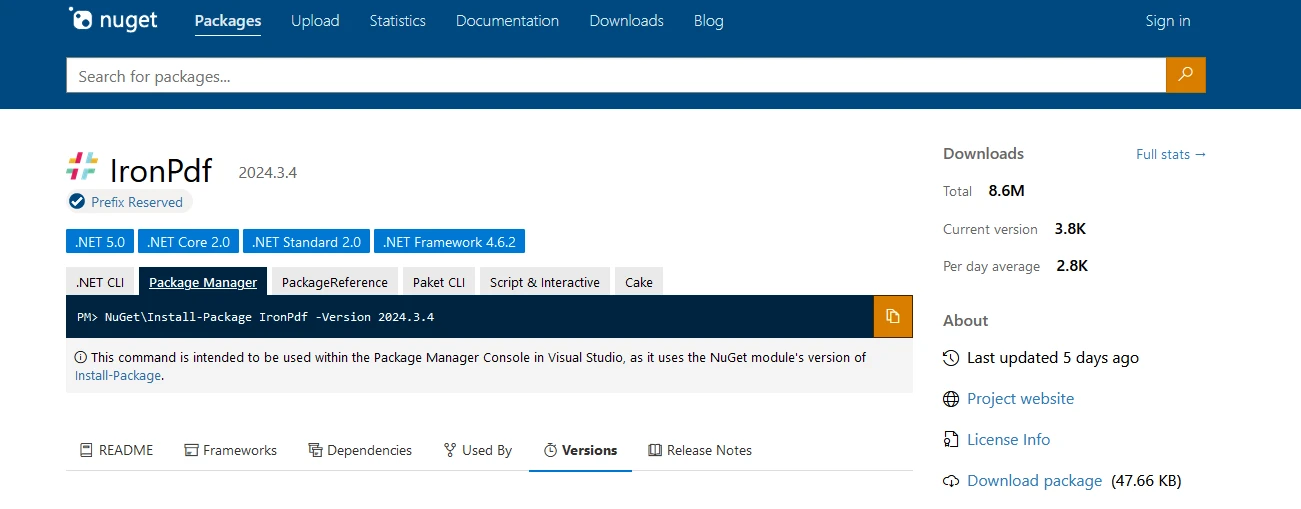
dotnet add package IronPdf --version 2024.3.4
または、以下に示すように Visual Studio から直接インストールできます。

では、DateTime オブジェクトをデモするための PDF 生成に進みましょう。
using IronPdf;

class Program
{
    static void Main()
    {
        Console.WriteLine("-----------Iron Software-------------");

        // Create a new instance of ChromePdfRenderer
        var renderer = new ChromePdfRenderer();

        // HTML content for the PDF
        var content = "<h1> Iron Software is Awesome </h1> Made with IronPDF!";
        content += "<h2>Demo Datetime Objects in C#</h2>";

        // Current date and time
        content += "<h3>Current date and time</h3>";
        DateTime currentDateTime = DateTime.Now;
        content += $"<p>Current date and time: {currentDateTime:U}</p>";
        Console.WriteLine($"Current date and time: {currentDateTime:U}");

        // Specific date and time
        content += "<h3>Specific date and time</h3>";
        DateTime specificDateTime = new DateTime(2024, 3, 16, 10, 30, 0);
        content += $"<p>Specific date and time: {specificDateTime:U}</p>";
        Console.WriteLine($"Specific date and time: {specificDateTime:U}");

        // Date only
        content += "<h3>Date Only</h3>";
        DateTime dateOnly = DateTime.Today;
        content += $"<p>Date only: {dateOnly:U}</p>";
        Console.WriteLine($"Date only: {dateOnly:U}");

        // Date and time in UTC
        content += "<h3>Date and time in UTC</h3>";
        DateTime utcDateTime = DateTime.UtcNow;
        content += $"<p>Date and time in UTC: {utcDateTime:U}</p>";
        Console.WriteLine($"Date and time in UTC: {utcDateTime:U}");

        // Compare dates with Operators
        content += "<h3>Compare dates with Operators</h3>";
        DateTime date1 = DateTime.Now;
        DateTime date2 = DateTime.Now.AddDays(1);
        content += $"<p>Compare date1 {date1:d}, date2 {date2:d}: {CompareDates(date1, date2)}</p>";
        Console.WriteLine($"Compare date1 {date1:U}, date2 {date2:U}: {CompareDates(date1, date2)}");

        // Compare dates with Compare Method
        content += "<h3>Compare dates with Compare Method</h3>";
        content += $"<p>Compare date1 {date1:d}, date2 {date2:d}: {CompareDatesWithCompare(date1, date2)}</p>";
        Console.WriteLine($"Compare date1 {date1:U}, date2 {date2:U}: {CompareDatesWithCompare(date1, date2)}");

        // Render the content to PDF
        var pdf = renderer.RenderHtmlAsPdf(content);

        // Save the PDF to the output file
        pdf.SaveAs("outputDate.pdf");
    }

    // Compare two dates using CompareTo method
    public static string CompareDatesWithCompare(DateTime date1, DateTime date2)
    {
        int result = date1.CompareTo(date2);
        string resultString;
        if (result < 0)
        {
            resultString = "date1 is earlier than date2.";
            Console.WriteLine(resultString);
        }
        else if (result > 0)
        {
            resultString = "date1 is later than date2.";
            Console.WriteLine(resultString);
        }
        else
        {
            resultString = "date1 is equal to date2.";
            Console.WriteLine(resultString);
        }
        return resultString;
    }

    // Compare two dates using basic comparison operators
    public static string CompareDates(DateTime date1, DateTime date2)
    {
        string result;
        if (CheckLessor(date1, date2))
        {
            result = "date1 is earlier than date2.";
            Console.WriteLine(result);
        }
        else if (CheckGreater(date1, date2))
        {
            result = "date1 is later than date2.";
            Console.WriteLine(result);
        }
        else
        {
            result = "date1 is equal to date2.";
            Console.WriteLine(result);
        }
        return result;
    }

    // Helper method to check if the first date is greater than the second date
    public static bool CheckGreater(DateTime date1, DateTime date2)
    {
        return date1 > date2;
    }

    // Helper method to check if the first date is less than the second date
    public static bool CheckLessor(DateTime date1, DateTime date2)
    {
        return date1 < date2;
    }
}
using IronPdf;
class Program
{
static void Main()
{
Console.WriteLine("-----------Iron Software-------------");
// Create a new instance of ChromePdfRenderer
var renderer = new ChromePdfRenderer();
// HTML content for the PDF
var content = "<h1> Iron Software is Awesome </h1> Made with IronPDF!";
content += "<h2>Demo Datetime Objects in C#</h2>";
// Current date and time
content += "<h3>Current date and time</h3>";
DateTime currentDateTime = DateTime.Now;
content += $"<p>Current date and time: {currentDateTime:U}</p>";
Console.WriteLine($"Current date and time: {currentDateTime:U}");
// Specific date and time
content += "<h3>Specific date and time</h3>";
DateTime specificDateTime = new DateTime(2024, 3, 16, 10, 30, 0);
content += $"<p>Specific date and time: {specificDateTime:U}</p>";
Console.WriteLine($"Specific date and time: {specificDateTime:U}");
// Date only
content += "<h3>Date Only</h3>";
DateTime dateOnly = DateTime.Today;
content += $"<p>Date only: {dateOnly:U}</p>";
Console.WriteLine($"Date only: {dateOnly:U}");
// Date and time in UTC
content += "<h3>Date and time in UTC</h3>";
DateTime utcDateTime = DateTime.UtcNow;
content += $"<p>Date and time in UTC: {utcDateTime:U}</p>";
Console.WriteLine($"Date and time in UTC: {utcDateTime:U}");
// Compare dates with Operators
content += "<h3>Compare dates with Operators</h3>";
DateTime date1 = DateTime.Now;
DateTime date2 = DateTime.Now.AddDays(1);
content += $"<p>Compare date1 {date1:d}, date2 {date2:d}: {CompareDates(date1, date2)}</p>";
Console.WriteLine($"Compare date1 {date1:U}, date2 {date2:U}: {CompareDates(date1, date2)}");
// Compare dates with Compare Method
content += "<h3>Compare dates with Compare Method</h3>";
content += $"<p>Compare date1 {date1:d}, date2 {date2:d}: {CompareDatesWithCompare(date1, date2)}</p>";
Console.WriteLine($"Compare date1 {date1:U}, date2 {date2:U}: {CompareDatesWithCompare(date1, date2)}");
// Render the content to PDF
var pdf = renderer.RenderHtmlAsPdf(content);
// Save the PDF to the output file
pdf.SaveAs("outputDate.pdf");
}
// Compare two dates using CompareTo method
public static string CompareDatesWithCompare(DateTime date1, DateTime date2)
{
int result = date1.CompareTo(date2);
string resultString;
if (result < 0)
{
resultString = "date1 is earlier than date2.";
Console.WriteLine(resultString);
}
else if (result > 0)
{
resultString = "date1 is later than date2.";
Console.WriteLine(resultString);
}
else
{
resultString = "date1 is equal to date2.";
Console.WriteLine(resultString);
}
return resultString;
}
// Compare two dates using basic comparison operators
public static string CompareDates(DateTime date1, DateTime date2)
{
string result;
if (CheckLessor(date1, date2))
{
result = "date1 is earlier than date2.";
Console.WriteLine(result);
}
else if (CheckGreater(date1, date2))
{
result = "date1 is later than date2.";
Console.WriteLine(result);
}
else
{
result = "date1 is equal to date2.";
Console.WriteLine(result);
}
return result;
}
// Helper method to check if the first date is greater than the second date
public static bool CheckGreater(DateTime date1, DateTime date2)
{
return date1 > date2;
}
// Helper method to check if the first date is less than the second date
public static bool CheckLessor(DateTime date1, DateTime date2)
{
return date1 < date2;
}
}Imports IronPdf
Friend Class Program
Shared Sub Main()
Console.WriteLine("-----------Iron Software-------------")
' Create a new instance of ChromePdfRenderer
Dim renderer = New ChromePdfRenderer()
' HTML content for the PDF
Dim content = "<h1> Iron Software is Awesome </h1> Made with IronPDF!"
content &= "<h2>Demo Datetime Objects in C#</h2>"
' Current date and time
content &= "<h3>Current date and time</h3>"
Dim currentDateTime As DateTime = DateTime.Now
content &= $"<p>Current date and time: {currentDateTime:U}</p>"
Console.WriteLine($"Current date and time: {currentDateTime:U}")
' Specific date and time
content &= "<h3>Specific date and time</h3>"
Dim specificDateTime As New DateTime(2024, 3, 16, 10, 30, 0)
content &= $"<p>Specific date and time: {specificDateTime:U}</p>"
Console.WriteLine($"Specific date and time: {specificDateTime:U}")
' Date only
content &= "<h3>Date Only</h3>"
Dim dateOnly As DateTime = DateTime.Today
content &= $"<p>Date only: {dateOnly:U}</p>"
Console.WriteLine($"Date only: {dateOnly:U}")
' Date and time in UTC
content &= "<h3>Date and time in UTC</h3>"
Dim utcDateTime As DateTime = DateTime.UtcNow
content &= $"<p>Date and time in UTC: {utcDateTime:U}</p>"
Console.WriteLine($"Date and time in UTC: {utcDateTime:U}")
' Compare dates with Operators
content &= "<h3>Compare dates with Operators</h3>"
Dim date1 As DateTime = DateTime.Now
Dim date2 As DateTime = DateTime.Now.AddDays(1)
content &= $"<p>Compare date1 {date1:d}, date2 {date2:d}: {CompareDates(date1, date2)}</p>"
Console.WriteLine($"Compare date1 {date1:U}, date2 {date2:U}: {CompareDates(date1, date2)}")
' Compare dates with Compare Method
content &= "<h3>Compare dates with Compare Method</h3>"
content &= $"<p>Compare date1 {date1:d}, date2 {date2:d}: {CompareDatesWithCompare(date1, date2)}</p>"
Console.WriteLine($"Compare date1 {date1:U}, date2 {date2:U}: {CompareDatesWithCompare(date1, date2)}")
' Render the content to PDF
Dim pdf = renderer.RenderHtmlAsPdf(content)
' Save the PDF to the output file
pdf.SaveAs("outputDate.pdf")
End Sub
' Compare two dates using CompareTo method
Public Shared Function CompareDatesWithCompare(ByVal date1 As DateTime, ByVal date2 As DateTime) As String
Dim result As Integer = date1.CompareTo(date2)
Dim resultString As String
If result < 0 Then
resultString = "date1 is earlier than date2."
Console.WriteLine(resultString)
ElseIf result > 0 Then
resultString = "date1 is later than date2."
Console.WriteLine(resultString)
Else
resultString = "date1 is equal to date2."
Console.WriteLine(resultString)
End If
Return resultString
End Function
' Compare two dates using basic comparison operators
Public Shared Function CompareDates(ByVal date1 As DateTime, ByVal date2 As DateTime) As String
Dim result As String
If CheckLessor(date1, date2) Then
result = "date1 is earlier than date2."
Console.WriteLine(result)
ElseIf CheckGreater(date1, date2) Then
result = "date1 is later than date2."
Console.WriteLine(result)
Else
result = "date1 is equal to date2."
Console.WriteLine(result)
End If
Return result
End Function
' Helper method to check if the first date is greater than the second date
Public Shared Function CheckGreater(ByVal date1 As DateTime, ByVal date2 As DateTime) As Boolean
Return date1 > date2
End Function
' Helper method to check if the first date is less than the second date
Public Shared Function CheckLessor(ByVal date1 As DateTime, ByVal date2 As DateTime) As Boolean
Return date1 < date2
End Function
End Class次の出力は、DateTime オブジェクトで生成された PDF を示しています。
DateTime C# のオブジェクト (開発者向けの仕組み): 図 3
IronPDF トライアル ライセンス
IronPDF は、完全な機能を利用するためにトライアル ライセンスが必要です。 ライセンスキーを生成するためにメール ID を提供すると、メールでライセンスキーが送信されます。
"IronPdf.LicenseKey": "<Your Key>"ライセンス キーを AppSettings.json ファイルに配置します。
結論
DateTime C# のオブジェクトは、 .NETアプリケーションで日付と時刻を操作するための強力な方法を提供します。 それらは、日付と時刻の作成、操作、フォーマット、比較の幅広い機能を提供します。 DateTime オブジェクトを効果的に使用する方法を理解することは、C# アプリケーションで信頼性が高く正確な日付と時刻の機能を構築するために不可欠です。
DateTime オブジェクトの機能を活用することで、開発者は、発生する特定の要件やシナリオに関係なく、アプリケーションが日付と時刻を正しく処理することを保証できます。
期間の計算、タスクのスケジュール設定、ユーザーへの日付と時刻の表示など、DateTime オブジェクトは、日付と時刻の管理に関連する C# プログラミングの多くの側面で重要な役割を果たします。
よくある質問
C# の DateTime オブジェクトは何に使用されますか?
C# の DateTime オブジェクトは、.NET フレームワークアプリケーション内で日付と時刻を処理するために使用されます。日付と時刻の操作、フォーマット、および比較の機能を提供し、時間データを扱うアプリケーションにとって不可欠です。
C# で特定の日付の DateTime オブジェクトをどのように作成しますか?
C# で特定の日付の DateTime オブジェクトを作成するには、パラメータを使用したコンストラクタを使用します。例えば、DateTime specificDate = new DateTime(2023, 12, 31); は 2023年12月31日の DateTime オブジェクトを作成します。
C# で DateTime オブジェクトを文字列としてどのようにフォーマットしますか?
C# では、フォーマット指定子を使用して DateTime オブジェクトを文字列としてフォーマットできます。例えば、dateTime.ToString("yyyy-MM-dd") は日付を '2023-12-31' としてフォーマットします。
C# で DateTime を使用してローカル時間を UTC にどのように変換しますか?
C# では、DateTime オブジェクトで ToUniversalTime() メソッドを使用してローカル時間を UTC に変換できます。これは、異なるタイムゾーン間で日時データを標準化するのに役立ちます。
C# で DateTime オブジェクトを比較するために利用可能なメソッドは何ですか?
C# では、<、>、<=、>=、==、!= などの演算子を使用して DateTime オブジェクトを比較できます。さらに、CompareTo() メソッドにより、2つの DateTime インスタンスの相対的な順序を判断することができます。
C# で DateTime オブジェクトを使用して PDF ドキュメントをどのように生成しますか?
IronPDF を使用すると、C# で DateTime 情報を含む PDF ドキュメントを作成できます。フォーマットされた DateTime 文字列を PDF コンテンツに挿入して、動的な日時データを表示できます。
C# で DateTime を使用してサマータイムの変更をどのように処理しますか?
サマータイムは、DateTime オブジェクトを UTC に変換してから ToLocalTime() を使用し、タイムゾーンの調整を考慮して正確な時間表現を確保することで管理できます。
C# アプリケーションで DateTime.UtcNow プロパティが重要なのはなぜですか?
DateTime.UtcNow プロパティは現在の UTC 日付と時刻を提供し、ロギングやデータ同期のために一貫性がありタイムゾーンに依存しない時間基準が必要なアプリケーションにとって不可欠です。
C# で DateTime オブジェクトをカスタム形式でフォーマットすることはできますか?
はい、C# では ToString() メソッドにフォーマット文字列を提供することで、DateTime オブジェクトをカスタム形式でフォーマットできます。これにより、任意の形式で日付と時刻を表示できます。
C# で DateTime オブジェクトを文字列形式に変換することの重要性は何ですか?
C# で DateTime オブジェクトを文字列形式に変換することは、ユーザーインターフェース、レポート、ログで日時情報を表示するために重要です。この変換により、データが読みやすく一貫した形で提示されます。



















 無料で始めましょう
 無料で始めましょう
 無料ライブデモを予約





 クレジットカードやアカウントの作成は不要です。










