


C# 中的 DateTime 對象(對於開發者的運行原理)

DateTime 物件在C#中是處理 .NET Framework 應用程式中日期和時間的基礎。 它們提供一組強大的功能來操作、格式化和比較日期和時間。
本文旨在提供 C# 中 DateTime 物件的綜合概覽,涵蓋其建立、操作、格式化和常見的使用案例。 在文章的末尾,我們還將探索如何使用 IronPDF 來自 Iron Software 在 C# 應用程式中動態生成 PDF 文件。
建立 DateTime 物件
在 C# 中建立 DateTime 物件非常簡單。 有多種構造函式可用於以不同參數初始化 DateTime 物件:
// Current date and time
DateTime currentDateTime = DateTime.Now;
// Specific date and time
DateTime specificDateTime = new DateTime(2024, 3, 16, 10, 30, 0);
// Date only
DateTime dateOnly = DateTime.Today;
// Date and time in UTC
DateTime utcDateTime = DateTime.UtcNow;
// Current date and time
DateTime currentDateTime = DateTime.Now;
// Specific date and time
DateTime specificDateTime = new DateTime(2024, 3, 16, 10, 30, 0);
// Date only
DateTime dateOnly = DateTime.Today;
// Date and time in UTC
DateTime utcDateTime = DateTime.UtcNow;' Current date and time
Dim currentDateTime As DateTime = DateTime.Now
' Specific date and time
Dim specificDateTime As New DateTime(2024, 3, 16, 10, 30, 0)
' Date only
Dim dateOnly As DateTime = DateTime.Today
' Date and time in UTC
Dim utcDateTime As DateTime = DateTime.UtcNow操作 DateTime 物件
DateTime 物件提供多種方法來操作日期和時間,例如新增或減去時間間隔、提取組件和在時區之間轉換。
DateTime now = DateTime.Now;
// Adding days
DateTime futureDate = now.AddDays(7);
// Subtracting hours
DateTime pastTime = now.AddHours(-3);
// Getting components
int year = now.Year;
int month = now.Month;
int day = now.Day;
int hour = now.Hour;
int minute = now.Minute;
int second = now.Second;
// Converting between time zones
DateTime utcTime = DateTime.UtcNow;
DateTime localTime = utcTime.ToLocalTime();
DateTime now = DateTime.Now;
// Adding days
DateTime futureDate = now.AddDays(7);
// Subtracting hours
DateTime pastTime = now.AddHours(-3);
// Getting components
int year = now.Year;
int month = now.Month;
int day = now.Day;
int hour = now.Hour;
int minute = now.Minute;
int second = now.Second;
// Converting between time zones
DateTime utcTime = DateTime.UtcNow;
DateTime localTime = utcTime.ToLocalTime();Dim now As DateTime = DateTime.Now
' Adding days
Dim futureDate As DateTime = now.AddDays(7)
' Subtracting hours
Dim pastTime As DateTime = now.AddHours(-3)
' Getting components
Dim year As Integer = now.Year
Dim month As Integer = now.Month
Dim day As Integer = now.Day
Dim hour As Integer = now.Hour
Dim minute As Integer = now.Minute
Dim second As Integer = now.Second
' Converting between time zones
Dim utcTime As DateTime = DateTime.UtcNow
Dim localTime As DateTime = utcTime.ToLocalTime()格式化 DateTime 物件
DateTime 物件可以使用各種格式規範符號將其格式化為字串,以便在所需格式中表示。
DateTime dateTime = DateTime.Now;
// Standard date and time format
string standardFormat = dateTime.ToString("G");
// Custom format
string customFormat = dateTime.ToString("dd/MM/yyyy HH:mm:ss");
// Format for sorting
string sortableFormat = dateTime.ToString("yyyy-MM-ddTHH:mm:ss");
DateTime dateTime = DateTime.Now;
// Standard date and time format
string standardFormat = dateTime.ToString("G");
// Custom format
string customFormat = dateTime.ToString("dd/MM/yyyy HH:mm:ss");
// Format for sorting
string sortableFormat = dateTime.ToString("yyyy-MM-ddTHH:mm:ss");Imports System
Dim dateTime As DateTime = DateTime.Now
' Standard date and time format
Dim standardFormat As String = dateTime.ToString("G")
' Custom format
Dim customFormat As String = dateTime.ToString("dd/MM/yyyy HH:mm:ss")
' Format for sorting
Dim sortableFormat As String = dateTime.ToString("yyyy-MM-ddTHH:mm:ss")比較 DateTime 物件
C# 提供了標準的比較運算子 (<, >, <=, >=, ==, !=),可用於直接比較兩個 DateTime 物件。 這些運算子比較 DateTime 物件的基礎刻度,這代表自西元 1 年 1 月 1 日 00:00:00.000(格里高利曆)以來經過的 100 奈秒間隔的數量。
這是演示使用比較運算子的範例:
DateTime date1 = DateTime.Now;
DateTime date2 = DateTime.Now.AddDays(1);
if (date1 < date2)
{
    Console.WriteLine("date1 is earlier than date2.");
}
else if (date1 > date2)
{
    Console.WriteLine("date1 is later than date2.");
}
else
{
    Console.WriteLine("date1 is equal to date2.");
}
DateTime date1 = DateTime.Now;
DateTime date2 = DateTime.Now.AddDays(1);
if (date1 < date2)
{
Console.WriteLine("date1 is earlier than date2.");
}
else if (date1 > date2)
{
Console.WriteLine("date1 is later than date2.");
}
else
{
Console.WriteLine("date1 is equal to date2.");
}Dim date1 As DateTime = DateTime.Now
Dim date2 As DateTime = DateTime.Now.AddDays(1)
If date1 < date2 Then
Console.WriteLine("date1 is earlier than date2.")
ElseIf date1 > date2 Then
Console.WriteLine("date1 is later than date2.")
Else
Console.WriteLine("date1 is equal to date2.")
End If使用 DateTime.Compare C# 方法
除了比較運算子,DateTime 物件還提供方法來比較這些物件之間的相對值。 這些方法在某些情況下提供了更多的靈活性和可讀性。 CompareTo() 方法比較兩個 DateTime 物件,並返回一個整數值,指出其中之一是更早、更晚還是與另一個相同。
DateTime date1 = DateTime.Now;
DateTime date2 = DateTime.Now.AddDays(1);
int result = date1.CompareTo(date2);
if (result < 0)
{
    Console.WriteLine("date1 is earlier than date2.");
}
else if (result > 0)
{
    Console.WriteLine("date1 is later than date2.");
}
else
{
    Console.WriteLine("date1 is equal to date2.");
}
DateTime date1 = DateTime.Now;
DateTime date2 = DateTime.Now.AddDays(1);
int result = date1.CompareTo(date2);
if (result < 0)
{
Console.WriteLine("date1 is earlier than date2.");
}
else if (result > 0)
{
Console.WriteLine("date1 is later than date2.");
}
else
{
Console.WriteLine("date1 is equal to date2.");
}Dim date1 As DateTime = DateTime.Now
Dim date2 As DateTime = DateTime.Now.AddDays(1)
Dim result As Integer = date1.CompareTo(date2)
If result < 0 Then
Console.WriteLine("date1 is earlier than date2.")
ElseIf result > 0 Then
Console.WriteLine("date1 is later than date2.")
Else
Console.WriteLine("date1 is equal to date2.")
End If比較具有容忍度的 DateTime 物件
要比較 DateTime 物件,尤其是在處理涉及時間間隔的計算時,由於潛在的精度差異,考慮容忍水平是很重要的。
這可以通過將兩個 DateTime 值之間的絕對差值與預定的容忍閾值進行比較來實現。
class Program
{
    public static void Main()
    {
        DateTime date1 = DateTime.Now;
        DateTime date2 = DateTime.Now.AddMilliseconds(10);
        TimeSpan tolerance = TimeSpan.FromMilliseconds(5);
        bool isEqual = Math.Abs((date1 - date2).TotalMilliseconds) <= tolerance.TotalMilliseconds;
        if (isEqual)
        {
            Console.WriteLine("date1 is considered equal to date2 within the tolerance.");
        }
        else
        {
            Console.WriteLine("date1 is not equal to date2 within the tolerance.");
        }
    }
}
class Program
{
public static void Main()
{
DateTime date1 = DateTime.Now;
DateTime date2 = DateTime.Now.AddMilliseconds(10);
TimeSpan tolerance = TimeSpan.FromMilliseconds(5);
bool isEqual = Math.Abs((date1 - date2).TotalMilliseconds) <= tolerance.TotalMilliseconds;
if (isEqual)
{
Console.WriteLine("date1 is considered equal to date2 within the tolerance.");
}
else
{
Console.WriteLine("date1 is not equal to date2 within the tolerance.");
}
}
}Friend Class Program
Public Shared Sub Main()
Dim date1 As DateTime = DateTime.Now
Dim date2 As DateTime = DateTime.Now.AddMilliseconds(10)
Dim tolerance As TimeSpan = TimeSpan.FromMilliseconds(5)
Dim isEqual As Boolean = Math.Abs((date1.Subtract(date2)).TotalMilliseconds) <= tolerance.TotalMilliseconds
If isEqual Then
Console.WriteLine("date1 is considered equal to date2 within the tolerance.")
Else
Console.WriteLine("date1 is not equal to date2 within the tolerance.")
End If
End Sub
End Class處理時區和夏令時間
C# 中的 DateTime 物件可以表示本地時間和協調世界時間(UTC)。 在處理全球應用程式時,了解時區轉換非常重要。
DateTime localTime = DateTime.Now;
DateTime utcTime = DateTime.UtcNow;
Console.WriteLine("Local Time: " + localTime);
Console.WriteLine("UTC Time: " + utcTime);
DateTime localTime = DateTime.Now;
DateTime utcTime = DateTime.UtcNow;
Console.WriteLine("Local Time: " + localTime);
Console.WriteLine("UTC Time: " + utcTime);Dim localTime As DateTime = DateTime.Now
Dim utcTime As DateTime = DateTime.UtcNow
Console.WriteLine("Local Time: " & localTime)
Console.WriteLine("UTC Time: " & utcTime)IronPDF to Generate PDF documents in C
Iron Software 的 IronPDF 是一個高效且易於使用的 PDF 生成程式庫。 您可以使用 NuGet 套件管理器來安裝它:
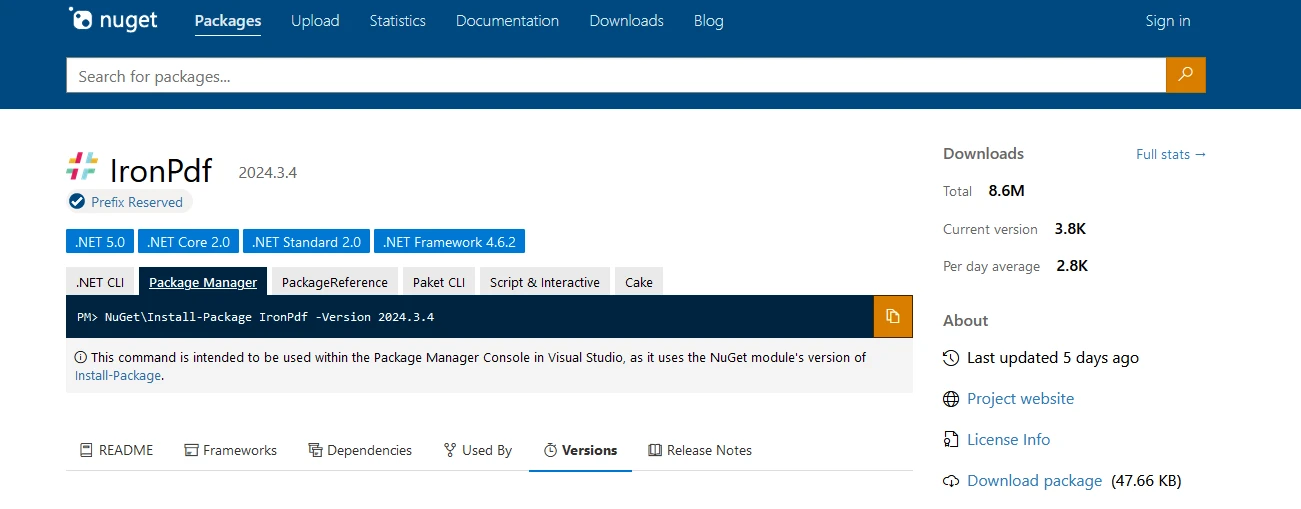
dotnet add package IronPdf --version 2024.3.4
或者從 Visual Studio 如下所示:

現在讓我們深入探討 PDF 生成來示範 DateTime 物件。
using IronPdf;

class Program
{
    static void Main()
    {
        Console.WriteLine("-----------Iron Software-------------");

        // Create a new instance of ChromePdfRenderer
        var renderer = new ChromePdfRenderer();

        // HTML content for the PDF
        var content = "<h1> Iron Software is Awesome </h1> Made with IronPDF!";
        content += "<h2>Demo Datetime Objects in C#</h2>";

        // Current date and time
        content += "<h3>Current date and time</h3>";
        DateTime currentDateTime = DateTime.Now;
        content += $"<p>Current date and time: {currentDateTime:U}</p>";
        Console.WriteLine($"Current date and time: {currentDateTime:U}");

        // Specific date and time
        content += "<h3>Specific date and time</h3>";
        DateTime specificDateTime = new DateTime(2024, 3, 16, 10, 30, 0);
        content += $"<p>Specific date and time: {specificDateTime:U}</p>";
        Console.WriteLine($"Specific date and time: {specificDateTime:U}");

        // Date only
        content += "<h3>Date Only</h3>";
        DateTime dateOnly = DateTime.Today;
        content += $"<p>Date only: {dateOnly:U}</p>";
        Console.WriteLine($"Date only: {dateOnly:U}");

        // Date and time in UTC
        content += "<h3>Date and time in UTC</h3>";
        DateTime utcDateTime = DateTime.UtcNow;
        content += $"<p>Date and time in UTC: {utcDateTime:U}</p>";
        Console.WriteLine($"Date and time in UTC: {utcDateTime:U}");

        // Compare dates with Operators
        content += "<h3>Compare dates with Operators</h3>";
        DateTime date1 = DateTime.Now;
        DateTime date2 = DateTime.Now.AddDays(1);
        content += $"<p>Compare date1 {date1:d}, date2 {date2:d}: {CompareDates(date1, date2)}</p>";
        Console.WriteLine($"Compare date1 {date1:U}, date2 {date2:U}: {CompareDates(date1, date2)}");

        // Compare dates with Compare Method
        content += "<h3>Compare dates with Compare Method</h3>";
        content += $"<p>Compare date1 {date1:d}, date2 {date2:d}: {CompareDatesWithCompare(date1, date2)}</p>";
        Console.WriteLine($"Compare date1 {date1:U}, date2 {date2:U}: {CompareDatesWithCompare(date1, date2)}");

        // Render the content to PDF
        var pdf = renderer.RenderHtmlAsPdf(content);

        // Save the PDF to the output file
        pdf.SaveAs("outputDate.pdf");
    }

    // Compare two dates using CompareTo method
    public static string CompareDatesWithCompare(DateTime date1, DateTime date2)
    {
        int result = date1.CompareTo(date2);
        string resultString;
        if (result < 0)
        {
            resultString = "date1 is earlier than date2.";
            Console.WriteLine(resultString);
        }
        else if (result > 0)
        {
            resultString = "date1 is later than date2.";
            Console.WriteLine(resultString);
        }
        else
        {
            resultString = "date1 is equal to date2.";
            Console.WriteLine(resultString);
        }
        return resultString;
    }

    // Compare two dates using basic comparison operators
    public static string CompareDates(DateTime date1, DateTime date2)
    {
        string result;
        if (CheckLessor(date1, date2))
        {
            result = "date1 is earlier than date2.";
            Console.WriteLine(result);
        }
        else if (CheckGreater(date1, date2))
        {
            result = "date1 is later than date2.";
            Console.WriteLine(result);
        }
        else
        {
            result = "date1 is equal to date2.";
            Console.WriteLine(result);
        }
        return result;
    }

    // Helper method to check if the first date is greater than the second date
    public static bool CheckGreater(DateTime date1, DateTime date2)
    {
        return date1 > date2;
    }

    // Helper method to check if the first date is less than the second date
    public static bool CheckLessor(DateTime date1, DateTime date2)
    {
        return date1 < date2;
    }
}
using IronPdf;
class Program
{
static void Main()
{
Console.WriteLine("-----------Iron Software-------------");
// Create a new instance of ChromePdfRenderer
var renderer = new ChromePdfRenderer();
// HTML content for the PDF
var content = "<h1> Iron Software is Awesome </h1> Made with IronPDF!";
content += "<h2>Demo Datetime Objects in C#</h2>";
// Current date and time
content += "<h3>Current date and time</h3>";
DateTime currentDateTime = DateTime.Now;
content += $"<p>Current date and time: {currentDateTime:U}</p>";
Console.WriteLine($"Current date and time: {currentDateTime:U}");
// Specific date and time
content += "<h3>Specific date and time</h3>";
DateTime specificDateTime = new DateTime(2024, 3, 16, 10, 30, 0);
content += $"<p>Specific date and time: {specificDateTime:U}</p>";
Console.WriteLine($"Specific date and time: {specificDateTime:U}");
// Date only
content += "<h3>Date Only</h3>";
DateTime dateOnly = DateTime.Today;
content += $"<p>Date only: {dateOnly:U}</p>";
Console.WriteLine($"Date only: {dateOnly:U}");
// Date and time in UTC
content += "<h3>Date and time in UTC</h3>";
DateTime utcDateTime = DateTime.UtcNow;
content += $"<p>Date and time in UTC: {utcDateTime:U}</p>";
Console.WriteLine($"Date and time in UTC: {utcDateTime:U}");
// Compare dates with Operators
content += "<h3>Compare dates with Operators</h3>";
DateTime date1 = DateTime.Now;
DateTime date2 = DateTime.Now.AddDays(1);
content += $"<p>Compare date1 {date1:d}, date2 {date2:d}: {CompareDates(date1, date2)}</p>";
Console.WriteLine($"Compare date1 {date1:U}, date2 {date2:U}: {CompareDates(date1, date2)}");
// Compare dates with Compare Method
content += "<h3>Compare dates with Compare Method</h3>";
content += $"<p>Compare date1 {date1:d}, date2 {date2:d}: {CompareDatesWithCompare(date1, date2)}</p>";
Console.WriteLine($"Compare date1 {date1:U}, date2 {date2:U}: {CompareDatesWithCompare(date1, date2)}");
// Render the content to PDF
var pdf = renderer.RenderHtmlAsPdf(content);
// Save the PDF to the output file
pdf.SaveAs("outputDate.pdf");
}
// Compare two dates using CompareTo method
public static string CompareDatesWithCompare(DateTime date1, DateTime date2)
{
int result = date1.CompareTo(date2);
string resultString;
if (result < 0)
{
resultString = "date1 is earlier than date2.";
Console.WriteLine(resultString);
}
else if (result > 0)
{
resultString = "date1 is later than date2.";
Console.WriteLine(resultString);
}
else
{
resultString = "date1 is equal to date2.";
Console.WriteLine(resultString);
}
return resultString;
}
// Compare two dates using basic comparison operators
public static string CompareDates(DateTime date1, DateTime date2)
{
string result;
if (CheckLessor(date1, date2))
{
result = "date1 is earlier than date2.";
Console.WriteLine(result);
}
else if (CheckGreater(date1, date2))
{
result = "date1 is later than date2.";
Console.WriteLine(result);
}
else
{
result = "date1 is equal to date2.";
Console.WriteLine(result);
}
return result;
}
// Helper method to check if the first date is greater than the second date
public static bool CheckGreater(DateTime date1, DateTime date2)
{
return date1 > date2;
}
// Helper method to check if the first date is less than the second date
public static bool CheckLessor(DateTime date1, DateTime date2)
{
return date1 < date2;
}
}Imports IronPdf
Friend Class Program
Shared Sub Main()
Console.WriteLine("-----------Iron Software-------------")
' Create a new instance of ChromePdfRenderer
Dim renderer = New ChromePdfRenderer()
' HTML content for the PDF
Dim content = "<h1> Iron Software is Awesome </h1> Made with IronPDF!"
content &= "<h2>Demo Datetime Objects in C#</h2>"
' Current date and time
content &= "<h3>Current date and time</h3>"
Dim currentDateTime As DateTime = DateTime.Now
content &= $"<p>Current date and time: {currentDateTime:U}</p>"
Console.WriteLine($"Current date and time: {currentDateTime:U}")
' Specific date and time
content &= "<h3>Specific date and time</h3>"
Dim specificDateTime As New DateTime(2024, 3, 16, 10, 30, 0)
content &= $"<p>Specific date and time: {specificDateTime:U}</p>"
Console.WriteLine($"Specific date and time: {specificDateTime:U}")
' Date only
content &= "<h3>Date Only</h3>"
Dim dateOnly As DateTime = DateTime.Today
content &= $"<p>Date only: {dateOnly:U}</p>"
Console.WriteLine($"Date only: {dateOnly:U}")
' Date and time in UTC
content &= "<h3>Date and time in UTC</h3>"
Dim utcDateTime As DateTime = DateTime.UtcNow
content &= $"<p>Date and time in UTC: {utcDateTime:U}</p>"
Console.WriteLine($"Date and time in UTC: {utcDateTime:U}")
' Compare dates with Operators
content &= "<h3>Compare dates with Operators</h3>"
Dim date1 As DateTime = DateTime.Now
Dim date2 As DateTime = DateTime.Now.AddDays(1)
content &= $"<p>Compare date1 {date1:d}, date2 {date2:d}: {CompareDates(date1, date2)}</p>"
Console.WriteLine($"Compare date1 {date1:U}, date2 {date2:U}: {CompareDates(date1, date2)}")
' Compare dates with Compare Method
content &= "<h3>Compare dates with Compare Method</h3>"
content &= $"<p>Compare date1 {date1:d}, date2 {date2:d}: {CompareDatesWithCompare(date1, date2)}</p>"
Console.WriteLine($"Compare date1 {date1:U}, date2 {date2:U}: {CompareDatesWithCompare(date1, date2)}")
' Render the content to PDF
Dim pdf = renderer.RenderHtmlAsPdf(content)
' Save the PDF to the output file
pdf.SaveAs("outputDate.pdf")
End Sub
' Compare two dates using CompareTo method
Public Shared Function CompareDatesWithCompare(ByVal date1 As DateTime, ByVal date2 As DateTime) As String
Dim result As Integer = date1.CompareTo(date2)
Dim resultString As String
If result < 0 Then
resultString = "date1 is earlier than date2."
Console.WriteLine(resultString)
ElseIf result > 0 Then
resultString = "date1 is later than date2."
Console.WriteLine(resultString)
Else
resultString = "date1 is equal to date2."
Console.WriteLine(resultString)
End If
Return resultString
End Function
' Compare two dates using basic comparison operators
Public Shared Function CompareDates(ByVal date1 As DateTime, ByVal date2 As DateTime) As String
Dim result As String
If CheckLessor(date1, date2) Then
result = "date1 is earlier than date2."
Console.WriteLine(result)
ElseIf CheckGreater(date1, date2) Then
result = "date1 is later than date2."
Console.WriteLine(result)
Else
result = "date1 is equal to date2."
Console.WriteLine(result)
End If
Return result
End Function
' Helper method to check if the first date is greater than the second date
Public Shared Function CheckGreater(ByVal date1 As DateTime, ByVal date2 As DateTime) As Boolean
Return date1 > date2
End Function
' Helper method to check if the first date is less than the second date
Public Shared Function CheckLessor(ByVal date1 As DateTime, ByVal date2 As DateTime) As Boolean
Return date1 < date2
End Function
End Class以下輸出顯示了使用 DateTime 物件生成的 PDF:
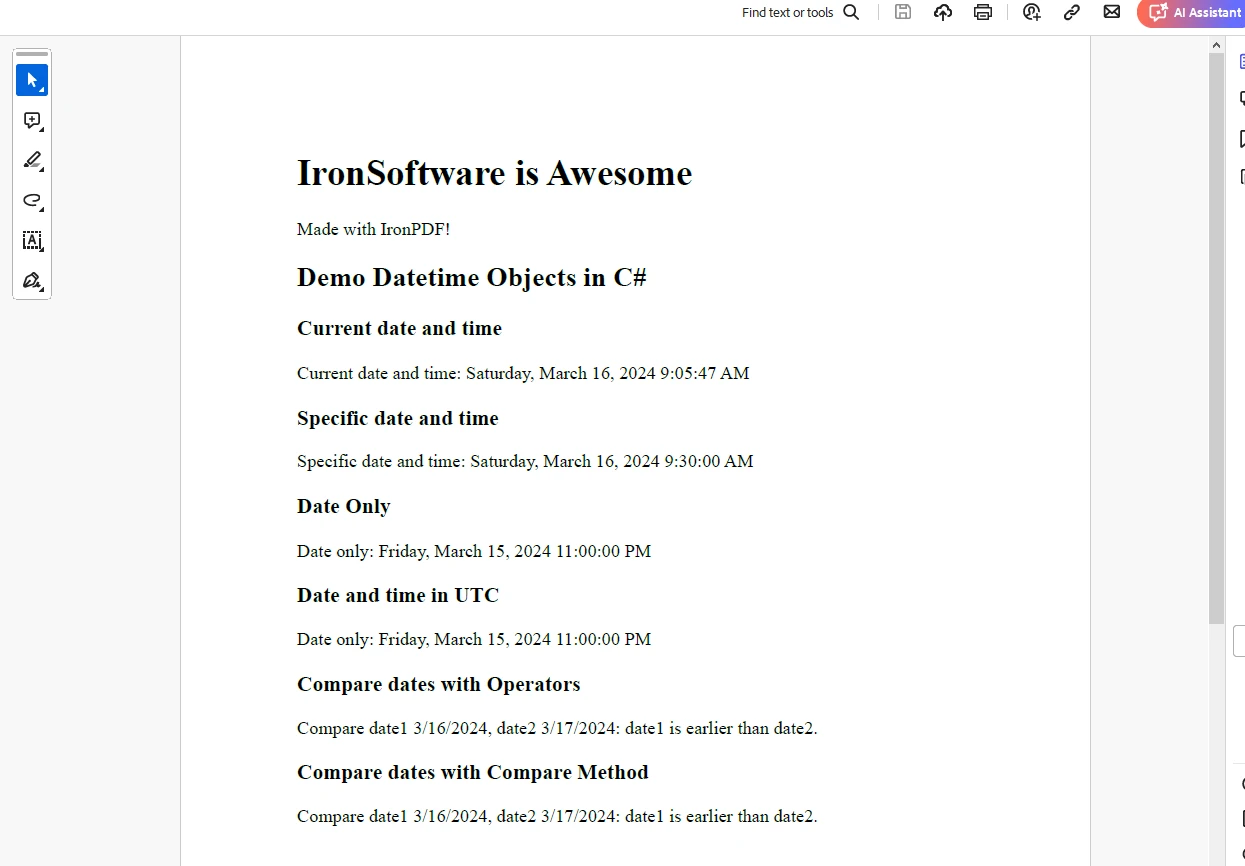
IronPDF 試用授權
IronPDF 需要試用授權才能獲得完整功能。 提供一個電子郵件 ID 以生成將發送到您的電子郵件的授權金鑰。
"IronPdf.LicenseKey": "<Your Key>"將授權金鑰放入 AppSettings.json 文件中。
結論
C# 中的 DateTime 物件提供瞭在 .NET 應用程式中處理日期和時間的強大方式。 它們提供了一個廣泛的功能集來建立、操作、格式化和比較日期和時間值。 了解如何有效地使用 DateTime 物件對於在 C# 應用程式中構建可靠且準確的日期和時間功能是必須的。
通過利用 DateTime 物件的能力,開發人員可以確保他們的應用程式可以正確處理日期和時間,不論它們遇到的特定需求或情境如何。
無論是計算持續時間、調度任務,還是顯示日期和時間給使用者,DateTime 物件在 C# 程式設計中與日期和時間管理相關的許多方面都扮演著關鍵角色。
常見問題
C# 中的 DateTime 物件有什麼用途?
C# 中的 DateTime 物件用於處理 .NET Framework 應用程式中的日期和時間。它們提供操作、格式化和比較日期和時間的功能,使任何涉及時間資料的應用程式都必不可少。
如何在 C# 中為特定日期建立 DateTime 物件?
要在 C# 中為特定日期建立 DateTime 物件,可以使用帶參數的構造函式。例如,DateTime specificDate = new DateTime(2023, 12, 31); 建立一個對應於 2023 年 12 月 31 日的 DateTime 物件。
如何將 DateTime 物件格式化為 C# 中的字串?
您可以使用 ToString() 方法與格式規範符將 DateTime 物件格式化為 C# 中的字串。例如,dateTime.ToString("yyyy-MM-dd") 將日期格式化為 '2023-12-31'。
如何使用 C# 中的 DateTime 轉換本地時間為 UTC?
可以在 C# 中對 DateTime 物件使用 ToUniversalTime() 方法來將本地時間轉換為 UTC。這對於在不同時區間標準化日期和時間資料非常有用。
比較 C# 中 DateTime 物件有哪些方法?
在 C# 中,DateTime 物件可以使用運算符如 <, >, <=, >=, == 和 != 進行比較。此外,CompareTo() 方法提供了一種確定兩個 DateTime 實例相對順序的方法。
如何在 C# 中使用 IronPDF 生成含有 DateTime 物件的 PDF 文件?
IronPDF 允許開發者在 C# 中建立包含 DateTime 資訊的 PDF 文件。可以將格式化的 DateTime 字串插入到 PDF 內容中,以顯示動態時間和日期資料。
如何在 C# 中使用 DateTime 處理夏令時間變化?
可以通過將 DateTime 物件轉換為 UTC 並從 UTC 使用 ToLocalTime() 方法來管理 C# 中的夏令時間,並考慮時區調整以確保正確的時間表示。
為何 C# 應用程式中的 DateTime.UtcNow 屬性很重要?
DateTime.UtcNow 屬性提供當前的 UTC 日期和時間,這對於需要一致且獨立於時區的時間參考進行日誌記錄和資料同步的應用程式來說至關重要。
在 C# 中可以使用自定義格式來格式化 DateTime 物件嗎?
是的,可以通過提供格式字串給 ToString() 方法來使用自定義格式格式化 C# 中的 DateTime 物件。這樣可以以任何所需格式顯示日期和時間。
轉換 C# 中的 DateTime 物件為字串格式的重要性是什麼?
在 C# 中將 DateTime 物件轉換為字串格式對於在使用者介面、報告及日誌中顯示日期和時間資訊非常重要。它確保資料以可讀和一致的方式呈現。










 免費開始
免費開始 免費開始
免費開始 預訂免費直播演示
















