


Obiekty daty i czasu w języku C# (jak to działa dla programistów)

DateTime obiekty w C# sa fundamentalne do pracy z datami i czasami w aplikacjach .NET Framework. Zapewniaja solidny zestaw funkcjonalności do manipulowania, formatowania i porownywania dat i czasow.
Artykul ten ma na celu przedstawienie kompleksowego przegladu obiektow DateTime w C#, obejmujacego ich tworzenie, manipulacje, formatowanie oraz typowe przypadki uzycia. Na koncu artykułu zbadamy również, jak IronPDF od Iron Software może generować dokument PDF na biezaco w aplikacjach C#.
Tworzenie obiektow DateTime
Tworzenie obiektu DateTime w C# jest proste. Istnieje kilka konstruktorow dostepnych do inicjalizacji obiektu DateTime z roznymi parametrami:
// Current date and time
DateTime currentDateTime = DateTime.Now;
// Specific date and time
DateTime specificDateTime = new DateTime(2024, 3, 16, 10, 30, 0);
// Date only
DateTime dateOnly = DateTime.Today;
// Date and time in UTC
DateTime utcDateTime = DateTime.UtcNow;
// Current date and time
DateTime currentDateTime = DateTime.Now;
// Specific date and time
DateTime specificDateTime = new DateTime(2024, 3, 16, 10, 30, 0);
// Date only
DateTime dateOnly = DateTime.Today;
// Date and time in UTC
DateTime utcDateTime = DateTime.UtcNow;' Current date and time
Dim currentDateTime As DateTime = DateTime.Now
' Specific date and time
Dim specificDateTime As New DateTime(2024, 3, 16, 10, 30, 0)
' Date only
Dim dateOnly As DateTime = DateTime.Today
' Date and time in UTC
Dim utcDateTime As DateTime = DateTime.UtcNowManipulacja obiektami DateTime
Obiekty DateTime zapewniaja rozne metody manipulacji datami i czasami, takie jak dodawanie lub odejmowanie przedzialow czasu, wyciaganie komponentow oraz konwersja miedzy strefami czasowymi.
DateTime now = DateTime.Now;
// Adding days
DateTime futureDate = now.AddDays(7);
// Subtracting hours
DateTime pastTime = now.AddHours(-3);
// Getting components
int year = now.Year;
int month = now.Month;
int day = now.Day;
int hour = now.Hour;
int minute = now.Minute;
int second = now.Second;
// Converting between time zones
DateTime utcTime = DateTime.UtcNow;
DateTime localTime = utcTime.ToLocalTime();
DateTime now = DateTime.Now;
// Adding days
DateTime futureDate = now.AddDays(7);
// Subtracting hours
DateTime pastTime = now.AddHours(-3);
// Getting components
int year = now.Year;
int month = now.Month;
int day = now.Day;
int hour = now.Hour;
int minute = now.Minute;
int second = now.Second;
// Converting between time zones
DateTime utcTime = DateTime.UtcNow;
DateTime localTime = utcTime.ToLocalTime();Dim now As DateTime = DateTime.Now
' Adding days
Dim futureDate As DateTime = now.AddDays(7)
' Subtracting hours
Dim pastTime As DateTime = now.AddHours(-3)
' Getting components
Dim year As Integer = now.Year
Dim month As Integer = now.Month
Dim day As Integer = now.Day
Dim hour As Integer = now.Hour
Dim minute As Integer = now.Minute
Dim second As Integer = now.Second
' Converting between time zones
Dim utcTime As DateTime = DateTime.UtcNow
Dim localTime As DateTime = utcTime.ToLocalTime()Formatowanie obiektow DateTime
Obiekty DateTime moga byc formatowane do lancuchow znakow uzywajac roznych specyfikatorow formatu, aby przedstawiac je w wymaganym formacie.
DateTime dateTime = DateTime.Now;
// Standard date and time format
string standardFormat = dateTime.ToString("G");
// Custom format
string customFormat = dateTime.ToString("dd/MM/yyyy HH:mm:ss");
// Format for sorting
string sortableFormat = dateTime.ToString("yyyy-MM-ddTHH:mm:ss");
DateTime dateTime = DateTime.Now;
// Standard date and time format
string standardFormat = dateTime.ToString("G");
// Custom format
string customFormat = dateTime.ToString("dd/MM/yyyy HH:mm:ss");
// Format for sorting
string sortableFormat = dateTime.ToString("yyyy-MM-ddTHH:mm:ss");Imports System
Dim dateTime As DateTime = DateTime.Now
' Standard date and time format
Dim standardFormat As String = dateTime.ToString("G")
' Custom format
Dim customFormat As String = dateTime.ToString("dd/MM/yyyy HH:mm:ss")
' Format for sorting
Dim sortableFormat As String = dateTime.ToString("yyyy-MM-ddTHH:mm:ss")Porownywanie obiektow DateTime
C# zapewnia standardowe operatory porownania (<, >, <=, >=, ==, !=), ktore moga byc uzywane do bezposredniego porownywania dwoch obiektow DateTime. Te operatory porownuja podstawowe tiksy obiektow DateTime, ktore reprezentuja liczby 100-nanosekundowych przedzialow, jakie uplynely od 1 stycznia 0001 roku, 00:00:00,000 w kalendarzu gregorianskim.
Oto przykład demonstrujacy użycie operatorow porownawczych:
DateTime date1 = DateTime.Now;
DateTime date2 = DateTime.Now.AddDays(1);
if (date1 < date2)
{
    Console.WriteLine("date1 is earlier than date2.");
}
else if (date1 > date2)
{
    Console.WriteLine("date1 is later than date2.");
}
else
{
    Console.WriteLine("date1 is equal to date2.");
}
DateTime date1 = DateTime.Now;
DateTime date2 = DateTime.Now.AddDays(1);
if (date1 < date2)
{
Console.WriteLine("date1 is earlier than date2.");
}
else if (date1 > date2)
{
Console.WriteLine("date1 is later than date2.");
}
else
{
Console.WriteLine("date1 is equal to date2.");
}Dim date1 As DateTime = DateTime.Now
Dim date2 As DateTime = DateTime.Now.AddDays(1)
If date1 < date2 Then
Console.WriteLine("date1 is earlier than date2.")
ElseIf date1 > date2 Then
Console.WriteLine("date1 is later than date2.")
Else
Console.WriteLine("date1 is equal to date2.")
End IfUzywajac metody DateTime.Compare C
Oprocz operatorow porownania, obiekty DateTime rowniez zapewniaja metody do porownywania wartosci wzglednych miedzy tymi obiektami. Te metody oferuja wieksza elastycznosc i czytelnosc w niektorych scenariuszach. Metoda CompareTo() porownuje dwa obiekty DateTime i zwraca wartosc calkowita wskazujaca, czy jeden jest wczesniejszy, pozniejszy, czy taki sam jak drugi.
DateTime date1 = DateTime.Now;
DateTime date2 = DateTime.Now.AddDays(1);
int result = date1.CompareTo(date2);
if (result < 0)
{
    Console.WriteLine("date1 is earlier than date2.");
}
else if (result > 0)
{
    Console.WriteLine("date1 is later than date2.");
}
else
{
    Console.WriteLine("date1 is equal to date2.");
}
DateTime date1 = DateTime.Now;
DateTime date2 = DateTime.Now.AddDays(1);
int result = date1.CompareTo(date2);
if (result < 0)
{
Console.WriteLine("date1 is earlier than date2.");
}
else if (result > 0)
{
Console.WriteLine("date1 is later than date2.");
}
else
{
Console.WriteLine("date1 is equal to date2.");
}Dim date1 As DateTime = DateTime.Now
Dim date2 As DateTime = DateTime.Now.AddDays(1)
Dim result As Integer = date1.CompareTo(date2)
If result < 0 Then
Console.WriteLine("date1 is earlier than date2.")
ElseIf result > 0 Then
Console.WriteLine("date1 is later than date2.")
Else
Console.WriteLine("date1 is equal to date2.")
End IfPorownywanie obiektow DateTime z tolerancja
Aby porownac obiekty DateTime, zwlaszcza w przypadku obliczen z udzialem przedzialow czasu, wazne jest uwzglednienie poziomu tolerancji z powodu potencjalnych roznic w precyzji.
Mozna to osiagnac porownujac absolutna roznice miedzy dwoma wartosciami DateTime z wstepnie zdefiniowanym progiem tolerancji.
class Program
{
    public static void Main()
    {
        DateTime date1 = DateTime.Now;
        DateTime date2 = DateTime.Now.AddMilliseconds(10);
        TimeSpan tolerance = TimeSpan.FromMilliseconds(5);
        bool isEqual = Math.Abs((date1 - date2).TotalMilliseconds) <= tolerance.TotalMilliseconds;
        if (isEqual)
        {
            Console.WriteLine("date1 is considered equal to date2 within the tolerance.");
        }
        else
        {
            Console.WriteLine("date1 is not equal to date2 within the tolerance.");
        }
    }
}
class Program
{
public static void Main()
{
DateTime date1 = DateTime.Now;
DateTime date2 = DateTime.Now.AddMilliseconds(10);
TimeSpan tolerance = TimeSpan.FromMilliseconds(5);
bool isEqual = Math.Abs((date1 - date2).TotalMilliseconds) <= tolerance.TotalMilliseconds;
if (isEqual)
{
Console.WriteLine("date1 is considered equal to date2 within the tolerance.");
}
else
{
Console.WriteLine("date1 is not equal to date2 within the tolerance.");
}
}
}Friend Class Program
Public Shared Sub Main()
Dim date1 As DateTime = DateTime.Now
Dim date2 As DateTime = DateTime.Now.AddMilliseconds(10)
Dim tolerance As TimeSpan = TimeSpan.FromMilliseconds(5)
Dim isEqual As Boolean = Math.Abs((date1.Subtract(date2)).TotalMilliseconds) <= tolerance.TotalMilliseconds
If isEqual Then
Console.WriteLine("date1 is considered equal to date2 within the tolerance.")
Else
Console.WriteLine("date1 is not equal to date2 within the tolerance.")
End If
End Sub
End ClassObsluga stref czasowych i letniego czasu
Obiekty DateTime w C# moga reprezentowac zarowno czas lokalny, jak i skoordynowany czas uniwersalny (UTC). Istotne jest aby uwzgledniac konwersje miedzy strefami czasowymi, zwlaszcza przy pracy z aplikacjami globalnymi.
DateTime localTime = DateTime.Now;
DateTime utcTime = DateTime.UtcNow;
Console.WriteLine("Local Time: " + localTime);
Console.WriteLine("UTC Time: " + utcTime);
DateTime localTime = DateTime.Now;
DateTime utcTime = DateTime.UtcNow;
Console.WriteLine("Local Time: " + localTime);
Console.WriteLine("UTC Time: " + utcTime);Dim localTime As DateTime = DateTime.Now
Dim utcTime As DateTime = DateTime.UtcNow
Console.WriteLine("Local Time: " & localTime)
Console.WriteLine("UTC Time: " & utcTime)IronPDF to Generate PDF documents in C
IronPDF od Iron Software to wydajna i łatwa w użyciu biblioteka do generowania dokumentów PDF. Możesz go zainstalować za pomoca menedzera paczek NuGet:
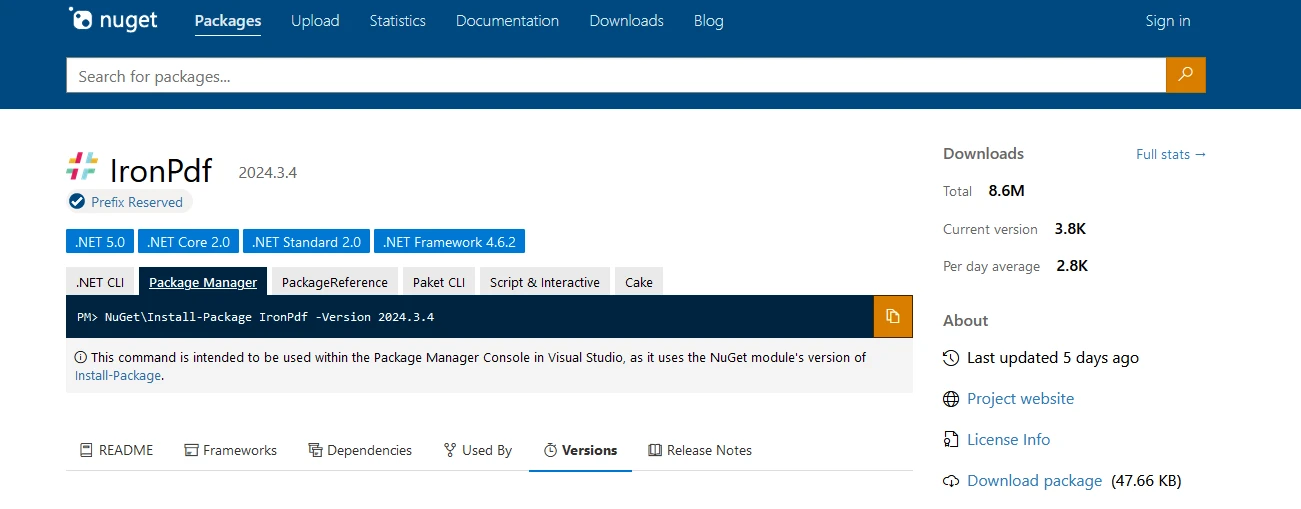
dotnet add package IronPdf --version 2024.3.4
Lub z Visual Studio, jak pokazano poniżej:

Teraz zanurzmy sie w generowanie PDF, aby zademonstrowac obiekt DateTime.
using IronPdf;

class Program
{
    static void Main()
    {
        Console.WriteLine("-----------Iron Software-------------");

        // Create a new instance of ChromePdfRenderer
        var renderer = new ChromePdfRenderer();

        // HTML content for the PDF
        var content = "<h1> Iron Software is Awesome </h1> Made with IronPDF!";
        content += "<h2>Demo Datetime Objects in C#</h2>";

        // Current date and time
        content += "<h3>Current date and time</h3>";
        DateTime currentDateTime = DateTime.Now;
        content += $"<p>Current date and time: {currentDateTime:U}</p>";
        Console.WriteLine($"Current date and time: {currentDateTime:U}");

        // Specific date and time
        content += "<h3>Specific date and time</h3>";
        DateTime specificDateTime = new DateTime(2024, 3, 16, 10, 30, 0);
        content += $"<p>Specific date and time: {specificDateTime:U}</p>";
        Console.WriteLine($"Specific date and time: {specificDateTime:U}");

        // Date only
        content += "<h3>Date Only</h3>";
        DateTime dateOnly = DateTime.Today;
        content += $"<p>Date only: {dateOnly:U}</p>";
        Console.WriteLine($"Date only: {dateOnly:U}");

        // Date and time in UTC
        content += "<h3>Date and time in UTC</h3>";
        DateTime utcDateTime = DateTime.UtcNow;
        content += $"<p>Date and time in UTC: {utcDateTime:U}</p>";
        Console.WriteLine($"Date and time in UTC: {utcDateTime:U}");

        // Compare dates with Operators
        content += "<h3>Compare dates with Operators</h3>";
        DateTime date1 = DateTime.Now;
        DateTime date2 = DateTime.Now.AddDays(1);
        content += $"<p>Compare date1 {date1:d}, date2 {date2:d}: {CompareDates(date1, date2)}</p>";
        Console.WriteLine($"Compare date1 {date1:U}, date2 {date2:U}: {CompareDates(date1, date2)}");

        // Compare dates with Compare Method
        content += "<h3>Compare dates with Compare Method</h3>";
        content += $"<p>Compare date1 {date1:d}, date2 {date2:d}: {CompareDatesWithCompare(date1, date2)}</p>";
        Console.WriteLine($"Compare date1 {date1:U}, date2 {date2:U}: {CompareDatesWithCompare(date1, date2)}");

        // Render the content to PDF
        var pdf = renderer.RenderHtmlAsPdf(content);

        // Save the PDF to the output file
        pdf.SaveAs("outputDate.pdf");
    }

    // Compare two dates using CompareTo method
    public static string CompareDatesWithCompare(DateTime date1, DateTime date2)
    {
        int result = date1.CompareTo(date2);
        string resultString;
        if (result < 0)
        {
            resultString = "date1 is earlier than date2.";
            Console.WriteLine(resultString);
        }
        else if (result > 0)
        {
            resultString = "date1 is later than date2.";
            Console.WriteLine(resultString);
        }
        else
        {
            resultString = "date1 is equal to date2.";
            Console.WriteLine(resultString);
        }
        return resultString;
    }

    // Compare two dates using basic comparison operators
    public static string CompareDates(DateTime date1, DateTime date2)
    {
        string result;
        if (CheckLessor(date1, date2))
        {
            result = "date1 is earlier than date2.";
            Console.WriteLine(result);
        }
        else if (CheckGreater(date1, date2))
        {
            result = "date1 is later than date2.";
            Console.WriteLine(result);
        }
        else
        {
            result = "date1 is equal to date2.";
            Console.WriteLine(result);
        }
        return result;
    }

    // Helper method to check if the first date is greater than the second date
    public static bool CheckGreater(DateTime date1, DateTime date2)
    {
        return date1 > date2;
    }

    // Helper method to check if the first date is less than the second date
    public static bool CheckLessor(DateTime date1, DateTime date2)
    {
        return date1 < date2;
    }
}
using IronPdf;
class Program
{
static void Main()
{
Console.WriteLine("-----------Iron Software-------------");
// Create a new instance of ChromePdfRenderer
var renderer = new ChromePdfRenderer();
// HTML content for the PDF
var content = "<h1> Iron Software is Awesome </h1> Made with IronPDF!";
content += "<h2>Demo Datetime Objects in C#</h2>";
// Current date and time
content += "<h3>Current date and time</h3>";
DateTime currentDateTime = DateTime.Now;
content += $"<p>Current date and time: {currentDateTime:U}</p>";
Console.WriteLine($"Current date and time: {currentDateTime:U}");
// Specific date and time
content += "<h3>Specific date and time</h3>";
DateTime specificDateTime = new DateTime(2024, 3, 16, 10, 30, 0);
content += $"<p>Specific date and time: {specificDateTime:U}</p>";
Console.WriteLine($"Specific date and time: {specificDateTime:U}");
// Date only
content += "<h3>Date Only</h3>";
DateTime dateOnly = DateTime.Today;
content += $"<p>Date only: {dateOnly:U}</p>";
Console.WriteLine($"Date only: {dateOnly:U}");
// Date and time in UTC
content += "<h3>Date and time in UTC</h3>";
DateTime utcDateTime = DateTime.UtcNow;
content += $"<p>Date and time in UTC: {utcDateTime:U}</p>";
Console.WriteLine($"Date and time in UTC: {utcDateTime:U}");
// Compare dates with Operators
content += "<h3>Compare dates with Operators</h3>";
DateTime date1 = DateTime.Now;
DateTime date2 = DateTime.Now.AddDays(1);
content += $"<p>Compare date1 {date1:d}, date2 {date2:d}: {CompareDates(date1, date2)}</p>";
Console.WriteLine($"Compare date1 {date1:U}, date2 {date2:U}: {CompareDates(date1, date2)}");
// Compare dates with Compare Method
content += "<h3>Compare dates with Compare Method</h3>";
content += $"<p>Compare date1 {date1:d}, date2 {date2:d}: {CompareDatesWithCompare(date1, date2)}</p>";
Console.WriteLine($"Compare date1 {date1:U}, date2 {date2:U}: {CompareDatesWithCompare(date1, date2)}");
// Render the content to PDF
var pdf = renderer.RenderHtmlAsPdf(content);
// Save the PDF to the output file
pdf.SaveAs("outputDate.pdf");
}
// Compare two dates using CompareTo method
public static string CompareDatesWithCompare(DateTime date1, DateTime date2)
{
int result = date1.CompareTo(date2);
string resultString;
if (result < 0)
{
resultString = "date1 is earlier than date2.";
Console.WriteLine(resultString);
}
else if (result > 0)
{
resultString = "date1 is later than date2.";
Console.WriteLine(resultString);
}
else
{
resultString = "date1 is equal to date2.";
Console.WriteLine(resultString);
}
return resultString;
}
// Compare two dates using basic comparison operators
public static string CompareDates(DateTime date1, DateTime date2)
{
string result;
if (CheckLessor(date1, date2))
{
result = "date1 is earlier than date2.";
Console.WriteLine(result);
}
else if (CheckGreater(date1, date2))
{
result = "date1 is later than date2.";
Console.WriteLine(result);
}
else
{
result = "date1 is equal to date2.";
Console.WriteLine(result);
}
return result;
}
// Helper method to check if the first date is greater than the second date
public static bool CheckGreater(DateTime date1, DateTime date2)
{
return date1 > date2;
}
// Helper method to check if the first date is less than the second date
public static bool CheckLessor(DateTime date1, DateTime date2)
{
return date1 < date2;
}
}Imports IronPdf
Friend Class Program
Shared Sub Main()
Console.WriteLine("-----------Iron Software-------------")
' Create a new instance of ChromePdfRenderer
Dim renderer = New ChromePdfRenderer()
' HTML content for the PDF
Dim content = "<h1> Iron Software is Awesome </h1> Made with IronPDF!"
content &= "<h2>Demo Datetime Objects in C#</h2>"
' Current date and time
content &= "<h3>Current date and time</h3>"
Dim currentDateTime As DateTime = DateTime.Now
content &= $"<p>Current date and time: {currentDateTime:U}</p>"
Console.WriteLine($"Current date and time: {currentDateTime:U}")
' Specific date and time
content &= "<h3>Specific date and time</h3>"
Dim specificDateTime As New DateTime(2024, 3, 16, 10, 30, 0)
content &= $"<p>Specific date and time: {specificDateTime:U}</p>"
Console.WriteLine($"Specific date and time: {specificDateTime:U}")
' Date only
content &= "<h3>Date Only</h3>"
Dim dateOnly As DateTime = DateTime.Today
content &= $"<p>Date only: {dateOnly:U}</p>"
Console.WriteLine($"Date only: {dateOnly:U}")
' Date and time in UTC
content &= "<h3>Date and time in UTC</h3>"
Dim utcDateTime As DateTime = DateTime.UtcNow
content &= $"<p>Date and time in UTC: {utcDateTime:U}</p>"
Console.WriteLine($"Date and time in UTC: {utcDateTime:U}")
' Compare dates with Operators
content &= "<h3>Compare dates with Operators</h3>"
Dim date1 As DateTime = DateTime.Now
Dim date2 As DateTime = DateTime.Now.AddDays(1)
content &= $"<p>Compare date1 {date1:d}, date2 {date2:d}: {CompareDates(date1, date2)}</p>"
Console.WriteLine($"Compare date1 {date1:U}, date2 {date2:U}: {CompareDates(date1, date2)}")
' Compare dates with Compare Method
content &= "<h3>Compare dates with Compare Method</h3>"
content &= $"<p>Compare date1 {date1:d}, date2 {date2:d}: {CompareDatesWithCompare(date1, date2)}</p>"
Console.WriteLine($"Compare date1 {date1:U}, date2 {date2:U}: {CompareDatesWithCompare(date1, date2)}")
' Render the content to PDF
Dim pdf = renderer.RenderHtmlAsPdf(content)
' Save the PDF to the output file
pdf.SaveAs("outputDate.pdf")
End Sub
' Compare two dates using CompareTo method
Public Shared Function CompareDatesWithCompare(ByVal date1 As DateTime, ByVal date2 As DateTime) As String
Dim result As Integer = date1.CompareTo(date2)
Dim resultString As String
If result < 0 Then
resultString = "date1 is earlier than date2."
Console.WriteLine(resultString)
ElseIf result > 0 Then
resultString = "date1 is later than date2."
Console.WriteLine(resultString)
Else
resultString = "date1 is equal to date2."
Console.WriteLine(resultString)
End If
Return resultString
End Function
' Compare two dates using basic comparison operators
Public Shared Function CompareDates(ByVal date1 As DateTime, ByVal date2 As DateTime) As String
Dim result As String
If CheckLessor(date1, date2) Then
result = "date1 is earlier than date2."
Console.WriteLine(result)
ElseIf CheckGreater(date1, date2) Then
result = "date1 is later than date2."
Console.WriteLine(result)
Else
result = "date1 is equal to date2."
Console.WriteLine(result)
End If
Return result
End Function
' Helper method to check if the first date is greater than the second date
Public Shared Function CheckGreater(ByVal date1 As DateTime, ByVal date2 As DateTime) As Boolean
Return date1 > date2
End Function
' Helper method to check if the first date is less than the second date
Public Shared Function CheckLessor(ByVal date1 As DateTime, ByVal date2 As DateTime) As Boolean
Return date1 < date2
End Function
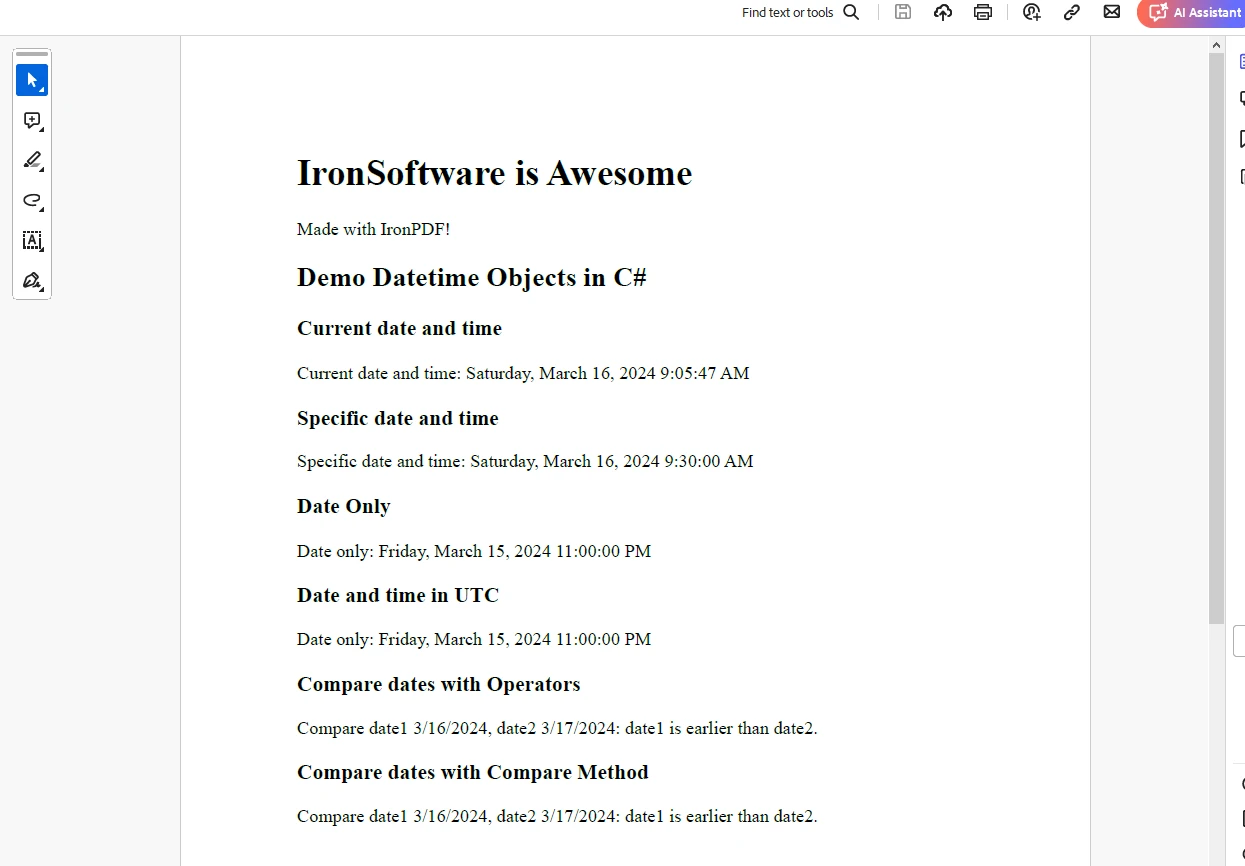
End ClassNastepujace wyjscie pokazuje PDF wygenerowany z obiektami DateTime:
Licencja próbna IronPDF
IronPDF wymaga licencji próbnej do pełnej funkcjonalności. Podaj ID e-mail, aby wygenerować klucz licencyjny, ktory zostanie dostarczony na Twoj e-mail.
"IronPdf.LicenseKey": "<Your Key>"Umiesc klucz licencyjny w pliku AppSettings.json.
Wnioski
Obiekty DateTime w C# zapewniaja potężny sposób pracy z datami i czasami w aplikacjach .NET. Oferuja szeroka game funkcjonalności do tworzenia, manipulowania, formatowania i porownywania wartosci dat i czasow. Zrozumienie, jak efektywnie korzystać z obiektów DateTime, jest niezbędne do budowania niezawodnych i dokładnych funkcji dat i godzin w aplikacjach C#.
Dzieki wykorzystaniu możliwości obiektów DateTime, programiści mogą zapewnić, że ich aplikacje prawidłowo obsługują daty i czasy, niezależnie od konkretnych wymagań czy scenariuszy, z którymi się spotykają.
Niezależnie od tego, czy chodzi o obliczanie czasu trwania, planowanie zadań czy wyświetlanie dat i godzin użytkownikom, obiekty DateTime odgrywają kluczową rolę w wielu aspektach programowania C# związanych z zarządzaniem datami i czasami.
Często Zadawane Pytania
Do czego służą obiekty DateTime w C#?
Obiekty DateTime w C# są używane do obsługi dat i czasów w aplikacjach .NET Framework. Oferują funkcje manipulacji, formatowania i porównywania dat oraz czasów, co czyni je niezbędnymi dla każdej aplikacji przetwarzającej dane czasowe.
Jak mogę utworzyć obiekt DateTime dla konkretnej daty w C#?
Aby utworzyć obiekt DateTime dla konkretnej daty w C#, można użyć konstruktóra z parametrami. Na przykład, DateTime specificDate = new DateTime(2023, 12, 31); tworzy obiekt DateTime dla 31 grudnia 2023.
Jak formatować obiekty DateTime jako ciągi znaków w C#?
Można formatować obiekty DateTime jako ciągi znaków w C# za pomocą metody ToString() z określeniami formatu. Na przykład, dateTime.ToString("yyyy-MM-dd") formatuje datę jako '2023-12-31'.
Jak mogę przekonwertować czas lokalny na UTC używając DateTime w C#?
Można przekonwertować czas lokalny na UTC w C# za pomocą metody ToUniversalTime() na obiekcie DateTime. Jest to przydatne do standaryzacji danych o dacie i czasie w różnych strefach czasowych.
Jakie metody są dostępne do porównywania obiektów DateTime w C#?
W C#, obiekty DateTime można porównywać za pomocą operatorów takich jak <, >, <=, >=, == i !=. Dodatkowo, metoda CompareTo() zapewnia możliwość ustalenia relatywnego porządku dwóch instancji DateTime.
Jak można użyć IronPDF do generowania dokumentów PDF z obiektami DateTime w C#?
IronPDF umożliwia deweloperom tworzenie dokumentów PDF w C# zawierających informacje o DateTime. Można umieszczać sformatowane ciągi znaków DateTime w treści PDF, aby wyświetlać dynamiczne dane czasowe.
Jak obsługiwać zmiany czasu letniego przy użyciu DateTime w C#?
Czas letni można zarządzać w C# poprzez konwersję obiektów DateTime na i z UTC używając ToLocalTime() oraz uwzględnienie dostosowań stref czasowych, aby zapewnić poprawną reprezentację czasu.
Dlaczego właściwość DateTime.UtcNow jest ważna w aplikacjach C#?
Właściwość DateTime.UtcNow dostarcza aktualną datę i czas w UTC, co jest kluczowe dla aplikacji wymagających spójnego i niezależnego od stref czasowych odniesienia czasowego do rejestrowania zdarzeń i synchronizacji danych.
Czy obiekty DateTime w C# mogą być formatowane za pomocą niestandardowych formatów?
Tak, obiekty DateTime w C# mogą być formatowane za pomocą niestandardowych formatów, podając ciąg formatu do metody ToString(). Pozwala to na wyświetlanie daty i czasu w dowolnie wybranym formacie.
Jakie jest znaczenie konwersji obiektów DateTime na format ciągu znaków w C#?
Konwersja obiektów DateTime na format ciągu znaków w C# ma znaczenie dla prezentacji informacji o dacie i czasie w interfejsach użytkownika, raportach i logach. Zapewnia to, że dane są prezentowane w czytelny i spójny sposób.










 Rozpocznij za DARMO
 Rozpocznij za DARMO
 Zarezerwuj darmowe Demo na żywo





 Nie wymaga karty kredytowej ani tworzenia konta










