using IronPdf;

// Disable local disk access or cross-origin requests
Installation.EnableWebSecurity = true;

// Instantiate Renderer
var renderer = new ChromePdfRenderer();

// Create a PDF from a HTML string using C#
var pdf = renderer.RenderHtmlAsPdf("<h1>Hello World</h1>");

// Export to a file or Stream
pdf.SaveAs("output.pdf");

// Advanced Example with HTML Assets
// Load external html assets: Images, CSS and JavaScript.
// An optional BasePath 'C:\site\assets\' is set as the file location to load assets from
var myAdvancedPdf = renderer.RenderHtmlAsPdf("<img src='icons/iron.png'>", @"C:\site\assets\");
myAdvancedPdf.SaveAs("html-with-assets.pdf");
using IronPdf;// Disable local disk access or cross-origin requestsInstallation.EnableWebSecurity = true;// Instantiate Renderervar renderer = new ChromePdfRenderer();// Create a PDF from a HTML string using C#var pdf = renderer.RenderHtmlAsPdf("<h1>Hello World</h1>");// Export to a file or Streampdf.SaveAs("output.pdf");// Advanced Example with HTML Assets// Load external html assets: Images, CSS and JavaScript.// An optional BasePath 'C:\site\assets\' is set as the file location to load assets fromvar myAdvancedPdf = renderer.RenderHtmlAsPdf("<img src='icons/iron.png'>", @"C:\site\assets\");myAdvancedPdf.SaveAs("html-with-assets.pdf");
Programlama dillerinin geniş sahasında, C# masaüstünden web ve mobil uygulamalara kadar geniş bir uygulama yelpazesi geliştirmek için kullanılan çok yönlü ve güçlü bir dil olarak öne çıkar. C#'ın geliştiriciler arasında favori olmasını sağlayan temel özelliklerden biri, çeşitli programlama zorluklarına çözüm sunan zengin kütüphane ve sınıf setidir. Bu sınıflardan biri olan [Stopwatch sınıfı](https://learn.microsoft.com/en-us/dotnet/api/system.diagnostics.stopwatch?view=net-8.0), kesin zaman ölçümü, profil oluşturma ve performans analizi alanında özel bir yere sahiptir.
Bu makalede, kamuya açık TimeSpan Elapsed özelliğini kullanarak belirli bir görevi gerçekleştirmek için geçen süreyi bulmak için C#'taki Stopwatch nesnesini nasıl kullanacağımızı göreceğiz. Ayrıca, [C# Geliştiricileri için IronPDF](https://ironpdf.com) kullanarak PDF oluşturma için ölçülen toplam geçen süreyi zamanlayacağız.
## 1. Stopwatch Sınıfı Nedir?
`Stopwatch` sınıfı, C#'de `System.Diagnostics` ad alanının bir parçasıdır ve yüksek hassasiyetle geçen zamanı ölçmek için basit ve verimli bir yol sağlar. .NET Framework ile tanıtılmıştır ve kod bölümlerinin yürütme süresini izleme, performansı optimize etme ve uygulamaları profile alma konusunda geliştiriciler için değerli bir araç olmuştur.
## 2. Başlatma ve Temel Kullanım
`Stopwatch` sınıfını kullanmak oldukça basittir. Kullanmaya başlamak için ilk olarak `Stopwatch` sınıfının yeni bir örneğini oluşturmanız gerekir:
```csharp
using System.Diagnostics;

class Program
{
    static void Main()
    {
        // Create a new stopwatch instance for timing operations
        Stopwatch stopwatch = new Stopwatch();
    }
}
```
`Stopwatch` örneği oluşturulduktan sonra, zamanı ölçmek için kronometreyi başlatıp durdurabilirsiniz:
```csharp
using System;
class Program
{
static void Main()
{
Stopwatch stopwatch = new Stopwatch();
// Start timing
stopwatch.Start();
Console.WriteLine("It will measure the time between start and stop");
// Stop timing
stopwatch.Stop();
}
}
```
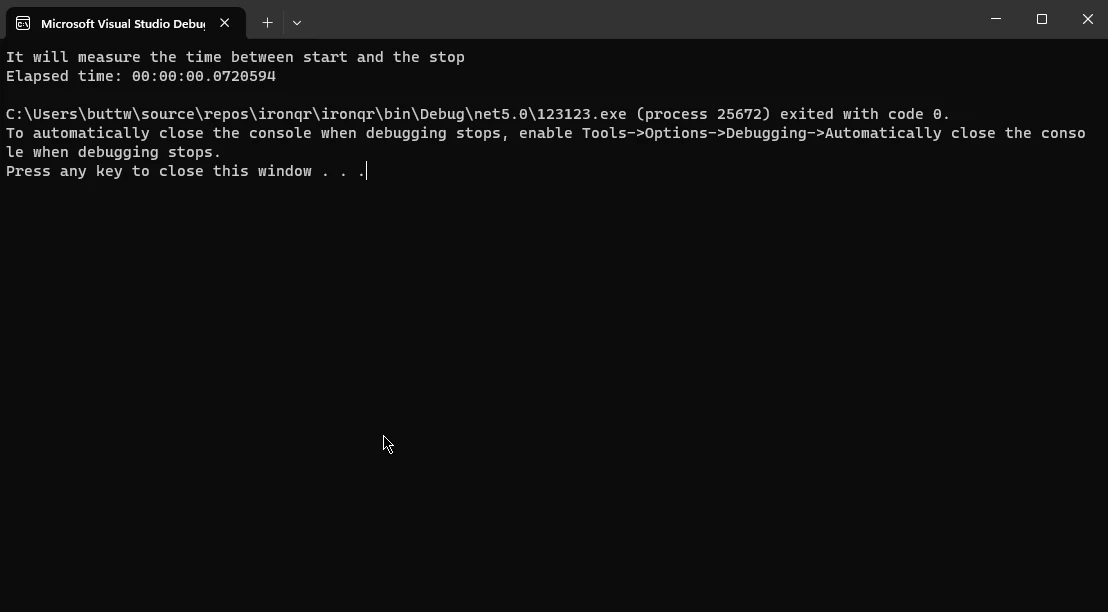
Geçen zaman `Elapsed` özelliği kullanılarak elde edilebilir:
```csharp
using System;
class Program
{
static void Main()
{
Stopwatch stopwatch = new Stopwatch();
stopwatch.Start();
// Simulate some work by sleeping for 2 seconds
System.Threading.Thread.Sleep(2000);
// Stop timing
stopwatch.Stop();
// Fetch the elapsed time
TimeSpan elapsed = stopwatch.Elapsed;
Console.WriteLine($"Elapsed time: {elapsed}");
}
}
```
**Çıktı:**
## 3. Stopwatch'ın Gelişmiş Özellikleri
`Stopwatch` sınıfı, temel zaman ölçümünün ötesinde birkaç gelişmiş özellik sunar. Bu özelliklerin bazılarına bir göz atalım:
### 3.1. Yeniden Başlat Yöntemi
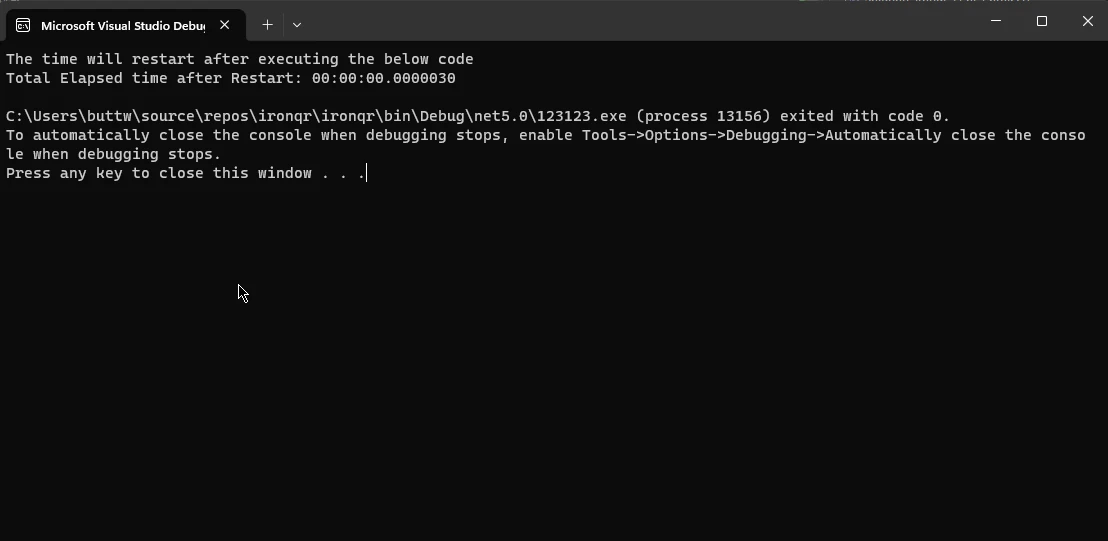
`Restart` yöntemi, geçen zamanı sıfırlayıp durdurmak için tek bir işlemde kullanışlı bir yol sunar. Bu, yeni bir `Stopwatch` örneği oluşturmadan birden fazla kod parçasının çalışma süresini ölçerken faydalı olabilir.
```csharp
using System;
class Program
{
static void Main()
{
Stopwatch stopwatch = new Stopwatch();
// Start timing
stopwatch.Start();
Console.WriteLine("The time will restart after executing the below code");
// Restart timing
stopwatch.Restart();
// Simulate work
System.Threading.Thread.Sleep(1000);
// Stop timing
stopwatch.Stop();
// Fetch the elapsed time after restart
TimeSpan elapsed = stopwatch.Elapsed;
Console.WriteLine($"Total Elapsed time after Restart: {elapsed}");
}
}
```
**Çıktı:**
### 3.2. `IsHighResolution` Özelliği
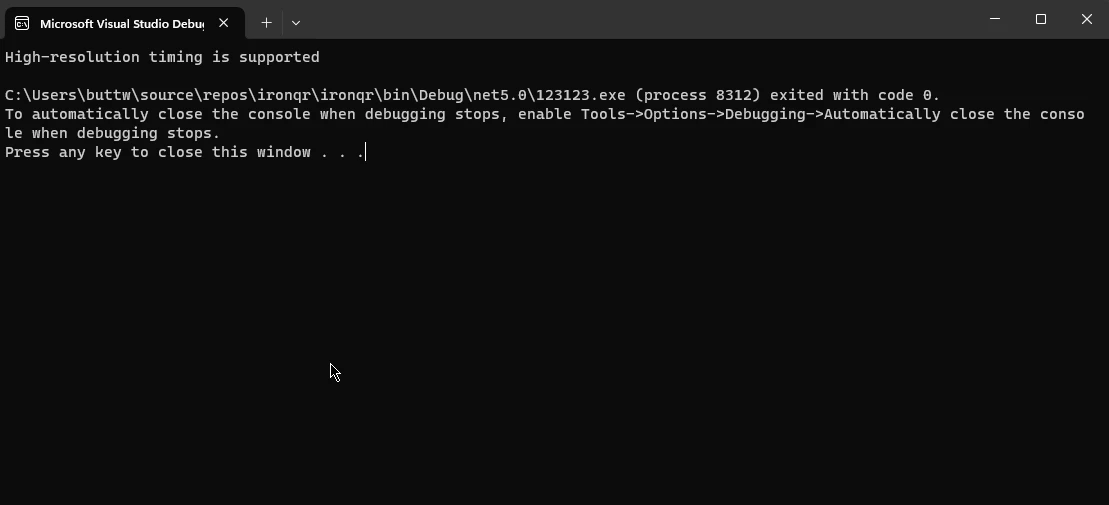
`IsHighResolution` özelliği, geçen zamanı doğru bir şekilde ölçmek için yüksek çözünürlüklü bir performans sayacına dayalı olup olmadığını gösterir. Bu özelliği kontrol etmek, yüksek çözünürlüklü zamanlama yöntemlerini desteklemeyen sistemlerle çalışırken faydalı olabilir.
```csharp
using System;
class Program
{
static void Main()
{
if (Stopwatch.IsHighResolution)
{
Console.WriteLine("High-resolution timing is supported");
}
else
{
Console.WriteLine("Fallback to lower-resolution timing");
}
}
}
```
**Çıktı:**
### 3.3. Sıklık Özelliği
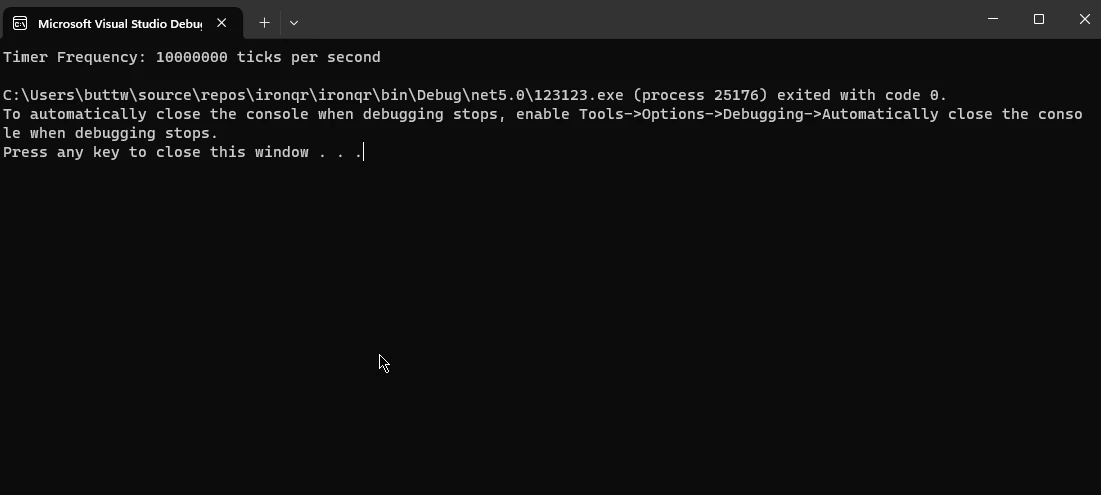
`Frequency` özelliği, temel timer'ın saniyedeki tik frekansını döndürür. Bu değer, geçen tıklamaları milisaniye gibi diğer zaman birimlerine dönüştürmek için faydalıdır.
```csharp
using System;
class Program
{
static void Main()
{
long frequency = Stopwatch.Frequency;
Console.WriteLine($"Timer Frequency: {frequency} ticks per second");
}
}
```
**Çıktı:**
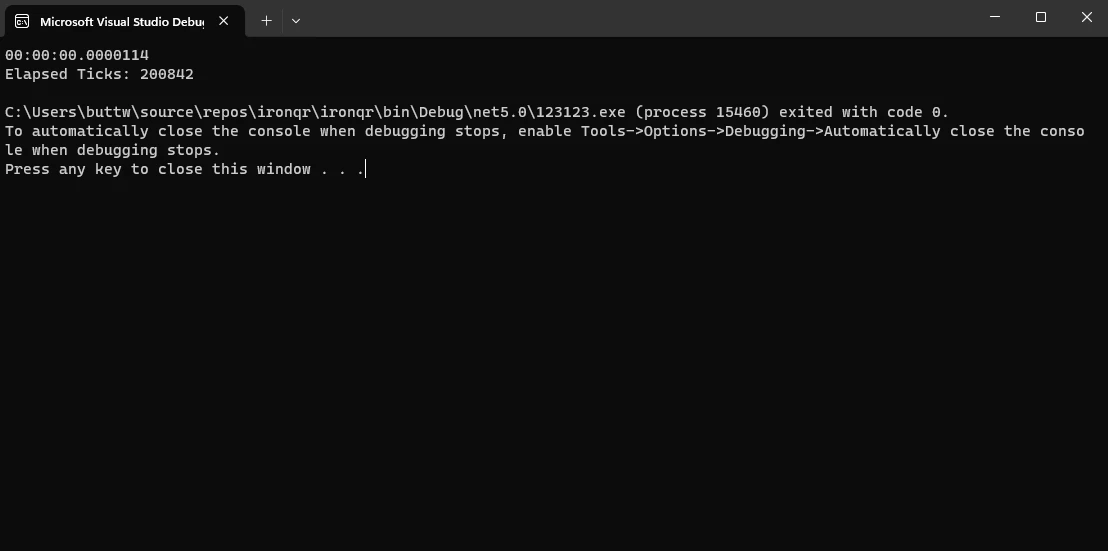
### 3.4. Geçen Tıklamalar Özelliği
`ElapsedTicks` özelliği, ham tik sayısına zaman birimlerine dönüştürmeden doğrudan erişim sağlar. Bu, özel hesaplamalar yaparken veya düşük seviyeli zamanlama gereksinimleriyle uğraşırken faydalı olabilir.
```csharp
using System;
class Program
{
static void Main()
{
Stopwatch stopwatch = new Stopwatch();
stopwatch.Start();
// Simulate some work
System.Threading.Thread.Sleep(1500);
// Stop timing
stopwatch.Stop();
// Fetch the elapsed ticks
long elapsedTicks = stopwatch.ElapsedTicks;
Console.WriteLine($"Elapsed Ticks: {elapsedTicks}");
}
}
```
**Çıktı:**
## 4. Introduction to IronPDF in C#
IronPDF, geliştiricilerin .NET uygulamalarında rahatlıkla PDF belgeleri oluşturmasına, manipüle etmesine ve işlemesine olanak tanıyan güçlü bir C# kütüphanesidir. HTML, resimler veya diğer formatlardan PDF'ler üretmeniz gereksinimi ne olursa olsun, IronPDF, C# projelerinize sorunsuz entegrasyon için kapsamlı bir araç seti sunar.
IronPDF, [HTML'yi PDF'ye dönüştürme](/tutorials/html-to-pdf/) kabiliyetiyle, tasarımları ve stilleri bozulmadan koruma olanağı sunar. Bu özellik, web içeriğinden, raporlar, faturalar veya belgeler oluşturmak için idealdir. HTML dosyalarını, URL'leri ve HTML dizelerini PDF dosyalarına dönüştürebilirsiniz.
```csharp
using IronPdf;
class Program
{
static void Main(string[] args)
{
// Initialize the PDF renderer
var renderer = new ChromePdfRenderer();
// 1. Convert HTML String to PDF
var htmlContent = "<h1>Hello, IronPDF!</h1><p>This is a PDF from an HTML string.</p>";
var pdfFromHtmlString = renderer.RenderHtmlAsPdf(htmlContent);
pdfFromHtmlString.SaveAs("HTMLStringToPDF.pdf");
// 2. Convert HTML File to PDF
var htmlFilePath = "path_to_your_html_file.html"; // Specify the path to your HTML file
var pdfFromHtmlFile = renderer.RenderHtmlFileAsPdf(htmlFilePath);
pdfFromHtmlFile.SaveAs("HTMLFileToPDF.pdf");
// 3. Convert URL to PDF
var url = "http://ironpdf.com"; // Specify the URL
var pdfFromUrl = renderer.RenderUrlAsPdf(url);
pdfFromUrl.SaveAs("URLToPDF.pdf");
}
}
```
### 4.1. Installation of IronPDF in C#
C# uygulamanızda IronPDF kullanmaya başlamak için bu basit adımları izleyin:
1. **NuGet Paket Yöneticisi:** C# projenizi Visual Studio'da açın ve Paket Yöneticisi Konsolu'na gidin. IronPDF'i kurmak için şu komutu çalıştırın:
```shell
:ProductInstall
```
Alternatif olarak, "IronPDF" paketini indirmek ve yüklemek için [IronPDF NuGet Paket Sayfası](https://www.nuget.org/packages/IronPdf)nı kullanabilirsiniz.
2. **Kodda Referans:** Başarılı kurulumdan sonra, C# kodunuzda IronPDF'e bir referans ekleyin:
```csharp
using IronPdf;
```
Artık IronPDF'in özelliklerinden faydalanmaya hazır olabilirsiniz.
### 4.2. URL'den PDF Oluşturma Zamanlamak İçin C# Stopwatch Kullanımı
Şimdi, IronPDF kullanarak bir URL'den bir PDF oluşturmak için geçen süreyi ölçmek amacıyla C#'ın `Stopwatch` sınıfını nasıl kullanacağımızı gösterelim:
```csharp
using System;
using System.Diagnostics;
using IronPdf;
class Program
{
static void Main()
{
// Initialize IronPDF Renderer
IronPdf.HtmlToPdf Renderer = new IronPdf.HtmlToPdf();
// Specify the URL for PDF generation
string urlToConvert = "https://example.com";
// Use Stopwatch to measure the time taken
Stopwatch stopwatch = new Stopwatch();
stopwatch.Start();
// Create PDF from URL
PdfDocument PDF = Renderer.RenderUrlAsPdf(urlToConvert);
// Stop measuring elapsed time
stopwatch.Stop();
// Save the generated PDF to a file
PDF.SaveAs("GeneratedPDF.pdf");
// Display the time taken
Console.WriteLine($"Time taken to create PDF from URL: {stopwatch.ElapsedMilliseconds} milliseconds");
}
}
```
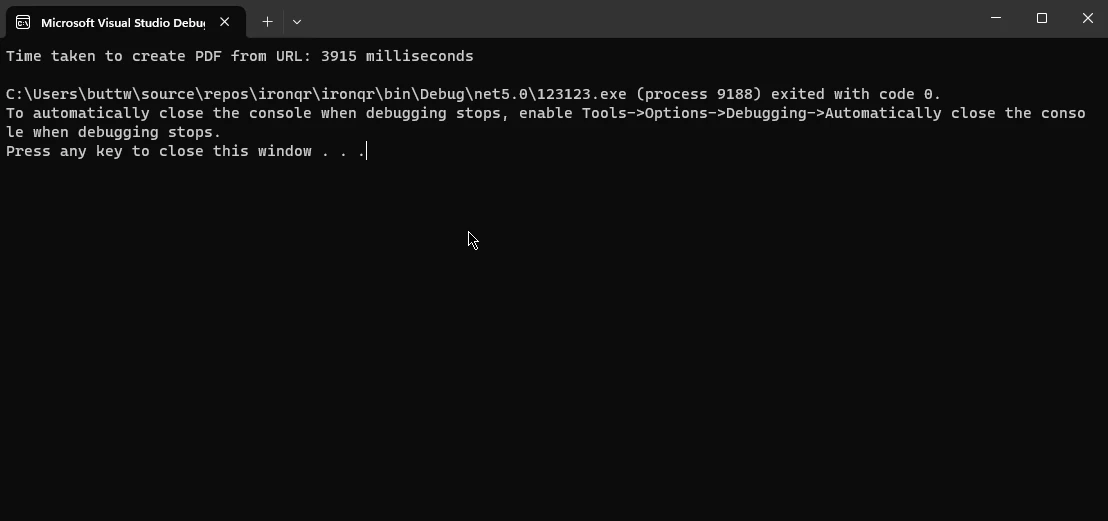
Bu örnek, IronPDF'yi başlatır, belirtilen bir URL'den bir PDF oluşturan `HtmlToPdf` sınıfını kullanır ve `Stopwatch` ile geçen süreyi ölçer. İstediğiniz URL ile `urlToConvert` değişkenini ayarlayın ve uygulamanız için ihtiyaç duyduğunuz şekilde PDF oluşturma sürecini daha da özelleştirebilirsiniz.
**Çıktı:**
## 5. Sonuç
Sonuç olarak, C#'deki `Stopwatch` sınıfı, doğru zaman ölçümü ve performans analizi için önemli bir araç olarak durur ve geliştiricilere kodu optimize etme ve operasyonel verimliliği değerlendirme araçları sunar. Kullanıcı dostu arayüzü ve gelişmiş özellikleri çeşitli zamanlama gereksinimleri için onu çok yönlü hale getirir. Buna ek olarak, C# projelerine IronPDF entegrasyonu, dilin PDF belge manipülasyonu yeteneklerini genişleterek, PDF'leri oluşturma, değiştirme ve işleme için sorunsuz bir çözüm sunar.
IronPDF ile bir URL'den bir PDF oluşturarak geçen süreyi ölçmek için `Stopwatch` kullanımının gösterildiği örnek, kesin zaman takibi ile gelişmiş kütüphaneler arasındaki etkileşimi sergileyerek, uygulama performansını değerlendirmede titiz zamanlamanın önemini vurgular. Birlikte, C#'ın `Stopwatch` ve IronPDF, geliştiricilere titiz zamanlama ve çok yönlü PDF işleme yetenekleriyle yüksek performanslı uygulamalar oluşturma yetkisi verir.
IronPDF işlevselliğini test etmek için ücretsiz deneme lisansınızı almak üzere [IronPDF Lisanslama Bilgi Sayfası](/licensing/)ni ziyaret edin. URL alımını PDF dönüşümü hakkında tüm öğreticiye [IronPDF URL alımı PDF Öğreticisi](/how-to/url-to-pdf/)nden ulaşabilirsiniz.
Programlama dillerinin geniş sahasında, C# masaüstünden web ve mobil uygulamalara kadar geniş bir uygulama yelpazesi geliştirmek için kullanılan çok yönlü ve güçlü bir dil olarak öne çıkar. C#'ın geliştiriciler arasında favori olmasını sağlayan temel özelliklerden biri, çeşitli programlama zorluklarına çözüm sunan zengin kütüphane ve sınıf setidir. Bu sınıflardan biri olan Stopwatch sınıfı, kesin zaman ölçümü, profil oluşturma ve performans analizi alanında özel bir yere sahiptir.
Bu makalede, kamuya açık TimeSpan Elapsed özelliğini kullanarak belirli bir görevi gerçekleştirmek için geçen süreyi bulmak için C#'taki Stopwatch nesnesini nasıl kullanacağımızı göreceğiz. Ayrıca, C# Geliştiricileri için IronPDF kullanarak PDF oluşturma için ölçülen toplam geçen süreyi zamanlayacağız.
1. Stopwatch Sınıfı Nedir?
Stopwatch sınıfı, C#'de System.Diagnostics ad alanının bir parçasıdır ve yüksek hassasiyetle geçen zamanı ölçmek için basit ve verimli bir yol sağlar. .NET Framework ile tanıtılmıştır ve kod bölümlerinin yürütme süresini izleme, performansı optimize etme ve uygulamaları profile alma konusunda geliştiriciler için değerli bir araç olmuştur.
2. Başlatma ve Temel Kullanım
Stopwatch sınıfını kullanmak oldukça basittir. Kullanmaya başlamak için ilk olarak Stopwatch sınıfının yeni bir örneğini oluşturmanız gerekir:
using System.Diagnostics;class Program{ static voidMain() { // Create a new stopwatch instance for timing operations Stopwatch stopwatch = new Stopwatch(); }}
using System.Diagnostics;

class Program
{
    static void Main()
    {
        // Create a new stopwatch instance for timing operations
        Stopwatch stopwatch = new Stopwatch();
    }
}
ImportsSystem.DiagnosticsFriend Class ProgramShared Sub Main() ' Create a new stopwatch instance for timing operations Dim stopwatch As New Stopwatch() End SubEnd Class
Imports System.Diagnostics

Friend Class Program
	Shared Sub Main()
		' Create a new stopwatch instance for timing operations
		Dim stopwatch As New Stopwatch()
	End Sub
End Class
Stopwatch örneği oluşturulduktan sonra, zamanı ölçmek için kronometreyi başlatıp durdurabilirsiniz:
using System;class Program{ static voidMain() { Stopwatch stopwatch = new Stopwatch(); // Start timing stopwatch.Start();Console.WriteLine("It will measure the time between start and stop"); // Stop timing stopwatch.Stop(); }}
using System;

class Program
{
    static void Main()
    {
        Stopwatch stopwatch = new Stopwatch();

        // Start timing
        stopwatch.Start();
        Console.WriteLine("It will measure the time between start and stop");

        // Stop timing
        stopwatch.Stop();
    }
}
ImportsSystemImportsSystem.DiagnosticsModuleProgram Sub Main() Dim stopwatch As New Stopwatch() ' Start timing stopwatch.Start()Console.WriteLine("It will measure the time between start and stop") ' Stop timing stopwatch.Stop() End SubEndModule
Imports System
Imports System.Diagnostics

Module Program
    Sub Main()
        Dim stopwatch As New Stopwatch()

        ' Start timing
        stopwatch.Start()
        Console.WriteLine("It will measure the time between start and stop")

        ' Stop timing
        stopwatch.Stop()
    End Sub
End Module
Geçen zaman Elapsed özelliği kullanılarak elde edilebilir:
using System;class Program{ static voidMain() { Stopwatch stopwatch = new Stopwatch(); stopwatch.Start(); // Simulate some work by sleeping for 2 secondsSystem.Threading.Thread.Sleep(2000); // Stop timing stopwatch.Stop(); // Fetch the elapsed time TimeSpan elapsed = stopwatch.Elapsed;Console.WriteLine($"Elapsed time: {elapsed}"); }}
using System;

class Program
{
    static void Main()
    {
        Stopwatch stopwatch = new Stopwatch();
        stopwatch.Start();

        // Simulate some work by sleeping for 2 seconds
        System.Threading.Thread.Sleep(2000);

        // Stop timing
        stopwatch.Stop();

        // Fetch the elapsed time
        TimeSpan elapsed = stopwatch.Elapsed;
        Console.WriteLine($"Elapsed time: {elapsed}");
    }
}
ImportsSystemFriend Class ProgramShared Sub Main() Dim stopwatch As New Stopwatch() stopwatch.Start() ' Simulate some work by sleeping for 2 secondsSystem.Threading.Thread.Sleep(2000) ' Stop timing stopwatch.Stop() ' Fetch the elapsed time Dim elapsed AsTimeSpan = stopwatch.ElapsedConsole.WriteLine($"Elapsed time: {elapsed}") End SubEnd Class
Imports System

Friend Class Program
	Shared Sub Main()
		Dim stopwatch As New Stopwatch()
		stopwatch.Start()

		' Simulate some work by sleeping for 2 seconds
		System.Threading.Thread.Sleep(2000)

		' Stop timing
		stopwatch.Stop()

		' Fetch the elapsed time
		Dim elapsed As TimeSpan = stopwatch.Elapsed
		Console.WriteLine($"Elapsed time: {elapsed}")
	End Sub
End Class
Çıktı:
3. Stopwatch'ın Gelişmiş Özellikleri
Stopwatch sınıfı, temel zaman ölçümünün ötesinde birkaç gelişmiş özellik sunar. Bu özelliklerin bazılarına bir göz atalım:
3.1. Yeniden Başlat Yöntemi
Restart yöntemi, geçen zamanı sıfırlayıp durdurmak için tek bir işlemde kullanışlı bir yol sunar. Bu, yeni bir Stopwatch örneği oluşturmadan birden fazla kod parçasının çalışma süresini ölçerken faydalı olabilir.
using System;class Program{ static voidMain() { Stopwatch stopwatch = new Stopwatch(); // Start timing stopwatch.Start();Console.WriteLine("The time will restart after executing the below code"); // Restart timing stopwatch.Restart(); // Simulate workSystem.Threading.Thread.Sleep(1000); // Stop timing stopwatch.Stop(); // Fetch the elapsed time after restart TimeSpan elapsed = stopwatch.Elapsed;Console.WriteLine($"Total Elapsed time after Restart: {elapsed}"); }}
using System;

class Program
{
    static void Main()
    {
        Stopwatch stopwatch = new Stopwatch();

        // Start timing
        stopwatch.Start();
        Console.WriteLine("The time will restart after executing the below code");

        // Restart timing
        stopwatch.Restart();

        // Simulate work
        System.Threading.Thread.Sleep(1000);

        // Stop timing
        stopwatch.Stop();

        // Fetch the elapsed time after restart
        TimeSpan elapsed = stopwatch.Elapsed;
        Console.WriteLine($"Total Elapsed time after Restart: {elapsed}");
    }
}
ImportsSystemImportsSystem.DiagnosticsImportsSystem.ThreadingModuleProgram Sub Main() Dim stopwatch As New Stopwatch() ' Start timing stopwatch.Start()Console.WriteLine("The time will restart after executing the below code") ' Restart timing stopwatch.Restart() ' Simulate workThread.Sleep(1000) ' Stop timing stopwatch.Stop() ' Fetch the elapsed time after restart Dim elapsed AsTimeSpan = stopwatch.ElapsedConsole.WriteLine($"Total Elapsed time after Restart: {elapsed}") End SubEndModule
Imports System
Imports System.Diagnostics
Imports System.Threading

Module Program
    Sub Main()
        Dim stopwatch As New Stopwatch()

        ' Start timing
        stopwatch.Start()
        Console.WriteLine("The time will restart after executing the below code")

        ' Restart timing
        stopwatch.Restart()

        ' Simulate work
        Thread.Sleep(1000)

        ' Stop timing
        stopwatch.Stop()

        ' Fetch the elapsed time after restart
        Dim elapsed As TimeSpan = stopwatch.Elapsed
        Console.WriteLine($"Total Elapsed time after Restart: {elapsed}")
    End Sub
End Module
Çıktı:
3.2. IsHighResolution Özelliği
IsHighResolution özelliği, geçen zamanı doğru bir şekilde ölçmek için yüksek çözünürlüklü bir performans sayacına dayalı olup olmadığını gösterir. Bu özelliği kontrol etmek, yüksek çözünürlüklü zamanlama yöntemlerini desteklemeyen sistemlerle çalışırken faydalı olabilir.
using System;class Program{ static voidMain() { if (Stopwatch.IsHighResolution) {Console.WriteLine("High-resolution timing is supported"); } else {Console.WriteLine("Fallback to lower-resolution timing"); } }}
using System;

class Program
{
    static void Main()
    {
        if (Stopwatch.IsHighResolution)
        {
            Console.WriteLine("High-resolution timing is supported");
        }
        else
        {
            Console.WriteLine("Fallback to lower-resolution timing");
        }
    }
}
ImportsSystemFriend Class ProgramShared Sub Main() IfStopwatch.IsHighResolutionThenConsole.WriteLine("High-resolution timing is supported") ElseConsole.WriteLine("Fallback to lower-resolution timing") End If End SubEnd Class
Imports System

Friend Class Program
	Shared Sub Main()
		If Stopwatch.IsHighResolution Then
			Console.WriteLine("High-resolution timing is supported")
		Else
			Console.WriteLine("Fallback to lower-resolution timing")
		End If
	End Sub
End Class
Çıktı:
3.3. Sıklık Özelliği
Frequency özelliği, temel timer'ın saniyedeki tik frekansını döndürür. Bu değer, geçen tıklamaları milisaniye gibi diğer zaman birimlerine dönüştürmek için faydalıdır.
using System;class Program{ static voidMain() { long frequency = Stopwatch.Frequency;Console.WriteLine($"Timer Frequency: {frequency} ticks per second"); }}
using System;

class Program
{
    static void Main()
    {
        long frequency = Stopwatch.Frequency;
        Console.WriteLine($"Timer Frequency: {frequency} ticks per second");
    }
}
ImportsSystemFriend Class ProgramShared Sub Main() Dim frequency AsLong = Stopwatch.FrequencyConsole.WriteLine($"Timer Frequency: {frequency} ticks per second") End SubEnd Class
Imports System

Friend Class Program
	Shared Sub Main()
		Dim frequency As Long = Stopwatch.Frequency
		Console.WriteLine($"Timer Frequency: {frequency} ticks per second")
	End Sub
End Class
Çıktı:
3.4. Geçen Tıklamalar Özelliği
ElapsedTicks özelliği, ham tik sayısına zaman birimlerine dönüştürmeden doğrudan erişim sağlar. Bu, özel hesaplamalar yaparken veya düşük seviyeli zamanlama gereksinimleriyle uğraşırken faydalı olabilir.
using System;class Program{ static voidMain() { Stopwatch stopwatch = new Stopwatch(); stopwatch.Start(); // Simulate some workSystem.Threading.Thread.Sleep(1500); // Stop timing stopwatch.Stop(); // Fetch the elapsed ticks long elapsedTicks = stopwatch.ElapsedTicks;Console.WriteLine($"Elapsed Ticks: {elapsedTicks}"); }}
using System;

class Program
{
    static void Main()
    {
        Stopwatch stopwatch = new Stopwatch();
        stopwatch.Start();

        // Simulate some work
        System.Threading.Thread.Sleep(1500);

        // Stop timing
        stopwatch.Stop();

        // Fetch the elapsed ticks
        long elapsedTicks = stopwatch.ElapsedTicks;
        Console.WriteLine($"Elapsed Ticks: {elapsedTicks}");
    }
}
ImportsSystemFriend Class ProgramShared Sub Main() Dim stopwatch As New Stopwatch() stopwatch.Start() ' Simulate some workSystem.Threading.Thread.Sleep(1500) ' Stop timing stopwatch.Stop() ' Fetch the elapsed ticks Dim elapsedTicks AsLong = stopwatch.ElapsedTicksConsole.WriteLine($"Elapsed Ticks: {elapsedTicks}") End SubEnd Class
Imports System

Friend Class Program
	Shared Sub Main()
		Dim stopwatch As New Stopwatch()
		stopwatch.Start()

		' Simulate some work
		System.Threading.Thread.Sleep(1500)

		' Stop timing
		stopwatch.Stop()

		' Fetch the elapsed ticks
		Dim elapsedTicks As Long = stopwatch.ElapsedTicks
		Console.WriteLine($"Elapsed Ticks: {elapsedTicks}")
	End Sub
End Class
Çıktı:
4. Introduction to IronPDF in C#
IronPDF, geliştiricilerin .NET uygulamalarında rahatlıkla PDF belgeleri oluşturmasına, manipüle etmesine ve işlemesine olanak tanıyan güçlü bir C# kütüphanesidir. HTML, resimler veya diğer formatlardan PDF'ler üretmeniz gereksinimi ne olursa olsun, IronPDF, C# projelerinize sorunsuz entegrasyon için kapsamlı bir araç seti sunar.
IronPDF, HTML'yi PDF'ye dönüştürme kabiliyetiyle, tasarımları ve stilleri bozulmadan koruma olanağı sunar. Bu özellik, web içeriğinden, raporlar, faturalar veya belgeler oluşturmak için idealdir. HTML dosyalarını, URL'leri ve HTML dizelerini PDF dosyalarına dönüştürebilirsiniz.
using IronPdf;class Program{ static voidMain(string[] args) { // Initialize the PDF renderer var renderer = new ChromePdfRenderer(); // 1. Convert HTML String to PDF var htmlContent = "<h1>Hello, IronPDF!</h1><p>This is a PDF from an HTML string.</p>"; var pdfFromHtmlString = renderer.RenderHtmlAsPdf(htmlContent); pdfFromHtmlString.SaveAs("HTMLStringToPDF.pdf"); // 2. Convert HTML File to PDF var htmlFilePath = "path_to_your_html_file.html"; // Specify the path to your HTML file var pdfFromHtmlFile = renderer.RenderHtmlFileAsPdf(htmlFilePath); pdfFromHtmlFile.SaveAs("HTMLFileToPDF.pdf"); // 3. Convert URL to PDF var url = "http://ironpdf.com"; // Specify the URL var pdfFromUrl = renderer.RenderUrlAsPdf(url); pdfFromUrl.SaveAs("URLToPDF.pdf"); }}
using IronPdf;

class Program
{
    static void Main(string[] args)
    {
        // Initialize the PDF renderer
        var renderer = new ChromePdfRenderer();

        // 1. Convert HTML String to PDF
        var htmlContent = "<h1>Hello, IronPDF!</h1><p>This is a PDF from an HTML string.</p>";
        var pdfFromHtmlString = renderer.RenderHtmlAsPdf(htmlContent);
        pdfFromHtmlString.SaveAs("HTMLStringToPDF.pdf");

        // 2. Convert HTML File to PDF
        var htmlFilePath = "path_to_your_html_file.html"; // Specify the path to your HTML file
        var pdfFromHtmlFile = renderer.RenderHtmlFileAsPdf(htmlFilePath);
        pdfFromHtmlFile.SaveAs("HTMLFileToPDF.pdf");

        // 3. Convert URL to PDF
        var url = "http://ironpdf.com"; // Specify the URL
        var pdfFromUrl = renderer.RenderUrlAsPdf(url);
        pdfFromUrl.SaveAs("URLToPDF.pdf");
    }
}
ImportsIronPdfModuleProgram Sub Main(args AsString()) ' Initialize the PDF renderer Dim renderer = New ChromePdfRenderer() ' 1. Convert HTML String to PDF Dim htmlContent = "<h1>Hello, IronPDF!</h1><p>This is a PDF from an HTML string.</p>" Dim pdfFromHtmlString = renderer.RenderHtmlAsPdf(htmlContent) pdfFromHtmlString.SaveAs("HTMLStringToPDF.pdf") ' 2. Convert HTML File to PDF Dim htmlFilePath = "path_to_your_html_file.html" ' Specify the path to your HTML file Dim pdfFromHtmlFile = renderer.RenderHtmlFileAsPdf(htmlFilePath) pdfFromHtmlFile.SaveAs("HTMLFileToPDF.pdf") ' 3. Convert URL to PDF Dim url = "http://ironpdf.com" ' Specify the URL Dim pdfFromUrl = renderer.RenderUrlAsPdf(url) pdfFromUrl.SaveAs("URLToPDF.pdf") End SubEndModule
Imports IronPdf

Module Program
    Sub Main(args As String())
        ' Initialize the PDF renderer
        Dim renderer = New ChromePdfRenderer()

        ' 1. Convert HTML String to PDF
        Dim htmlContent = "<h1>Hello, IronPDF!</h1><p>This is a PDF from an HTML string.</p>"
        Dim pdfFromHtmlString = renderer.RenderHtmlAsPdf(htmlContent)
        pdfFromHtmlString.SaveAs("HTMLStringToPDF.pdf")

        ' 2. Convert HTML File to PDF
        Dim htmlFilePath = "path_to_your_html_file.html" ' Specify the path to your HTML file
        Dim pdfFromHtmlFile = renderer.RenderHtmlFileAsPdf(htmlFilePath)
        pdfFromHtmlFile.SaveAs("HTMLFileToPDF.pdf")

        ' 3. Convert URL to PDF
        Dim url = "http://ironpdf.com" ' Specify the URL
        Dim pdfFromUrl = renderer.RenderUrlAsPdf(url)
        pdfFromUrl.SaveAs("URLToPDF.pdf")
    End Sub
End Module
4.1. Installation of IronPDF in C#
C# uygulamanızda IronPDF kullanmaya başlamak için bu basit adımları izleyin:
NuGet Paket Yöneticisi: C# projenizi Visual Studio'da açın ve Paket Yöneticisi Konsolu'na gidin. IronPDF'i kurmak için şu komutu çalıştırın:
PM > Install-Package IronPdf
Install-Package IronPdf
Alternatif olarak, "IronPDF" paketini indirmek ve yüklemek için IronPDF NuGet Paket Sayfasını kullanabilirsiniz.
Kodda Referans: Başarılı kurulumdan sonra, C# kodunuzda IronPDF'e bir referans ekleyin:
using IronPdf;
using IronPdf;
ImportsIronPdf
Imports IronPdf
Artık IronPDF'in özelliklerinden faydalanmaya hazır olabilirsiniz.
4.2. URL'den PDF Oluşturma Zamanlamak İçin C# Stopwatch Kullanımı
Şimdi, IronPDF kullanarak bir URL'den bir PDF oluşturmak için geçen süreyi ölçmek amacıyla C#'ın Stopwatch sınıfını nasıl kullanacağımızı gösterelim:
using System;using System.Diagnostics;using IronPdf;class Program{ static voidMain() { // Initialize IronPDF Renderer IronPdf.HtmlToPdfRenderer = new IronPdf.HtmlToPdf(); // Specify the URL for PDF generation string urlToConvert = "https://example.com"; // Use Stopwatch to measure the time taken Stopwatch stopwatch = new Stopwatch(); stopwatch.Start(); // Create PDF from URL PdfDocumentPDF = Renderer.RenderUrlAsPdf(urlToConvert); // Stop measuring elapsed time stopwatch.Stop(); // Save the generated PDF to a filePDF.SaveAs("GeneratedPDF.pdf"); // Display the time takenConsole.WriteLine($"Time taken to create PDF from URL: {stopwatch.ElapsedMilliseconds} milliseconds"); }}
using System;
using System.Diagnostics;
using IronPdf;

class Program
{
    static void Main()
    {
        // Initialize IronPDF Renderer
        IronPdf.HtmlToPdf Renderer = new IronPdf.HtmlToPdf();

        // Specify the URL for PDF generation
        string urlToConvert = "https://example.com";

        // Use Stopwatch to measure the time taken
        Stopwatch stopwatch = new Stopwatch();
        stopwatch.Start();

        // Create PDF from URL
        PdfDocument PDF = Renderer.RenderUrlAsPdf(urlToConvert);

        // Stop measuring elapsed time
        stopwatch.Stop();

        // Save the generated PDF to a file
        PDF.SaveAs("GeneratedPDF.pdf");

        // Display the time taken
        Console.WriteLine($"Time taken to create PDF from URL: {stopwatch.ElapsedMilliseconds} milliseconds");
    }
}
ImportsSystemImportsSystem.DiagnosticsImportsIronPdfFriend Class ProgramShared Sub Main() ' Initialize IronPDF Renderer DimRendererAs New IronPdf.HtmlToPdf() ' Specify the URL for PDF generation Dim urlToConvert AsString = "https://example.com" ' Use Stopwatch to measure the time taken Dim stopwatch As New Stopwatch() stopwatch.Start() ' Create PDF from URL DimPDFAsPdfDocument = Renderer.RenderUrlAsPdf(urlToConvert) ' Stop measuring elapsed time stopwatch.Stop() ' Save the generated PDF to a filePDF.SaveAs("GeneratedPDF.pdf") ' Display the time takenConsole.WriteLine($"Time taken to create PDF from URL: {stopwatch.ElapsedMilliseconds} milliseconds") End SubEnd Class
Imports System
Imports System.Diagnostics
Imports IronPdf

Friend Class Program
	Shared Sub Main()
		' Initialize IronPDF Renderer
		Dim Renderer As New IronPdf.HtmlToPdf()

		' Specify the URL for PDF generation
		Dim urlToConvert As String = "https://example.com"

		' Use Stopwatch to measure the time taken
		Dim stopwatch As New Stopwatch()
		stopwatch.Start()

		' Create PDF from URL
		Dim PDF As PdfDocument = Renderer.RenderUrlAsPdf(urlToConvert)

		' Stop measuring elapsed time
		stopwatch.Stop()

		' Save the generated PDF to a file
		PDF.SaveAs("GeneratedPDF.pdf")

		' Display the time taken
		Console.WriteLine($"Time taken to create PDF from URL: {stopwatch.ElapsedMilliseconds} milliseconds")
	End Sub
End Class
Bu örnek, IronPDF'yi başlatır, belirtilen bir URL'den bir PDF oluşturan HtmlToPdf sınıfını kullanır ve Stopwatch ile geçen süreyi ölçer. İstediğiniz URL ile urlToConvert değişkenini ayarlayın ve uygulamanız için ihtiyaç duyduğunuz şekilde PDF oluşturma sürecini daha da özelleştirebilirsiniz.
Çıktı:
5. Sonuç
Sonuç olarak, C#'deki Stopwatch sınıfı, doğru zaman ölçümü ve performans analizi için önemli bir araç olarak durur ve geliştiricilere kodu optimize etme ve operasyonel verimliliği değerlendirme araçları sunar. Kullanıcı dostu arayüzü ve gelişmiş özellikleri çeşitli zamanlama gereksinimleri için onu çok yönlü hale getirir. Buna ek olarak, C# projelerine IronPDF entegrasyonu, dilin PDF belge manipülasyonu yeteneklerini genişleterek, PDF'leri oluşturma, değiştirme ve işleme için sorunsuz bir çözüm sunar.
IronPDF ile bir URL'den bir PDF oluşturarak geçen süreyi ölçmek için Stopwatch kullanımının gösterildiği örnek, kesin zaman takibi ile gelişmiş kütüphaneler arasındaki etkileşimi sergileyerek, uygulama performansını değerlendirmede titiz zamanlamanın önemini vurgular. Birlikte, C#'ın Stopwatch ve IronPDF, geliştiricilere titiz zamanlama ve çok yönlü PDF işleme yetenekleriyle yüksek performanslı uygulamalar oluşturma yetkisi verir.
Jacob Mellor, Iron Software'de Baş Teknoloji Yöneticisidir ve C# PDF teknolojisinde öncü bir mühendisdir. Iron Software'ın ana kod tabanının ilk geliştiricisi olarak, CEO Cameron Rimington ile birlikte şirketin ürün mimarisini 50'den fazla kişilik bir şirkete dönüştürmüştür ve NASA, Tesla ve dünya genelindeki devlet kurumlarına hizmet etmektedir.



















