using IronPdf;

// Disable local disk access or cross-origin requests
Installation.EnableWebSecurity = true;

// Instantiate Renderer
var renderer = new ChromePdfRenderer();

// Create a PDF from a HTML string using C#
var pdf = renderer.RenderHtmlAsPdf("<h1>Hello World</h1>");

// Export to a file or Stream
pdf.SaveAs("output.pdf");

// Advanced Example with HTML Assets
// Load external html assets: Images, CSS and JavaScript.
// An optional BasePath 'C:\site\assets\' is set as the file location to load assets from
var myAdvancedPdf = renderer.RenderHtmlAsPdf("<img src='icons/iron.png'>", @"C:\site\assets\");
myAdvancedPdf.SaveAs("html-with-assets.pdf");
using IronPdf;// Disable local disk access or cross-origin requestsInstallation.EnableWebSecurity = true;// Instantiate Renderervar renderer = new ChromePdfRenderer();// Create a PDF from a HTML string using C#var pdf = renderer.RenderHtmlAsPdf("<h1>Hello World</h1>");// Export to a file or Streampdf.SaveAs("output.pdf");// Advanced Example with HTML Assets// Load external html assets: Images, CSS and JavaScript.// An optional BasePath 'C:\site\assets\' is set as the file location to load assets fromvar myAdvancedPdf = renderer.RenderHtmlAsPdf("<img src='icons/iron.png'>", @"C:\site\assets\");myAdvancedPdf.SaveAs("html-with-assets.pdf");
PM >Install-Package IronPdf
Install-Package IronPdf
GELIŞTIRICI GÜNCELLEMELERI
Swashbuckle ASP .NET Core (Geliştiriciler için Nasıl Çalışır)
Swashbuckle, RESTful Web API'lerini otomatik olarak belgelemeye yardımcı olan bir C# .NET Core [NuGet](https://www.nuget.org/) paketidir. Bu blogda, Swashbuckle ASP.NET Core ve [IronPDF Kurulum Talimatları](/docs/#installation) NuGet paketlerini inceleyeceğiz ve ASP.NET Core Web API'lerini modern geliştirme sağlayacağız. Birlikte, minimum kod ile elde edilebilecek bir dizi işlevsellik sağlarlar.
API dokümantasyon sayfaları, Web API projesinden üretilen bir `swagger.json` dosyasını kullanan Swagger UI aracı kullanılarak görüntülenir. Oluşturulan JSON belgesi, Open API standardına uyar. Swashbuckle, kurulup yapılandırıldığında, otomatik olarak Swagger JSON'u açığa çıkaracak [Swashbuckle.AspNetCore](https://www.nuget.org/packages/Swashbuckle.AspNetCore) olarak bir NuGet paketi olarak mevcuttur. Swagger UI aracı, API'ler üzerinde yazılı XML yorumlarından üretilen Swagger JSON dosyasını okur. Ek olarak, proje ayarları dosyasında etkinleştirilerek bir XML belgeleme dosyası oluşturulabilir. XML yorumları, Swagger JSON'un üretildiği bir XML belgeleme dosyasına dönüştürülür. Daha sonra, Swagger ara katmanı JSON'u okuyarak Swagger JSON uç noktalarını açığa çıkarır.
## .NET Core Web API projesinde Uygulama
Bir Web API projesi ile başlayalım:
```shell
dotnet new webapi -n SwashbuckleDemo
cd SwashbuckleDemo
dotnet build
dotnet add package Swashbuckle.AspNetCore --version 6.5.0
dotnet build
```
Burada, "SwashbuckleDemo" adlı bir web API projesi oluşturuyoruz ve ardından Swashbuckle paketini .NET Core Web API projesine Paket Yöneticisi Konsolu'nu kullanarak yüklüyoruz.
## Swagger Middleware'i Yapılandırma
Swagger servislerini `Startup.cs` dosyasında yapılandırın.
```csharp
using System.Reflection;
using Microsoft.Extensions.DependencyInjection;
using Microsoft.AspNetCore.Builder;
public class Startup
{
public void ConfigureServices(IServiceCollection services)
{
// Other service configurations...
// Register the Swagger generator
services.AddSwaggerGen(c =>
{
c.SwaggerDoc("v1", new OpenApiInfo { Title = "My API", Version = "v1" });
// Optionally, include XML comments for additional information
var xmlFile = $"{Assembly.GetExecutingAssembly().GetName().Name}.xml";
var xmlPath = Path.Combine(AppContext.BaseDirectory, xmlFile);
c.IncludeXmlComments(xmlPath);
});
}
public void Configure(IApplicationBuilder app, IHostingEnvironment env)
{
// Other app configurations...
// Enable middleware to serve generated Swagger as a JSON endpoint.
app.UseSwagger();
// Enable Swagger UI (HTML, JS, CSS, etc.), specifying the Swagger JSON endpoint.
app.UseSwaggerUI(c =>
{
c.SwaggerEndpoint("/swagger/v1/swagger.json", "My API V1");
});
}
}
```
Yapılacak işleri listeleyen API'ler için bir denetleyici ekleyin:
```csharp
using Microsoft.AspNetCore.Http.HttpResults;
using Microsoft.AspNetCore.Builder;
using Microsoft.EntityFrameworkCore;
using Microsoft.AspNetCore.Mvc;
using System.Threading.Tasks;
// Example to define an entity class
public class Todo
{
public int Id { get; set; }
public string Name { get; set; }
public bool IsComplete { get; set; }
}
// Example to define a DbContext class
public class TodoDb : DbContext
{
public DbSet<Todo> Todos => Set<Todo>();
}
var builder = WebApplication.CreateBuilder(args);
var app = builder.Build();
app.MapGet("/", () => "SwashbuckleDemo!");
app.MapGet("/todoitems", async (TodoDb db) =>
await db.Todos.ToListAsync());
app.MapGet("/todoitems/complete", async (TodoDb db) =>
await db.Todos.Where(t => t.IsComplete).ToListAsync());
app.MapGet("/todoitems/{id}", async (int id, TodoDb db) =>
await db.Todos.FindAsync(id) is Todo todo
? Results.Ok(todo)
: Results.NotFound());
app.MapPost("/todoitems", async (Todo todo, TodoDb db) =>
{
db.Todos.Add(todo);
await db.SaveChangesAsync();
return Results.Created($"/todoitems/{todo.Id}", todo);
});
app.MapPut("/todoitems/{id}", async (int id, Todo inputTodo, TodoDb db) =>
{
var todo = await db.Todos.FindAsync(id);
if (todo is null) return Results.NotFound();
todo.Name = inputTodo.Name;
todo.IsComplete = inputTodo.IsComplete;
await db.SaveChangesAsync();
return Results.NoContent();
});
app.MapDelete("/todoitems/{id}", async (int id, TodoDb db) =>
{
if (await db.Todos.FindAsync(id) is Todo todo)
{
db.Todos.Remove(todo);
await db.SaveChangesAsync();
return Results.Ok(todo);
}
return Results.NotFound();
});
app.Run();
```
Aşağıda gösterildiği gibi bir denetleyici de eklenebilir:
```csharp
using Microsoft.AspNetCore.Mvc;
using Microsoft.Extensions.Logging;
using System.Collections.Generic;
using System;
using System.Linq;
namespace RestFullMinimalApi.Controllers
{
[ApiController]
[Route("[controller]")]
public class WeatherForecastController : ControllerBase
{
private static readonly string[] Summaries = new[]
{
"Freezing", "Bracing", "Chilly", "Cool", "Mild", "Warm", "Balmy", "Hot", "Sweltering", "Scorching"
};
private readonly ILogger<WeatherForecastController> _logger;
public WeatherForecastController(ILogger<WeatherForecastController> logger)
{
_logger = logger;
}
/// <summary>
/// Retrieves WeatherForecast
/// </summary>
/// <remarks>Awesomeness!</remarks>
/// <response code="200">Retrieved</response>
/// <response code="404">Not found</response>
/// <response code="500">Oops! Can't lookup your request right now</response>
[HttpGet(Name = "GetWeatherForecast")]
public IEnumerable<WeatherForecast> Get()
{
return Enumerable.Range(1, 5).Select(index => new WeatherForecast
{
Date = DateTime.Now.AddDays(index),
TemperatureC = Random.Shared.Next(-20, 55),
Summary = Summaries[Random.Shared.Next(Summaries.Length)]
})
.ToArray();
}
}
public class WeatherForecast
{
public DateTime Date { get; set; }
public int TemperatureC { get; set; }
public string Summary { get; set; }
}
}
```
Yukarıdaki kod [GitHub - Swashbuckle Demo](https://github.com/santoshkaranam/swashbuckle-demo) üzerinde mevcuttur.
## Swashbuckle aşağıdaki özellikleri sunar
### Swagger UI aracı
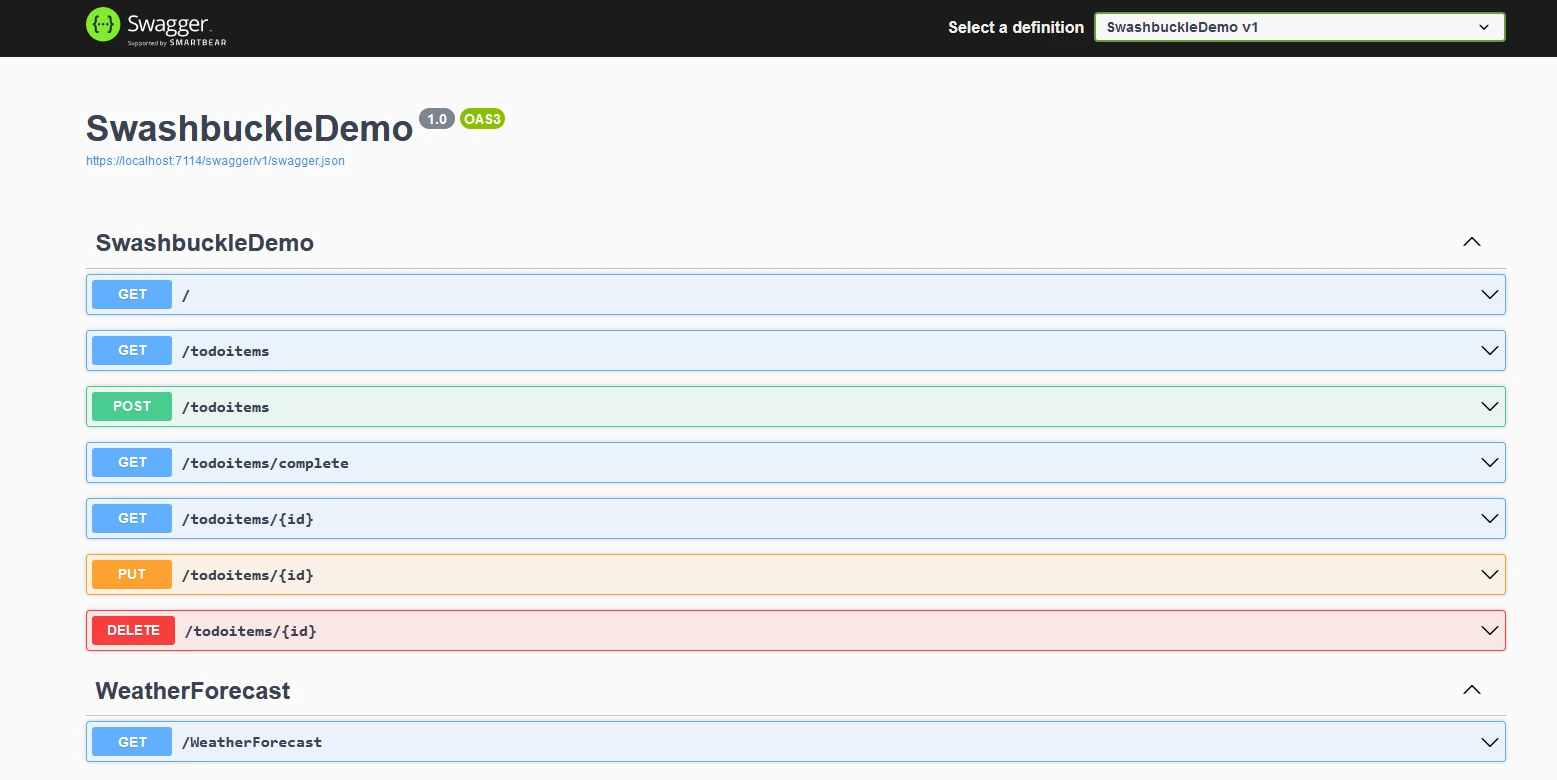
Swagger UI, Web API uygulamasının taban URL'sinden "/swagger/index.html" adresinde mevcuttur. Koddan tüm REST API'lerini listeler. Swagger üreteci, JSON dosyasını okur ve UI'yı doldurur.
### Swagger JSON
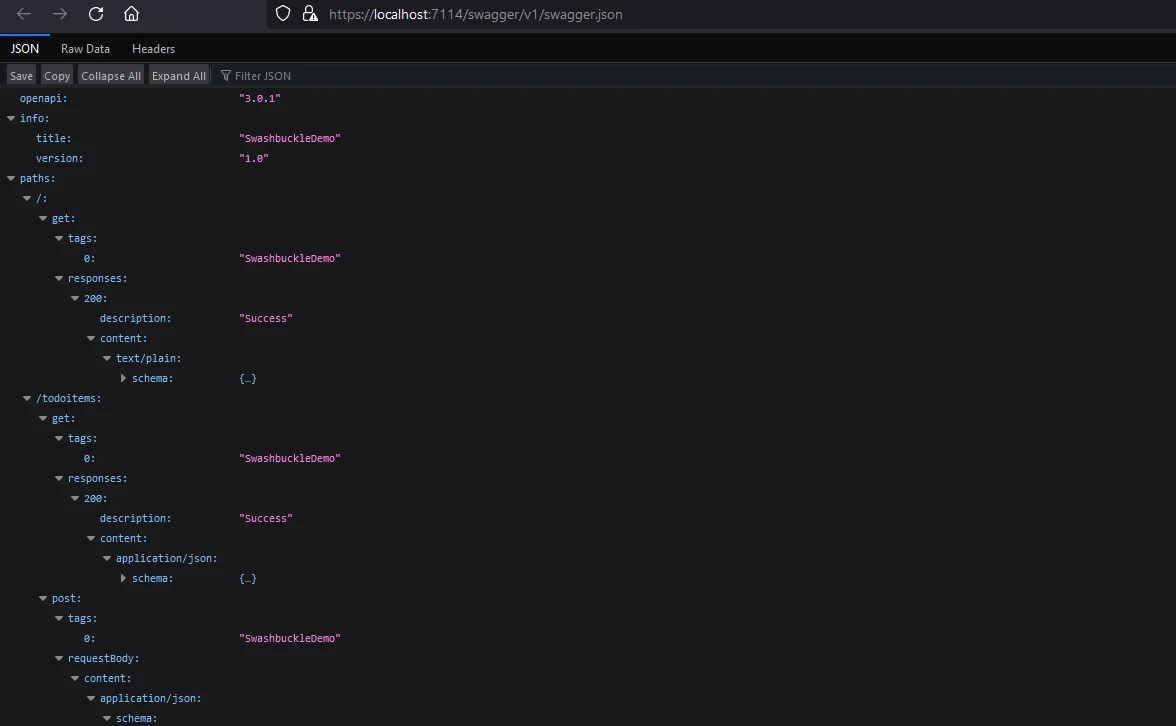
Swashbuckle.AspNetCore otomatik olarak, uç noktalar, istek ve yanıt türleri gibi API'nin yapısı hakkında bilgi içeren Swagger JSON dosyasını üretir. Bu JSON dosyası, Swagger/OpenAPI standardını destekleyen diğer araçlar ve hizmetler tarafından kullanılabilir.
Swagger JSON dosyası, web API uygulamasının taban URL'sinden "/swagger/v1/swagger.json" adresinde mevcuttur.
### Kod Açıklamaları
Geliştiriciler, Swagger belgelerine ek bilgi sağlamak için [ASP.NET](https://dotnet.microsoft.com/en-us/apps/aspnet) Core denetleyicilerinde XML yorumlarını ve niteliklerini kullanabilirler. Bu, oluşturulan Swagger belgesini geliştiren tanımlar, örnekler ve diğer meta verileri içerir.
```csharp
[ApiController]
[Route("[controller]")]
public class WeatherForecastController : ControllerBase
{
private static readonly string[] Summaries = new[]
{
"Freezing", "Bracing", "Chilly", "Cool", "Mild", "Warm", "Balmy", "Hot", "Sweltering", "Scorching"
};
private readonly ILogger<WeatherForecastController> _logger;
public WeatherForecastController(ILogger<WeatherForecastController> logger)
{
_logger = logger;
}
/// <summary>
/// Retrieves WeatherForecast
/// </summary>
/// <remarks>Awesomeness!</remarks>
/// <response code="200">Retrieved</response>
/// <response code="404">Not found</response>
/// <response code="500">Oops! Can't lookup your request right now</response>
[HttpGet(Name = "GetWeatherForecast")]
public IEnumerable<WeatherForecast> Get()
{
return Enumerable.Range(1, 5).Select(index => new WeatherForecast
{
Date = DateTime.Now.AddDays(index),
TemperatureC = Random.Shared.Next(-20, 55),
Summary = Summaries[Random.Shared.Next(Summaries.Length)]
})
.ToArray();
}
}
```
### Yapılandırma Seçenekleri
Swashbuckle.AspNetCore, Swagger belgesinin nasıl üretileceğini özelleştirmek için çeşitli yapılandırma seçenekleri sağlar. Geliştiriciler hangi API'lerin belgeleneceğini kontrol edebilir, adlandırma kurallarını yapılandırabilir ve diğer ayarları ayarlayabilirler.
Swashbuckle.AspNetCore tarafından sunulan ana yapılandırma seçeneklerinden bazıları şunlardır:
#### SwaggerGen Seçenekleri
```csharp
c.SwaggerDoc("v1", new OpenApiInfo { Title = "My API", Version = "v1" });
```
Bu satır, Swagger belge sürümünü belirtir ve API'nizin başlığı ve sürümü gibi meta verileri içerir.
```csharp
c.IncludeXmlComments(xmlPath);
```
Bu seçenek, Swagger belgelerine ek bilgi sağlamak amacıyla kodunuzdan XML yorumlarını dahil etmenize olanak tanır. `xmlPath` değişkeni, XML yorumları dosyanızın konumunu işaret etmeli.
```csharp
c.DescribeAllParametersInCamelCase();
```
Bu seçenek, Swagger üretecini parametre adları için camelCase kullanacak şekilde yapılandırır.
```csharp
c.OperationFilter<CustomOperationFilter>();
```
Belirli işlemler için Swagger belgesini değiştirmek için özel operasyon filtreleri kaydedebilirsiniz. `CustomOperationFilter`, `IOperationFilter`'i uygulayan bir sınıftır.
#### Swagger UI Seçenekleri
```csharp
c.SwaggerEndpoint("/swagger/v1/swagger.json", "My API V1");
```
Bu satır, Swagger UI'nın belgeyi görüntülemesi için yapılandırır. İlk parametre, Swagger JSON dosyasının URL'si ve ikinci parametre, API sürümü için kullanıcı dostu bir addır.
```csharp
c.RoutePrefix = "swagger";
```
Swagger UI için rota ön ekini ayarlayabilirsiniz. Bu örnekte, Swagger UI /swagger adresinde mevcut olacaktır.
```csharp
c.DocExpansion(DocExpansion.None);
```
Bu seçenek, Swagger UI'nın API belgesini nasıl görüntülediğini kontrol eder. `DocExpansion.None` varsayılan olarak tüm işlemleri daraltır.
#### SwaggerOptions
```csharp
c.SerializeAsV2 = true;
```
Bu seçenek Swagger belgesini 2.0 sürüm formatında (`true`) veya 3.0 sürüm formatında (`false`) seri hale getirip getirmeyeceğini belirler. Swagger 2.0 kullanmak istiyorsanız, bunu `true` olarak ayarlayın.
```csharp
c.DisplayOperationId();
```
Bu seçenek, Swagger UI'sında işlem kimliğini görüntüleyerek, API'nizin yapısını anlamak ve hata ayıklama için faydalı olabilir.
```csharp
c.OAuthClientId("swagger-ui");
```
API'niz OAuth kimlik doğrulaması kullanıyorsa, Swagger UI için OAuth istemci kimliğini yapılandırabilirsiniz.
Bu, mevcut yapılandırma seçeneklerinden sadece birkaç örnektir. Swashbuckle.AspNetCore kütüphanesi oldukça özelleştirilebilir ve çeşitli seçenekler ve filtreleri bir arada kullanarak Swagger belgelerini ihtiyaçlarınıza uygun hale getirebilirsiniz. Mevcut seçenekler hakkında en güncel ve kapsamlı bilgileri almak için her zaman resmi belgeleri veya geliştirme ortamınızdaki IntelliSense'i referans alın.
# IronPDF Tanıtımı
[IronPDF Ürün Genel Bakış](/docs/), PDF belgelerini okumaya ve oluşturmaya yardımcı olan Iron Software Web Sitesi'nden [C# PDF Library](https://ironsoftware.com/)'dir. Biçimlendirilmiş belgeleri stil bilgisi ile birlikte kolayca PDF'ye dönüştürebilir. IronPDF, HTML içeriğinden çok kolay bir şekilde PDF oluşturabilir. Bir URL'den HTML içeriğini indirir ve ardından PDF'ler oluşturur.
IronPDF, web sayfalarını, URL'leri ve [HTML'yi PDF'ye dönüştürmek](/tutorials/html-to-pdf/) için harika bir araçtır ve kaynağı mükemmel bir şekilde yeniden oluşturur. Çevrimiçi içeriklerin, raporların ve faturaların PDF versiyonlarını oluşturmak için idealdir ve herhangi bir web sayfasının PDF versiyonunu kolayca hazırlar.
```csharp
using IronPdf;
class Program
{
static void Main(string[] args)
{
var renderer = new ChromePdfRenderer();
// 1. Convert HTML String to PDF
var htmlContent = "<h1>Hello, IronPDF!</h1><p>This is a PDF from an HTML string.</p>";
var pdfFromHtmlString = renderer.RenderHtmlAsPdf(htmlContent);
pdfFromHtmlString.SaveAs("HTMLStringToPDF.pdf");
// 2. Convert HTML File to PDF
var htmlFilePath = "path_to_your_html_file.html"; // Specify the path to your HTML file
var pdfFromHtmlFile = renderer.RenderHtmlFileAsPdf(htmlFilePath);
pdfFromHtmlFile.SaveAs("HTMLFileToPDF.pdf");
// 3. Convert URL to PDF
var url = "http://ironpdf.com"; // Specify the URL
var pdfFromUrl = renderer.RenderUrlAsPdf(url);
pdfFromUrl.SaveAs("URLToPDF.pdf");
}
}
```
## Kurulum
[NuGet Üzerinden IronPDF Kurun](https://www.nuget.org/packages/IronPdf/) kullanarak [NuGet Paket Yöneticisi Detayları](https://www.nuget.org/) veya [Visual Studio Kurulum Kılavuzu](https://visualstudio.microsoft.com/) paket yöneticisi konsolu ile.
Paket Yöneticisi Konsolu'na komutu girin:
```shell
:ProductInstall
```
**Visual Studio Kullanarak**
! [Swashbuckle ASP .NET Core (Geliştirici İçin Nasıl Çalışır): Şekil 3 - Projeyi Visual Studio'da Açın] "Araçlar" menüsüne gidin, "NuGet Paket Yöneticisi"ni seçin, ardından "Çözüm için NuGet Paketlerini Yönet"'i seçin. NuGet Paketi Yönetici arayüzünde, Gözat sekmesinde "IronPDF" paketini arayın. Daha sonra IronPDF'nin son versiyonunu seçin ve yükleyin.](/static-assets/pdf/blog/swashbuckle-asp-net-core/swashbuckle-asp-net-core-3.webp)
Şimdi, uygulamamızı web sitesi içeriğini PDF dosyası olarak indirmek için fonksiyon eklemek üzere değiştirelim.
```csharp
using Microsoft.AspNetCore.Mvc;
using Microsoft.Extensions.Logging;
using IronPdf;
using System;
using System.Collections.Generic;
using System.IO;
using System.Linq;
namespace RestFullMinimalApi.Controllers
{
[ApiController]
[Route("[controller]")]
public class WeatherForecastController : ControllerBase
{
private static readonly string[] Summaries = new[]
{
"Freezing", "Bracing", "Chilly", "Cool", "Mild", "Warm", "Balmy", "Hot", "Sweltering", "Scorching"
};
private readonly ILogger<WeatherForecastController> _logger;
public WeatherForecastController(ILogger<WeatherForecastController> logger)
{
_logger = logger;
}
/// <summary>
/// Retrieves WeatherForecast
/// </summary>
/// <remarks>Awesomeness!</remarks>
/// <response code="200">Retrieved</response>
/// <response code="404">Not found</response>
/// <response code="500">Oops! Can't lookup your request right now</response>
[HttpGet(Name = "GetWeatherForecast")]
public IEnumerable<WeatherForecast> Get()
{
return Enumerable.Range(1, 5).Select(index => new WeatherForecast
{
Date = DateTime.Now.AddDays(index),
TemperatureC = Random.Shared.Next(-20, 55),
Summary = Summaries[Random.Shared.Next(Summaries.Length)]
})
.ToArray();
}
/// <summary>
/// Retrieves WeatherForecast as Pdf
/// </summary>
/// <remarks>Awesomeness!</remarks>
/// <response code="200">Retrieved</response>
/// <response code="404">Not found</response>
/// <response code="500">Oops! Can't lookup your request right now</response>
[HttpGet("download", Name = "DownloadWeatherForecast")]
public IActionResult GetWeatherPdf()
{
var results = Enumerable.Range(1, 5).Select(index => new WeatherForecast
{
Date = DateTime.Now.AddDays(index),
TemperatureC = Random.Shared.Next(-20, 55),
Summary = Summaries[Random.Shared.Next(Summaries.Length)]
}).ToArray();
var html = GetHtml(results);
var renderer = new ChromePdfRenderer();
var pdf = renderer.RenderHtmlAsPdf(html);
var fileName = "WeatherReport.pdf";
pdf.SaveAs(fileName);
var stream = new FileStream(fileName, FileMode.Open);
// Return the PDF file for download
return new FileStreamResult(stream, "application/octet-stream") { FileDownloadName = fileName };
}
private static string GetHtml(WeatherForecast[] weatherForecasts)
{
string header = @"
<html>
<head><title>WeatherForecast</title></head>
<body>
<h1>WeatherForecast</h1>
";
var footer = @"
</body>
</html>";
var htmlContent = header;
foreach (var weather in weatherForecasts)
{
htmlContent += $@"
<h2>{weather.Date}</h2>
<p>Summary: {weather.Summary}</p>
<p>Temperature in Celsius: {weather.TemperatureC}</p>
<p>Temperature in Fahrenheit: {weather.TemperatureF}</p>
";
}
htmlContent += footer;
return htmlContent;
}
}
public class WeatherForecast
{
public DateTime Date { get; set; }
public int TemperatureC { get; set; }
public string Summary { get; set; }
public int TemperatureF => 32 + (int)(TemperatureC / 0.5556);
}
}
```
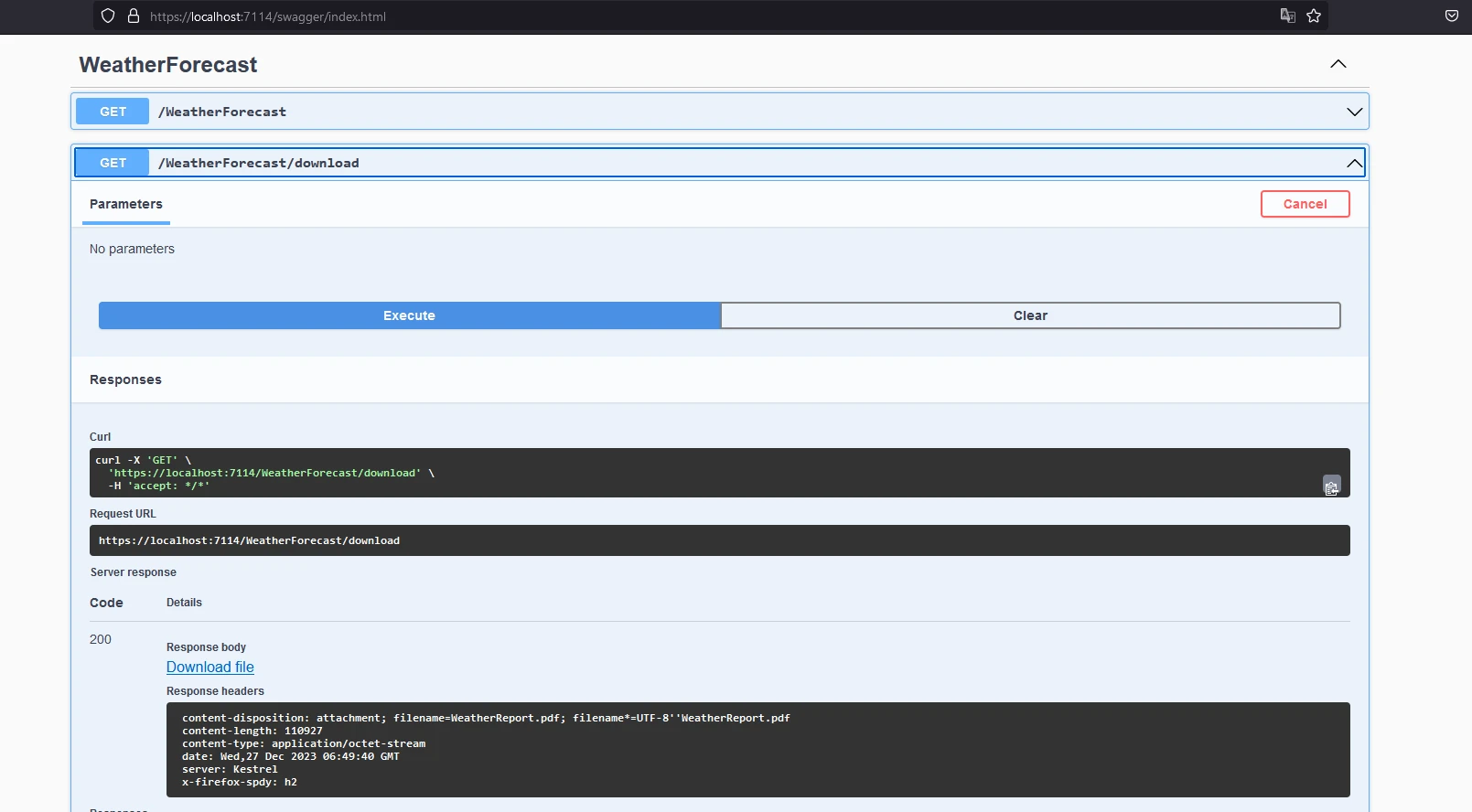
Burada, HTML dizesi oluşturmak için hava durumu verilerini kullanıyoruz ve ardından bir PDF belgesi oluşturmak için kullanıyoruz.
#### HTML İçeriği
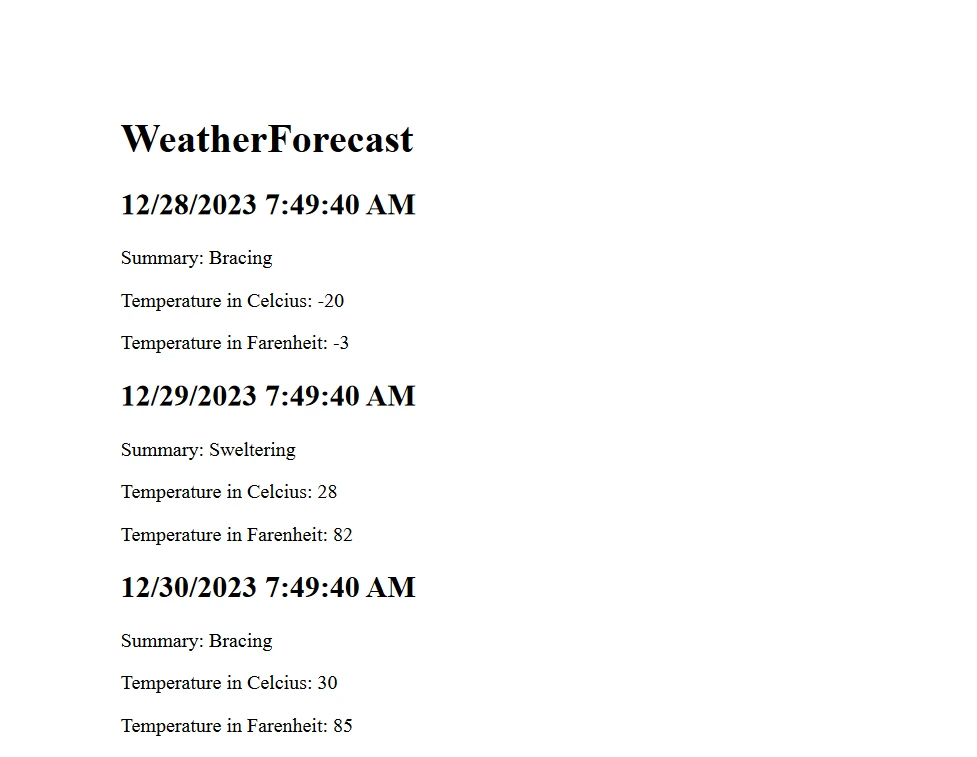
Ve PDF raporu şu şekilde görünüyor:
Tüm kod GitHub'da bulunmaktadır - [Swashbuckle Demo Kaynak Kodu](https://github.com/santoshkaranam/swashbuckle-demo).
Belgenin deneme lisansları için küçük bir filigranı var, geçerli bir lisansla kaldırılabilir.
### Lisanslama (Ücretsiz Deneme Mevcuttur)
Yukarıdaki kodun çalışması için bir lisans anahtarı gereklidir. Bu anahtarı `appsettings.json` dosyasına yerleştirin.
```json
{
"IronPdf": {
"LicenseKey": "your license key"
}
}
```
[IronPDF Deneme Kaydı](trial-license) ile kaydolduktan sonra geliştiriciler için bir deneme lisansı mevcuttur. Deneme lisansı için kredi kartı gerekmez. Ücretsiz deneme almak için e-posta adresinizle kaydolun.
# Sonuç
Swashbuckle ve IronPDF'yi anlamak, ASP.NET Core uygulamalarınıza API belgeleme ve PDF oluşturma yeteneklerini etkili bir şekilde entegre etmenize olanak tanır. IronPDF ayrıca [Başlarken](/docs/) için kapsamlı belgeler ve çeşitli [PDF Üretim Kodu Örnekleri](/examples/using-html-to-create-a-pdf/) sunar.
Ayrıca, kodlama yeteneklerinizi geliştirmenize ve modern uygulama gereksinimlerini karşılamanıza yardımcı olacak Iron Software'den [ilgili yazılım ürünlerini keşfedebilirsiniz](https://ironsoftware.com/enterprise/).
Swashbuckle, RESTful Web API'lerini otomatik olarak belgelemeye yardımcı olan bir C# .NET Core NuGet paketidir. Bu blogda, Swashbuckle ASP.NET Core ve IronPDF Kurulum Talimatları NuGet paketlerini inceleyeceğiz ve ASP.NET Core Web API'lerini modern geliştirme sağlayacağız. Birlikte, minimum kod ile elde edilebilecek bir dizi işlevsellik sağlarlar.
API dokümantasyon sayfaları, Web API projesinden üretilen bir swagger.json dosyasını kullanan Swagger UI aracı kullanılarak görüntülenir. Oluşturulan JSON belgesi, Open API standardına uyar. Swashbuckle, kurulup yapılandırıldığında, otomatik olarak Swagger JSON'u açığa çıkaracak Swashbuckle.AspNetCore olarak bir NuGet paketi olarak mevcuttur. Swagger UI aracı, API'ler üzerinde yazılı XML yorumlarından üretilen Swagger JSON dosyasını okur. Ek olarak, proje ayarları dosyasında etkinleştirilerek bir XML belgeleme dosyası oluşturulabilir. XML yorumları, Swagger JSON'un üretildiği bir XML belgeleme dosyasına dönüştürülür. Daha sonra, Swagger ara katmanı JSON'u okuyarak Swagger JSON uç noktalarını açığa çıkarır.
dotnet new webapi -n SwashbuckleDemo
cd SwashbuckleDemo
dotnet build
dotnet add package Swashbuckle.AspNetCore --version 6.5.0
dotnet build
SHELL
Burada, "SwashbuckleDemo" adlı bir web API projesi oluşturuyoruz ve ardından Swashbuckle paketini .NET Core Web API projesine Paket Yöneticisi Konsolu'nu kullanarak yüklüyoruz.
using System.Reflection;using Microsoft.Extensions.DependencyInjection;using Microsoft.AspNetCore.Builder;public class Startup{ public voidConfigureServices(IServiceCollection services) { // Other service configurations... // Register the Swagger generator services.AddSwaggerGen(c => { c.SwaggerDoc("v1", new OpenApiInfo { Title = "My API", Version = "v1" }); // Optionally, include XML comments for additional information var xmlFile = $"{Assembly.GetExecutingAssembly().GetName().Name}.xml"; var xmlPath = Path.Combine(AppContext.BaseDirectory, xmlFile); c.IncludeXmlComments(xmlPath); }); } public voidConfigure(IApplicationBuilder app, IHostingEnvironment env) { // Other app configurations... // Enable middleware to serve generated Swagger as a JSON endpoint. app.UseSwagger(); // Enable Swagger UI (HTML, JS, CSS, etc.), specifying the Swagger JSON endpoint. app.UseSwaggerUI(c => { c.SwaggerEndpoint("/swagger/v1/swagger.json", "My API V1"); }); }}
using System.Reflection;
using Microsoft.Extensions.DependencyInjection;
using Microsoft.AspNetCore.Builder;

public class Startup
{
    public void ConfigureServices(IServiceCollection services)
    {
        // Other service configurations...

        // Register the Swagger generator
        services.AddSwaggerGen(c =>
        {
            c.SwaggerDoc("v1", new OpenApiInfo { Title = "My API", Version = "v1" });

            // Optionally, include XML comments for additional information
            var xmlFile = $"{Assembly.GetExecutingAssembly().GetName().Name}.xml";
            var xmlPath = Path.Combine(AppContext.BaseDirectory, xmlFile);
            c.IncludeXmlComments(xmlPath);
        });
    }

    public void Configure(IApplicationBuilder app, IHostingEnvironment env)
    {
        // Other app configurations...

        // Enable middleware to serve generated Swagger as a JSON endpoint.
        app.UseSwagger();

        // Enable Swagger UI (HTML, JS, CSS, etc.), specifying the Swagger JSON endpoint.
        app.UseSwaggerUI(c =>
        {
            c.SwaggerEndpoint("/swagger/v1/swagger.json", "My API V1");
        });
    }
}
ImportsSystem.ReflectionImportsMicrosoft.Extensions.DependencyInjectionImportsMicrosoft.AspNetCore.BuilderPublic Class Startup Public Sub ConfigureServices(ByVal services AsIServiceCollection) ' Other service configurations... ' Register the Swagger generator services.AddSwaggerGen(Sub(c) c.SwaggerDoc("v1", New OpenApiInfoWith { .Title = "My API", .Version = "v1" }) ' Optionally, include XML comments for additional information Dim xmlFile = $"{System.Reflection.Assembly.GetExecutingAssembly().GetName().Name}.xml" Dim xmlPath = Path.Combine(AppContext.BaseDirectory, xmlFile) c.IncludeXmlComments(xmlPath) End Sub) End Sub Public Sub Configure(ByVal app AsIApplicationBuilder, ByVal env AsIHostingEnvironment) ' Other app configurations... ' Enable middleware to serve generated Swagger as a JSON endpoint. app.UseSwagger() ' Enable Swagger UI (HTML, JS, CSS, etc.), specifying the Swagger JSON endpoint. app.UseSwaggerUI(Sub(c) c.SwaggerEndpoint("/swagger/v1/swagger.json", "My API V1") End Sub) End SubEnd Class
Imports System.Reflection
Imports Microsoft.Extensions.DependencyInjection
Imports Microsoft.AspNetCore.Builder

Public Class Startup
	Public Sub ConfigureServices(ByVal services As IServiceCollection)
		' Other service configurations...

		' Register the Swagger generator
		services.AddSwaggerGen(Sub(c)
			c.SwaggerDoc("v1", New OpenApiInfo With {
				.Title = "My API",
				.Version = "v1"
			})

			' Optionally, include XML comments for additional information
			Dim xmlFile = $"{System.Reflection.Assembly.GetExecutingAssembly().GetName().Name}.xml"
			Dim xmlPath = Path.Combine(AppContext.BaseDirectory, xmlFile)
			c.IncludeXmlComments(xmlPath)
		End Sub)
	End Sub

	Public Sub Configure(ByVal app As IApplicationBuilder, ByVal env As IHostingEnvironment)
		' Other app configurations...

		' Enable middleware to serve generated Swagger as a JSON endpoint.
		app.UseSwagger()

		' Enable Swagger UI (HTML, JS, CSS, etc.), specifying the Swagger JSON endpoint.
		app.UseSwaggerUI(Sub(c)
			c.SwaggerEndpoint("/swagger/v1/swagger.json", "My API V1")
		End Sub)
	End Sub
End Class
Yapılacak işleri listeleyen API'ler için bir denetleyici ekleyin:
using Microsoft.AspNetCore.Http.HttpResults;using Microsoft.AspNetCore.Builder;using Microsoft.EntityFrameworkCore;using Microsoft.AspNetCore.Mvc;using System.Threading.Tasks;// Example to define an entity classpublic class Todo{ public intId { get; set; } public stringName { get; set; } public boolIsComplete { get; set; }}// Example to define a DbContext classpublic class TodoDb : DbContext{ public DbSet<Todo> Todos => Set<Todo>();}var builder = WebApplication.CreateBuilder(args);var app = builder.Build();app.MapGet("/", () => "SwashbuckleDemo!");app.MapGet("/todoitems", async (TodoDb db) => await db.Todos.ToListAsync());app.MapGet("/todoitems/complete", async (TodoDb db) => await db.Todos.Where(t => t.IsComplete).ToListAsync());app.MapGet("/todoitems/{id}", async (int id, TodoDb db) => await db.Todos.FindAsync(id) is Todo todo ? Results.Ok(todo) : Results.NotFound());app.MapPost("/todoitems", async (Todo todo, TodoDb db) =>{ db.Todos.Add(todo); await db.SaveChangesAsync(); returnResults.Created($"/todoitems/{todo.Id}", todo);});app.MapPut("/todoitems/{id}", async (int id, Todo inputTodo, TodoDb db) =>{ var todo = await db.Todos.FindAsync(id); if (todo is null) returnResults.NotFound(); todo.Name = inputTodo.Name; todo.IsComplete = inputTodo.IsComplete; await db.SaveChangesAsync(); returnResults.NoContent();});app.MapDelete("/todoitems/{id}", async (int id, TodoDb db) =>{ if (await db.Todos.FindAsync(id) is Todo todo) { db.Todos.Remove(todo); await db.SaveChangesAsync(); returnResults.Ok(todo); } returnResults.NotFound();});app.Run();
using Microsoft.AspNetCore.Http.HttpResults;
using Microsoft.AspNetCore.Builder;
using Microsoft.EntityFrameworkCore;
using Microsoft.AspNetCore.Mvc;
using System.Threading.Tasks;

// Example to define an entity class
public class Todo
{
    public int Id { get; set; }
    public string Name { get; set; }
    public bool IsComplete { get; set; }
}

// Example to define a DbContext class
public class TodoDb : DbContext
{
    public DbSet<Todo> Todos => Set<Todo>();
}

var builder = WebApplication.CreateBuilder(args);
var app = builder.Build();

app.MapGet("/", () => "SwashbuckleDemo!");

app.MapGet("/todoitems", async (TodoDb db) =>
    await db.Todos.ToListAsync());

app.MapGet("/todoitems/complete", async (TodoDb db) =>
    await db.Todos.Where(t => t.IsComplete).ToListAsync());

app.MapGet("/todoitems/{id}", async (int id, TodoDb db) =>
    await db.Todos.FindAsync(id) is Todo todo
        ? Results.Ok(todo)
        : Results.NotFound());

app.MapPost("/todoitems", async (Todo todo, TodoDb db) =>
{
    db.Todos.Add(todo);
    await db.SaveChangesAsync();
    return Results.Created($"/todoitems/{todo.Id}", todo);
});

app.MapPut("/todoitems/{id}", async (int id, Todo inputTodo, TodoDb db) =>
{
    var todo = await db.Todos.FindAsync(id);
    if (todo is null) return Results.NotFound();
    todo.Name = inputTodo.Name;
    todo.IsComplete = inputTodo.IsComplete;
    await db.SaveChangesAsync();
    return Results.NoContent();
});

app.MapDelete("/todoitems/{id}", async (int id, TodoDb db) =>
{
    if (await db.Todos.FindAsync(id) is Todo todo)
    {
        db.Todos.Remove(todo);
        await db.SaveChangesAsync();
        return Results.Ok(todo);
    }

    return Results.NotFound();
});

app.Run();
ImportsMicrosoft.AspNetCore.Http.HttpResultsImportsMicrosoft.AspNetCore.BuilderImportsMicrosoft.EntityFrameworkCoreImportsMicrosoft.AspNetCore.MvcImportsSystem.Threading.Tasks' Example to define an entity classPublic Class Todo Public Property Id() AsInteger Public Property Name() AsString Public Property IsComplete() AsBooleanEnd Class' Example to define a DbContext classPublic Class TodoDbInheritsDbContext PublicReadOnlyPropertyTodos() AsDbSet(OfTodo) Get Return [Set](OfTodo)()End Get End PropertyEnd ClassPrivate builder = WebApplication.CreateBuilder(args)Private app = builder.Build()app.MapGet("/", Function() "SwashbuckleDemo!")app.MapGet("/todoitems", Async Function(db AsTodoDb) Await db.Todos.ToListAsync())app.MapGet("/todoitems/complete", Async Function(db AsTodoDb) Await db.Todos.Where(Function(t) t.IsComplete).ToListAsync())Dim tempVar AsBoolean = TypeOf db.Todos.FindAsync(id) IsTodoDim todo AsTodo = If(tempVar, CType(db.Todos.FindAsync(id), Todo), Nothing)app.MapGet("/todoitems/{id}", Async Function(id AsInteger, db AsTodoDb)If(Await tempVar, Results.Ok(todo), Results.NotFound()))app.MapPost("/todoitems", Async Function(todo AsTodo, db AsTodoDb) db.Todos.Add(todo)Await db.SaveChangesAsync() ReturnResults.Created($"/todoitems/{todo.Id}", todo)End Function)app.MapPut("/todoitems/{id}", Async Function(id AsInteger, inputTodo AsTodo, db AsTodoDb) Dim todo = Await db.Todos.FindAsync(id) If todo Is Nothing Then ReturnResults.NotFound() End If todo.Name = inputTodo.Name todo.IsComplete = inputTodo.IsCompleteAwait db.SaveChangesAsync() ReturnResults.NoContent()End Function)app.MapDelete("/todoitems/{id}", Async Function(id AsInteger, db AsTodoDb) Dim tempVar2 AsBoolean = TypeOf db.Todos.FindAsync(id) IsTodo Dim todo AsTodo = If(tempVar2, CType(db.Todos.FindAsync(id), Todo), Nothing) IfAwait tempVar2 Then db.Todos.Remove(todo)Await db.SaveChangesAsync() ReturnResults.Ok(todo) End If ReturnResults.NotFound()End Function)app.Run()
Imports Microsoft.AspNetCore.Http.HttpResults
Imports Microsoft.AspNetCore.Builder
Imports Microsoft.EntityFrameworkCore
Imports Microsoft.AspNetCore.Mvc
Imports System.Threading.Tasks

' Example to define an entity class
Public Class Todo
	Public Property Id() As Integer
	Public Property Name() As String
	Public Property IsComplete() As Boolean
End Class

' Example to define a DbContext class
Public Class TodoDb
	Inherits DbContext

	Public ReadOnly Property Todos() As DbSet(Of Todo)
		Get
			Return [Set](Of Todo)()
		End Get
	End Property
End Class

Private builder = WebApplication.CreateBuilder(args)
Private app = builder.Build()

app.MapGet("/", Function() "SwashbuckleDemo!")

app.MapGet("/todoitems", Async Function(db As TodoDb) Await db.Todos.ToListAsync())

app.MapGet("/todoitems/complete", Async Function(db As TodoDb) Await db.Todos.Where(Function(t) t.IsComplete).ToListAsync())

Dim tempVar As Boolean = TypeOf db.Todos.FindAsync(id) Is Todo
Dim todo As Todo = If(tempVar, CType(db.Todos.FindAsync(id), Todo), Nothing)
app.MapGet("/todoitems/{id}", Async Function(id As Integer, db As TodoDb)If(Await tempVar, Results.Ok(todo), Results.NotFound()))

app.MapPost("/todoitems", Async Function(todo As Todo, db As TodoDb)
	db.Todos.Add(todo)
	Await db.SaveChangesAsync()
	Return Results.Created($"/todoitems/{todo.Id}", todo)
End Function)

app.MapPut("/todoitems/{id}", Async Function(id As Integer, inputTodo As Todo, db As TodoDb)
	Dim todo = Await db.Todos.FindAsync(id)
	If todo Is Nothing Then
		Return Results.NotFound()
	End If
	todo.Name = inputTodo.Name
	todo.IsComplete = inputTodo.IsComplete
	Await db.SaveChangesAsync()
	Return Results.NoContent()
End Function)

app.MapDelete("/todoitems/{id}", Async Function(id As Integer, db As TodoDb)
	Dim tempVar2 As Boolean = TypeOf db.Todos.FindAsync(id) Is Todo
	Dim todo As Todo = If(tempVar2, CType(db.Todos.FindAsync(id), Todo), Nothing)
	If Await tempVar2 Then
		db.Todos.Remove(todo)
		Await db.SaveChangesAsync()
		Return Results.Ok(todo)
	End If

	Return Results.NotFound()
End Function)

app.Run()
Aşağıda gösterildiği gibi bir denetleyici de eklenebilir:
using Microsoft.AspNetCore.Mvc;using Microsoft.Extensions.Logging;using System.Collections.Generic;using System;using System.Linq;namespace RestFullMinimalApi.Controllers{ [ApiController] [Route("[controller]")] public class WeatherForecastController : ControllerBase { private static readonly string[] Summaries = new[] { "Freezing", "Bracing", "Chilly", "Cool", "Mild", "Warm", "Balmy", "Hot", "Sweltering", "Scorching" }; private readonly ILogger<WeatherForecastController> _logger; publicWeatherForecastController(ILogger<WeatherForecastController> logger) { _logger = logger; } /// <summary> /// Retrieves WeatherForecast /// </summary> /// <remarks>Awesomeness!</remarks> /// <response code="200">Retrieved</response> /// <response code="404">Not found</response> /// <response code="500">Oops! Can't lookup your request right now</response> [HttpGet(Name = "GetWeatherForecast")] public IEnumerable<WeatherForecast> Get() { returnEnumerable.Range(1, 5).Select(index => new WeatherForecast {Date = DateTime.Now.AddDays(index),TemperatureC = Random.Shared.Next(-20, 55),Summary = Summaries[Random.Shared.Next(Summaries.Length)] }) .ToArray(); } } public class WeatherForecast { public DateTimeDate { get; set; } public intTemperatureC { get; set; } public stringSummary { get; set; } }}
using Microsoft.AspNetCore.Mvc;
using Microsoft.Extensions.Logging;
using System.Collections.Generic;
using System;
using System.Linq;

namespace RestFullMinimalApi.Controllers
{
    [ApiController]
    [Route("[controller]")]
    public class WeatherForecastController : ControllerBase
    {
        private static readonly string[] Summaries = new[]
        {
            "Freezing", "Bracing", "Chilly", "Cool", "Mild", "Warm", "Balmy", "Hot", "Sweltering", "Scorching"
        };

        private readonly ILogger<WeatherForecastController> _logger;

        public WeatherForecastController(ILogger<WeatherForecastController> logger)
        {
            _logger = logger;
        }

        /// <summary>
        /// Retrieves WeatherForecast
        /// </summary>
        /// <remarks>Awesomeness!</remarks>
        /// <response code="200">Retrieved</response>
        /// <response code="404">Not found</response>
        /// <response code="500">Oops! Can't lookup your request right now</response>
        [HttpGet(Name = "GetWeatherForecast")]
        public IEnumerable<WeatherForecast> Get()
        {
            return Enumerable.Range(1, 5).Select(index => new WeatherForecast
            {
                Date = DateTime.Now.AddDays(index),
                TemperatureC = Random.Shared.Next(-20, 55),
                Summary = Summaries[Random.Shared.Next(Summaries.Length)]
            })
            .ToArray();
        }
    }

    public class WeatherForecast
    {
        public DateTime Date { get; set; }
        public int TemperatureC { get; set; }
        public string Summary { get; set; }
    }
}
ImportsMicrosoft.AspNetCore.MvcImportsMicrosoft.Extensions.LoggingImportsSystem.Collections.GenericImportsSystemImportsSystem.LinqNamespaceRestFullMinimalApi.Controllers <ApiController> <Route("[controller]")> Public Class WeatherForecastControllerInheritsControllerBase PrivateSharedReadOnlySummaries() AsString = { "Freezing", "Bracing", "Chilly", "Cool", "Mild", "Warm", "Balmy", "Hot", "Sweltering", "Scorching" } PrivateReadOnly _logger AsILogger(OfWeatherForecastController) Public Sub New(ByVal logger AsILogger(OfWeatherForecastController)) _logger = logger End Sub ''' <summary> ''' Retrieves WeatherForecast ''' </summary> ''' <remarks>Awesomeness!</remarks> ''' <response code="200">Retrieved</response> ''' <response code="404">Not found</response> ''' <response code="500">Oops! Can't lookup your request right now</response> <HttpGet(Name := "GetWeatherForecast")> Public Function [Get]() AsIEnumerable(OfWeatherForecast) ReturnEnumerable.Range(1, 5).Select(Function(index) New WeatherForecastWith { .Date = DateTime.Now.AddDays(index), .TemperatureC = Random.Shared.Next(-20, 55), .Summary = Summaries(Random.Shared.Next(Summaries.Length)) }).ToArray() End Function End Class Public Class WeatherForecast Public Property [Date]() AsDateTime Public Property TemperatureC() AsInteger Public Property Summary() AsString End ClassEndNamespace
Imports Microsoft.AspNetCore.Mvc
Imports Microsoft.Extensions.Logging
Imports System.Collections.Generic
Imports System
Imports System.Linq

Namespace RestFullMinimalApi.Controllers
	<ApiController>
	<Route("[controller]")>
	Public Class WeatherForecastController
		Inherits ControllerBase

		Private Shared ReadOnly Summaries() As String = { "Freezing", "Bracing", "Chilly", "Cool", "Mild", "Warm", "Balmy", "Hot", "Sweltering", "Scorching" }

		Private ReadOnly _logger As ILogger(Of WeatherForecastController)

		Public Sub New(ByVal logger As ILogger(Of WeatherForecastController))
			_logger = logger
		End Sub

		''' <summary>
		''' Retrieves WeatherForecast
		''' </summary>
		''' <remarks>Awesomeness!</remarks>
		''' <response code="200">Retrieved</response>
		''' <response code="404">Not found</response>
		''' <response code="500">Oops! Can't lookup your request right now</response>
		<HttpGet(Name := "GetWeatherForecast")>
		Public Function [Get]() As IEnumerable(Of WeatherForecast)
			Return Enumerable.Range(1, 5).Select(Function(index) New WeatherForecast With {
				.Date = DateTime.Now.AddDays(index),
				.TemperatureC = Random.Shared.Next(-20, 55),
				.Summary = Summaries(Random.Shared.Next(Summaries.Length))
			}).ToArray()
		End Function
	End Class

	Public Class WeatherForecast
		Public Property [Date]() As DateTime
		Public Property TemperatureC() As Integer
		Public Property Summary() As String
	End Class
End Namespace
Swagger UI, Web API uygulamasının taban URL'sinden "/swagger/index.html" adresinde mevcuttur. Koddan tüm REST API'lerini listeler. Swagger üreteci, JSON dosyasını okur ve UI'yı doldurur.
Swagger JSON
Swashbuckle.AspNetCore otomatik olarak, uç noktalar, istek ve yanıt türleri gibi API'nin yapısı hakkında bilgi içeren Swagger JSON dosyasını üretir. Bu JSON dosyası, Swagger/OpenAPI standardını destekleyen diğer araçlar ve hizmetler tarafından kullanılabilir.
Swagger JSON dosyası, web API uygulamasının taban URL'sinden "/swagger/v1/swagger.json" adresinde mevcuttur.
Kod Açıklamaları
Geliştiriciler, Swagger belgelerine ek bilgi sağlamak için ASP.NET Core denetleyicilerinde XML yorumlarını ve niteliklerini kullanabilirler. Bu, oluşturulan Swagger belgesini geliştiren tanımlar, örnekler ve diğer meta verileri içerir.
<ApiController><Route("[controller]")>Public Class WeatherForecastControllerInheritsControllerBase PrivateSharedReadOnlySummaries() AsString = { "Freezing", "Bracing", "Chilly", "Cool", "Mild", "Warm", "Balmy", "Hot", "Sweltering", "Scorching" } PrivateReadOnly _logger AsILogger(OfWeatherForecastController) Public Sub New(ByVal logger AsILogger(OfWeatherForecastController)) _logger = logger End Sub ''' <summary> ''' Retrieves WeatherForecast ''' </summary> ''' <remarks>Awesomeness!</remarks> ''' <response code="200">Retrieved</response> ''' <response code="404">Not found</response> ''' <response code="500">Oops! Can't lookup your request right now</response> <HttpGet(Name := "GetWeatherForecast")> Public Function [Get]() AsIEnumerable(OfWeatherForecast) ReturnEnumerable.Range(1, 5).Select(Function(index) New WeatherForecastWith { .Date = DateTime.Now.AddDays(index), .TemperatureC = Random.Shared.Next(-20, 55), .Summary = Summaries(Random.Shared.Next(Summaries.Length)) }).ToArray() End FunctionEnd Class
<ApiController>
<Route("[controller]")>
Public Class WeatherForecastController
	Inherits ControllerBase

	Private Shared ReadOnly Summaries() As String = { "Freezing", "Bracing", "Chilly", "Cool", "Mild", "Warm", "Balmy", "Hot", "Sweltering", "Scorching" }

	Private ReadOnly _logger As ILogger(Of WeatherForecastController)

	Public Sub New(ByVal logger As ILogger(Of WeatherForecastController))
		_logger = logger
	End Sub

	''' <summary>
	''' Retrieves WeatherForecast
	''' </summary>
	''' <remarks>Awesomeness!</remarks>
	''' <response code="200">Retrieved</response>
	''' <response code="404">Not found</response>
	''' <response code="500">Oops! Can't lookup your request right now</response>
	<HttpGet(Name := "GetWeatherForecast")>
	Public Function [Get]() As IEnumerable(Of WeatherForecast)
		Return Enumerable.Range(1, 5).Select(Function(index) New WeatherForecast With {
			.Date = DateTime.Now.AddDays(index),
			.TemperatureC = Random.Shared.Next(-20, 55),
			.Summary = Summaries(Random.Shared.Next(Summaries.Length))
		}).ToArray()
	End Function
End Class
Yapılandırma Seçenekleri
Swashbuckle.AspNetCore, Swagger belgesinin nasıl üretileceğini özelleştirmek için çeşitli yapılandırma seçenekleri sağlar. Geliştiriciler hangi API'lerin belgeleneceğini kontrol edebilir, adlandırma kurallarını yapılandırabilir ve diğer ayarları ayarlayabilirler.
Swashbuckle.AspNetCore tarafından sunulan ana yapılandırma seçeneklerinden bazıları şunlardır:
SwaggerGen Seçenekleri
c.SwaggerDoc("v1", new OpenApiInfo { Title = "My API", Version = "v1" });
c.SwaggerDoc("v1", new OpenApiInfo { Title = "My API", Version = "v1" });
c.SwaggerDoc("v1", New OpenApiInfoWith { .Title = "My API", .Version = "v1"})
c.SwaggerDoc("v1", New OpenApiInfo With {
	.Title = "My API",
	.Version = "v1"
})
Bu satır, Swagger belge sürümünü belirtir ve API'nizin başlığı ve sürümü gibi meta verileri içerir.
c.IncludeXmlComments(xmlPath);
c.IncludeXmlComments(xmlPath);
c.IncludeXmlComments(xmlPath)
c.IncludeXmlComments(xmlPath)
Bu seçenek, Swagger belgelerine ek bilgi sağlamak amacıyla kodunuzdan XML yorumlarını dahil etmenize olanak tanır. xmlPath değişkeni, XML yorumları dosyanızın konumunu işaret etmeli.
c.DescribeAllParametersInCamelCase();
c.DescribeAllParametersInCamelCase();
c.DescribeAllParametersInCamelCase()
c.DescribeAllParametersInCamelCase()
Bu seçenek, Swagger üretecini parametre adları için camelCase kullanacak şekilde yapılandırır.
c.OperationFilter<CustomOperationFilter>();
c.OperationFilter<CustomOperationFilter>();
c.OperationFilter(OfCustomOperationFilter)()
c.OperationFilter(Of CustomOperationFilter)()
Belirli işlemler için Swagger belgesini değiştirmek için özel operasyon filtreleri kaydedebilirsiniz. CustomOperationFilter, IOperationFilter'i uygulayan bir sınıftır.
Swagger UI Seçenekleri
c.SwaggerEndpoint("/swagger/v1/swagger.json", "My API V1");
c.SwaggerEndpoint("/swagger/v1/swagger.json", "My API V1");
c.SwaggerEndpoint("/swagger/v1/swagger.json", "My API V1")
c.SwaggerEndpoint("/swagger/v1/swagger.json", "My API V1")
Bu satır, Swagger UI'nın belgeyi görüntülemesi için yapılandırır. İlk parametre, Swagger JSON dosyasının URL'si ve ikinci parametre, API sürümü için kullanıcı dostu bir addır.
c.RoutePrefix = "swagger";
c.RoutePrefix = "swagger";
c.RoutePrefix = "swagger"
c.RoutePrefix = "swagger"
Swagger UI için rota ön ekini ayarlayabilirsiniz. Bu örnekte, Swagger UI /swagger adresinde mevcut olacaktır.
c.DocExpansion(DocExpansion.None);
c.DocExpansion(DocExpansion.None);
c.DocExpansion(DocExpansion.None)
c.DocExpansion(DocExpansion.None)
Bu seçenek, Swagger UI'nın API belgesini nasıl görüntülediğini kontrol eder. DocExpansion.None varsayılan olarak tüm işlemleri daraltır.
SwaggerOptions
c.SerializeAsV2 = true;
c.SerializeAsV2 = true;
c.SerializeAsV2 = True
c.SerializeAsV2 = True
Bu seçenek Swagger belgesini 2.0 sürüm formatında (true) veya 3.0 sürüm formatında (false) seri hale getirip getirmeyeceğini belirler. Swagger 2.0 kullanmak istiyorsanız, bunu true olarak ayarlayın.
c.DisplayOperationId();
c.DisplayOperationId();
c.DisplayOperationId()
c.DisplayOperationId()
Bu seçenek, Swagger UI'sında işlem kimliğini görüntüleyerek, API'nizin yapısını anlamak ve hata ayıklama için faydalı olabilir.
Bu, mevcut yapılandırma seçeneklerinden sadece birkaç örnektir. Swashbuckle.AspNetCore kütüphanesi oldukça özelleştirilebilir ve çeşitli seçenekler ve filtreleri bir arada kullanarak Swagger belgelerini ihtiyaçlarınıza uygun hale getirebilirsiniz. Mevcut seçenekler hakkında en güncel ve kapsamlı bilgileri almak için her zaman resmi belgeleri veya geliştirme ortamınızdaki IntelliSense'i referans alın.
IronPDF Tanıtımı
IronPDF Ürün Genel Bakış, PDF belgelerini okumaya ve oluşturmaya yardımcı olan Iron Software Web Sitesi'nden C# PDF Library'dir. Biçimlendirilmiş belgeleri stil bilgisi ile birlikte kolayca PDF'ye dönüştürebilir. IronPDF, HTML içeriğinden çok kolay bir şekilde PDF oluşturabilir. Bir URL'den HTML içeriğini indirir ve ardından PDF'ler oluşturur.
IronPDF, web sayfalarını, URL'leri ve HTML'yi PDF'ye dönüştürmek için harika bir araçtır ve kaynağı mükemmel bir şekilde yeniden oluşturur. Çevrimiçi içeriklerin, raporların ve faturaların PDF versiyonlarını oluşturmak için idealdir ve herhangi bir web sayfasının PDF versiyonunu kolayca hazırlar.
using IronPdf;class Program{ static voidMain(string[] args) { var renderer = new ChromePdfRenderer(); // 1. Convert HTML String to PDF var htmlContent = "<h1>Hello, IronPDF!</h1><p>This is a PDF from an HTML string.</p>"; var pdfFromHtmlString = renderer.RenderHtmlAsPdf(htmlContent); pdfFromHtmlString.SaveAs("HTMLStringToPDF.pdf"); // 2. Convert HTML File to PDF var htmlFilePath = "path_to_your_html_file.html"; // Specify the path to your HTML file var pdfFromHtmlFile = renderer.RenderHtmlFileAsPdf(htmlFilePath); pdfFromHtmlFile.SaveAs("HTMLFileToPDF.pdf"); // 3. Convert URL to PDF var url = "http://ironpdf.com"; // Specify the URL var pdfFromUrl = renderer.RenderUrlAsPdf(url); pdfFromUrl.SaveAs("URLToPDF.pdf"); }}
using IronPdf;

class Program
{
    static void Main(string[] args)
    {
        var renderer = new ChromePdfRenderer();

        // 1. Convert HTML String to PDF
        var htmlContent = "<h1>Hello, IronPDF!</h1><p>This is a PDF from an HTML string.</p>";
        var pdfFromHtmlString = renderer.RenderHtmlAsPdf(htmlContent);
        pdfFromHtmlString.SaveAs("HTMLStringToPDF.pdf");

        // 2. Convert HTML File to PDF
        var htmlFilePath = "path_to_your_html_file.html"; // Specify the path to your HTML file
        var pdfFromHtmlFile = renderer.RenderHtmlFileAsPdf(htmlFilePath);
        pdfFromHtmlFile.SaveAs("HTMLFileToPDF.pdf");

        // 3. Convert URL to PDF
        var url = "http://ironpdf.com"; // Specify the URL
        var pdfFromUrl = renderer.RenderUrlAsPdf(url);
        pdfFromUrl.SaveAs("URLToPDF.pdf");
    }
}
ImportsIronPdfFriend Class ProgramShared Sub Main(ByVal args() AsString) Dim renderer = New ChromePdfRenderer() ' 1. Convert HTML String to PDF Dim htmlContent = "<h1>Hello, IronPDF!</h1><p>This is a PDF from an HTML string.</p>" Dim pdfFromHtmlString = renderer.RenderHtmlAsPdf(htmlContent) pdfFromHtmlString.SaveAs("HTMLStringToPDF.pdf") ' 2. Convert HTML File to PDF Dim htmlFilePath = "path_to_your_html_file.html" ' Specify the path to your HTML file Dim pdfFromHtmlFile = renderer.RenderHtmlFileAsPdf(htmlFilePath) pdfFromHtmlFile.SaveAs("HTMLFileToPDF.pdf") ' 3. Convert URL to PDF Dim url = "http://ironpdf.com" ' Specify the URL Dim pdfFromUrl = renderer.RenderUrlAsPdf(url) pdfFromUrl.SaveAs("URLToPDF.pdf") End SubEnd Class
Imports IronPdf

Friend Class Program
	Shared Sub Main(ByVal args() As String)
		Dim renderer = New ChromePdfRenderer()

		' 1. Convert HTML String to PDF
		Dim htmlContent = "<h1>Hello, IronPDF!</h1><p>This is a PDF from an HTML string.</p>"
		Dim pdfFromHtmlString = renderer.RenderHtmlAsPdf(htmlContent)
		pdfFromHtmlString.SaveAs("HTMLStringToPDF.pdf")

		' 2. Convert HTML File to PDF
		Dim htmlFilePath = "path_to_your_html_file.html" ' Specify the path to your HTML file
		Dim pdfFromHtmlFile = renderer.RenderHtmlFileAsPdf(htmlFilePath)
		pdfFromHtmlFile.SaveAs("HTMLFileToPDF.pdf")

		' 3. Convert URL to PDF
		Dim url = "http://ironpdf.com" ' Specify the URL
		Dim pdfFromUrl = renderer.RenderUrlAsPdf(url)
		pdfFromUrl.SaveAs("URLToPDF.pdf")
	End Sub
End Class
! [Swashbuckle ASP .NET Core (Geliştirici İçin Nasıl Çalışır): Şekil 3 - Projeyi Visual Studio'da Açın] "Araçlar" menüsüne gidin, "NuGet Paket Yöneticisi"ni seçin, ardından "Çözüm için NuGet Paketlerini Yönet"'i seçin. NuGet Paketi Yönetici arayüzünde, Gözat sekmesinde "IronPDF" paketini arayın. Daha sonra IronPDF'nin son versiyonunu seçin ve yükleyin.](/static-assets/pdf/blog/swashbuckle-asp-net-core/swashbuckle-asp-net-core-3.webp)
Şimdi, uygulamamızı web sitesi içeriğini PDF dosyası olarak indirmek için fonksiyon eklemek üzere değiştirelim.
using Microsoft.AspNetCore.Mvc;using Microsoft.Extensions.Logging;using IronPdf;using System;using System.Collections.Generic;using System.IO;using System.Linq;namespace RestFullMinimalApi.Controllers{ [ApiController] [Route("[controller]")] public class WeatherForecastController : ControllerBase { private static readonly string[] Summaries = new[] { "Freezing", "Bracing", "Chilly", "Cool", "Mild", "Warm", "Balmy", "Hot", "Sweltering", "Scorching" }; private readonly ILogger<WeatherForecastController> _logger; publicWeatherForecastController(ILogger<WeatherForecastController> logger) { _logger = logger; } /// <summary> /// Retrieves WeatherForecast /// </summary> /// <remarks>Awesomeness!</remarks> /// <response code="200">Retrieved</response> /// <response code="404">Not found</response> /// <response code="500">Oops! Can't lookup your request right now</response> [HttpGet(Name = "GetWeatherForecast")] public IEnumerable<WeatherForecast> Get() { returnEnumerable.Range(1, 5).Select(index => new WeatherForecast {Date = DateTime.Now.AddDays(index),TemperatureC = Random.Shared.Next(-20, 55),Summary = Summaries[Random.Shared.Next(Summaries.Length)] }) .ToArray(); } /// <summary> /// Retrieves WeatherForecast as Pdf /// </summary> /// <remarks>Awesomeness!</remarks> /// <response code="200">Retrieved</response> /// <response code="404">Not found</response> /// <response code="500">Oops! Can't lookup your request right now</response> [HttpGet("download", Name = "DownloadWeatherForecast")] public IActionResultGetWeatherPdf() { var results = Enumerable.Range(1, 5).Select(index => new WeatherForecast {Date = DateTime.Now.AddDays(index),TemperatureC = Random.Shared.Next(-20, 55),Summary = Summaries[Random.Shared.Next(Summaries.Length)] }).ToArray(); var html = GetHtml(results); var renderer = new ChromePdfRenderer(); var pdf = renderer.RenderHtmlAsPdf(html); var fileName = "WeatherReport.pdf"; pdf.SaveAs(fileName); var stream = new FileStream(fileName, FileMode.Open); // Return the PDF file for download return new FileStreamResult(stream, "application/octet-stream") { FileDownloadName = fileName }; } private static stringGetHtml(WeatherForecast[] weatherForecasts) { string header = @"<html><head><title>WeatherForecast</title></head><body><h1>WeatherForecast</h1>"; var footer = @"</body></html>"; var htmlContent = header; foreach (var weather in weatherForecasts) { htmlContent += $@" <h2>{weather.Date}</h2> <p>Summary: {weather.Summary}</p> <p>Temperature in Celsius: {weather.TemperatureC}</p> <p>Temperature in Fahrenheit: {weather.TemperatureF}</p>"; } htmlContent += footer; return htmlContent; } } public class WeatherForecast { public DateTimeDate { get; set; } public intTemperatureC { get; set; } public stringSummary { get; set; } public intTemperatureF => 32 + (int)(TemperatureC / 0.5556); }}
using Microsoft.AspNetCore.Mvc;
using Microsoft.Extensions.Logging;
using IronPdf;
using System;
using System.Collections.Generic;
using System.IO;
using System.Linq;

namespace RestFullMinimalApi.Controllers
{
    [ApiController]
    [Route("[controller]")]
    public class WeatherForecastController : ControllerBase
    {
        private static readonly string[] Summaries = new[]
        {
            "Freezing", "Bracing", "Chilly", "Cool", "Mild", "Warm", "Balmy", "Hot", "Sweltering", "Scorching"
        };

        private readonly ILogger<WeatherForecastController> _logger;

        public WeatherForecastController(ILogger<WeatherForecastController> logger)
        {
            _logger = logger;
        }

        /// <summary>
        /// Retrieves WeatherForecast
        /// </summary>
        /// <remarks>Awesomeness!</remarks>
        /// <response code="200">Retrieved</response>
        /// <response code="404">Not found</response>
        /// <response code="500">Oops! Can't lookup your request right now</response>
        [HttpGet(Name = "GetWeatherForecast")]
        public IEnumerable<WeatherForecast> Get()
        {
            return Enumerable.Range(1, 5).Select(index => new WeatherForecast
            {
                Date = DateTime.Now.AddDays(index),
                TemperatureC = Random.Shared.Next(-20, 55),
                Summary = Summaries[Random.Shared.Next(Summaries.Length)]
            })
            .ToArray();
        }

        /// <summary>
        /// Retrieves WeatherForecast as Pdf
        /// </summary>
        /// <remarks>Awesomeness!</remarks>
        /// <response code="200">Retrieved</response>
        /// <response code="404">Not found</response>
        /// <response code="500">Oops! Can't lookup your request right now</response>
        [HttpGet("download", Name = "DownloadWeatherForecast")]
        public IActionResult GetWeatherPdf()
        {
            var results = Enumerable.Range(1, 5).Select(index => new WeatherForecast
            {
                Date = DateTime.Now.AddDays(index),
                TemperatureC = Random.Shared.Next(-20, 55),
                Summary = Summaries[Random.Shared.Next(Summaries.Length)]
            }).ToArray();

            var html = GetHtml(results);
            var renderer = new ChromePdfRenderer();
            var pdf = renderer.RenderHtmlAsPdf(html);
            var fileName = "WeatherReport.pdf";
            pdf.SaveAs(fileName);

            var stream = new FileStream(fileName, FileMode.Open);
            // Return the PDF file for download
            return new FileStreamResult(stream, "application/octet-stream") { FileDownloadName = fileName };
        }

        private static string GetHtml(WeatherForecast[] weatherForecasts)
        {
            string header = @"
<html>
<head><title>WeatherForecast</title></head>
<body>
<h1>WeatherForecast</h1>
";

            var footer = @"
</body>
</html>";

            var htmlContent = header;
            foreach (var weather in weatherForecasts)
            {
                htmlContent += $@"
    <h2>{weather.Date}</h2>
    <p>Summary: {weather.Summary}</p>
    <p>Temperature in Celsius: {weather.TemperatureC}</p>
    <p>Temperature in Fahrenheit: {weather.TemperatureF}</p>
";
            }
            htmlContent += footer;
            return htmlContent;
        }
    }

    public class WeatherForecast
    {
        public DateTime Date { get; set; }
        public int TemperatureC { get; set; }
        public string Summary { get; set; }

        public int TemperatureF => 32 + (int)(TemperatureC / 0.5556);
    }
}
ImportsMicrosoft.AspNetCore.MvcImportsMicrosoft.Extensions.LoggingImportsIronPdfImportsSystemImportsSystem.Collections.GenericImportsSystem.IOImportsSystem.LinqNamespaceRestFullMinimalApi.Controllers <ApiController> <Route("[controller]")> Public Class WeatherForecastControllerInheritsControllerBase PrivateSharedReadOnlySummariesAsString() = {"Freezing", "Bracing", "Chilly", "Cool", "Mild", "Warm", "Balmy", "Hot", "Sweltering", "Scorching"} PrivateReadOnly _logger AsILogger(OfWeatherForecastController) Public Sub New(logger AsILogger(OfWeatherForecastController)) _logger = logger End Sub ''' <summary> ''' Retrieves WeatherForecast ''' </summary> ''' <remarks>Awesomeness!</remarks> ''' <response code="200">Retrieved</response> ''' <response code="404">Not found</response> ''' <response code="500">Oops! Can't lookup your request right now</response> <HttpGet(Name:="GetWeatherForecast")> Public Function [Get]() AsIEnumerable(OfWeatherForecast) ReturnEnumerable.Range(1, 5).Select(Function(index) New WeatherForecastWith { .Date = DateTime.Now.AddDays(index), .TemperatureC = Random.Shared.Next(-20, 55), .Summary = Summaries(Random.Shared.Next(Summaries.Length)) }).ToArray() End Function ''' <summary> ''' Retrieves WeatherForecast as Pdf ''' </summary> ''' <remarks>Awesomeness!</remarks> ''' <response code="200">Retrieved</response> ''' <response code="404">Not found</response> ''' <response code="500">Oops! Can't lookup your request right now</response> <HttpGet("download", Name:="DownloadWeatherForecast")> Public Function GetWeatherPdf() AsIActionResult Dim results = Enumerable.Range(1, 5).Select(Function(index) New WeatherForecastWith { .Date = DateTime.Now.AddDays(index), .TemperatureC = Random.Shared.Next(-20, 55), .Summary = Summaries(Random.Shared.Next(Summaries.Length)) }).ToArray() Dim html = GetHtml(results) Dim renderer = New ChromePdfRenderer() Dim pdf = renderer.RenderHtmlAsPdf(html) Dim fileName = "WeatherReport.pdf" pdf.SaveAs(fileName) Dim stream = New FileStream(fileName, FileMode.Open) ' Return the PDF file for download Return New FileStreamResult(stream, "application/octet-stream") With {.FileDownloadName = fileName} End Function PrivateShared Function GetHtml(weatherForecasts AsWeatherForecast()) AsString Dim header AsString = "<html><head><title>WeatherForecast</title></head><body><h1>WeatherForecast</h1>" Dim footer AsString = "</body></html>" Dim htmlContent AsString = header For Each weather In weatherForecasts htmlContent += $" <h2>{weather.Date}</h2> <p>Summary: {weather.Summary}</p> <p>Temperature in Celsius: {weather.TemperatureC}</p> <p>Temperature in Fahrenheit: {weather.TemperatureF}</p>" Next htmlContent += footer Return htmlContent End Function End Class Public Class WeatherForecast Public Property [Date] AsDateTime Public Property TemperatureCAsInteger Public Property SummaryAsString PublicReadOnlyPropertyTemperatureFAsInteger Get Return 32 + CInt(TemperatureC / 0.5556)End Get End Property End ClassEndNamespace
Imports Microsoft.AspNetCore.Mvc
Imports Microsoft.Extensions.Logging
Imports IronPdf
Imports System
Imports System.Collections.Generic
Imports System.IO
Imports System.Linq

Namespace RestFullMinimalApi.Controllers
    <ApiController>
    <Route("[controller]")>
    Public Class WeatherForecastController
        Inherits ControllerBase

        Private Shared ReadOnly Summaries As String() = {"Freezing", "Bracing", "Chilly", "Cool", "Mild", "Warm", "Balmy", "Hot", "Sweltering", "Scorching"}

        Private ReadOnly _logger As ILogger(Of WeatherForecastController)

        Public Sub New(logger As ILogger(Of WeatherForecastController))
            _logger = logger
        End Sub

        ''' <summary>
        ''' Retrieves WeatherForecast
        ''' </summary>
        ''' <remarks>Awesomeness!</remarks>
        ''' <response code="200">Retrieved</response>
        ''' <response code="404">Not found</response>
        ''' <response code="500">Oops! Can't lookup your request right now</response>
        <HttpGet(Name:="GetWeatherForecast")>
        Public Function [Get]() As IEnumerable(Of WeatherForecast)
            Return Enumerable.Range(1, 5).Select(Function(index) New WeatherForecast With {
                .Date = DateTime.Now.AddDays(index),
                .TemperatureC = Random.Shared.Next(-20, 55),
                .Summary = Summaries(Random.Shared.Next(Summaries.Length))
            }).ToArray()
        End Function

        ''' <summary>
        ''' Retrieves WeatherForecast as Pdf
        ''' </summary>
        ''' <remarks>Awesomeness!</remarks>
        ''' <response code="200">Retrieved</response>
        ''' <response code="404">Not found</response>
        ''' <response code="500">Oops! Can't lookup your request right now</response>
        <HttpGet("download", Name:="DownloadWeatherForecast")>
        Public Function GetWeatherPdf() As IActionResult
            Dim results = Enumerable.Range(1, 5).Select(Function(index) New WeatherForecast With {
                .Date = DateTime.Now.AddDays(index),
                .TemperatureC = Random.Shared.Next(-20, 55),
                .Summary = Summaries(Random.Shared.Next(Summaries.Length))
            }).ToArray()

            Dim html = GetHtml(results)
            Dim renderer = New ChromePdfRenderer()
            Dim pdf = renderer.RenderHtmlAsPdf(html)
            Dim fileName = "WeatherReport.pdf"
            pdf.SaveAs(fileName)

            Dim stream = New FileStream(fileName, FileMode.Open)
            ' Return the PDF file for download
            Return New FileStreamResult(stream, "application/octet-stream") With {.FileDownloadName = fileName}
        End Function

        Private Shared Function GetHtml(weatherForecasts As WeatherForecast()) As String
            Dim header As String = "
<html>
<head><title>WeatherForecast</title></head>
<body>
<h1>WeatherForecast</h1>
"
            Dim footer As String = "
</body>
</html>"

            Dim htmlContent As String = header
            For Each weather In weatherForecasts
                htmlContent += $"
    <h2>{weather.Date}</h2>
    <p>Summary: {weather.Summary}</p>
    <p>Temperature in Celsius: {weather.TemperatureC}</p>
    <p>Temperature in Fahrenheit: {weather.TemperatureF}</p>
"
            Next
            htmlContent += footer
            Return htmlContent
        End Function
    End Class

    Public Class WeatherForecast
        Public Property [Date] As DateTime
        Public Property TemperatureC As Integer
        Public Property Summary As String

        Public ReadOnly Property TemperatureF As Integer
            Get
                Return 32 + CInt(TemperatureC / 0.5556)
            End Get
        End Property
    End Class
End Namespace
Burada, HTML dizesi oluşturmak için hava durumu verilerini kullanıyoruz ve ardından bir PDF belgesi oluşturmak için kullanıyoruz.
HTML İçeriği
Ve PDF raporu şu şekilde görünüyor:
Tüm kod GitHub'da bulunmaktadır - Swashbuckle Demo Kaynak Kodu.
Belgenin deneme lisansları için küçük bir filigranı var, geçerli bir lisansla kaldırılabilir.
Lisanslama (Ücretsiz Deneme Mevcuttur)
Yukarıdaki kodun çalışması için bir lisans anahtarı gereklidir. Bu anahtarı appsettings.json dosyasına yerleştirin.
IronPDF Deneme Kaydı ile kaydolduktan sonra geliştiriciler için bir deneme lisansı mevcuttur. Deneme lisansı için kredi kartı gerekmez. Ücretsiz deneme almak için e-posta adresinizle kaydolun.
Sonuç
Swashbuckle ve IronPDF'yi anlamak, ASP.NET Core uygulamalarınıza API belgeleme ve PDF oluşturma yeteneklerini etkili bir şekilde entegre etmenize olanak tanır. IronPDF ayrıca Başlarken için kapsamlı belgeler ve çeşitli PDF Üretim Kodu Örnekleri sunar.
Ayrıca, kodlama yeteneklerinizi geliştirmenize ve modern uygulama gereksinimlerini karşılamanıza yardımcı olacak Iron Software'den ilgili yazılım ürünlerini keşfedebilirsiniz.
Jacob Mellor, Iron Software'de Baş Teknoloji Yöneticisidir ve C# PDF teknolojisinde öncü bir mühendisdir. Iron Software'ın ana kod tabanının ilk geliştiricisi olarak, CEO Cameron Rimington ile birlikte şirketin ürün mimarisini 50'den fazla kişilik bir şirkete dönüştürmüştür ve NASA, Tesla ve dünya genelindeki devlet kurumlarına hizmet etmektedir.

















