using IronPdf;

// Disable local disk access or cross-origin requests
Installation.EnableWebSecurity = true;

// Instantiate Renderer
var renderer = new ChromePdfRenderer();

// Create a PDF from a HTML string using C#
var pdf = renderer.RenderHtmlAsPdf("<h1>Hello World</h1>");

// Export to a file or Stream
pdf.SaveAs("output.pdf");

// Advanced Example with HTML Assets
// Load external html assets: Images, CSS and JavaScript.
// An optional BasePath 'C:\site\assets\' is set as the file location to load assets from
var myAdvancedPdf = renderer.RenderHtmlAsPdf("<img src='icons/iron.png'>", @"C:\site\assets\");
myAdvancedPdf.SaveAs("html-with-assets.pdf");
using IronPdf;// Disable local disk access or cross-origin requestsInstallation.EnableWebSecurity = true;// Instantiate Renderervar renderer = new ChromePdfRenderer();// Create a PDF from a HTML string using C#var pdf = renderer.RenderHtmlAsPdf("<h1>Hello World</h1>");// Export to a file or Streampdf.SaveAs("output.pdf");// Advanced Example with HTML Assets// Load external html assets: Images, CSS and JavaScript.// An optional BasePath 'C:\site\assets\' is set as the file location to load assets fromvar myAdvancedPdf = renderer.RenderHtmlAsPdf("<img src='icons/iron.png'>", @"C:\site\assets\");myAdvancedPdf.SaveAs("html-with-assets.pdf");
PM >Install-Package IronPdf
Install-Package IronPdf
ATUALIZAÇÕES DO DESENVOLVEDOR
Swashbuckle ASP.NET Core (Como funciona para desenvolvedores)
O Swashbuckle é um pacote [NuGet para](https://www.nuget.org/) C# .NET Core que auxilia na documentação automática de APIs Web RESTful. Neste blog, vamos explorar os pacotes NuGet Swashbuckle ASP.NET Core e [IronPDF Installation Instructions](/docs/#installation) , que possibilitam o desenvolvimento moderno de APIs Web ASP.NET Core . Juntos, eles oferecem uma série de funcionalidades que podem ser implementadas com o mínimo de código.
As páginas de documentação da API são exibidas usando a ferramenta Swagger UI, que utiliza um arquivo `swagger.json` gerado a partir do projeto Web API. O documento JSON gerado segue o padrão Open API. O Swashbuckle está disponível como um pacote NuGet, [o Swashbuckle.AspNetCore](https://www.nuget.org/packages/Swashbuckle.AspNetCore) , que, quando instalado e configurado, expõe automaticamente o JSON do Swagger. A ferramenta Swagger UI lê o arquivo JSON do Swagger, gerado a partir de comentários XML escritos nas APIs. Além disso, um arquivo de documentação XML pode ser criado habilitando-o nas configurações do projeto. Os comentários XML são convertidos em um arquivo de documentação XML, a partir do qual o JSON do Swagger é gerado. Em seguida, o middleware Swagger lê o JSON e expõe os endpoints JSON do Swagger.
## Implementação em projeto de API Web .NET Core
Vamos começar com um projeto de API Web:
```shell
dotnet new webapi -n SwashbuckleDemo
cd SwashbuckleDemo
dotnet build
dotnet add package Swashbuckle.AspNetCore --version 6.5.0
dotnet build
```
Aqui, criamos um projeto de API Web chamado "SwashbuckleDemo" e, em seguida, instalamos o pacote Swashbuckle no projeto de API Web .NET Core usando o Console do Gerenciador de Pacotes.
## Configurar Middleware Swagger
Configurar os serviços Swagger no arquivo `Startup.cs`.
```csharp
using System.Reflection;
using Microsoft.Extensions.DependencyInjection;
using Microsoft.AspNetCore.Builder;
public class Startup
{
public void ConfigureServices(IServiceCollection services)
{
// Other service configurations...
// Register the Swagger generator
services.AddSwaggerGen(c =>
{
c.SwaggerDoc("v1", new OpenApiInfo { Title = "My API", Version = "v1" });
// Optionally, include XML comments for additional information
var xmlFile = $"{Assembly.GetExecutingAssembly().GetName().Name}.xml";
var xmlPath = Path.Combine(AppContext.BaseDirectory, xmlFile);
c.IncludeXmlComments(xmlPath);
});
}
public void Configure(IApplicationBuilder app, IHostingEnvironment env)
{
// Other app configurations...
// Enable middleware to serve generated Swagger as a JSON endpoint.
app.UseSwagger();
// Enable Swagger UI (HTML, JS, CSS, etc.), specifying the Swagger JSON endpoint.
app.UseSwaggerUI(c =>
{
c.SwaggerEndpoint("/swagger/v1/swagger.json", "My API V1");
});
}
}
```
Adicionar um controlador para APIs de lista de tarefas:
```csharp
using Microsoft.AspNetCore.Http.HttpResults;
using Microsoft.AspNetCore.Builder;
using Microsoft.EntityFrameworkCore;
using Microsoft.AspNetCore.Mvc;
using System.Threading.Tasks;
// Example to define an entity class
public class Todo
{
public int Id { get; set; }
public string Name { get; set; }
public bool IsComplete { get; set; }
}
// Example to define a DbContext class
public class TodoDb : DbContext
{
public DbSet<Todo> Todos => Set<Todo>();
}
var builder = WebApplication.CreateBuilder(args);
var app = builder.Build();
app.MapGet("/", () => "SwashbuckleDemo!");
app.MapGet("/todoitems", async (TodoDb db) =>
await db.Todos.ToListAsync());
app.MapGet("/todoitems/complete", async (TodoDb db) =>
await db.Todos.Where(t => t.IsComplete).ToListAsync());
app.MapGet("/todoitems/{id}", async (int id, TodoDb db) =>
await db.Todos.FindAsync(id) is Todo todo
? Results.Ok(todo)
: Results.NotFound());
app.MapPost("/todoitems", async (Todo todo, TodoDb db) =>
{
db.Todos.Add(todo);
await db.SaveChangesAsync();
return Results.Created($"/todoitems/{todo.Id}", todo);
});
app.MapPut("/todoitems/{id}", async (int id, Todo inputTodo, TodoDb db) =>
{
var todo = await db.Todos.FindAsync(id);
if (todo is null) return Results.NotFound();
todo.Name = inputTodo.Name;
todo.IsComplete = inputTodo.IsComplete;
await db.SaveChangesAsync();
return Results.NoContent();
});
app.MapDelete("/todoitems/{id}", async (int id, TodoDb db) =>
{
if (await db.Todos.FindAsync(id) is Todo todo)
{
db.Todos.Remove(todo);
await db.SaveChangesAsync();
return Results.Ok(todo);
}
return Results.NotFound();
});
app.Run();
```
Também é possível adicionar um controlador, como mostrado abaixo:
```csharp
using Microsoft.AspNetCore.Mvc;
using Microsoft.Extensions.Logging;
using System.Collections.Generic;
using System;
using System.Linq;
namespace RestFullMinimalApi.Controllers
{
[ApiController]
[Route("[controller]")]
public class WeatherForecastController : ControllerBase
{
private static readonly string[] Summaries = new[]
{
"Freezing", "Bracing", "Chilly", "Cool", "Mild", "Warm", "Balmy", "Hot", "Sweltering", "Scorching"
};
private readonly ILogger<WeatherForecastController> _logger;
public WeatherForecastController(ILogger<WeatherForecastController> logger)
{
_logger = logger;
}
/// <summary>
/// Retrieves WeatherForecast
/// </summary>
/// <remarks>Awesomeness!</remarks>
/// <response code="200">Retrieved</response>
/// <response code="404">Not found</response>
/// <response code="500">Oops! Can't lookup your request right now</response>
[HttpGet(Name = "GetWeatherForecast")]
public IEnumerable<WeatherForecast> Get()
{
return Enumerable.Range(1, 5).Select(index => new WeatherForecast
{
Date = DateTime.Now.AddDays(index),
TemperatureC = Random.Shared.Next(-20, 55),
Summary = Summaries[Random.Shared.Next(Summaries.Length)]
})
.ToArray();
}
}
public class WeatherForecast
{
public DateTime Date { get; set; }
public int TemperatureC { get; set; }
public string Summary { get; set; }
}
}
```
O código acima está disponível no[GitHub - Demonstração do Swashbuckle](https://github.com/santoshkaranam/swashbuckle-demo) .
## Swashbuckle oferece os seguintes recursos
### Ferramenta de interface do usuário Swagger
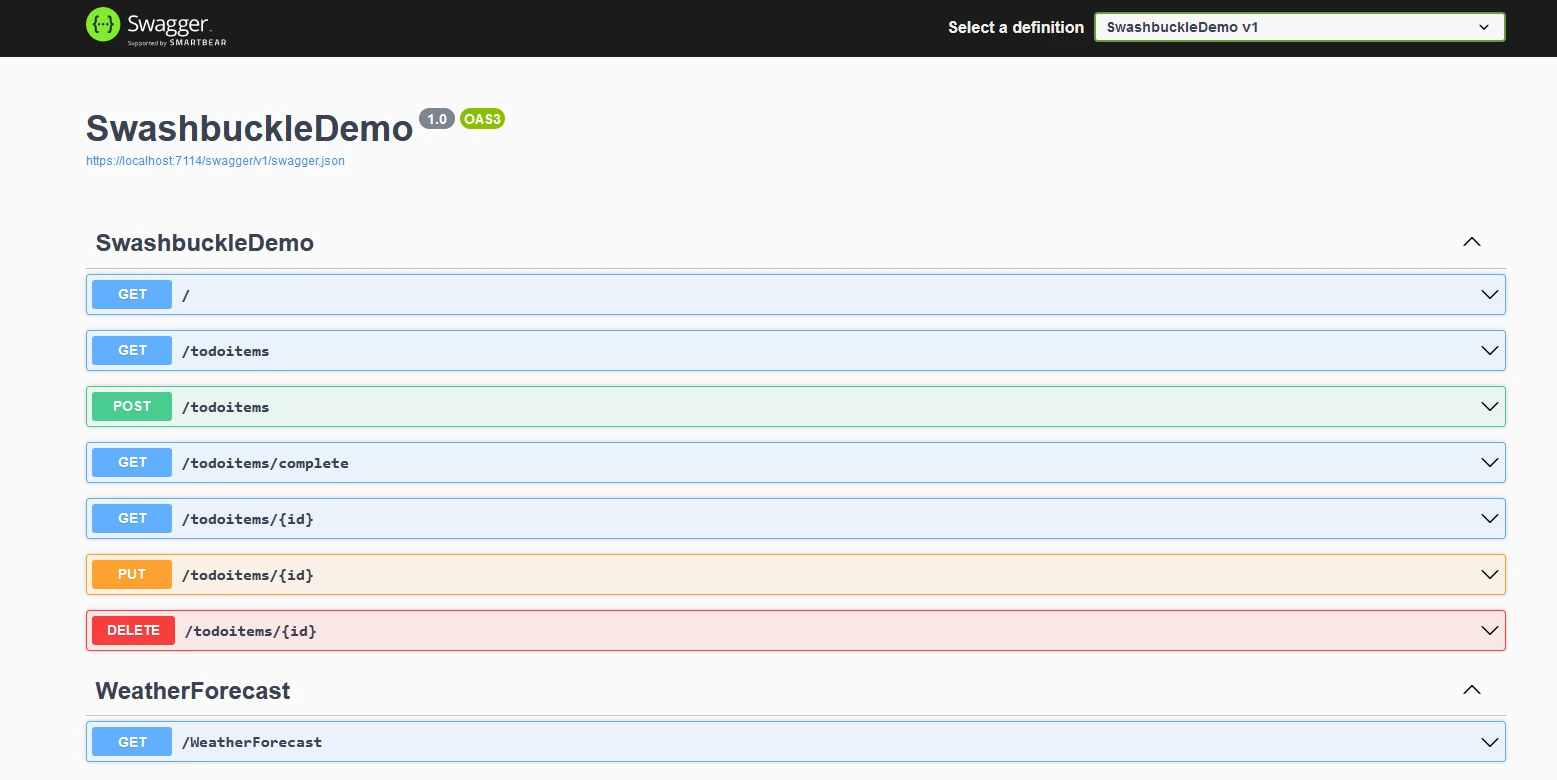
A interface do Swagger está disponível em "/swagger/index.html" a partir da URL base da aplicação Web API. A lista inclui todas as APIs REST presentes no código. O gerador Swagger lê o arquivo JSON e preenche a interface do usuário.
### Swagger JSON
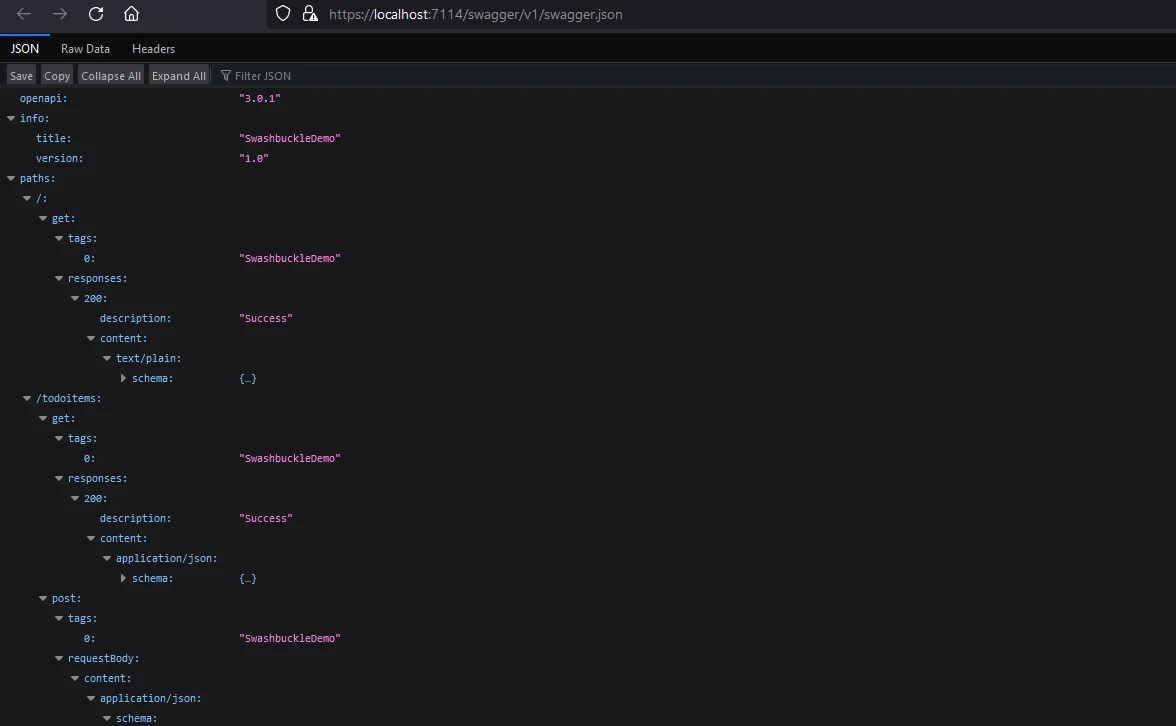
O Swashbuckle.AspNetCore gera automaticamente o arquivo JSON do Swagger, que contém informações sobre a estrutura da API, incluindo detalhes como endpoints, tipos de requisição e resposta, e muito mais. Este arquivo JSON pode ser usado por outras ferramentas e serviços que suportam o padrão Swagger/OpenAPI.
O arquivo JSON do Swagger está disponível em "/swagger/v1/swagger.json" na URL base da aplicação da API web.
### Anotações de código
Os desenvolvedores podem usar comentários e atributos XML em seus controladores [ASP.NET](https://dotnet.microsoft.com/en-us/apps/aspnet) Core para fornecer informações adicionais para a documentação Swagger. Isso inclui descrições, exemplos e outros metadados que aprimoram a documentação Swagger gerada.
```csharp
[ApiController]
[Route("[controller]")]
public class WeatherForecastController : ControllerBase
{
private static readonly string[] Summaries = new[]
{
"Freezing", "Bracing", "Chilly", "Cool", "Mild", "Warm", "Balmy", "Hot", "Sweltering", "Scorching"
};
private readonly ILogger<WeatherForecastController> _logger;
public WeatherForecastController(ILogger<WeatherForecastController> logger)
{
_logger = logger;
}
/// <summary>
/// Retrieves WeatherForecast
/// </summary>
/// <remarks>Awesomeness!</remarks>
/// <response code="200">Retrieved</response>
/// <response code="404">Not found</response>
/// <response code="500">Oops! Can't lookup your request right now</response>
[HttpGet(Name = "GetWeatherForecast")]
public IEnumerable<WeatherForecast> Get()
{
return Enumerable.Range(1, 5).Select(index => new WeatherForecast
{
Date = DateTime.Now.AddDays(index),
TemperatureC = Random.Shared.Next(-20, 55),
Summary = Summaries[Random.Shared.Next(Summaries.Length)]
})
.ToArray();
}
}
```
### Opções de configuração
O Swashbuckle.AspNetCore oferece diversas opções de configuração para personalizar a forma como a documentação Swagger é gerada. Os desenvolvedores podem controlar quais APIs são documentadas, configurar convenções de nomenclatura e ajustar outras configurações.
Aqui estão algumas das principais opções de configuração fornecidas pelo Swashbuckle.AspNetCore:
#### Opções do SwaggerGen
```csharp
c.SwaggerDoc("v1", new OpenApiInfo { Title = "My API", Version = "v1" });
```
Esta linha especifica a versão do documento Swagger e inclui metadados como o título e a versão da sua API.
```csharp
c.IncludeXmlComments(xmlPath);
```
Essa opção permite incluir comentários XML do seu código para fornecer informações adicionais na documentação Swagger. A variável `xmlPath` deve apontar para o local do seu arquivo de comentários em XML.
```csharp
c.DescribeAllParametersInCamelCase();
```
Esta opção configura o gerador Swagger para usar camelCase nos nomes dos parâmetros.
```csharp
c.OperationFilter<CustomOperationFilter>();
```
Você pode registrar filtros de operação personalizados para modificar a documentação Swagger de operações específicas. `CustomOperationFilter` é uma classe que implementa `IOperationFilter`.
#### Opções de interface do usuário Swagger
```csharp
c.SwaggerEndpoint("/swagger/v1/swagger.json", "My API V1");
```
Esta linha configura a interface do Swagger para exibir a documentação. O primeiro parâmetro é a URL do arquivo JSON do Swagger e o segundo parâmetro é um nome amigável para a versão da API.
```csharp
c.RoutePrefix = "swagger";
```
Você pode definir o prefixo da rota para a interface do usuário do Swagger. Neste exemplo, a interface do Swagger estará disponível em /swagger.
```csharp
c.DocExpansion(DocExpansion.None);
```
Esta opção controla como a interface do Swagger exibe a documentação da API. `DocExpansion.None` colapsa todas as operações por padrão.
#### Opções Swagger
```csharp
c.SerializeAsV2 = true;
```
Esta opção especifica se deve serializar o documento Swagger no formato da versão 2.0 (`true`) ou no formato 3.0 (`false`). Defina como `true` se você quiser usar Swagger 2.0.
```csharp
c.DisplayOperationId();
```
Essa opção exibe o ID da operação na interface do Swagger, o que pode ser útil para depurar e entender a estrutura da sua API.
```csharp
c.OAuthClientId("swagger-ui");
```
Se sua API usa autenticação OAuth, você pode configurar o ID do cliente OAuth para a interface do usuário do Swagger.
Esses são apenas alguns exemplos das opções de configuração disponíveis. A biblioteca Swashbuckle.AspNetCore é altamente personalizável, e você pode adaptar a documentação Swagger para atender às suas necessidades específicas, combinando várias opções e filtros. Consulte sempre a documentação oficial ou o IntelliSense em seu ambiente de desenvolvimento para obter as informações mais atualizadas e completas sobre as opções disponíveis.
# Apresentando o IronPDF
[O IronPDF](/docs/) é uma biblioteca C# para PDF, disponível no [site da Iron Software ,](https://ironsoftware.com/) que auxilia na leitura e geração de documentos PDF. Ele pode converter facilmente documentos formatados com informações de estilo para PDF. O IronPDF pode gerar PDFs a partir de conteúdo HTML sem esforço. Ele pode baixar o conteúdo HTML de um URL e, em seguida, gerar PDFs.
O IronPDF é uma ótima ferramenta para converter páginas da web, URLs e [HTML em PDFs](/tutorials/html-to-pdf/) que replicam perfeitamente o original. É ideal para gerar PDFs de conteúdo online, como relatórios e faturas, e cria facilmente versões em PDF de qualquer página da web.
```csharp
using IronPdf;
class Program
{
static void Main(string[] args)
{
var renderer = new ChromePdfRenderer();
// 1. Convert HTML String to PDF
var htmlContent = "<h1>Hello, IronPDF!</h1><p>This is a PDF from an HTML string.</p>";
var pdfFromHtmlString = renderer.RenderHtmlAsPdf(htmlContent);
pdfFromHtmlString.SaveAs("HTMLStringToPDF.pdf");
// 2. Convert HTML File to PDF
var htmlFilePath = "path_to_your_html_file.html"; // Specify the path to your HTML file
var pdfFromHtmlFile = renderer.RenderHtmlFileAsPdf(htmlFilePath);
pdfFromHtmlFile.SaveAs("HTMLFileToPDF.pdf");
// 3. Convert URL to PDF
var url = "http://ironpdf.com"; // Specify the URL
var pdfFromUrl = renderer.RenderUrlAsPdf(url);
pdfFromUrl.SaveAs("URLToPDF.pdf");
}
}
```
## Instalação
[Instale o IronPDF via NuGet](https://www.nuget.org/packages/IronPdf/) usando [os detalhes do Gerenciador de Pacotes NuGet](https://www.nuget.org/) ou o console do gerenciador de pacotes [do Guia de Instalação do Visual Studio](https://visualstudio.microsoft.com/) .
No console do gerenciador de pacotes, digite o comando:
```shell
:ProductInstall
```
**Usando o Visual Studio**

Agora, vamos modificar nosso aplicativo para adicionar a funcionalidade de baixar o conteúdo do site como um arquivo PDF.
```csharp
using Microsoft.AspNetCore.Mvc;
using Microsoft.Extensions.Logging;
using IronPdf;
using System;
using System.Collections.Generic;
using System.IO;
using System.Linq;
namespace RestFullMinimalApi.Controllers
{
[ApiController]
[Route("[controller]")]
public class WeatherForecastController : ControllerBase
{
private static readonly string[] Summaries = new[]
{
"Freezing", "Bracing", "Chilly", "Cool", "Mild", "Warm", "Balmy", "Hot", "Sweltering", "Scorching"
};
private readonly ILogger<WeatherForecastController> _logger;
public WeatherForecastController(ILogger<WeatherForecastController> logger)
{
_logger = logger;
}
/// <summary>
/// Retrieves WeatherForecast
/// </summary>
/// <remarks>Awesomeness!</remarks>
/// <response code="200">Retrieved</response>
/// <response code="404">Not found</response>
/// <response code="500">Oops! Can't lookup your request right now</response>
[HttpGet(Name = "GetWeatherForecast")]
public IEnumerable<WeatherForecast> Get()
{
return Enumerable.Range(1, 5).Select(index => new WeatherForecast
{
Date = DateTime.Now.AddDays(index),
TemperatureC = Random.Shared.Next(-20, 55),
Summary = Summaries[Random.Shared.Next(Summaries.Length)]
})
.ToArray();
}
/// <summary>
/// Retrieves WeatherForecast as Pdf
/// </summary>
/// <remarks>Awesomeness!</remarks>
/// <response code="200">Retrieved</response>
/// <response code="404">Not found</response>
/// <response code="500">Oops! Can't lookup your request right now</response>
[HttpGet("download", Name = "DownloadWeatherForecast")]
public IActionResult GetWeatherPdf()
{
var results = Enumerable.Range(1, 5).Select(index => new WeatherForecast
{
Date = DateTime.Now.AddDays(index),
TemperatureC = Random.Shared.Next(-20, 55),
Summary = Summaries[Random.Shared.Next(Summaries.Length)]
}).ToArray();
var html = GetHtml(results);
var renderer = new ChromePdfRenderer();
var pdf = renderer.RenderHtmlAsPdf(html);
var fileName = "WeatherReport.pdf";
pdf.SaveAs(fileName);
var stream = new FileStream(fileName, FileMode.Open);
// Return the PDF file for download
return new FileStreamResult(stream, "application/octet-stream") { FileDownloadName = fileName };
}
private static string GetHtml(WeatherForecast[] weatherForecasts)
{
string header = @"
<html>
<head><title>WeatherForecast</title></head>
<body>
<h1>WeatherForecast</h1>
";
var footer = @"
</body>
</html>";
var htmlContent = header;
foreach (var weather in weatherForecasts)
{
htmlContent += $@"
<h2>{weather.Date}</h2>
<p>Summary: {weather.Summary}</p>
<p>Temperature in Celsius: {weather.TemperatureC}</p>
<p>Temperature in Fahrenheit: {weather.TemperatureF}</p>
";
}
htmlContent += footer;
return htmlContent;
}
}
public class WeatherForecast
{
public DateTime Date { get; set; }
public int TemperatureC { get; set; }
public string Summary { get; set; }
public int TemperatureF => 32 + (int)(TemperatureC / 0.5556);
}
}
```
Aqui, utilizamos os dados meteorológicos para gerar uma string HTML, que é então usada para criar um documento PDF.
#### Conteúdo HTML
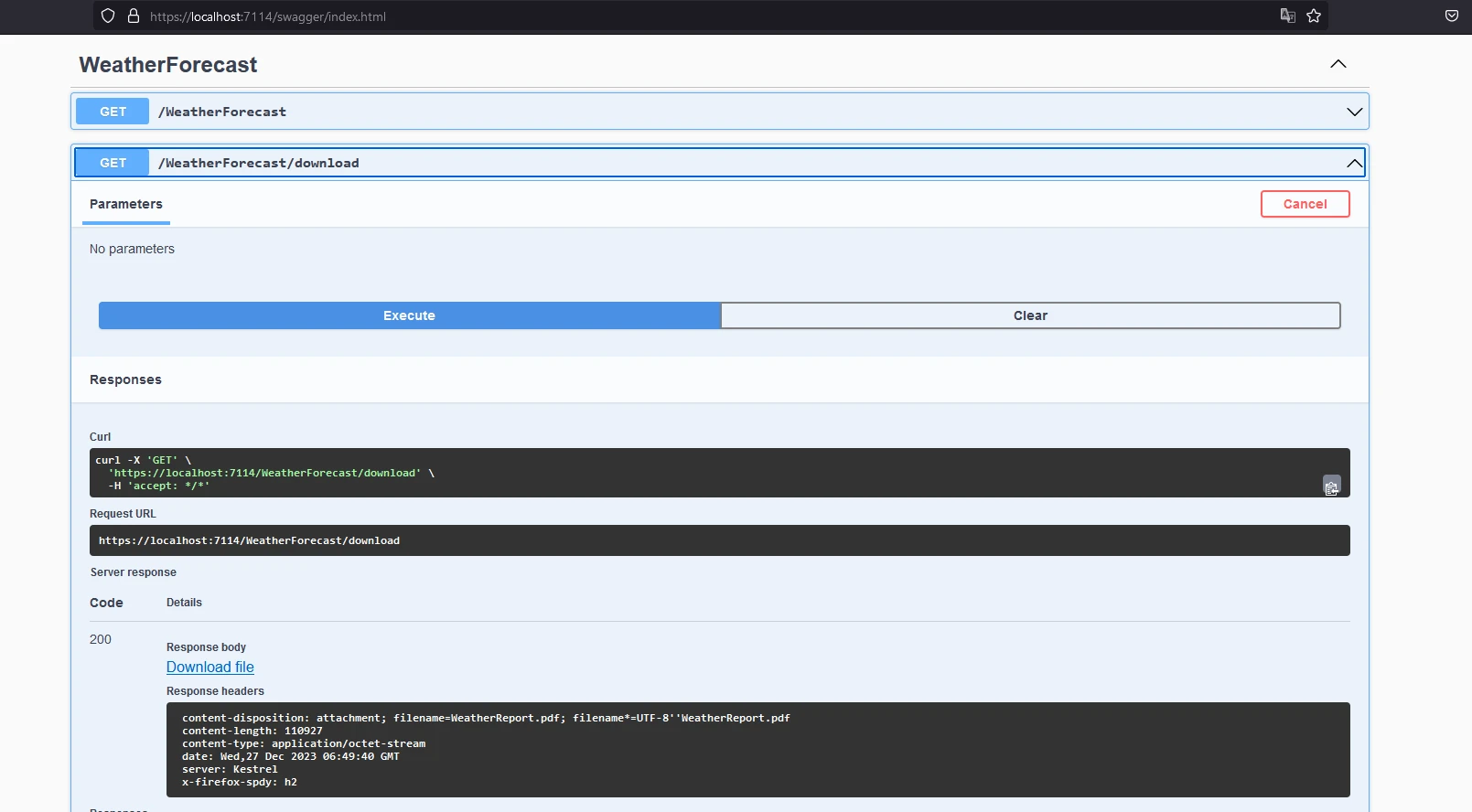
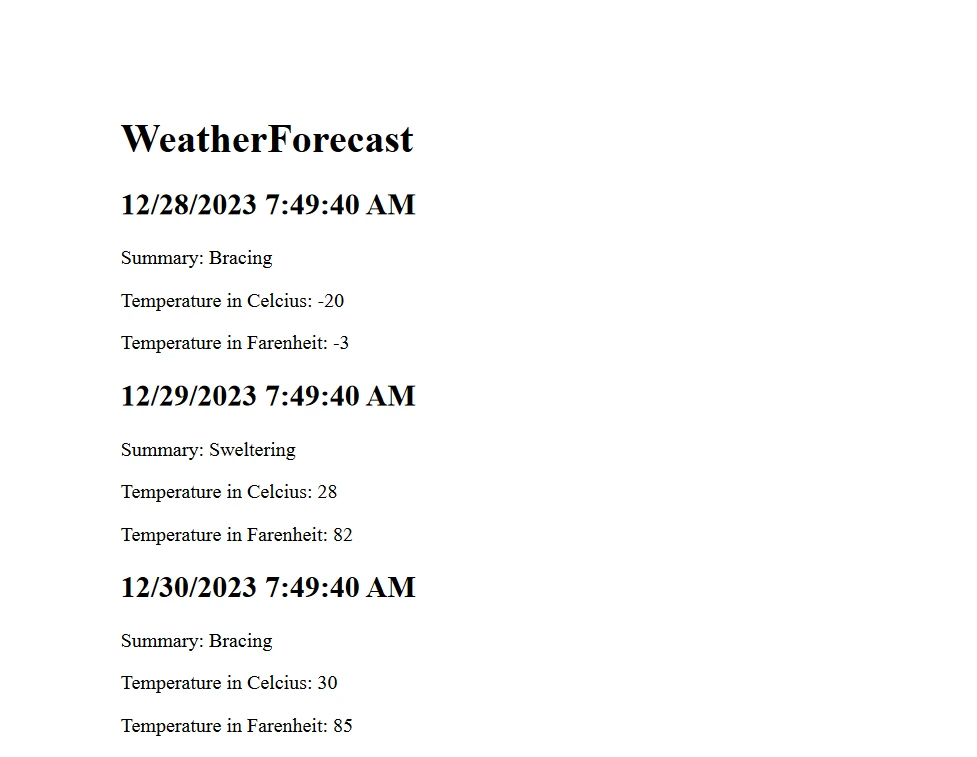
E o relatório em PDF tem este aspecto:
O código completo pode ser encontrado no GitHub - [Código-fonte da demonstração do Swashbuckle](https://github.com/santoshkaranam/swashbuckle-demo) .
O documento possui uma pequena marca d'água para licenças de teste, removível mediante apresentação de uma licença válida.
### Licenciamento (Teste Gratuito Disponível)
Para que o código acima funcione, é necessária uma chave de licença. Coloque esta chave no arquivo `appsettings.json`.
```json
{
"IronPdf": {
"LicenseKey": "your license key"
}
}
```
Uma licença de avaliação está disponível para desenvolvedores mediante cadastro no [IronPDF Trial Registration](trial-license) . Não é necessário cartão de crédito para obter uma licença de teste. Cadastre-se com seu endereço de e-mail para obter um teste gratuito.
# Conclusão
Compreender o Swashbuckle e o IronPDF permite integrar de forma eficaz a documentação de API e os recursos de geração de PDF em suas aplicações ASP.NET Core . O IronPDF também oferece documentação completa para [primeiros passos](/docs/) , juntamente com vários [exemplos de código para geração de PDFs](/examples/using-html-to-create-a-pdf/) .
Além disso, você pode [explorar produtos de software relacionados da Iron Software](https://ironsoftware.com/enterprise/) que o ajudarão a aprimorar suas habilidades de programação e a atender aos requisitos de aplicativos modernos.
O Swashbuckle é um pacote NuGet para C# .NET Core que auxilia na documentação automática de APIs Web RESTful. Neste blog, vamos explorar os pacotes NuGet Swashbuckle ASP.NET Core e IronPDF Installation Instructions , que possibilitam o desenvolvimento moderno de APIs Web ASP.NET Core . Juntos, eles oferecem uma série de funcionalidades que podem ser implementadas com o mínimo de código.
As páginas de documentação da API são exibidas usando a ferramenta Swagger UI, que utiliza um arquivo swagger.json gerado a partir do projeto Web API. O documento JSON gerado segue o padrão Open API. O Swashbuckle está disponível como um pacote NuGet, o Swashbuckle.AspNetCore , que, quando instalado e configurado, expõe automaticamente o JSON do Swagger. A ferramenta Swagger UI lê o arquivo JSON do Swagger, gerado a partir de comentários XML escritos nas APIs. Além disso, um arquivo de documentação XML pode ser criado habilitando-o nas configurações do projeto. Os comentários XML são convertidos em um arquivo de documentação XML, a partir do qual o JSON do Swagger é gerado. Em seguida, o middleware Swagger lê o JSON e expõe os endpoints JSON do Swagger.
dotnet new webapi -n SwashbuckleDemo
cd SwashbuckleDemo
dotnet build
dotnet add package Swashbuckle.AspNetCore --version 6.5.0
dotnet build
SHELL
Aqui, criamos um projeto de API Web chamado "SwashbuckleDemo" e, em seguida, instalamos o pacote Swashbuckle no projeto de API Web .NET Core usando o Console do Gerenciador de Pacotes.
Configurar Middleware Swagger
Configurar os serviços Swagger no arquivo Startup.cs.
using System.Reflection;using Microsoft.Extensions.DependencyInjection;using Microsoft.AspNetCore.Builder;public class Startup{ public voidConfigureServices(IServiceCollection services) { // Other service configurations... // Register the Swagger generator services.AddSwaggerGen(c => { c.SwaggerDoc("v1", new OpenApiInfo { Title = "My API", Version = "v1" }); // Optionally, include XML comments for additional information var xmlFile = $"{Assembly.GetExecutingAssembly().GetName().Name}.xml"; var xmlPath = Path.Combine(AppContext.BaseDirectory, xmlFile); c.IncludeXmlComments(xmlPath); }); } public voidConfigure(IApplicationBuilder app, IHostingEnvironment env) { // Other app configurations... // Enable middleware to serve generated Swagger as a JSON endpoint. app.UseSwagger(); // Enable Swagger UI (HTML, JS, CSS, etc.), specifying the Swagger JSON endpoint. app.UseSwaggerUI(c => { c.SwaggerEndpoint("/swagger/v1/swagger.json", "My API V1"); }); }}
using System.Reflection;
using Microsoft.Extensions.DependencyInjection;
using Microsoft.AspNetCore.Builder;

public class Startup
{
    public void ConfigureServices(IServiceCollection services)
    {
        // Other service configurations...

        // Register the Swagger generator
        services.AddSwaggerGen(c =>
        {
            c.SwaggerDoc("v1", new OpenApiInfo { Title = "My API", Version = "v1" });

            // Optionally, include XML comments for additional information
            var xmlFile = $"{Assembly.GetExecutingAssembly().GetName().Name}.xml";
            var xmlPath = Path.Combine(AppContext.BaseDirectory, xmlFile);
            c.IncludeXmlComments(xmlPath);
        });
    }

    public void Configure(IApplicationBuilder app, IHostingEnvironment env)
    {
        // Other app configurations...

        // Enable middleware to serve generated Swagger as a JSON endpoint.
        app.UseSwagger();

        // Enable Swagger UI (HTML, JS, CSS, etc.), specifying the Swagger JSON endpoint.
        app.UseSwaggerUI(c =>
        {
            c.SwaggerEndpoint("/swagger/v1/swagger.json", "My API V1");
        });
    }
}
ImportsSystem.ReflectionImportsMicrosoft.Extensions.DependencyInjectionImportsMicrosoft.AspNetCore.BuilderPublic Class Startup Public Sub ConfigureServices(ByVal services AsIServiceCollection) ' Other service configurations... ' Register the Swagger generator services.AddSwaggerGen(Sub(c) c.SwaggerDoc("v1", New OpenApiInfoWith { .Title = "My API", .Version = "v1" }) ' Optionally, include XML comments for additional information Dim xmlFile = $"{System.Reflection.Assembly.GetExecutingAssembly().GetName().Name}.xml" Dim xmlPath = Path.Combine(AppContext.BaseDirectory, xmlFile) c.IncludeXmlComments(xmlPath) End Sub) End Sub Public Sub Configure(ByVal app AsIApplicationBuilder, ByVal env AsIHostingEnvironment) ' Other app configurations... ' Enable middleware to serve generated Swagger as a JSON endpoint. app.UseSwagger() ' Enable Swagger UI (HTML, JS, CSS, etc.), specifying the Swagger JSON endpoint. app.UseSwaggerUI(Sub(c) c.SwaggerEndpoint("/swagger/v1/swagger.json", "My API V1") End Sub) End SubEnd Class
Imports System.Reflection
Imports Microsoft.Extensions.DependencyInjection
Imports Microsoft.AspNetCore.Builder

Public Class Startup
	Public Sub ConfigureServices(ByVal services As IServiceCollection)
		' Other service configurations...

		' Register the Swagger generator
		services.AddSwaggerGen(Sub(c)
			c.SwaggerDoc("v1", New OpenApiInfo With {
				.Title = "My API",
				.Version = "v1"
			})

			' Optionally, include XML comments for additional information
			Dim xmlFile = $"{System.Reflection.Assembly.GetExecutingAssembly().GetName().Name}.xml"
			Dim xmlPath = Path.Combine(AppContext.BaseDirectory, xmlFile)
			c.IncludeXmlComments(xmlPath)
		End Sub)
	End Sub

	Public Sub Configure(ByVal app As IApplicationBuilder, ByVal env As IHostingEnvironment)
		' Other app configurations...

		' Enable middleware to serve generated Swagger as a JSON endpoint.
		app.UseSwagger()

		' Enable Swagger UI (HTML, JS, CSS, etc.), specifying the Swagger JSON endpoint.
		app.UseSwaggerUI(Sub(c)
			c.SwaggerEndpoint("/swagger/v1/swagger.json", "My API V1")
		End Sub)
	End Sub
End Class
Adicionar um controlador para APIs de lista de tarefas:
using Microsoft.AspNetCore.Http.HttpResults;using Microsoft.AspNetCore.Builder;using Microsoft.EntityFrameworkCore;using Microsoft.AspNetCore.Mvc;using System.Threading.Tasks;// Example to define an entity classpublic class Todo{ public intId { get; set; } public stringName { get; set; } public boolIsComplete { get; set; }}// Example to define a DbContext classpublic class TodoDb : DbContext{ public DbSet<Todo> Todos => Set<Todo>();}var builder = WebApplication.CreateBuilder(args);var app = builder.Build();app.MapGet("/", () => "SwashbuckleDemo!");app.MapGet("/todoitems", async (TodoDb db) => await db.Todos.ToListAsync());app.MapGet("/todoitems/complete", async (TodoDb db) => await db.Todos.Where(t => t.IsComplete).ToListAsync());app.MapGet("/todoitems/{id}", async (int id, TodoDb db) => await db.Todos.FindAsync(id) is Todo todo ? Results.Ok(todo) : Results.NotFound());app.MapPost("/todoitems", async (Todo todo, TodoDb db) =>{ db.Todos.Add(todo); await db.SaveChangesAsync(); returnResults.Created($"/todoitems/{todo.Id}", todo);});app.MapPut("/todoitems/{id}", async (int id, Todo inputTodo, TodoDb db) =>{ var todo = await db.Todos.FindAsync(id); if (todo is null) returnResults.NotFound(); todo.Name = inputTodo.Name; todo.IsComplete = inputTodo.IsComplete; await db.SaveChangesAsync(); returnResults.NoContent();});app.MapDelete("/todoitems/{id}", async (int id, TodoDb db) =>{ if (await db.Todos.FindAsync(id) is Todo todo) { db.Todos.Remove(todo); await db.SaveChangesAsync(); returnResults.Ok(todo); } returnResults.NotFound();});app.Run();
using Microsoft.AspNetCore.Http.HttpResults;
using Microsoft.AspNetCore.Builder;
using Microsoft.EntityFrameworkCore;
using Microsoft.AspNetCore.Mvc;
using System.Threading.Tasks;

// Example to define an entity class
public class Todo
{
    public int Id { get; set; }
    public string Name { get; set; }
    public bool IsComplete { get; set; }
}

// Example to define a DbContext class
public class TodoDb : DbContext
{
    public DbSet<Todo> Todos => Set<Todo>();
}

var builder = WebApplication.CreateBuilder(args);
var app = builder.Build();

app.MapGet("/", () => "SwashbuckleDemo!");

app.MapGet("/todoitems", async (TodoDb db) =>
    await db.Todos.ToListAsync());

app.MapGet("/todoitems/complete", async (TodoDb db) =>
    await db.Todos.Where(t => t.IsComplete).ToListAsync());

app.MapGet("/todoitems/{id}", async (int id, TodoDb db) =>
    await db.Todos.FindAsync(id) is Todo todo
        ? Results.Ok(todo)
        : Results.NotFound());

app.MapPost("/todoitems", async (Todo todo, TodoDb db) =>
{
    db.Todos.Add(todo);
    await db.SaveChangesAsync();
    return Results.Created($"/todoitems/{todo.Id}", todo);
});

app.MapPut("/todoitems/{id}", async (int id, Todo inputTodo, TodoDb db) =>
{
    var todo = await db.Todos.FindAsync(id);
    if (todo is null) return Results.NotFound();
    todo.Name = inputTodo.Name;
    todo.IsComplete = inputTodo.IsComplete;
    await db.SaveChangesAsync();
    return Results.NoContent();
});

app.MapDelete("/todoitems/{id}", async (int id, TodoDb db) =>
{
    if (await db.Todos.FindAsync(id) is Todo todo)
    {
        db.Todos.Remove(todo);
        await db.SaveChangesAsync();
        return Results.Ok(todo);
    }

    return Results.NotFound();
});

app.Run();
ImportsMicrosoft.AspNetCore.Http.HttpResultsImportsMicrosoft.AspNetCore.BuilderImportsMicrosoft.EntityFrameworkCoreImportsMicrosoft.AspNetCore.MvcImportsSystem.Threading.Tasks' Example to define an entity classPublic Class Todo Public Property Id() AsInteger Public Property Name() AsString Public Property IsComplete() AsBooleanEnd Class' Example to define a DbContext classPublic Class TodoDbInheritsDbContext PublicReadOnlyPropertyTodos() AsDbSet(OfTodo) Get Return [Set](OfTodo)()End Get End PropertyEnd ClassPrivate builder = WebApplication.CreateBuilder(args)Private app = builder.Build()app.MapGet("/", Function() "SwashbuckleDemo!")app.MapGet("/todoitems", Async Function(db AsTodoDb) Await db.Todos.ToListAsync())app.MapGet("/todoitems/complete", Async Function(db AsTodoDb) Await db.Todos.Where(Function(t) t.IsComplete).ToListAsync())Dim tempVar AsBoolean = TypeOf db.Todos.FindAsync(id) IsTodoDim todo AsTodo = If(tempVar, CType(db.Todos.FindAsync(id), Todo), Nothing)app.MapGet("/todoitems/{id}", Async Function(id AsInteger, db AsTodoDb)If(Await tempVar, Results.Ok(todo), Results.NotFound()))app.MapPost("/todoitems", Async Function(todo AsTodo, db AsTodoDb) db.Todos.Add(todo)Await db.SaveChangesAsync() ReturnResults.Created($"/todoitems/{todo.Id}", todo)End Function)app.MapPut("/todoitems/{id}", Async Function(id AsInteger, inputTodo AsTodo, db AsTodoDb) Dim todo = Await db.Todos.FindAsync(id) If todo Is Nothing Then ReturnResults.NotFound() End If todo.Name = inputTodo.Name todo.IsComplete = inputTodo.IsCompleteAwait db.SaveChangesAsync() ReturnResults.NoContent()End Function)app.MapDelete("/todoitems/{id}", Async Function(id AsInteger, db AsTodoDb) Dim tempVar2 AsBoolean = TypeOf db.Todos.FindAsync(id) IsTodo Dim todo AsTodo = If(tempVar2, CType(db.Todos.FindAsync(id), Todo), Nothing) IfAwait tempVar2 Then db.Todos.Remove(todo)Await db.SaveChangesAsync() ReturnResults.Ok(todo) End If ReturnResults.NotFound()End Function)app.Run()
Imports Microsoft.AspNetCore.Http.HttpResults
Imports Microsoft.AspNetCore.Builder
Imports Microsoft.EntityFrameworkCore
Imports Microsoft.AspNetCore.Mvc
Imports System.Threading.Tasks

' Example to define an entity class
Public Class Todo
	Public Property Id() As Integer
	Public Property Name() As String
	Public Property IsComplete() As Boolean
End Class

' Example to define a DbContext class
Public Class TodoDb
	Inherits DbContext

	Public ReadOnly Property Todos() As DbSet(Of Todo)
		Get
			Return [Set](Of Todo)()
		End Get
	End Property
End Class

Private builder = WebApplication.CreateBuilder(args)
Private app = builder.Build()

app.MapGet("/", Function() "SwashbuckleDemo!")

app.MapGet("/todoitems", Async Function(db As TodoDb) Await db.Todos.ToListAsync())

app.MapGet("/todoitems/complete", Async Function(db As TodoDb) Await db.Todos.Where(Function(t) t.IsComplete).ToListAsync())

Dim tempVar As Boolean = TypeOf db.Todos.FindAsync(id) Is Todo
Dim todo As Todo = If(tempVar, CType(db.Todos.FindAsync(id), Todo), Nothing)
app.MapGet("/todoitems/{id}", Async Function(id As Integer, db As TodoDb)If(Await tempVar, Results.Ok(todo), Results.NotFound()))

app.MapPost("/todoitems", Async Function(todo As Todo, db As TodoDb)
	db.Todos.Add(todo)
	Await db.SaveChangesAsync()
	Return Results.Created($"/todoitems/{todo.Id}", todo)
End Function)

app.MapPut("/todoitems/{id}", Async Function(id As Integer, inputTodo As Todo, db As TodoDb)
	Dim todo = Await db.Todos.FindAsync(id)
	If todo Is Nothing Then
		Return Results.NotFound()
	End If
	todo.Name = inputTodo.Name
	todo.IsComplete = inputTodo.IsComplete
	Await db.SaveChangesAsync()
	Return Results.NoContent()
End Function)

app.MapDelete("/todoitems/{id}", Async Function(id As Integer, db As TodoDb)
	Dim tempVar2 As Boolean = TypeOf db.Todos.FindAsync(id) Is Todo
	Dim todo As Todo = If(tempVar2, CType(db.Todos.FindAsync(id), Todo), Nothing)
	If Await tempVar2 Then
		db.Todos.Remove(todo)
		Await db.SaveChangesAsync()
		Return Results.Ok(todo)
	End If

	Return Results.NotFound()
End Function)

app.Run()
Também é possível adicionar um controlador, como mostrado abaixo:
using Microsoft.AspNetCore.Mvc;using Microsoft.Extensions.Logging;using System.Collections.Generic;using System;using System.Linq;namespace RestFullMinimalApi.Controllers{ [ApiController] [Route("[controller]")] public class WeatherForecastController : ControllerBase { private static readonly string[] Summaries = new[] { "Freezing", "Bracing", "Chilly", "Cool", "Mild", "Warm", "Balmy", "Hot", "Sweltering", "Scorching" }; private readonly ILogger<WeatherForecastController> _logger; publicWeatherForecastController(ILogger<WeatherForecastController> logger) { _logger = logger; } /// <summary> /// Retrieves WeatherForecast /// </summary> /// <remarks>Awesomeness!</remarks> /// <response code="200">Retrieved</response> /// <response code="404">Not found</response> /// <response code="500">Oops! Can't lookup your request right now</response> [HttpGet(Name = "GetWeatherForecast")] public IEnumerable<WeatherForecast> Get() { returnEnumerable.Range(1, 5).Select(index => new WeatherForecast {Date = DateTime.Now.AddDays(index),TemperatureC = Random.Shared.Next(-20, 55),Summary = Summaries[Random.Shared.Next(Summaries.Length)] }) .ToArray(); } } public class WeatherForecast { public DateTimeDate { get; set; } public intTemperatureC { get; set; } public stringSummary { get; set; } }}
using Microsoft.AspNetCore.Mvc;
using Microsoft.Extensions.Logging;
using System.Collections.Generic;
using System;
using System.Linq;

namespace RestFullMinimalApi.Controllers
{
    [ApiController]
    [Route("[controller]")]
    public class WeatherForecastController : ControllerBase
    {
        private static readonly string[] Summaries = new[]
        {
            "Freezing", "Bracing", "Chilly", "Cool", "Mild", "Warm", "Balmy", "Hot", "Sweltering", "Scorching"
        };

        private readonly ILogger<WeatherForecastController> _logger;

        public WeatherForecastController(ILogger<WeatherForecastController> logger)
        {
            _logger = logger;
        }

        /// <summary>
        /// Retrieves WeatherForecast
        /// </summary>
        /// <remarks>Awesomeness!</remarks>
        /// <response code="200">Retrieved</response>
        /// <response code="404">Not found</response>
        /// <response code="500">Oops! Can't lookup your request right now</response>
        [HttpGet(Name = "GetWeatherForecast")]
        public IEnumerable<WeatherForecast> Get()
        {
            return Enumerable.Range(1, 5).Select(index => new WeatherForecast
            {
                Date = DateTime.Now.AddDays(index),
                TemperatureC = Random.Shared.Next(-20, 55),
                Summary = Summaries[Random.Shared.Next(Summaries.Length)]
            })
            .ToArray();
        }
    }

    public class WeatherForecast
    {
        public DateTime Date { get; set; }
        public int TemperatureC { get; set; }
        public string Summary { get; set; }
    }
}
ImportsMicrosoft.AspNetCore.MvcImportsMicrosoft.Extensions.LoggingImportsSystem.Collections.GenericImportsSystemImportsSystem.LinqNamespaceRestFullMinimalApi.Controllers <ApiController> <Route("[controller]")> Public Class WeatherForecastControllerInheritsControllerBase PrivateSharedReadOnlySummaries() AsString = { "Freezing", "Bracing", "Chilly", "Cool", "Mild", "Warm", "Balmy", "Hot", "Sweltering", "Scorching" } PrivateReadOnly _logger AsILogger(OfWeatherForecastController) Public Sub New(ByVal logger AsILogger(OfWeatherForecastController)) _logger = logger End Sub ''' <summary> ''' Retrieves WeatherForecast ''' </summary> ''' <remarks>Awesomeness!</remarks> ''' <response code="200">Retrieved</response> ''' <response code="404">Not found</response> ''' <response code="500">Oops! Can't lookup your request right now</response> <HttpGet(Name := "GetWeatherForecast")> Public Function [Get]() AsIEnumerable(OfWeatherForecast) ReturnEnumerable.Range(1, 5).Select(Function(index) New WeatherForecastWith { .Date = DateTime.Now.AddDays(index), .TemperatureC = Random.Shared.Next(-20, 55), .Summary = Summaries(Random.Shared.Next(Summaries.Length)) }).ToArray() End Function End Class Public Class WeatherForecast Public Property [Date]() AsDateTime Public Property TemperatureC() AsInteger Public Property Summary() AsString End ClassEndNamespace
Imports Microsoft.AspNetCore.Mvc
Imports Microsoft.Extensions.Logging
Imports System.Collections.Generic
Imports System
Imports System.Linq

Namespace RestFullMinimalApi.Controllers
	<ApiController>
	<Route("[controller]")>
	Public Class WeatherForecastController
		Inherits ControllerBase

		Private Shared ReadOnly Summaries() As String = { "Freezing", "Bracing", "Chilly", "Cool", "Mild", "Warm", "Balmy", "Hot", "Sweltering", "Scorching" }

		Private ReadOnly _logger As ILogger(Of WeatherForecastController)

		Public Sub New(ByVal logger As ILogger(Of WeatherForecastController))
			_logger = logger
		End Sub

		''' <summary>
		''' Retrieves WeatherForecast
		''' </summary>
		''' <remarks>Awesomeness!</remarks>
		''' <response code="200">Retrieved</response>
		''' <response code="404">Not found</response>
		''' <response code="500">Oops! Can't lookup your request right now</response>
		<HttpGet(Name := "GetWeatherForecast")>
		Public Function [Get]() As IEnumerable(Of WeatherForecast)
			Return Enumerable.Range(1, 5).Select(Function(index) New WeatherForecast With {
				.Date = DateTime.Now.AddDays(index),
				.TemperatureC = Random.Shared.Next(-20, 55),
				.Summary = Summaries(Random.Shared.Next(Summaries.Length))
			}).ToArray()
		End Function
	End Class

	Public Class WeatherForecast
		Public Property [Date]() As DateTime
		Public Property TemperatureC() As Integer
		Public Property Summary() As String
	End Class
End Namespace
A interface do Swagger está disponível em "/swagger/index.html" a partir da URL base da aplicação Web API. A lista inclui todas as APIs REST presentes no código. O gerador Swagger lê o arquivo JSON e preenche a interface do usuário.
Swagger JSON
O Swashbuckle.AspNetCore gera automaticamente o arquivo JSON do Swagger, que contém informações sobre a estrutura da API, incluindo detalhes como endpoints, tipos de requisição e resposta, e muito mais. Este arquivo JSON pode ser usado por outras ferramentas e serviços que suportam o padrão Swagger/OpenAPI.
O arquivo JSON do Swagger está disponível em "/swagger/v1/swagger.json" na URL base da aplicação da API web.
Anotações de código
Os desenvolvedores podem usar comentários e atributos XML em seus controladores ASP.NET Core para fornecer informações adicionais para a documentação Swagger. Isso inclui descrições, exemplos e outros metadados que aprimoram a documentação Swagger gerada.
<ApiController><Route("[controller]")>Public Class WeatherForecastControllerInheritsControllerBase PrivateSharedReadOnlySummaries() AsString = { "Freezing", "Bracing", "Chilly", "Cool", "Mild", "Warm", "Balmy", "Hot", "Sweltering", "Scorching" } PrivateReadOnly _logger AsILogger(OfWeatherForecastController) Public Sub New(ByVal logger AsILogger(OfWeatherForecastController)) _logger = logger End Sub ''' <summary> ''' Retrieves WeatherForecast ''' </summary> ''' <remarks>Awesomeness!</remarks> ''' <response code="200">Retrieved</response> ''' <response code="404">Not found</response> ''' <response code="500">Oops! Can't lookup your request right now</response> <HttpGet(Name := "GetWeatherForecast")> Public Function [Get]() AsIEnumerable(OfWeatherForecast) ReturnEnumerable.Range(1, 5).Select(Function(index) New WeatherForecastWith { .Date = DateTime.Now.AddDays(index), .TemperatureC = Random.Shared.Next(-20, 55), .Summary = Summaries(Random.Shared.Next(Summaries.Length)) }).ToArray() End FunctionEnd Class
<ApiController>
<Route("[controller]")>
Public Class WeatherForecastController
	Inherits ControllerBase

	Private Shared ReadOnly Summaries() As String = { "Freezing", "Bracing", "Chilly", "Cool", "Mild", "Warm", "Balmy", "Hot", "Sweltering", "Scorching" }

	Private ReadOnly _logger As ILogger(Of WeatherForecastController)

	Public Sub New(ByVal logger As ILogger(Of WeatherForecastController))
		_logger = logger
	End Sub

	''' <summary>
	''' Retrieves WeatherForecast
	''' </summary>
	''' <remarks>Awesomeness!</remarks>
	''' <response code="200">Retrieved</response>
	''' <response code="404">Not found</response>
	''' <response code="500">Oops! Can't lookup your request right now</response>
	<HttpGet(Name := "GetWeatherForecast")>
	Public Function [Get]() As IEnumerable(Of WeatherForecast)
		Return Enumerable.Range(1, 5).Select(Function(index) New WeatherForecast With {
			.Date = DateTime.Now.AddDays(index),
			.TemperatureC = Random.Shared.Next(-20, 55),
			.Summary = Summaries(Random.Shared.Next(Summaries.Length))
		}).ToArray()
	End Function
End Class
Opções de configuração
O Swashbuckle.AspNetCore oferece diversas opções de configuração para personalizar a forma como a documentação Swagger é gerada. Os desenvolvedores podem controlar quais APIs são documentadas, configurar convenções de nomenclatura e ajustar outras configurações.
Aqui estão algumas das principais opções de configuração fornecidas pelo Swashbuckle.AspNetCore:
Opções do SwaggerGen
c.SwaggerDoc("v1", new OpenApiInfo { Title = "My API", Version = "v1" });
c.SwaggerDoc("v1", new OpenApiInfo { Title = "My API", Version = "v1" });
c.SwaggerDoc("v1", New OpenApiInfoWith { .Title = "My API", .Version = "v1"})
c.SwaggerDoc("v1", New OpenApiInfo With {
	.Title = "My API",
	.Version = "v1"
})
Esta linha especifica a versão do documento Swagger e inclui metadados como o título e a versão da sua API.
c.IncludeXmlComments(xmlPath);
c.IncludeXmlComments(xmlPath);
c.IncludeXmlComments(xmlPath)
c.IncludeXmlComments(xmlPath)
Essa opção permite incluir comentários XML do seu código para fornecer informações adicionais na documentação Swagger. A variável xmlPath deve apontar para o local do seu arquivo de comentários em XML.
c.DescribeAllParametersInCamelCase();
c.DescribeAllParametersInCamelCase();
c.DescribeAllParametersInCamelCase()
c.DescribeAllParametersInCamelCase()
Esta opção configura o gerador Swagger para usar camelCase nos nomes dos parâmetros.
c.OperationFilter<CustomOperationFilter>();
c.OperationFilter<CustomOperationFilter>();
c.OperationFilter(OfCustomOperationFilter)()
c.OperationFilter(Of CustomOperationFilter)()
Você pode registrar filtros de operação personalizados para modificar a documentação Swagger de operações específicas. CustomOperationFilter é uma classe que implementa IOperationFilter.
Opções de interface do usuário Swagger
c.SwaggerEndpoint("/swagger/v1/swagger.json", "My API V1");
c.SwaggerEndpoint("/swagger/v1/swagger.json", "My API V1");
c.SwaggerEndpoint("/swagger/v1/swagger.json", "My API V1")
c.SwaggerEndpoint("/swagger/v1/swagger.json", "My API V1")
Esta linha configura a interface do Swagger para exibir a documentação. O primeiro parâmetro é a URL do arquivo JSON do Swagger e o segundo parâmetro é um nome amigável para a versão da API.
c.RoutePrefix = "swagger";
c.RoutePrefix = "swagger";
c.RoutePrefix = "swagger"
c.RoutePrefix = "swagger"
Você pode definir o prefixo da rota para a interface do usuário do Swagger. Neste exemplo, a interface do Swagger estará disponível em /swagger.
c.DocExpansion(DocExpansion.None);
c.DocExpansion(DocExpansion.None);
c.DocExpansion(DocExpansion.None)
c.DocExpansion(DocExpansion.None)
Esta opção controla como a interface do Swagger exibe a documentação da API. DocExpansion.None colapsa todas as operações por padrão.
Opções Swagger
c.SerializeAsV2 = true;
c.SerializeAsV2 = true;
c.SerializeAsV2 = True
c.SerializeAsV2 = True
Esta opção especifica se deve serializar o documento Swagger no formato da versão 2.0 (true) ou no formato 3.0 (false). Defina como true se você quiser usar Swagger 2.0.
c.DisplayOperationId();
c.DisplayOperationId();
c.DisplayOperationId()
c.DisplayOperationId()
Essa opção exibe o ID da operação na interface do Swagger, o que pode ser útil para depurar e entender a estrutura da sua API.
c.OAuthClientId("swagger-ui");
c.OAuthClientId("swagger-ui");
c.OAuthClientId("swagger-ui")
c.OAuthClientId("swagger-ui")
Se sua API usa autenticação OAuth, você pode configurar o ID do cliente OAuth para a interface do usuário do Swagger.
Esses são apenas alguns exemplos das opções de configuração disponíveis. A biblioteca Swashbuckle.AspNetCore é altamente personalizável, e você pode adaptar a documentação Swagger para atender às suas necessidades específicas, combinando várias opções e filtros. Consulte sempre a documentação oficial ou o IntelliSense em seu ambiente de desenvolvimento para obter as informações mais atualizadas e completas sobre as opções disponíveis.
Apresentando o IronPDF
O IronPDF é uma biblioteca C# para PDF, disponível no site da Iron Software , que auxilia na leitura e geração de documentos PDF. Ele pode converter facilmente documentos formatados com informações de estilo para PDF. O IronPDF pode gerar PDFs a partir de conteúdo HTML sem esforço. Ele pode baixar o conteúdo HTML de um URL e, em seguida, gerar PDFs.
O IronPDF é uma ótima ferramenta para converter páginas da web, URLs e HTML em PDFs que replicam perfeitamente o original. É ideal para gerar PDFs de conteúdo online, como relatórios e faturas, e cria facilmente versões em PDF de qualquer página da web.
using IronPdf;class Program{ static voidMain(string[] args) { var renderer = new ChromePdfRenderer(); // 1. Convert HTML String to PDF var htmlContent = "<h1>Hello, IronPDF!</h1><p>This is a PDF from an HTML string.</p>"; var pdfFromHtmlString = renderer.RenderHtmlAsPdf(htmlContent); pdfFromHtmlString.SaveAs("HTMLStringToPDF.pdf"); // 2. Convert HTML File to PDF var htmlFilePath = "path_to_your_html_file.html"; // Specify the path to your HTML file var pdfFromHtmlFile = renderer.RenderHtmlFileAsPdf(htmlFilePath); pdfFromHtmlFile.SaveAs("HTMLFileToPDF.pdf"); // 3. Convert URL to PDF var url = "http://ironpdf.com"; // Specify the URL var pdfFromUrl = renderer.RenderUrlAsPdf(url); pdfFromUrl.SaveAs("URLToPDF.pdf"); }}
using IronPdf;

class Program
{
    static void Main(string[] args)
    {
        var renderer = new ChromePdfRenderer();

        // 1. Convert HTML String to PDF
        var htmlContent = "<h1>Hello, IronPDF!</h1><p>This is a PDF from an HTML string.</p>";
        var pdfFromHtmlString = renderer.RenderHtmlAsPdf(htmlContent);
        pdfFromHtmlString.SaveAs("HTMLStringToPDF.pdf");

        // 2. Convert HTML File to PDF
        var htmlFilePath = "path_to_your_html_file.html"; // Specify the path to your HTML file
        var pdfFromHtmlFile = renderer.RenderHtmlFileAsPdf(htmlFilePath);
        pdfFromHtmlFile.SaveAs("HTMLFileToPDF.pdf");

        // 3. Convert URL to PDF
        var url = "http://ironpdf.com"; // Specify the URL
        var pdfFromUrl = renderer.RenderUrlAsPdf(url);
        pdfFromUrl.SaveAs("URLToPDF.pdf");
    }
}
ImportsIronPdfFriend Class ProgramShared Sub Main(ByVal args() AsString) Dim renderer = New ChromePdfRenderer() ' 1. Convert HTML String to PDF Dim htmlContent = "<h1>Hello, IronPDF!</h1><p>This is a PDF from an HTML string.</p>" Dim pdfFromHtmlString = renderer.RenderHtmlAsPdf(htmlContent) pdfFromHtmlString.SaveAs("HTMLStringToPDF.pdf") ' 2. Convert HTML File to PDF Dim htmlFilePath = "path_to_your_html_file.html" ' Specify the path to your HTML file Dim pdfFromHtmlFile = renderer.RenderHtmlFileAsPdf(htmlFilePath) pdfFromHtmlFile.SaveAs("HTMLFileToPDF.pdf") ' 3. Convert URL to PDF Dim url = "http://ironpdf.com" ' Specify the URL Dim pdfFromUrl = renderer.RenderUrlAsPdf(url) pdfFromUrl.SaveAs("URLToPDF.pdf") End SubEnd Class
Imports IronPdf

Friend Class Program
	Shared Sub Main(ByVal args() As String)
		Dim renderer = New ChromePdfRenderer()

		' 1. Convert HTML String to PDF
		Dim htmlContent = "<h1>Hello, IronPDF!</h1><p>This is a PDF from an HTML string.</p>"
		Dim pdfFromHtmlString = renderer.RenderHtmlAsPdf(htmlContent)
		pdfFromHtmlString.SaveAs("HTMLStringToPDF.pdf")

		' 2. Convert HTML File to PDF
		Dim htmlFilePath = "path_to_your_html_file.html" ' Specify the path to your HTML file
		Dim pdfFromHtmlFile = renderer.RenderHtmlFileAsPdf(htmlFilePath)
		pdfFromHtmlFile.SaveAs("HTMLFileToPDF.pdf")

		' 3. Convert URL to PDF
		Dim url = "http://ironpdf.com" ' Specify the URL
		Dim pdfFromUrl = renderer.RenderUrlAsPdf(url)
		pdfFromUrl.SaveAs("URLToPDF.pdf")
	End Sub
End Class
No console do gerenciador de pacotes, digite o comando:
PM > Install-Package IronPdf
Install-Package IronPdf
Usando o Visual Studio
Agora, vamos modificar nosso aplicativo para adicionar a funcionalidade de baixar o conteúdo do site como um arquivo PDF.
using Microsoft.AspNetCore.Mvc;using Microsoft.Extensions.Logging;using IronPdf;using System;using System.Collections.Generic;using System.IO;using System.Linq;namespace RestFullMinimalApi.Controllers{ [ApiController] [Route("[controller]")] public class WeatherForecastController : ControllerBase { private static readonly string[] Summaries = new[] { "Freezing", "Bracing", "Chilly", "Cool", "Mild", "Warm", "Balmy", "Hot", "Sweltering", "Scorching" }; private readonly ILogger<WeatherForecastController> _logger; publicWeatherForecastController(ILogger<WeatherForecastController> logger) { _logger = logger; } /// <summary> /// Retrieves WeatherForecast /// </summary> /// <remarks>Awesomeness!</remarks> /// <response code="200">Retrieved</response> /// <response code="404">Not found</response> /// <response code="500">Oops! Can't lookup your request right now</response> [HttpGet(Name = "GetWeatherForecast")] public IEnumerable<WeatherForecast> Get() { returnEnumerable.Range(1, 5).Select(index => new WeatherForecast {Date = DateTime.Now.AddDays(index),TemperatureC = Random.Shared.Next(-20, 55),Summary = Summaries[Random.Shared.Next(Summaries.Length)] }) .ToArray(); } /// <summary> /// Retrieves WeatherForecast as Pdf /// </summary> /// <remarks>Awesomeness!</remarks> /// <response code="200">Retrieved</response> /// <response code="404">Not found</response> /// <response code="500">Oops! Can't lookup your request right now</response> [HttpGet("download", Name = "DownloadWeatherForecast")] public IActionResultGetWeatherPdf() { var results = Enumerable.Range(1, 5).Select(index => new WeatherForecast {Date = DateTime.Now.AddDays(index),TemperatureC = Random.Shared.Next(-20, 55),Summary = Summaries[Random.Shared.Next(Summaries.Length)] }).ToArray(); var html = GetHtml(results); var renderer = new ChromePdfRenderer(); var pdf = renderer.RenderHtmlAsPdf(html); var fileName = "WeatherReport.pdf"; pdf.SaveAs(fileName); var stream = new FileStream(fileName, FileMode.Open); // Return the PDF file for download return new FileStreamResult(stream, "application/octet-stream") { FileDownloadName = fileName }; } private static stringGetHtml(WeatherForecast[] weatherForecasts) { string header = @"<html><head><title>WeatherForecast</title></head><body><h1>WeatherForecast</h1>"; var footer = @"</body></html>"; var htmlContent = header; foreach (var weather in weatherForecasts) { htmlContent += $@" <h2>{weather.Date}</h2> <p>Summary: {weather.Summary}</p> <p>Temperature in Celsius: {weather.TemperatureC}</p> <p>Temperature in Fahrenheit: {weather.TemperatureF}</p>"; } htmlContent += footer; return htmlContent; } } public class WeatherForecast { public DateTimeDate { get; set; } public intTemperatureC { get; set; } public stringSummary { get; set; } public intTemperatureF => 32 + (int)(TemperatureC / 0.5556); }}
using Microsoft.AspNetCore.Mvc;
using Microsoft.Extensions.Logging;
using IronPdf;
using System;
using System.Collections.Generic;
using System.IO;
using System.Linq;

namespace RestFullMinimalApi.Controllers
{
    [ApiController]
    [Route("[controller]")]
    public class WeatherForecastController : ControllerBase
    {
        private static readonly string[] Summaries = new[]
        {
            "Freezing", "Bracing", "Chilly", "Cool", "Mild", "Warm", "Balmy", "Hot", "Sweltering", "Scorching"
        };

        private readonly ILogger<WeatherForecastController> _logger;

        public WeatherForecastController(ILogger<WeatherForecastController> logger)
        {
            _logger = logger;
        }

        /// <summary>
        /// Retrieves WeatherForecast
        /// </summary>
        /// <remarks>Awesomeness!</remarks>
        /// <response code="200">Retrieved</response>
        /// <response code="404">Not found</response>
        /// <response code="500">Oops! Can't lookup your request right now</response>
        [HttpGet(Name = "GetWeatherForecast")]
        public IEnumerable<WeatherForecast> Get()
        {
            return Enumerable.Range(1, 5).Select(index => new WeatherForecast
            {
                Date = DateTime.Now.AddDays(index),
                TemperatureC = Random.Shared.Next(-20, 55),
                Summary = Summaries[Random.Shared.Next(Summaries.Length)]
            })
            .ToArray();
        }

        /// <summary>
        /// Retrieves WeatherForecast as Pdf
        /// </summary>
        /// <remarks>Awesomeness!</remarks>
        /// <response code="200">Retrieved</response>
        /// <response code="404">Not found</response>
        /// <response code="500">Oops! Can't lookup your request right now</response>
        [HttpGet("download", Name = "DownloadWeatherForecast")]
        public IActionResult GetWeatherPdf()
        {
            var results = Enumerable.Range(1, 5).Select(index => new WeatherForecast
            {
                Date = DateTime.Now.AddDays(index),
                TemperatureC = Random.Shared.Next(-20, 55),
                Summary = Summaries[Random.Shared.Next(Summaries.Length)]
            }).ToArray();

            var html = GetHtml(results);
            var renderer = new ChromePdfRenderer();
            var pdf = renderer.RenderHtmlAsPdf(html);
            var fileName = "WeatherReport.pdf";
            pdf.SaveAs(fileName);

            var stream = new FileStream(fileName, FileMode.Open);
            // Return the PDF file for download
            return new FileStreamResult(stream, "application/octet-stream") { FileDownloadName = fileName };
        }

        private static string GetHtml(WeatherForecast[] weatherForecasts)
        {
            string header = @"
<html>
<head><title>WeatherForecast</title></head>
<body>
<h1>WeatherForecast</h1>
";

            var footer = @"
</body>
</html>";

            var htmlContent = header;
            foreach (var weather in weatherForecasts)
            {
                htmlContent += $@"
    <h2>{weather.Date}</h2>
    <p>Summary: {weather.Summary}</p>
    <p>Temperature in Celsius: {weather.TemperatureC}</p>
    <p>Temperature in Fahrenheit: {weather.TemperatureF}</p>
";
            }
            htmlContent += footer;
            return htmlContent;
        }
    }

    public class WeatherForecast
    {
        public DateTime Date { get; set; }
        public int TemperatureC { get; set; }
        public string Summary { get; set; }

        public int TemperatureF => 32 + (int)(TemperatureC / 0.5556);
    }
}
ImportsMicrosoft.AspNetCore.MvcImportsMicrosoft.Extensions.LoggingImportsIronPdfImportsSystemImportsSystem.Collections.GenericImportsSystem.IOImportsSystem.LinqNamespaceRestFullMinimalApi.Controllers <ApiController> <Route("[controller]")> Public Class WeatherForecastControllerInheritsControllerBase PrivateSharedReadOnlySummariesAsString() = {"Freezing", "Bracing", "Chilly", "Cool", "Mild", "Warm", "Balmy", "Hot", "Sweltering", "Scorching"} PrivateReadOnly _logger AsILogger(OfWeatherForecastController) Public Sub New(logger AsILogger(OfWeatherForecastController)) _logger = logger End Sub ''' <summary> ''' Retrieves WeatherForecast ''' </summary> ''' <remarks>Awesomeness!</remarks> ''' <response code="200">Retrieved</response> ''' <response code="404">Not found</response> ''' <response code="500">Oops! Can't lookup your request right now</response> <HttpGet(Name:="GetWeatherForecast")> Public Function [Get]() AsIEnumerable(OfWeatherForecast) ReturnEnumerable.Range(1, 5).Select(Function(index) New WeatherForecastWith { .Date = DateTime.Now.AddDays(index), .TemperatureC = Random.Shared.Next(-20, 55), .Summary = Summaries(Random.Shared.Next(Summaries.Length)) }).ToArray() End Function ''' <summary> ''' Retrieves WeatherForecast as Pdf ''' </summary> ''' <remarks>Awesomeness!</remarks> ''' <response code="200">Retrieved</response> ''' <response code="404">Not found</response> ''' <response code="500">Oops! Can't lookup your request right now</response> <HttpGet("download", Name:="DownloadWeatherForecast")> Public Function GetWeatherPdf() AsIActionResult Dim results = Enumerable.Range(1, 5).Select(Function(index) New WeatherForecastWith { .Date = DateTime.Now.AddDays(index), .TemperatureC = Random.Shared.Next(-20, 55), .Summary = Summaries(Random.Shared.Next(Summaries.Length)) }).ToArray() Dim html = GetHtml(results) Dim renderer = New ChromePdfRenderer() Dim pdf = renderer.RenderHtmlAsPdf(html) Dim fileName = "WeatherReport.pdf" pdf.SaveAs(fileName) Dim stream = New FileStream(fileName, FileMode.Open) ' Return the PDF file for download Return New FileStreamResult(stream, "application/octet-stream") With {.FileDownloadName = fileName} End Function PrivateShared Function GetHtml(weatherForecasts AsWeatherForecast()) AsString Dim header AsString = "<html><head><title>WeatherForecast</title></head><body><h1>WeatherForecast</h1>" Dim footer AsString = "</body></html>" Dim htmlContent AsString = header For Each weather In weatherForecasts htmlContent += $" <h2>{weather.Date}</h2> <p>Summary: {weather.Summary}</p> <p>Temperature in Celsius: {weather.TemperatureC}</p> <p>Temperature in Fahrenheit: {weather.TemperatureF}</p>" Next htmlContent += footer Return htmlContent End Function End Class Public Class WeatherForecast Public Property [Date] AsDateTime Public Property TemperatureCAsInteger Public Property SummaryAsString PublicReadOnlyPropertyTemperatureFAsInteger Get Return 32 + CInt(TemperatureC / 0.5556)End Get End Property End ClassEndNamespace
Imports Microsoft.AspNetCore.Mvc
Imports Microsoft.Extensions.Logging
Imports IronPdf
Imports System
Imports System.Collections.Generic
Imports System.IO
Imports System.Linq

Namespace RestFullMinimalApi.Controllers
    <ApiController>
    <Route("[controller]")>
    Public Class WeatherForecastController
        Inherits ControllerBase

        Private Shared ReadOnly Summaries As String() = {"Freezing", "Bracing", "Chilly", "Cool", "Mild", "Warm", "Balmy", "Hot", "Sweltering", "Scorching"}

        Private ReadOnly _logger As ILogger(Of WeatherForecastController)

        Public Sub New(logger As ILogger(Of WeatherForecastController))
            _logger = logger
        End Sub

        ''' <summary>
        ''' Retrieves WeatherForecast
        ''' </summary>
        ''' <remarks>Awesomeness!</remarks>
        ''' <response code="200">Retrieved</response>
        ''' <response code="404">Not found</response>
        ''' <response code="500">Oops! Can't lookup your request right now</response>
        <HttpGet(Name:="GetWeatherForecast")>
        Public Function [Get]() As IEnumerable(Of WeatherForecast)
            Return Enumerable.Range(1, 5).Select(Function(index) New WeatherForecast With {
                .Date = DateTime.Now.AddDays(index),
                .TemperatureC = Random.Shared.Next(-20, 55),
                .Summary = Summaries(Random.Shared.Next(Summaries.Length))
            }).ToArray()
        End Function

        ''' <summary>
        ''' Retrieves WeatherForecast as Pdf
        ''' </summary>
        ''' <remarks>Awesomeness!</remarks>
        ''' <response code="200">Retrieved</response>
        ''' <response code="404">Not found</response>
        ''' <response code="500">Oops! Can't lookup your request right now</response>
        <HttpGet("download", Name:="DownloadWeatherForecast")>
        Public Function GetWeatherPdf() As IActionResult
            Dim results = Enumerable.Range(1, 5).Select(Function(index) New WeatherForecast With {
                .Date = DateTime.Now.AddDays(index),
                .TemperatureC = Random.Shared.Next(-20, 55),
                .Summary = Summaries(Random.Shared.Next(Summaries.Length))
            }).ToArray()

            Dim html = GetHtml(results)
            Dim renderer = New ChromePdfRenderer()
            Dim pdf = renderer.RenderHtmlAsPdf(html)
            Dim fileName = "WeatherReport.pdf"
            pdf.SaveAs(fileName)

            Dim stream = New FileStream(fileName, FileMode.Open)
            ' Return the PDF file for download
            Return New FileStreamResult(stream, "application/octet-stream") With {.FileDownloadName = fileName}
        End Function

        Private Shared Function GetHtml(weatherForecasts As WeatherForecast()) As String
            Dim header As String = "
<html>
<head><title>WeatherForecast</title></head>
<body>
<h1>WeatherForecast</h1>
"
            Dim footer As String = "
</body>
</html>"

            Dim htmlContent As String = header
            For Each weather In weatherForecasts
                htmlContent += $"
    <h2>{weather.Date}</h2>
    <p>Summary: {weather.Summary}</p>
    <p>Temperature in Celsius: {weather.TemperatureC}</p>
    <p>Temperature in Fahrenheit: {weather.TemperatureF}</p>
"
            Next
            htmlContent += footer
            Return htmlContent
        End Function
    End Class

    Public Class WeatherForecast
        Public Property [Date] As DateTime
        Public Property TemperatureC As Integer
        Public Property Summary As String

        Public ReadOnly Property TemperatureF As Integer
            Get
                Return 32 + CInt(TemperatureC / 0.5556)
            End Get
        End Property
    End Class
End Namespace
Aqui, utilizamos os dados meteorológicos para gerar uma string HTML, que é então usada para criar um documento PDF.
Conteúdo HTML
E o relatório em PDF tem este aspecto:
O código completo pode ser encontrado no GitHub - Código-fonte da demonstração do Swashbuckle .
O documento possui uma pequena marca d'água para licenças de teste, removível mediante apresentação de uma licença válida.
Licenciamento (Teste Gratuito Disponível)
Para que o código acima funcione, é necessária uma chave de licença. Coloque esta chave no arquivo appsettings.json.
Uma licença de avaliação está disponível para desenvolvedores mediante cadastro no IronPDF Trial Registration . Não é necessário cartão de crédito para obter uma licença de teste. Cadastre-se com seu endereço de e-mail para obter um teste gratuito.
Conclusão
Compreender o Swashbuckle e o IronPDF permite integrar de forma eficaz a documentação de API e os recursos de geração de PDF em suas aplicações ASP.NET Core . O IronPDF também oferece documentação completa para primeiros passos , juntamente com vários exemplos de código para geração de PDFs .
Curtis Chau é bacharel em Ciência da Computação (Universidade Carleton) e se especializa em desenvolvimento front-end, com experiência em Node.js, TypeScript, JavaScript e React. Apaixonado por criar interfaces de usuário intuitivas e esteticamente agradáveis, Curtis gosta de trabalhar com frameworks modernos e criar manuais bem estruturados e visualmente atraentes.


















