




已更新 2026年4月23日
在 .NET 中用 Microsoft.Extensions.AI 簡化 LLM 整合
AI 正在改變軟體開發,但將大型語言模型 (LLM) 整合到 .NET 中一直很複雜。利用 IronPdf.AI 將 AI 整合推向更遠,為 .NET 應用程式帶來由 OpenAI 驅動的 PDF 解析、資料擷取和內容總結。
閱讀更多

Swashbuckle 是一個 C# .NET Core NuGet 套件,幫助自動記錄 RESTful Web API。在這篇部落格中,我們將探索 Swashbuckle ASP.NET Core 和 IronPDF 安裝說明 NuGet 套件,使 ASP.NET Core Web API 的現代開發成為可能。它們共同提供了一系列功能,這些功能可以通過最少的程式碼實現。
API 文件頁面使用 Swagger UI 工具顯示,該工具使用從 Web API 專案生成的 swagger.json 文件。 生成的 JSON 文件遵循 Open API 標準。 Swashbuckle 作為 NuGet 套件 Swashbuckle.AspNetCore 提供,安裝和配置後,將自動公開 Swagger JSON。 Swagger UI 工具會讀取由 API 上的 XML 注釋生成的 Swagger JSON 文件。此外,通過在專案設置文件中啟用,可以建立 XML 文件文件。XML 注釋被轉換為 XML 文件文件,從該文件生成 Swagger JSON。 然後,Swagger 中間件讀取 JSON 並公開 Swagger JSON 端點。
讓我們從一個 Web API 專案開始:
dotnet new webapi -n SwashbuckleDemo
cd SwashbuckleDemo
dotnet build
dotnet add package Swashbuckle.AspNetCore --version 6.5.0
dotnet build在此,我們建立一個名為 "SwashbuckleDemo" 的 web API 專案,然後使用套件管理器控制台將 Swashbuckle 套件安裝到 .NET Core Web API 專案中。
在 Startup.cs 文件中配置 Swagger 服務。
using System.Reflection;
using Microsoft.Extensions.DependencyInjection;
using Microsoft.AspNetCore.Builder;

public class Startup
{
    public void ConfigureServices(IServiceCollection services)
    {
        // Other service configurations...

        // Register the Swagger generator
        services.AddSwaggerGen(c =>
        {
            c.SwaggerDoc("v1", new OpenApiInfo { Title = "My API", Version = "v1" });

            // Optionally, include XML comments for additional information
            var xmlFile = $"{Assembly.GetExecutingAssembly().GetName().Name}.xml";
            var xmlPath = Path.Combine(AppContext.BaseDirectory, xmlFile);
            c.IncludeXmlComments(xmlPath);
        });
    }

    public void Configure(IApplicationBuilder app, IHostingEnvironment env)
    {
        // Other app configurations...

        // Enable middleware to serve generated Swagger as a JSON endpoint.
        app.UseSwagger();

        // Enable Swagger UI (HTML, JS, CSS, etc.), specifying the Swagger JSON endpoint.
        app.UseSwaggerUI(c =>
        {
            c.SwaggerEndpoint("/swagger/v1/swagger.json", "My API V1");
        });
    }
}Imports System.Reflection
Imports Microsoft.Extensions.DependencyInjection
Imports Microsoft.AspNetCore.Builder
Public Class Startup
Public Sub ConfigureServices(ByVal services As IServiceCollection)
' Other service configurations...
' Register the Swagger generator
services.AddSwaggerGen(Sub(c)
c.SwaggerDoc("v1", New OpenApiInfo With {
.Title = "My API",
.Version = "v1"
})
' Optionally, include XML comments for additional information
Dim xmlFile = $"{System.Reflection.Assembly.GetExecutingAssembly().GetName().Name}.xml"
Dim xmlPath = Path.Combine(AppContext.BaseDirectory, xmlFile)
c.IncludeXmlComments(xmlPath)
End Sub)
End Sub
Public Sub Configure(ByVal app As IApplicationBuilder, ByVal env As IHostingEnvironment)
' Other app configurations...
' Enable middleware to serve generated Swagger as a JSON endpoint.
app.UseSwagger()
' Enable Swagger UI (HTML, JS, CSS, etc.), specifying the Swagger JSON endpoint.
app.UseSwaggerUI(Sub(c)
c.SwaggerEndpoint("/swagger/v1/swagger.json", "My API V1")
End Sub)
End Sub
End Class為待辦事項列表 API 新增一個控制器:
using Microsoft.AspNetCore.Http.HttpResults;
using Microsoft.AspNetCore.Builder;
using Microsoft.EntityFrameworkCore;
using Microsoft.AspNetCore.Mvc;
using System.Threading.Tasks;

// Example to define an entity class
public class Todo
{
    public int Id { get; set; }
    public string Name { get; set; }
    public bool IsComplete { get; set; }
}

// Example to define a DbContext class
public class TodoDb : DbContext
{
    public DbSet<Todo> Todos => Set<Todo>();
}

var builder = WebApplication.CreateBuilder(args);
var app = builder.Build();

app.MapGet("/", () => "SwashbuckleDemo!");

app.MapGet("/todoitems", async (TodoDb db) =>
    await db.Todos.ToListAsync());

app.MapGet("/todoitems/complete", async (TodoDb db) =>
    await db.Todos.Where(t => t.IsComplete).ToListAsync());

app.MapGet("/todoitems/{id}", async (int id, TodoDb db) =>
    await db.Todos.FindAsync(id) is Todo todo
        ? Results.Ok(todo)
        : Results.NotFound());

app.MapPost("/todoitems", async (Todo todo, TodoDb db) =>
{
    db.Todos.Add(todo);
    await db.SaveChangesAsync();
    return Results.Created($"/todoitems/{todo.Id}", todo);
});

app.MapPut("/todoitems/{id}", async (int id, Todo inputTodo, TodoDb db) =>
{
    var todo = await db.Todos.FindAsync(id);
    if (todo is null) return Results.NotFound();
    todo.Name = inputTodo.Name;
    todo.IsComplete = inputTodo.IsComplete;
    await db.SaveChangesAsync();
    return Results.NoContent();
});

app.MapDelete("/todoitems/{id}", async (int id, TodoDb db) =>
{
    if (await db.Todos.FindAsync(id) is Todo todo)
    {
        db.Todos.Remove(todo);
        await db.SaveChangesAsync();
        return Results.Ok(todo);
    }

    return Results.NotFound();
});

app.Run();Imports Microsoft.AspNetCore.Http.HttpResults
Imports Microsoft.AspNetCore.Builder
Imports Microsoft.EntityFrameworkCore
Imports Microsoft.AspNetCore.Mvc
Imports System.Threading.Tasks
' Example to define an entity class
Public Class Todo
Public Property Id() As Integer
Public Property Name() As String
Public Property IsComplete() As Boolean
End Class
' Example to define a DbContext class
Public Class TodoDb
Inherits DbContext
Public ReadOnly Property Todos() As DbSet(Of Todo)
Get
Return [Set](Of Todo)()
End Get
End Property
End Class
Private builder = WebApplication.CreateBuilder(args)
Private app = builder.Build()
app.MapGet("/", Function() "SwashbuckleDemo!")
app.MapGet("/todoitems", Async Function(db As TodoDb) Await db.Todos.ToListAsync())
app.MapGet("/todoitems/complete", Async Function(db As TodoDb) Await db.Todos.Where(Function(t) t.IsComplete).ToListAsync())
Dim tempVar As Boolean = TypeOf db.Todos.FindAsync(id) Is Todo
Dim todo As Todo = If(tempVar, CType(db.Todos.FindAsync(id), Todo), Nothing)
app.MapGet("/todoitems/{id}", Async Function(id As Integer, db As TodoDb)If(Await tempVar, Results.Ok(todo), Results.NotFound()))
app.MapPost("/todoitems", Async Function(todo As Todo, db As TodoDb)
db.Todos.Add(todo)
Await db.SaveChangesAsync()
Return Results.Created($"/todoitems/{todo.Id}", todo)
End Function)
app.MapPut("/todoitems/{id}", Async Function(id As Integer, inputTodo As Todo, db As TodoDb)
Dim todo = Await db.Todos.FindAsync(id)
If todo Is Nothing Then
Return Results.NotFound()
End If
todo.Name = inputTodo.Name
todo.IsComplete = inputTodo.IsComplete
Await db.SaveChangesAsync()
Return Results.NoContent()
End Function)
app.MapDelete("/todoitems/{id}", Async Function(id As Integer, db As TodoDb)
Dim tempVar2 As Boolean = TypeOf db.Todos.FindAsync(id) Is Todo
Dim todo As Todo = If(tempVar2, CType(db.Todos.FindAsync(id), Todo), Nothing)
If Await tempVar2 Then
db.Todos.Remove(todo)
Await db.SaveChangesAsync()
Return Results.Ok(todo)
End If
Return Results.NotFound()
End Function)
app.Run()可以像下列方式新增一個控制器:
using Microsoft.AspNetCore.Mvc;
using Microsoft.Extensions.Logging;
using System.Collections.Generic;
using System;
using System.Linq;

namespace RestFullMinimalApi.Controllers
{
    [ApiController]
    [Route("[controller]")]
    public class WeatherForecastController : ControllerBase
    {
        private static readonly string[] Summaries = new[]
        {
            "Freezing", "Bracing", "Chilly", "Cool", "Mild", "Warm", "Balmy", "Hot", "Sweltering", "Scorching"
        };

        private readonly ILogger<WeatherForecastController> _logger;

        public WeatherForecastController(ILogger<WeatherForecastController> logger)
        {
            _logger = logger;
        }

        /// <summary>
        /// Retrieves WeatherForecast
        /// </summary>
        /// <remarks>Awesomeness!</remarks>
        /// <response code="200">Retrieved</response>
        /// <response code="404">Not found</response>
        /// <response code="500">Oops! Can't lookup your request right now</response>
        [HttpGet(Name = "GetWeatherForecast")]
        public IEnumerable<WeatherForecast> Get()
        {
            return Enumerable.Range(1, 5).Select(index => new WeatherForecast
            {
                Date = DateTime.Now.AddDays(index),
                TemperatureC = Random.Shared.Next(-20, 55),
                Summary = Summaries[Random.Shared.Next(Summaries.Length)]
            })
            .ToArray();
        }
    }

    public class WeatherForecast
    {
        public DateTime Date { get; set; }
        public int TemperatureC { get; set; }
        public string Summary { get; set; }
    }
}Imports Microsoft.AspNetCore.Mvc
Imports Microsoft.Extensions.Logging
Imports System.Collections.Generic
Imports System
Imports System.Linq
Namespace RestFullMinimalApi.Controllers
<ApiController>
<Route("[controller]")>
Public Class WeatherForecastController
Inherits ControllerBase
Private Shared ReadOnly Summaries() As String = { "Freezing", "Bracing", "Chilly", "Cool", "Mild", "Warm", "Balmy", "Hot", "Sweltering", "Scorching" }
Private ReadOnly _logger As ILogger(Of WeatherForecastController)
Public Sub New(ByVal logger As ILogger(Of WeatherForecastController))
_logger = logger
End Sub
''' <summary>
''' Retrieves WeatherForecast
''' </summary>
''' <remarks>Awesomeness!</remarks>
''' <response code="200">Retrieved</response>
''' <response code="404">Not found</response>
''' <response code="500">Oops! Can't lookup your request right now</response>
<HttpGet(Name := "GetWeatherForecast")>
Public Function [Get]() As IEnumerable(Of WeatherForecast)
Return Enumerable.Range(1, 5).Select(Function(index) New WeatherForecast With {
.Date = DateTime.Now.AddDays(index),
.TemperatureC = Random.Shared.Next(-20, 55),
.Summary = Summaries(Random.Shared.Next(Summaries.Length))
}).ToArray()
End Function
End Class
Public Class WeatherForecast
Public Property [Date]() As DateTime
Public Property TemperatureC() As Integer
Public Property Summary() As String
End Class
End Namespace以上程式碼可以在 GitHub - Swashbuckle Demo 上獲得。
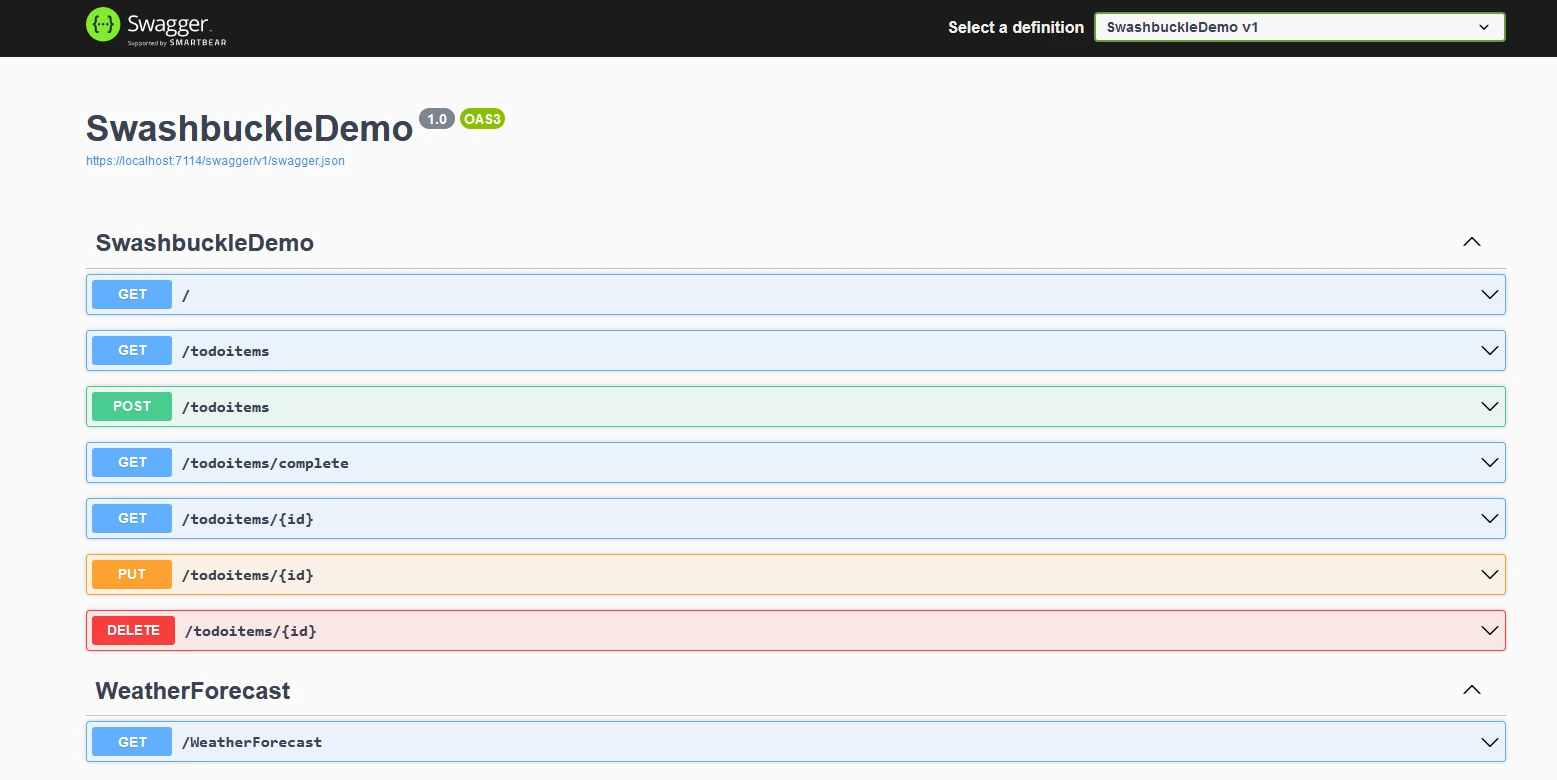
Swagger UI 可以從 Web API 應用程式的基礎 URL 的 "/swagger/index.html" 獲得。 它列出了來自程式碼的所有 REST API。 Swagger 生成器讀取 JSON 文件並填充 UI。
Swashbuckle.AspNetCore 自動生成 Swagger JSON 文件,其中包含 API 結構的資訊,包括端點、請求和響應型別等詳情。 此 JSON 文件可以由其他支持 Swagger/OpenAPI 標準的工具和服務使用。
從 web API 應用程式的基礎 URL 的 "/swagger/v1/swagger.json" 可以獲得 Swagger JSON 文件。
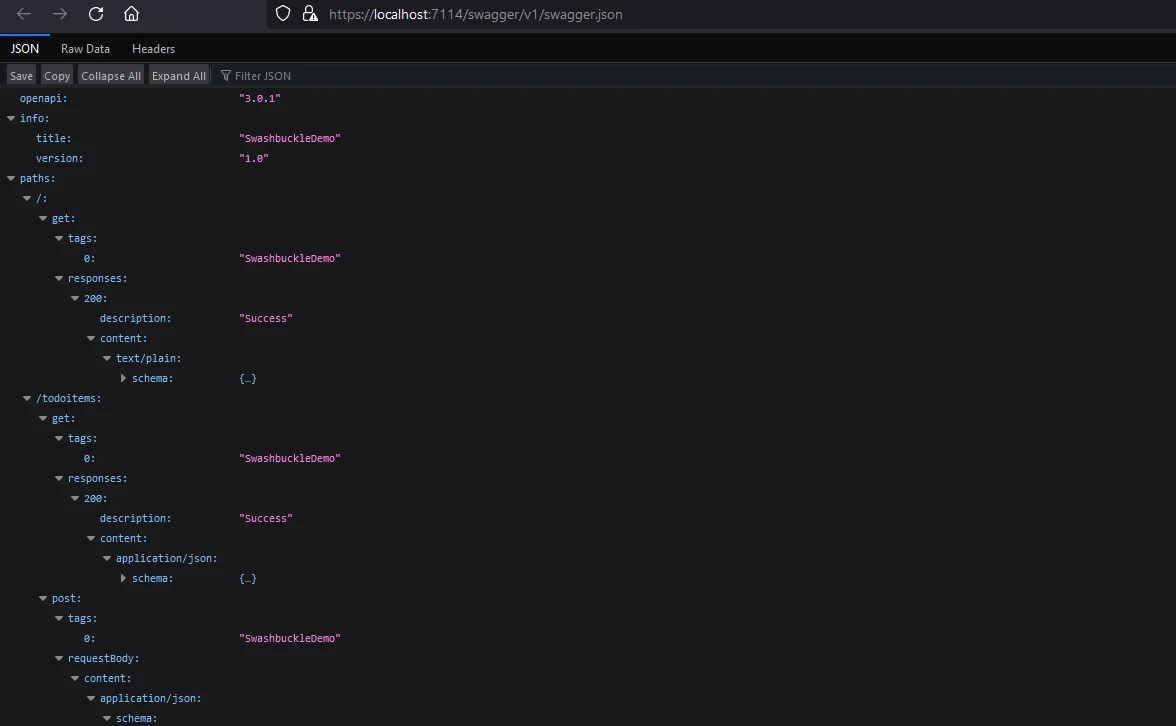
開發人員可以在 ASP.NET Core 控制器中使用 XML 注釋和屬性,為 Swagger 文件提供更多資訊。 這包括描述、範例和其他增強生成的 Swagger 文件的資料。
[ApiController]
[Route("[controller]")]
public class WeatherForecastController : ControllerBase
{
    private static readonly string[] Summaries = new[]
    {
        "Freezing", "Bracing", "Chilly", "Cool", "Mild", "Warm", "Balmy", "Hot", "Sweltering", "Scorching"
    };

    private readonly ILogger<WeatherForecastController> _logger;

    public WeatherForecastController(ILogger<WeatherForecastController> logger)
    {
        _logger = logger;
    }

    /// <summary>
    /// Retrieves WeatherForecast
    /// </summary>
    /// <remarks>Awesomeness!</remarks>
    /// <response code="200">Retrieved</response>
    /// <response code="404">Not found</response>
    /// <response code="500">Oops! Can't lookup your request right now</response>
    [HttpGet(Name = "GetWeatherForecast")]
    public IEnumerable<WeatherForecast> Get()
    {
        return Enumerable.Range(1, 5).Select(index => new WeatherForecast
        {
            Date = DateTime.Now.AddDays(index),
            TemperatureC = Random.Shared.Next(-20, 55),
            Summary = Summaries[Random.Shared.Next(Summaries.Length)]
        })
        .ToArray();
    }
}<ApiController>
<Route("[controller]")>
Public Class WeatherForecastController
Inherits ControllerBase
Private Shared ReadOnly Summaries() As String = { "Freezing", "Bracing", "Chilly", "Cool", "Mild", "Warm", "Balmy", "Hot", "Sweltering", "Scorching" }
Private ReadOnly _logger As ILogger(Of WeatherForecastController)
Public Sub New(ByVal logger As ILogger(Of WeatherForecastController))
_logger = logger
End Sub
''' <summary>
''' Retrieves WeatherForecast
''' </summary>
''' <remarks>Awesomeness!</remarks>
''' <response code="200">Retrieved</response>
''' <response code="404">Not found</response>
''' <response code="500">Oops! Can't lookup your request right now</response>
<HttpGet(Name := "GetWeatherForecast")>
Public Function [Get]() As IEnumerable(Of WeatherForecast)
Return Enumerable.Range(1, 5).Select(Function(index) New WeatherForecast With {
.Date = DateTime.Now.AddDays(index),
.TemperatureC = Random.Shared.Next(-20, 55),
.Summary = Summaries(Random.Shared.Next(Summaries.Length))
}).ToArray()
End Function
End ClassSwashbuckle.AspNetCore 提供各種配置選項來自定義如何生成 Swagger 文件。 開發人員可以控制哪些 API 被記錄,配置命名約定以及調整其他設置。
以下是 Swashbuckle.AspNetCore 提供的一些關鍵配置選項:
c.SwaggerDoc("v1", new OpenApiInfo { Title = "My API", Version = "v1" });c.SwaggerDoc("v1", New OpenApiInfo With {
.Title = "My API",
.Version = "v1"
})這行指定了 Swagger 文件的版本,並包括您的 API 的標題和版本等元資料。
c.IncludeXmlComments(xmlPath);c.IncludeXmlComments(xmlPath)此選項允許您包含來自程式碼的 XML 注釋,以在 Swagger 文件中提供更多資訊。 xmlPath 變數應指向您的 XML 注釋文件的位置。
c.DescribeAllParametersInCamelCase();c.DescribeAllParametersInCamelCase()此選項配置 Swagger 生成器使用 camelCase 作為參數名。
c.OperationFilter<CustomOperationFilter>();c.OperationFilter(Of CustomOperationFilter)()您可以註冊自定義選項過濾器來修改特定操作的 Swagger 文件。 CustomOperationFilter 是實現 IOperationFilter 的類。
c.SwaggerEndpoint("/swagger/v1/swagger.json", "My API V1");c.SwaggerEndpoint("/swagger/v1/swagger.json", "My API V1")此行配置 Swagger UI 以顯示文件。 第一個參數是 Swagger JSON 文件的 URL,第二個參數是 API 版本的使用者友好名稱。
c.RoutePrefix = "swagger";c.RoutePrefix = "swagger"您可以為 Swagger UI 設置路由前綴。 在此範例中,Swagger UI 將在 /swagger 下可用。
c.DocExpansion(DocExpansion.None);c.DocExpansion(DocExpansion.None)此選項控制 Swagger UI 如何顯示 API 文件。 DocExpansion.None 預設情況下會折疊所有操作。
c.SerializeAsV2 = true;c.SerializeAsV2 = True此選項指定是否將 Swagger 文件序列化為版本 2.0 格式 (true) 或 3.0 格式 (false)。 如果您希望使用 Swagger 2.0,請將其設置為 true。
c.DisplayOperationId();c.DisplayOperationId()此選項在 Swagger UI 中顯示操作 ID,這對於除錯和了解您的 API 結構非常有用。
c.OAuthClientId("swagger-ui");c.OAuthClientId("swagger-ui")如果您的 API 使用 OAuth 認證,您可以為 Swagger UI 配置 OAuth 客戶端 ID。
這些只是一些可用配置選項的範例。 Swashbuckle.AspNetCore 程式庫高度可自定義,您可以通過各種選項和過濾器組合來調整 Swagger 文件以滿足您的特定需求。 始終參考官方文件或開發環境中的 IntelliSense 以獲得可用選項的最新和全面資訊。
IronPDF 產品概覽是來自 Iron Software 網站的 C# PDF 程式庫,可以幫助讀取和生成 PDF 文件。 它可以輕鬆將帶有樣式資訊的格式化文件轉換為 PDF。 IronPDF 可以輕鬆從 HTML 內容生成 PDF。 它可以從 URL 下載 HTML 內容,然後生成 PDF。
IronPDF 是一個將網頁、URLs 和 HTML 轉換為 PDF 的絕佳工具,完美再現來源。 它非常適合生成在線內容的 PDF,例如報告和發票,並能輕鬆建立任何網頁的 PDF 版本。
using IronPdf;

class Program
{
    static void Main(string[] args)
    {
        var renderer = new ChromePdfRenderer();

        // 1. Convert HTML String to PDF
        var htmlContent = "<h1>Hello, IronPDF!</h1><p>This is a PDF from an HTML string.</p>";
        var pdfFromHtmlString = renderer.RenderHtmlAsPdf(htmlContent);
        pdfFromHtmlString.SaveAs("HTMLStringToPDF.pdf");

        // 2. Convert HTML File to PDF
        var htmlFilePath = "path_to_your_html_file.html"; // Specify the path to your HTML file
        var pdfFromHtmlFile = renderer.RenderHtmlFileAsPdf(htmlFilePath);
        pdfFromHtmlFile.SaveAs("HTMLFileToPDF.pdf");

        // 3. Convert URL to PDF
        var url = "http://ironpdf.com"; // Specify the URL
        var pdfFromUrl = renderer.RenderUrlAsPdf(url);
        pdfFromUrl.SaveAs("URLToPDF.pdf");
    }
}Imports IronPdf
Friend Class Program
Shared Sub Main(ByVal args() As String)
Dim renderer = New ChromePdfRenderer()
' 1. Convert HTML String to PDF
Dim htmlContent = "<h1>Hello, IronPDF!</h1><p>This is a PDF from an HTML string.</p>"
Dim pdfFromHtmlString = renderer.RenderHtmlAsPdf(htmlContent)
pdfFromHtmlString.SaveAs("HTMLStringToPDF.pdf")
' 2. Convert HTML File to PDF
Dim htmlFilePath = "path_to_your_html_file.html" ' Specify the path to your HTML file
Dim pdfFromHtmlFile = renderer.RenderHtmlFileAsPdf(htmlFilePath)
pdfFromHtmlFile.SaveAs("HTMLFileToPDF.pdf")
' 3. Convert URL to PDF
Dim url = "http://ironpdf.com" ' Specify the URL
Dim pdfFromUrl = renderer.RenderUrlAsPdf(url)
pdfFromUrl.SaveAs("URLToPDF.pdf")
End Sub
End Class通過 NuGet 安裝 IronPDF,使用 NuGet 套件管理器詳細資訊或 Visual Studio 安裝指南 套件管理器控制台。
在套件管理器控制台,輸入命令:
使用 Visual Studio

現在,讓我們修改應用程式,以增加將網站內容下載為 PDF 文件的功能。
using Microsoft.AspNetCore.Mvc;
using Microsoft.Extensions.Logging;
using IronPdf;
using System;
using System.Collections.Generic;
using System.IO;
using System.Linq;

namespace RestFullMinimalApi.Controllers
{
    [ApiController]
    [Route("[controller]")]
    public class WeatherForecastController : ControllerBase
    {
        private static readonly string[] Summaries = new[]
        {
            "Freezing", "Bracing", "Chilly", "Cool", "Mild", "Warm", "Balmy", "Hot", "Sweltering", "Scorching"
        };

        private readonly ILogger<WeatherForecastController> _logger;

        public WeatherForecastController(ILogger<WeatherForecastController> logger)
        {
            _logger = logger;
        }

        /// <summary>
        /// Retrieves WeatherForecast
        /// </summary>
        /// <remarks>Awesomeness!</remarks>
        /// <response code="200">Retrieved</response>
        /// <response code="404">Not found</response>
        /// <response code="500">Oops! Can't lookup your request right now</response>
        [HttpGet(Name = "GetWeatherForecast")]
        public IEnumerable<WeatherForecast> Get()
        {
            return Enumerable.Range(1, 5).Select(index => new WeatherForecast
            {
                Date = DateTime.Now.AddDays(index),
                TemperatureC = Random.Shared.Next(-20, 55),
                Summary = Summaries[Random.Shared.Next(Summaries.Length)]
            })
            .ToArray();
        }

        /// <summary>
        /// Retrieves WeatherForecast as Pdf
        /// </summary>
        /// <remarks>Awesomeness!</remarks>
        /// <response code="200">Retrieved</response>
        /// <response code="404">Not found</response>
        /// <response code="500">Oops! Can't lookup your request right now</response>
        [HttpGet("download", Name = "DownloadWeatherForecast")]
        public IActionResult GetWeatherPdf()
        {
            var results = Enumerable.Range(1, 5).Select(index => new WeatherForecast
            {
                Date = DateTime.Now.AddDays(index),
                TemperatureC = Random.Shared.Next(-20, 55),
                Summary = Summaries[Random.Shared.Next(Summaries.Length)]
            }).ToArray();

            var html = GetHtml(results);
            var renderer = new ChromePdfRenderer();
            var pdf = renderer.RenderHtmlAsPdf(html);
            var fileName = "WeatherReport.pdf";
            pdf.SaveAs(fileName);

            var stream = new FileStream(fileName, FileMode.Open);
            // Return the PDF file for download
            return new FileStreamResult(stream, "application/octet-stream") { FileDownloadName = fileName };
        }

        private static string GetHtml(WeatherForecast[] weatherForecasts)
        {
            string header = @"
<html>
<head><title>WeatherForecast</title></head>
<body>
<h1>WeatherForecast</h1>
";

            var footer = @"
</body>
</html>";

            var htmlContent = header;
            foreach (var weather in weatherForecasts)
            {
                htmlContent += $@"
    <h2>{weather.Date}</h2>
    <p>Summary: {weather.Summary}</p>
    <p>Temperature in Celsius: {weather.TemperatureC}</p>
    <p>Temperature in Fahrenheit: {weather.TemperatureF}</p>
";
            }
            htmlContent += footer;
            return htmlContent;
        }
    }

    public class WeatherForecast
    {
        public DateTime Date { get; set; }
        public int TemperatureC { get; set; }
        public string Summary { get; set; }

        public int TemperatureF => 32 + (int)(TemperatureC / 0.5556);
    }
}Imports Microsoft.AspNetCore.Mvc
Imports Microsoft.Extensions.Logging
Imports IronPdf
Imports System
Imports System.Collections.Generic
Imports System.IO
Imports System.Linq
Namespace RestFullMinimalApi.Controllers
<ApiController>
<Route("[controller]")>
Public Class WeatherForecastController
Inherits ControllerBase
Private Shared ReadOnly Summaries As String() = {"Freezing", "Bracing", "Chilly", "Cool", "Mild", "Warm", "Balmy", "Hot", "Sweltering", "Scorching"}
Private ReadOnly _logger As ILogger(Of WeatherForecastController)
Public Sub New(logger As ILogger(Of WeatherForecastController))
_logger = logger
End Sub
''' <summary>
''' Retrieves WeatherForecast
''' </summary>
''' <remarks>Awesomeness!</remarks>
''' <response code="200">Retrieved</response>
''' <response code="404">Not found</response>
''' <response code="500">Oops! Can't lookup your request right now</response>
<HttpGet(Name:="GetWeatherForecast")>
Public Function [Get]() As IEnumerable(Of WeatherForecast)
Return Enumerable.Range(1, 5).Select(Function(index) New WeatherForecast With {
.Date = DateTime.Now.AddDays(index),
.TemperatureC = Random.Shared.Next(-20, 55),
.Summary = Summaries(Random.Shared.Next(Summaries.Length))
}).ToArray()
End Function
''' <summary>
''' Retrieves WeatherForecast as Pdf
''' </summary>
''' <remarks>Awesomeness!</remarks>
''' <response code="200">Retrieved</response>
''' <response code="404">Not found</response>
''' <response code="500">Oops! Can't lookup your request right now</response>
<HttpGet("download", Name:="DownloadWeatherForecast")>
Public Function GetWeatherPdf() As IActionResult
Dim results = Enumerable.Range(1, 5).Select(Function(index) New WeatherForecast With {
.Date = DateTime.Now.AddDays(index),
.TemperatureC = Random.Shared.Next(-20, 55),
.Summary = Summaries(Random.Shared.Next(Summaries.Length))
}).ToArray()
Dim html = GetHtml(results)
Dim renderer = New ChromePdfRenderer()
Dim pdf = renderer.RenderHtmlAsPdf(html)
Dim fileName = "WeatherReport.pdf"
pdf.SaveAs(fileName)
Dim stream = New FileStream(fileName, FileMode.Open)
' Return the PDF file for download
Return New FileStreamResult(stream, "application/octet-stream") With {.FileDownloadName = fileName}
End Function
Private Shared Function GetHtml(weatherForecasts As WeatherForecast()) As String
Dim header As String = "
<html>
<head><title>WeatherForecast</title></head>
<body>
<h1>WeatherForecast</h1>
"
Dim footer As String = "
</body>
</html>"
Dim htmlContent As String = header
For Each weather In weatherForecasts
htmlContent += $"
<h2>{weather.Date}</h2>
<p>Summary: {weather.Summary}</p>
<p>Temperature in Celsius: {weather.TemperatureC}</p>
<p>Temperature in Fahrenheit: {weather.TemperatureF}</p>
"
Next
htmlContent += footer
Return htmlContent
End Function
End Class
Public Class WeatherForecast
Public Property [Date] As DateTime
Public Property TemperatureC As Integer
Public Property Summary As String
Public ReadOnly Property TemperatureF As Integer
Get
Return 32 + CInt(TemperatureC / 0.5556)
End Get
End Property
End Class
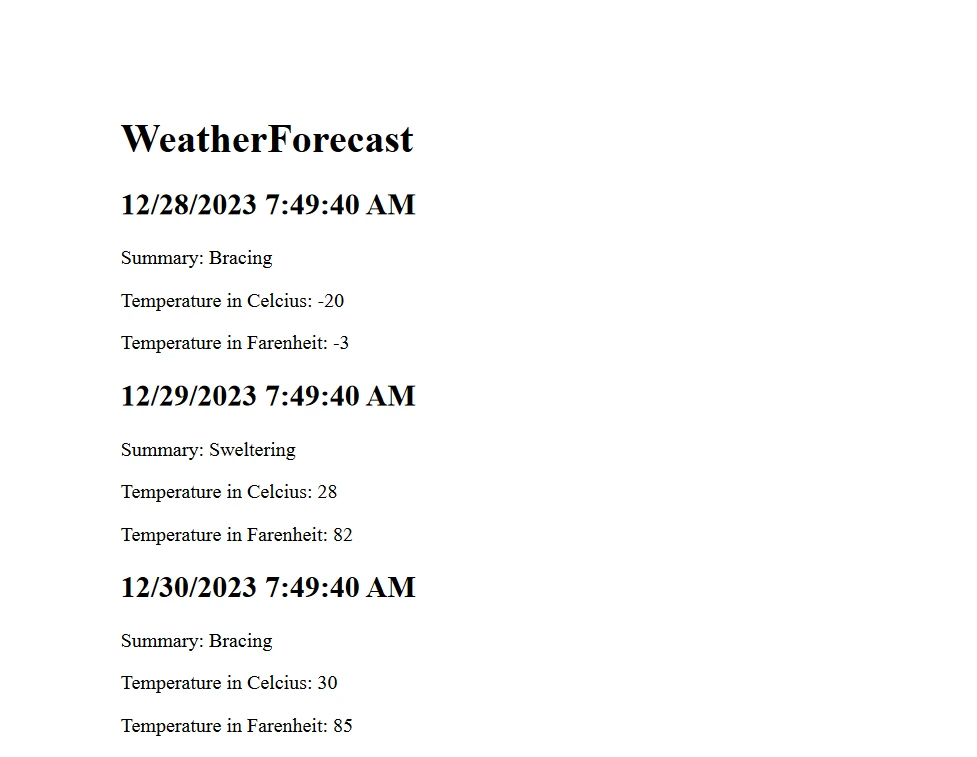
End Namespace在此,我們使用天氣資料生成一個 HTML 字元串,然後用於建立 PDF 文件。
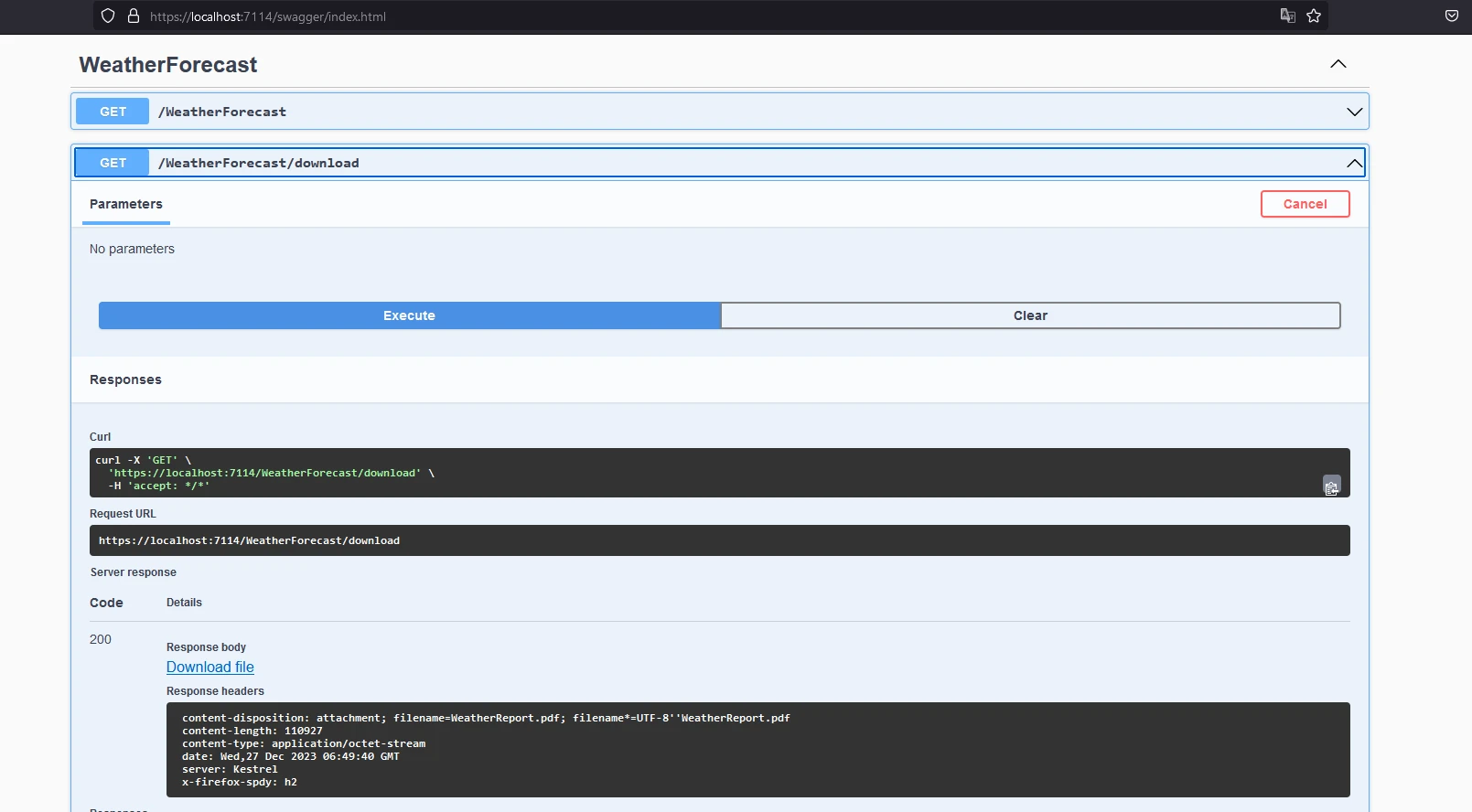
PDF 報告看起來像這樣:
完整的程式碼可以在 GitHub - Swashbuckle 示範源程式碼找到。
該文件有一個小的水印用于試用授權,可以通過有效的授權去除。
為了讓上述程式碼正常工作,需要授權金鑰。 將此密鑰放在 appsettings.json 文件中。
{
    "IronPdf": {
        "LicenseKey": "your license key"
    }
}開發人員在 IronPDF 試用註冊 註冊後可以獲得試用授權。 試用授權不需要信用卡。 使用您的電子郵件地址註冊以獲得免費試用。
了解 Swashbuckle 和 IronPDF 可以讓您有效地將 API 文件和 PDF 生成功能整合到您的 ASP.NET Core 應用程式中。 IronPDF 還提供全面的文件供 入門,以及各種 用於 PDF 生成的程式碼範例。
此外,您可以 探索 Iron Software 的相關軟體產品,這將幫助您提高編程技能並滿足現代應用程式的需求。

Jacob Mellor是Iron Software的首席技術官,一位在C# PDF技術上開創先河的遠見工程師。作為Iron Software核心程式碼庫的原開發者,他從創立以來就一直在塑造公司的產品架構,與首席執行官Cameron Rimington一起將公司轉變為服務於NASA、特斯拉和全球政府公司的50多名人員的公司。



IronPDF 是 IRONSUITE 的一部分
10 款適用於辦公室文件的 .NET API 產品

當您需要您的PDF看起來像HTML一樣快速。












