


Octokit .NET (Geliştiriciler İçin Nasıl Çalışır)

Octokit.NET Başlangıç
.NET Projelerinde Octokit.NET'i Kurmak
Projelerinizde Octokit.NET'i kullanmaya başlamak için, önce paketi yüklemeniz gerekmektedir. Bunu yapmak için en kolay yöntem olan NuGet aracılığıyla ekleyebilirsiniz. Visual Studio'da, NuGet Paket Yöneticisini kullanabilirsiniz. Projenizde Octokit arayın ve yükleyin.
Temel Kod Örneği: GitHub Kullanıcı Bilgisine Erişme
Octokit.NET'i kullanarak bir GitHub kullanıcısı hakkında bilgi almanın basit bir örneği burada. Bu örnek, projenizin zaten Octokit.NET ile ayarlı olduğunu varsayar.
using Octokit;
using System;
using System.Threading.Tasks;

class Program
{
    static async Task Main(string[] args)
    {
        // Create a new instance of the GitHubClient class with your application name
        var client = new GitHubClient(new ProductHeaderValue("YourAppName"));

        // Retrieve user information for the specified GitHub username
        var user = await client.User.Get("octocat");

        // Output the user's name to the console
        Console.WriteLine("User Name: " + user.Name);
    }
}
using Octokit;
using System;
using System.Threading.Tasks;
class Program
{
static async Task Main(string[] args)
{
// Create a new instance of the GitHubClient class with your application name
var client = new GitHubClient(new ProductHeaderValue("YourAppName"));
// Retrieve user information for the specified GitHub username
var user = await client.User.Get("octocat");
// Output the user's name to the console
Console.WriteLine("User Name: " + user.Name);
}
}Imports Octokit
Imports System
Imports System.Threading.Tasks
Friend Class Program
Shared Async Function Main(ByVal args() As String) As Task
' Create a new instance of the GitHubClient class with your application name
Dim client = New GitHubClient(New ProductHeaderValue("YourAppName"))
' Retrieve user information for the specified GitHub username
Dim user = Await client.User.Get("octocat")
' Output the user's name to the console
Console.WriteLine("User Name: " & user.Name)
End Function
End ClassBu kod parçası yeni bir GitHub istemcisi oluşturur ve belirli bir kullanıcı, octocat, için bilgi alır. Ardından, kullanıcının adını konsola yazdırır. Bu, GitHub'ın API'sine genel kullanıcı bilgileri için kimlik doğrulama yapmadan erişimi gösterir.
Octokit.NET Özelliklerini Uygulamak
Depoları Arama
Octokit.NET kullanarak kriterlere göre GitHub depolarını arayabilirsiniz. Bir aramayı nasıl yapacağınız aşağıda belirtilmiştir:
using Octokit;
using System;
using System.Threading.Tasks;

class Program
{
    static async Task Main(string[] args)
    {
        var client = new GitHubClient(new ProductHeaderValue("YourAppName"));

        // Define search criteria: topic 'machine learning' and language 'C#'
        var searchRepositoriesRequest = new SearchRepositoriesRequest("machine learning")
        {
            Language = Language.CSharp
        };

        // Execute the search and retrieve the results
        var result = await client.Search.SearchRepo(searchRepositoriesRequest);

        // Iterate and print each repository's full name
        foreach (var repo in result.Items)
        {
            Console.WriteLine(repo.FullName);
        }
    }
}
using Octokit;
using System;
using System.Threading.Tasks;
class Program
{
static async Task Main(string[] args)
{
var client = new GitHubClient(new ProductHeaderValue("YourAppName"));
// Define search criteria: topic 'machine learning' and language 'C#'
var searchRepositoriesRequest = new SearchRepositoriesRequest("machine learning")
{
Language = Language.CSharp
};
// Execute the search and retrieve the results
var result = await client.Search.SearchRepo(searchRepositoriesRequest);
// Iterate and print each repository's full name
foreach (var repo in result.Items)
{
Console.WriteLine(repo.FullName);
}
}
}Imports Octokit
Imports System
Imports System.Threading.Tasks
Friend Class Program
Shared Async Function Main(ByVal args() As String) As Task
Dim client = New GitHubClient(New ProductHeaderValue("YourAppName"))
' Define search criteria: topic 'machine learning' and language 'C#'
Dim searchRepositoriesRequest As New SearchRepositoriesRequest("machine learning") With {.Language = Language.CSharp}
' Execute the search and retrieve the results
Dim result = Await client.Search.SearchRepo(searchRepositoriesRequest)
' Iterate and print each repository's full name
For Each repo In result.Items
Console.WriteLine(repo.FullName)
Next repo
End Function
End ClassBu kod, C#'ta yazılmış "makine öğrenimi" ile ilgili depoları arar. Depoların tam adlarını çıktılar.
Çatallanmış Depoları Yönetme
Çatallanmış depoları yönetmek için, listelerini ve çatalları oluşturabilirsiniz. Bir deponun çatal listesini nasıl göstereceğinizi aşağıda belirtiyoruz:
using Octokit;
using System;
using System.Threading.Tasks;

class Program
{
    static async Task Main(string[] args)
    {
        var client = new GitHubClient(new ProductHeaderValue("YourAppName"));

        // List all forks for the 'Hello-World' repository owned by 'octocat'
        var forks = await client.Repository.Forks.GetAll("octocat", "Hello-World");

        // Print each fork's ID and owner login
        foreach (var fork in forks)
        {
            Console.WriteLine("Fork ID: " + fork.Id + " - Owner: " + fork.Owner.Login);
        }
    }
}
using Octokit;
using System;
using System.Threading.Tasks;
class Program
{
static async Task Main(string[] args)
{
var client = new GitHubClient(new ProductHeaderValue("YourAppName"));
// List all forks for the 'Hello-World' repository owned by 'octocat'
var forks = await client.Repository.Forks.GetAll("octocat", "Hello-World");
// Print each fork's ID and owner login
foreach (var fork in forks)
{
Console.WriteLine("Fork ID: " + fork.Id + " - Owner: " + fork.Owner.Login);
}
}
}Imports Octokit
Imports System
Imports System.Threading.Tasks
Friend Class Program
Shared Async Function Main(ByVal args() As String) As Task
Dim client = New GitHubClient(New ProductHeaderValue("YourAppName"))
' List all forks for the 'Hello-World' repository owned by 'octocat'
Dim forks = Await client.Repository.Forks.GetAll("octocat", "Hello-World")
' Print each fork's ID and owner login
For Each fork In forks
Console.WriteLine("Fork ID: " & fork.Id & " - Owner: " & fork.Owner.Login)
Next fork
End Function
End ClassBu örnek, octocat tarafından sahip olunan "Hello-World" deposunun tüm çatallarını listeler.
Oran Sınırlarını Yönetme
GitHub API ile etkileşim kurarken oran sınırlarını anlamak ve yönetmek çok önemlidir. Octokit.NET, oran limitlerinizi kontrol etmek için araçlar sağlar:
using Octokit;
using System;
using System.Threading.Tasks;

class Program
{
    static async Task Main(string[] args)
    {
        var client = new GitHubClient(new ProductHeaderValue("YourAppName"));

        // Retrieve the current rate limits for your GitHub API usage
        var rateLimit = await client.Miscellaneous.GetRateLimits();

        // Display the core API usage limit information
        Console.WriteLine("Core Limit: " + rateLimit.Resources.Core.Limit);
    }
}
using Octokit;
using System;
using System.Threading.Tasks;
class Program
{
static async Task Main(string[] args)
{
var client = new GitHubClient(new ProductHeaderValue("YourAppName"));
// Retrieve the current rate limits for your GitHub API usage
var rateLimit = await client.Miscellaneous.GetRateLimits();
// Display the core API usage limit information
Console.WriteLine("Core Limit: " + rateLimit.Resources.Core.Limit);
}
}Imports Octokit
Imports System
Imports System.Threading.Tasks
Friend Class Program
Shared Async Function Main(ByVal args() As String) As Task
Dim client = New GitHubClient(New ProductHeaderValue("YourAppName"))
' Retrieve the current rate limits for your GitHub API usage
Dim rateLimit = Await client.Miscellaneous.GetRateLimits()
' Display the core API usage limit information
Console.WriteLine("Core Limit: " & rateLimit.Resources.Core.Limit)
End Function
End ClassBu kod parçası, GitHub API kullanımının çekirdek limitini kontrol eder ve gösterir, talepleri oran limitlerini aşmadan yönetmenize yardımcı olur.
Reactive Extensions Desteği
Octokit.NET, reaktif programlama için Reactive Extensions (Rx) destekler. İşte temel bir örnek:
using Octokit.Reactive;
using System;

class ReactiveExample
{
    static void Main(string[] args)
    {
        var client = new ObservableGitHubClient(new ProductHeaderValue("YourAppName"));

        // Subscribe to retrieve user information and handle data/error reactively
        var subscription = client.User.Get("octocat").Subscribe(
            user => Console.WriteLine("User Name: " + user.Name),
            error => Console.WriteLine("Error: " + error.Message)
        );

        // Unsubscribe when done to avoid memory leaks
        subscription.Dispose();
    }
}
using Octokit.Reactive;
using System;
class ReactiveExample
{
static void Main(string[] args)
{
var client = new ObservableGitHubClient(new ProductHeaderValue("YourAppName"));
// Subscribe to retrieve user information and handle data/error reactively
var subscription = client.User.Get("octocat").Subscribe(
user => Console.WriteLine("User Name: " + user.Name),
error => Console.WriteLine("Error: " + error.Message)
);
// Unsubscribe when done to avoid memory leaks
subscription.Dispose();
}
}Imports Octokit.Reactive
Imports System
Friend Class ReactiveExample
Shared Sub Main(ByVal args() As String)
Dim client = New ObservableGitHubClient(New ProductHeaderValue("YourAppName"))
' Subscribe to retrieve user information and handle data/error reactively
Dim subscription = client.User.Get("octocat").Subscribe(Sub(user) Console.WriteLine("User Name: " & user.Name), Sub([error]) Console.WriteLine("Error: " & [error].Message))
' Unsubscribe when done to avoid memory leaks
subscription.Dispose()
End Sub
End ClassBu örnek, kullanıcı bilgilerini asenkron olarak almayı ve reaktif bir şekilde işlemeyi gösterir.
Etiketlerle Çalışmak
Octokit.NET aracılığıyla Git etiketleriyle çalışmak için, bir depodan etiketleri alabilirsiniz:
using Octokit;
using System;
using System.Threading.Tasks;

class Program
{
    static async Task Main(string[] args)
    {
        var client = new GitHubClient(new ProductHeaderValue("YourAppName"));

        // Retrieve all tags for the 'Hello-World' repository owned by 'octocat'
        var tags = await client.Repository.GetAllTags("octocat", "Hello-World");

        // Print each tag's name
        foreach (var tag in tags)
        {
            Console.WriteLine("Tag Name: " + tag.Name);
        }
    }
}
using Octokit;
using System;
using System.Threading.Tasks;
class Program
{
static async Task Main(string[] args)
{
var client = new GitHubClient(new ProductHeaderValue("YourAppName"));
// Retrieve all tags for the 'Hello-World' repository owned by 'octocat'
var tags = await client.Repository.GetAllTags("octocat", "Hello-World");
// Print each tag's name
foreach (var tag in tags)
{
Console.WriteLine("Tag Name: " + tag.Name);
}
}
}Imports Octokit
Imports System
Imports System.Threading.Tasks
Friend Class Program
Shared Async Function Main(ByVal args() As String) As Task
Dim client = New GitHubClient(New ProductHeaderValue("YourAppName"))
' Retrieve all tags for the 'Hello-World' repository owned by 'octocat'
Dim tags = Await client.Repository.GetAllTags("octocat", "Hello-World")
' Print each tag's name
For Each tag In tags
Console.WriteLine("Tag Name: " & tag.Name)
Next tag
End Function
End ClassBu kod, octocat tarafından sahip olunan "Hello-World" deposunun tüm etiketlerini listeler.
Octokit.NET'i IronPDF ile Entegre Etme
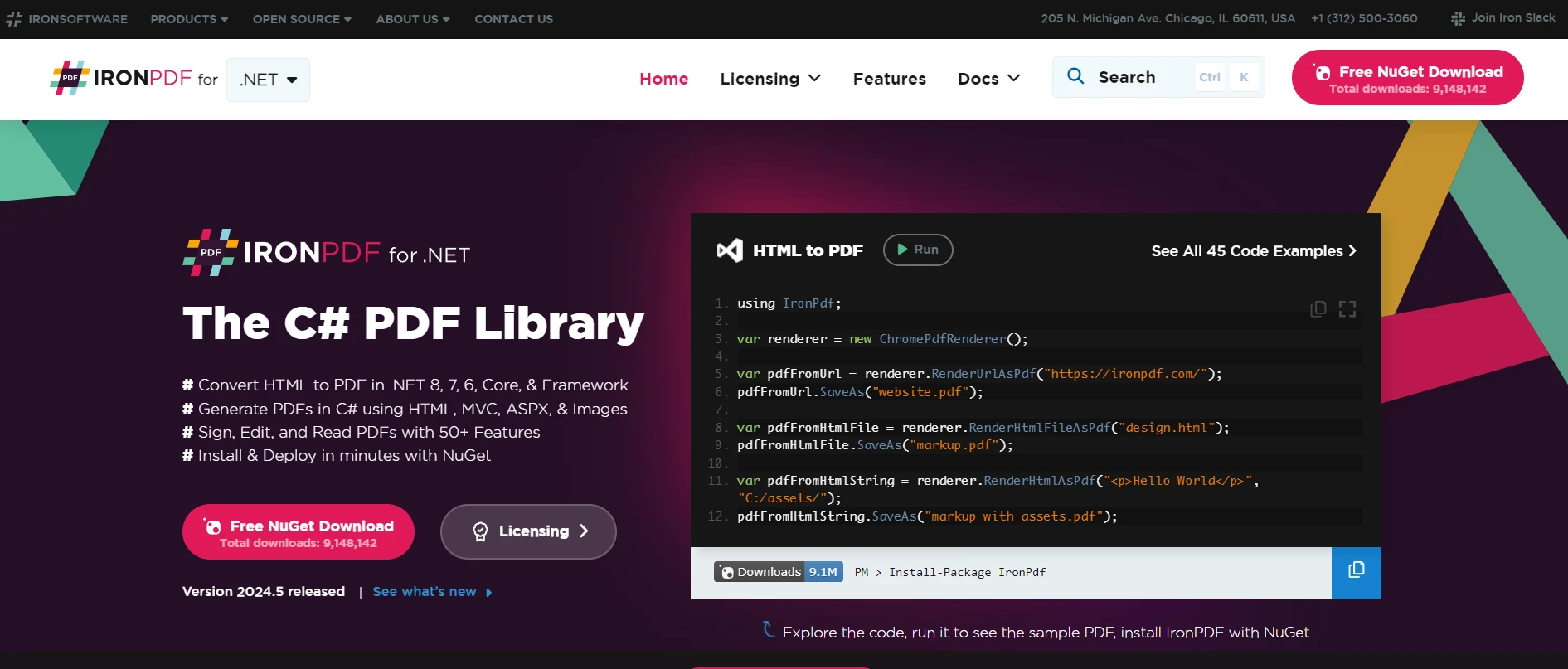
IronPDF, C# ve .NET uygulamalarında doğrudan PDF oluşturmayı, düzenlemeyi ve render etmeyi sağlayan popüler bir .NET kütüphanesidir. HTML'den, faturalar veya sabit sayfa düzeni gerektiren herhangi bir belgeden PDF raporları oluşturmak için güçlü bir araçtır. GitHub'un API'si ile etkileşime giren Octokit.NET ile birleştirildiğinde, özellikle kod depolarını içeren belge süreçlerini otomatikleştirme potansiyeli önemli ölçüde artar.
IronPDF Kütüphanesini Keşfedin
IronPDF ve işlevsellikleri hakkında daha fazla bilgi edinmek için lütfen IronPDF Resmi Web Sitesi'ni ziyaret edin. Sitelerinde, geliştirme sürecinizi destekleyecek kapsamlı kaynaklar ve belgeler sunulmaktadır.
IronPDF'in Octokit.NET ile Birleştirilmesi Durumu
IronPDF'in Octokit.NET ile birleştirilmesine yönelik bir pratik kullanım örneği, bir GitHub deposunda saklanan bir projenin belgelendirmesinin otomatik olarak PDF raporu olarak oluşturulmasıdır. Örneğin, belirli bir depodan tüm markdown dosyalarını alabilir, bunları bir PDF belgeye dönüştürebilir ve ardından bu belgeyi derlenmiş belge veya yayın notlarının bir versiyonunu tercih edebilecek hissedarlara veya müşterilere dağıtabilirsiniz.
Kullanım Durumu Kod Örneği
Bu entegrasyonu gösteren basit bir uygulama oluşturalım. Uygulama aşağıdaki görevleri gerçekleştirecek:
- Octokit.NET kullanarak GitHub'a kimlik doğrulaması yapın ve bağlanın.
- Belirtilen bir depodan dosyaları alın.
- Bu dosyaları IronPDF kullanarak Markdown'dan PDF'ye dönüştürün.
- PDF'yi yerel makineye kaydedin.
Bunu C# dilinde böyle yazabilirsiniz:
using Octokit;
using IronPdf;
using System;
using System.Threading.Tasks;
using System.Linq;

class Program
{
    static async Task Main(string[] args)
    {
        // GitHub client setup
        var client = new GitHubClient(new ProductHeaderValue("YourAppName"));
        var tokenAuth = new Credentials("your_github_token"); // Replace with your GitHub token
        client.Credentials = tokenAuth;

        // Repository details
        var owner = "repository_owner";
        var repo = "repository_name";

        // Fetch repository content
        var contents = await client.Repository.Content.GetAllContents(owner, repo);

        // Initialize the PDF builder
        var pdf = new ChromePdfRenderer();

        // Convert each markdown file to PDF
        foreach (var content in contents.Where(c => c.Name.EndsWith(".md")))
        {
            pdf.RenderHtmlAsPdf(content.Content).SaveAs($"{content.Name}.pdf");
            Console.WriteLine($"Created PDF for: {content.Name}");
        }
    }
}
using Octokit;
using IronPdf;
using System;
using System.Threading.Tasks;
using System.Linq;
class Program
{
static async Task Main(string[] args)
{
// GitHub client setup
var client = new GitHubClient(new ProductHeaderValue("YourAppName"));
var tokenAuth = new Credentials("your_github_token"); // Replace with your GitHub token
client.Credentials = tokenAuth;
// Repository details
var owner = "repository_owner";
var repo = "repository_name";
// Fetch repository content
var contents = await client.Repository.Content.GetAllContents(owner, repo);
// Initialize the PDF builder
var pdf = new ChromePdfRenderer();
// Convert each markdown file to PDF
foreach (var content in contents.Where(c => c.Name.EndsWith(".md")))
{
pdf.RenderHtmlAsPdf(content.Content).SaveAs($"{content.Name}.pdf");
Console.WriteLine($"Created PDF for: {content.Name}");
}
}
}Imports Octokit
Imports IronPdf
Imports System
Imports System.Threading.Tasks
Imports System.Linq
Friend Class Program
Shared Async Function Main(ByVal args() As String) As Task
' GitHub client setup
Dim client = New GitHubClient(New ProductHeaderValue("YourAppName"))
Dim tokenAuth = New Credentials("your_github_token") ' Replace with your GitHub token
client.Credentials = tokenAuth
' Repository details
Dim owner = "repository_owner"
Dim repo = "repository_name"
' Fetch repository content
Dim contents = Await client.Repository.Content.GetAllContents(owner, repo)
' Initialize the PDF builder
Dim pdf = New ChromePdfRenderer()
' Convert each markdown file to PDF
For Each content In contents.Where(Function(c) c.Name.EndsWith(".md"))
pdf.RenderHtmlAsPdf(content.Content).SaveAs($"{content.Name}.pdf")
Console.WriteLine($"Created PDF for: {content.Name}")
Next content
End Function
End ClassBu örnekte, GitHub istemcisini kurduktan ve kimlik bilgilerinizi belirttikten sonra, bir depodan içerik alınır. Depodaki her markdown dosyası için IronPDF, içeriği bir PDF dosyasına dönüştürür ve bu daha sonra yerel olarak kaydedilir. Bu basit ama etkili iş akışı, daha büyük depolar için daha karmaşık filtreleme, biçimlendirme veya hatta toplu işlemeyi içerecek şekilde genişletilebilir.
Sonuç
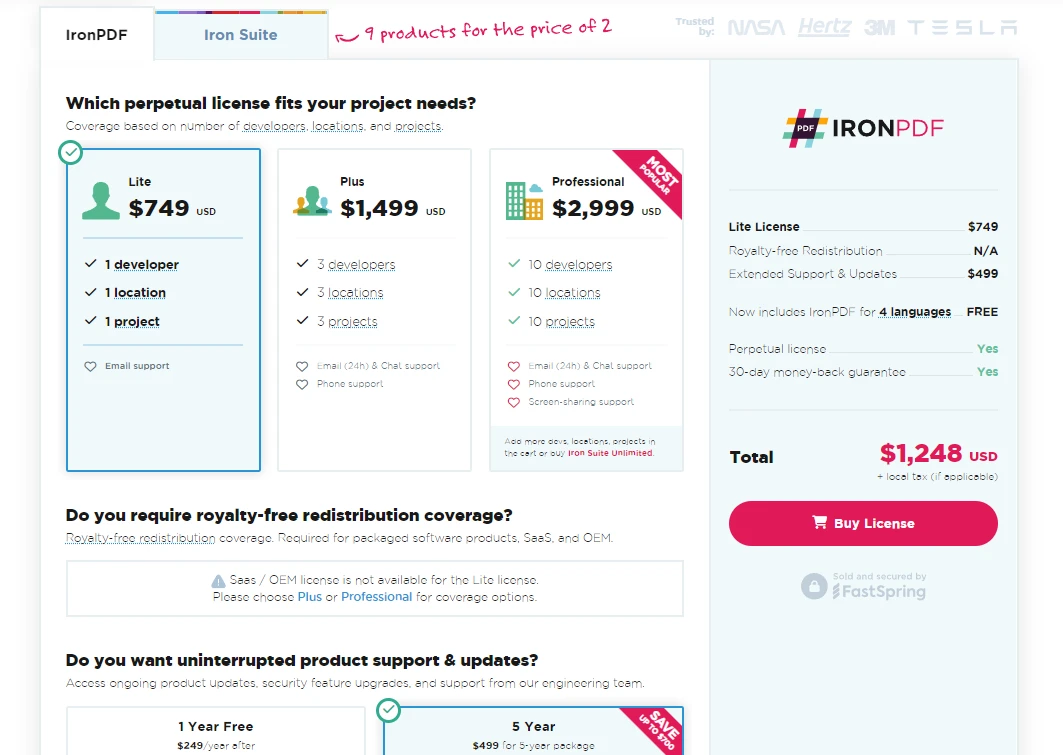
Octokit.NET'in IronPDF ile entegrasyonu, GitHub projelerinizdeki belge iş akışlarını otomatikleştirmek ve düzenlemek için kesintisiz bir yaklaşım sunar. Bu araçları kullanarak, belgelerin işlenmesindeki verimliliği artırabilir, çeşitli profesyonel ihtiyaçları karşılayan formatlarda kolayca erişilebilir hale getirebilirsiniz. Özellikle IronPDF, PDF manipülasyonu için sağlam bir platform sunar ve başladığınızda ücretsiz denemeler sunarlar. Projenizde uygulamaya karar verirseniz, lisanslama $999 ile başlar.
Iron Software ürün teklifleri hakkında daha fazla bilgi için, IronPDF ve IronBarcode, IronOCR, IronWebScraper gibi diğer kütüphaneleri kapsayan ürün bilgilerini Iron Software Ürün Kütüphaneleri adresinden ziyaret edebilirsiniz.
Sıkça Sorulan Sorular
Octokit.NET'i PDF oluşturma araçlarıyla nasıl entegre edebilirim?
Octokit.NET'i, GitHub depo içeriğinden PDF raporları otomatikleştirmek için IronPDF gibi kütüphanelerle entegre edebilirsiniz. Octokit.NET'i kullanarak markdown dosyalarını alıp IronPDF ile PDF'ye dönüştürerek belge iş akışlarını kolaylaştırabilirsiniz.
.NET kullanarak GitHub markdown dosyalarını PDF'lere dönüştürmek için adımlar nelerdir?
İlk olarak, GitHub deponuzdan markdown dosyalarına erişmek için Octokit.NET'i kullanın. Daha sonra, bu markdown dosyalarını PDF formatına dönüştürmek için IronPDF'in ChromePdfRenderer sınıfını kullanarak kolayca dağıtım ve arşivleme yapın.
Octokit.NET ile belge iş akışlarını otomatikleştirmek mümkün mü?
Evet, Octokit.NET'i IronPDF ile birleştirerek, GitHub depolarından içerik alma ve bunları PDF belgelerine dönüştürme işlemini otomatikleştirerek belge iş akışlarının verimliliğini artırabilirsiniz.
Octokit.NET kullanarak depo içeriğini nasıl çekebilirim?
Octokit.NET ile depo içeriğini almak için GitHubClient başlatın ve belirli bir depodan dosyaları veya dizinleri almak için Repository.GetAllContents gibi yöntemleri kullanın.
GitHub belgeleri için PDF raporlarının sağladığı faydalar nelerdir?
GitHub belgelerinden PDF raporları oluşturmak, içeriğin kolayca dağıtılabilir ve çevrimdışı erişilebilir olmasını sağlar. IronPDF gibi araçlar bu süreci kolaylaştırarak profesyonel ve tutarlı biçimlendirilmiş belgeler oluşturur.
Hız limitleri, Octokit.NET kullanımımı nasıl etkiler?
Octokit.NET, Miscellaneous.GetRateLimits gibi yöntemler içererek API hız limitlerini izlemenizi sağlar. Bu, hız limitlerini aşarak kesintilere neden olmaktan kaçınarak API isteklerinizi etkili bir şekilde yönetmenize yardımcı olur.
Octokit.NET ile Neden Reaktif Uzantıları Kullanmalısınız?
Octokit.NET'teki Reaktif Uzantılar, asenkron veri akışlarını verimli bir şekilde yönetmenize olanak tanır, veri ve hataları ele almak için reaktif bir yaklaşım sunar, bu da sağlam veri işleme gerektiren uygulamalar için faydalıdır.










 Ücretsiz Başlayın
 Ücretsiz Başlayın
 Ücretsiz Canlı Demo Rezervasyonu





 Kredi kartı veya hesap oluşturma gerektirmez










