




Güncellendi 21 Nisan 2026
TIFF'i Java'da PDF'ye Dönüştürme Yöntemi
Bu kapsamlı kılavuz, IronPDF kullanarak Java'da TIFF görüntüsünü PDF'ye sorunsuz bir şekilde dönüştürme adımlarını size gösterecek.
Daha Fazla Oku

Bu makale, IronPDF Kütüphanesi ile Java kullanarak birden fazla PDF belgesinin nasıl birleştirileceğini gösterecektir. Ortamı kurma sürecini, kütüphaneyi içe aktarmayı, giriş dosyalarını okumayı ve bunları tek bir belgede birleştirmeyi inceleyeceğiz.
IronPDF for Java, geliştiricilere sıfırdan yeni PDF belgeleri oluşturma ve çeşitli dosya formatlarını PDF belgelerine dönüştürme imkanı sağlayan güçlü bir kütüphanedir. Ayrıca birden fazla PDF dosyasını tek bir belgede birleştirme imkanı da sunar.
IronPDF for Java kullanımı kolaydır ve geliştiricilere PDF dosyaları oluşturmalarını kolaylaştıran basit ve sezgisel bir API'ye sahiptir. PDF'lerde Grafik Görselleştirme, PDF Formları ile Çalışma ve hatta Dijital İmzaları Programatik Olarak Ele Alma yöntemleri de desteklenmektedir.
Uygulamaya başlamadan önce, PDF oluşturma sürecini gerçekleştirmek için yerine getirilmesi gereken birkaç ön koşul bulunmaktadır.
Tüm gereksinimler karşılanırsa, Java için IronPDF kurulumu oldukça basit ve anlaşılır olacaktır, hatta Java acemileri için bile.
Bu makale için JetBrains'in IntelliJ IDEA'sı ile örnekleri yüklemek ve çalıştırmak için kullanılacaktır.
Öncelikle, JetBrains IntelliJ IDEA'yı açın ve yeni bir Maven projesi oluşturun.
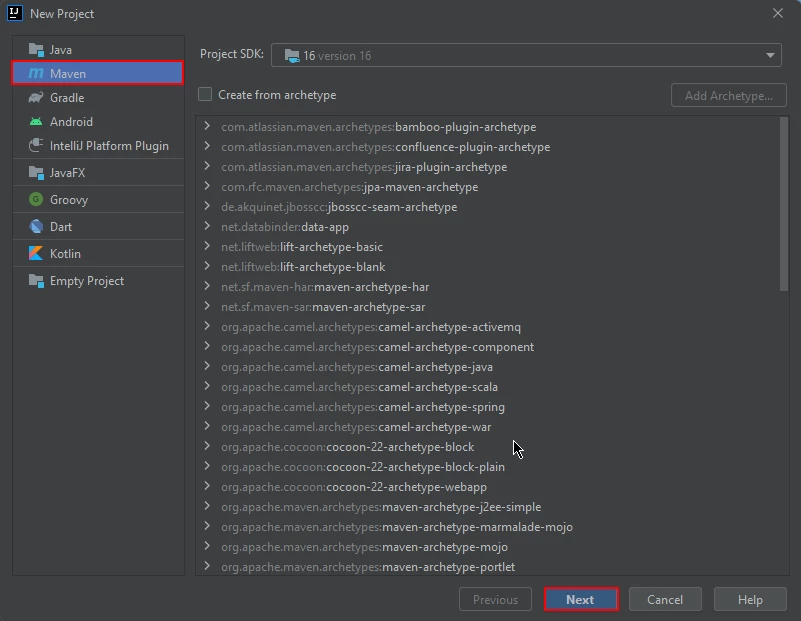 IntelliJ'de Yeni Maven Projesi
Yeni bir pencere açılacak. Proje adını girin ve bitir üzerine tıklayın.
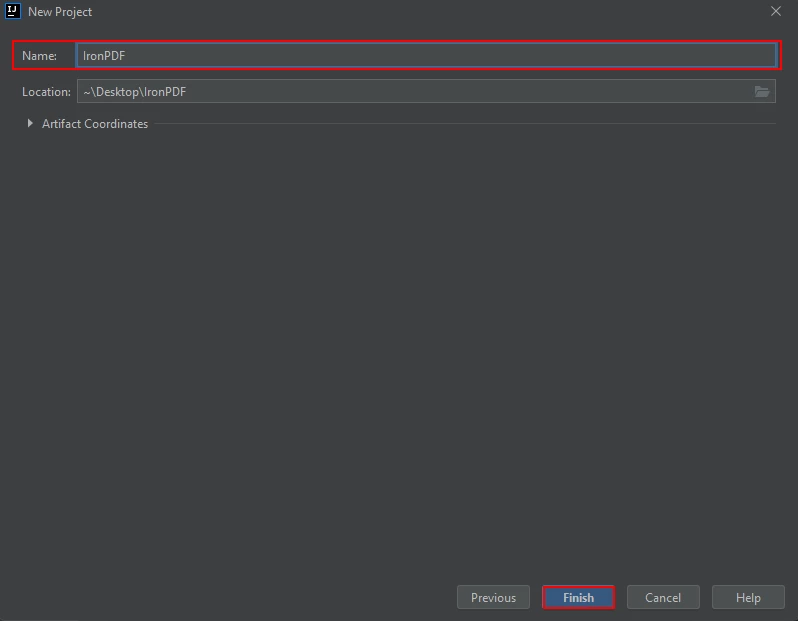 Maven Projesini Adlandırın ve Bitir'e tıklayın
Bitir'e tıkladıktan sonra, pom.xml için IronPDF for Java için Maven bağımlılıklarını eklemek üzere yeni bir proje açılacaktır.
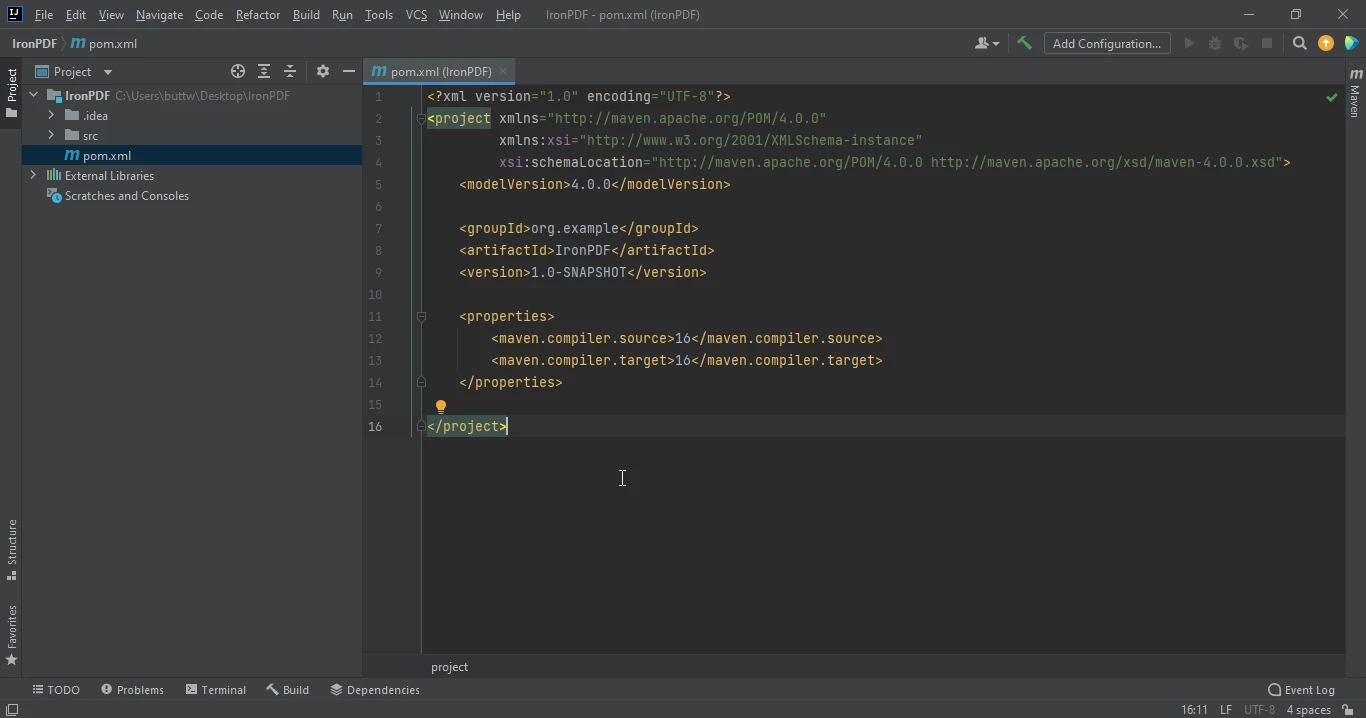 pom.xml dosyası
Aşağıdaki bağımlılıkları pom.xml dosyasına ekleyin veya aşağıdaki Maven Central üzerindeki IronPDF Listesi üzerinden JAR dosyasını indirebilirsiniz.
<dependency>
    <groupId>com.ironsoftware</groupId>
    <artifactId>ironpdf</artifactId>
    <version>YOUR_DESIRED_VERSION_HERE</version>
</dependency>Bağımlılıkları pom.xml dosyasına yerleştirdiğinizde, dosyanın sağ üst köşesinde küçük bir simge belirecektir.
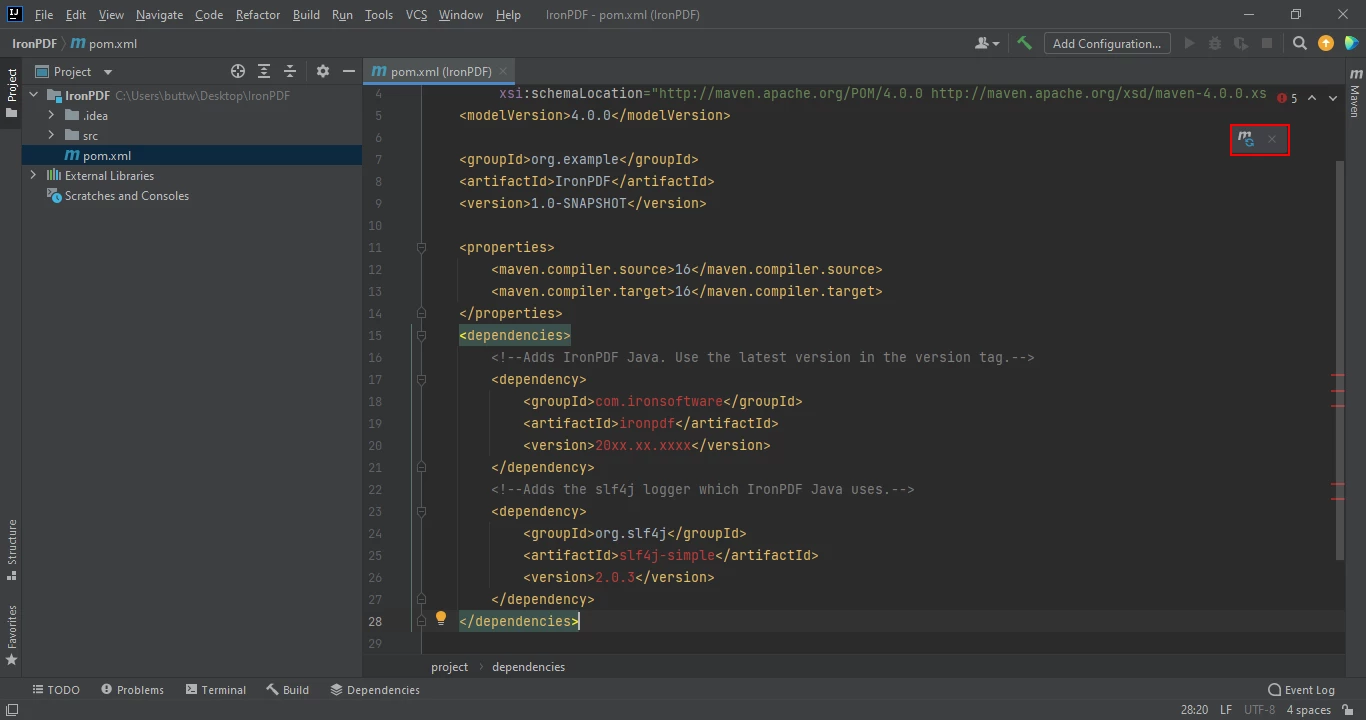 Maven gereksinimlerini otomatik kurmak için yüzen simgeye tıklayın
Bu ikon'a tıklayarak IronPDF for Java'nın Maven gereksinimlerini yükleyin. Bu, internet bağlantınızın hızına bağlı olarak sadece birkaç dakika sürecektir.
IronPDF, bir Java programı kullanarak birden fazla PDF belgesini tek bir PDF belgesine birleştirmenize olanak tanır. IronPDF, PDF belgelerini birleştirmenin birkaç yolunu sunar:
import com.ironsoftware.ironpdf.PdfDocument;

import java.io.IOException;
import java.nio.file.Paths;

// This class demonstrates how to create and merge two PDF documents using the IronPDF library.
public class Main {
    public static void main(String[] args) throws IOException {
        // Define the HTML content for the first PDF document
        String htmlA = "<p> [PDF_1] </p>"
                + "<p> Hi this is the first PDF </p>";
        // Define the HTML content for the second PDF document
        String htmlB = "<p> [PDF_2] </p>"
                + "<p> This is the 2nd PDF </p>";

        // Render the HTML content to create two separate PDF documents
        PdfDocument pdfA = PdfDocument.renderHtmlAsPdf(htmlA);
        PdfDocument pdfB = PdfDocument.renderHtmlAsPdf(htmlB);
        // Merge the two PDF documents into one
        PdfDocument merged = PdfDocument.merge(pdfA, pdfB);

        // Save the merged PDF document to the specified path
        merged.saveAs(Paths.get("assets/merged.pdf"));
    }
}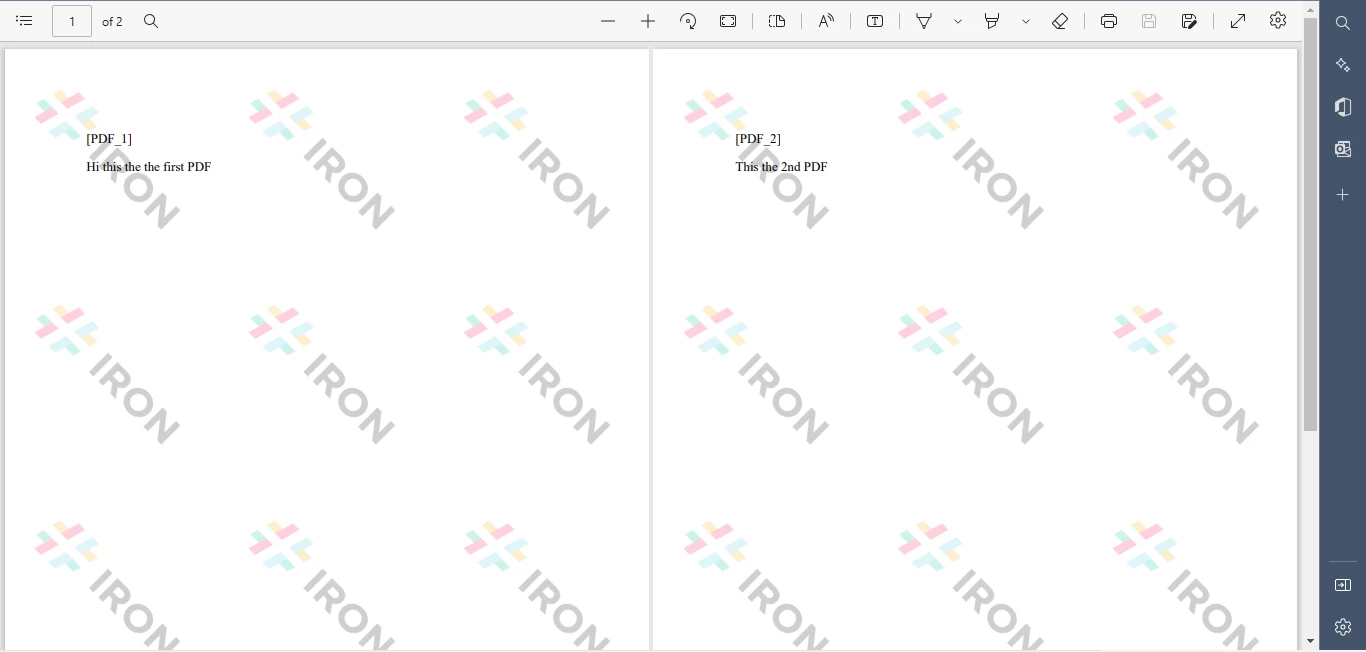 Yeni PDF Dosya Birleştirici
IronPDF, mevcut PDF dosyalarını tek bir ortak PDF dosyası halinde birleştirmenize olanak tanır. Tek yapmanız gereken PDF giriş dosyalarının listesini belirtmektir. IronPDF tüm PDF dosyalarını tek bir PDF belgesine birleştirecek ve hedef dosyaya kaydedecektir. Çıktı, başarıyla birleştirilen PDF dosyalarının sonucunu içerecektir.
import com.ironsoftware.ironpdf.PdfDocument;

import java.io.IOException;
import java.nio.file.Paths;

// This class demonstrates how to merge existing PDF files using the IronPDF library.
public class Main {
    public static void main(String[] args) throws IOException {
        // Load the existing PDF files from the specified paths
        PdfDocument pdfA = PdfDocument.fromFile(Paths.get("assets/1.pdf"));
        PdfDocument pdfB = PdfDocument.fromFile(Paths.get("assets/2.pdf"));
        // Merge the two PDF documents into one
        PdfDocument merged = PdfDocument.merge(pdfA, pdfB);

        // Save the merged PDF document to the specified path
        merged.saveAs(Paths.get("assets/merged.pdf"));
    }
}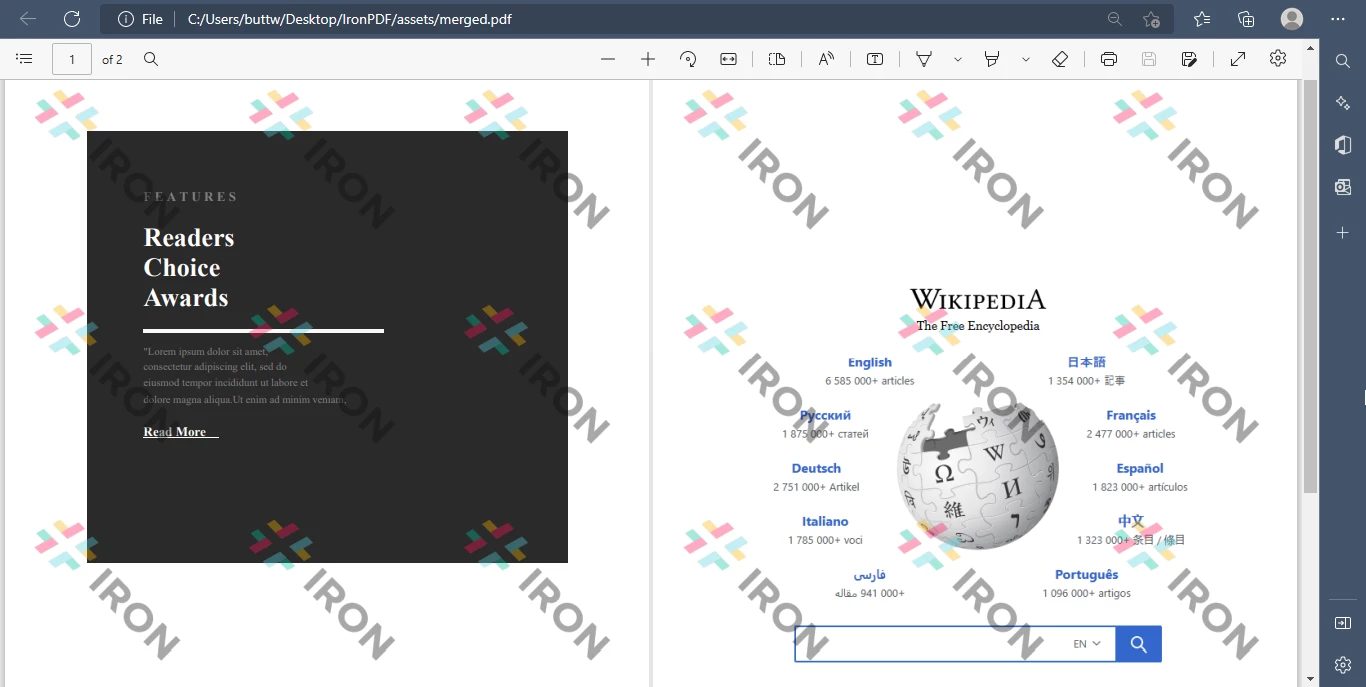 Mevcut PDF Birleştirici Çıkışı
IronPDF for Java kullanarak ikiden fazla PDF dosyasını kolayca birleştirebilirsiniz.
import com.ironsoftware.ironpdf.PdfDocument;

import java.io.IOException;
import java.nio.file.Paths;
import java.util.ArrayList;
import java.util.List;

// This class demonstrates how to merge more than two PDF documents using the IronPDF library.
public class Main {
    public static void main(String[] args) throws IOException {
        // Create a list to hold the PDF documents
        List<PdfDocument> pdfList = new ArrayList<>();
        // Add existing PDF files to the list
        pdfList.add(PdfDocument.fromFile(Paths.get("assets/1.pdf")));
        pdfList.add(PdfDocument.fromFile(Paths.get("assets/2.pdf")));
        pdfList.add(PdfDocument.fromFile(Paths.get("assets/3.pdf")));
        // Merge all PDF documents in the list into one
        PdfDocument merged = PdfDocument.merge(pdfList);
        // Save the merged PDF document to the specified path
        merged.saveAs(Paths.get("assets/merged.pdf"));
    }
}Bu makale, Java ve IronPDF kütüphanesini kullanarak birden fazla PDF dosyasını nasıl birleştireceğinizi kapsamaktadır. Bu makalede belirtilen adımları izleyerek, ortamı kurup kütüphaneyi içe aktarabilir, giriş dosyalarını okuyabilir ve bunları tek bir belgede birleştirebilirsiniz.
Java'da IronPDF Kullanarak PDF Dosyalarını Birleştirme hakkında daha fazla bilgi için Makalelerimizi keşfedin ve HTML'den PDF Olarak Oluşturma ve IronPDF ile PDF'leri Biçimlendirme ile ilgili benzer eğitimler için Geniş Kapsamlı Belgelerimizi Keşfedin.
Java için IronPDF, geliştirme amaçlı ücretsizdir ancak Üretim Ortamlarında Kullanım İçin Ticari Lisans Gerektirir.
Curtis Chau, Bilgisayar Bilimleri alanında Lisans Derecesine (Carleton Üniversitesi) sahip ve Node.js, TypeScript, JavaScript ve React konularında uzmanlaşmış ön uç geliştirmeyle ilgileniyor. Sezgisel ve estetik açıdan hoş kullanıcı arayüzleri oluşturma tutkunu, Curtis modern çerçevelerle çalışmayı ve iyi yapılandırılmış, görsel olarak çekici kılavuzlar oluşturmayı seviyor.



IronPDF, IRONSUITE'in bir parçasıdır
Ofis belgeleriniz için 10 .NET API ürünü

PDF'nizin HTML gibi görünmesine ihtiyaç duyduğunuzda, hızlı.

