跳過到頁腳內容
使用 IRONPDF FOR JAVA

如何在 Java 中合併兩個 PDF 文件

本文將示範如何使用Java 版IronPDF庫合併多個 PDF 文件。 我們將逐步完成環境設定、庫導入、讀取輸入檔案以及將它們合併成一個文件的過程。

IronPDF for Java

IronPDF for Java 是一個功能強大的程式庫,它允許開發人員從頭開始建立新的 PDF 文檔,並將各種文件格式轉換為 PDF 文件。 它還提供了將多個 PDF 文件合併成一個文件的功能。

IronPDF for Java 易於使用,並具有簡單直覺的 API,可讓開發人員輕鬆建立 PDF 檔案。 它還支援在 PDF 中渲染圖表、處理PDF 表單,甚至以程式設計方式處理數位簽章的方法。

先決條件

在實作之前,必須滿足一些先決條件才能執行 PDF 建立流程。

  1. 您的系統應該安裝 Java,並且應該在環境變數中設定其路徑。 如果您尚未安裝 Java,請參考Java 網站上的安裝指南以取得說明。
  2. 需要安裝 Java IDE,例如 Eclipse 或 IntelliJ。 您可以從Eclipse 官方下載頁面下載 Eclipse,從JetBrains 下載頁面下載 IntelliJ。
  3. 需要下載IronPDF Java 庫並將其作為依賴項新增至您的專案。 您可以在IronPDF官方網站上學習如何操作。
  4. 在開始 PDF 轉換之前,應先安裝Maven並將其整合到您的 IDE 中。 有關安裝Maven並將其整合到您的環境中的教程,請訪問JetBrains 提供的Maven逐步教程

IronPDF Java 安裝

如果滿足所有要求,即使對於 Java 新手來說,安裝IronPDF 適用於 Java 也非常簡單直接。

本文將使用 JetBrains 的 IntelliJ IDEA 來安裝和運行範例。

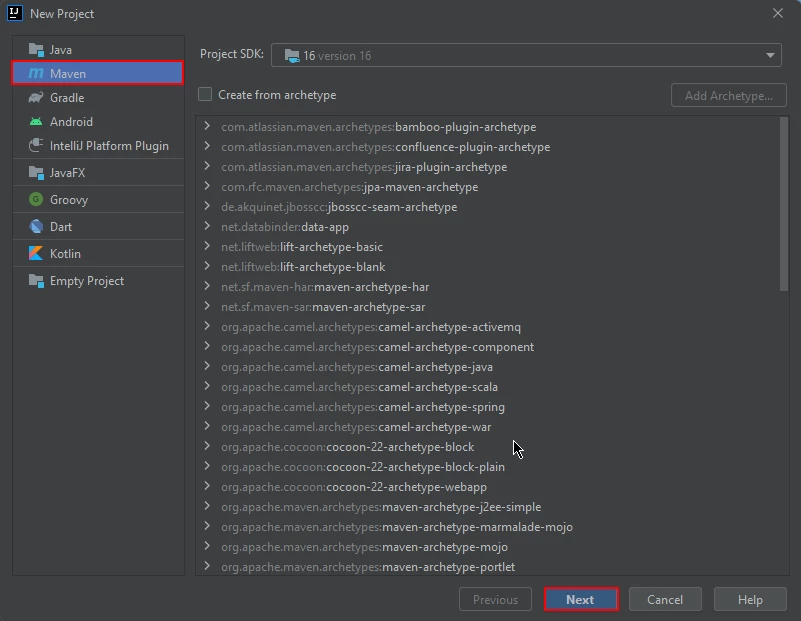
首先,打開 JetBrains IntelliJ IDEA 並建立一個新的Maven專案。

如何使用Java合併兩個PDF文件,圖1:IntelliJ中的新建Maven專案 在 IntelliJ 新建Maven項目

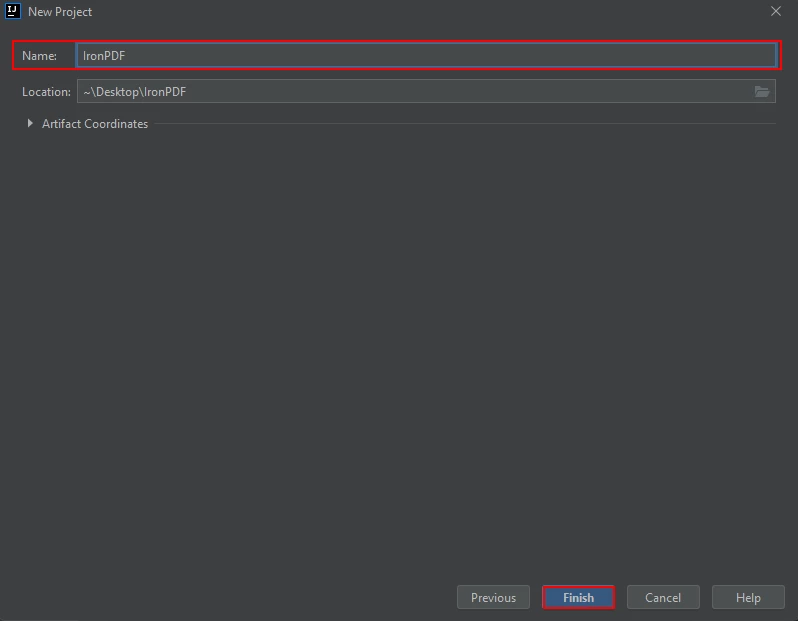
將出現一個新視窗。 輸入項目名稱,然後點選完成。

如何使用Java合併兩個PDF文件,圖2:命名Maven專案並按一下 為Maven專案命名,然後按一下"完成"。

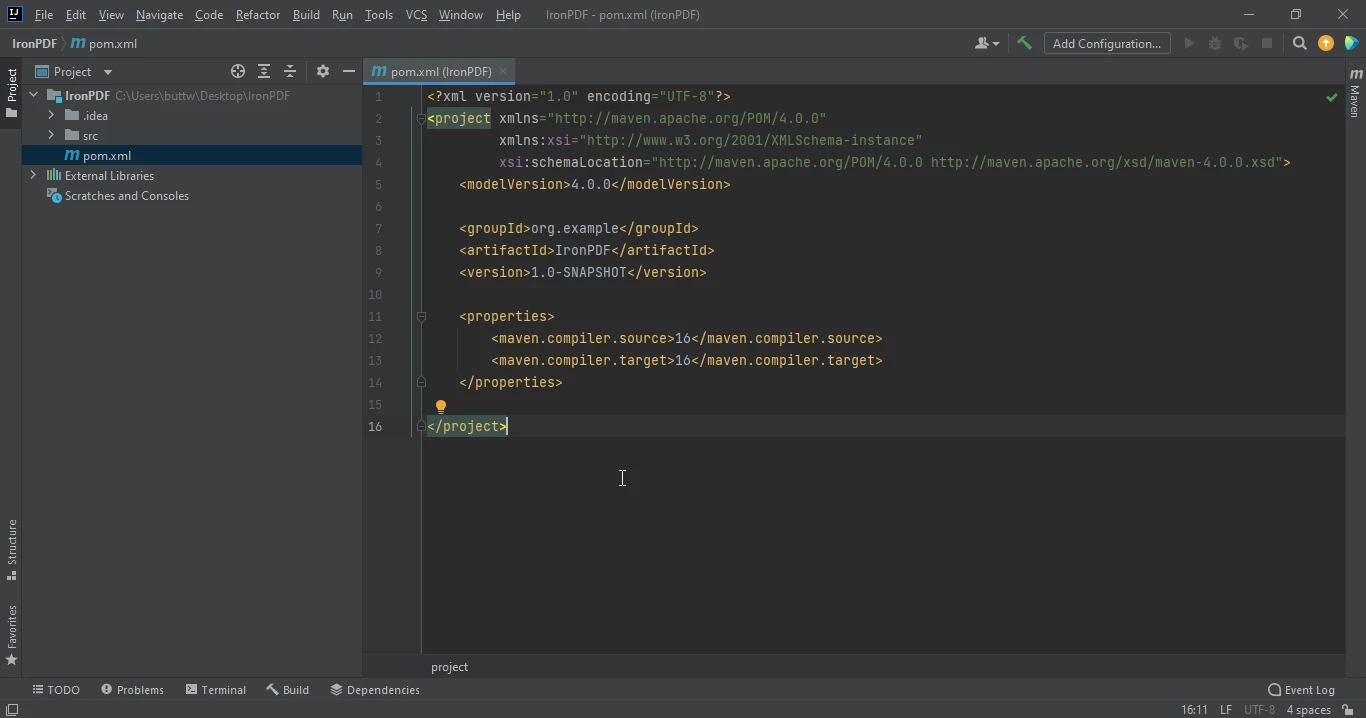
點擊"完成"後,將開啟一個新項目,進入 pom.xml 文件,新增IronPDF 適用於 Java 的Maven相依性。

如何使用Java合併兩個PDF文件,圖3:pom.xml檔案 pom.xml 文件

pom.xml 檔案中新增以下依賴項,或者您可以從Maven Central 上的以下IronPDF清單下載 JAR 檔案。

<dependency>
    <groupId>com.ironsoftware</groupId>
    <artifactId>ironpdf</artifactId>
    <version>YOUR_DESIRED_VERSION_HERE</version>
</dependency>
<dependency>
    <groupId>com.ironsoftware</groupId>
    <artifactId>ironpdf</artifactId>
    <version>YOUR_DESIRED_VERSION_HERE</version>
</dependency>
XML

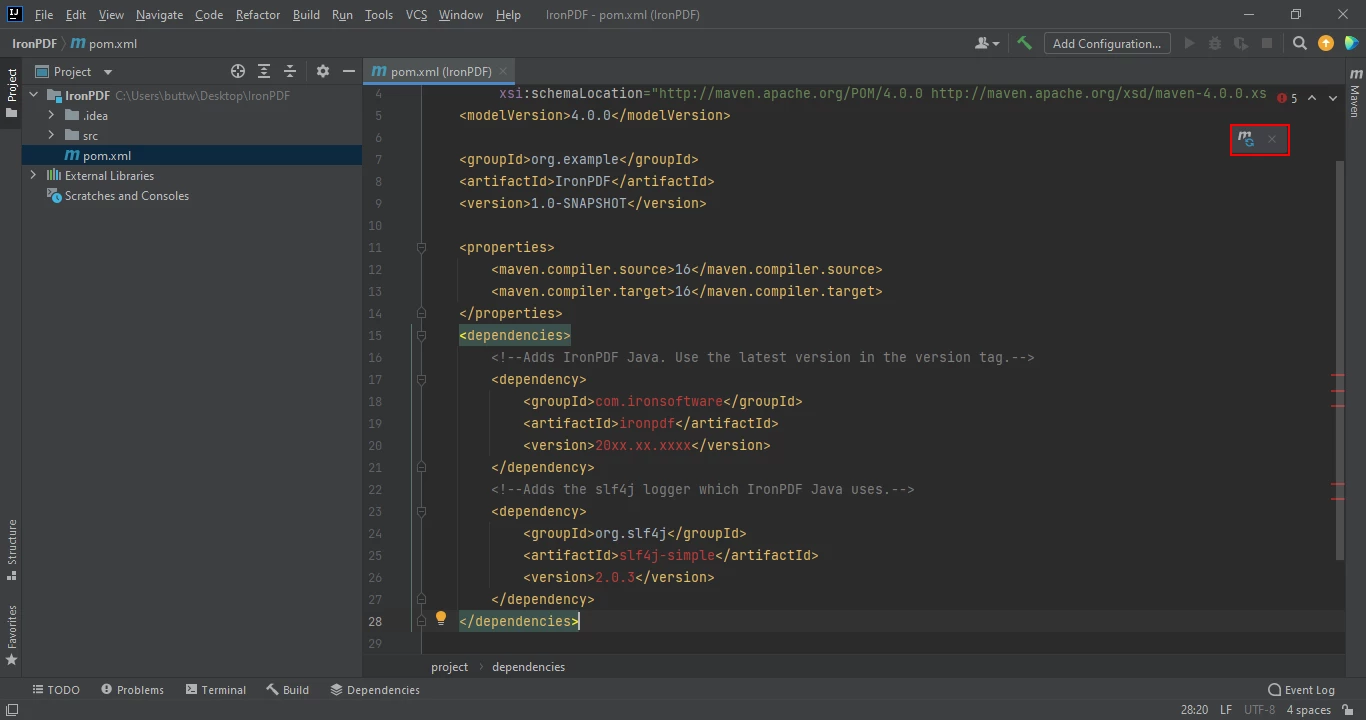
將相依性放入 pom.xml 檔案後,檔案右上角會出現一個小圖示。

如何使用Java合併兩個PDF文件,圖4:點選浮動圖示自動安裝Maven依賴項 點選懸浮圖示即可自動安裝Maven依賴項。

點選此圖示安裝IronPDF 適用於 Java 的Maven相依性。 這只需要幾分鐘,具體時間取決於您的網路連線速度。

合併多個PDF文檔

IronPDF可讓您使用 Java 程式將多個 PDF 文件合併為一個 PDF 文件。 IronPDF提供了多種合併 PDF 文件的方法:

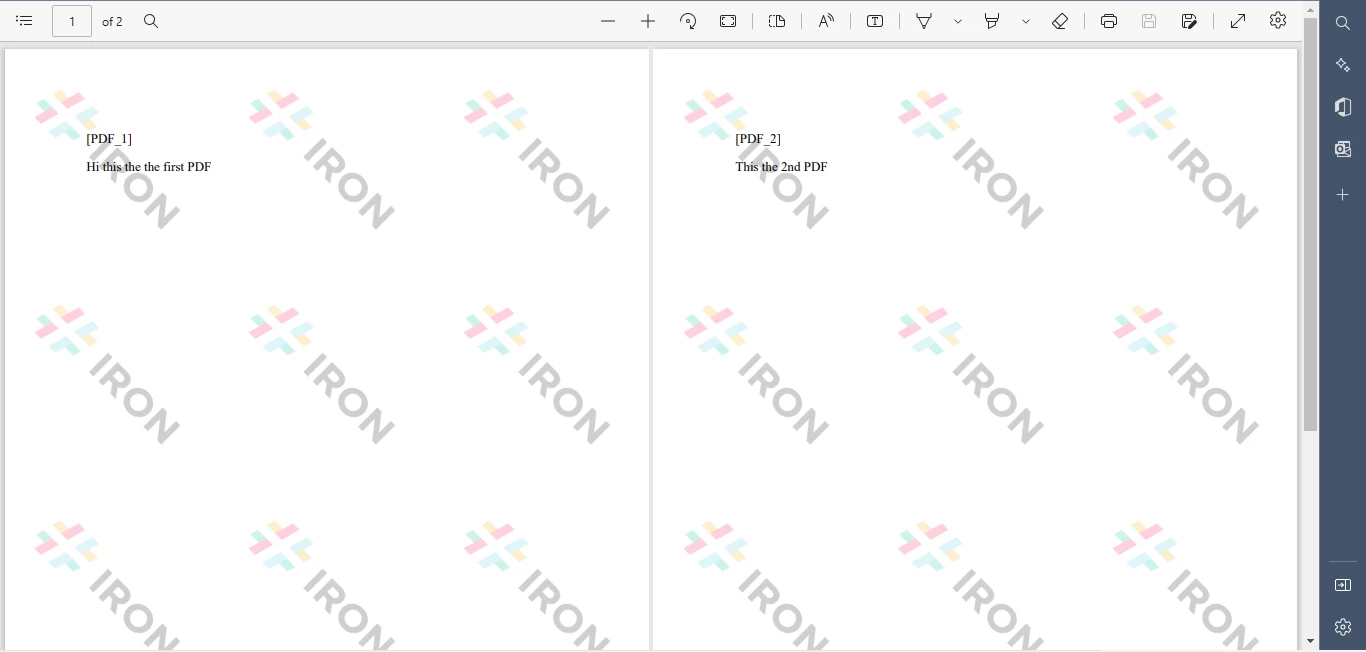
  1. 建立兩個新的 PDF 文檔,並將它們合併為一個 PDF 文檔。
  2. 將輸入的 PDF 檔案合併成一個 PDF 檔案。
  3. 合併兩個以上的PDF文件。

建立兩個新的PDF文件並將它們合併在一起

import com.ironsoftware.ironpdf.PdfDocument;

import java.io.IOException;
import java.nio.file.Paths;

// This class demonstrates how to create and merge two PDF documents using the IronPDF library.
public class Main {
    public static void main(String[] args) throws IOException {
        // Define the HTML content for the first PDF document
        String htmlA = "<p> [PDF_1] </p>"
                + "<p> Hi this is the first PDF </p>";
        // Define the HTML content for the second PDF document
        String htmlB = "<p> [PDF_2] </p>"
                + "<p> This is the 2nd PDF </p>";

        // Render the HTML content to create two separate PDF documents
        PdfDocument pdfA = PdfDocument.renderHtmlAsPdf(htmlA);
        PdfDocument pdfB = PdfDocument.renderHtmlAsPdf(htmlB);
        // Merge the two PDF documents into one
        PdfDocument merged = PdfDocument.merge(pdfA, pdfB);

        // Save the merged PDF document to the specified path
        merged.saveAs(Paths.get("assets/merged.pdf"));
    }
}
import com.ironsoftware.ironpdf.PdfDocument;

import java.io.IOException;
import java.nio.file.Paths;

// This class demonstrates how to create and merge two PDF documents using the IronPDF library.
public class Main {
    public static void main(String[] args) throws IOException {
        // Define the HTML content for the first PDF document
        String htmlA = "<p> [PDF_1] </p>"
                + "<p> Hi this is the first PDF </p>";
        // Define the HTML content for the second PDF document
        String htmlB = "<p> [PDF_2] </p>"
                + "<p> This is the 2nd PDF </p>";

        // Render the HTML content to create two separate PDF documents
        PdfDocument pdfA = PdfDocument.renderHtmlAsPdf(htmlA);
        PdfDocument pdfB = PdfDocument.renderHtmlAsPdf(htmlB);
        // Merge the two PDF documents into one
        PdfDocument merged = PdfDocument.merge(pdfA, pdfB);

        // Save the merged PDF document to the specified path
        merged.saveAs(Paths.get("assets/merged.pdf"));
    }
}
JAVA

如何使用Java合併兩個PDF文件,圖5:新的PDF文件合併器 新的PDF文件合併器

將現有文件合併為一個 PDF 文件

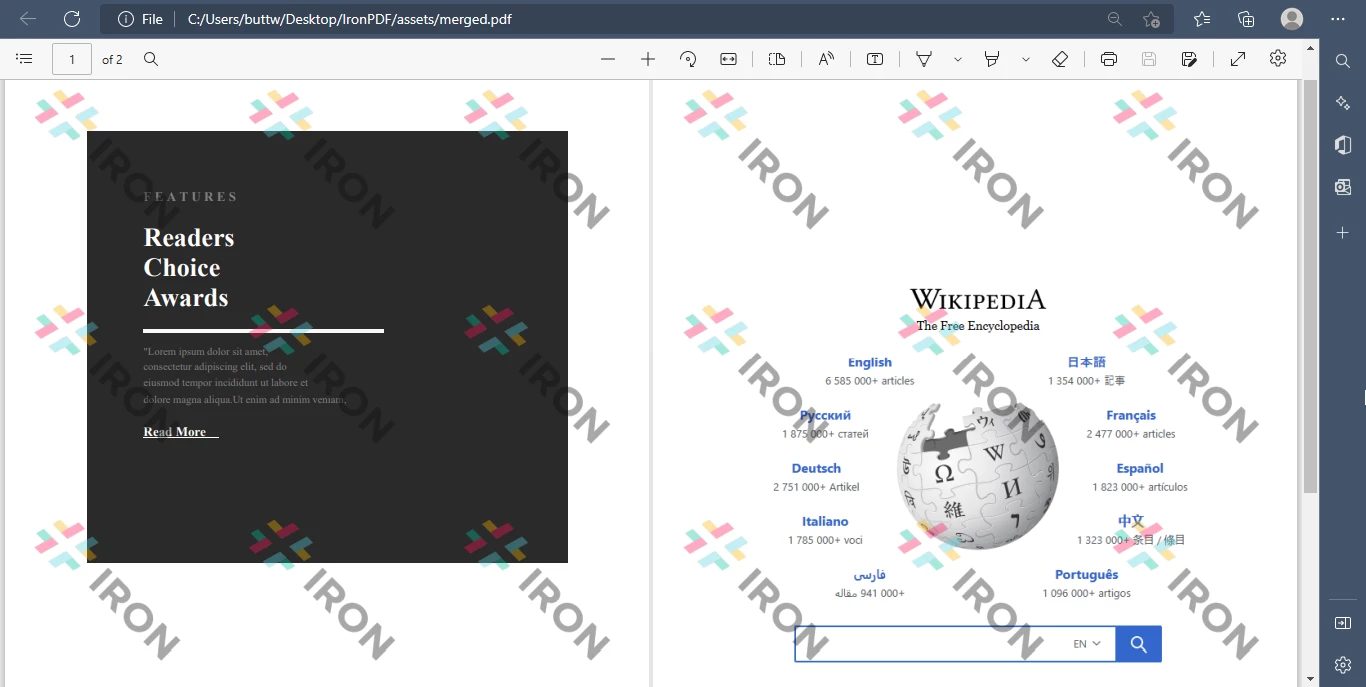
IronPDF可讓您將多個 PDF 檔案合併成一個通用的 PDF 檔案。只需指定要輸入的 PDF 文件清單即可。 IronPDF會將所有PDF文件合併成一個PDF文檔,並將其儲存到目標位置。輸出結果將包含成功合併的PDF檔案。

import com.ironsoftware.ironpdf.PdfDocument;

import java.io.IOException;
import java.nio.file.Paths;

// This class demonstrates how to merge existing PDF files using the IronPDF library.
public class Main {
    public static void main(String[] args) throws IOException {
        // Load the existing PDF files from the specified paths
        PdfDocument pdfA = PdfDocument.fromFile(Paths.get("assets/1.pdf"));
        PdfDocument pdfB = PdfDocument.fromFile(Paths.get("assets/2.pdf"));
        // Merge the two PDF documents into one
        PdfDocument merged = PdfDocument.merge(pdfA, pdfB);

        // Save the merged PDF document to the specified path
        merged.saveAs(Paths.get("assets/merged.pdf"));
    }
}
import com.ironsoftware.ironpdf.PdfDocument;

import java.io.IOException;
import java.nio.file.Paths;

// This class demonstrates how to merge existing PDF files using the IronPDF library.
public class Main {
    public static void main(String[] args) throws IOException {
        // Load the existing PDF files from the specified paths
        PdfDocument pdfA = PdfDocument.fromFile(Paths.get("assets/1.pdf"));
        PdfDocument pdfB = PdfDocument.fromFile(Paths.get("assets/2.pdf"));
        // Merge the two PDF documents into one
        PdfDocument merged = PdfDocument.merge(pdfA, pdfB);

        // Save the merged PDF document to the specified path
        merged.saveAs(Paths.get("assets/merged.pdf"));
    }
}
JAVA

如何使用Java合併兩個PDF文件,圖6:現有PDF合併輸出 現有 PDF 合併輸出

合併兩個以上的PDF文檔

使用IronPDF 適用於 Java 可以輕鬆合併兩個以上的 PDF 檔案。

import com.ironsoftware.ironpdf.PdfDocument;

import java.io.IOException;
import java.nio.file.Paths;
import java.util.ArrayList;
import java.util.List;

// This class demonstrates how to merge more than two PDF documents using the IronPDF library.
public class Main {
    public static void main(String[] args) throws IOException {
        // Create a list to hold the PDF documents
        List<PdfDocument> pdfList = new ArrayList<>();
        // Add existing PDF files to the list
        pdfList.add(PdfDocument.fromFile(Paths.get("assets/1.pdf")));
        pdfList.add(PdfDocument.fromFile(Paths.get("assets/2.pdf")));
        pdfList.add(PdfDocument.fromFile(Paths.get("assets/3.pdf")));
        // Merge all PDF documents in the list into one
        PdfDocument merged = PdfDocument.merge(pdfList);
        // Save the merged PDF document to the specified path
        merged.saveAs(Paths.get("assets/merged.pdf"));
    }
}
import com.ironsoftware.ironpdf.PdfDocument;

import java.io.IOException;
import java.nio.file.Paths;
import java.util.ArrayList;
import java.util.List;

// This class demonstrates how to merge more than two PDF documents using the IronPDF library.
public class Main {
    public static void main(String[] args) throws IOException {
        // Create a list to hold the PDF documents
        List<PdfDocument> pdfList = new ArrayList<>();
        // Add existing PDF files to the list
        pdfList.add(PdfDocument.fromFile(Paths.get("assets/1.pdf")));
        pdfList.add(PdfDocument.fromFile(Paths.get("assets/2.pdf")));
        pdfList.add(PdfDocument.fromFile(Paths.get("assets/3.pdf")));
        // Merge all PDF documents in the list into one
        PdfDocument merged = PdfDocument.merge(pdfList);
        // Save the merged PDF document to the specified path
        merged.saveAs(Paths.get("assets/merged.pdf"));
    }
}
JAVA

結論

本文介紹如何使用 Java 和IronPDF庫合併多個 PDF 檔案。 按照本文所述的步驟,您將能夠設定環境、匯入庫、讀取輸入檔案並將它們合併到一個文件中。

有關使用IronPDF在 Java 中合併 PDF 文件的更多信息,以及如何從 HTML 創建 PDF使用IronPDF格式化 PDF 的類似教程,請瀏覽我們全面的文檔

IronPDF for Java 可免費用於開發目的,但在生產環境中使用則需要商業許可證

常見問題解答

如何使用Java合併兩個PDF檔案?

您可以使用IronPDF 適用於 Java 中的PdfDocument類別來合併兩個 PDF 檔案。首先,使用PdfDocument.fromFile方法載入 PDF 文檔,然後使用merge方法將它們合併成一個文檔,最後使用saveAs儲存輸出結果。

如何設定IronPDF 適用於 Java?

若要為 Java 設定IronPDF ,請確保已安裝 Java 和 Java IDE(例如 IntelliJ)。透過從IronPDF網站或 Maven Central 取得必要的依賴項,將IronPDF新增為專案中的 Maven 依賴項。

IronPDF for Java 能否合併兩個以上的 PDF 檔?

是的, IronPDF for Java 可以合併兩個以上的 PDF 檔案。您可以將多個 PDF 文件載入到一個清單中,然後使用merge方法將它們合併成一個 PDF 文件。

如何在Java中從HTML建立PDF文件?

IronPDF for Java 可讓您使用HtmlToPdf.renderHtmlAsPdf方法從 HTML 建立 PDF 文件。您可以直接將 HTML 字串或檔案渲染成 PDF。

IronPDF for Java 是否適用於生產環境?

IronPDF for Java 可免費用於開發目的,但在生產環境中部署則需要商業許可證。

在 Java 中使用IronPDF需要哪些前提條件?

前提條件包括安裝和設定 Java,使用 Java IDE(例如 IntelliJ IDEA),以及將IronPDF作為 Maven 依賴項整合到您的專案中。

哪裡可以找到IronPDF 適用於 Java 的文檔?

IronPDF官方網站提供了IronPDF 適用於 Java 的完整文檔,包括合併 PDF 和從 HTML 建立 PDF 的指南。

如何排查在 Java 中合併 PDF 時所出現的問題?

請確保使用 IronPDF 的PdfDocument.fromFile方法正確載入所有 PDF 文件,並驗證IronPDF庫是否已正確新增為 Maven 依賴項。更多故障排除提示,請參閱IronPDF文件。

Darrius Serrant
全棧軟件工程師 (WebOps)

Darrius Serrant 擁有邁阿密大學計算機科學學士學位,目前任職於 Iron Software 的全栈 WebOps 市場營銷工程師。從小就迷上編碼,他認為計算既神秘又可接近,是創意和解決問題的完美媒介。

在 Iron Software,Darrius 喜歡創造新事物,並簡化複雜概念以便於理解。作為我們的駐場開發者之一,他也自願教學生,分享他的專業知識給下一代。

對 Darrius 來說,工作令人滿意因為它被重視且有實際影響。

鋼鐵支援團隊

我們每週 5 天,每天 24 小時在線上。
聊天
電子郵件
打電話給我