

sqlite3 Python (Geliştiriciler İçin Nasıl Çalışir)

sqlite3 modülü, Python'da SQLite veritabanları ile etkileşim kurmanın bir yolunu sunar. Python Standart Kütüphanesi'nin bir parçasıdır, dolayısıyla kullanmak için ek bir şey yüklemeniz gerekmez. Özelliklerini keşfedelim ve bazı kod örnekleri görelim. Bu makalenin ilerleyen bölümlerinde, IronPDF, Iron Software'in geliştirdiği bir PDF oluşturma kütüphanesini keşfedeceğiz.
SQLite, ayrı bir veritabanı sunucu süreci gerektirmeyen hafif, disk tabanlı bir veritabanıdır. sqlite3 modülü, mevcut veya yeni oluşturulan bir veritabanı ile kesintisiz etkileşim kurmak için SQL arayüz uyumlu bir ortam sağlar. Modül, PEP 249 tarafından tanımlanan DB-API 2.0 spesifikasyonunu uygular.
Temel Kullanım
sqlite3 hakkında başlamanızı sağlayacak basit bir örnek ve birden fazla SQL ifadesi.
Bir Veritabanına Bağlanma
İlk olarak, SQLite veritabanınıza bağlanmanız gerekecek. Veritabanı dosyası eksikse, oluşturulacaktır:
import sqlite3

# Connect to the database (or create it if it doesn't exist)
conn = sqlite3.connect('example.db')
# Create a cursor object
cur = conn.cursor()
import sqlite3
# Connect to the database (or create it if it doesn't exist)
conn = sqlite3.connect('example.db')
# Create a cursor object
cur = conn.cursor()Tablo Oluşturma
Yeni bir veri tablosu oluşturmak için CREATE TABLE SQL ifadesini kullanın:
# Create a table using SQL statements
cur.execute('''
    CREATE TABLE IF NOT EXISTS users (
        id INTEGER PRIMARY KEY,
        name TEXT NOT NULL,
        age INTEGER
    )
''')
# Create a table using SQL statements
cur.execute('''
CREATE TABLE IF NOT EXISTS users (
id INTEGER PRIMARY KEY,
name TEXT NOT NULL,
age INTEGER
)
''')Veri Ekleme
İşte veritabanı tablosuna veri ekleme yöntemi:
# Insert data into the table
cur.execute('''
    INSERT INTO users (name, age) VALUES (?, ?)
''', ('Alice', 30))

# Commit the transaction using the connection object
conn.commit()
# Insert data into the table
cur.execute('''
INSERT INTO users (name, age) VALUES (?, ?)
''', ('Alice', 30))
# Commit the transaction using the connection object
conn.commit()Veri Sorgulama
Veri tablosundan SQL komutları çalıştırabilir ve sonuçlar alabilirsiniz:
# Query the database
cur.execute('SELECT * FROM users')

# Fetch all results
rows = cur.fetchall()

# Print the results
for row in rows:
    print(row)
# Query the database
cur.execute('SELECT * FROM users')
# Fetch all results
rows = cur.fetchall()
# Print the results
for row in rows:
print(row)Veri Güncelleme
Tablodaki mevcut verileri güncellemek için:
# Update data in the table
cur.execute('''
UPDATE users SET age = ? WHERE name = ?
''', (31, 'Alice'))
# Commit the transaction
conn.commit()# Update data in the table
cur.execute('''
UPDATE users SET age = ? WHERE name = ?
''', (31, 'Alice'))
# Commit the transaction
conn.commit()Veri Silme
Adı Alice olan veritabanı satırlarından verileri silmek için:
# Delete data from the table
cur.execute('''
DELETE FROM users WHERE name = ?
''', ('Alice',))
# Commit the transaction
conn.commit()# Delete data from the table
cur.execute('''
DELETE FROM users WHERE name = ?
''', ('Alice',))
# Commit the transaction
conn.commit()Bağlantıyı Kapatma
İşiniz bittiğinde, hem imleci hem de bağlantıyı kapatmayı unutmayın:
# Close the cursor and connection
cur.close()
conn.close()# Close the cursor and connection
cur.close()
conn.close()Gelişmiş Özellikler
Bağlam Yöneticileri Kullanma
Bağlantıyı otomatik olarak kapatmayı ele almak için bağlam yöneticilerini kullanabilirsiniz:
with sqlite3.connect('example.db') as conn:
cur = conn.cursor()
cur.execute('SELECT * FROM users')
rows = cur.fetchall()
for row in rows:
print(row)with sqlite3.connect('example.db') as conn:
cur = conn.cursor()
cur.execute('SELECT * FROM users')
rows = cur.fetchall()
for row in rows:
print(row)İşlemleri Yönetme
SQLite işlemleri destekler ve bunları yönetmek için BEGIN, COMMIT ve ROLLBACK kullanabilirsiniz:
try:
conn.execute('BEGIN')
cur.execute('INSERT INTO users (name, age) VALUES (?, ?)', ('Bob', 25))
conn.commit()
except sqlite3.Error as e:
conn.rollback()
print(f"An error occurred: {e}")try:
conn.execute('BEGIN')
cur.execute('INSERT INTO users (name, age) VALUES (?, ?)', ('Bob', 25))
conn.commit()
except sqlite3.Error as e:
conn.rollback()
print(f"An error occurred: {e}")IronPDF Tanıtımı
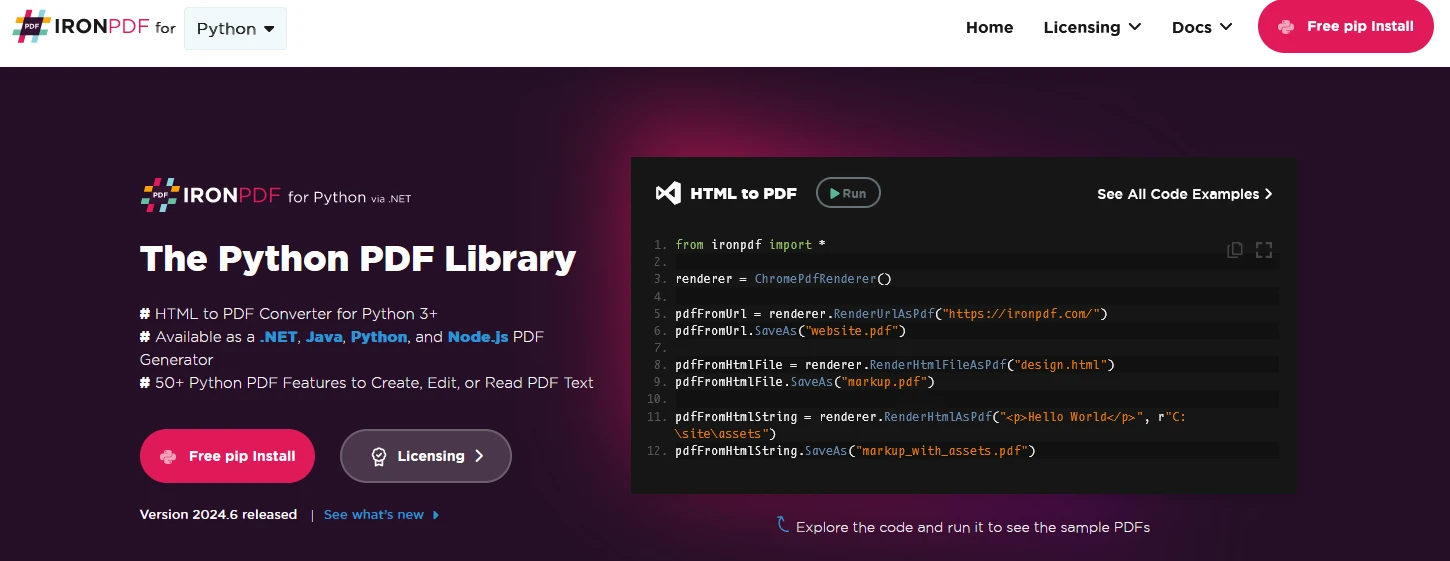
IronPDF, HTML, CSS, resimler ve JavaScript kullanarak PDF'ler oluşturmak, düzenlemek ve imzalamak için tasarlanmış güçlü bir Python kütüphanesidir. Düşük bellek kullanımıyla ticari düzeyde performans sunar. Önemli özellikler şunları içerir:
HTML'den PDF'ye Dönüşüm:
HTML dosyalarını, HTML dizelerini ve URL'leri PDF'ye dönüştürün. Örneğin, bir web sayfasını Chrome PDF render edici kullanarak PDF olarak işleyin.
Çapraz Platform Desteği:
.NET Core, .NET Standard ve .NET Framework gibi çeşitli .NET platformlarıyla uyumludur. Windows, Linux ve macOS'u destekler.
Düzenleme ve İmzalama:
Özellikleri ayarlayın, parolalar ve izinlerle güvenlik ekleyin ve PDF'lerinizi dijital olarak imzalayın.
Sayfa Şablonları ve Ayarları:
Başlıklar, altbilgiler, sayfa numaraları ve ayarlanabilir kenar boşlukları ile PDF'leri özelleştirin. Duyarlı düzenleri ve özel kağıt boyutlarını destekler.
Standartlara Uyum:
PDF/A ve PDF/UA gibi PDF standartlarına uyumludur, UTF-8 karakter kodlamasını destekler ve resimler, CSS ve yazı tipleri gibi varlıkları yönetir.
IronPDF ve SQLite3 Python Kullanarak PDF Belgeleri Oluşturun
import sqlite3
from ironpdf import *
# Apply your license key
License.LicenseKey = "key"
# Connect to the sqlite database file (or create it if it doesn't exist)
conn = sqlite3.connect('example.db')
# Create a cursor object for database connection
cur = conn.cursor()
# Create a table SQL command
cur.execute('''
CREATE TABLE IF NOT EXISTS users (
id INTEGER PRIMARY KEY,
name TEXT NOT NULL,
age INTEGER
)
''')
# Insert data into the table
cur.execute('''
INSERT INTO users (name, age) VALUES (?, ?)
''', ('IronUser1', 30))
cur.execute('''
INSERT INTO users (name, age) VALUES (?, ?)
''', ('IronUser2', 31))
cur.execute('''
INSERT INTO users (name, age) VALUES (?, ?)
''', ('IronUser3', 25))
cur.execute('''
INSERT INTO users (name, age) VALUES (?, ?)
''', ('IronUser4', 28))
# Commit the transaction using the connection object
conn.commit()
# Query the database
cur.execute('SELECT * FROM users')

# Fetch all results
rows = cur.fetchall()

# Print the results
for row in rows:
    print(row)
# Update data in the table
cur.execute('''
    UPDATE users SET age = ? WHERE name = ?
''', (31, 'Alice'))

# Commit the transaction
conn.commit()
# Delete data from the table
cur.execute('''
DELETE FROM users WHERE name = ?
''', ('IronUser1',))
# Commit the transaction
conn.commit()
# Initialize PDF renderer
renderer = ChromePdfRenderer()
# Create a PDF from an HTML string using Python
content = "<h1>Awesome Iron PDF with Sqlite3</h1>"
content += "<p>table data</p>"
for row in rows:
content += "<p>" + str(row) + "</p>"
# Close the cursor and connection
cur.close()
conn.close()
# Render the HTML as a PDF
pdf = renderer.RenderHtmlAsPdf(content)
# Export to a file
pdf.SaveAs("DemoSqlite3.pdf")import sqlite3
from ironpdf import *
# Apply your license key
License.LicenseKey = "key"
# Connect to the sqlite database file (or create it if it doesn't exist)
conn = sqlite3.connect('example.db')
# Create a cursor object for database connection
cur = conn.cursor()
# Create a table SQL command
cur.execute('''
CREATE TABLE IF NOT EXISTS users (
id INTEGER PRIMARY KEY,
name TEXT NOT NULL,
age INTEGER
)
''')
# Insert data into the table
cur.execute('''
INSERT INTO users (name, age) VALUES (?, ?)
''', ('IronUser1', 30))
cur.execute('''
INSERT INTO users (name, age) VALUES (?, ?)
''', ('IronUser2', 31))
cur.execute('''
INSERT INTO users (name, age) VALUES (?, ?)
''', ('IronUser3', 25))
cur.execute('''
INSERT INTO users (name, age) VALUES (?, ?)
''', ('IronUser4', 28))
# Commit the transaction using the connection object
conn.commit()
# Query the database
cur.execute('SELECT * FROM users')
# Fetch all results
rows = cur.fetchall()
# Print the results
for row in rows:
print(row)
# Update data in the table
cur.execute('''
    UPDATE users SET age = ? WHERE name = ?
''', (31, 'Alice'))

# Commit the transaction
conn.commit()
# Delete data from the table
cur.execute('''
DELETE FROM users WHERE name = ?
''', ('IronUser1',))
# Commit the transaction
conn.commit()
# Initialize PDF renderer
renderer = ChromePdfRenderer()
# Create a PDF from an HTML string using Python
content = "<h1>Awesome Iron PDF with Sqlite3</h1>"
content += "<p>table data</p>"
for row in rows:
content += "<p>" + str(row) + "</p>"
# Close the cursor and connection
cur.close()
conn.close()
# Render the HTML as a PDF
pdf = renderer.RenderHtmlAsPdf(content)
# Export to a file
pdf.SaveAs("DemoSqlite3.pdf")Kod Açıklaması
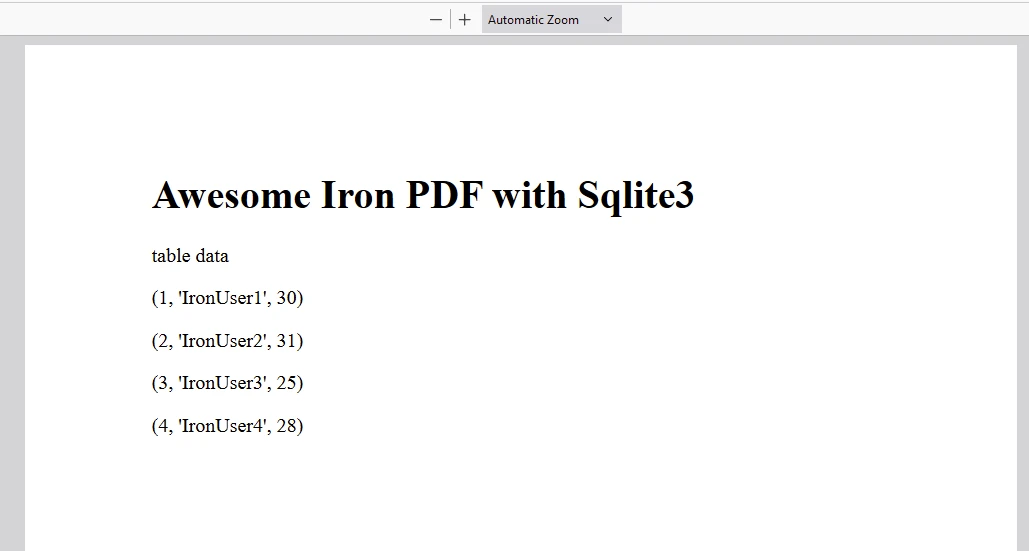
Bu Python programı, bir veritabanı oluşturmak, veri eklemek, sorgulamalar gerçekleştirmek, kayıtları güncellemek, kayıtları silmek ve son olarak IronPDF kullanarak bir PDF belge oluşturmak için SQLite kütüphanesini nasıl kullanacağınızı gösterir.
Kütüphanelerin İçe Aktarılması:
sqlite3: SQLite veritabanları ile çalışmak için Python'un yerleşik modülü.ironpdf: PDF oluşturma imkanı sağlayan IronPDF bileşenlerinin içeri aktarılması.
Veritabanına Bağlanma:
example.dbadlı bir SQLite veritabanına bağlantı kurar.
Tablo Oluşturma:
- Sütunları
id(INTEGER, PRIMARY KEY),name(TEXT, NOT NULL), veage(INTEGER) olanusersadlı bir SQLite tablosunu tanımlar.
- Sütunları
Veri Ekleme:
userstablosuna birden fazla veri satırı ekler.
İşlemleri Taahhüt Etme:
- Veritabanına yapılan değişiklikleri kalıcı hale getirmek için taahhüt eder.
Veritabanını Sorgulama:
userstablosundan tüm satırları almak için bir SELECT ifadesi yürütür.
Veri Güncelleme:
- 'Alice' adlı kullanıcının
agegünceller.
- 'Alice' adlı kullanıcının
Veri Silme:
- 'IronUser1' adlı kullanıcıyı
userstablosundan siler.
- 'IronUser1' adlı kullanıcıyı
PDF Oluşturma:
- HTML içeriğinden PDF belgesi oluşturmak için IronPDF (
ChromePdfRenderer) kullanır. - Başlık ve tablodan alınan verileri HTML içeriğine birleştirir.
- PDF belgesini
DemoSqlite3.pdfolarak kaydeder.
- HTML içeriğinden PDF belgesi oluşturmak için IronPDF (
- Bağlantıları Kapatma:
- Kaynakları serbest bırakmak için imleci (
cur) ve bağlantıyı (conn) kapatır.
- Kaynakları serbest bırakmak için imleci (
Bu betik, Python'un SQLite3 ve IronPDF kütüphanelerini kullanarak veritabanı kurulumundan veri manipülasyonuna ve PDF oluşturma iş akışını tam anlamıyla göstermektedir.
Çıktı

IronPDF Lisansı
IronPDF bir lisans anahtarı ile çalışır. IronPDF for Python, kullanıcıların satın almadan önce geniş özelliklerini test edebilmeleri için bir ücretsiz deneme lisans anahtarı sunar.
Lisans Anahtarını buraya yerleştirin:
import {IronPdfGlobalConfig, PdfDocument} from "@ironsoftware/ironpdf";

// Apply your IronPDF license key
IronPdfGlobalConfig.getConfig().licenseKey = "Add Your key here";
import {IronPdfGlobalConfig, PdfDocument} from "@ironsoftware/ironpdf";
// Apply your IronPDF license key
IronPdfGlobalConfig.getConfig().licenseKey = "Add Your key here";Sonuç
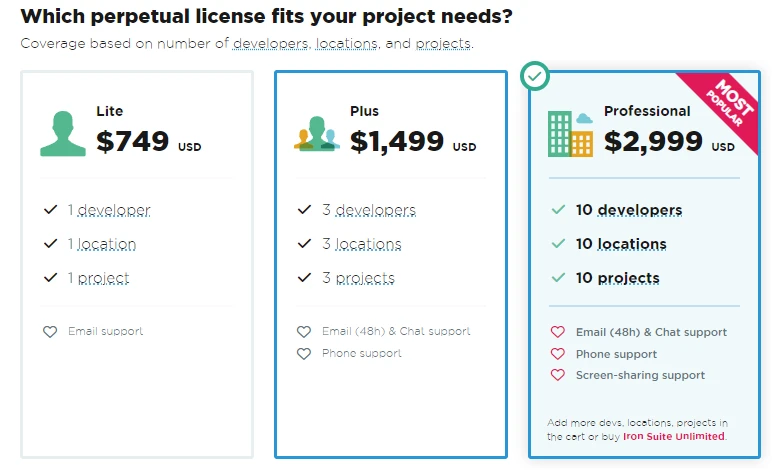
sqlite3 modülü, Python'da SQLite veritabanları ile çalışmak için güçlü ve kullanımı kolay bir araçtır. Python Standart Kütüphanesi ile olan entegrasyonu, basit ve karmaşık veritabanı işlemlerini kolaylaştırır. IronPDF ücretsiz bir deneme lisansı sunar. Daha sonra, lisans $999 ve üzerine başlar.









 Ücretsiz Başlayın
 Ücretsiz Başlayın
 Ücretsiz Canlı Demo Rezervasyonu





 Kredi kartı veya hesap oluşturma gerektirmez










