



已更新 2026年4月23日
deepstream io(開發人員的工作原理)
在這篇文章中,我們將學習如何使用開放即時伺服器 deepstream 和 IronPDF 生成 PDF。
閱讀更多

Python中的sqlite3模組提供與SQLite資料庫互動的方式。 它是Python標準程式庫的一部分,所以您不需安裝任何額外的東西即可使用。 讓我們來探索它的功能並查看一些程式碼範例。 這篇文章稍後我們將探討IronPDF,這是一個由Iron Software開發的PDF生成程式庫。
SQLite是一種輕量級、基於磁碟的資料庫,不需要單獨的資料庫伺服器進程。 sqlite3模組提供一個符合SQL介面的環境,讓您與現有或新建立的資料庫無縫互動。 該模組強制執行PEP 249描述的DB-API 2.0規範。
這裡有一個簡單的例子和多個SQL語句可以讓您開始使用sqlite3。
首先,您需要連接到您的SQLite資料庫。 如果資料庫檔案遺失,它將被生成:
import sqlite3

# Connect to the database (or create it if it doesn't exist)
conn = sqlite3.connect('example.db')
# Create a cursor object
cur = conn.cursor()使用CREATE TABLE SQL語句建立一個新的資料表:
# Create a table using SQL statements
cur.execute('''
    CREATE TABLE IF NOT EXISTS users (
        id INTEGER PRIMARY KEY,
        name TEXT NOT NULL,
        age INTEGER
    )
''')這是如何將資料插入到資料庫表格中的方法:
# Insert data into the table
cur.execute('''
    INSERT INTO users (name, age) VALUES (?, ?)
''', ('Alice', 30))

# Commit the transaction using the connection object
conn.commit()您可以運行SQL命令並從資料庫表格中擷取結果:
# Query the database
cur.execute('SELECT * FROM users')

# Fetch all results
rows = cur.fetchall()

# Print the results
for row in rows:
print(row)要更新表格中的現有資料:
# Update data in the table
cur.execute('''
UPDATE users SET age = ? WHERE name = ?
''', (31, 'Alice'))
# Commit the transaction
conn.commit()要刪除資料庫列中名稱為Alice的資料:
# Delete data from the table
cur.execute('''
DELETE FROM users WHERE name = ?
''', ('Alice',))
# Commit the transaction
conn.commit()記得在完成時關閉游標和連接:
# Close the cursor and connection
cur.close()
conn.close()您可以使用上下文管理器自動處理關閉連接:
with sqlite3.connect('example.db') as conn:
cur = conn.cursor()
cur.execute('SELECT * FROM users')
rows = cur.fetchall()
for row in rows:
print(row)SQLite支持交易,您可以使用BEGIN、COMMIT和ROLLBACK來管理它們:
try:
conn.execute('BEGIN')
cur.execute('INSERT INTO users (name, age) VALUES (?, ?)', ('Bob', 25))
conn.commit()
except sqlite3.Error as e:
conn.rollback()
print(f"An error occurred: {e}")
IronPDF是一個強大的Python程式庫,設計用於使用HTML、CSS、圖像和JavaScript來建立、編輯和簽署PDF。 它提供商業級的性能,並具備低記憶體佔用。 其主要功能包括:
HTML 轉 PDF 轉換:
將 HTML 文件、HTML 字串和 URL 轉換為 PDF。 例如,使用 Chrome PDF 轉換器將網頁渲染為 PDF。
跨平臺支援:
相容各種 .NET 平台,包括 .NET Core、.NET Standard 和 .NET Framework。 它支援 Windows、Linux 和 macOS。
編輯和簽署:
設置屬性、用密碼和權限增加安全性,並將數位簽名應用於您的 PDF。
頁面模板和設置:
可透過頁眉、頁腳、頁碼和可調整的邊距自訂 PDF。 它支持響應式布局和自定義紙張大小。
標準相容性:
它符合PDF標準,如PDF/A和PDF/UA,支持UTF-8字元編碼,並管理如圖像、CSS和字體等資產。
import sqlite3
from ironpdf import *
# Apply your license key
License.LicenseKey = "key"
# Connect to the sqlite database file (or create it if it doesn't exist)
conn = sqlite3.connect('example.db')
# Create a cursor object for database connection
cur = conn.cursor()
# Create a table SQL command
cur.execute('''
CREATE TABLE IF NOT EXISTS users (
id INTEGER PRIMARY KEY,
name TEXT NOT NULL,
age INTEGER
)
''')
# Insert data into the table
cur.execute('''
INSERT INTO users (name, age) VALUES (?, ?)
''', ('IronUser1', 30))
cur.execute('''
INSERT INTO users (name, age) VALUES (?, ?)
''', ('IronUser2', 31))
cur.execute('''
INSERT INTO users (name, age) VALUES (?, ?)
''', ('IronUser3', 25))
cur.execute('''
INSERT INTO users (name, age) VALUES (?, ?)
''', ('IronUser4', 28))
# Commit the transaction using the connection object
conn.commit()
# Query the database
cur.execute('SELECT * FROM users')

# Fetch all results
rows = cur.fetchall()

# Print the results
for row in rows:
    print(row)
# Update data in the table
cur.execute('''
    UPDATE users SET age = ? WHERE name = ?
''', (31, 'Alice'))

# Commit the transaction
conn.commit()
# Delete data from the table
cur.execute('''
DELETE FROM users WHERE name = ?
''', ('IronUser1',))
# Commit the transaction
conn.commit()
# Initialize PDF renderer
renderer = ChromePdfRenderer()
# Create a PDF from an HTML string using Python
content = "<h1>Awesome Iron PDF with Sqlite3</h1>"
content += "<p>table data</p>"
for row in rows:
content += "<p>" + str(row) + "</p>"
# Close the cursor and connection
cur.close()
conn.close()
# Render the HTML as a PDF
pdf = renderer.RenderHtmlAsPdf(content)
# Export to a file
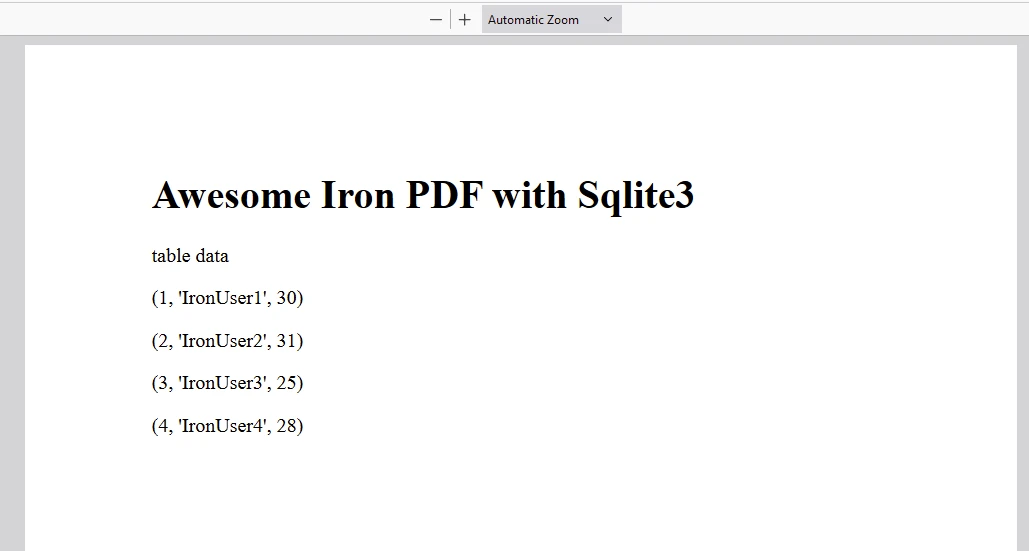
pdf.SaveAs("DemoSqlite3.pdf")這個Python程式展示了如何使用SQLite程式庫建立資料庫、插入資料、執行查詢、更新記錄、刪除記錄,並最終使用IronPDF生成PDF文件。
導入程式庫:
sqlite3: Python內建的模組,用於操作SQLite資料庫。ironpdf: 從IronPDF匯入組件,它允許生成PDF。連接到資料庫:
example.db的SQLite資料庫的連接。建立表格:
users的SQLite資料表,具有欄位id(INTEGER, PRIMARY KEY)、name(TEXT, NOT NULL)和age(INTEGER)。插入資料:
users表中插入多行資料。提交交易:
查詢資料庫:
users表中的所有行。更新資料:
age。刪除資料:
users表中刪除名為'IronUser1'的使用者。生成PDF:
ChromePdfRenderer)從HTML內容建立PDF文件。DemoSqlite3.pdf。關閉連接:
cur)和連接(conn)以釋放資源。這個腳本展示了一個完整的工作流程,從資料庫設置到資料操作再到使用Python的SQLite3和IronPDF程式庫生成PDF。

IronPDF 依賴於授權金鑰運行。 IronPDF for Python提供免費試用授權金鑰,以允許使用者在購買前測試其廣泛功能。
在這裡放置授權金鑰:
import {IronPdfGlobalConfig, PdfDocument} from "@ironsoftware/ironpdf";

// Apply your IronPDF license key
IronPdfGlobalConfig.getConfig().licenseKey = "Add Your key here";sqlite3模組是一個功能強大且易於使用的工具,用於在Python中操作SQLite資料庫。 它整合到Python標準程式庫中,使簡單和複雜的資料庫操作變得方便。 IronPDF提供試用授權。 之後,授權從$999開始往上。

Curtis Chau擁有Carleton大學的電腦科學學士學位,專精於前端開發,擁有Node.js、TypeScript、JavaScript和React的專業知識。Curtis熱衷於建立直觀且美觀的使用者介面,喜愛使用現代框架並建立結構良好、視覺吸引力的手冊。


IronPDF 是 IRONSUITE 的一部分
10 款適用於辦公室文件的 .NET API 產品

當您需要您的PDF看起來像HTML一樣快速。











