本文介紹了如何在 Java 中程式化地填寫 PDF 表單。 一個常見場景是應用程式通過 UI 收集使用者資訊,這些資訊需要以 PDF 格式保存以便存檔、合規或後續處理。
在獲取使用者輸入後,應用程式通常需要將這些資料直接注入預先存在的 PDF 模板中。 多個 Java PDF 程式庫可以處理這項任務,包括 Apache PDFBox、iText 和 IronPDF。 本指南解釋了如何使用 IronPDF 填寫帶有文字欄位、複選框、單選按鈕和下拉列表的互動表單。 對於構建相關文件工作流程的開發人員,請參閱在 Java 中從頭建立 PDF 表單 的指南。
什麼是 IronPDF for Java?
IronPDF 是一個 Java PDF 程式庫,用於建立、編輯和操作 PDF 文件。 它能夠整合到任何基於 Maven 的 Java 專案中,並提供簡潔的 API,使常見的 PDF 任務能夠以最少的樣板程式碼來實現。
該程式庫涵蓋了整個 PDF 生命週期:將 HTML 渲染為 PDF、讀寫表單資料、新增數位簽名、應用安全設置、壓縮文件和列印。 在表單處理中,IronPDF 提供了對 PDF 文件中每一個欄位型別的程式化存取,同時保留原始格式。 這使得它非常適合批量表單處理、使用資料庫記錄預先填充模板或將表單填寫與較大的 Java 工作流程整合。 請參閱 IronPDF Java API 參考 以獲取完整的可用類和方法列表。
產生一致結構且可填寫的 PDF 最可靠的方法是用 HTML 定義表單並用 IronPDF 渲染。 該程式庫將 HTML <input> 元素直接轉換為互動式 PDF 表單欄位。
以下程式碼將從 HTML 字串建立一個包含兩個欄位的 PDF 表單,然後填寫兩個欄位:
//:path=/static-assets/pdf/content-code-examples/how-to/java-fill-pdf-form-tutorial/create-and-fill-form.javaimport com.ironsoftware.ironpdf.PdfDocument;import com.ironsoftware.ironpdf.render.ChromePdfRenderOptions;import java.io.IOException;import java.nio.file.Paths;public class App { public static void main(String[] args) throws IOException { // Define an HTML form with two text input fields String formHTML = "<html>" + "<body>" + "<h2>Editable PDF Form</h2>" + "<form>" + "First name: <br><input type='text' name='firstname' value=''><br>" + "Last name: <br><input type='text' name='lastname' value=''>" + "</form>" + "</body>" + "</html>"; // Enable HTML-to-form-field conversion during rendering ChromePdfRenderOptions renderOptions = newChromePdfRenderOptions(); renderOptions.setCreatePdfFormsFromHtml(true); // Render HTML to PDF and save the blank templatePdfDocument.renderHtmlAsPdf(formHTML, renderOptions) .saveAs(Paths.get("assets/BasicForm.pdf")); // Load the template and fill in field values PdfDocument form = PdfDocument.fromFile(Paths.get("assets/BasicForm.pdf")); form.getForm().setFieldValue("firstname", "Minnie"); form.getForm().setFieldValue("lastname", "Mouse"); // Save the completed form to a new file form.saveAs(Paths.get("assets/BasicForm_Filled.pdf")); }}
//:path=/static-assets/pdf/content-code-examples/how-to/java-fill-pdf-form-tutorial/create-and-fill-form.java
import com.ironsoftware.ironpdf.PdfDocument;
import com.ironsoftware.ironpdf.render.ChromePdfRenderOptions;
import java.io.IOException;
import java.nio.file.Paths;

public class App {

    public static void main(String[] args) throws IOException {

        // Define an HTML form with two text input fields
        String formHTML = "<html>"
            + "<body>"
            + "<h2>Editable PDF Form</h2>"
            + "<form>"
            + "First name: <br><input type='text' name='firstname' value=''><br>"
            + "Last name: <br><input type='text' name='lastname' value=''>"
            + "</form>"
            + "</body>"
            + "</html>";

        // Enable HTML-to-form-field conversion during rendering
        ChromePdfRenderOptions renderOptions = new ChromePdfRenderOptions();
        renderOptions.setCreatePdfFormsFromHtml(true);

        // Render HTML to PDF and save the blank template
        PdfDocument.renderHtmlAsPdf(formHTML, renderOptions)
            .saveAs(Paths.get("assets/BasicForm.pdf"));

        // Load the template and fill in field values
        PdfDocument form = PdfDocument.fromFile(Paths.get("assets/BasicForm.pdf"));
        form.getForm().setFieldValue("firstname", "Minnie");
        form.getForm().setFieldValue("lastname", "Mouse");

        // Save the completed form to a new file
        form.saveAs(Paths.get("assets/BasicForm_Filled.pdf"));
    }
}
Java
第一個塊使用 ChromePdfRenderOptions 與 setCreatePdfFormsFromHtml(true) 告訴渲染引擎將 HTML <input> 元素視為活動的 PDF 表單欄位而不是靜態文字。 渲染的 PDF 保存為可重用模板。 第二個塊載入該模板,依次調用 getForm().setFieldValue() 並將結果寫入另一個輸出文件,保持原始模板不變以供未來使用。
輸出看起來如何?
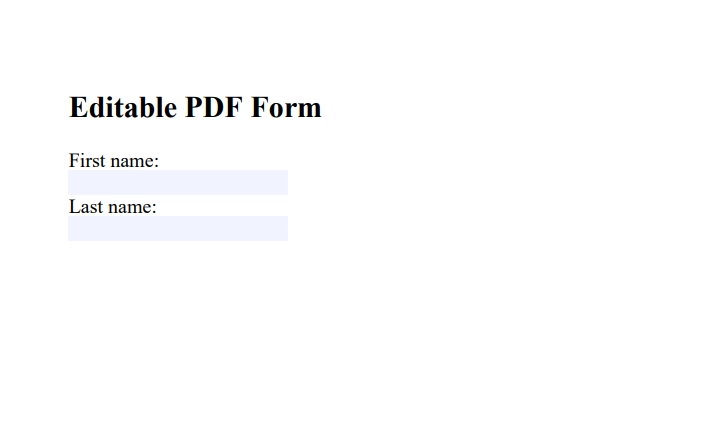
第一次渲染產生了具有兩個空的文字欄位的 PDF,可以在任何 PDF 閱讀器中完全編輯。
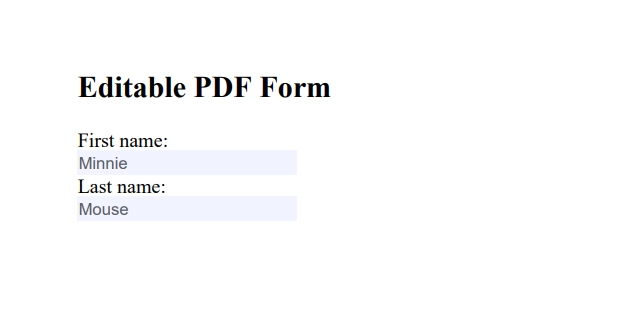
在執行 setFieldValue() 後,兩個欄位都會用提供的資料填充:
如何填寫我未建立的現有 PDF 表單?
許多實務工作流程會接收到包含名欄位的第三方 PDF 模板(政府表單、保險文件、供應商合同)。 載入和填寫這些文件的過程相同:使用 PdfDocument.fromFile() 載入文件,然後使用 getForm().setFieldValue() 按名稱為每個欄位設置值。
//:path=/static-assets/pdf/content-code-examples/how-to/java-fill-pdf-form-tutorial/fill-existing-form.javaimport com.ironsoftware.ironpdf.PdfDocument;import java.io.IOException;import java.nio.file.Paths;public class FillExistingForm { public static void main(String[] args) throws IOException { // Load a third-party fillable PDF PdfDocument form = PdfDocument.fromFile(Paths.get("templates/application.pdf")); // Set text field values by field name form.getForm().setFieldValue("applicant_name", "Jane Smith"); form.getForm().setFieldValue("date_of_birth", "1985-06-14"); form.getForm().setFieldValue("reference_number", "REF-2024-00421"); // Save the completed application form.saveAs(Paths.get("output/application_filled.pdf")); }}
//:path=/static-assets/pdf/content-code-examples/how-to/java-fill-pdf-form-tutorial/fill-existing-form.java
import com.ironsoftware.ironpdf.PdfDocument;
import java.io.IOException;
import java.nio.file.Paths;

public class FillExistingForm {

    public static void main(String[] args) throws IOException {

        // Load a third-party fillable PDF
        PdfDocument form = PdfDocument.fromFile(Paths.get("templates/application.pdf"));

        // Set text field values by field name
        form.getForm().setFieldValue("applicant_name", "Jane Smith");
        form.getForm().setFieldValue("date_of_birth", "1985-06-14");
        form.getForm().setFieldValue("reference_number", "REF-2024-00421");

        // Save the completed application
        form.saveAs(Paths.get("output/application_filled.pdf"));
    }
}
Java
要在現有 PDF 中發現欄位名,請在 Adobe Acrobat Reader 中打開文件,右鍵點擊任何欄位,然後選擇"屬性"。 欄位名出現在"常規"選項卡中。 或者,程式化地遍歷所有欄位:
//:path=/static-assets/pdf/content-code-examples/how-to/java-fill-pdf-form-tutorial/list-form-fields.javaimport com.ironsoftware.ironpdf.PdfDocument;import com.ironsoftware.ironpdf.form.FormField;import java.nio.file.Paths;public class ListFormFields { public static void main(String[] args) throws Exception { PdfDocument form = PdfDocument.fromFile(Paths.get("templates/application.pdf")); // Print the name and type of every form field for (FormField field : form.getForm().getFields()) {System.out.println("Field: " + field.getName() + " | Type: " + field.getType()); } }}
//:path=/static-assets/pdf/content-code-examples/how-to/java-fill-pdf-form-tutorial/list-form-fields.java
import com.ironsoftware.ironpdf.PdfDocument;
import com.ironsoftware.ironpdf.form.FormField;
import java.nio.file.Paths;

public class ListFormFields {

    public static void main(String[] args) throws Exception {

        PdfDocument form = PdfDocument.fromFile(Paths.get("templates/application.pdf"));

        // Print the name and type of every form field
        for (FormField field : form.getForm().getFields()) {
            System.out.println("Field: " + field.getName()
                + " | Type: " + field.getType());
        }
    }
}
Java
在寫入資料之前列印欄位名,以防止 setFieldValue() 在名稱不匹配時悄然失敗。 PDF 文件中的欄位名是區分大小寫的,因此 "firstname" 和 "FirstName" 被視為不同的欄位。
文字欄位可直接接受字串值,但複選框和單選按鈕需要特定的導出值,這些值是在建立 PDF 時定義的。使用 setFieldValue() 並為每個欄位傳遞正確的導出值字串。
//:path=/static-assets/pdf/content-code-examples/how-to/java-fill-pdf-form-tutorial/fill-checkboxes-radio.javaimport com.ironsoftware.ironpdf.PdfDocument;import java.nio.file.Paths;public class FillCheckboxesAndRadio { public static void main(String[] args) throws Exception { PdfDocument form = PdfDocument.fromFile(Paths.get("templates/survey.pdf")); // Check a checkbox by setting its exported value (often "Yes" or "On") form.getForm().setFieldValue("agree_terms", "Yes"); // Select a radio button option by its exported value form.getForm().setFieldValue("preferred_contact", "email"); form.saveAs(Paths.get("output/survey_filled.pdf")); }}
//:path=/static-assets/pdf/content-code-examples/how-to/java-fill-pdf-form-tutorial/fill-checkboxes-radio.java
import com.ironsoftware.ironpdf.PdfDocument;
import java.nio.file.Paths;

public class FillCheckboxesAndRadio {

    public static void main(String[] args) throws Exception {

        PdfDocument form = PdfDocument.fromFile(Paths.get("templates/survey.pdf"));

        // Check a checkbox by setting its exported value (often "Yes" or "On")
        form.getForm().setFieldValue("agree_terms", "Yes");

        // Select a radio button option by its exported value
        form.getForm().setFieldValue("preferred_contact", "email");

        form.saveAs(Paths.get("output/survey_filled.pdf"));
    }
}
//:path=/static-assets/pdf/content-code-examples/how-to/java-fill-pdf-form-tutorial/fill-dropdown.javaimport com.ironsoftware.ironpdf.PdfDocument;import java.nio.file.Paths;public class FillDropdown { public static void main(String[] args) throws Exception { PdfDocument form = PdfDocument.fromFile(Paths.get("templates/registration.pdf")); // Set a dropdown/combo box field to a specific option form.getForm().setFieldValue("country", "United States"); // Set a list box field (multi-select may require comma-separated values) form.getForm().setFieldValue("subscription_tier", "Professional"); form.saveAs(Paths.get("output/registration_filled.pdf")); }}
//:path=/static-assets/pdf/content-code-examples/how-to/java-fill-pdf-form-tutorial/fill-dropdown.java
import com.ironsoftware.ironpdf.PdfDocument;
import java.nio.file.Paths;

public class FillDropdown {

    public static void main(String[] args) throws Exception {

        PdfDocument form = PdfDocument.fromFile(Paths.get("templates/registration.pdf"));

        // Set a dropdown/combo box field to a specific option
        form.getForm().setFieldValue("country", "United States");

        // Set a list box field (multi-select may require comma-separated values)
        form.getForm().setFieldValue("subscription_tier", "Professional");

        form.saveAs(Paths.get("output/registration_filled.pdf"));
    }
}
扁平化將所有表單欄位轉換為靜態的、不可編輯的內容。 這防止收件人更改提交的資料,是許多歸檔和合規用途的要求。 IronPDF 支持將表單扁平化作為其 PDF 操控能力 的一部分。
//:path=/static-assets/pdf/content-code-examples/how-to/java-fill-pdf-form-tutorial/flatten-form.javaimport com.ironsoftware.ironpdf.PdfDocument;import java.nio.file.Paths;public class FlattenForm { public static void main(String[] args) throws Exception { PdfDocument form = PdfDocument.fromFile(Paths.get("assets/BasicForm_Filled.pdf")); // Flatten all form fields -- values become static text form.getForm().flatten(); form.saveAs(Paths.get("output/BasicForm_Archived.pdf")); }}
//:path=/static-assets/pdf/content-code-examples/how-to/java-fill-pdf-form-tutorial/flatten-form.java
import com.ironsoftware.ironpdf.PdfDocument;
import java.nio.file.Paths;

public class FlattenForm {

    public static void main(String[] args) throws Exception {

        PdfDocument form = PdfDocument.fromFile(Paths.get("assets/BasicForm_Filled.pdf"));

        // Flatten all form fields -- values become static text
        form.getForm().flatten();

        form.saveAs(Paths.get("output/BasicForm_Archived.pdf"));
    }
}
Java
在運行 flatten() 後,輸出 PDF 中不再有互動式表單欄位。 文件大小通常減少,因為表單欄位覆蓋層已被刪除。 扁平化的 PDF 是可以安全分發的,無需擔心接收者編輯已提交的數值。
How can I fill dropdown lists in a PDF form using IronPDF?
Use setFieldValue() to assign the dropdown option's export value. The exact export value should match the option's defined value in the PDF form, with FormComboBoxField.getOptions() providing the list of valid values.
How do I flatten a filled PDF form using IronPDF?
Flattening a filled PDF form with IronPDF can be done by calling form.getForm().flatten() on the PdfDocument, which converts form fields into static text, preventing further editing.
What are some additional features of IronPDF for Java?
Beyond form filling, IronPDF features include rendering HTML to PDF, manipulating PDF security settings, applying digital signatures, and allowing programmatic access to various PDF document elements.
How can I find more resources to further explore IronPDF capabilities?
Explore the [IronPDF Java API reference](https://ironpdf.com/java/object-reference/api/) for detailed documentation, and additional guides on creating forms from HTML, HTML to PDF conversion, and PDF security and digital signing.