已更新 2026年4月21日
next-auth NPM(開發者的使用方法)
NextAuth.js 是開放源程式碼驗證庫為 Next.js 應用程式專門提供實現身份驗證的一種靈活且安全的方法。
閱讀更多

在廣闊的網頁開發世界中,在文字中建立可點擊的連結或錨標籤是一項基本任務。 無論您是建立一個部落格、社交媒體平台,還是電子郵件客戶端,自動檢測並將URL、電子郵件地址和其他文字轉換為可點擊連結的能力對於提供無縫的使用者體驗至關重要。 引入 Linkify React —— 一個強大的npm套件,旨在簡化在React應用程式中的這一過程。 在本文中,我們將探討如何使用 Linkify 簡化React專案中的連結建立,並附上程式碼範例以展示其用法。
除此之外,我們還將向您介紹IronPDF,一個多功能的程式庫,可以讓您從網頁生成高質量的PDF文件。 我們將向您展示,通過將 IronPDF 和 Linkify 結合使用,您可以輕鬆建立維持與您的網頁內容相同互動性的可點擊連結的PDF,這些連結由 Linkify 自動識別並轉換。
Linkify React 是一個輕量且易於使用的npm套件,可以自動將包含URL、電子郵件地址和其他發現的連結的純文字轉換為可點擊的超連結作為巢狀元素。 它消除了手動連結解析和格式化的需要,為開發者節省了寶貴的時間和精力。 讓我們深入了解如何將 Linkify 整合到您的React應用程式中。
要開始使用 React Linkify,您首先需要將其安裝為專案中的一個依賴項。 您可以使用 npm 或 yarn 完成此操作。 打開您的終端,運行以下命令:
npm install react-linkify
# or
yarn add react-linkify一旦 React Linkify 安裝完成,您可以輕鬆地將其整合到您的React元件中。 以下是一個簡單的範例,展示如何使用 React Linkify 在文字內容中呈現可點擊的連結:
import React from 'react';
import Linkify from 'react-linkify';

// A React component to display clickable links
const MyComponent = () => {
  return (
    <div>
      <h1>Clickable Links with React Linkify</h1>
      <Linkify>
        <p>
          Check out this cool website: https://example.com
          <br />
          You can also reach me at hello@example.com
        </p>
      </Linkify>
    </div>
  );
};

export default MyComponent;在此範例中,我們從 react-linkify 套件中導入了 Linkify 元件,並將我們的文字內容包裹在其中。 React Linkify 自動檢測文字中的URL和電子郵件地址並將其轉換為可點擊的超連結。
Linkify 提供了多種屬性、屬性和選項來自訂生成連結的行為和外觀。 例如,您可以指定 target 屬性來控制連結的打開方式。 以下是您可以自訂 React Linkify 行為的方法:
<Linkify properties={{target: '_blank'}}>
  <p>
    Clickable links will open in a new tab: https://example.com
  </p>
</Linkify>IronPDF 是一個強大的npm套件,旨在促進在Node.js應用程式中生成PDF。 它允許您從HTML 內容、URLs或現有的PDF文件中生成PDF文件。 無論您是在生成發票、報告或任何其他型別的文件,IronPDF 都可以通過其直觀的API和強大的功能集簡化過程。

輕鬆將 HTML 元素轉換為 PDF 文件。 此功能特別適合從網頁內容生成動態 PDF。
直接從URL生成PDF。 這允許您捕捉網頁內容並程式化地將其保存為PDF文件。
輕鬆合併、分割和操作現有的 PDF 文件。 IronPDF提供操縱PDF文件的功能,例如附加頁面、分割文件等等。
通過密碼加密或應用數位簽名來保護您的 PDF 文件。 IronPDF 提供選項來保護您的敏感文件免受未經授權的存取。
生產高品質的 PDF 文件,以精確的文字、圖像和格式渲染。 IronPDF 確保您生成的 PDF 保持原始內容的忠實度。
IronPDF可以與多種平台相容,包括Windows,Linux和macOS,適合多種開發環境。
using npm 套件輕鬆將 IronPDF 整合到您的 Node.js 應用中。 API 文件完善,便於在您的專案中加入 PDF 生成功能。
無論您是建構網頁應用程式、伺服器端腳本,還是命令行工具,IronPDF 都能使您有效且可靠地建立專業級PDF文件。
首先,使用以下命令建立一個新的 Next.js 專案(如果您還未建立):
npx create-next-app@latest linkify-ironpdf --use-npm --example "https://github.com/vercel/next-learn/tree/main/basics/learn-starter"接下來,導航至您的專案目錄:
cd linkify-ironpdf安裝所需的套件:
yarn add @ironsoftware/ironpdf @ironsoftware/ironpdf-engine-windows-x64
yarn add react-linkify現在,讓我們建立一個使用 IronPDF 生成PDF的簡單範例。 在您的 Next.js 元件中(例如,pages/index.tsx),新增以下程式碼:
**PDF生成API:**第一步是建立一個後端API來生成PDF文件。 由於IronPDF僅運行在伺服器端,我們需要建立一個使用者在需要生成PDF時調用的API。 在 pages/api/pdf.js 路徑中建立一個文件,並新增以下內容。
IronPDF 還需要許可金鑰,您可以從許可頁面獲取並將其放入下面的程式碼中:
// pages/api/pdf.js

import { IronPdfGlobalConfig, PdfDocument } from "@ironsoftware/ironpdf";

// Apply your IronPDF license key
IronPdfGlobalConfig.getConfig().licenseKey = "Your license key goes here";

export default async function handler(req, res) {
  try {
    const url = req.query.url;
    const pdf = await PdfDocument.fromUrl(url);
    const data = await pdf.saveAsBuffer();
    console.error('data PDF:', data);
    res.setHeader('Content-Type', 'application/pdf');
    res.setHeader('Content-Disposition', 'attachment; filename=awesomeIron.pdf');
    res.send(data);
  } catch (error) {
    console.error('Error generating PDF:', error);
    res.status(500).end();
  }
}下面是設置 PDF 生成頁面的 index.js 程式碼,供使用者使用:
import Head from "next/head";
import styles from "../styles/Home.module.css";
import React, { useState } from "react";
import Linkify from 'react-linkify';

// Home component for link conversion and PDF generation
export default function Home() {
  const [text, setText] = useState("");

  // Function to generate PDF from entered URL
  const generatePdf = async () => {
    try {
      const response = await fetch("/api/pdf?url=" + text);
      const blob = await response.blob();
      const url = window.URL.createObjectURL(new Blob([blob]));
      const link = document.createElement("a");
      link.href = url;
      link.setAttribute("download", "awesomeIron.pdf");
      document.body.appendChild(link);
      link.click();
      link.parentNode.removeChild(link);
    } catch (error) {
      console.error("Error generating PDF:", error);
    }
  };

  // Handle changes in the input text field
  const handleChange = (event) => {
    setText(event.target.value);
  };

  return (
    <div className={styles.container}>
      <Head>
        <title>Generate PDF Using IronPDF</title>
        <link rel="icon" href="/favicon.ico" />
      </Head>
      <main>
        <h1>Demo Linkify and Generate PDF Using IronPDF</h1>
        <p>
          <span>Enter URL to Linkify and Convert to PDF:</span>{" "}
        </p>
        <input type="text" value={text} onChange={handleChange} />
        <Linkify properties={{target: '_blank'}}>
          <p>
            Clickable links from input text: {text}
          </p>
        </Linkify>
        <button style={{margin: 20, padding: 5}} onClick={generatePdf}>
          Generate PDF From Link
        </button>
      </main>
      <style jsx>{`
        main {
          padding: 5rem 0;
          flex: 1;
          display: flex;
          flex-direction: column;
          justify-content: center;
          align-items: center;
        }
        footer {
          width: 100%;
          height: 100px;
          border-top: 1px solid #eaeaea;
          display: flex;
          justify-content: center;
          align-items: center;
        }
        footer img {
          margin-left: 0.5rem;
        }
        footer a {
          display: flex;
          justify-content: center;
          align-items: center;
          text-decoration: none;
          color: inherit;
        }
        code {
          background: #fafafa;
          border-radius: 5px;
          padding: 0.75rem;
          font-size: 1.1rem;
          font-family:
            Menlo,
            Monaco,
            Lucida Console,
            Liberation Mono,
            DejaVu Sans Mono,
            Bitstream Vera Sans Mono,
            Courier New,
            monospace;
        }
      `}</style>
      <style jsx global>{`
        html,
        body {
          padding: 0;
          margin: 0;
          font-family:
            -apple-system,
            BlinkMacSystemFont,
            Segoe UI,
            Roboto,
            Oxygen,
            Ubuntu,
            Cantarell,
            Fira Sans,
            Droid Sans,
            Helvetica Neue,
            sans-serif;
        }
        * {
          box-sizing: border-box;
        }
      `}</style>
    </div>
  );
}Linkify 整合:
Linkify 元件包圍包含連結文字的HTML標籤。PDF 生成:
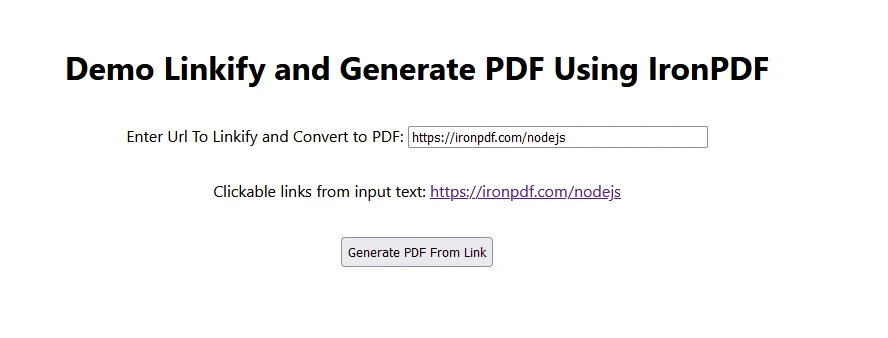
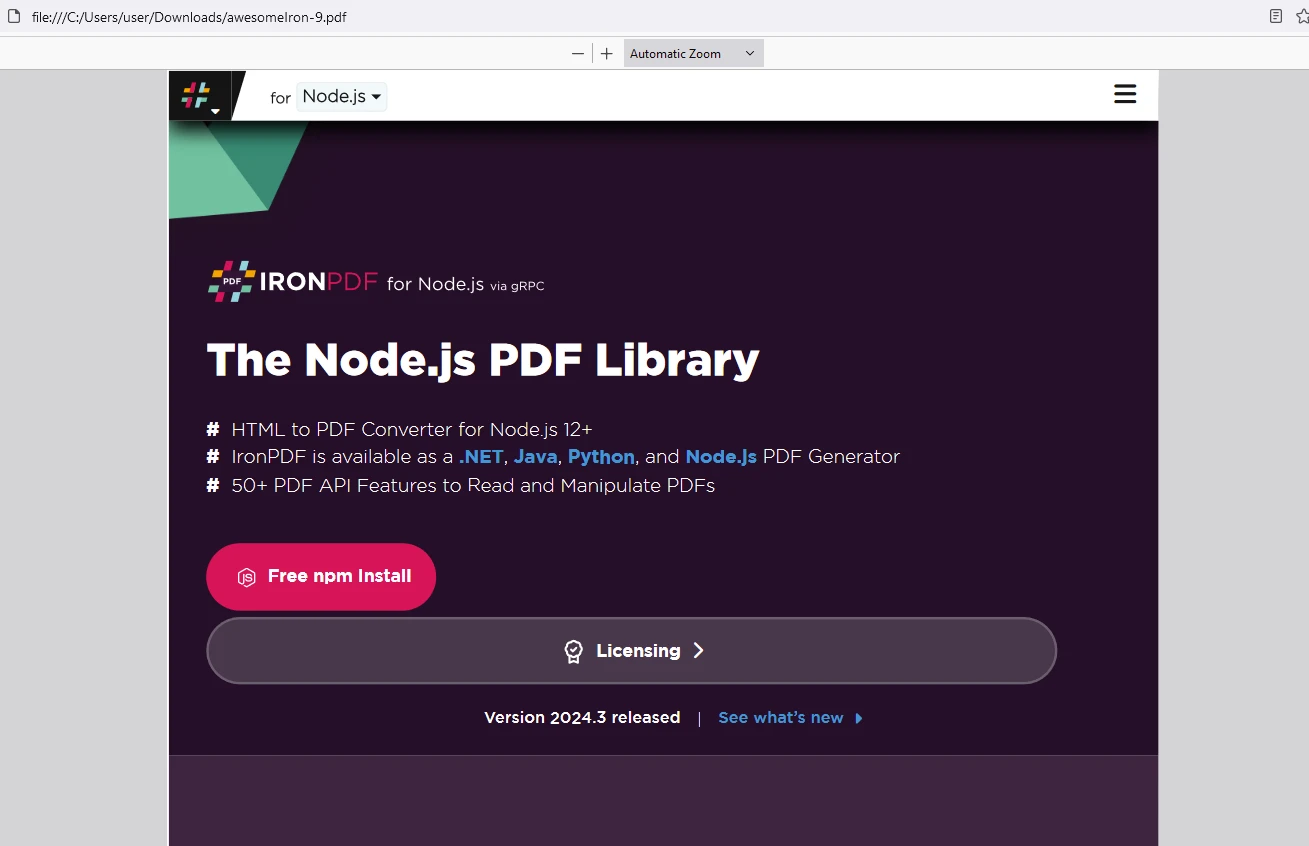
將許可金鑰放在此處:
import { IronPdfGlobalConfig, PdfDocument } from "@ironsoftware/ironpdf";

// Apply your IronPDF license key
IronPdfGlobalConfig.getConfig().licenseKey = "Add Your license key here";React Linkify 簡化了在 React 應用程式中的文字內容中建立可點擊連結的過程。 通過自動檢測和將URLs、電子郵件地址及其他連結轉換為可點擊的超連結,Linkify 簡化了開發工作流並提升了使用者體驗。 憑藉其簡單的整合、自訂選項和強大的功能,React Linkify 是想要建立引人入勝且使用者友好的介面的React開發者的一個寶貴工具。
除此之外,IronPDF 已證明是一個適合開發者的強大Node.js程式庫,專為希望將綜合PDF生成、操作和編輯功能整合到其應用程式中的開發者設計。 憑藉支持將多種格式轉換為PDF、編輯現有的PDF文件以及管理PDF安全性的能力,IronPDF 提供了一個多功能的工具集,可以在Node.js環境中以程式化的方式建立和自訂PDF文件。 其特性滿足了從簡單文件生成到複雜文件管理任務的廣泛需求,使其成為Node.js開發人員處理PDF文件時的一個寶貴工具。

Curtis Chau擁有Carleton大學的電腦科學學士學位,專精於前端開發,擁有Node.js、TypeScript、JavaScript和React的專業知識。Curtis熱衷於建立直觀且美觀的使用者介面,喜愛使用現代框架並建立結構良好、視覺吸引力的手冊。

IronPDF 是 IRONSUITE 的一部分
10 款適用於辦公室文件的 .NET API 產品

當您需要您的PDF看起來像HTML一樣快速。