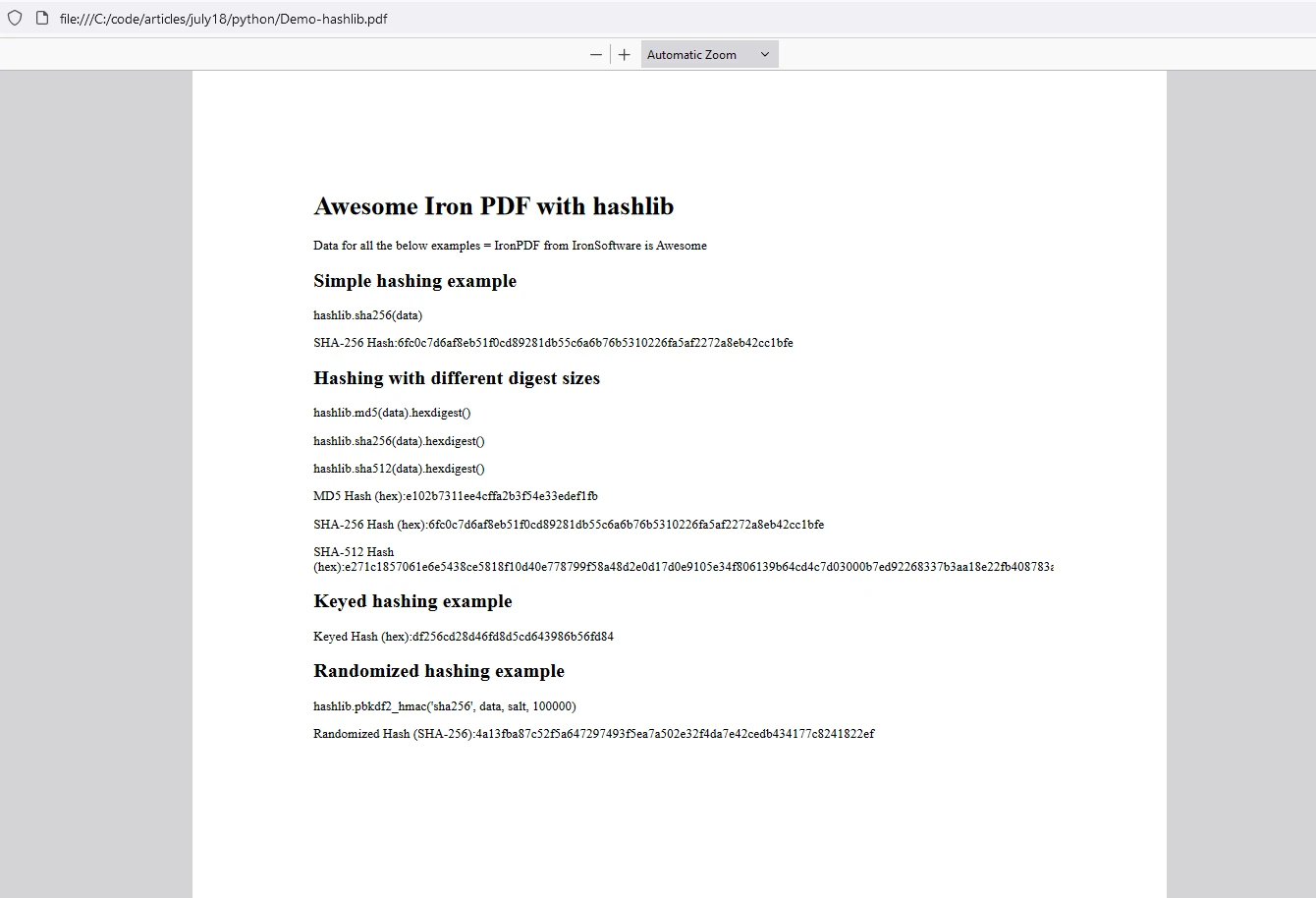
PYTHON 幫助 hashlib Python(開發人員指南工作原理) Curtis Chau 更新日期:7月 28, 2025 Download IronPDF pip 下載 Start Free Trial Copy for LLMs Copy for LLMs Copy page as Markdown for LLMs Open in ChatGPT Ask ChatGPT about this page Open in Gemini Ask Gemini about this page Open in Grok Ask Grok about this page Open in Perplexity Ask Perplexity about this page Share Share on Facebook Share on X (Twitter) Share on LinkedIn Copy URL Email article Python 中的hashlib 模組是用於安全雜湊和訊息摘要演算法的強大工具。 該模組提供了多種安全雜湊演算法的標準介面,使其成為開發人員確保資料完整性和安全性的一個多功能選擇。 Later in the article, we will also look into a versatile PDF generation Library from IronSoftware called IronPDF and write a script using both libraries to demonstrate their usage. hashlib模組是 Python 標準庫的一部分,因此無需單獨安裝。 它包含各種加密雜湊函數,如 MD5、SHA-1、SHA-224、SHA-256、SHA-384、SHA-512 和 SHA-3 系列。 這些函數用於創建雜湊對象,然後可以用於生成資料的雜湊值。 主要特徵 廣泛的演算法範圍:hashlib支援多種雜湊算法,包括 MD5 和 SHA-1 等舊算法,以及 SHA-256 和 SHA-3 等更現代的算法。 簡單介面:每個雜湊演算法都有一個構造函數,返回一個雜湊對象。 該對象可以使用 update 方法提供資料,並使用 digest 或 hexdigest 方法生成雜湊值。 安全性:儘管某些算法如 MD5 和 SHA-1 已知存在漏洞,hashlib 包含更安全的選擇,如 SHA-256 和 SHA-3。 安裝 hashlib 是一個內建模組,不需要顯式安裝。 基本用法 這裡有一個簡單的例子,說明如何使用hashlib通過 hashlib 雜湊構造函數生成 SHA-256 雜湊: import hashlib # Creating hash objects with SHA-256 hash_object = hashlib.sha256() # Update the hash object with data hash_object.update(b'IronPDF from Iron Software is Awesome') # Get the hexadecimal representation of the hash hash_hex = hash_object.hexdigest() # hash_hex is the hexadecimal digest print(hash_hex) # Output the hash # Output: 6fc0c7d6af8eb51f0cd89281db55c6a6b76b5310226fa5af2272a8eb42cc1bfe import hashlib # Creating hash objects with SHA-256 hash_object = hashlib.sha256() # Update the hash object with data hash_object.update(b'IronPDF from Iron Software is Awesome') # Get the hexadecimal representation of the hash hash_hex = hash_object.hexdigest() # hash_hex is the hexadecimal digest print(hash_hex) # Output the hash # Output: 6fc0c7d6af8eb51f0cd89281db55c6a6b76b5310226fa5af2272a8eb42cc1bfe PYTHON 高級功能 多線程支援:使用加密雜湊函數時,hashlib在一次提供超過2047字節的資料時釋放全局解釋器鎖(GIL),從而在多線程應用中提高性能。 自定義雜湊算法:如果您的 Python 版本的 hashlib 與提供其他算法的 OpenSSL 構建鏈接,您可以通過 new() 方法訪問它們。 利用 HashLib 模組進行不同類型的雜湊 1. 簡單雜湊 import hashlib # Simple hashing example data = b'Hello, World!' hash_object = hashlib.sha256(data) hex_dig = hash_object.hexdigest() print("SHA-256 Hash:", hex_dig) # Output: SHA-256 Hash: dffd6021bb2bd5b0af676290809ec3a53191dd81c7f70a4b28688a362182986f import hashlib # Simple hashing example data = b'Hello, World!' hash_object = hashlib.sha256(data) hex_dig = hash_object.hexdigest() print("SHA-256 Hash:", hex_dig) # Output: SHA-256 Hash: dffd6021bb2bd5b0af676290809ec3a53191dd81c7f70a4b28688a362182986f PYTHON 代碼為輸入資料生成 SHA-256 雜湊。 2. 使用不同的摘要大小 import hashlib # Hashing with different digest sizes data = b'Hello, World!' # MD5, SHA-256, and SHA-512 hash generation hash_md5 = hashlib.md5(data).hexdigest() hash_sha256 = hashlib.sha256(data).hexdigest() hash_sha512 = hashlib.sha512(data).hexdigest() # Print each hash print("MD5 Hash (hex):", hash_md5) print("SHA-256 Hash (hex):", hash_sha256) print("SHA-512 Hash (hex):", hash_sha512) # Output: # MD5 Hash (hex): 65a8e27d8879283831b664bd8b7f0ad4 # SHA-256 Hash (hex): dffd6021bb2bd5b0af676290809ec3a53191dd81c7f70a4b28688a362182986f # SHA-512 Hash (hex): 374d794a95cdcfd8b35993185fef9ba368f160d8daf432d08ba9f1ed1e5abe6cc69291e0fa2fe0006a52570ef18c19def4e617c33ce52ef0a6e5fbe318cb0387 import hashlib # Hashing with different digest sizes data = b'Hello, World!' # MD5, SHA-256, and SHA-512 hash generation hash_md5 = hashlib.md5(data).hexdigest() hash_sha256 = hashlib.sha256(data).hexdigest() hash_sha512 = hashlib.sha512(data).hexdigest() # Print each hash print("MD5 Hash (hex):", hash_md5) print("SHA-256 Hash (hex):", hash_sha256) print("SHA-512 Hash (hex):", hash_sha512) # Output: # MD5 Hash (hex): 65a8e27d8879283831b664bd8b7f0ad4 # SHA-256 Hash (hex): dffd6021bb2bd5b0af676290809ec3a53191dd81c7f70a4b28688a362182986f # SHA-512 Hash (hex): 374d794a95cdcfd8b35993185fef9ba368f160d8daf432d08ba9f1ed1e5abe6cc69291e0fa2fe0006a52570ef18c19def4e617c33ce52ef0a6e5fbe318cb0387 PYTHON 代碼使用提供的資料生成 MD5、SHA-256 和 SHA-512 的雜湊。 3. 帶密鑰的雜湊 import hashlib from hashlib import blake2b # Keyed hashing example h = blake2b(key=b'pseudorandom key', digest_size=16) h.update(b'message data') print(h.hexdigest()) # Output: 3d363ff7401e02026f4a4687d4863ced import hashlib from hashlib import blake2b # Keyed hashing example h = blake2b(key=b'pseudorandom key', digest_size=16) h.update(b'message data') print(h.hexdigest()) # Output: 3d363ff7401e02026f4a4687d4863ced PYTHON 這段代碼展示了如何使用 Blake2b 演算法創建帶密鑰的雜湊。 4. 隨機雜湊 import hashlib import os # Randomized hashing example using PBKDF2-HMAC data = b'Hello, World!' salt = os.urandom(16) # Generate a random salt hash_object = hashlib.pbkdf2_hmac('sha256', data, salt, 100000) hex_dig = hash_object.hex() print("Randomized Hash (SHA-256):", hex_dig) # Output: Randomized Hash (SHA-256): a2a3c1a30a2add1867d55eac97fd9c84dc679691c0f15ae09c01e1bcc63ba47a import hashlib import os # Randomized hashing example using PBKDF2-HMAC data = b'Hello, World!' salt = os.urandom(16) # Generate a random salt hash_object = hashlib.pbkdf2_hmac('sha256', data, salt, 100000) hex_dig = hash_object.hex() print("Randomized Hash (SHA-256):", hex_dig) # Output: Randomized Hash (SHA-256): a2a3c1a30a2add1867d55eac97fd9c84dc679691c0f15ae09c01e1bcc63ba47a PYTHON 這些例子涵蓋了使用不同摘要大小的基本雜湊。 可以根據特定需求或偏好進行調整,例如使用不同的算法或參數。 實際應用 資料完整性:雜湊函數通常用於確認記錄的完整性。 通過比較原始數據的雜湊值與接收到的數據的雜湊值,您可以確保數據未被更改。 密碼存儲:雜湊函數常用於安全存儲密碼。 系統存储的是密码的雜湊值而不是实际密码。 當用戶登錄時,輸入密碼的哈希值與存儲的哈希值進行比較。 數位簽名:雜湊函數常用於創建數位簽名,以驗證訊息的真實性和完整性。 介紹 IronPDF IronPDF 是一個強大的 Python 庫,用於使用 HTML、CSS、圖像和 JavaScript 創建、編輯和簽署 PDF。 它提供高性能能力,並使用最少的內存。 Users can generate PDFs from HTML, merge or split PDF documents, extract text and images from PDFs, apply watermarks, rasterize a PDF to image formats like JPEG and PNG, encrypt PDF files, and more. IronPDF 提供廣泛的 PDF 操作。 IronPDF的主要特徵 HTML 到 PDF 轉換 用戶可以將 HTML 文件、HTML 字串和 URLs 轉換為 PDF。 例如,使用 IronPDF 的 Chrome PDF 渲染器將網頁呈現為PDF。 跨平台支持 IronPDF 是專為 Python 3+ 版本設計的,可在 Windows、Mac、Linux 或雲端平台上運行。 IronPDF is also available in .NET, Java, Python, and Node.js. 編輯和簽署 The user can set properties, add security with passwords and permissions, and apply digital signatures to PDFs using IronPDF. 頁面模板和設置 IronPDF 允許您使用頁眉、頁腳、頁碼和可調邊距來自定義 PDF 文檔。 它還支持響應式佈局和自定義紙張尺寸。 標準合規性 IronPDF 包也遵循 PDF 標準,如 PDF/A 和 PDF/UA。 它支持UTF-8 字符編碼並處理圖像、CSS 和字體等資源。 使用 IronPDF 和 HashLib 模組生成 PDF 文檔 IronPDF 前置條件 IronPDF 使用 .NET 6.0 作為其底層技術。 因此,確保您的系統上安裝了.NET 6.0 運行時。 Python 3.0+:您需要安裝 Python 版本 3 或更高版本。 Pip:安裝 Python 包管理工具pip來安裝 IronPDF 包。 首先,讓我們創建一個 Python 文件來添加我們的腳本。在此示例中,我們使用Visual Studio Code作為代碼編輯器。 打開 Visual Studio Code 並創建一個文件,hashlibDemo.py。 安裝 IronPDF 庫: pip install ironpdf 然後添加下面的代碼以演示 IronPDF 和 Hashlib python 包的用法 import hashlib import os from hashlib import blake2b from ironpdf import * # Apply your license key License.LicenseKey = "your key" # Create a PDF from a HTML string using Python content = "<h1>Awesome Iron PDF with hashlib</h1>" content += "<p>Data for all the below examples = IronPDF from Iron Software is Awesome</p>" content += "<h2> Simple hashing example</h2>" # Simple hashing example data = b'IronPDF from Iron Software is Awesome' content += "<p>hashlib.sha256(data)</p>" hash_object = hashlib.sha256(data) hex_dig = hash_object.hexdigest() print("SHA-256 Hash:", hex_dig) content += "<p>SHA-256 Hash:"+str(hex_dig)+"</p>" content += "<h2> Hashing with different digest sizes</h2>" # Hashing with different digest sizes hash_md5 = hashlib.md5(data).hexdigest() content += "<p>hashlib.md5(data).hexdigest()</p>" hash_sha256 = hashlib.sha256(data).hexdigest() content += "<p>hashlib.sha256(data).hexdigest()</p>" hash_sha512 = hashlib.sha512(data).hexdigest() content += "<p>hashlib.sha512(data).hexdigest()</p>" print("MD5 Hash (hex):", hash_md5) print("SHA-256 Hash (hex):", hash_sha256) print("SHA-512 Hash (hex):", hash_sha512) content += "<p>MD5 Hash (hex):"+str(hash_md5)+"</p>" content += "<p>SHA-256 Hash (hex):"+str(hash_sha256)+"</p>" content += "<p>SHA-512 Hash (hex):"+str(hash_sha512)+"</p>" # Keyed hashing example content += "<h2> Keyed hashing example</h2>" h = blake2b(key=b'pseudorandom key', digest_size=16) content += "<p></p>" h.update(data) print(h.hexdigest()) content += "<p>Keyed Hash (hex):"+str(h.hexdigest())+"</p>" # Randomized hashing example content += "<h2> Randomized hashing example </h2>" salt = os.urandom(16) # Generate a random salt hash_object = hashlib.pbkdf2_hmac('sha256', data, salt, 100000) content += "<p>hashlib.pbkdf2_hmac('sha256', data, salt, 100000)</p>" hex_dig = hash_object.hex() print("Randomized Hash (SHA-256):", hex_dig) content += "<p>Randomized Hash (SHA-256):"+str(hex_dig)+"</p>" # Generate PDF using IronPDF renderer = ChromePdfRenderer() pdf = renderer.RenderHtmlAsPdf(content) # Export to a file or Stream pdf.SaveAs("Demo-hashlib.pdf") import hashlib import os from hashlib import blake2b from ironpdf import * # Apply your license key License.LicenseKey = "your key" # Create a PDF from a HTML string using Python content = "<h1>Awesome Iron PDF with hashlib</h1>" content += "<p>Data for all the below examples = IronPDF from Iron Software is Awesome</p>" content += "<h2> Simple hashing example</h2>" # Simple hashing example data = b'IronPDF from Iron Software is Awesome' content += "<p>hashlib.sha256(data)</p>" hash_object = hashlib.sha256(data) hex_dig = hash_object.hexdigest() print("SHA-256 Hash:", hex_dig) content += "<p>SHA-256 Hash:"+str(hex_dig)+"</p>" content += "<h2> Hashing with different digest sizes</h2>" # Hashing with different digest sizes hash_md5 = hashlib.md5(data).hexdigest() content += "<p>hashlib.md5(data).hexdigest()</p>" hash_sha256 = hashlib.sha256(data).hexdigest() content += "<p>hashlib.sha256(data).hexdigest()</p>" hash_sha512 = hashlib.sha512(data).hexdigest() content += "<p>hashlib.sha512(data).hexdigest()</p>" print("MD5 Hash (hex):", hash_md5) print("SHA-256 Hash (hex):", hash_sha256) print("SHA-512 Hash (hex):", hash_sha512) content += "<p>MD5 Hash (hex):"+str(hash_md5)+"</p>" content += "<p>SHA-256 Hash (hex):"+str(hash_sha256)+"</p>" content += "<p>SHA-512 Hash (hex):"+str(hash_sha512)+"</p>" # Keyed hashing example content += "<h2> Keyed hashing example</h2>" h = blake2b(key=b'pseudorandom key', digest_size=16) content += "<p></p>" h.update(data) print(h.hexdigest()) content += "<p>Keyed Hash (hex):"+str(h.hexdigest())+"</p>" # Randomized hashing example content += "<h2> Randomized hashing example </h2>" salt = os.urandom(16) # Generate a random salt hash_object = hashlib.pbkdf2_hmac('sha256', data, salt, 100000) content += "<p>hashlib.pbkdf2_hmac('sha256', data, salt, 100000)</p>" hex_dig = hash_object.hex() print("Randomized Hash (SHA-256):", hex_dig) content += "<p>Randomized Hash (SHA-256):"+str(hex_dig)+"</p>" # Generate PDF using IronPDF renderer = ChromePdfRenderer() pdf = renderer.RenderHtmlAsPdf(content) # Export to a file or Stream pdf.SaveAs("Demo-hashlib.pdf") PYTHON 代碼解釋 提供的代碼展示了使用 Python 的hashlib庫的各種雜湊技術的使用: 簡單雜湊示例:計算特定數據字符串的 SHA-256 哈希(b'IronPDF from Iron Software is Awesome')。 具有不同摘要大小的雜湊:本節演示對相同數據字符串使用 MD5、SHA-256 和 SHA-512 算法進行雜湊。 密鑰雜湊示例:此示例使用指定的密鑰(b'pseudorandom key')與 blake2b 雜湊函數一起對數據進行帶密鑰的雜湊。 隨機雜湊示例:利用 PBKDF2-HMAC 算法與 SHA-256 在隨機生成的 salt 上生成隨機哈希。 PDF生成功能:在演示雜湊示例之後,代碼使用 IronPDF 生成包含雜湊示例 HTML 內容的 PDF 文檔。 每個示例都展示了加密雜湊的不同方面,例如標準雜湊、帶密鑰的雜湊和隨機雜湊技術。 輸出 PDF IronPDF 許可證 IronPDF運行於 Python 的授權密鑰上。 IronPDF for Python 提供免費試用授權密鑰,以允許用戶在購買之前測試其豐富功能。 在使用IronPDF 套件之前,請在腳本的開頭放置許可證密鑰: from ironpdf import * # Apply your license key License.LicenseKey = "key" from ironpdf import * # Apply your license key License.LicenseKey = "key" PYTHON 結論 hashlib 模組是 Python 標準庫的重要組成部分,為各種應用提供強大而安全的雜湊功能。 無論您是確保數據完整性、安全存儲密碼,還是創建數位簽名,hashlib 都提供了所需的工具。 另一方面,IronPDF是一個強大的 PDF 生成和 PDF 操作庫。 使用這兩個庫,開發人員可以輕鬆生成雜湊並將其存儲在 PDF 格式中。 Curtis Chau 立即與工程團隊聊天 技術作家 Curtis Chau 擁有卡爾頓大學計算機科學學士學位,專注於前端開發,擅長於 Node.js、TypeScript、JavaScript 和 React。Curtis 熱衷於創建直觀且美觀的用戶界面,喜歡使用現代框架並打造結構良好、視覺吸引人的手冊。除了開發之外,Curtis 對物聯網 (IoT) 有著濃厚的興趣,探索將硬體和軟體結合的創新方式。在閒暇時間,他喜愛遊戲並構建 Discord 機器人,結合科技與創意的樂趣。 相關文章 更新日期 6月 22, 2025 deepstream io(開發人員的工作原理) 在這篇文章中,我們將學習如何使用開放即時伺服器 deepstream 和 IronPDF 生成 PDF。 閱讀更多 更新日期 6月 22, 2025 imageio python(開發人員如何工作) 我們將探討如何使用 Imageio 讀寫圖像,然後我們還將研究 IronPDF 從 Iron Software 生產的生成 PDF 文檔 閱讀更多 更新日期 6月 22, 2025 igraph python(開發人員如何工作) 在這篇文章中,我們使用 igraph 展示了如何能夠生成網絡圖,並打印到 PDF 文件,使用靈活和可靠的 IronPDF 庫。 閱讀更多 Seaborn Python(開發人員指南工作原理)XGBoost Python(開發人員指南...
更新日期 6月 22, 2025 imageio python(開發人員如何工作) 我們將探討如何使用 Imageio 讀寫圖像,然後我們還將研究 IronPDF 從 Iron Software 生產的生成 PDF 文檔 閱讀更多
更新日期 6月 22, 2025 igraph python(開發人員如何工作) 在這篇文章中,我們使用 igraph 展示了如何能夠生成網絡圖,並打印到 PDF 文件,使用靈活和可靠的 IronPDF 庫。 閱讀更多