

hashlib Python(開發者指南)

Python中的hashlib模組是處理安全雜湊和訊息摘要演算法的強大工具。 此模組提供了多種安全雜湊演算法的標準介面,是開發人員需要確保資料完整性和安全性時的多樣化選擇。 在本文的後半部分,我們還將研究來自Iron Software的多功能PDF生成程式庫IronPDF,並編寫腳本來展示它們的用法。
hashlib模組是Python標準程式庫的一部分,因此無需單獨安裝。 它包括多種加密雜湊函式,如MD5、SHA-1、SHA-224、SHA-256、SHA-384、SHA-512以及SHA-3系列。 這些函式用於建立雜湊物件,然後可用來生成資料的雜湊。
主要特點
- 多樣化的演算法: hashlib支持多種雜湊演算法,包括舊式的MD5和SHA-1以及較新的SHA-256和SHA-3。
- 簡單介面: 每個雜湊演算法都有一個構造方法,返回一個雜湊物件。 這個物件可以用update方法進行資料餵入,並使用digest或hexdigest方法產生雜湊值。
- 安全性: 雖然一些演算法如MD5和SHA-1已知存在漏洞,但hashlib包含SHA-256和SHA-3等更安全的選擇。
安裝
hashlib是內建模組,無需顯式安裝。
基本用法
這裡有一個使用hashlib生成SHA-256雜湊的簡單範例,通過hashlib雜湊構造方法。
import hashlib

# Creating hash objects with SHA-256
hash_object = hashlib.sha256()
# Update the hash object with data
hash_object.update(b'IronPDF from Iron Software is Awesome')
# Get the hexadecimal representation of the hash
hash_hex = hash_object.hexdigest()  # hash_hex is the hexadecimal digest
print(hash_hex)  # Output the hash
# Output: 6fc0c7d6af8eb51f0cd89281db55c6a6b76b5310226fa5af2272a8eb42cc1bfe
import hashlib
# Creating hash objects with SHA-256
hash_object = hashlib.sha256()
# Update the hash object with data
hash_object.update(b'IronPDF from Iron Software is Awesome')
# Get the hexadecimal representation of the hash
hash_hex = hash_object.hexdigest() # hash_hex is the hexadecimal digest
print(hash_hex) # Output the hash
# Output: 6fc0c7d6af8eb51f0cd89281db55c6a6b76b5310226fa5af2272a8eb42cc1bfe進階特色
- 多執行緒支援: 使用加密雜湊函式時,如果同時提供超過2047字節的資料,hashlib在計算雜湊時會釋放全域解釋器鎖(GIL),從而提高多執行緒應用程式的性能。
- 自定義雜湊演算法: 如果您的Python發行版的hashlib連接到OpenSSL的構建版本,該版本提供額外的演算法,您可以透過new()方法存取它們。
使用HashLib模組進行多種雜湊
1. 簡單雜湊
import hashlib

# Simple hashing example
data = b'Hello, World!'
hash_object = hashlib.sha256(data)
hex_dig = hash_object.hexdigest()
print("SHA-256 Hash:", hex_dig)
# Output: SHA-256 Hash: dffd6021bb2bd5b0af676290809ec3a53191dd81c7f70a4b28688a362182986f
import hashlib
# Simple hashing example
data = b'Hello, World!'
hash_object = hashlib.sha256(data)
hex_dig = hash_object.hexdigest()
print("SHA-256 Hash:", hex_dig)
# Output: SHA-256 Hash: dffd6021bb2bd5b0af676290809ec3a53191dd81c7f70a4b28688a362182986f此程式碼為輸入資料生成SHA-256雜湊。
2. 使用不同的摘要大小
import hashlib

# Hashing with different digest sizes
data = b'Hello, World!'

# MD5, SHA-256, and SHA-512 hash generation
hash_md5 = hashlib.md5(data).hexdigest()
hash_sha256 = hashlib.sha256(data).hexdigest()
hash_sha512 = hashlib.sha512(data).hexdigest()

# Print each hash
print("MD5 Hash (hex):", hash_md5)
print("SHA-256 Hash (hex):", hash_sha256)
print("SHA-512 Hash (hex):", hash_sha512)
# Output:
# MD5 Hash (hex): 65a8e27d8879283831b664bd8b7f0ad4
# SHA-256 Hash (hex): dffd6021bb2bd5b0af676290809ec3a53191dd81c7f70a4b28688a362182986f
# SHA-512 Hash (hex): 374d794a95cdcfd8b35993185fef9ba368f160d8daf432d08ba9f1ed1e5abe6cc69291e0fa2fe0006a52570ef18c19def4e617c33ce52ef0a6e5fbe318cb0387
import hashlib
# Hashing with different digest sizes
data = b'Hello, World!'
# MD5, SHA-256, and SHA-512 hash generation
hash_md5 = hashlib.md5(data).hexdigest()
hash_sha256 = hashlib.sha256(data).hexdigest()
hash_sha512 = hashlib.sha512(data).hexdigest()
# Print each hash
print("MD5 Hash (hex):", hash_md5)
print("SHA-256 Hash (hex):", hash_sha256)
print("SHA-512 Hash (hex):", hash_sha512)
# Output:
# MD5 Hash (hex): 65a8e27d8879283831b664bd8b7f0ad4
# SHA-256 Hash (hex): dffd6021bb2bd5b0af676290809ec3a53191dd81c7f70a4b28688a362182986f
# SHA-512 Hash (hex): 374d794a95cdcfd8b35993185fef9ba368f160d8daf432d08ba9f1ed1e5abe6cc69291e0fa2fe0006a52570ef18c19def4e617c33ce52ef0a6e5fbe318cb0387此程式碼為提供的資料生成MD5、SHA-256和SHA-512的雜湊。
3. 密鑰雜湊
import hashlib
from hashlib import blake2b

# Keyed hashing example
h = blake2b(key=b'pseudorandom key', digest_size=16)
h.update(b'message data')
print(h.hexdigest())
# Output: 3d363ff7401e02026f4a4687d4863ced
import hashlib
from hashlib import blake2b
# Keyed hashing example
h = blake2b(key=b'pseudorandom key', digest_size=16)
h.update(b'message data')
print(h.hexdigest())
# Output: 3d363ff7401e02026f4a4687d4863ced此程式碼演示使用Blake2b演算法建立密鑰雜湊。
4. 隨機化雜湊
import hashlib
import os

# Randomized hashing example using PBKDF2-HMAC
data = b'Hello, World!'
salt = os.urandom(16)  # Generate a random salt
hash_object = hashlib.pbkdf2_hmac('sha256', data, salt, 100000)
hex_dig = hash_object.hex()
print("Randomized Hash (SHA-256):", hex_dig)
# Output: Randomized Hash (SHA-256): a2a3c1a30a2add1867d55eac97fd9c84dc679691c0f15ae09c01e1bcc63ba47a
import hashlib
import os
# Randomized hashing example using PBKDF2-HMAC
data = b'Hello, World!'
salt = os.urandom(16) # Generate a random salt
hash_object = hashlib.pbkdf2_hmac('sha256', data, salt, 100000)
hex_dig = hash_object.hex()
print("Randomized Hash (SHA-256):", hex_dig)
# Output: Randomized Hash (SHA-256): a2a3c1a30a2add1867d55eac97fd9c84dc679691c0f15ae09c01e1bcc63ba47a這些範例涵蓋使用不同摘要大小的基本雜湊。 可以根據特定需求或偏好進行調整,例如使用不同演算法或參數。
實際應用
- 資料完整性: 雜湊函式通常用於確認記錄的完整性。 通過比較原始資料的雜湊與接收到的資料的雜湊,可以確保資料未被篡改。
- 密碼儲存: 雜湊函式通常用於安全儲存密碼。 系統只儲存密碼的雜湊值,而不是實際密碼。 當使用者登錄時,輸入密碼的雜湊與儲存的雜湊進行比較。
- 數位簽章: 雜湊函式常用於建立數位簽章,以驗證消息的真實性和完整性。
介紹 IronPDF
IronPDF是一個強大的Python程式庫,用於透過HTML、CSS、圖片和JavaScript建立、編輯和簽署PDF文件。 它提供了高效能的功能,並且記憶體使用率極低。 使用者可以從HTML生成PDF、合併或拆分PDF文件、從PDF中提取文字和圖片、應用水印、將PDF光柵化為圖片格式如JPEG和PNG、加密PDF文件等。 IronPDF 提供廣泛的 PDF 操作範圍。
IronPDF的主要特色
HTML 到 PDF 轉換
使用者可以將HTML文件、HTML字串和URL轉換為PDF。 例如,使用IronPDF的Chrome PDF渲染器從IronPDF將網頁渲染為PDF。
跨平台支援
IronPDF設計用於Python 3+版,可在Windows、Mac、Linux或雲平台上執行。
IronPDF is also available in .NET, Java, Python, and Node.js.
編輯和簽署
使用IronPDF,使用者可以設置屬性,通過密碼和權限增加安全性,並將數位簽章應用於PDF。
頁面模板和設置
IronPDF允許您自訂PDF文件,包含頁首、頁尾、頁碼和可調邊界。 它也支持響應式佈局和自訂紙張大小。
標準合規
IronPDF套件還遵循PDF標準,例如PDF/A和PDF/UA。 它支持UTF-8字元編碼,並處理圖片、CSS和字體等資源。
使用IronPDF和HashLib模組生成PDF文件
IronPDF的先決條件
- IronPDF 使用 .NET 6.0 作為其底層技術。 因此,請確保您的系統上已安裝.NET 6.0運行時。
- Python 3.0+: 您需要安裝Python 3或更新版本。
- Pip: 安裝Python包管理器pip以安裝IronPDF包。
要開始,讓我們建立一個Python文件來新增我們的腳本。對於本範例,我們使用Visual Studio Code作為編輯器。
打開Visual Studio Code並建立一個文件,hashlibDemo.py。
安裝IronPDF程式庫:
pip install ironpdf
然後新增以下程式碼以展示IronPDF和Hashlib python包的使用方法
import hashlib
import os
from hashlib import blake2b
from ironpdf import *

# Apply your license key
License.LicenseKey = "your key"

# Create a PDF from a HTML string using Python
content = "<h1>Awesome Iron PDF with hashlib</h1>"
content += "<p>Data for all the below examples = IronPDF from Iron Software is Awesome</p>"
content += "<h2> Simple hashing example</h2>"

# Simple hashing example
data = b'IronPDF from Iron Software is Awesome'
content += "<p>hashlib.sha256(data)</p>"
hash_object = hashlib.sha256(data)
hex_dig = hash_object.hexdigest()
print("SHA-256 Hash:", hex_dig)
content += "<p>SHA-256 Hash:"+str(hex_dig)+"</p>"

content += "<h2> Hashing with different digest sizes</h2>"
# Hashing with different digest sizes
hash_md5 = hashlib.md5(data).hexdigest()
content += "<p>hashlib.md5(data).hexdigest()</p>"
hash_sha256 = hashlib.sha256(data).hexdigest()
content += "<p>hashlib.sha256(data).hexdigest()</p>"
hash_sha512 = hashlib.sha512(data).hexdigest()
content += "<p>hashlib.sha512(data).hexdigest()</p>"

print("MD5 Hash (hex):", hash_md5)
print("SHA-256 Hash (hex):", hash_sha256)
print("SHA-512 Hash (hex):", hash_sha512)
content += "<p>MD5 Hash (hex):"+str(hash_md5)+"</p>"
content += "<p>SHA-256 Hash (hex):"+str(hash_sha256)+"</p>"
content += "<p>SHA-512 Hash (hex):"+str(hash_sha512)+"</p>"

# Keyed hashing example
content += "<h2> Keyed hashing example</h2>"
h = blake2b(key=b'pseudorandom key', digest_size=16)
content += "<p></p>"
h.update(data)
print(h.hexdigest())
content += "<p>Keyed Hash (hex):"+str(h.hexdigest())+"</p>"

# Randomized hashing example
content += "<h2> Randomized hashing example </h2>"
salt = os.urandom(16)  # Generate a random salt
hash_object = hashlib.pbkdf2_hmac('sha256', data, salt, 100000)
content += "<p>hashlib.pbkdf2_hmac('sha256', data, salt, 100000)</p>"
hex_dig = hash_object.hex()
print("Randomized Hash (SHA-256):", hex_dig)
content += "<p>Randomized Hash (SHA-256):"+str(hex_dig)+"</p>"

# Generate PDF using IronPDF
renderer = ChromePdfRenderer()
pdf = renderer.RenderHtmlAsPdf(content)
# Export to a file or Stream
pdf.SaveAs("Demo-hashlib.pdf")
import hashlib
import os
from hashlib import blake2b
from ironpdf import *
# Apply your license key
License.LicenseKey = "your key"
# Create a PDF from a HTML string using Python
content = "<h1>Awesome Iron PDF with hashlib</h1>"
content += "<p>Data for all the below examples = IronPDF from Iron Software is Awesome</p>"
content += "<h2> Simple hashing example</h2>"
# Simple hashing example
data = b'IronPDF from Iron Software is Awesome'
content += "<p>hashlib.sha256(data)</p>"
hash_object = hashlib.sha256(data)
hex_dig = hash_object.hexdigest()
print("SHA-256 Hash:", hex_dig)
content += "<p>SHA-256 Hash:"+str(hex_dig)+"</p>"
content += "<h2> Hashing with different digest sizes</h2>"
# Hashing with different digest sizes
hash_md5 = hashlib.md5(data).hexdigest()
content += "<p>hashlib.md5(data).hexdigest()</p>"
hash_sha256 = hashlib.sha256(data).hexdigest()
content += "<p>hashlib.sha256(data).hexdigest()</p>"
hash_sha512 = hashlib.sha512(data).hexdigest()
content += "<p>hashlib.sha512(data).hexdigest()</p>"
print("MD5 Hash (hex):", hash_md5)
print("SHA-256 Hash (hex):", hash_sha256)
print("SHA-512 Hash (hex):", hash_sha512)
content += "<p>MD5 Hash (hex):"+str(hash_md5)+"</p>"
content += "<p>SHA-256 Hash (hex):"+str(hash_sha256)+"</p>"
content += "<p>SHA-512 Hash (hex):"+str(hash_sha512)+"</p>"
# Keyed hashing example
content += "<h2> Keyed hashing example</h2>"
h = blake2b(key=b'pseudorandom key', digest_size=16)
content += "<p></p>"
h.update(data)
print(h.hexdigest())
content += "<p>Keyed Hash (hex):"+str(h.hexdigest())+"</p>"
# Randomized hashing example
content += "<h2> Randomized hashing example </h2>"
salt = os.urandom(16) # Generate a random salt
hash_object = hashlib.pbkdf2_hmac('sha256', data, salt, 100000)
content += "<p>hashlib.pbkdf2_hmac('sha256', data, salt, 100000)</p>"
hex_dig = hash_object.hex()
print("Randomized Hash (SHA-256):", hex_dig)
content += "<p>Randomized Hash (SHA-256):"+str(hex_dig)+"</p>"
# Generate PDF using IronPDF
renderer = ChromePdfRenderer()
pdf = renderer.RenderHtmlAsPdf(content)
# Export to a file or Stream
pdf.SaveAs("Demo-hashlib.pdf")程式碼說明
提供的程式碼展示了使用Python的hashlib程式庫的各種雜湊技術:
- 簡單雜湊範例: 計算特定資料字串的SHA-256雜湊 (
b'IronPDF from Iron Software is Awesome')。 - 使用不同摘要大小的雜湊: 本節展示了使用MD5, SHA-256和SHA-512演算法對相同資料字串進行雜湊。
- 密鑰雜湊範例: 此範例使用
b'pseudorandom key')進行資料的密鑰雜湊。 - 隨機化雜湊範例: 使用PBKDF2-HMAC演算法和SHA-256隨機生成一個含隨機生成鹽的隨機雜湊。
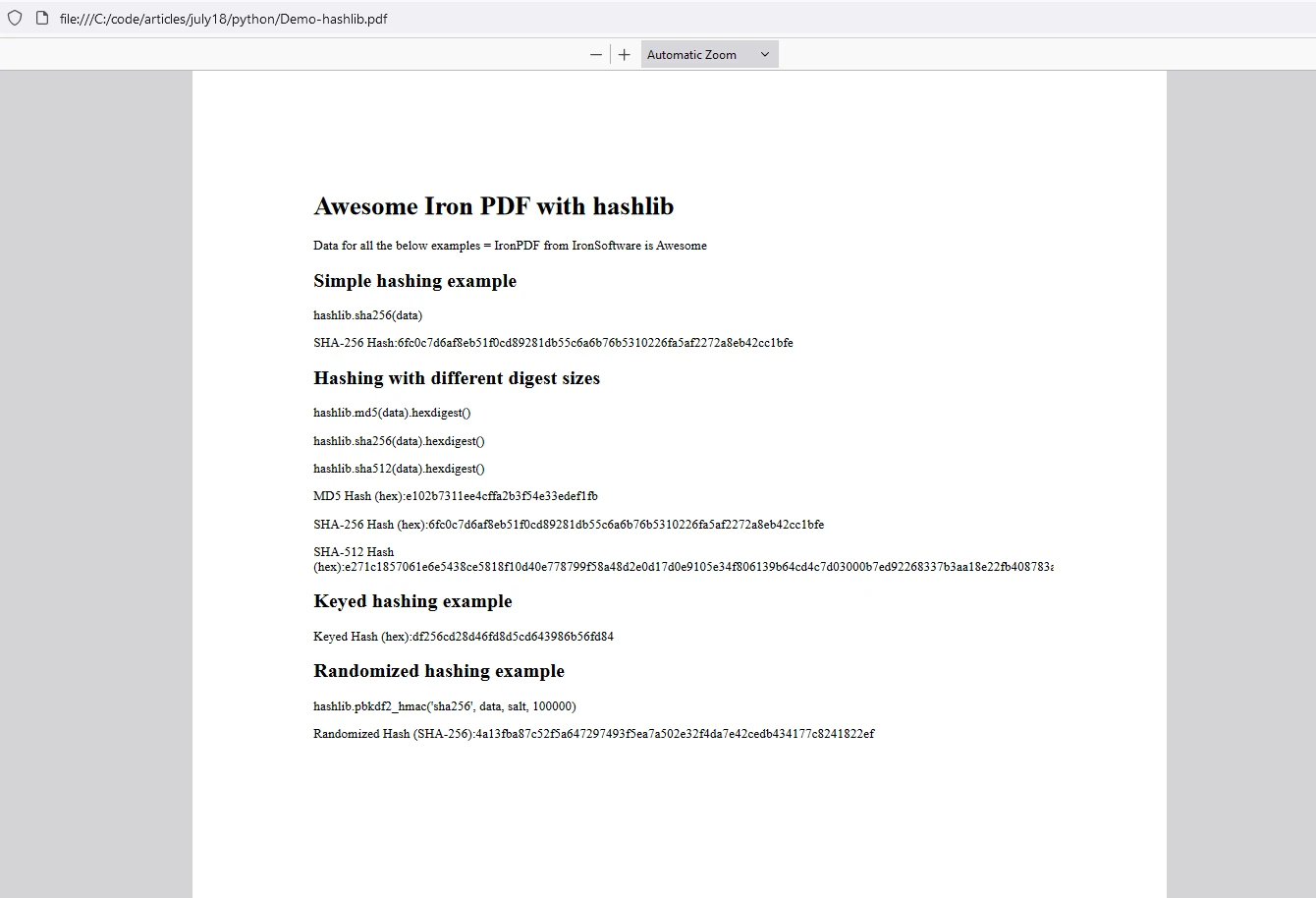
- PDF生成: 演示完雜湊範例後,程式碼使用IronPDF生成包含顯示雜湊範例的HTML內容的PDF文件。
每個範例都說明了加密雜湊的不同方面,如標準雜湊、密鑰雜湊、隨機化雜湊技術。
輸出

IronPDF 授權
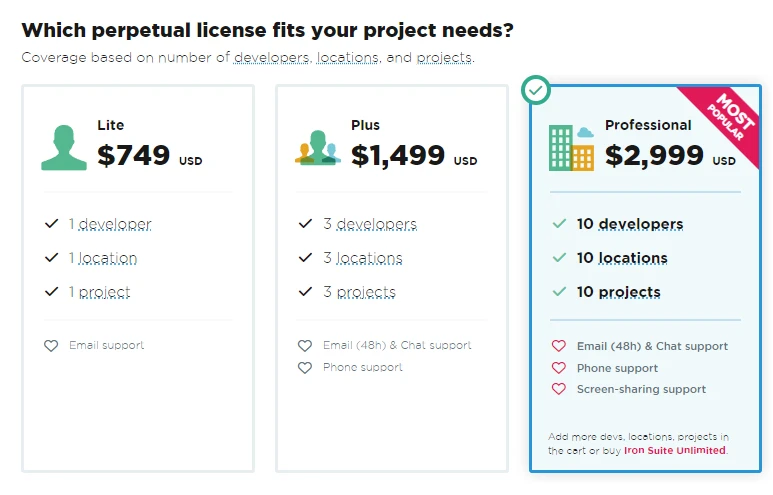
IronPDF在Python授權金鑰下運行。 IronPDF for Python提供免費試用授權金鑰,以允許使用者在購買前測試其廣泛功能。
在使用 IronPDF 套件之前,將 License Key 放在腳本的開頭:
from ironpdf import *
# Apply your license key
License.LicenseKey = "key"
from ironpdf import *
# Apply your license key
License.LicenseKey = "key"結論
hashlib模組是Python標準程式庫的重要組成部分,為各種應用程式提供穩定且安全的雜湊函式。 無論您是在確保資料完整性、安全儲存密碼,還是建立數位簽章,hashlib都提供了所需的工具。 另一方面,IronPDF是生成和操作PDF的強大程式庫。 透過這兩個程式庫,開發人員可以快速生成雜湊並將其儲存為PDF格式。








 免費開始
免費開始 免費開始
免費開始 預訂免費直播演示
















