已更新 2026年5月8日
生成每月账户报表(PDF 文档)
using IronPDF C# PDF 库,开发人员可以在 .NET 项目中将 HTML 转换为可靠的 PDF 文件,而无需依赖外部服务。
阅读更多

 每个小时,销售代表花在将客户关系管理系统(CRM)中的逐项明细复制到Word模板时间都是他们不在销售。 在一个拥有十名代表、每人处理二十个活跃机会的团队中,这些时间累计起来,而输出甚至不可靠。 定价层次应用错误,折扣字段依旧停留在上季度的费率,同时旧模板版本的条款语言滑入未审核即发给客户的文档。
时间线问题加剧了准确性问题。 一位客户在周二下午请求报价,若在星期三晚上才收到报价,则要花一天时间来怀疑这笔交易是否真实。 当PDF文件到达时,他们的注意力可能已经转移到反应更快的竞争对手。
现有的CPQ工具可以解决部分问题,但其企业价位和实施时间表不适合那些只需从现有机会数据中提取出干净PDF文件的团队。 如果以电子邮件发送电子表格或纯文本价格列表而不是格式化提案,给潜在客户的信号就是公司的销售流程是即兴发挥的。 当潜在客户要求修订时,版本的混淆加剧,多次迭代以电子邮件附件形式漂浮而无法附加到CRM记录的单一版本。
情景各不相同:B2B软件公司从Salesforce获取许可报价,制造公司从ERP库存项生成部件和定价提案,代理公司从内部估算生成项目范围文件,批发分销商为零售买家创建批量折扣报价。 每种情况下根本的阻力却是相同的。
IronPDF 是一个强大的.NET PDF库,可以让.NET应用程序直接从CRM商机数据生成品牌化的PDF报价和提案。 当销售代表将交易标记为准备报价或在内部工具中点击按钮时,应用程序从CRM或数据库中提取项目、定价、客户详细信息和条款,填充HTML模板或HTML内容字符串,然后ChromePdfRenderer根据该HTML生成C# PDF 。
报价以电子邮件形式发送给潜在客户,发送的文档自动记录回CRM记录中,无需手动格式化,无需Word模板,无需按文档收费的SaaS费用。 渲染在现有的.NET应用程序中以单个NuGet包的形式运行。 模板由您的团队拥有和版本化,在一个地方更新,并在每个未来的报价中体现,销售团队无需重新分发文件。
当销售代表在CRM UI中点击"生成报价",商机自动进入特定的流程阶段,或外部自动化平台发出API调用到报价终端时,流程开始。 这三种入口点都采用相同的生成流程,触发机制不会改变接下来的事情。
应用程序查询CRM或数据库以获取报价所需的所有信息:潜在客户公司名称、联系人姓名和电子邮件、带有SKU的项目、描述、数量、单价、应用的折扣百分比和项目总计; 小计、税收计算和总计; 支付条款、报价有效期以及销售代表添加到商机中的任何自定义备注。
模板处理报价的完整视觉结构:公司标志和页眉,带有潜在客户详细信息的"准备给"块,包含描述、数量、单价、折扣和项目总计的项目表,一个小计和总计概览,条款和条件部分,以及一个包含销售代表姓名、职务和直接联系信息的页脚。
通过在C#处理程序中遍历商机的项目并构建HTML行来构建项目表,然后将完整模板传递给IronPDF。 这将逻辑保留在应用程序层而不是模板本身中。

IronPDF的强大渲染引擎使HTML到PDF的转换变得简单,通常只需几行代码即可完成。
using IronPdf;
var renderer = new ChromePdfRenderer();
renderer.RenderingOptions.PaperSize = IronPdf.Rendering.PdfPaperSize.Letter;
renderer.RenderingOptions.MarginTop = 20;
renderer.RenderingOptions.MarginBottom = 20;
var lineItemRows = string.Concat(opportunity.LineItems.Select(item => $@"
<tr>
<td>{item.Description}</td>
<td style='text-align:center'>{item.Quantity}</td>
<td style='text-align:right'>{item.UnitPrice:C}</td>
<td style='text-align:center'>{item.DiscountPct}%</td>
<td style='text-align:right'>{item.LineTotal:C}</td>
</tr>"));
string html = $@"
<h1>Quote — {opportunity.ProspectCompany}</h1>
<p>Prepared for: {opportunity.ContactName} <{opportunity.ContactEmail}></p>
<p>Valid until: {opportunity.QuoteExpiry:MMMM d, yyyy} | Terms: {opportunity.PaymentTerms}</p>
<table border='1' cellpadding='6' width='100%'>
<thead><tr><th>Description</th><th>Qty</th><th>Unit Price</th><th>Discount</th><th>Total</th></tr></thead>
<tbody>{lineItemRows}</tbody>
</table>
<p style='text-align:right'><strong>Subtotal:</strong> {opportunity.Subtotal:C}</p>
<p style='text-align:right'><strong>Tax ({opportunity.TaxRatePct}%):</strong> {opportunity.TaxAmount:C}</p>
<p style='text-align:right'><strong>Grand Total:</strong> {opportunity.GrandTotal:C}</p>
<hr/><p style='font-size:11px'>{opportunity.TermsAndConditions}</p>";
PdfDocument quote = renderer.RenderHtmlAsPdf(html);Imports IronPdf
Dim renderer As New ChromePdfRenderer()
renderer.RenderingOptions.PaperSize = IronPdf.Rendering.PdfPaperSize.Letter
renderer.RenderingOptions.MarginTop = 20
renderer.RenderingOptions.MarginBottom = 20
Dim lineItemRows As String = String.Concat(opportunity.LineItems.Select(Function(item) $"
<tr>
<td>{item.Description}</td>
<td style='text-align:center'>{item.Quantity}</td>
<td style='text-align:right'>{item.UnitPrice:C}</td>
<td style='text-align:center'>{item.DiscountPct}%</td>
<td style='text-align:right'>{item.LineTotal:C}</td>
</tr>"))
Dim html As String = $"
<h1>Quote — {opportunity.ProspectCompany}</h1>
<p>Prepared for: {opportunity.ContactName} <{opportunity.ContactEmail}></p>
<p>Valid until: {opportunity.QuoteExpiry:MMMM d, yyyy} | Terms: {opportunity.PaymentTerms}</p>
<table border='1' cellpadding='6' width='100%'>
<thead><tr><th>Description</th><th>Qty</th><th>Unit Price</th><th>Discount</th><th>Total</th></tr></thead>
<tbody>{lineItemRows}</tbody>
</table>
<p style='text-align:right'><strong>Subtotal:</strong> {opportunity.Subtotal:C}</p>
<p style='text-align:right'><strong>Tax ({opportunity.TaxRatePct}%):</strong> {opportunity.TaxAmount:C}</p>
<p style='text-align:right'><strong>Grand Total:</strong> {opportunity.GrandTotal:C}</p>
<hr/><p style='font-size:11px'>{opportunity.TermsAndConditions}</p>"
Dim quote As PdfDocument = renderer.RenderHtmlAsPdf(html)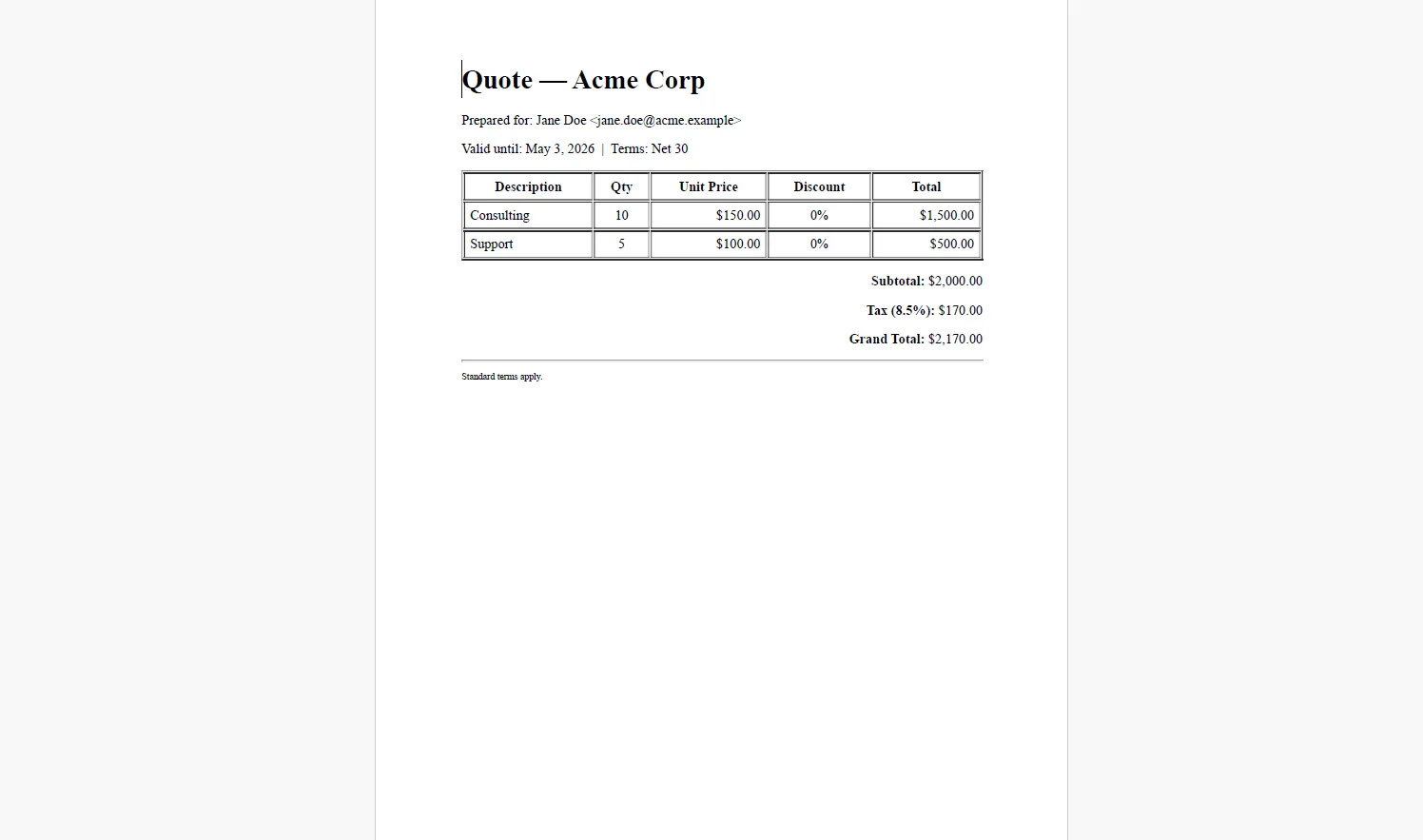
using System.Net.Mail;
using System.IO;

// Save versioned copy to document storage
string outputPath = $"quotes/{opportunity.Id}/v{opportunity.QuoteVersion}.pdf";

quote.SaveAs(outputPath);

// Email to prospect
using var stream = new MemoryStream(quote.BinaryData);
using var attachment = new Attachment(stream,
    $"Quote-{opportunity.ProspectCompany}-v{opportunity.QuoteVersion}.pdf",
    "application/pdf");

var message = new MailMessage("sales@yourcompany.com", opportunity.ContactEmail)
{
    Subject = $"Your Quote from {opportunity.RepName} — {opportunity.ProspectCompany}",
    Body = $"Hi {opportunity.ContactName},\n\nPlease find your quote attached. It is valid until {opportunity.QuoteExpiry:MMMM d, yyyy}.\n\n{opportunity.RepName}"
};

message.Attachments.Add(attachment);

using var smtp = new SmtpClient("smtp.yourprovider.com");

await smtp.SendMailAsync(message);

// Log reference back to CRM
await _crmService.LogQuoteSentAsync(opportunity.Id, outputPath, DateTime.UtcNow);Imports System.Net.Mail
Imports System.IO
' Save versioned copy to document storage
Dim outputPath As String = $"quotes/{opportunity.Id}/v{opportunity.QuoteVersion}.pdf"
quote.SaveAs(outputPath)
' Email to prospect
Using stream As New MemoryStream(quote.BinaryData)
Using attachment As New Attachment(stream, $"Quote-{opportunity.ProspectCompany}-v{opportunity.QuoteVersion}.pdf", "application/pdf")
Dim message As New MailMessage("sales@yourcompany.com", opportunity.ContactEmail) With {
.Subject = $"Your Quote from {opportunity.RepName} — {opportunity.ProspectCompany}",
.Body = $"Hi {opportunity.ContactName}," & vbCrLf & vbCrLf & $"Please find your quote attached. It is valid until {opportunity.QuoteExpiry:MMMM d, yyyy}." & vbCrLf & vbCrLf & $"{opportunity.RepName}"
}
message.Attachments.Add(attachment)
Using smtp As New SmtpClient("smtp.yourprovider.com")
Await smtp.SendMailAsync(message)
End Using
End Using
End Using
' Log reference back to CRM
Await _crmService.LogQuoteSentAsync(opportunity.Id, outputPath, DateTime.UtcNow)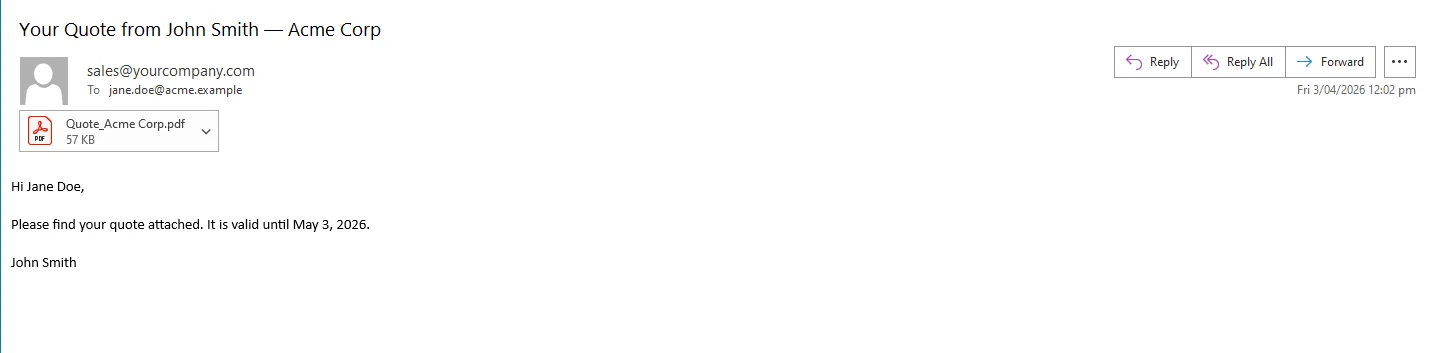 文件路径和文件名中的版本号为每个修订版提供其自己的永久记录。 当潜在客户请求更改时,销售代表在CRM中更新商机,应用程序以增量版本重新生成,并发送新的报价,完整的历史记录保存在文档存储中并记录到CRM记录中。
快速到客户。 在销售代表发起后,报价会在几秒钟内生成并发送电子邮件。 没有格式化延迟,没有文件滞留在草稿文件夹中,也没有销售代表决定报价与潜在客户收到之间的滞后。
价格准确性。 项目、折扣等级和总计直接从CRM商机中提取。 没有手动抄录步骤,也没有销售代表应用上季度价格或错误折扣计划的风险。
品牌一致性。 公司发送的每份报价都带有相同的标志、布局、条款语言和页脚,无论销售代表是谁生成的,或是从哪个流程阶段。 没有漂泊在个人笔记本电脑上的不规范Word模板。
版本跟踪。 每个生成的报价都与其商机ID、版本号和发送时的时间戳一起存储。 CRM日志为销售经理提供了完整的可见性,可以看到报价的内容、对象和时间,而无需深入研究电子邮件线程。
模板重用。 当法律团队更新条款语言或品牌团队更新标志时,一个HTML文件会发生变化,并且每个未来的报价都会反映出来。 没有将Word模板重新分发给销售团队。
无按文件成本。 渲染在.NET应用程序内部运行。 没有CPQ订阅,没有文件生成API计量,也没有根据交易量扩展的成本模式。
CRM商机数据与潜在客户收件箱中的专业PDF之间的差距比看起来更小,这是一个模板,一个渲染呼叫,一个电子邮件发送,都是由销售工作流程中的单个动作触发的。 去除手动格式化步骤不仅节省时间;它还消除了一类可能导致交易失败的错误。
该流程在现有的.NET应用程序内部构建和维护非常简单。 IronPDF处理C#中PDF生成的完整生命周期在ironpdf.com,从渲染HTML模板到保存、流处理和操作文档。 免费30天试用为您提供足够的时间来构建和测试完整的报价生成流程,使用您自己的CRM数据和销售流程。

Curtis Chau 拥有卡尔顿大学的计算机科学学士学位,专注于前端开发,精通 Node.js、TypeScript、JavaScript 和 React。他热衷于打造直观且美观的用户界面,喜欢使用现代框架并创建结构良好、视觉吸引力强的手册。

当您需要PDF看起来像HTML时,速度快。