The Problem With Manual Quote Generation
 Every hour a sales rep spends copying line items from a CRM into a Word template is an hour they're not selling. Across a team of ten reps running twenty active opportunities each, that time adds up, and the output isn't even reliable. Pricing tiers get applied incorrectly, discount fields get left at last quarter's rates, and terms language from an old template version slips into a document that goes out to a customer unreviewed.
The timeline problem compounds the accuracy problem. A prospect who requests a quote on a Tuesday afternoon and receives it on Wednesday evening has spent a day wondering whether the deal is real. By the time the PDF file arrives, their attention may have moved to a competitor who responded faster.
Existing CPQ tools solve parts of this, but at enterprise price points and implementation timelines that don't fit teams that just need a clean PDF file out of their existing opportunity data. Emailing a spreadsheet or a plain-text price list in lieu of a formatted proposal signals to the prospect that the company's sales process is improvised. And when the prospect requests revisions, version confusion multiplies, multiple iterations floating as email attachments with no single source of truth attached to the CRM record.
The scenarios vary: a B2B software company pulling license quotes from Salesforce, a manufacturing firm generating part-and-pricing proposals from ERP line items, an agency producing project scope documents from internal estimates, a wholesale distributor creating volume-discount offers for retail buyers. The underlying friction is the same in every case.
The Solution: Generating Quotes Directly From Opportunity Data
IronPDF is a powerful .NET PDF library that lets .NET applications generate branded PDF quotes and proposals directly from CRM opportunity data. When a rep marks a deal as ready to quote or clicks a button in an internal tool, the application pulls line items, pricing, customer details, and terms from the CRM or database, populates an HTML template or string of HTML content, and ChromePdfRenderer produces the C# PDF from that HTML.
The quote is emailed to the prospect and the sent document is logged back to the CRM record automatically, no manual formatting, no Word templates, no per-document SaaS fees. The rendering runs inside the existing .NET application as a single NuGet package. The template is owned and versioned by your team, updated in one place, and reflected in every future quote without redistributing files to the sales team.
How It Works in Practice
1. A Trigger Initiates the Quote
The pipeline starts when a rep clicks "Generate Quote" in the CRM UI, an opportunity enters a specific pipeline stage automatically, or an external automation platform makes an API call to the quoting endpoint. All three entry points feed the same generation flow, the trigger mechanism doesn't change what happens next.
The application queries the CRM or database for everything the quote requires: prospect company name, contact name and email, line items with SKUs, descriptions, quantities, unit prices, applied discount percentages, and line totals; the subtotal, tax calculation, and grand total; payment terms, quote validity period, and any custom notes the rep added to the opportunity.
2. HTML Template Defines the Quote Layout
The template handles the full visual structure of the quote: company logo and header, a "Prepared for" block with the prospect's details, a line-item table with columns for description, quantity, unit price, discount, and line total, a subtotal and grand total summary, a terms and conditions section, and a footer with the rep's name, title, and direct contact.
The line-item table is built by iterating over the opportunity's line items in the C# handler and constructing the HTML rows before passing the complete template to IronPDF. This keeps the logic in the application layer rather than in the template itself.
Example HTML File Template

3. ChromePdfRenderer Produces the Quote PDF Document
IronPDF's powerful rendering engine makes HTML to PDF conversion simple, often done in just a few lines of code.
using IronPdf;
var renderer = new ChromePdfRenderer();
renderer.RenderingOptions.PaperSize = IronPdf.Rendering.PdfPaperSize.Letter;
renderer.RenderingOptions.MarginTop = 20;
renderer.RenderingOptions.MarginBottom = 20;
var lineItemRows = string.Concat(opportunity.LineItems.Select(item => $@"
<tr>
<td>{item.Description}</td>
<td style='text-align:center'>{item.Quantity}</td>
<td style='text-align:right'>{item.UnitPrice:C}</td>
<td style='text-align:center'>{item.DiscountPct}%</td>
<td style='text-align:right'>{item.LineTotal:C}</td>
</tr>"));
string html = $@"
<h1>Quote — {opportunity.ProspectCompany}</h1>
<p>Prepared for: {opportunity.ContactName} <{opportunity.ContactEmail}></p>
<p>Valid until: {opportunity.QuoteExpiry:MMMM d, yyyy} | Terms: {opportunity.PaymentTerms}</p>
<table border='1' cellpadding='6' width='100%'>
<thead><tr><th>Description</th><th>Qty</th><th>Unit Price</th><th>Discount</th><th>Total</th></tr></thead>
<tbody>{lineItemRows}</tbody>
</table>
<p style='text-align:right'><strong>Subtotal:</strong> {opportunity.Subtotal:C}</p>
<p style='text-align:right'><strong>Tax ({opportunity.TaxRatePct}%):</strong> {opportunity.TaxAmount:C}</p>
<p style='text-align:right'><strong>Grand Total:</strong> {opportunity.GrandTotal:C}</p>
<hr/><p style='font-size:11px'>{opportunity.TermsAndConditions}</p>";
PdfDocument quote = renderer.RenderHtmlAsPdf(html);
using IronPdf;
var renderer = new ChromePdfRenderer();
renderer.RenderingOptions.PaperSize = IronPdf.Rendering.PdfPaperSize.Letter;
renderer.RenderingOptions.MarginTop = 20;
renderer.RenderingOptions.MarginBottom = 20;
var lineItemRows = string.Concat(opportunity.LineItems.Select(item => $@"
<tr>
<td>{item.Description}</td>
<td style='text-align:center'>{item.Quantity}</td>
<td style='text-align:right'>{item.UnitPrice:C}</td>
<td style='text-align:center'>{item.DiscountPct}%</td>
<td style='text-align:right'>{item.LineTotal:C}</td>
</tr>"));
string html = $@"
<h1>Quote — {opportunity.ProspectCompany}</h1>
<p>Prepared for: {opportunity.ContactName} <{opportunity.ContactEmail}></p>
<p>Valid until: {opportunity.QuoteExpiry:MMMM d, yyyy} | Terms: {opportunity.PaymentTerms}</p>
<table border='1' cellpadding='6' width='100%'>
<thead><tr><th>Description</th><th>Qty</th><th>Unit Price</th><th>Discount</th><th>Total</th></tr></thead>
<tbody>{lineItemRows}</tbody>
</table>
<p style='text-align:right'><strong>Subtotal:</strong> {opportunity.Subtotal:C}</p>
<p style='text-align:right'><strong>Tax ({opportunity.TaxRatePct}%):</strong> {opportunity.TaxAmount:C}</p>
<p style='text-align:right'><strong>Grand Total:</strong> {opportunity.GrandTotal:C}</p>
<hr/><p style='font-size:11px'>{opportunity.TermsAndConditions}</p>";
PdfDocument quote = renderer.RenderHtmlAsPdf(html);Imports IronPdf
Dim renderer As New ChromePdfRenderer()
renderer.RenderingOptions.PaperSize = IronPdf.Rendering.PdfPaperSize.Letter
renderer.RenderingOptions.MarginTop = 20
renderer.RenderingOptions.MarginBottom = 20
Dim lineItemRows As String = String.Concat(opportunity.LineItems.Select(Function(item) $"
<tr>
<td>{item.Description}</td>
<td style='text-align:center'>{item.Quantity}</td>
<td style='text-align:right'>{item.UnitPrice:C}</td>
<td style='text-align:center'>{item.DiscountPct}%</td>
<td style='text-align:right'>{item.LineTotal:C}</td>
</tr>"))
Dim html As String = $"
<h1>Quote — {opportunity.ProspectCompany}</h1>
<p>Prepared for: {opportunity.ContactName} <{opportunity.ContactEmail}></p>
<p>Valid until: {opportunity.QuoteExpiry:MMMM d, yyyy} | Terms: {opportunity.PaymentTerms}</p>
<table border='1' cellpadding='6' width='100%'>
<thead><tr><th>Description</th><th>Qty</th><th>Unit Price</th><th>Discount</th><th>Total</th></tr></thead>
<tbody>{lineItemRows}</tbody>
</table>
<p style='text-align:right'><strong>Subtotal:</strong> {opportunity.Subtotal:C}</p>
<p style='text-align:right'><strong>Tax ({opportunity.TaxRatePct}%):</strong> {opportunity.TaxAmount:C}</p>
<p style='text-align:right'><strong>Grand Total:</strong> {opportunity.GrandTotal:C}</p>
<hr/><p style='font-size:11px'>{opportunity.TermsAndConditions}</p>"
Dim quote As PdfDocument = renderer.RenderHtmlAsPdf(html)
Imports IronPdf
Dim renderer As New ChromePdfRenderer()
renderer.RenderingOptions.PaperSize = IronPdf.Rendering.PdfPaperSize.Letter
renderer.RenderingOptions.MarginTop = 20
renderer.RenderingOptions.MarginBottom = 20
Dim lineItemRows As String = String.Concat(opportunity.LineItems.Select(Function(item) $"
<tr>
<td>{item.Description}</td>
<td style='text-align:center'>{item.Quantity}</td>
<td style='text-align:right'>{item.UnitPrice:C}</td>
<td style='text-align:center'>{item.DiscountPct}%</td>
<td style='text-align:right'>{item.LineTotal:C}</td>
</tr>"))
Dim html As String = $"
<h1>Quote — {opportunity.ProspectCompany}</h1>
<p>Prepared for: {opportunity.ContactName} <{opportunity.ContactEmail}></p>
<p>Valid until: {opportunity.QuoteExpiry:MMMM d, yyyy} | Terms: {opportunity.PaymentTerms}</p>
<table border='1' cellpadding='6' width='100%'>
<thead><tr><th>Description</th><th>Qty</th><th>Unit Price</th><th>Discount</th><th>Total</th></tr></thead>
<tbody>{lineItemRows}</tbody>
</table>
<p style='text-align:right'><strong>Subtotal:</strong> {opportunity.Subtotal:C}</p>
<p style='text-align:right'><strong>Tax ({opportunity.TaxRatePct}%):</strong> {opportunity.TaxAmount:C}</p>
<p style='text-align:right'><strong>Grand Total:</strong> {opportunity.GrandTotal:C}</p>
<hr/><p style='font-size:11px'>{opportunity.TermsAndConditions}</p>"
Dim quote As PdfDocument = renderer.RenderHtmlAsPdf(html)
Generated PDF Document
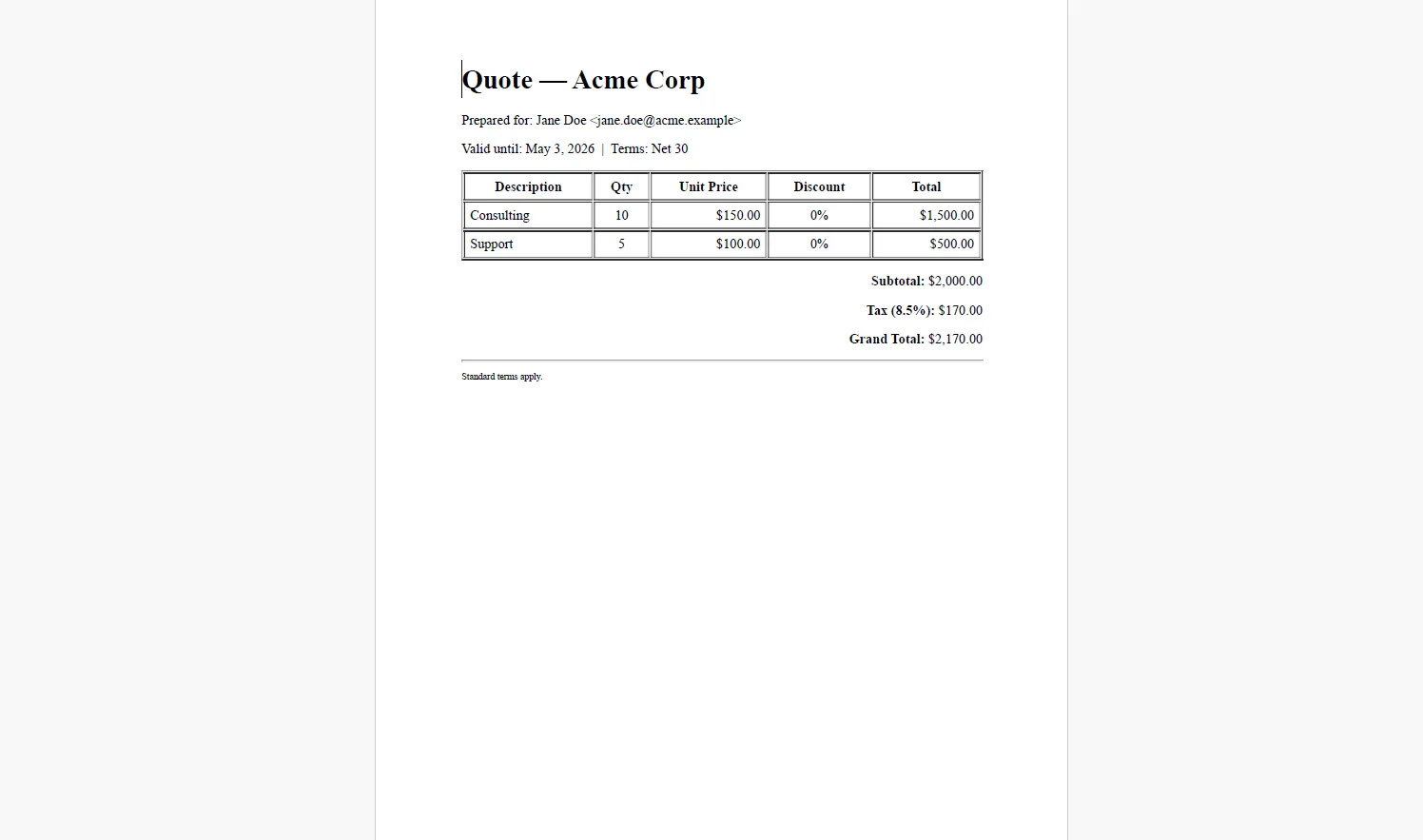
Embed your company logo and any font files as base64 data URIs in the template, or set a BaseUrlPath as the second parameter on RenderHtmlAsPdf() so IronPDF resolves relative asset paths regardless of where the application is deployed.
4. Quote Delivered and Logged
using System.Net.Mail;
using System.IO;

// Save versioned copy to document storage
string outputPath = $"quotes/{opportunity.Id}/v{opportunity.QuoteVersion}.pdf";

quote.SaveAs(outputPath);

// Email to prospect
using var stream = new MemoryStream(quote.BinaryData);
using var attachment = new Attachment(stream,
    $"Quote-{opportunity.ProspectCompany}-v{opportunity.QuoteVersion}.pdf",
    "application/pdf");

var message = new MailMessage("sales@yourcompany.com", opportunity.ContactEmail)
{
    Subject = $"Your Quote from {opportunity.RepName} — {opportunity.ProspectCompany}",
    Body = $"Hi {opportunity.ContactName},\n\nPlease find your quote attached. It is valid until {opportunity.QuoteExpiry:MMMM d, yyyy}.\n\n{opportunity.RepName}"
};

message.Attachments.Add(attachment);

using var smtp = new SmtpClient("smtp.yourprovider.com");

await smtp.SendMailAsync(message);

// Log reference back to CRM
await _crmService.LogQuoteSentAsync(opportunity.Id, outputPath, DateTime.UtcNow);
using System.Net.Mail;
using System.IO;

// Save versioned copy to document storage
string outputPath = $"quotes/{opportunity.Id}/v{opportunity.QuoteVersion}.pdf";

quote.SaveAs(outputPath);

// Email to prospect
using var stream = new MemoryStream(quote.BinaryData);
using var attachment = new Attachment(stream,
    $"Quote-{opportunity.ProspectCompany}-v{opportunity.QuoteVersion}.pdf",
    "application/pdf");

var message = new MailMessage("sales@yourcompany.com", opportunity.ContactEmail)
{
    Subject = $"Your Quote from {opportunity.RepName} — {opportunity.ProspectCompany}",
    Body = $"Hi {opportunity.ContactName},\n\nPlease find your quote attached. It is valid until {opportunity.QuoteExpiry:MMMM d, yyyy}.\n\n{opportunity.RepName}"
};

message.Attachments.Add(attachment);

using var smtp = new SmtpClient("smtp.yourprovider.com");

await smtp.SendMailAsync(message);

// Log reference back to CRM
await _crmService.LogQuoteSentAsync(opportunity.Id, outputPath, DateTime.UtcNow);
Imports System.Net.Mail
Imports System.IO
' Save versioned copy to document storage
Dim outputPath As String = $"quotes/{opportunity.Id}/v{opportunity.QuoteVersion}.pdf"
quote.SaveAs(outputPath)
' Email to prospect
Using stream As New MemoryStream(quote.BinaryData)
Using attachment As New Attachment(stream, $"Quote-{opportunity.ProspectCompany}-v{opportunity.QuoteVersion}.pdf", "application/pdf")
Dim message As New MailMessage("sales@yourcompany.com", opportunity.ContactEmail) With {
.Subject = $"Your Quote from {opportunity.RepName} — {opportunity.ProspectCompany}",
.Body = $"Hi {opportunity.ContactName}," & vbCrLf & vbCrLf & $"Please find your quote attached. It is valid until {opportunity.QuoteExpiry:MMMM d, yyyy}." & vbCrLf & vbCrLf & $"{opportunity.RepName}"
}
message.Attachments.Add(attachment)
Using smtp As New SmtpClient("smtp.yourprovider.com")
Await smtp.SendMailAsync(message)
End Using
End Using
End Using
' Log reference back to CRM
Await _crmService.LogQuoteSentAsync(opportunity.Id, outputPath, DateTime.UtcNow)
Imports System.Net.Mail
Imports System.IO

' Save versioned copy to document storage
Dim outputPath As String = $"quotes/{opportunity.Id}/v{opportunity.QuoteVersion}.pdf"

quote.SaveAs(outputPath)

' Email to prospect
Using stream As New MemoryStream(quote.BinaryData)
    Using attachment As New Attachment(stream, $"Quote-{opportunity.ProspectCompany}-v{opportunity.QuoteVersion}.pdf", "application/pdf")
        Dim message As New MailMessage("sales@yourcompany.com", opportunity.ContactEmail) With {
            .Subject = $"Your Quote from {opportunity.RepName} — {opportunity.ProspectCompany}",
            .Body = $"Hi {opportunity.ContactName}," & vbCrLf & vbCrLf & $"Please find your quote attached. It is valid until {opportunity.QuoteExpiry:MMMM d, yyyy}." & vbCrLf & vbCrLf & $"{opportunity.RepName}"
        }

        message.Attachments.Add(attachment)

        Using smtp As New SmtpClient("smtp.yourprovider.com")
            Await smtp.SendMailAsync(message)
        End Using
    End Using
End Using

' Log reference back to CRM
Await _crmService.LogQuoteSentAsync(opportunity.Id, outputPath, DateTime.UtcNow)
Example of Sent Email with Attached PDF
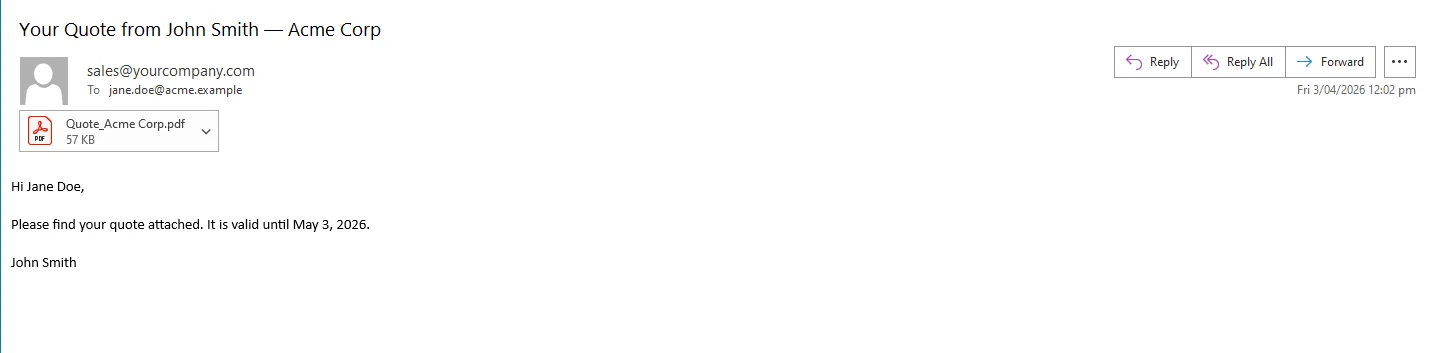 A version number in both the file path and the filename gives every revision its own permanent record. When the prospect requests changes, the rep updates the opportunity in the CRM, the application regenerates with an incremented version, and the new quote is sent, with the full history retained in document storage and logged to the CRM record.
Real-World Benefits
Speed to prospect. A quote is generated and emailed in seconds after the rep initiates it. There is no formatting delay, no document sitting in a drafts folder, and no lag between the rep's decision to quote and the prospect receiving it.
Pricing accuracy. Line items, discount tiers, and grand totals are pulled directly from the CRM opportunity. There is no manual transcription step and no risk of a rep applying last quarter's pricing or the wrong discount schedule.
Brand consistency. Every quote the company sends carries the same logo, layout, terms language, and footer, regardless of which rep generated it or from which pipeline stage. There are no rogue Word templates floating on individual laptops.
Version tracking. Each generated quote is stored with its opportunity ID, version number, and a timestamp of when it was sent. The CRM log gives sales managers full visibility into what was quoted, to whom, and when, without digging through email threads.
Template reuse. When the legal team updates the terms language or the brand team refreshes the logo, one HTML file changes and every future quote reflects it. There is no redistribution of Word templates to the sales team.
No per-document costs. The rendering runs in-process inside the .NET application. There is no CPQ subscription, no document generation API metering, and no cost model that scales against deal volume.
Closing
The gap between CRM opportunity data and a professional PDF in the prospect's inbox is smaller than it looks, it's a template, a render call, and an email send, all triggered by a single action in the sales workflow. Removing the manual formatting step doesn't just save time; it removes a category of errors that can cost deals.
That pipeline is straightforward to build and maintain inside an existing .NET application. IronPDF handles the full lifecycle of PDF generation in C# at ironpdf.com, from rendering HTML templates to saving, streaming, and manipulating documents. The free 30-day trial gives you enough time to build and test a complete quote generation pipeline against your own CRM data and sales workflow.























