The Problem With Static and Manual Document Delivery
 When a policyholder calls to ask for their current declarations page, or a banking customer opens a support ticket to request a three-month statement, the request ends up on a staff member's desk. That person queries a system, formats a document, and emails it back, sometimes the same day, sometimes 48 hours later. Across thousands of customers, that workflow doesn't scale, and every request it handles is one that a self-service portal should have made unnecessary.
The alternatives organizations reach for tend to trade one problem for another. Pre-generating PDFs for every customer on a nightly schedule produces a mountain of documents that may never be downloaded, and every one of them starts going stale the moment the underlying data changes. A customer who updates their payment method or changes their coverage tier can download a PDF that no longer reflects their account, and call support anyway.
Third-party document generation APIs offer on-demand rendering but add per-request costs that scale directly with portal traffic, plus a network dependency sitting in the critical path of a user-facing action. A banking portal that sends 200,000 statement downloads per month doesn't want that on a metered API.
The user's expectation is simple: a "Download PDF" button that produces the right document, right now. An insurance policyholder downloading their declarations page, a utility customer pulling their latest bill, a SaaS admin exporting a current subscription report, a telecom customer downloading a call detail record, all of them expect an instant result, not a queued request.
The Solution: On-Demand Rendering Inside the API Endpoint
IronPDF lets .NET web applications generate PDF files on demand inside a controller action or minimal API endpoint. When a user clicks "Download PDF," the server pulls their live data from the database, populates an HTML template, and ChromePdfRenderer renders the PDF content in memory. The response streams the file directly to the browser as a download, no pre-generation, no stale files, no support queue.
The document reflects the user's account data at the exact moment of the request. The rendering runs inside the existing .NET application as a single NuGet package with no external processes, no document API to call, no sidecar service to keep alive, and no per-download cost to track.
As this is a C# NuGet Library for PDF workflows, you can easily install IronPDF through the NuGet Package Manager. With key features including PDF generation, tools to modify new and existing PDF files, apply security such as digital signatures and passwords, and more, IronPDF is a great tool to add to your projects.
How It Works in Practice
1. User Clicks "Download PDF Document" on the Portal
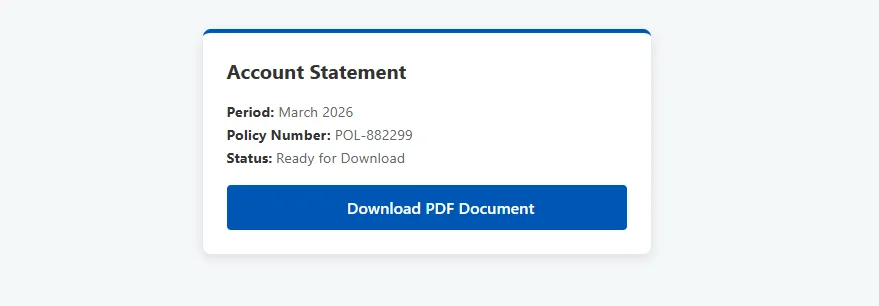
The button triggers an HTTP GET to an API endpoint, passing the document type and any parameters the user has selected, statement period, policy number, date range. The endpoint authenticates and authorizes the request before doing anything else, verifying both identity and entitlement to the specific document.
Authorization is not optional here. A customer requesting their own statement is fine; a customer requesting another customer's is not. The endpoint must validate that the authenticated user is entitled to the document ID or parameters they're requesting before querying any data.
Example Portal View
2. Live Data Populates the Template that Contains the HTML Content
The action method queries the database for the user's current data such as account details, line items, balances, policy terms, coverage selections, or usage metrics, and populates an HTML template specific to the document type. The template includes the customer's name and account number, the document date, all relevant line items, company branding, and any required legal disclaimer text in the footer.
A different HTML template handles each document type: policy summary, account statement, payment receipt, all rendered through the same controller and generation pipeline.
3. ChromePdfRenderer Converts HTML to PDF and Returns the File
using IronPdf;

[HttpGet("portal/documents/statement")]
[Authorize]
public IActionResult DownloadStatement([FromQuery] string period)
{
    var userId = User.GetUserId();
    var data = _accountService.GetStatementData(userId, period);

    string html = $@"
        <h1>Account Statement — {data.Period}</h1>
        <p><strong>Account:</strong> {data.AccountNumber}</p>
        <p><strong>Name:</strong> {data.CustomerName}</p>
        {data.LineItemsHtml}
        <p><strong>Closing Balance:</strong> {data.ClosingBalance:C}</p>";

    var renderer = new ChromePdfRenderer();

    renderer.RenderingOptions.MarginTop = 20;

    renderer.RenderingOptions.MarginBottom = 20;

    PdfDocument pdf = renderer.RenderHtmlAsPdf(html);

    return File(pdf.BinaryData, "application/pdf",
        $"Statement-{data.Period}-{data.AccountNumber}.pdf");

}
using IronPdf;

[HttpGet("portal/documents/statement")]
[Authorize]
public IActionResult DownloadStatement([FromQuery] string period)
{
    var userId = User.GetUserId();
    var data = _accountService.GetStatementData(userId, period);

    string html = $@"
        <h1>Account Statement — {data.Period}</h1>
        <p><strong>Account:</strong> {data.AccountNumber}</p>
        <p><strong>Name:</strong> {data.CustomerName}</p>
        {data.LineItemsHtml}
        <p><strong>Closing Balance:</strong> {data.ClosingBalance:C}</p>";

    var renderer = new ChromePdfRenderer();

    renderer.RenderingOptions.MarginTop = 20;

    renderer.RenderingOptions.MarginBottom = 20;

    PdfDocument pdf = renderer.RenderHtmlAsPdf(html);

    return File(pdf.BinaryData, "application/pdf",
        $"Statement-{data.Period}-{data.AccountNumber}.pdf");

}
Imports IronPdf
Imports Microsoft.AspNetCore.Mvc
<HttpGet("portal/documents/statement")>
<Authorize>
Public Function DownloadStatement(<FromQuery> period As String) As IActionResult
Dim userId = User.GetUserId()
Dim data = _accountService.GetStatementData(userId, period)
Dim html As String = $"
<h1>Account Statement — {data.Period}</h1>
<p><strong>Account:</strong> {data.AccountNumber}</p>
<p><strong>Name:</strong> {data.CustomerName}</p>
{data.LineItemsHtml}
<p><strong>Closing Balance:</strong> {data.ClosingBalance:C}</p>"
Dim renderer As New ChromePdfRenderer()
renderer.RenderingOptions.MarginTop = 20
renderer.RenderingOptions.MarginBottom = 20
Dim pdf As PdfDocument = renderer.RenderHtmlAsPdf(html)
Return File(pdf.BinaryData, "application/pdf", $"Statement-{data.Period}-{data.AccountNumber}.pdf")
End Function
Imports IronPdf
Imports Microsoft.AspNetCore.Mvc

<HttpGet("portal/documents/statement")>
<Authorize>
Public Function DownloadStatement(<FromQuery> period As String) As IActionResult
    Dim userId = User.GetUserId()
    Dim data = _accountService.GetStatementData(userId, period)

    Dim html As String = $"
        <h1>Account Statement — {data.Period}</h1>
        <p><strong>Account:</strong> {data.AccountNumber}</p>
        <p><strong>Name:</strong> {data.CustomerName}</p>
        {data.LineItemsHtml}
        <p><strong>Closing Balance:</strong> {data.ClosingBalance:C}</p>"

    Dim renderer As New ChromePdfRenderer()

    renderer.RenderingOptions.MarginTop = 20

    renderer.RenderingOptions.MarginBottom = 20

    Dim pdf As PdfDocument = renderer.RenderHtmlAsPdf(html)

    Return File(pdf.BinaryData, "application/pdf", $"Statement-{data.Period}-{data.AccountNumber}.pdf")
End Function
Example Output PDF File
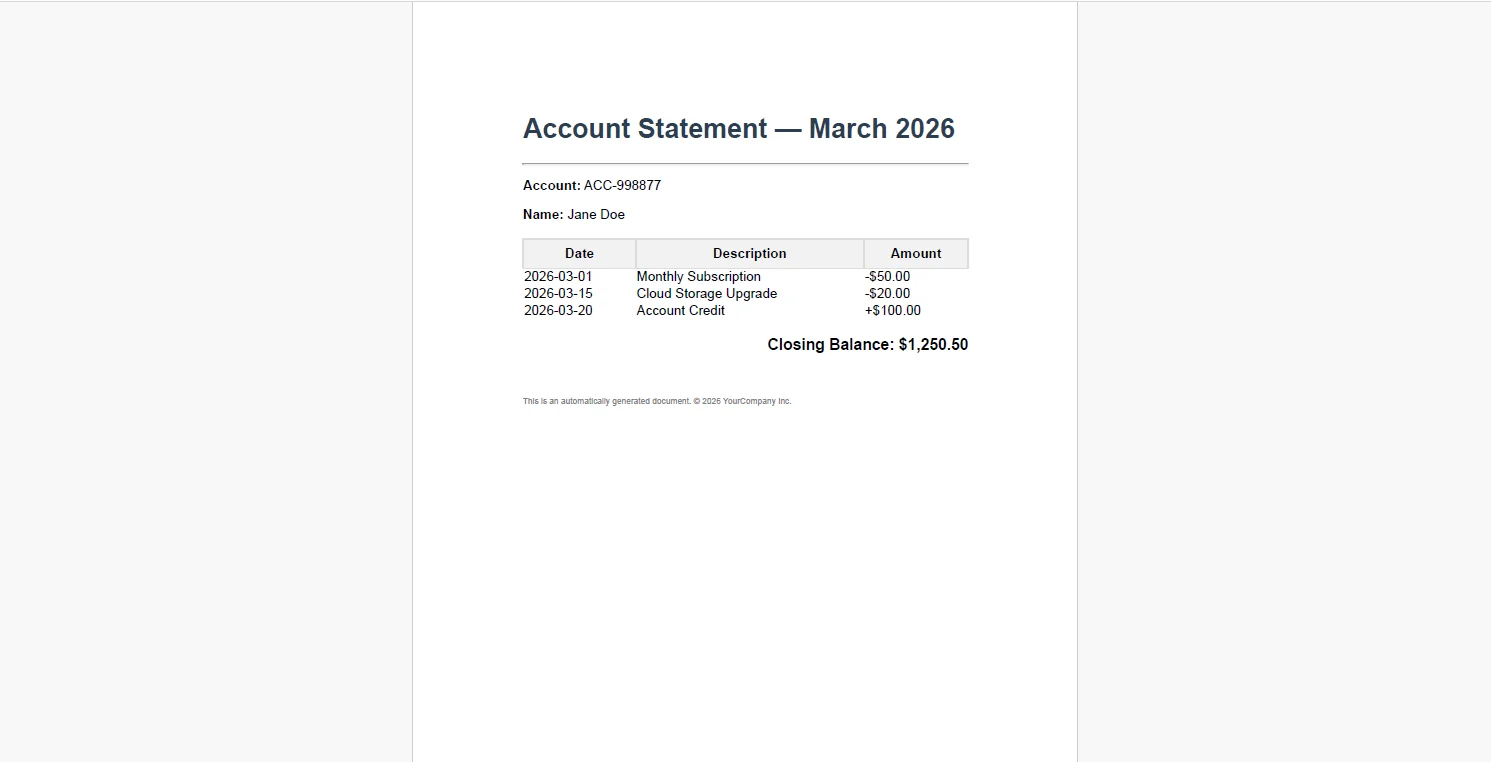 File() with a filename sets Content-Disposition: attachment automatically, prompting the browser to save the file rather than attempt to render it inline. The PDF is never written to disk, it's generated in memory and streamed directly to the response.
4. Optional Caching for Repeated Downloads
For document types where the underlying data changes infrequently such as with a policy declarations page that only updates at renewal, a caching layer avoids re-rendering the same PDF multiple times:
var dataHash = _accountService.GetStatementDataHash(userId, period);

string cacheKey = $"statement/{userId}/{period}/{dataHash}";

byte[] pdfBytes = await _cache.GetAsync(cacheKey);

if (pdfBytes == null)
{
    var renderer = new ChromePdfRenderer();
    PdfDocument pdf = renderer.RenderHtmlAsPdf(html);

    pdfBytes = pdf.BinaryData;

    await _cache.SetAsync(cacheKey, pdfBytes,
        new DistributedCacheEntryOptions
        {
            AbsoluteExpirationRelativeToNow = TimeSpan.FromHours(24)
        });
}

return File(pdfBytes, "application/pdf", $"Statement-{period}.pdf");
var dataHash = _accountService.GetStatementDataHash(userId, period);

string cacheKey = $"statement/{userId}/{period}/{dataHash}";

byte[] pdfBytes = await _cache.GetAsync(cacheKey);

if (pdfBytes == null)
{
    var renderer = new ChromePdfRenderer();
    PdfDocument pdf = renderer.RenderHtmlAsPdf(html);

    pdfBytes = pdf.BinaryData;

    await _cache.SetAsync(cacheKey, pdfBytes,
        new DistributedCacheEntryOptions
        {
            AbsoluteExpirationRelativeToNow = TimeSpan.FromHours(24)
        });
}

return File(pdfBytes, "application/pdf", $"Statement-{period}.pdf");
Imports System
Imports System.Threading.Tasks
Imports IronPdf
Dim dataHash = _accountService.GetStatementDataHash(userId, period)
Dim cacheKey As String = $"statement/{userId}/{period}/{dataHash}"
Dim pdfBytes As Byte() = Await _cache.GetAsync(cacheKey)
If pdfBytes Is Nothing Then
Dim renderer As New ChromePdfRenderer()
Dim pdf As PdfDocument = renderer.RenderHtmlAsPdf(html)
pdfBytes = pdf.BinaryData
Await _cache.SetAsync(cacheKey, pdfBytes, New DistributedCacheEntryOptions With {
.AbsoluteExpirationRelativeToNow = TimeSpan.FromHours(24)
})
End If
Return File(pdfBytes, "application/pdf", $"Statement-{period}.pdf")
Imports System
Imports System.Threading.Tasks
Imports IronPdf

Dim dataHash = _accountService.GetStatementDataHash(userId, period)

Dim cacheKey As String = $"statement/{userId}/{period}/{dataHash}"

Dim pdfBytes As Byte() = Await _cache.GetAsync(cacheKey)

If pdfBytes Is Nothing Then
    Dim renderer As New ChromePdfRenderer()
    Dim pdf As PdfDocument = renderer.RenderHtmlAsPdf(html)

    pdfBytes = pdf.BinaryData

    Await _cache.SetAsync(cacheKey, pdfBytes, New DistributedCacheEntryOptions With {
        .AbsoluteExpirationRelativeToNow = TimeSpan.FromHours(24)
    })
End If

Return File(pdfBytes, "application/pdf", $"Statement-{period}.pdf")
The cache key incorporates a hash of the underlying data, not just the user ID and period. If the data changes, a late payment posts, a credit is applied, the hash changes, the cache misses, and the next download re-renders from current data. The customer never downloads a stale document.
Real-World Benefits
Always current. Documents are generated from live data at the moment of the request. There is no sync lag between data changes and document content, a customer who updates their account information downloads a PDF that reflects it immediately.
Zero support overhead. Customers who can download their own policy, statement, or letter don't open tickets requesting them. The download button replaces a support workflow that costs time per request.
No storage bloat. PDFs are generated on demand and streamed to the browser. There is no need to pre-generate and store documents for every customer across every billing cycle, storage costs don't scale with the customer base.
Fast response times. ChromePdfRenderer produces a typical portal document: a single-page statement, a policy summary, a payment receipt, in milliseconds. The user experiences a near-instant download rather than a progress indicator.
Brand consistency. Every document type has an approved HTML and CSS template. Every downloaded PDF carries the same logo, typography, layout, and legal disclaimers, regardless of which endpoint handled the request or when it was generated.
No per-document costs. The rendering runs in-process inside the web application. There is no third-party API metering, no usage-based pricing, and no line item on the infrastructure bill that grows with portal traffic.
Closing
An on-demand PDF download is a small feature with disproportionate impact. It removes a class of support request entirely, eliminates the risk of customers acting on stale documents, and replaces a manual delivery workflow with something that takes a few hundred milliseconds.
The implementation fits inside a single controller action, a database query, an HTML template, a render call, and a file response. IronPDF handles the full lifecycle of PDF generation in C# at ironpdf.com, from rendering HTML templates to saving, streaming, and manipulating documents. The free 30-day trial gives you enough time to build and test an on-demand download endpoint against your own portal and data.