using IronPdf;

// Disable local disk access or cross-origin requests
Installation.EnableWebSecurity = true;

// Instantiate Renderer
var renderer = new ChromePdfRenderer();

// Create a PDF from a HTML string using C#
var pdf = renderer.RenderHtmlAsPdf("<h1>Hello World</h1>");

// Export to a file or Stream
pdf.SaveAs("output.pdf");

// Advanced Example with HTML Assets
// Load external html assets: Images, CSS and JavaScript.
// An optional BasePath 'C:\site\assets\' is set as the file location to load assets from
var myAdvancedPdf = renderer.RenderHtmlAsPdf("<img src='icons/iron.png'>", @"C:\site\assets\");
myAdvancedPdf.SaveAs("html-with-assets.pdf");
using IronPdf;// Disable local disk access or cross-origin requestsInstallation.EnableWebSecurity = true;// Instantiate Renderervar renderer = new ChromePdfRenderer();// Create a PDF from a HTML string using C#var pdf = renderer.RenderHtmlAsPdf("<h1>Hello World</h1>");// Export to a file or Streampdf.SaveAs("output.pdf");// Advanced Example with HTML Assets// Load external html assets: Images, CSS and JavaScript.// An optional BasePath 'C:\site\assets\' is set as the file location to load assets fromvar myAdvancedPdf = renderer.RenderHtmlAsPdf("<img src='icons/iron.png'>", @"C:\site\assets\");myAdvancedPdf.SaveAs("html-with-assets.pdf");
## The Problem With Certificate Generation at Scale

For a small cohort, opening a Canva template and exporting a personalized certificate for each learner is manageable. At a few hundred completions per week, it becomes a part-time job. At thousands per month, it breaks entirely.
Manual certificate workflows introduce exactly the problems they're meant to avoid: a learner's name misspelled because someone copy-pasted from a spreadsheet, a certificate issued with last semester's date because a template wasn't updated, formatting drift when different staff members handle different cohorts. Batch-export plugins help at the margins but rarely support the level of customization a brand actually requires.
LMS plugins for certificate generation are typically an afterthought, rigid templates, limited font control, no support for co-branding when a course is delivered in partnership with an external institution. Third-party certificate APIs solve the customization problem but add per-document costs that scale directly against enrollment growth, plus an external dependency that sits in the critical path of the completion workflow.
The scenarios vary but the problem is consistent: a MOOC platform issuing thousands of completions each month, a corporate training system generating compliance certificates after employees pass mandatory modules, a professional certification body producing credentialed exam results with expiration dates, a coding bootcamp distributing graduation documents per cohort and curriculum track. All of them need a generation pipeline that runs automatically, produces a polished document, and requires no manual intervention.
## The Solution: Event-Driven Certificate Generation With IronPDF .NET Library
IronPDF lets .NET applications generate branded PDF certificates [from HTML and CSS templates](/tutorials/html-to-pdf/) the moment a course completion event fires. The learner's name, course title, completion date, instructor name, and a unique credential ID fill the template, ChromePdfRenderer produces the PDF, and the application delivers it by email and stores it for download in the learner's dashboard.
There are no design tool exports, no manual queue, and no third-party certificate API adding latency and per-document cost to the completion flow. IronPDF runs inside the existing .NET application, one C# NuGet library for PDF processing, no external processes, and the HTML template is owned and versioned by your team.
## How It Works in Practice: Generate Multiple PDF Documents
### 1. Completion Event Triggers Generation
The pipeline starts when a learner finishes all required modules, passes a final assessment, or an instructor marks a course complete. The completion handler retrieves everything the certificate needs from the database: full name, email, course title, completion date, final score if applicable, instructor name, and a generated credential ID that will serve as the permanent verification key.
The credential ID is written to the database immediately, linking the learner and course before the PDF is generated. This ensures the verification record exists even if the storage or email step fails and needs to be retried.
### 2. HTML File Template Defines the Certificate Layout
The template is a standard [HTML file](/how-to/html-file-to-pdf/) with CSS controlling every visual detail, border design, background texture, institution logo, decorative rules, and the typographic hierarchy that makes a certificate feel official. The learner's name is typically the largest element on the page, rendered in a display font loaded via @font-face and embedded as a [base64 data](/how-to/base-urls/) URI for consistent rendering across deployment environments.
A verification URL printed near the credential ID allows employers and institutions to confirm authenticity by querying the platform's public verification endpoint.
### 3. Convert HTML to PDF with ChromePdfRenderer to Produce the Landscape PDF
Certificates are conventionally landscape-oriented. IronPDF supports [custom page dimensions](/how-to/custom-paper-size/) directly through rendering options, as seen in the following code:
```csharp
using IronPdf;
using IronPdf.Rendering;
var renderer = new ChromePdfRenderer();
renderer.RenderingOptions.PaperSize = PdfPaperSize.A4;
renderer.RenderingOptions.PaperOrientation = PdfPaperOrientation.Landscape;
renderer.RenderingOptions.MarginTop = 0;
renderer.RenderingOptions.MarginBottom = 0;
renderer.RenderingOptions.MarginLeft = 0;
renderer.RenderingOptions.MarginRight = 0;
string html = $@"
<div class='certificate'>
<h1>Certificate of Completion</h1>
<p class='learner-name'>{learner.FullName}</p>
<p>has successfully completed</p>
<h2>{course.Title}</h2>
<p>Completed: {completion.Date:MMMM d, yyyy} | Instructor: {course.InstructorName}</p>
<p class='credential'>Credential ID: {credentialId}</p>
<p class='verify'>Verify at: https://platform.example.com/verify/{credentialId}</p>
</div>";
PdfDocument certificate = renderer.RenderHtmlAsPdf(html);
```
#### Example Output Certificate
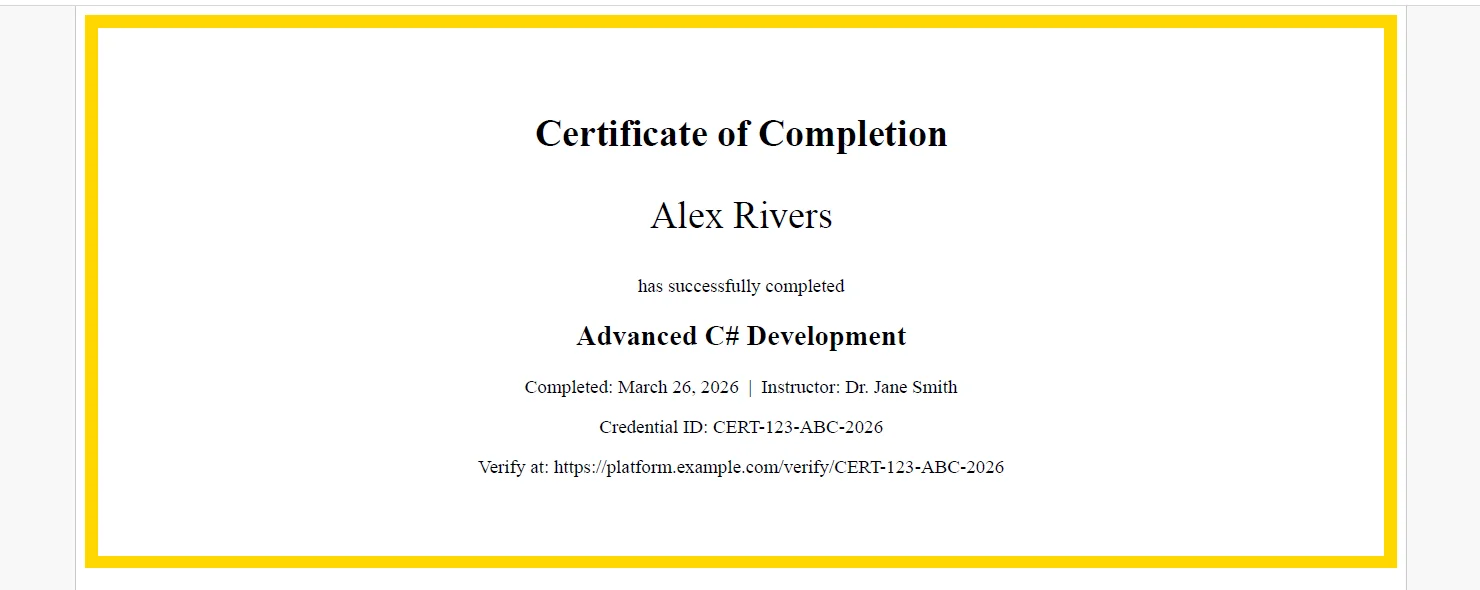
Zero margins allow the [CSS](/how-to/html-to-pdf-responsive-css/) to control all spacing and border positioning precisely, which is important for certificates where the decorative border needs to reach the edge of the page.
[[t:(Reference your certificate stylesheet with a <link /> tag and set a BaseUrlPath as the second parameter on RenderHtmlAsPdf() so IronPDF resolves the CSS file, fonts, and logo relative to the template's directory — avoiding base64 encoding everything inline.)]]
### 4. PDF Stored and Delivered to the Learner
```csharp
using System.Net.Mail;
using System.IO;

// Save to document storage keyed by learner and course
string storagePath = $"certificates/{learner.Id}/{course.Id}/{credentialId}.pdf";
certificate.SaveAs(storagePath);

// Email to learner
using var stream = new MemoryStream(certificate.BinaryData);
using var attachment = new Attachment(stream,
    $"{course.Title}-Certificate.pdf", "application/pdf");

var message = new MailMessage("academy@example.com", learner.Email)
{
    Subject = $"Congrats! Your Certificate for {course.Title}",
    Body = $"Hi {learner.FullName}, your certificate is attached."
};

message.Attachments.Add(attachment);
using var smtp = new SmtpClient("smtp.yourprovider.com");

await smtp.SendMailAsync(message);
```
#### Example Email with Attached Certificate
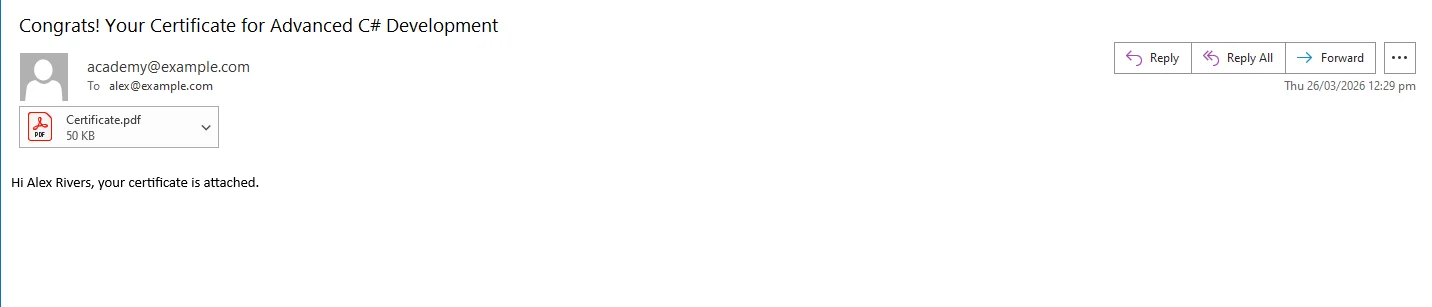
The same file path stored in the database gives the learner's dashboard a permanent download link for re-access at any time, years after completion, for a job application or credential renewal.
## Real-World Benefits
**Instant delivery.** The certificate is generated and emailed within seconds of the completion event firing. There is no batch job to wait for, no queue to monitor, and no manual step between finishing a course and holding the credential.
**Scale without overhead.** IronPDF renders each certificate in milliseconds. A MOOC platform processing thousands of completions on a busy weekend runs the same generation code in parallel across core, no design team involvement, no per-document cost scaling with enrollment.
**Brand consistency.** Every certificate the platform issues carries the same logo, typography, border design, and layout, regardless of which developer deployed the code, which instructor delivered the course, or which month the completion occurred. Template changes apply forward automatically.
**Credential verification.** The unique credential ID embedded in each certificate enables a public verification URL that employers and institutions can check independently. This is the difference between a decorative document and a verifiable credential.
**Template flexibility.** Different HTML and CSS files can serve different certificate types, a standard course completion layout, an advanced certification format with expiration dates, a co-branded template for partner institutions - all rendered through the same generation pipeline with no additional infrastructure.
**No per-certificate costs.** The rendering runs in-process. There are no API calls to an external certificate vendor, no usage metering, and no cost model that penalizes the platform for high enrollment months.
## Closing
Automating certificate generation removes a manual bottleneck that grows harder to justify as enrollment scales. The learner gets a professional document within seconds, the platform gets a permanent archivable record, and the team maintains one HTML template instead of a design tool workflow nobody owns cleanly.
The generation pipeline - completion event, template population, PDF render, email delivery, dashboard storage - is straightforward to wire into an existing .NET application. The IronPDF library handles the full lifecycle of PDF file generation in C# at [ironpdf.com](http://ironpdf.com), from rendering HTML templates to saving, streaming, and manipulating the output. If you're building a certificate system or replacing a manual process, the [free 30-day trial](trial-license) gives you enough time to build and test the complete pipeline against your own course data and templates. IronPDF can be integrated into your .NET projects in minutes through the NuGet Package Manager Console in Visual Studio.
For a small cohort, opening a Canva template and exporting a personalized certificate for each learner is manageable. At a few hundred completions per week, it becomes a part-time job. At thousands per month, it breaks entirely.
Manual certificate workflows introduce exactly the problems they're meant to avoid: a learner's name misspelled because someone copy-pasted from a spreadsheet, a certificate issued with last semester's date because a template wasn't updated, formatting drift when different staff members handle different cohorts. Batch-export plugins help at the margins but rarely support the level of customization a brand actually requires.
LMS plugins for certificate generation are typically an afterthought, rigid templates, limited font control, no support for co-branding when a course is delivered in partnership with an external institution. Third-party certificate APIs solve the customization problem but add per-document costs that scale directly against enrollment growth, plus an external dependency that sits in the critical path of the completion workflow.
The scenarios vary but the problem is consistent: a MOOC platform issuing thousands of completions each month, a corporate training system generating compliance certificates after employees pass mandatory modules, a professional certification body producing credentialed exam results with expiration dates, a coding bootcamp distributing graduation documents per cohort and curriculum track. All of them need a generation pipeline that runs automatically, produces a polished document, and requires no manual intervention.
The Solution: Event-Driven Certificate Generation With IronPDF .NET Library
IronPDF lets .NET applications generate branded PDF certificates from HTML and CSS templates the moment a course completion event fires. The learner's name, course title, completion date, instructor name, and a unique credential ID fill the template, ChromePdfRenderer produces the PDF, and the application delivers it by email and stores it for download in the learner's dashboard.
There are no design tool exports, no manual queue, and no third-party certificate API adding latency and per-document cost to the completion flow. IronPDF runs inside the existing .NET application, one C# NuGet library for PDF processing, no external processes, and the HTML template is owned and versioned by your team.
How It Works in Practice: Generate Multiple PDF Documents
1. Completion Event Triggers Generation
The pipeline starts when a learner finishes all required modules, passes a final assessment, or an instructor marks a course complete. The completion handler retrieves everything the certificate needs from the database: full name, email, course title, completion date, final score if applicable, instructor name, and a generated credential ID that will serve as the permanent verification key.
The credential ID is written to the database immediately, linking the learner and course before the PDF is generated. This ensures the verification record exists even if the storage or email step fails and needs to be retried.
2. HTML File Template Defines the Certificate Layout
The template is a standard HTML file with CSS controlling every visual detail, border design, background texture, institution logo, decorative rules, and the typographic hierarchy that makes a certificate feel official. The learner's name is typically the largest element on the page, rendered in a display font loaded via @font-face and embedded as a base64 data URI for consistent rendering across deployment environments.
A verification URL printed near the credential ID allows employers and institutions to confirm authenticity by querying the platform's public verification endpoint.
3. Convert HTML to PDF with ChromePdfRenderer to Produce the Landscape PDF
Certificates are conventionally landscape-oriented. IronPDF supports custom page dimensions directly through rendering options, as seen in the following code:
Imports IronPdf
Imports IronPdf.Rendering
Dim renderer As New ChromePdfRenderer()
renderer.RenderingOptions.PaperSize = PdfPaperSize.A4
renderer.RenderingOptions.PaperOrientation = PdfPaperOrientation.Landscape
renderer.RenderingOptions.MarginTop = 0
renderer.RenderingOptions.MarginBottom = 0
renderer.RenderingOptions.MarginLeft = 0
renderer.RenderingOptions.MarginRight = 0
Dim html As String = $"
<div class='certificate'>
<h1>Certificate of Completion</h1>
<p class='learner-name'>{learner.FullName}</p>
<p>has successfully completed</p>
<h2>{course.Title}</h2>
<p>Completed: {completion.Date:MMMM d, yyyy} | Instructor: {course.InstructorName}</p>
<p class='credential'>Credential ID: {credentialId}</p>
<p class='verify'>Verify at: https://platform.example.com/verify/{credentialId}</p>
</div>"
Dim certificate As PdfDocument = renderer.RenderHtmlAsPdf(html)
Example Output Certificate
Zero margins allow the CSS to control all spacing and border positioning precisely, which is important for certificates where the decorative border needs to reach the edge of the page.
Tips: Reference your certificate stylesheet with a tag and set a BaseUrlPath as the second parameter on RenderHtmlAsPdf() so IronPDF resolves the CSS file, fonts, and logo relative to the template's directory — avoiding base64 encoding everything inline.
4. PDF Stored and Delivered to the Learner
using System.Net.Mail;using System.IO;// Save to document storage keyed by learner and coursestring storagePath = $"certificates/{learner.Id}/{course.Id}/{credentialId}.pdf";certificate.SaveAs(storagePath);// Email to learnerusing var stream = new MemoryStream(certificate.BinaryData);using var attachment = new Attachment(stream, $"{course.Title}-Certificate.pdf", "application/pdf");var message = new MailMessage("academy@example.com", learner.Email){Subject = $"Congrats! Your Certificate for {course.Title}",Body = $"Hi {learner.FullName}, your certificate is attached."};message.Attachments.Add(attachment);using var smtp = new SmtpClient("smtp.yourprovider.com");await smtp.SendMailAsync(message);
using System.Net.Mail;
using System.IO;

// Save to document storage keyed by learner and course
string storagePath = $"certificates/{learner.Id}/{course.Id}/{credentialId}.pdf";
certificate.SaveAs(storagePath);

// Email to learner
using var stream = new MemoryStream(certificate.BinaryData);
using var attachment = new Attachment(stream,
    $"{course.Title}-Certificate.pdf", "application/pdf");

var message = new MailMessage("academy@example.com", learner.Email)
{
    Subject = $"Congrats! Your Certificate for {course.Title}",
    Body = $"Hi {learner.FullName}, your certificate is attached."
};

message.Attachments.Add(attachment);
using var smtp = new SmtpClient("smtp.yourprovider.com");

await smtp.SendMailAsync(message);
ImportsSystem.Net.MailImportsSystem.IO' Save to document storage keyed by learner and courseDim storagePath AsString = $"certificates/{learner.Id}/{course.Id}/{credentialId}.pdf"certificate.SaveAs(storagePath)' Email to learnerUsing stream As New MemoryStream(certificate.BinaryData)Using attachment As New Attachment(stream, $"{course.Title}-Certificate.pdf", "application/pdf") Dim message As New MailMessage("academy@example.com", learner.Email) With { .Subject = $"Congrats! Your Certificate for {course.Title}", .Body = $"Hi {learner.FullName}, your certificate is attached." } message.Attachments.Add(attachment)Using smtp As New SmtpClient("smtp.yourprovider.com")Await smtp.SendMailAsync(message)EndUsingEndUsingEndUsing
Imports System.Net.Mail
Imports System.IO

' Save to document storage keyed by learner and course
Dim storagePath As String = $"certificates/{learner.Id}/{course.Id}/{credentialId}.pdf"
certificate.SaveAs(storagePath)

' Email to learner
Using stream As New MemoryStream(certificate.BinaryData)
    Using attachment As New Attachment(stream, $"{course.Title}-Certificate.pdf", "application/pdf")
        Dim message As New MailMessage("academy@example.com", learner.Email) With {
            .Subject = $"Congrats! Your Certificate for {course.Title}",
            .Body = $"Hi {learner.FullName}, your certificate is attached."
        }

        message.Attachments.Add(attachment)
        Using smtp As New SmtpClient("smtp.yourprovider.com")
            Await smtp.SendMailAsync(message)
        End Using
    End Using
End Using
Example Email with Attached Certificate
The same file path stored in the database gives the learner's dashboard a permanent download link for re-access at any time, years after completion, for a job application or credential renewal.
Real-World Benefits
Instant delivery. The certificate is generated and emailed within seconds of the completion event firing. There is no batch job to wait for, no queue to monitor, and no manual step between finishing a course and holding the credential.
Scale without overhead. IronPDF renders each certificate in milliseconds. A MOOC platform processing thousands of completions on a busy weekend runs the same generation code in parallel across core, no design team involvement, no per-document cost scaling with enrollment.
Brand consistency. Every certificate the platform issues carries the same logo, typography, border design, and layout, regardless of which developer deployed the code, which instructor delivered the course, or which month the completion occurred. Template changes apply forward automatically.
Credential verification. The unique credential ID embedded in each certificate enables a public verification URL that employers and institutions can check independently. This is the difference between a decorative document and a verifiable credential.
Template flexibility. Different HTML and CSS files can serve different certificate types, a standard course completion layout, an advanced certification format with expiration dates, a co-branded template for partner institutions - all rendered through the same generation pipeline with no additional infrastructure.
No per-certificate costs. The rendering runs in-process. There are no API calls to an external certificate vendor, no usage metering, and no cost model that penalizes the platform for high enrollment months.
Closing
Automating certificate generation removes a manual bottleneck that grows harder to justify as enrollment scales. The learner gets a professional document within seconds, the platform gets a permanent archivable record, and the team maintains one HTML template instead of a design tool workflow nobody owns cleanly.
The generation pipeline - completion event, template population, PDF render, email delivery, dashboard storage - is straightforward to wire into an existing .NET application. The IronPDF library handles the full lifecycle of PDF file generation in C# at ironpdf.com, from rendering HTML templates to saving, streaming, and manipulating the output. If you're building a certificate system or replacing a manual process, the free 30-day trial gives you enough time to build and test the complete pipeline against your own course data and templates. IronPDF can be integrated into your .NET projects in minutes through the NuGet Package Manager Console in Visual Studio.
Curtis Chau holds a Bachelor’s degree in Computer Science (Carleton University) and specializes in front-end development with expertise in Node.js, TypeScript, JavaScript, and React. Passionate about crafting intuitive and aesthetically pleasing user interfaces, Curtis enjoys working with modern frameworks and creating well-structured, visually appealing manuals.





 For a small cohort, opening a Canva template and exporting a personalized certificate for each learner is manageable. At a few hundred completions per week, it becomes a part-time job. At thousands per month, it breaks entirely.
 Zero margins allow the
  The same file path stored in the database gives the learner's dashboard a permanent download link for re-access at any time, years after completion, for a job application or credential renewal.