The Problem With Distributed PDF Generation
 When every team that needs a PDF export builds its own implementation, the codebase ends up with six versions of the same rendering logic, each slightly different, each maintained by a different team with different priorities. A BI dashboard has its own export controller. The admin panel has another. The finance system has a third built around a different library from three years ago. None of them produce documents that look like they came from the same company.
The coupling problem is as costly as the duplication. When a PDF template needs to change, a legal disclaimer updated, a logo refreshed, a column added to a standard report, that change has to be deployed to every application that embeds its own rendering logic. A template that should take an afternoon to update becomes a multi-team, multi-sprint coordination effort.
Alternatives tend to introduce different problems. Piping JSON through a CLI tool works until it doesn't, and debugging a shell script failing silently in production is a miserable experience. External document generation APIs solve the isolation problem but add per-call costs and a network round-trip for what should be an internal capability. Ops teams requesting ad-hoc reports still wait for a developer to write a custom export, because there's no general-purpose endpoint to call.
Real scenarios: a BI backend that needs to offer PDF export for any chart or table without each dashboard owning its own renderer, a finance system that calls an internal service to render month-end summaries before distribution, a QA platform generating PDF test-run reports from CI pipeline JSON output, an ops team that wants a single endpoint to turn any structured payload into a formatted report.
The Solution: A Dedicated HTML to PDF Rendering Microservice
IronPDF acts as the rendering engine inside a lightweight .NET microservice that accepts JSON via HTTP POST, maps the data onto an HTML and CSS template, and returns a finished PDF in the response body. Any internal system such as a dashboard backend, a scheduler, a CLI tool, or another microservice, sends a request with a template name and a JSON payload, and gets back a PDF binary.
Template changes deploy once to the reporting service and take effect for every consumer immediately, no coordinated redeploys across teams. There are no per-call SaaS fees, no duplicated rendering logic scattered across applications, and no library version mismatches between teams. The service runs as a containerized .NET application, one NuGet package, no external processes.
How It Works in Practice
1. A Single POST Endpoint Accepts Template Name and Data
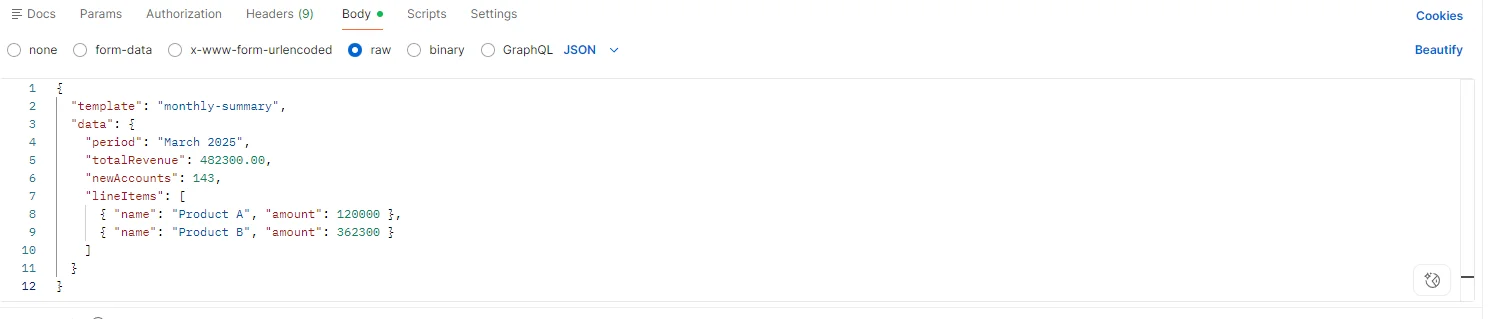
The service exposes one endpoint: POST /api/reports/generate. The request body carries a template identifier and a JSON data payload. The template identifier maps to an HTML file maintained by the team that owns the report design, versioned alongside the service in source control.
{
  "template": "monthly-summary",
  "data": {
    "period": "March 2025",
    "totalRevenue": 482300.00,
    "newAccounts": 143,
    "lineItems": [...]
  }
}
{
  "template": "monthly-summary",
  "data": {
    "period": "March 2025",
    "totalRevenue": 482300.00,
    "newAccounts": 143,
    "lineItems": [...]
  }
}
JSON
The service is the single source of truth for every PDF format the organization produces. Adding a new report type means adding a new HTML template and a new template identifier, no changes required in any consuming system.
Example: Testing our Endpoint in Postman with JSON Data
2. Template Is Populated and Rendered in C# PDF
On receiving the request, the service loads the HTML template, deserializes the JSON payload into a typed or dynamic model, and populates the template with the data. For structured reports with consistent schemas, a typed deserialization step gives compile-time safety. For ad-hoc payloads where the schema varies by template, a JsonDocument or dynamic binding works with string interpolation or a lightweight library like Scriban.
using IronPdf;

using System.Text.Json;

app.MapPost("/api/reports/generate", async (HttpContext ctx) =>
{
    using var doc = await JsonDocument.ParseAsync(ctx.Request.Body);
    string templateId = doc.RootElement.GetProperty("template").GetString();
    var data = doc.RootElement.GetProperty("data");

    string templateHtml = await File.ReadAllTextAsync($"Templates/{templateId}.html");

    // Populate template with data values via string replacement or templating engine
    string html = templateHtml
        .Replace("{{period}}", data.GetProperty("period").GetString())
        .Replace("{{totalRevenue}}", data.GetProperty("totalRevenue").GetDecimal().ToString("C"))
        .Replace("{{newAccounts}}", data.GetProperty("newAccounts").GetInt32().ToString());

    var renderer = new ChromePdfRenderer();

    renderer.RenderingOptions.PaperSize = IronPdf.Rendering.PdfPaperSize.A4;

    renderer.RenderingOptions.MarginTop = 20;

    renderer.RenderingOptions.MarginBottom = 20;

    PdfDocument pdf = renderer.RenderHtmlAsPdf(html);

    ctx.Response.ContentType = "application/pdf";

    ctx.Response.Headers["Content-Disposition"] = $"attachment; filename=\"{templateId}-report.pdf\"";

    await ctx.Response.Body.WriteAsync(pdf.BinaryData);

});
using IronPdf;

using System.Text.Json;

app.MapPost("/api/reports/generate", async (HttpContext ctx) =>
{
    using var doc = await JsonDocument.ParseAsync(ctx.Request.Body);
    string templateId = doc.RootElement.GetProperty("template").GetString();
    var data = doc.RootElement.GetProperty("data");

    string templateHtml = await File.ReadAllTextAsync($"Templates/{templateId}.html");

    // Populate template with data values via string replacement or templating engine
    string html = templateHtml
        .Replace("{{period}}", data.GetProperty("period").GetString())
        .Replace("{{totalRevenue}}", data.GetProperty("totalRevenue").GetDecimal().ToString("C"))
        .Replace("{{newAccounts}}", data.GetProperty("newAccounts").GetInt32().ToString());

    var renderer = new ChromePdfRenderer();

    renderer.RenderingOptions.PaperSize = IronPdf.Rendering.PdfPaperSize.A4;

    renderer.RenderingOptions.MarginTop = 20;

    renderer.RenderingOptions.MarginBottom = 20;

    PdfDocument pdf = renderer.RenderHtmlAsPdf(html);

    ctx.Response.ContentType = "application/pdf";

    ctx.Response.Headers["Content-Disposition"] = $"attachment; filename=\"{templateId}-report.pdf\"";

    await ctx.Response.Body.WriteAsync(pdf.BinaryData);

});
Imports IronPdf
Imports System.Text.Json
app.MapPost("/api/reports/generate", Async Function(ctx As HttpContext) As Task
Using doc = Await JsonDocument.ParseAsync(ctx.Request.Body)
Dim templateId As String = doc.RootElement.GetProperty("template").GetString()
Dim data = doc.RootElement.GetProperty("data")
Dim templateHtml As String = Await File.ReadAllTextAsync($"Templates/{templateId}.html")
' Populate template with data values via string replacement or templating engine
Dim html As String = templateHtml _
.Replace("{{period}}", data.GetProperty("period").GetString()) _
.Replace("{{totalRevenue}}", data.GetProperty("totalRevenue").GetDecimal().ToString("C")) _
.Replace("{{newAccounts}}", data.GetProperty("newAccounts").GetInt32().ToString())
Dim renderer As New ChromePdfRenderer()
renderer.RenderingOptions.PaperSize = IronPdf.Rendering.PdfPaperSize.A4
renderer.RenderingOptions.MarginTop = 20
renderer.RenderingOptions.MarginBottom = 20
Dim pdf As PdfDocument = renderer.RenderHtmlAsPdf(html)
ctx.Response.ContentType = "application/pdf"
ctx.Response.Headers("Content-Disposition") = $"attachment; filename=""{templateId}-report.pdf"""
Await ctx.Response.Body.WriteAsync(pdf.BinaryData)
End Using
End Function)
Imports IronPdf
Imports System.Text.Json

app.MapPost("/api/reports/generate", Async Function(ctx As HttpContext) As Task
    Using doc = Await JsonDocument.ParseAsync(ctx.Request.Body)
        Dim templateId As String = doc.RootElement.GetProperty("template").GetString()
        Dim data = doc.RootElement.GetProperty("data")

        Dim templateHtml As String = Await File.ReadAllTextAsync($"Templates/{templateId}.html")

        ' Populate template with data values via string replacement or templating engine
        Dim html As String = templateHtml _
            .Replace("{{period}}", data.GetProperty("period").GetString()) _
            .Replace("{{totalRevenue}}", data.GetProperty("totalRevenue").GetDecimal().ToString("C")) _
            .Replace("{{newAccounts}}", data.GetProperty("newAccounts").GetInt32().ToString())

        Dim renderer As New ChromePdfRenderer()

        renderer.RenderingOptions.PaperSize = IronPdf.Rendering.PdfPaperSize.A4

        renderer.RenderingOptions.MarginTop = 20

        renderer.RenderingOptions.MarginBottom = 20

        Dim pdf As PdfDocument = renderer.RenderHtmlAsPdf(html)

        ctx.Response.ContentType = "application/pdf"

        ctx.Response.Headers("Content-Disposition") = $"attachment; filename=""{templateId}-report.pdf"""

        Await ctx.Response.Body.WriteAsync(pdf.BinaryData)
    End Using
End Function)
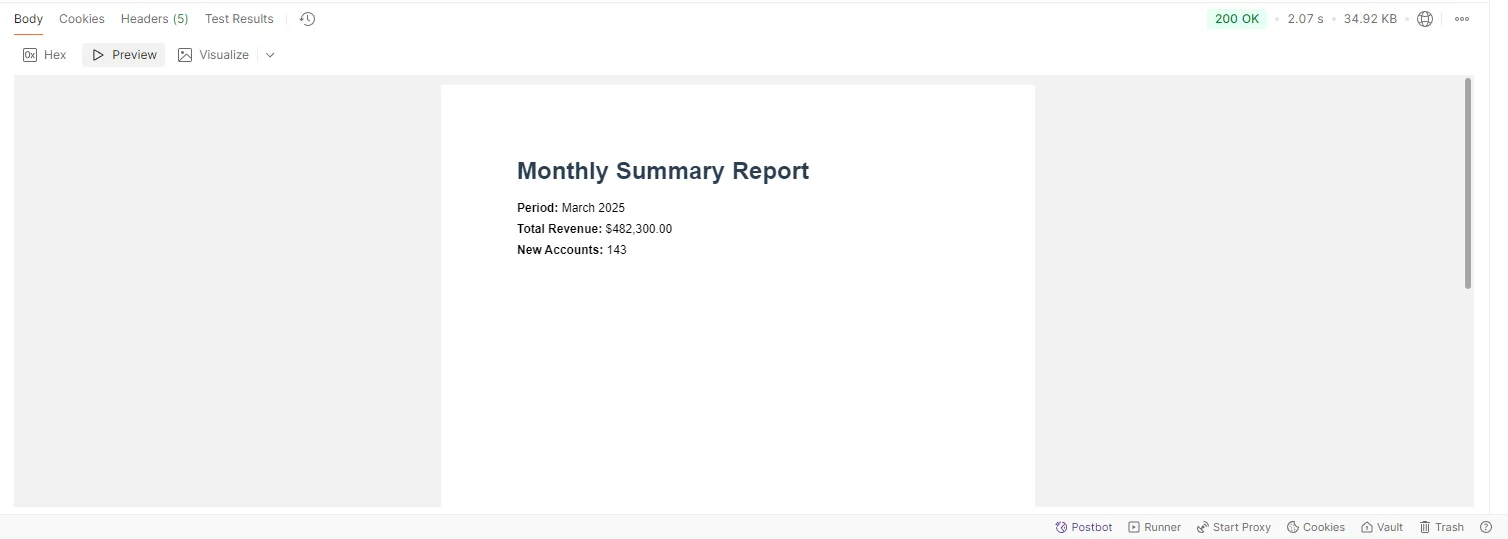
Output PDF Document
3. Consuming Systems Call the Service Over HTTP
Any internal system that can make an HTTP POST can generate a PDF without embedding any rendering logic or managing any library dependency:
using System.Net.Http;
using System.Text;
using System.Text.Json;

var payload = new
{
    template = "monthly-summary",
    data = new { period = "March 2025", totalRevenue = 482300.00, newAccounts = 143 }
};

using var client = new HttpClient { BaseAddress = new Uri("http://pdf-service.internal") };

var content = new StringContent(JsonSerializer.Serialize(payload), Encoding.UTF8, "application/json");

using var response = await client.PostAsync("/api/reports/generate", content);

response.EnsureSuccessStatusCode();

byte[] pdfBytes = await response.Content.ReadAsByteArrayAsync();

// Stream to browser, save to storage, attach to email, etc.
using System.Net.Http;
using System.Text;
using System.Text.Json;

var payload = new
{
    template = "monthly-summary",
    data = new { period = "March 2025", totalRevenue = 482300.00, newAccounts = 143 }
};

using var client = new HttpClient { BaseAddress = new Uri("http://pdf-service.internal") };

var content = new StringContent(JsonSerializer.Serialize(payload), Encoding.UTF8, "application/json");

using var response = await client.PostAsync("/api/reports/generate", content);

response.EnsureSuccessStatusCode();

byte[] pdfBytes = await response.Content.ReadAsByteArrayAsync();

// Stream to browser, save to storage, attach to email, etc.
Imports System.Net.Http
Imports System.Text
Imports System.Text.Json
Dim payload = New With {
.template = "monthly-summary",
.data = New With {.period = "March 2025", .totalRevenue = 482300.0, .newAccounts = 143}
}
Using client As New HttpClient With {.BaseAddress = New Uri("http://pdf-service.internal")}
Dim content As New StringContent(JsonSerializer.Serialize(payload), Encoding.UTF8, "application/json")
Using response As HttpResponseMessage = Await client.PostAsync("/api/reports/generate", content)
response.EnsureSuccessStatusCode()
Dim pdfBytes As Byte() = Await response.Content.ReadAsByteArrayAsync()
' Stream to browser, save to storage, attach to email, etc.
End Using
End Using
Imports System.Net.Http
Imports System.Text
Imports System.Text.Json

Dim payload = New With {
    .template = "monthly-summary",
    .data = New With {.period = "March 2025", .totalRevenue = 482300.0, .newAccounts = 143}
}

Using client As New HttpClient With {.BaseAddress = New Uri("http://pdf-service.internal")}
    Dim content As New StringContent(JsonSerializer.Serialize(payload), Encoding.UTF8, "application/json")

    Using response As HttpResponseMessage = Await client.PostAsync("/api/reports/generate", content)
        response.EnsureSuccessStatusCode()

        Dim pdfBytes As Byte() = Await response.Content.ReadAsByteArrayAsync()

        ' Stream to browser, save to storage, attach to email, etc.
    End Using
End Using
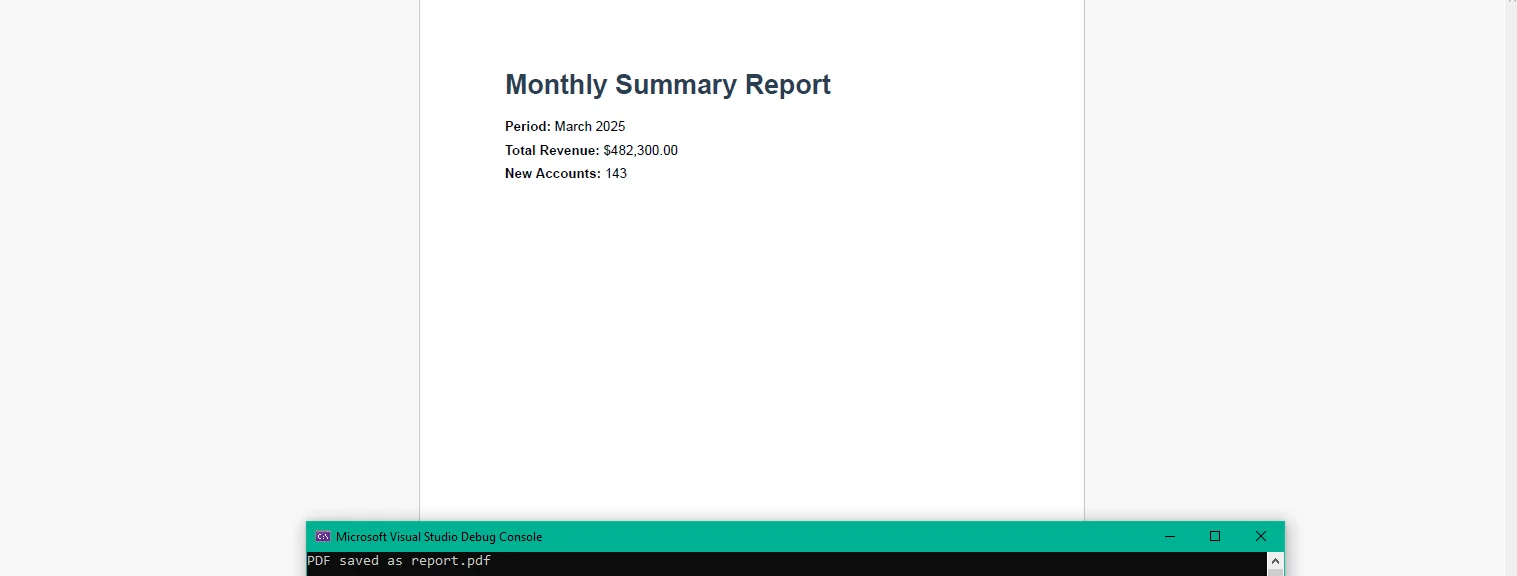
This code runs in any consuming system (console app, backend service, or microservice), not inside the PDF service itself. The calling system receives raw PDF bytes it can stream to a user's browser, write to blob storage, or attach to an outbound email, whatever its context requires. It has no knowledge of how the PDF was produced.
Output: Report Generated with Console app + your API
4. The Service Is Stateless and Observable
The service holds no data between requests. Each render is independent, which means the service scales horizontally behind a load balancer or in a Kubernetes deployment without coordination. A spike in report demand like month-end runs or bulk exports triggered by a scheduled job, is handled by adding replicas rather than changing application logic.
Structured logging captures render time, template identifier, payload size, and success or failure for every request. Centralized metrics surface render latency trends, error rates by template, and volume patterns in one place, rather than scattered across the logs of every consuming application.
Real-World Benefits
Centralized rendering. One service owns PDF generation across the organization. Template updates deploy once and every consumer gets the change without touching their own codebase or coordinating a release.
Stateless scalability. No shared state between requests means the service scales horizontally to meet demand, add replicas, remove them when load drops. No sticky sessions, no distributed cache required.
Consistent output. Every PDF produced by the service uses the same rendering engine, the same templates, and the same configuration. There is no divergence between what the finance system produces and what the dashboard exports.
Fast integration. Any system that can make an HTTP POST can create PDF files. There is no SDK to embed on the consumer side, no library version to manage, and no import to add. The contract is JSON in, PDF out.
Observability. Every render is logged and measured in one place. Response time percentiles, error rates by template, and daily volume are visible in a single dashboard rather than scattered across multiple applications.
No per-call costs. The service runs in-process inside a container. There is no third-party API metering and no cost model that scales with report volume, generating 100 or 100,000 reports costs the same in infrastructure terms.
Closing
Centralizing PDF generation into a dedicated microservice trades a distributed maintenance problem for a simple one: one service, one rendering engine, one place to update templates. Every internal system that produces PDF files benefits from the change without doing any work themselves.
The service itself is a minimal .NET application, an endpoint, a template loader, and a render call. IronPDF handles the full lifecycle of PDF generation in C# at ironpdf.com, from rendering HTML templates to saving, streaming, and manipulating documents. If you're ready to build and validate the service against your own internal APIs, start your free 30-day trial, it's enough time to stand up the service, connect it to your data sources, and confirm the output before rolling it out to your team.























