The Problem With Case Records That Live Only in the Ticketing System
 When a regulatory inquiry arrives or a customer dispute escalates to legal, the first thing asked for is the complete communication record. What actually exists is a web UI that requires a ticketing system login, a thread spread across dozens of paginated messages, and internal notes mixed in with customer-facing replies. None of that is submittable to a regulator or admissible in a dispute.
The manual workarounds are as slow as they are error-prone. A support manager screenshots each page of a thread and compiles them into a Word document. An agent copies and pastes messages into a chronologically ordered email. A developer exports raw JSON from the ticketing API and hands it to a lawyer who cannot interpret it. Long-running cases: a six-month billing dispute, a warranty claim with twenty message exchanges across three agents, are nearly impossible to reconstruct completely by hand without misordering entries or dropping attachments.
The compliance dimension makes the stakes real. A financial services firm responding to a regulatory inquiry needs every client communication in order, timestamped, immutable. A SaaS company in a contract dispute needs to demonstrate what was said and when. A healthcare helpdesk under audit needs patient interaction logs in a format the auditors can read without a system walkthrough. An e-commerce platform fulfilling a GDPR data subject access request needs every support conversation exported for that customer, all of them, not just the ones someone remembered to pull.
The ticketing system's web UI is not an archival format. It needs to become one.
IronPDF lets .NET applications render a complete support case history: every message, internal note, status change, and timestamp, into a formatted, self-contained PDF transcript. The application queries the ticketing database for the full case thread, populates a new or existing HTML file template that presents the conversation in chronological order with clear sender labels and timestamps, and ChromePdfRenderer produces the PDF.
The result is a document that reads like a printed conversation log, interpretable by a lawyer, an auditor, or a customer without needing access to the ticketing system or explanation of the data structure. No screenshots, no copy-pasting, no raw data dumps. The rendering runs inside the existing .NET application as a single NuGet package with no external processes.
How It Works in Practice
1. A Trigger Initiates the Export
The export can be initiated three ways. A legal team member clicks "Export Case as PDF format" in an internal admin tool, referencing a specific case ID. A compliance workflow automatically archives closed cases after a configured retention period. A data subject access request triggers a bulk export of all cases linked to a specific customer account.
All three paths hit the same generation logic, the trigger mechanism only determines which case IDs feed into it.
2. Full Case Record Queried From the Database
The application queries for the complete case record: case ID, subject, priority, status history, creation and resolution dates, and the full message thread. The thread includes customer messages, agent replies, internal notes, and system-generated entries for status transitions, ordered by timestamp ascending so the transcript reads as a chronological conversation.
For external exports (customer GDPR requests, regulatory submissions), internal notes are excluded at the query level before any rendering occurs. For legal discovery and internal review, internal notes are included with a visual label distinguishing them from customer-facing content.
3. HTML to PDF Conversion with ChromePdfRenderer
using IronPdf;
var renderer = new ChromePdfRenderer();
renderer.RenderingOptions.MarginTop = 25;
renderer.RenderingOptions.MarginBottom = 25;
var messageHtml = string.Concat(caseRecord.Messages.Select(m => $@"
<div class='message {m.SenderRole.ToLower()}' style='
background:{(m.SenderRole == "Agent" ? "#f0f4ff" : m.SenderRole == "Internal" ? "#fff8e1" : "#fff")};
border-left: 4px solid {(m.SenderRole == "Internal" ? "#f59e0b" : "#3b82f6")};
margin-bottom:12px; padding:10px;'>
<p style='margin:0; font-size:11px; color:#555;'>
<strong>{m.SenderName}</strong> ({m.SenderRole}) — {m.SentAt:f}
</p>
<p style='margin-top:6px;'>{m.Body}</p>
</div>"));
string html = $@"
<h1 style='font-size:16px;'>Case #{caseRecord.CaseId}: {caseRecord.Subject}</h1>
<p>Status: {caseRecord.Status} | Priority: {caseRecord.Priority}</p>
<p>Opened: {caseRecord.CreatedAt:f} | Resolved: {caseRecord.ResolvedAt:f}</p>
<hr/>
{messageHtml}";
PdfDocument transcript = renderer.RenderHtmlAsPdf(html);
transcript.SaveAs($"transcripts/case-{caseRecord.CaseId}.pdf");
using IronPdf;
var renderer = new ChromePdfRenderer();
renderer.RenderingOptions.MarginTop = 25;
renderer.RenderingOptions.MarginBottom = 25;
var messageHtml = string.Concat(caseRecord.Messages.Select(m => $@"
<div class='message {m.SenderRole.ToLower()}' style='
background:{(m.SenderRole == "Agent" ? "#f0f4ff" : m.SenderRole == "Internal" ? "#fff8e1" : "#fff")};
border-left: 4px solid {(m.SenderRole == "Internal" ? "#f59e0b" : "#3b82f6")};
margin-bottom:12px; padding:10px;'>
<p style='margin:0; font-size:11px; color:#555;'>
<strong>{m.SenderName}</strong> ({m.SenderRole}) — {m.SentAt:f}
</p>
<p style='margin-top:6px;'>{m.Body}</p>
</div>"));
string html = $@"
<h1 style='font-size:16px;'>Case #{caseRecord.CaseId}: {caseRecord.Subject}</h1>
<p>Status: {caseRecord.Status} | Priority: {caseRecord.Priority}</p>
<p>Opened: {caseRecord.CreatedAt:f} | Resolved: {caseRecord.ResolvedAt:f}</p>
<hr/>
{messageHtml}";
PdfDocument transcript = renderer.RenderHtmlAsPdf(html);
transcript.SaveAs($"transcripts/case-{caseRecord.CaseId}.pdf");Imports IronPdf
Dim renderer As New ChromePdfRenderer()
renderer.RenderingOptions.MarginTop = 25
renderer.RenderingOptions.MarginBottom = 25
Dim messageHtml = String.Concat(caseRecord.Messages.Select(Function(m) $"
<div class='message {m.SenderRole.ToLower()}' style='
background:{If(m.SenderRole = ""Agent"", ""#f0f4ff"", If(m.SenderRole = ""Internal"", ""#fff8e1"", ""#fff""))};
border-left: 4px solid {If(m.SenderRole = ""Internal"", ""#f59e0b"", ""#3b82f6"")};
margin-bottom:12px; padding:10px;'>
<p style='margin:0; font-size:11px; color:#555;'>
<strong>{m.SenderName}</strong> ({m.SenderRole}) — {m.SentAt:f}
</p>
<p style='margin-top:6px;'>{m.Body}</p>
</div>"))
Dim html As String = $"
<h1 style='font-size:16px;'>Case #{caseRecord.CaseId}: {caseRecord.Subject}</h1>
<p>Status: {caseRecord.Status} | Priority: {caseRecord.Priority}</p>
<p>Opened: {caseRecord.CreatedAt:f} | Resolved: {caseRecord.ResolvedAt:f}</p>
<hr/>
{messageHtml}"
Dim transcript As PdfDocument = renderer.RenderHtmlAsPdf(html)
transcript.SaveAs($"transcripts/case-{caseRecord.CaseId}.pdf")
Imports IronPdf
Dim renderer As New ChromePdfRenderer()
renderer.RenderingOptions.MarginTop = 25
renderer.RenderingOptions.MarginBottom = 25
Dim messageHtml = String.Concat(caseRecord.Messages.Select(Function(m) $"
<div class='message {m.SenderRole.ToLower()}' style='
background:{If(m.SenderRole = ""Agent"", ""#f0f4ff"", If(m.SenderRole = ""Internal"", ""#fff8e1"", ""#fff""))};
border-left: 4px solid {If(m.SenderRole = ""Internal"", ""#f59e0b"", ""#3b82f6"")};
margin-bottom:12px; padding:10px;'>
<p style='margin:0; font-size:11px; color:#555;'>
<strong>{m.SenderName}</strong> ({m.SenderRole}) — {m.SentAt:f}
</p>
<p style='margin-top:6px;'>{m.Body}</p>
</div>"))
Dim html As String = $"
<h1 style='font-size:16px;'>Case #{caseRecord.CaseId}: {caseRecord.Subject}</h1>
<p>Status: {caseRecord.Status} | Priority: {caseRecord.Priority}</p>
<p>Opened: {caseRecord.CreatedAt:f} | Resolved: {caseRecord.ResolvedAt:f}</p>
<hr/>
{messageHtml}"
Dim transcript As PdfDocument = renderer.RenderHtmlAsPdf(html)
transcript.SaveAs($"transcripts/case-{caseRecord.CaseId}.pdf")
IronPDF Example Output PDF Document
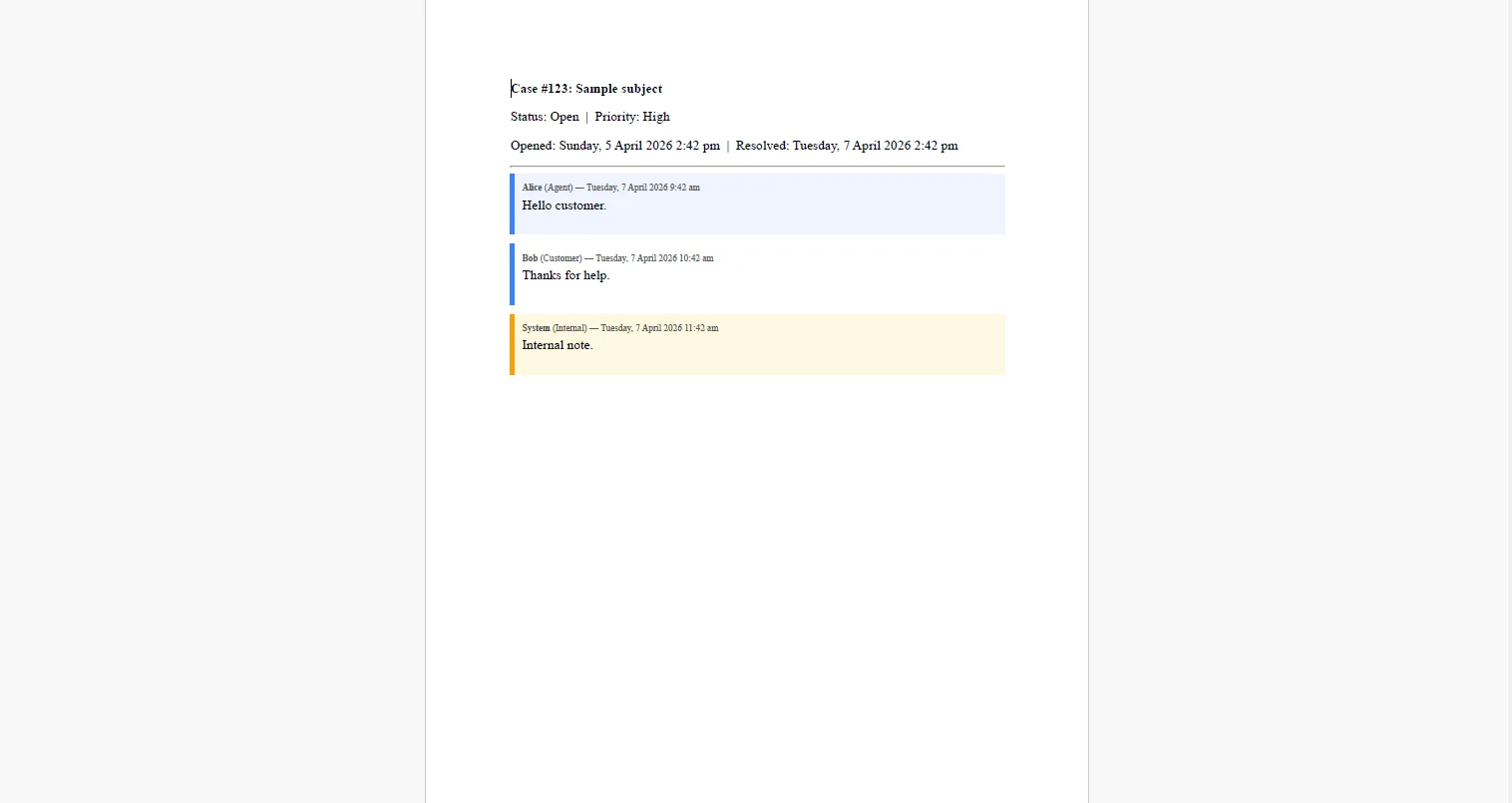 Long cases with many messages flow naturally across multiple pages, there is no page limit, no message count threshold that breaks the layout.
4. Header and Footer Establish Provenance on Every Page
renderer.RenderingOptions.HtmlHeader = new HtmlHeaderFooter
{
    HtmlFragment = $@"
        <div style='font-size:9px; color:#555; width:100%; border-bottom:1px solid #ddd; padding-bottom:4px;'>
            Case #{caseRecord.CaseId} — Exported: {DateTime.UtcNow:u} UTC
        </div>",
};

renderer.RenderingOptions.HtmlFooter = new HtmlHeaderFooter
{
    HtmlFragment = @"
        <div style='font-size:9px; color:#555; text-align:center; width:100%;'>
            CONFIDENTIAL — Page {page} of {total-pages}
        </div>",
    DrawDividerLine = true
};
renderer.RenderingOptions.HtmlHeader = new HtmlHeaderFooter
{
    HtmlFragment = $@"
        <div style='font-size:9px; color:#555; width:100%; border-bottom:1px solid #ddd; padding-bottom:4px;'>
            Case #{caseRecord.CaseId} — Exported: {DateTime.UtcNow:u} UTC
        </div>",
};

renderer.RenderingOptions.HtmlFooter = new HtmlHeaderFooter
{
    HtmlFragment = @"
        <div style='font-size:9px; color:#555; text-align:center; width:100%;'>
            CONFIDENTIAL — Page {page} of {total-pages}
        </div>",
    DrawDividerLine = true
};
HTML
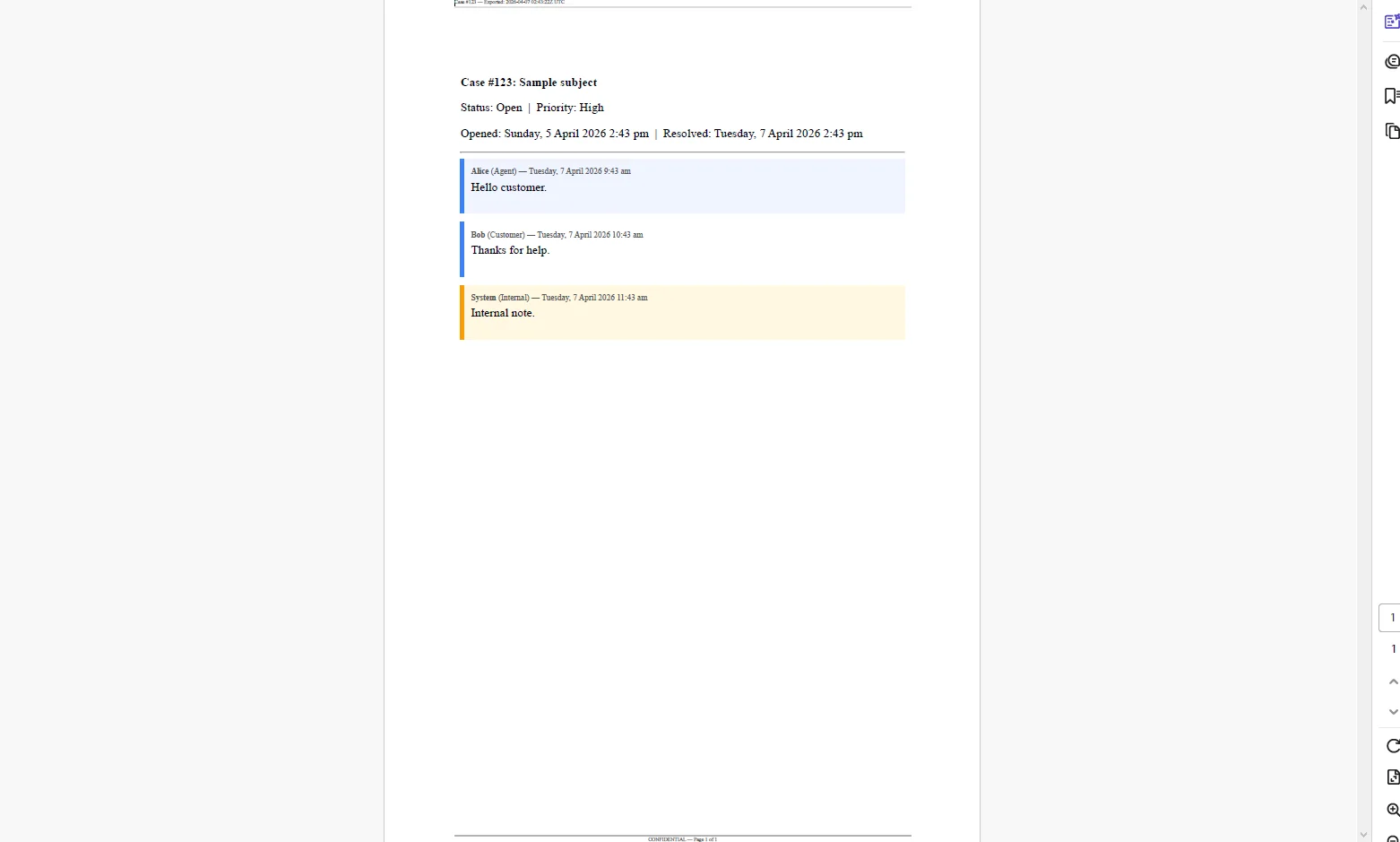 The header on every page identifies the case ID and the export timestamp, so even if a single page is separated from the rest, its provenance is unambiguous. The footer's page count makes clear whether a document is complete when it's handed to a reviewer.
For bulk exports under a GDPR data subject request, the same generation loop runs per case and PdfDocument.Merge() assembles all cases for that customer into a single document, or keeps them as individual files in a zip, whichever the request handling requires.
Real-World Benefits
Legal readiness. A complete case transcript is produced in seconds. When legal or a regulator requests communication records, the response is a document, not a multi-day effort to compile screenshots and paste messages into Word.
Immutable record. The generated PDF document is a point-in-time snapshot of the case as it existed at export. It cannot be altered after generation, making it suitable as evidence in discovery or as documentation in a compliance audit.
Readable format. A formatted conversation log requires no explanation. Lawyers, auditors, and customers read it the same way they'd read a printed email thread - sender, timestamp, message - without needing a ticketing system walkthrough or raw data interpretation.
Redaction control. Internal notes are included or excluded at the query level, before any HTML is constructed. The same export pipeline serves both legal discovery (full record including internal notes) and customer-facing GDPR exports (customer-visible messages only) with no template duplication.
Bulk export. Data subject access requests are handled programmatically, all cases for a customer are queried, generated, and delivered in a single batch. There is no manual case-by-case export, no risk of missing a case, and no developer effort proportional to the number of cases.
No per-export costs. The rendering runs in-process. There is no third-party export API metering, no per-document charge, and no pricing model that makes a large discovery request disproportionately expensive.
Closing
A support case history that only exists inside a ticketing UI is a liability the moment legal, compliance, or a customer asks for it. Generating a formatted PDF transcript at the moment of request - or automatically at case closure - converts that liability into a document the organization can actually produce and stand behind.
The pipeline is straightforward: query the full thread, render it as a readable HTML layout, add headers and footers for provenance, and return the file. IronPDF handles the full lifecycle of PDF generation in C# at ironpdf.com, from rendering HTML templates to saving, streaming, and manipulating documents. If you're building a case export feature or hardening an existing one, start your free 30-day trial and validate the output against your own ticketing data before your next legal request arrives.























