已更新 2026年4月21日
linkify-react(它是如何工作的:开发者指南)
Linkify React 是一个轻量且易于使用的 npm 包,可自动将包含 URL 的纯文本转换。
阅读更多

在现代Web应用程序中,确保数据安全和隐私至关重要。 一种保护数据库ID或URL等敏感信息的有效方法是使用Hashids,一个JavaScript加密库,可以将数值数据转换为独特的、可逆的加密哈希。 本文探讨了如何将Hashids无缝集成到您的React应用程序中,以混淆和解码标识符。
Hashids是一个小型而强大的库,可将数值数据转换为哈希字符串。 主要目标是掩盖数字标识符,以防止敏感信息的暴露。 此转换是可逆的,允许在需要时检索原始数字数据。 Hashids是一个JavaScript库,可从数字生成类似YouTube的ID,编码敏感数据或安全地将数据库ID暴露给用户,或仅从数字中混淆ID。
要将Hashids集成到您的React应用程序中,请按照以下步骤操作:
首先,在您的React项目中通过npm安装Hashids:
npm install hashids
# or
yarn add hashids在您的React组件或实用文件中,使用salt(盐)和可选的最小哈希长度初始化一个新的Hashids实例:
import { useState, useEffect } from 'react';
import Hashids from 'hashids';

// React component demonstrating Hashids integration
const MyComponent = () => {
  const [hashids, setHashids] = useState(null);

  useEffect(() => {
    // Initialize the Hashids library with a custom salt string and minimum hash length of 8
    const initHashids = new Hashids('your_salt_here', 8); // Replace 'your_salt_here' with your actual salt or configure custom alphabet
    setHashids(initHashids);
  }, []);

  // Other component logic here
  return (
    <div>
      {/* Your JSX content */}
    </div>
  );
};

export default MyComponent;用独特的字符串(盐)替换'your_salt_here',以自定义哈希输出。
一旦初始化,您可以使用Hashids来编码和解码数字数据。 例如,编码数据库ID:
const encodedId = hashids.encode(12345); // Example: 'B0zGbvA9' non-sequential IDs并将其解码回原始ID:
const decodedIds = hashids.decode('B0zGbvA9'); // Example: [12345]在必要的情况下,将Hashids集成到React组件中。 例如,作为props传递哈希ID:
const MyComponent = ({ id }) => {
  // Encode ID using Hashids if the hashids instance is initialized
  const encodedId = hashids ? hashids.encode(id) : '';

  return (
    <div>
      <p>Encoded ID: {encodedId}</p>
      {/* Other JSX content */}
    </div>
  );
};-**安全性:**哈希可以模糊数字 ID,防止直接映射到敏感信息,从而增强数据隐私和安全性。 -**易于集成:**简单的 npm 安装和直接的 API 使 Hashids 易于在 React 应用程序中实现。 -**灵活性:**可自定义哈希长度和盐值,使哈希值能够灵活地适应应用程序的安全需求。
IronPDF 适用于 Node.js是来自Iron Software的一个强大的Node.js PDF库,允许开发人员在其.NET项目中生成和编辑PDF。 无论您是需要从HTML创建PDF,操作现有PDF,还是将网页转换为PDF格式,IronPDF都能满足您的需求。
轻松将HTML内容转换为PDF文档。 此功能特别适合从网络内容生成动态PDF。
直接从URL生成PDF,允许您捕获网页内容并以编程方式将其保存为PDF文件。
轻松合并、拆分和操作现有PDF文档。 IronPDF提供了添加页面、拆分文档等功能。
通过密码加密或应用数字签名来保护您的PDF文档。 IronPDF提供了保护您的敏感文档免受未经授权访问的选项。
生成高质量的PDF文档,精确呈现文本、图像和格式。 IronPDF确保您生成的PDF保持对原始内容的忠实。
IronPDF与多种平台兼容,包括Windows、Linux和macOS,适用于广泛的开发环境。
轻松将IronPDF集成到您的Node.js应用程序中,使用其npm包。 API有良好的文档记录,使得将PDF生成功能融入您的项目变得简单明了。
要安装IronPDF NPM包,请使用以下命令:
yarn add @ironsoftware/ironpdf @ironsoftware/ironpdf-engine-windows-x64**安装依赖项:**首先,使用以下命令创建一个新的 Next.js 项目(如果尚未创建):请参阅此处
npx create-next-app@latest hashids-pdf --use-npm --example "https://github.com/vercel/next-learn/tree/main/basics/learn-starter"接下来,导航到您的项目目录:
cd hashids-pdf安装所需的包:
yarn add @ironsoftware/ironpdf @ironsoftware/ironpdf-engine-windows-x64
yarn add hashids现在,让我们创建一个使用IronPDF生成PDF的简单示例。 在您的Next.js组件中(例如,pages/index.tsx),添加以下代码:
**PDF 生成 API:**第一步是创建后端 API 来生成 PDF 文档。 由于IronPDF仅在服务器端运行,因此我们需要创建一个API,以便在用户想要生成PDF时调用。 在路径pages/api/pdf.js中创建一个文件并添加以下内容。
IronPDF需要一个许可密钥,您可以从许可页面获取,并将其放入下面的代码中。
// pages/api/pdf.js
import { IronPdfGlobalConfig, PdfDocument } from "@ironsoftware/ironpdf";
import Hashids from 'hashids';

// Apply your IronPDF license key
IronPdfGlobalConfig.getConfig().licenseKey = "Your license key";

export default async function handler(req, res) {
  try {
    const initHashids = new Hashids('IronPDF Is Awesome and this is the salt', 8);
    const f = req.query.f;
    const l = initHashids.encode(f);

    let content = "<h1>Demo Hashids and Generate PDF Using IronPDF</h1>";
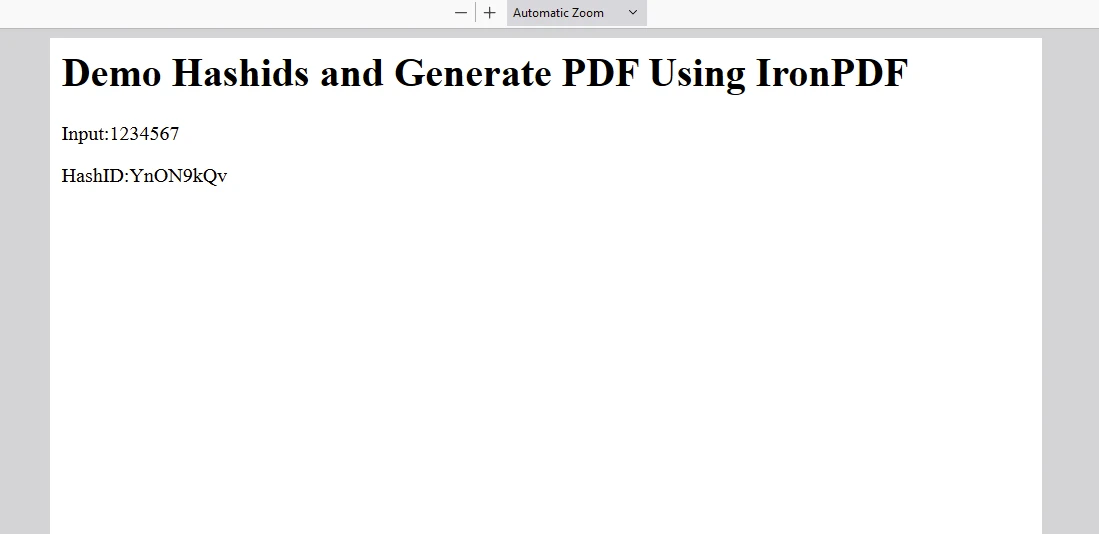
    content += "<p>Input:" + f + "</p>";
    content += "<p>HashID:" + l + "</p>";

    const pdf = await PdfDocument.fromHtml(content);
    const data = await pdf.saveAsBuffer();

    res.setHeader("Content-Type", "application/pdf");
    res.setHeader(
      "Content-Disposition",
      "attachment; filename=awesomeIron.pdf"
    );
    res.send(data);
  } catch (error) {
    console.error("Error generating PDF:", error);
    res.status(500).end();
  }
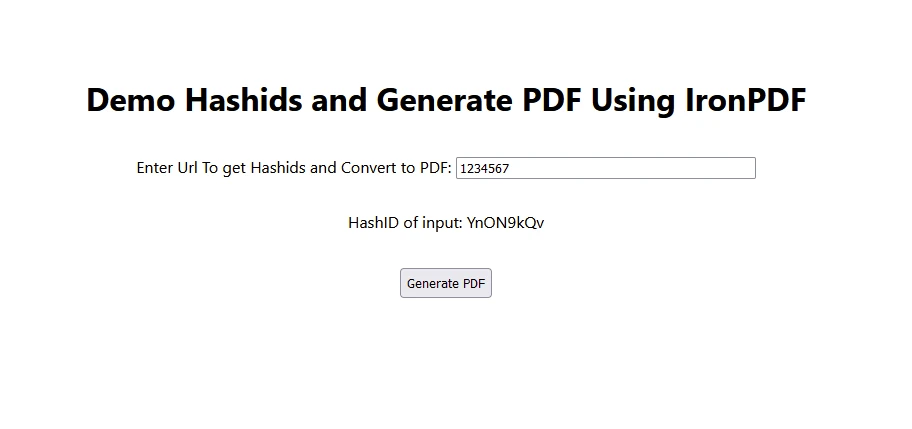
}现在修改index.js代码如下,以使用hashID和IronPDF
import Head from "next/head";
import styles from "../styles/Home.module.css";
import React, { useState, useEffect } from "react";
import Hashids from 'hashids';

export default function Home() {
  const [text, setText] = useState("");
  const [etext, seteText] = useState("");
  const [hashids, setHashids] = useState(null);

  // Initialize Hashids on component mount
  useEffect(() => {
    const initHashids = new Hashids('IronPDF Is Awesome and this is the salt', 8);
    setHashids(initHashids);
  }, []);

  // Generate PDF by calling backend API
  const generatePdf = async () => {
    try {
      const response = await fetch("/api/pdf?f=" + text);
      const blob = await response.blob();
      const url = window.URL.createObjectURL(new Blob([blob]));
      const link = document.createElement("a");
      link.href = url;
      link.setAttribute("download", "awesomeIron.pdf");
      document.body.appendChild(link);
      link.click();
      link.parentNode.removeChild(link);
    } catch (error) {
      console.error("Error generating PDF:", error);
    }
  };

  // Handle text change and encode input number
  const handleChange = (event) => {
    seteText(hashids ? hashids.encode(event.target.value) : '');
    setText(event.target.value);
  };

  return (
    <div className={styles.container}>
      <Head>
        <title>Generate PDF Using IronPDF</title>
        <link rel="icon" href="/favicon.ico" />
      </Head>
      <main>
        <h1>Demo Hashids and Generate PDF Using IronPDF</h1>
        <p>
          <span>Enter Url To get Hashids and Convert to PDF:</span>{" "}
        </p>
        <input type="number" value={text} onChange={handleChange} />
        <p>
          HashID of input: {etext}
        </p>
        <button style={{margin: 20, padding: 5}} onClick={generatePdf}>
          Generate PDF
        </button>
      </main>
      <style jsx>{`
        main {
          padding: 5rem 0;
          flex: 1;
          display: flex;
          flex-direction: column;
          justify-content: center;
          align-items: center;
        }
        footer {
          width: 100%;
          height: 100px;
          border-top: 1px solid #eaeaea;
          display: flex;
          justify-content: center;
          align-items: center;
        }
        footer img {
          margin-left: 0.5rem;
        }
        footer a {
          display: flex;
          justify-content: center;
          align-items: center;
          text-decoration: none;
          color: inherit;
        }
        code {
          background: #fafafa;
          border-radius: 5px;
          padding: 0.75rem;
          font-size: 1.1rem;
          font-family:
            Menlo,
            Monaco,
            Lucida Console,
            Liberation Mono,
            DejaVu Sans Mono,
            Bitstream Vera Sans Mono,
            Courier New,
            monospace;
        }
      `}</style>
      <style jsx global>{`
        html,
        body {
          padding: 0;
          margin: 0;
          font-family:
            -apple-system,
            BlinkMacSystemFont,
            Segoe UI,
            Roboto,
            Oxygen,
            Ubuntu,
            Cantarell,
            Fira Sans,
            Droid Sans,
            Helvetica Neue,
            sans-serif;
        }
        * {
          box-sizing: border-box;
        }
      `}</style>
    </div>
  );
}
在此处放置许可证密钥:
import { IronPdfGlobalConfig, PdfDocument } from "@ironsoftware/ironpdf";
// Apply your IronPDF license key
IronPdfGlobalConfig.getConfig().licenseKey = "Add Your key here";将Hashids集成到您的React应用程序中是一种保护诸如数据库ID或URL之类的敏感数据的实际方法。 通过使用Hashids,您可以确保标识符保持安全,同时在需要时保留检索原始数据的能力。
无论您是在构建小型应用程序还是复杂的企业系统,Hashids都提供了可靠的解决方案,以增强React项目中的数据隐私和安全性,并擅长将递增的数字编码到唯一的哈希中。 Hashids确保即使输入数字中的重复模式也会产生不同的,非重复的哈希,维护应用程序中的数据完整性和安全性。
IronPDF是一个在Node.js开发人员中脱颖而出的强大且多功能的库,提供全面的PDF生成、操作和管理功能。 无论您是在构建Web应用程序、桌面软件,还是将PDF功能集成到企业解决方案中。

Curtis Chau 拥有卡尔顿大学的计算机科学学士学位,专注于前端开发,精通 Node.js、TypeScript、JavaScript 和 React。他热衷于打造直观且美观的用户界面,喜欢使用现代框架并创建结构良好、视觉吸引力强的手册。

当您需要PDF看起来像HTML时,速度快。