Eine digitale Signatur ist ein mathematischer Algorithmus, der verwendet wird, um die Identität des Unterzeichners zu authentifizieren und die Integrität eines Dokuments sicherzustellen. Sie erstellt einen einzigartigen Identifikator, der mit dem Dokument verknüpft ist und mit einem privaten Schlüssel signiert wird, der nur dem Unterzeichner bekannt ist. Um die Echtheit eines digital signierten Dokuments zu überprüfen, verwendet der Empfänger den öffentlichen Schlüssel, um die Signatur zu entschlüsseln und deren Gültigkeit zu bestätigen.
In diesem Artikel vergleichen wir, wie man digitale Signaturen zu PDF-Dokumenten mit den QuestPDF- und IronPDF-Bibliotheken in C# hinzufügt. Beide Bibliotheken bieten robuste Funktionen zur PDF-Manipulation, einschließlich digitaler Signaturfunktionen.
Warum sind digitale Signaturen wichtig?
Digitale Signaturen stellen sicher, dass der Inhalt eines Dokuments nicht manipuliert wurde und die Identität des Unterzeichners beweisen. Dies bietet ein höheres Maß an Sicherheit im Vergleich zu traditionellen Unterschriften. Digitale Signaturen sind in vielen Ländern rechtlich bindend und werden häufig für Verträge, Vereinbarungen und andere rechtliche Dokumente verwendet.
Voraussetzungen
Bevor wir beginnen, stellen Sie sicher, dass Sie ein grundlegendes Verständnis von C# und dem .NET Framework haben. Sie müssen sowohl QuestPDF als auch IronPDF installieren. QuestPDF kann von NuGet installiert werden, und IronPDF kann von der IronPDF-Website oder über den NuGet-Paket-Manager heruntergeladen werden.
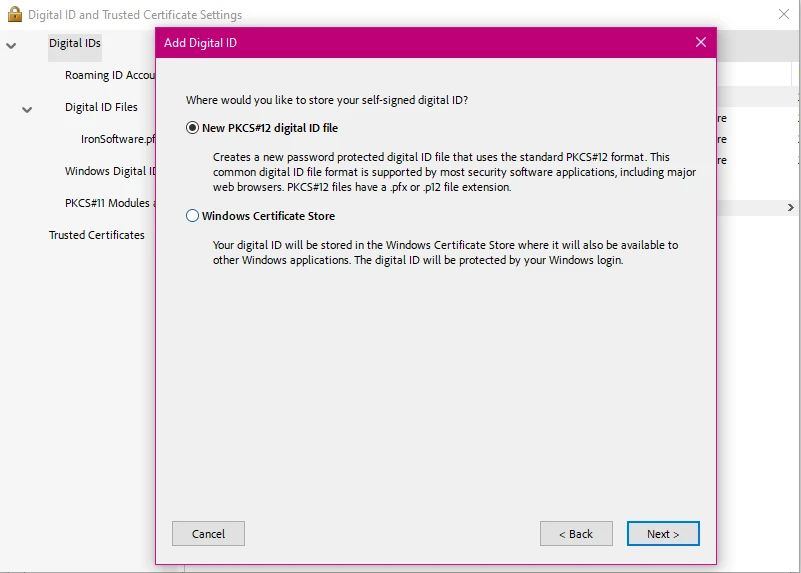
Sie benötigen auch eine fertige digitale Signatur, und falls nicht, gibt es viele Ressourcen, die Ihnen helfen können, eine neue zu erstellen.
Vergleich zum Hinzufügen digitaler Signaturen zu PDF-Dokumenten in C# mit QuestPDF vs IronPDF
Schauen wir uns nun diese beiden Bibliotheken genauer an und wie sie die Aufgabe des Anbringens digitaler Signaturen an PDF-Dokumente handhaben.
QuestPDF ist eine Open-Source-Bibliothek, die sich auf die Generierung von PDF-Dokumenten mittels einer fließenden API zur Erstellung komplexer Layouts basiert, dank ihrer umfassenden Layout-Engine. Sie ist weniger auf die PDF-Manipulation ausgerichtet, kann jedoch in Verbindung mit anderen Tools zum Signieren von PDFs verwendet werden. Es enthält auch eine Begleit-App, die es Benutzern ermöglicht, die Dokumentstruktur ihrer PDFs problemlos zu erkunden, und nutzt eine Hot-Reload-Funktion, um Ihnen Live-Dokumentvorschauen ohne Neukompilierung des Codes zu bieten.
IronPDF ist eine robuste .NET-Bibliothek, die leistungsstarke Funktionen zur Erstellung, Manipulation und Signierung von PDF-Dokumenten bietet. Es ist für .NET-Entwickler konzipiert, die eine umfassende und benutzerfreundliche Lösung suchen. Mit IronPDF können Sie problemlos PDF-Dokumente verschlüsseln, Anmerkungen hinzufügen, HTML in PDF konvertieren, Inhalte extrahieren und mehr!
QuestPDF
QuestPDF unterstützt nativ keine digitalen Signaturen. Sie können es jedoch mit anderen Bibliotheken (wie BouncyCastle oder PDFSharp) für diese Funktionalität kombinieren. Nachdem Sie Ihr Dokument mit QuestPDF erstellt haben, können Sie es mit einer Bibliothek signieren, die Werkzeuge zum Signieren von PDFs bietet, wie z.B. iText, aber die QuestPDF-Bibliothek selbst verarbeitet das Signieren von PDFs nicht.
Es bietet andere grundlegende Formen der PDF-Sicherheit in Form von PDF-Verschlüsselung sowie erweiterte PDF-Erstellungsfunktionen und die Möglichkeit, PDF-Dokumente zu gestalten, sodass es immer noch eine brauchbare Option für diejenigen ist, die eine PDF-Bibliothek suchen, die in der Lage ist grundlegende PDF-Aufgaben ohne zu viele Schnörkel zu bearbeiten.
IronPDF
IronPDF bietet eine einfache API zum Signieren von PDFs mit einem digitalen Zertifikat. Der folgende Code zeigt, wie man eine digitale Signatur auf eine PDF-Datei mit IronPDF anwendet.
using IronPdf;
using IronPdf.Signing;
using System.Security.Cryptography.X509Certificates;

public class Program
{
    static void Main(string[] args)
    {
        // Load an existing PDF document
        PdfDocument pdf = PdfDocument.FromFile("invoice.pdf");

        // Load a certificate from a .pfx file
        X509Certificate2 cert = new X509Certificate2("IronSoftware.pfx", "your-password", X509KeyStorageFlags.Exportable);

        // Create a PDF signature using the certificate
        var sig = new PdfSignature(cert);

        // Sign the PDF document
        pdf.Sign(sig);

        // Save the signed PDF document
        pdf.SaveAs("signed.pdf");
    }
}
using IronPdf;
using IronPdf.Signing;
using System.Security.Cryptography.X509Certificates;

public class Program
{
    static void Main(string[] args)
    {
        // Load an existing PDF document
        PdfDocument pdf = PdfDocument.FromFile("invoice.pdf");

        // Load a certificate from a .pfx file
        X509Certificate2 cert = new X509Certificate2("IronSoftware.pfx", "your-password", X509KeyStorageFlags.Exportable);

        // Create a PDF signature using the certificate
        var sig = new PdfSignature(cert);

        // Sign the PDF document
        pdf.Sign(sig);

        // Save the signed PDF document
        pdf.SaveAs("signed.pdf");
    }
}
Imports IronPdf
Imports IronPdf.Signing
Imports System.Security.Cryptography.X509Certificates
Public Class Program
Shared Sub Main(ByVal args() As String)
' Load an existing PDF document
Dim pdf As PdfDocument = PdfDocument.FromFile("invoice.pdf")
' Load a certificate from a .pfx file
Dim cert As New X509Certificate2("IronSoftware.pfx", "your-password", X509KeyStorageFlags.Exportable)
' Create a PDF signature using the certificate
Dim sig = New PdfSignature(cert)
' Sign the PDF document
pdf.Sign(sig)
' Save the signed PDF document
pdf.SaveAs("signed.pdf")
End Sub
End Class
Imports IronPdf
Imports IronPdf.Signing
Imports System.Security.Cryptography.X509Certificates

Public Class Program
	Shared Sub Main(ByVal args() As String)
		' Load an existing PDF document
		Dim pdf As PdfDocument = PdfDocument.FromFile("invoice.pdf")

		' Load a certificate from a .pfx file
		Dim cert As New X509Certificate2("IronSoftware.pfx", "your-password", X509KeyStorageFlags.Exportable)

		' Create a PDF signature using the certificate
		Dim sig = New PdfSignature(cert)

		' Sign the PDF document
		pdf.Sign(sig)

		' Save the signed PDF document
		pdf.SaveAs("signed.pdf")
	End Sub
End Class
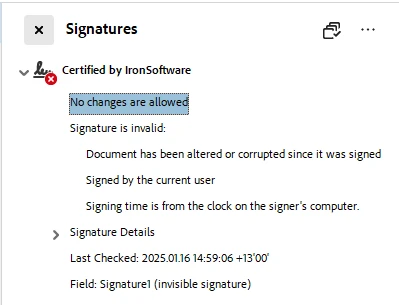
Dieser Code zeigt, wie man ein PDF-Dokument mit IronPDF und einem X.509-Zertifikat digital signiert. Zuerst lädt es ein bestehendes PDF (invoice.pdf) in ein PdfDocument Objekt. Dann lädt es ein Zertifikat aus einer .pfx Datei (IronSoftware.pfx), indem es das Passwort (your-password) angibt und das Flag X509KeyStorageFlags.Exportable setzt, um gegebenenfalls den Export des privaten Schlüssels des Zertifikats zu ermöglichen.
Als Nächstes wird ein PdfSignature Objekt mit dem geladenen Zertifikat erstellt. Diese Signatur wird dann auf das PDF-Dokument angewendet und es wird effektiv signiert. Schließlich wird das signierte PDF als neue Datei mit dem Namen signed.pdf gespeichert. Dieser Prozess stellt sicher, dass das PDF sicher signiert ist und die Authentizität sowie Integrität überprüft.
Mit IronPDF eine Signatur prüfen
IronPDF bietet auch eine einfache Möglichkeit zur Überprüfung digitaler Signaturen. Sie können die VerifyPdfSignatures Methode aufrufen, um die Gültigkeit der Signaturen im Dokument zu überprüfen.
using IronPdf;

PdfDocument pdf = PdfDocument.FromFile("signed_test_document.pdf");

// Verify the digital signatures in the PDF document
bool isValid = pdf.VerifyPdfSignatures();
if (isValid)
{
    Console.WriteLine("The digital signature is valid.");
}
else
{
    Console.WriteLine("The digital signature is invalid or missing.");
}
using IronPdf;

PdfDocument pdf = PdfDocument.FromFile("signed_test_document.pdf");

// Verify the digital signatures in the PDF document
bool isValid = pdf.VerifyPdfSignatures();
if (isValid)
{
    Console.WriteLine("The digital signature is valid.");
}
else
{
    Console.WriteLine("The digital signature is invalid or missing.");
}
Imports IronPdf
Private pdf As PdfDocument = PdfDocument.FromFile("signed_test_document.pdf")
' Verify the digital signatures in the PDF document
Private isValid As Boolean = pdf.VerifyPdfSignatures()
If isValid Then
Console.WriteLine("The digital signature is valid.")
Else
Console.WriteLine("The digital signature is invalid or missing.")
End If
Imports IronPdf

Private pdf As PdfDocument = PdfDocument.FromFile("signed_test_document.pdf")

' Verify the digital signatures in the PDF document
Private isValid As Boolean = pdf.VerifyPdfSignatures()
If isValid Then
	Console.WriteLine("The digital signature is valid.")
Else
	Console.WriteLine("The digital signature is invalid or missing.")
End If
Diese Methode gibt true zurück, wenn alle Signaturen im Dokument gültig sind, und false, wenn eine Signatur ungültig oder fehlt.
Zusammenfassung der Unterschiede zwischen QuestPDF und IronPDF
Benutzerfreundlichkeit: IronPDF bietet eine viel einfachere API für das Signieren von PDFs im Vergleich zu QuestPDF. QuestPDF bietet keine native Unterstützung für digitale Signaturen und erfordert externe Bibliotheken (z.B. BouncyCastle) für diese Funktionalität. Im Gegensatz dazu verfügt IronPDF über eingebaute Methoden zum Signieren und Überprüfen von PDFs, was die Implementierung digitaler Signaturen einfacher macht.
Zertifikatsverwaltung: Beide Bibliotheken können mit Zertifikaten arbeiten, aber IronPDF behandelt sie direkt über seine eingebauten Methoden (z.B. SignWithFile), was den Prozess vereinfacht. Es ermöglicht Ihnen auch, Signaturberechtigungen anzugeben, was von QuestPDF nicht angeboten wird. Signieren Sie PDF-Dokumente mit IronPDF in nur wenigen Zeilen Code.
Überprüfung der digitalen Signatur: IronPDF bietet eine einfach zu bedienende Methode (VerifyPdfSignatures) zur Überprüfung der Gültigkeit digitaler Signaturen in PDFs, während QuestPDF diese Funktion fehlt und auf externe Bibliotheken zur Signaturüberprüfung angewiesen ist.
Lizenz & Kosten: QuestPDF ist eine Open-Source-Bibliothek, die kostenlos verwendet werden kann. Dies kommt mit dem Mangel an fortgeschrittenen Funktionen wie digitaler Signaturunterstützung. IronPDF ist kostenlos für die Entwicklung, und darüber hinaus bietet es eine Reihe von Preismodellen für seine kommerzielle Lizenzierung an, um es auszuprobieren, bevor Sie es kaufen.
Abschluss
Zusammenfassend lässt sich sagen, dass QuestPDF zwar beim Erstellen von PDFs mit komplexen Layouts hervorragend ist, es jedoch an nativer Unterstützung für digitale Signaturen fehlt, sodass externe Bibliotheken wie BouncyCastle für diese Funktionalität erforderlich sind. Im Gegensatz dazu bietet IronPDF eine integrierte Lösung zum Signieren und Überprüfen digitaler Signaturen, was einen einfacheren und effizienteren Prozess bietet.
Für Entwickler, die eine umfassende PDF-Lösung mit eingebauten digitalen Signatur-Funktionen benötigen, ist IronPDF die bessere Wahl mit einer breiten Palette von Features, ausführlicher Dokumentation und mehr. QuestPDF bleibt jedoch nach wie vor eine starke Open-Source-Option für die PDF-Erstellung, jedoch erfordert das digitale Signieren zusätzliche Komplexität. Die Entscheidung hängt letztendlich von den Projektanforderungen und dem gewünschten Maß an Einfachheit ab.
QuestPDF und BouncyCastle sind eingetragene Marken ihrer jeweiligen Inhaber. Diese Seite ist nicht mit QuestPDF oder BouncyCastle verbunden, wird nicht unterstützt oder gesponsert. Alle Produktnamen, Logos und Marken sind Eigentum ihrer jeweiligen Eigentümer. Vergleiche dienen nur zu Informationszwecken und spiegeln öffentlich zugängliche Informationen zum Zeitpunkt des Schreibens wider.























