using IronPdf;

// Disable local disk access or cross-origin requests
Installation.EnableWebSecurity = true;

// Instantiate Renderer
var renderer = new ChromePdfRenderer();

// Create a PDF from a HTML string using C#
var pdf = renderer.RenderHtmlAsPdf("<h1>Hello World</h1>");

// Export to a file or Stream
pdf.SaveAs("output.pdf");

// Advanced Example with HTML Assets
// Load external html assets: Images, CSS and JavaScript.
// An optional BasePath 'C:\site\assets\' is set as the file location to load assets from
var myAdvancedPdf = renderer.RenderHtmlAsPdf("<img src='icons/iron.png'>", @"C:\site\assets\");
myAdvancedPdf.SaveAs("html-with-assets.pdf");
using IronPdf;// Disable local disk access or cross-origin requestsInstallation.EnableWebSecurity = true;// Instantiate Renderervar renderer = new ChromePdfRenderer();// Create a PDF from a HTML string using C#var pdf = renderer.RenderHtmlAsPdf("<h1>Hello World</h1>");// Export to a file or Streampdf.SaveAs("output.pdf");// Advanced Example with HTML Assets// Load external html assets: Images, CSS and JavaScript.// An optional BasePath 'C:\site\assets\' is set as the file location to load assets fromvar myAdvancedPdf = renderer.RenderHtmlAsPdf("<img src='icons/iron.png'>", @"C:\site\assets\");myAdvancedPdf.SaveAs("html-with-assets.pdf");
PM >Install-Package IronPdf
Install-Package IronPdf
ENTWICKLER-UPDATES
C# CancellationToken (Wie es für Entwickler funktioniert)
In der modernen Softwareentwicklung ist das effiziente Verwalten von lang andauernden Aufgaben besonders entscheidend, insbesondere in Anwendungen, in denen das Erzeugen großer oder komplexer PDF-Dateien üblich ist. C#-Entwickler verlassen sich oft auf IronPDF für nahtlose PDF-Erstellung, aber das Handhaben potenziell langer Aufgaben zur PDF-Erstellung erfordert eine Möglichkeit, Benutzereingriffe oder -abbrüche zu verwalten.
Hier kommt der [**CancellationToken**](https://learn.microsoft.com/en-us/dotnet/api/system.threading.cancellationtoken?view=net-8.0) in C# ins Spiel. Durch Integration mit [**IronPDF**](https://ironpdf.com) können Sie sicherstellen, dass Ihre PDF-Erstellungsaufgaben sowohl reaktionsfähig als auch effizient sind. In diesem Artikel werden wir die Bedeutung von `CancellationToken` untersuchen, warum es gut mit IronPDF harmoniert und wie Sie es implementieren können, um Aufgaben elegant abzubrechen.
## Was ist ein CancellationToken in C#?
Der **CancellationToken** ist ein grundlegender Bestandteil der asynchronen Programmierung in C#. Er erlaubt Ihnen, zu signalisieren, dass eine Aufgabe abgebrochen werden soll, was den Entwicklern eine bessere Kontrolle über langwierige Vorgänge gibt. Dies kann besonders hilfreich sein, wenn Aufgaben wie das Erstellen von Berichten oder Rechnungen durchgeführt werden, bei denen Sie möglicherweise kontinuierlich dynamische Berichte aus Daten generieren möchten, bis Sie Ihre Zielmenge erreicht haben. Zu diesem Zeitpunkt können Sie C#-Abbruchtoken verwenden, um anzuzeigen, dass der Vorgang abgebrochen werden soll, wodurch das Programm elegant beendet wird.
### Wie funktioniert es?
Im Wesentlichen wird ein **CancellationToken** an eine Aufgabe oder Methode übergeben, die regelmäßig überprüft, ob ein Abbruch angefordert wurde. Wenn ja, kann die Aufgabe elegant beendet werden, wodurch Ressourcen freigegeben und die Reaktionsfähigkeit Ihrer Anwendung verbessert wird. Dies ist besonders nützlich bei der PDF-Erstellung, bei der komplexe Dokumente Zeit zur Erstellung benötigen könnten.
Durch die Verwendung von **CancellationTokens** vermeiden Sie die potenziellen Nachteile von Aufgaben, die unnötig lange laufen, wie beispielsweise verschwendete Systemressourcen und eine schlechte Benutzererfahrung.
### Interne Storno-Token
In C# bezieht sich ein internes Abbruch-Token auf ein Abbruch-Token, welches innerhalb einer bestimmten Klasse oder Methode erstellt und verwaltet wird, anstatt von einer externen Quelle übergeben zu werden. Dies ermöglicht eine feinere Kontrolle über den Abbruch von Aufgaben im Rahmen einer einzelnen Komponente, wodurch es auf Abbruchanforderungen reagieren kann, die intern entstehen.
Ein internes Abbruch-Token zu verwenden, ist besonders nützlich in Szenarien, in denen Sie die Abbruchlogik kapseln möchten, ohne sie den Nutzern Ihrer Klasse auszusetzen, wodurch eine saubere Schnittstelle erhalten bleibt. Dieser Ansatz kann die Modularität des Codes verbessern und es einfacher machen, komplexe asynchrone Arbeitsabläufe zu verwalten, während die Flexibilität des breiteren **CancellationToken**-Rahmens genutzt wird.
## Warum ein Cancellation Token mit IronPDF verwenden?
Bei der PDF-Erzeugung, insbesondere in Webanwendungen oder komplexen Berichtssystemen, könnten Sie auf Situationen stoßen, in denen ein Benutzer eine Aufgabe initiiert, wie das Erstellen einer großen PDF-Datei, diese aber dann verlässt oder das Ergebnis nicht mehr benötigt. In solchen Fällen möchten Sie die Option haben, den Prozess der PDF-Erstellung abzubrechen, um unnötige Last auf dem Server oder der UI zu vermeiden.
Deshalb ist die Verwendung von **CancellationToken** mit **IronPDF** entscheidend:
### 1. **Unnötige Last verhindern**
Wenn ein Benutzer das angeforderte PDF nicht mehr benötigt, gibt es keinen Grund, den Prozess fortzusetzen. Durch die Nutzung von **CancellationToken** können Sie die PDF-Erstellungsaufgabe stoppen, wodurch übermäßige Belastungen Ihrer Server und eine Verbesserung der Gesamtleistung der Anwendung vermieden werden.
### 2. **Verbesserung der Benutzerfreundlichkeit**
In Desktop-Anwendungen kann die PDF-Erstellung im UI-Thread erfolgen, was die Benutzeroberfläche blockieren könnte, wenn die Aufgabe lange andauert. Durch die Einbindung von **CancellationToken** können Benutzer die Aufgabe abbrechen und die Anwendung reaktionsfähig halten.
### 3. **Verbesserung der Skalierbarkeit**
In Webanwendungen, in denen zahlreiche Benutzer gleichzeitig PDFs erstellen, ist Skalierbarkeit entscheidend. CancellationToken ermöglicht es Ihnen, unnötige Aufgaben sicher abzubrechen, wodurch Ressourcen freigesetzt werden, um andere Anfragen effizient zu bearbeiten.
## Wie man CancellationToken mit IronPDF implementiert
Nun, da wir verstehen, warum **CancellationToken** nützlich ist, schauen wir uns an, wie man es mit **IronPDF** implementiert.
### Schritt 1: Einrichten von IronPDF in Ihrem Projekt
Um [IronPDF](https://ironpdf.com) zu verwenden, müssen Sie es zuerst installieren. Wenn es bereits installiert ist, können Sie zum nächsten Abschnitt übergehen; Andernfalls behandeln die folgenden Schritte die Installation der IronPDF-Bibliothek.
**Über die NuGet Package Manager Console**
Um [IronPDF über die NuGet-Paketmanager-Konsole](https://www.nuget.org/packages/IronPdf/) zu installieren, öffnen Sie Visual Studio und navigieren Sie zur Paketmanager-Konsole. Führen Sie dann den folgenden Befehl aus:
```shell
:ProductInstall
```
**Über den NuGet-Paket-Manager für die Lösung**
Öffnen Sie Visual Studio, gehen Sie zu "Tools -> NuGet-Paket-Manager -> Verwalten von NuGet-Paketen für die Lösung" und suchen Sie nach IronPDF. Von hier aus müssen Sie nur Ihr Projekt auswählen und auf "Installieren" klicken, und IronPDF wird zu Ihrem Projekt hinzugefügt.
Sobald Sie IronPDF installiert haben, müssen Sie nur noch die richtige using-Anweisung zu Beginn Ihres Codes hinzufügen, um IronPDF verwenden zu können:
```csharp
using IronPdf;
```
### Schritt 2: Verwendung von Storno-Token in einer asynchronen PDF-Generierungsmethode
Lassen Sie uns in die eigentliche Implementierung eintauchen. In diesem Beispiel werden wir ein einfaches PDF aus HTML erstellen, indem wir **IronPDF** verwenden, jedoch mit einem **CancellationToken**, das erlaubt, die Aufgabe bei Bedarf abzubrechen.
```csharp
using IronPdf;
using System;
using System.Threading;
using System.Threading.Tasks;

public class PdfGenerator
{
    public async Task GeneratePdfWithCancellation(CancellationToken token)
    {
        var Renderer = new ChromePdfRenderer();
        try
        {
            // Check for cancellation before starting
            token.ThrowIfCancellationRequested();

            // Simulating a long task that can be checked for cancellation periodically
            for (int i = 0; i < 10; i++)
            {
                // Simulating a piece of work (this could be part of a larger HTML rendering)
                await Task.Delay(500); // Simulate chunk processing

                // Periodically check for cancellation in long-running operations
                if (token.IsCancellationRequested)
                {
                    Console.WriteLine("Cancellation requested. Throwing exception.");
                    token.ThrowIfCancellationRequested();  // This will trigger an OperationCanceledException
                }
            }

            // Simulate PDF creation after the long process
            var pdf = await Renderer.RenderHtmlAsPdfAsync("<h1>Hello, PDF!</h1>");

            // Save the PDF after ensuring no cancellation occurred
            pdf.SaveAs("output.pdf");
            Console.WriteLine("PDF generated successfully.");
        }
        catch (OperationCanceledException)
        {
            // Handle task cancellation
            Console.WriteLine("PDF generation was canceled.");
        }
        catch (Exception ex)
        {
            // Handle other exceptions
            Console.WriteLine($"An error occurred: {ex.Message}");
        }
    }
}

public class Program
{
    public static async Task Main(string[] args)
    {
        // Create a CancellationTokenSource
        var cancellationTokenSource = new CancellationTokenSource();

        // Create our cancellation token
        var token = cancellationTokenSource.Token;

        // Start the PDF generation task
        var pdfGenerator = new PdfGenerator();
        Task pdfTask = pdfGenerator.GeneratePdfWithCancellation(token);

        // Simulate a cancellation scenario
        Console.WriteLine("Press any key to cancel PDF generation...");
        Console.ReadKey();

        // Cancel the task by calling Cancel() on the CancellationTokenSource
        cancellationTokenSource.Cancel();

        try
        {
            // Await the task to handle any exceptions, such as cancellation
            await pdfTask;
        }
        catch (OperationCanceledException)
        {
            // Confirm the cancellation
            Console.WriteLine("The PDF generation was canceled.");
        }
        finally
        {
            cancellationTokenSource.Dispose();
        }

        Console.WriteLine("Program finished.");
    }
}
```
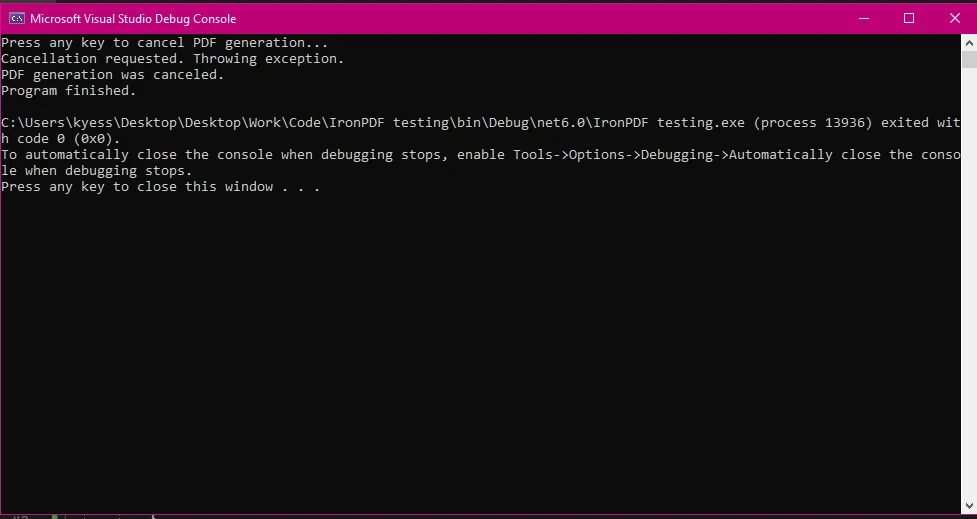
**Konsolenausgabe**
**PDF-Ausgabe**
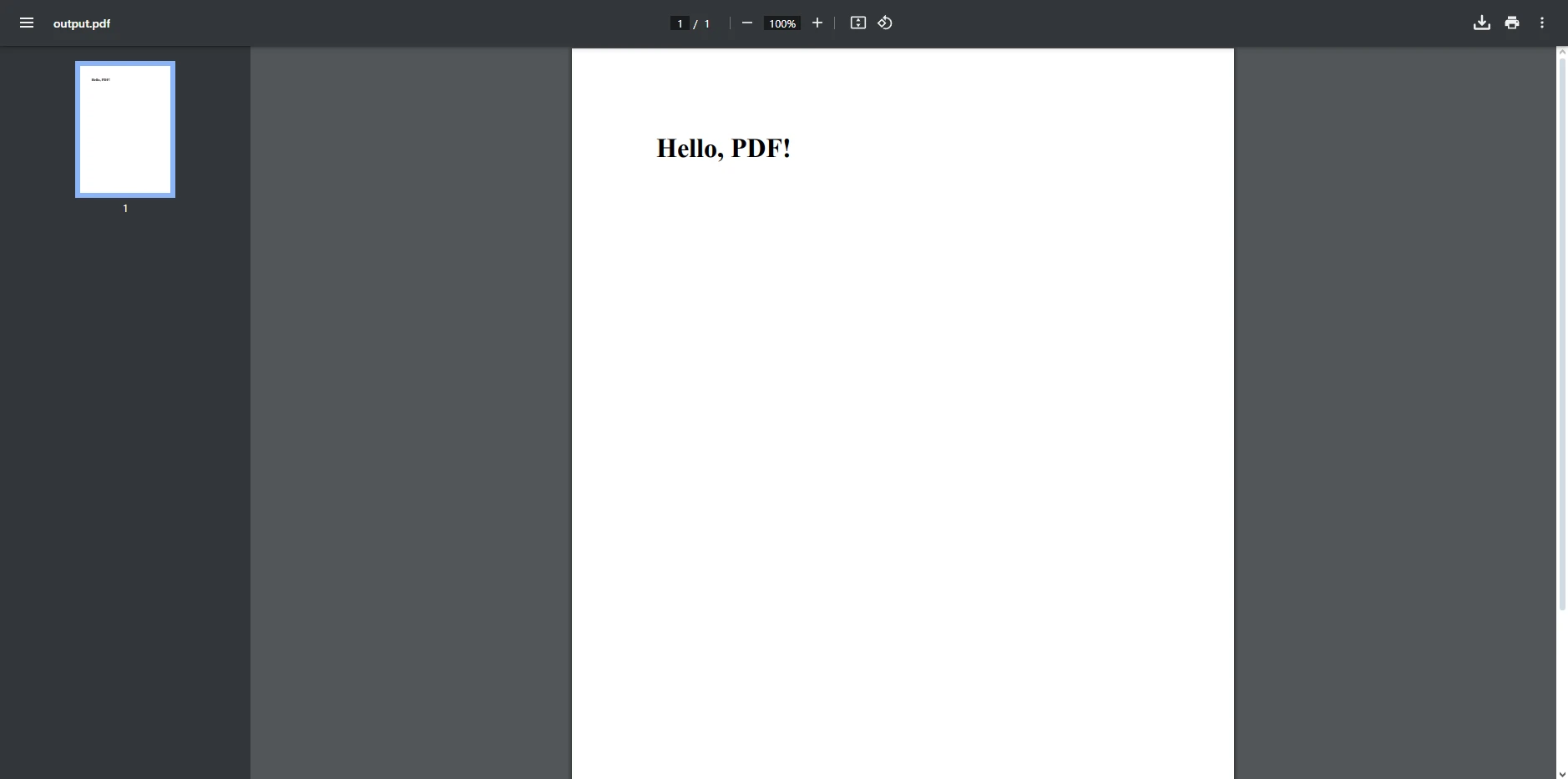
In diesem Beispiel demonstrieren wir, wie man ein **CancellationToken** in einem C#-Programm verwendet, um eine lang andauernde PDF-Erstellung mit IronPDF abzubrechen. Der Code ist in zwei Teile gegliedert: der PDF-Erstellungsprozess (`PdfGenerator`-Klasse) und die Hauptprogramm-Logik (`Program`-Klasse).
* **Klasse PdfGenerator:** Diese Klasse enthält eine Methode, die das Erzeugen einer PDF-Datei simuliert und die Unterstützung des Abbruchs mittels eines **CancellationToken** unterstützt.
* Wir erstellen unsere Abbruch-Token-Quelle in der **main**-Methode mithilfe von **`CancellationTokenSource()`** und erstellen dann unser Token-Objekt, indem wir die Eigenschaft Token der **CancellationTokenSource** an das Objekt übergeben.
* [**ChromePdfRenderer**](/object-reference/api/IronPdf.ChromePdfRenderer.html) wird aus der IronPDF-Bibliothek verwendet, um HTML-Inhalte in ein PDF-Dokument zu rendern.
* Die **GeneratePdfWithCancellation**-Methode ist asynchron (`async`) und gibt eine Task zurück. Diese Methode akzeptiert ein **CancellationToken** (`token`), um die Auftragsstornierung durch die Stornierungsanfrage zu handhaben.
* Das **CancellationToken** erlaubt uns, lang andauernde Operationen sicher abzubrechen. Der Abbruch ist jedoch kooperativ, was bedeutet, dass die Aufgabe selbst regelmäßig den Token-Status überprüfen muss.
* In diesem Code simulieren wir eine lange Aufgabe mit regelmäßigen Abbruchüberprüfungen. Der entscheidende Punkt ist, dass wir während des PDF-Erstellungsprozesses manuell auf eine Stornierung (`token.IsCancellationRequested`) prüfen und bereit sind, die Abbruchmethode auszuführen, wenn das Token übergeben wird.
* Wenn der Benutzer eine Taste drückt, um den Abbruch des Programms zu signalisieren, stoppt die Aufgabe elegant und wirft eine **OperationCanceledException**, wodurch das vollständige Generieren der PDF-Datei auf angemessene und rechtzeitige Weise verhindert wird.
* Das resultierende PDF wird als "**output.pdf"** gespeichert, falls kein Abbruch erfolgt ist, um zu verhindern, dass das Programm den vollständigen Aufgabenprozess ausführt.
## Real-World Use Cases von IronPDF mit CancellationToken
Es gibt mehrere praktische Situationen, in denen die Verwendung eines oder mehrerer Abbruch-Token mit **IronPDF** die Leistung Ihrer Anwendung und das Benutzererlebnis verbessern kann. Hier sind einige Beispiele:
### 1. **Webanwendungen**
In einer Webanwendung initiieren Benutzer häufig Aktionen wie das Erstellen von Berichten im PDF-Format. Wenn der Benutzer jedoch die Seite verlässt oder den Browser schließt, kann das System dies erkennen und **CancellationToken** nutzen, um den PDF-Erstellungsprozess zu stoppen.
```csharp
HttpContext.Response.RegisterForDispose(CancellationTokenSource);
```
Diese einfache Implementierung ermöglicht es Webservern, effektiver zu skalieren, indem sie keine Ressourcen für Aufgaben widmen, die nicht mehr benötigt werden.
### 2. **Langlaufende Berichte**
In Berichtsanwendungen könnten Benutzer große Datensätze zum Exportieren als PDF anfordern. Wenn der Benutzer seine Meinung ändert oder eine falsche Anfrage stellt, ermöglicht **CancellationToken** Ihnen, die Aufgabe auf halbem Weg abzubrechen, um Ressourcenverschwendung zu verhindern.
### 3. **Hintergrunddienste**
In Hintergrunddiensten oder Microservices können Aufgaben, die einen erheblichen Zeitaufwand erfordern, wie die Generierung großer PDF-Batches, effizienter verwaltet werden, indem **CancellationToken** verwendet wird. Wenn der Dienst heruntergefahren oder das System verkleinert werden soll, können Aufgaben, die gerade in Bearbeitung sind, sauber abgebrochen werden, um sicherzustellen, dass keine Daten verloren gehen oder beschädigt werden.
## Abschluss
Nun, da wir das Ende der heutigen Diskussion über die Verwendung von Abbruch-Token mit IronPDF erreicht haben, können Sie diese wie ein Profi in Ihre PDF-Projekte implementieren! Die Verwendung von **C# CancellationToken** mit [**IronPDF**](/docs/) ermöglicht es Ihnen, effizientere und reaktionsfähigere Anwendungen zu erstellen, die Aufgaben zur PDF-Erstellung elegant handhaben. Dieser Ansatz ermöglicht ein kooperatives Abbruchmodell, das es Aufgaben erlaubt, während der Ausführung an sicheren Punkten auf Abbruchanforderungen zu prüfen, anstatt abrupt beendet zu werden.
Unabhängig davon, ob Sie lang andauernde Berichte verwalten, on-Demand PDF-Erstellung in Webanwendungen durchführen oder Hintergrunddienste einsetzen, sorgt die Einbeziehung eines **CancellationToken** oder mehrerer gleichzeitig dafür, dass unnötige Aufgaben abgebrochen werden können, wodurch Ressourcenverschwendung verhindert und das Benutzererlebnis verbessert wird.
Mit nur wenigen Codezeilen können Sie die Skalierbarkeit und Reaktionsfähigkeit Ihrer Anwendung verbessern und den Benutzern mehr Kontrolle über ihre Aktionen bieten. Wenn Sie IronPDF noch nicht erkundet haben, ist jetzt der perfekte Zeitpunkt, um die [**kostenlose Testversion**](trial-license) auszuprobieren und herauszufinden, wie seine leistungsstarken PDF-Erstellungsmöglichkeiten Ihre C#-Projekte transformieren können.
In der modernen Softwareentwicklung ist das effiziente Verwalten von lang andauernden Aufgaben besonders entscheidend, insbesondere in Anwendungen, in denen das Erzeugen großer oder komplexer PDF-Dateien üblich ist. C#-Entwickler verlassen sich oft auf IronPDF für nahtlose PDF-Erstellung, aber das Handhaben potenziell langer Aufgaben zur PDF-Erstellung erfordert eine Möglichkeit, Benutzereingriffe oder -abbrüche zu verwalten.
Hier kommt der CancellationToken in C# ins Spiel. Durch Integration mit IronPDF können Sie sicherstellen, dass Ihre PDF-Erstellungsaufgaben sowohl reaktionsfähig als auch effizient sind. In diesem Artikel werden wir die Bedeutung von CancellationToken untersuchen, warum es gut mit IronPDF harmoniert und wie Sie es implementieren können, um Aufgaben elegant abzubrechen.
Was ist ein CancellationToken in C#?
Der CancellationToken ist ein grundlegender Bestandteil der asynchronen Programmierung in C#. Er erlaubt Ihnen, zu signalisieren, dass eine Aufgabe abgebrochen werden soll, was den Entwicklern eine bessere Kontrolle über langwierige Vorgänge gibt. Dies kann besonders hilfreich sein, wenn Aufgaben wie das Erstellen von Berichten oder Rechnungen durchgeführt werden, bei denen Sie möglicherweise kontinuierlich dynamische Berichte aus Daten generieren möchten, bis Sie Ihre Zielmenge erreicht haben. Zu diesem Zeitpunkt können Sie C#-Abbruchtoken verwenden, um anzuzeigen, dass der Vorgang abgebrochen werden soll, wodurch das Programm elegant beendet wird.
Wie funktioniert es?
Im Wesentlichen wird ein CancellationToken an eine Aufgabe oder Methode übergeben, die regelmäßig überprüft, ob ein Abbruch angefordert wurde. Wenn ja, kann die Aufgabe elegant beendet werden, wodurch Ressourcen freigegeben und die Reaktionsfähigkeit Ihrer Anwendung verbessert wird. Dies ist besonders nützlich bei der PDF-Erstellung, bei der komplexe Dokumente Zeit zur Erstellung benötigen könnten.
Durch die Verwendung von CancellationTokens vermeiden Sie die potenziellen Nachteile von Aufgaben, die unnötig lange laufen, wie beispielsweise verschwendete Systemressourcen und eine schlechte Benutzererfahrung.
Interne Storno-Token
In C# bezieht sich ein internes Abbruch-Token auf ein Abbruch-Token, welches innerhalb einer bestimmten Klasse oder Methode erstellt und verwaltet wird, anstatt von einer externen Quelle übergeben zu werden. Dies ermöglicht eine feinere Kontrolle über den Abbruch von Aufgaben im Rahmen einer einzelnen Komponente, wodurch es auf Abbruchanforderungen reagieren kann, die intern entstehen.
Ein internes Abbruch-Token zu verwenden, ist besonders nützlich in Szenarien, in denen Sie die Abbruchlogik kapseln möchten, ohne sie den Nutzern Ihrer Klasse auszusetzen, wodurch eine saubere Schnittstelle erhalten bleibt. Dieser Ansatz kann die Modularität des Codes verbessern und es einfacher machen, komplexe asynchrone Arbeitsabläufe zu verwalten, während die Flexibilität des breiteren CancellationToken-Rahmens genutzt wird.
Warum ein Cancellation Token mit IronPDF verwenden?
Bei der PDF-Erzeugung, insbesondere in Webanwendungen oder komplexen Berichtssystemen, könnten Sie auf Situationen stoßen, in denen ein Benutzer eine Aufgabe initiiert, wie das Erstellen einer großen PDF-Datei, diese aber dann verlässt oder das Ergebnis nicht mehr benötigt. In solchen Fällen möchten Sie die Option haben, den Prozess der PDF-Erstellung abzubrechen, um unnötige Last auf dem Server oder der UI zu vermeiden.
Deshalb ist die Verwendung von CancellationToken mit IronPDF entscheidend:
1. Unnötige Last verhindern
Wenn ein Benutzer das angeforderte PDF nicht mehr benötigt, gibt es keinen Grund, den Prozess fortzusetzen. Durch die Nutzung von CancellationToken können Sie die PDF-Erstellungsaufgabe stoppen, wodurch übermäßige Belastungen Ihrer Server und eine Verbesserung der Gesamtleistung der Anwendung vermieden werden.
2. Verbesserung der Benutzerfreundlichkeit
In Desktop-Anwendungen kann die PDF-Erstellung im UI-Thread erfolgen, was die Benutzeroberfläche blockieren könnte, wenn die Aufgabe lange andauert. Durch die Einbindung von CancellationToken können Benutzer die Aufgabe abbrechen und die Anwendung reaktionsfähig halten.
3. Verbesserung der Skalierbarkeit
In Webanwendungen, in denen zahlreiche Benutzer gleichzeitig PDFs erstellen, ist Skalierbarkeit entscheidend. CancellationToken ermöglicht es Ihnen, unnötige Aufgaben sicher abzubrechen, wodurch Ressourcen freigesetzt werden, um andere Anfragen effizient zu bearbeiten.
Wie man CancellationToken mit IronPDF implementiert
Nun, da wir verstehen, warum CancellationToken nützlich ist, schauen wir uns an, wie man es mit IronPDF implementiert.
Schritt 1: Einrichten von IronPDF in Ihrem Projekt
Um IronPDF zu verwenden, müssen Sie es zuerst installieren. Wenn es bereits installiert ist, können Sie zum nächsten Abschnitt übergehen; Andernfalls behandeln die folgenden Schritte die Installation der IronPDF-Bibliothek.
Über die NuGet Package Manager Console
Um IronPDF über die NuGet-Paketmanager-Konsole zu installieren, öffnen Sie Visual Studio und navigieren Sie zur Paketmanager-Konsole. Führen Sie dann den folgenden Befehl aus:
PM > Install-Package IronPdf
Install-Package IronPdf
Über den NuGet-Paket-Manager für die Lösung
Öffnen Sie Visual Studio, gehen Sie zu "Tools -> NuGet-Paket-Manager -> Verwalten von NuGet-Paketen für die Lösung" und suchen Sie nach IronPDF. Von hier aus müssen Sie nur Ihr Projekt auswählen und auf "Installieren" klicken, und IronPDF wird zu Ihrem Projekt hinzugefügt.
Sobald Sie IronPDF installiert haben, müssen Sie nur noch die richtige using-Anweisung zu Beginn Ihres Codes hinzufügen, um IronPDF verwenden zu können:
using IronPdf;
using IronPdf;
ImportsIronPdf
Imports IronPdf
Schritt 2: Verwendung von Storno-Token in einer asynchronen PDF-Generierungsmethode
Lassen Sie uns in die eigentliche Implementierung eintauchen. In diesem Beispiel werden wir ein einfaches PDF aus HTML erstellen, indem wir IronPDF verwenden, jedoch mit einem CancellationToken, das erlaubt, die Aufgabe bei Bedarf abzubrechen.
using IronPdf;using System;using System.Threading;using System.Threading.Tasks;public class PdfGenerator{ public async TaskGeneratePdfWithCancellation(CancellationToken token) { varRenderer = new ChromePdfRenderer(); try { // Check for cancellation before starting token.ThrowIfCancellationRequested(); // Simulating a long task that can be checked for cancellation periodically for (int i = 0; i < 10; i++) { // Simulating a piece of work (this could be part of a larger HTML rendering) awaitTask.Delay(500); // Simulate chunk processing // Periodically check for cancellation in long-running operations if (token.IsCancellationRequested) {Console.WriteLine("Cancellation requested. Throwing exception."); token.ThrowIfCancellationRequested(); // This will trigger an OperationCanceledException } } // Simulate PDF creation after the long process var pdf = awaitRenderer.RenderHtmlAsPdfAsync("<h1>Hello, PDF!</h1>"); // Save the PDF after ensuring no cancellation occurred pdf.SaveAs("output.pdf");Console.WriteLine("PDF generated successfully."); } catch (OperationCanceledException) { // Handle task cancellationConsole.WriteLine("PDF generation was canceled."); } catch (Exception ex) { // Handle other exceptionsConsole.WriteLine($"An error occurred: {ex.Message}"); } }}public class Program{ public static async TaskMain(string[] args) { // Create a CancellationTokenSource var cancellationTokenSource = new CancellationTokenSource(); // Create our cancellation token var token = cancellationTokenSource.Token; // Start the PDF generation task var pdfGenerator = new PdfGenerator(); Task pdfTask = pdfGenerator.GeneratePdfWithCancellation(token); // Simulate a cancellation scenarioConsole.WriteLine("Press any key to cancel PDF generation...");Console.ReadKey(); // Cancel the task by calling Cancel() on the CancellationTokenSource cancellationTokenSource.Cancel(); try { // Await the task to handle any exceptions, such as cancellation await pdfTask; } catch (OperationCanceledException) { // Confirm the cancellationConsole.WriteLine("The PDF generation was canceled."); } finally { cancellationTokenSource.Dispose(); }Console.WriteLine("Program finished."); }}
using IronPdf;
using System;
using System.Threading;
using System.Threading.Tasks;

public class PdfGenerator
{
    public async Task GeneratePdfWithCancellation(CancellationToken token)
    {
        var Renderer = new ChromePdfRenderer();
        try
        {
            // Check for cancellation before starting
            token.ThrowIfCancellationRequested();

            // Simulating a long task that can be checked for cancellation periodically
            for (int i = 0; i < 10; i++)
            {
                // Simulating a piece of work (this could be part of a larger HTML rendering)
                await Task.Delay(500); // Simulate chunk processing

                // Periodically check for cancellation in long-running operations
                if (token.IsCancellationRequested)
                {
                    Console.WriteLine("Cancellation requested. Throwing exception.");
                    token.ThrowIfCancellationRequested();  // This will trigger an OperationCanceledException
                }
            }

            // Simulate PDF creation after the long process
            var pdf = await Renderer.RenderHtmlAsPdfAsync("<h1>Hello, PDF!</h1>");

            // Save the PDF after ensuring no cancellation occurred
            pdf.SaveAs("output.pdf");
            Console.WriteLine("PDF generated successfully.");
        }
        catch (OperationCanceledException)
        {
            // Handle task cancellation
            Console.WriteLine("PDF generation was canceled.");
        }
        catch (Exception ex)
        {
            // Handle other exceptions
            Console.WriteLine($"An error occurred: {ex.Message}");
        }
    }
}

public class Program
{
    public static async Task Main(string[] args)
    {
        // Create a CancellationTokenSource
        var cancellationTokenSource = new CancellationTokenSource();

        // Create our cancellation token
        var token = cancellationTokenSource.Token;

        // Start the PDF generation task
        var pdfGenerator = new PdfGenerator();
        Task pdfTask = pdfGenerator.GeneratePdfWithCancellation(token);

        // Simulate a cancellation scenario
        Console.WriteLine("Press any key to cancel PDF generation...");
        Console.ReadKey();

        // Cancel the task by calling Cancel() on the CancellationTokenSource
        cancellationTokenSource.Cancel();

        try
        {
            // Await the task to handle any exceptions, such as cancellation
            await pdfTask;
        }
        catch (OperationCanceledException)
        {
            // Confirm the cancellation
            Console.WriteLine("The PDF generation was canceled.");
        }
        finally
        {
            cancellationTokenSource.Dispose();
        }

        Console.WriteLine("Program finished.");
    }
}
ImportsIronPdfImportsSystemImportsSystem.ThreadingImportsSystem.Threading.TasksPublic Class PdfGenerator PublicAsync Function GeneratePdfWithCancellation(token AsCancellationToken) AsTask DimRenderer = New ChromePdfRenderer()Try ' Check for cancellation before starting token.ThrowIfCancellationRequested() ' Simulating a long task that can be checked for cancellation periodically For i AsInteger = 0 To 9 ' Simulating a piece of work (this could be part of a larger HTML rendering)AwaitTask.Delay(500) ' Simulate chunk processing ' Periodically check for cancellation in long-running operations If token.IsCancellationRequestedThenConsole.WriteLine("Cancellation requested. Throwing exception.") token.ThrowIfCancellationRequested() ' This will trigger an OperationCanceledException End If Next ' Simulate PDF creation after the long process Dim pdf = AwaitRenderer.RenderHtmlAsPdfAsync("<h1>Hello, PDF!</h1>") ' Save the PDF after ensuring no cancellation occurred pdf.SaveAs("output.pdf")Console.WriteLine("PDF generated successfully.")Catch ex AsOperationCanceledException ' Handle task cancellationConsole.WriteLine("PDF generation was canceled.")Catch ex AsException ' Handle other exceptionsConsole.WriteLine($"An error occurred: {ex.Message}")EndTry End FunctionEnd ClassPublic Class Program PublicSharedAsync Function Main(args AsString()) AsTask ' Create a CancellationTokenSource Dim cancellationTokenSource = New CancellationTokenSource() ' Create our cancellation token Dim token = cancellationTokenSource.Token ' Start the PDF generation task Dim pdfGenerator = New PdfGenerator() Dim pdfTask AsTask = pdfGenerator.GeneratePdfWithCancellation(token) ' Simulate a cancellation scenarioConsole.WriteLine("Press any key to cancel PDF generation...")Console.ReadKey() ' Cancel the task by calling Cancel() on the CancellationTokenSource cancellationTokenSource.Cancel()Try ' Await the task to handle any exceptions, such as cancellationAwait pdfTaskCatch ex AsOperationCanceledException ' Confirm the cancellationConsole.WriteLine("The PDF generation was canceled.")Finally cancellationTokenSource.Dispose()EndTryConsole.WriteLine("Program finished.") End FunctionEnd Class
Imports IronPdf
Imports System
Imports System.Threading
Imports System.Threading.Tasks

Public Class PdfGenerator
    Public Async Function GeneratePdfWithCancellation(token As CancellationToken) As Task
        Dim Renderer = New ChromePdfRenderer()
        Try
            ' Check for cancellation before starting
            token.ThrowIfCancellationRequested()

            ' Simulating a long task that can be checked for cancellation periodically
            For i As Integer = 0 To 9
                ' Simulating a piece of work (this could be part of a larger HTML rendering)
                Await Task.Delay(500) ' Simulate chunk processing

                ' Periodically check for cancellation in long-running operations
                If token.IsCancellationRequested Then
                    Console.WriteLine("Cancellation requested. Throwing exception.")
                    token.ThrowIfCancellationRequested()  ' This will trigger an OperationCanceledException
                End If
            Next

            ' Simulate PDF creation after the long process
            Dim pdf = Await Renderer.RenderHtmlAsPdfAsync("<h1>Hello, PDF!</h1>")

            ' Save the PDF after ensuring no cancellation occurred
            pdf.SaveAs("output.pdf")
            Console.WriteLine("PDF generated successfully.")
        Catch ex As OperationCanceledException
            ' Handle task cancellation
            Console.WriteLine("PDF generation was canceled.")
        Catch ex As Exception
            ' Handle other exceptions
            Console.WriteLine($"An error occurred: {ex.Message}")
        End Try
    End Function
End Class

Public Class Program
    Public Shared Async Function Main(args As String()) As Task
        ' Create a CancellationTokenSource
        Dim cancellationTokenSource = New CancellationTokenSource()

        ' Create our cancellation token
        Dim token = cancellationTokenSource.Token

        ' Start the PDF generation task
        Dim pdfGenerator = New PdfGenerator()
        Dim pdfTask As Task = pdfGenerator.GeneratePdfWithCancellation(token)

        ' Simulate a cancellation scenario
        Console.WriteLine("Press any key to cancel PDF generation...")
        Console.ReadKey()

        ' Cancel the task by calling Cancel() on the CancellationTokenSource
        cancellationTokenSource.Cancel()

        Try
            ' Await the task to handle any exceptions, such as cancellation
            Await pdfTask
        Catch ex As OperationCanceledException
            ' Confirm the cancellation
            Console.WriteLine("The PDF generation was canceled.")
        Finally
            cancellationTokenSource.Dispose()
        End Try

        Console.WriteLine("Program finished.")
    End Function
End Class
Konsolenausgabe
PDF-Ausgabe
In diesem Beispiel demonstrieren wir, wie man ein CancellationToken in einem C#-Programm verwendet, um eine lang andauernde PDF-Erstellung mit IronPDF abzubrechen. Der Code ist in zwei Teile gegliedert: der PDF-Erstellungsprozess (PdfGenerator-Klasse) und die Hauptprogramm-Logik (Program-Klasse).
Klasse PdfGenerator: Diese Klasse enthält eine Methode, die das Erzeugen einer PDF-Datei simuliert und die Unterstützung des Abbruchs mittels eines CancellationToken unterstützt.
Wir erstellen unsere Abbruch-Token-Quelle in der main-Methode mithilfe von CancellationTokenSource() und erstellen dann unser Token-Objekt, indem wir die Eigenschaft Token der CancellationTokenSource an das Objekt übergeben.
ChromePdfRenderer wird aus der IronPDF-Bibliothek verwendet, um HTML-Inhalte in ein PDF-Dokument zu rendern.
Die GeneratePdfWithCancellation-Methode ist asynchron (async) und gibt eine Task zurück. Diese Methode akzeptiert ein CancellationToken (token), um die Auftragsstornierung durch die Stornierungsanfrage zu handhaben.
Das CancellationToken erlaubt uns, lang andauernde Operationen sicher abzubrechen. Der Abbruch ist jedoch kooperativ, was bedeutet, dass die Aufgabe selbst regelmäßig den Token-Status überprüfen muss.
In diesem Code simulieren wir eine lange Aufgabe mit regelmäßigen Abbruchüberprüfungen. Der entscheidende Punkt ist, dass wir während des PDF-Erstellungsprozesses manuell auf eine Stornierung (token.IsCancellationRequested) prüfen und bereit sind, die Abbruchmethode auszuführen, wenn das Token übergeben wird.
Wenn der Benutzer eine Taste drückt, um den Abbruch des Programms zu signalisieren, stoppt die Aufgabe elegant und wirft eine OperationCanceledException, wodurch das vollständige Generieren der PDF-Datei auf angemessene und rechtzeitige Weise verhindert wird.
Das resultierende PDF wird als "output.pdf" gespeichert, falls kein Abbruch erfolgt ist, um zu verhindern, dass das Programm den vollständigen Aufgabenprozess ausführt.
Real-World Use Cases von IronPDF mit CancellationToken
Es gibt mehrere praktische Situationen, in denen die Verwendung eines oder mehrerer Abbruch-Token mit IronPDF die Leistung Ihrer Anwendung und das Benutzererlebnis verbessern kann. Hier sind einige Beispiele:
1. Webanwendungen
In einer Webanwendung initiieren Benutzer häufig Aktionen wie das Erstellen von Berichten im PDF-Format. Wenn der Benutzer jedoch die Seite verlässt oder den Browser schließt, kann das System dies erkennen und CancellationToken nutzen, um den PDF-Erstellungsprozess zu stoppen.
Diese einfache Implementierung ermöglicht es Webservern, effektiver zu skalieren, indem sie keine Ressourcen für Aufgaben widmen, die nicht mehr benötigt werden.
2. Langlaufende Berichte
In Berichtsanwendungen könnten Benutzer große Datensätze zum Exportieren als PDF anfordern. Wenn der Benutzer seine Meinung ändert oder eine falsche Anfrage stellt, ermöglicht CancellationToken Ihnen, die Aufgabe auf halbem Weg abzubrechen, um Ressourcenverschwendung zu verhindern.
3. Hintergrunddienste
In Hintergrunddiensten oder Microservices können Aufgaben, die einen erheblichen Zeitaufwand erfordern, wie die Generierung großer PDF-Batches, effizienter verwaltet werden, indem CancellationToken verwendet wird. Wenn der Dienst heruntergefahren oder das System verkleinert werden soll, können Aufgaben, die gerade in Bearbeitung sind, sauber abgebrochen werden, um sicherzustellen, dass keine Daten verloren gehen oder beschädigt werden.
Abschluss
Nun, da wir das Ende der heutigen Diskussion über die Verwendung von Abbruch-Token mit IronPDF erreicht haben, können Sie diese wie ein Profi in Ihre PDF-Projekte implementieren! Die Verwendung von C# CancellationToken mit IronPDF ermöglicht es Ihnen, effizientere und reaktionsfähigere Anwendungen zu erstellen, die Aufgaben zur PDF-Erstellung elegant handhaben. Dieser Ansatz ermöglicht ein kooperatives Abbruchmodell, das es Aufgaben erlaubt, während der Ausführung an sicheren Punkten auf Abbruchanforderungen zu prüfen, anstatt abrupt beendet zu werden.
Unabhängig davon, ob Sie lang andauernde Berichte verwalten, on-Demand PDF-Erstellung in Webanwendungen durchführen oder Hintergrunddienste einsetzen, sorgt die Einbeziehung eines CancellationToken oder mehrerer gleichzeitig dafür, dass unnötige Aufgaben abgebrochen werden können, wodurch Ressourcenverschwendung verhindert und das Benutzererlebnis verbessert wird.
Mit nur wenigen Codezeilen können Sie die Skalierbarkeit und Reaktionsfähigkeit Ihrer Anwendung verbessern und den Benutzern mehr Kontrolle über ihre Aktionen bieten. Wenn Sie IronPDF noch nicht erkundet haben, ist jetzt der perfekte Zeitpunkt, um die kostenlose Testversion auszuprobieren und herauszufinden, wie seine leistungsstarken PDF-Erstellungsmöglichkeiten Ihre C#-Projekte transformieren können.
Jacob Mellor ist Chief Technology Officer bei Iron Software und ein visionärer Ingenieur, der Pionierarbeit in der C# PDF-Technologie leistet. Als der ursprüngliche Entwickler hinter der Kern-Codebasis von Iron Software hat er die Produktarchitektur des Unternehmens seit seiner Gründung geprägt und es zusammen mit CEO Cameron Rimington in ein Unternehmen mit mehr als 50 Mitarbeitern verwandelt, das die NASA, Tesla und globale Regierungsbehörden beliefert.

























