


C# Cancellationtoken(對開發者如何理解其工作)

在現代軟體開發中,高效管理長時間執行的任務是至關重要的,特別是在需要生成大型或複雜PDF文件的應用程式中。 C#開發人員經常依賴IronPDF來輕鬆建立PDF,但處理潛在冗長的PDF生成任務需要一種方法來管理使用者中斷或取消。
這就是C#中的CancellationToken發揮作用的地方。 通過將其整合到IronPDF中,您可以確保您的PDF生成任務既具響應性又高效。 在本文中,我們將探索CancellationToken的重要性,為什麼它與IronPDF完美搭配,以及如何實施它以優雅地取消任務。
什麼是C#中的CancellationToken?
CancellationToken是C#中非同步程式設計的一個基礎部分。 它允許您表示一個任務應該被取消,使開發人員對長時間運行的操作有更大的控制權。 這在執行諸如生成報告或發票之類的任務時特別有用,您可能希望從資料中持續生成動態報告,直到達成目標數量,屆時您可以使用C#取消令牌來指示運作應該被取消,如此一來,程式會優雅地結束。
它如何運作?
基本上,CancellationToken被傳遞給任務或方法,並定期檢查是否有取消請求。 如果是這樣,任務可以優雅地結束,釋放資源並提高應用程式的響應性。 這在需要花時間建立複雜文件的情況下尤其有用,比如PDF生成。
通過使用CancellationTokens,您可以避免任務不必要地長時間運行的潛在缺點,例如浪費系統資源和糟糕的使用者體驗。
內部取消令牌
在C#中,內部取消令牌是指在特定類或方法中建立和管理的取消令牌,而不是從外部來源傳入。 這使得在單個組件範圍內對任務取消進行更精細的控制,使其能夠監視和響應來自內部的取消請求。
在不暴露給類的使用者的情況下封裝取消邏輯,使用內部取消令牌特別有用,因此維持了一個乾淨的介面。 這種方法可以增強程式碼的模組化並使得在管理複雜的非同步工作流時,更易於利用更廣泛的CancellationToken框架提供的靈活性。
為什麼要將Cancellation Token與IronPDF一起使用?
在生成PDF時,特別是在網站應用程式或複雜的報表系統中,您可能會遇到這樣的情況:使用者發起了一個任務,比如建立一個大型PDF文件,但隨後轉移到其他頁面或不再需要結果。 在這些情況下,您需要選擇取消PDF生成過程,以避免在伺服器或使用者介面上的不必要負載。
以下是為什麼使用CancellationToken與IronPDF至關重要的原因:
1. 防止不必要的負載
如果使用者不再需要他們請求的PDF,則該過程沒有理由繼續。 利用CancellationToken,您可以停止PDF生成任務,從而防止伺服器過載並改善整體應用程式性能。
2. 提升使用者體驗
在桌面應用程式中,PDF生成可能在UI執行緒上進行,這可能會導致使用者介面在任務長時間運行時鎖死。 透過納入CancellationToken,使用者可以取消任務並保持應用程式的響應性。
3. 改善擴展性
在眾多使用者同時生成PDF的網站應用程式中,擴展性是關鍵。 CancellationToken允許您安全地取消不必要的任務,從而釋放資源以有效地處理其他請求。
如何在IronPDF中實現CancellationToken
現在我們已經了解了CancellationToken的用途,讓我們來逐步實施IronPDF。
步驟1:在您的專案中設置IronPDF
要開始使用 IronPDF,您首先需要安裝它。 如果它已經安裝,則可以跳過到下一節; 否則,以下步驟將介紹如何安裝 IronPDF 程式庫。
Via the NuGet Package Manager Console
要使用 NuGet 包管理器控制台安裝 IronPDF,打開 Visual Studio 並導航到套件管理器控制台。 然後運行以下命令:
Install-Package IronPdf
Via the NuGet Package Manager for Solution
打開Visual Studio,轉到"工具 -> NuGet Package Manager -> Manage NuGet Packages for Solution"並搜尋IronPDF。 在此處,您只需選擇您的專案並按"安裝",IronPDF將被新增到您的專案中。
一旦您安裝了 IronPDF,開始使用 IronPDF 所需做的只是將正確的 using 語句新增到程式碼頂部:
using IronPdf;using IronPdf;Imports IronPdf步驟2:在非同步PDF生成方法中使用取消令牌
讓我們深入到真正的實現中。 在這個例子中,我們將使用IronPDF生成一個簡單的HTML產生的PDF,但具備一個CancellationToken,允許在必要時取消任務。
using IronPdf;
using System;
using System.Threading;
using System.Threading.Tasks;

public class PdfGenerator
{
    public async Task GeneratePdfWithCancellation(CancellationToken token)
    {
        var Renderer = new ChromePdfRenderer();
        try
        {
            // Check for cancellation before starting
            token.ThrowIfCancellationRequested();

            // Simulating a long task that can be checked for cancellation periodically
            for (int i = 0; i < 10; i++)
            {
                // Simulating a piece of work (this could be part of a larger HTML rendering)
                await Task.Delay(500); // Simulate chunk processing

                // Periodically check for cancellation in long-running operations
                if (token.IsCancellationRequested)
                {
                    Console.WriteLine("Cancellation requested. Throwing exception.");
                    token.ThrowIfCancellationRequested();  // This will trigger an OperationCanceledException
                }
            }

            // Simulate PDF creation after the long process
            var pdf = await Renderer.RenderHtmlAsPdfAsync("<h1>Hello, PDF!</h1>");

            // Save the PDF after ensuring no cancellation occurred
            pdf.SaveAs("output.pdf");
            Console.WriteLine("PDF generated successfully.");
        }
        catch (OperationCanceledException)
        {
            // Handle task cancellation
            Console.WriteLine("PDF generation was canceled.");
        }
        catch (Exception ex)
        {
            // Handle other exceptions
            Console.WriteLine($"An error occurred: {ex.Message}");
        }
    }
}

public class Program
{
    public static async Task Main(string[] args)
    {
        // Create a CancellationTokenSource
        var cancellationTokenSource = new CancellationTokenSource();

        // Create our cancellation token
        var token = cancellationTokenSource.Token;

        // Start the PDF generation task
        var pdfGenerator = new PdfGenerator();
        Task pdfTask = pdfGenerator.GeneratePdfWithCancellation(token);

        // Simulate a cancellation scenario
        Console.WriteLine("Press any key to cancel PDF generation...");
        Console.ReadKey();

        // Cancel the task by calling Cancel() on the CancellationTokenSource
        cancellationTokenSource.Cancel();

        try
        {
            // Await the task to handle any exceptions, such as cancellation
            await pdfTask;
        }
        catch (OperationCanceledException)
        {
            // Confirm the cancellation
            Console.WriteLine("The PDF generation was canceled.");
        }
        finally
        {
            cancellationTokenSource.Dispose();
        }

        Console.WriteLine("Program finished.");
    }
}
using IronPdf;
using System;
using System.Threading;
using System.Threading.Tasks;
public class PdfGenerator
{
public async Task GeneratePdfWithCancellation(CancellationToken token)
{
var Renderer = new ChromePdfRenderer();
try
{
// Check for cancellation before starting
token.ThrowIfCancellationRequested();
// Simulating a long task that can be checked for cancellation periodically
for (int i = 0; i < 10; i++)
{
// Simulating a piece of work (this could be part of a larger HTML rendering)
await Task.Delay(500); // Simulate chunk processing
// Periodically check for cancellation in long-running operations
if (token.IsCancellationRequested)
{
Console.WriteLine("Cancellation requested. Throwing exception.");
token.ThrowIfCancellationRequested(); // This will trigger an OperationCanceledException
}
}
// Simulate PDF creation after the long process
var pdf = await Renderer.RenderHtmlAsPdfAsync("<h1>Hello, PDF!</h1>");
// Save the PDF after ensuring no cancellation occurred
pdf.SaveAs("output.pdf");
Console.WriteLine("PDF generated successfully.");
}
catch (OperationCanceledException)
{
// Handle task cancellation
Console.WriteLine("PDF generation was canceled.");
}
catch (Exception ex)
{
// Handle other exceptions
Console.WriteLine($"An error occurred: {ex.Message}");
}
}
}
public class Program
{
public static async Task Main(string[] args)
{
// Create a CancellationTokenSource
var cancellationTokenSource = new CancellationTokenSource();
// Create our cancellation token
var token = cancellationTokenSource.Token;
// Start the PDF generation task
var pdfGenerator = new PdfGenerator();
Task pdfTask = pdfGenerator.GeneratePdfWithCancellation(token);
// Simulate a cancellation scenario
Console.WriteLine("Press any key to cancel PDF generation...");
Console.ReadKey();
// Cancel the task by calling Cancel() on the CancellationTokenSource
cancellationTokenSource.Cancel();
try
{
// Await the task to handle any exceptions, such as cancellation
await pdfTask;
}
catch (OperationCanceledException)
{
// Confirm the cancellation
Console.WriteLine("The PDF generation was canceled.");
}
finally
{
cancellationTokenSource.Dispose();
}
Console.WriteLine("Program finished.");
}
}Imports IronPdf
Imports System
Imports System.Threading
Imports System.Threading.Tasks
Public Class PdfGenerator
Public Async Function GeneratePdfWithCancellation(ByVal token As CancellationToken) As Task
Dim Renderer = New ChromePdfRenderer()
Try
' Check for cancellation before starting
token.ThrowIfCancellationRequested()
' Simulating a long task that can be checked for cancellation periodically
For i As Integer = 0 To 9
' Simulating a piece of work (this could be part of a larger HTML rendering)
Await Task.Delay(500) ' Simulate chunk processing
' Periodically check for cancellation in long-running operations
If token.IsCancellationRequested Then
Console.WriteLine("Cancellation requested. Throwing exception.")
token.ThrowIfCancellationRequested() ' This will trigger an OperationCanceledException
End If
Next i
' Simulate PDF creation after the long process
Dim pdf = Await Renderer.RenderHtmlAsPdfAsync("<h1>Hello, PDF!</h1>")
' Save the PDF after ensuring no cancellation occurred
pdf.SaveAs("output.pdf")
Console.WriteLine("PDF generated successfully.")
Catch e1 As OperationCanceledException
' Handle task cancellation
Console.WriteLine("PDF generation was canceled.")
Catch ex As Exception
' Handle other exceptions
Console.WriteLine($"An error occurred: {ex.Message}")
End Try
End Function
End Class
Public Class Program
Public Shared Async Function Main(ByVal args() As String) As Task
' Create a CancellationTokenSource
Dim cancellationTokenSource As New CancellationTokenSource()
' Create our cancellation token
Dim token = cancellationTokenSource.Token
' Start the PDF generation task
Dim pdfGenerator As New PdfGenerator()
Dim pdfTask As Task = pdfGenerator.GeneratePdfWithCancellation(token)
' Simulate a cancellation scenario
Console.WriteLine("Press any key to cancel PDF generation...")
Console.ReadKey()
' Cancel the task by calling Cancel() on the CancellationTokenSource
cancellationTokenSource.Cancel()
Try
' Await the task to handle any exceptions, such as cancellation
Await pdfTask
Catch e1 As OperationCanceledException
' Confirm the cancellation
Console.WriteLine("The PDF generation was canceled.")
Finally
cancellationTokenSource.Dispose()
End Try
Console.WriteLine("Program finished.")
End Function
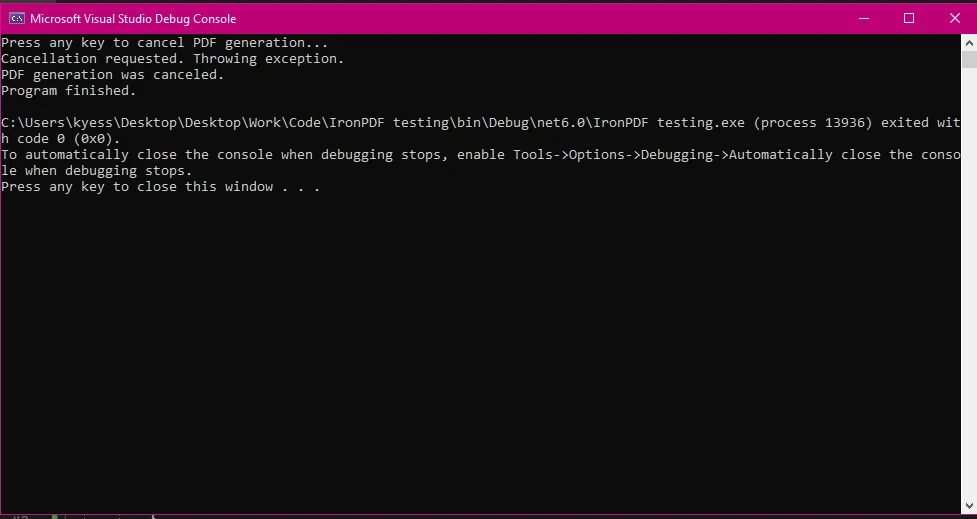
End Class控制台輸出
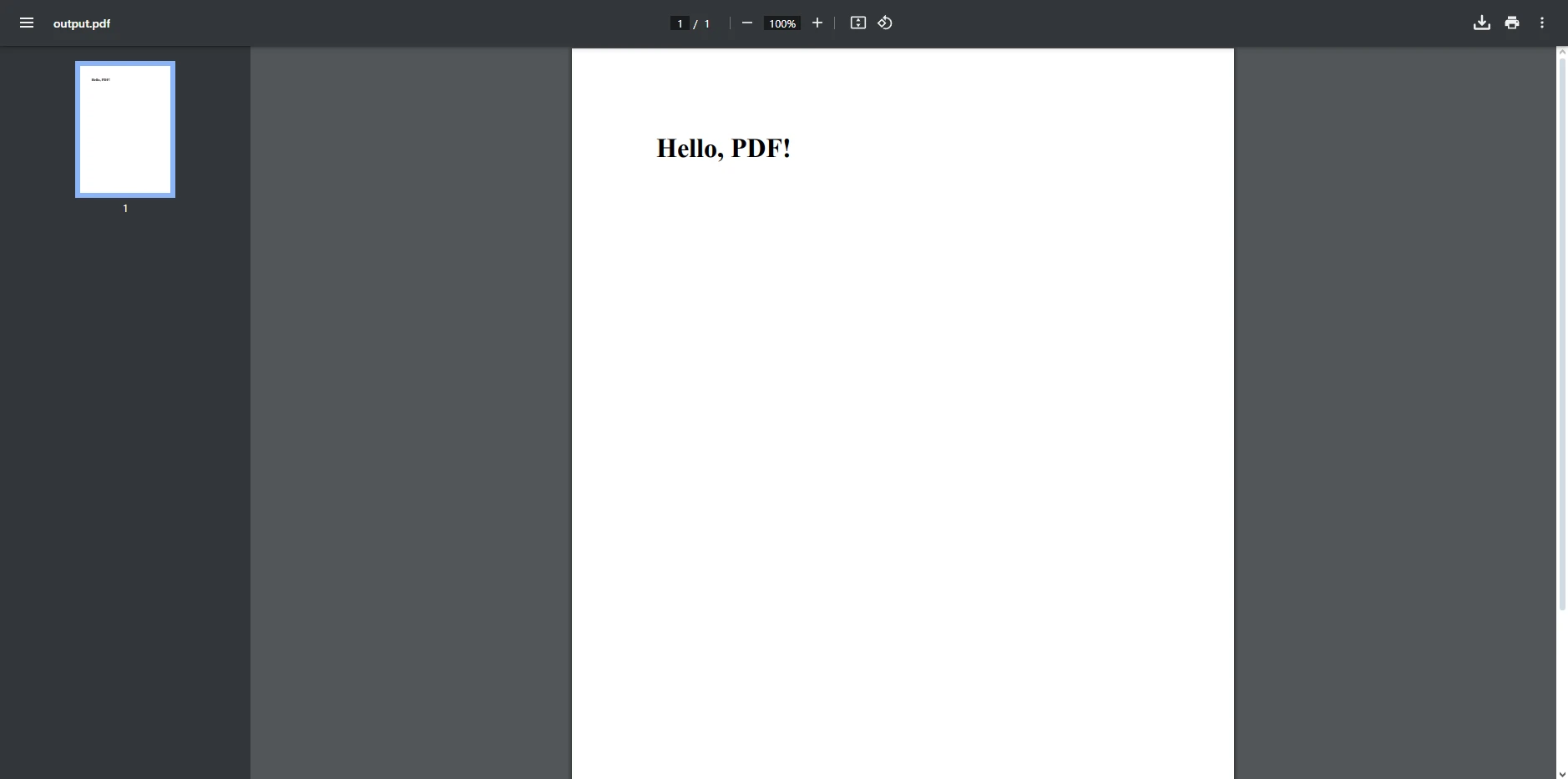
PDF輸出
在本範例中,我們展示如何在C#程式中使用CancellationToken來取消與IronPDF一起的長時間運行的PDF生成任務。 程式碼分為兩個部分:PDF生成過程(Program類)。
- 類 PdfGenerator: 此類包含一個方法,模擬生成支持取消的PDF文件的生成。
- 我們在main方法中使用
CancellationTokenSource()建立我們的取消令牌源,然後通過將CancellationTokenSource的Token屬性傳遞給它來建立我們的令牌物件。 - 從IronPDF程式庫中使用ChromePdfRenderer將HTML內容渲染為PDF文件。
- GeneratePdfWithCancellation方法是非同步的(
async)並返回一個Task。 此方法接受一個CancellationToken (token)以通過取消請求來處理任務取消。 - CancellationToken允許我們安全地取消長時間運行的操作。 但是,取消是合作的,意味著任務本身必須定期檢查令牌狀態。
- 在此程式碼中,我們模擬一個具有定期取消檢查的長任務。 關鍵在於我們在PDF生成過程中手動檢查取消(
token.IsCancellationRequested),準備好一旦有令牌被傳遞,它就運行取消方法。 - 如果使用者按下按鍵表示程式取消,任務會優雅地停止,並拋出一個OperationCanceledException,從而以恰當和及時的方式防止PDF生成的完成。
- 如果沒有發生取消,生成的PDF會被保存為"output.pdf",以防止程式運行完整的任務過程。
IronPDF及CancellationToken的實際應用案例
有多個實際情況下,使用一個或多個取消令牌與IronPDF可以增強您應用程式的性能和使用者體驗。 以下是幾個例子:
1. 網站應用程式
在網站應用程式中,使用者經常啟動操作,例如以PDF格式生成報告。 然而,如果使用者離開頁面或關閉瀏覽器,系統可以檢測到這一點,並使用CancellationToken來停止PDF生成過程。
HttpContext.Response.RegisterForDispose(CancellationTokenSource);HttpContext.Response.RegisterForDispose(CancellationTokenSource);HttpContext.Response.RegisterForDispose(CancellationTokenSource)這一簡單的實施,可以使網站伺服器更有效地擴展,因為不再將資源致力於不再需要的任務。
2. 長時間運行的報告
在報告應用程式中,使用者可能會要求將大型資料集匯出為PDF文件。 如果使用者改變了主意或進行了不正確的查詢,CancellationToken允許您在中途取消任務,防止資源浪費。
3. 背景服務
在背景服務或微服務中,像生成大量PDF批次這樣需要大量時間的任務可以更高效地使用CancellationToken進行管理。 當服務即將關閉或縮減時,正在進行的任務可被乾淨地取消,確保不丟失或損壞資料。
結論
現在,我們結束了今天有關使用IronPDF與取消令牌的討論,您將能夠像專業人士一樣將其實施到您的PDF專案中! 使用IronPDF將C# CancellationToken結合起來,使您能夠構建更加高效、響應迅速的應用程式,並優雅地處理PDF生成任務。 這種方法實施了一種合作的取消模型,允許任務在執行過程中的安全點檢查取消請求,而不是突然被終止。
無論您是在管理長時間運行的報告、網站應用程式中的按需PDF生成,或是在背景服務中,納入一個CancellationToken或同時納入多個,確保不必要的任務可以被取消,防止資源浪費並提升使用者體驗。
只需幾行程式碼,您就可以提高應用程式的擴展性和響應性,同時賦予使用者更大的控制權。 如果您還沒有探索IronPDF,現在就是嘗試免費試用的最佳時機,並發現其強大的PDF生成功能如何改變您的C#項目。
常見問題
我如何使用CancellationToken來管理C#中長時間運行的任務?
您可以通過將CancellationToken傳遞給任務並定期檢查是否有取消請求來整合到長時間運行的任務中。這允許任務優雅終止,釋放資源並維持應用程式的響應能力。
為什麼CancellationToken在PDF生成中很重要?
在PDF生成中,CancellationToken可通過允許取消不再需要的任務來有效管理資源,例如何時使用者離開頁面。這可防止過度的伺服器負載並提升使用者體驗。
我如何在C#的PDF生成任務中實現CancellationToken?
要在C#的PDF生成任務中實現CancellationToken,您需要將令牌傳遞給您的方法,並在執行過程中定期檢查是否有取消請求。如果檢測到取消,您可以優雅地終止任務。
在PDF生成中使用async方法與CancellationToken的目的是什麼?
在PDF生成中使用async方法與CancellationToken可以讓任務異步運行,提高應用程式的響應能力,並使不再需要的任務能夠被取消。
CancellationToken如何改善網頁應用程式中的使用者體驗?
通過運用CancellationToken,網頁應用程式能夠在使用者導航離開時取消任務(如PDF生成),避免不必要的處理保持應用程式反應迅速,從而提升使用者體驗。
在異步PDF建立中ChromePdfRenderer的作用是什麼?
ChromePdfRenderer來自IronPDF,用於將HTML內容轉換為PDF文件。它支持異步操作,允許您使用CancellationToken來有效管理任務生命周期和響應能力。
如果在PDF生成過程中發出取消請求,會發生什麼?
如果在PDF生成過程中發出取消請求,任務將檢查CancellationToken狀態。如果檢測到取消,它將拋出OperationCanceledException,以停止進程以節省資源。
CancellationToken如何增強應用程式的擴展性?
CancellationToken通過允許應用程式取消不必要的任務(如生成PDF),減少資源消耗並提高應用程式的整體性能來增強擴展性。
在背景服務中使用CancellationToken有什麼好處?
在背景服務中,使用CancellationToken可以管理長時間運行的任務,如批量PDF處理,允許任務在服務關閉或擴展操作時被乾淨地取消。
CancellationToken與IronPDF的整合如何改善應用程式效能?
CancellationToken與IronPDF的整合允許更好的資源管理,通過取消不必要的PDF生成任務,提高應用程式效能和響應能力,同時減少伺服器負載。










 免費開始
免費開始 免費開始
免費開始 預訂免費直播演示
















