Dekonstruktoren in C# sind Methoden, die Ihnen helfen, ein Objekt in mehrere Werte zu zerlegen. Dies ist sehr unterschiedlich zu Destruktoren, die verwendet werden, um Ressourcen zu bereinigen, bevor ein Objekt von der Garbage Collection eingesammelt wird. Ein Dekonstruktor ermöglicht es Ihnen, Werte aus einem Objekt mühelos zu extrahieren. Das Verständnis von Dekonstruktoren ist für Entwickler, die mit komplexen Datenstrukturen arbeiten und schnell und sauber auf Teile eines Objekts zugreifen müssen, sehr hilfreich. Wir werden untersuchen, was ein Dekonstruktor ist und wie er mit der IronPDF-Bibliothek verwendet wird.
Was ist ein Deconstructor?
Ein Dekonstruktor in C# ist innerhalb einer Klasse definiert und befasst sich speziell mit dem Zerlegen des Objekts in Teile. Sie definieren einen Dekonstruktor mithilfe der public void Deconstruct Methode. Diese Methode verwendet Parameter, um die Komponenten des Objekts zurückzugeben. Jeder Parameter entspricht einem Datenteil innerhalb des Objekts. Es ist entscheidend, dies von Destruktoren zu unterscheiden, die normalerweise mithilfe von protected override void Finalize definiert werden.
Beispiel für einen Basic Deconstructor
Betrachten Sie eine einfache Person Klasse. Diese Klasse kann einen Dekonstruktor haben, der das Objekt in Name und Alter aufteilt. Hier ist, wie Sie es definieren können:
public class Person
{
    public string Name { get; set; }
    public int Age { get; set; }

    // Deconstructor method to split Person object into its properties
    public void Deconstruct(out string name, out int age)
    {
        name = this.Name;
        age = this.Age;
    }
}
public class Person
{
    public string Name { get; set; }
    public int Age { get; set; }

    // Deconstructor method to split Person object into its properties
    public void Deconstruct(out string name, out int age)
    {
        name = this.Name;
        age = this.Age;
    }
}
Public Class Person
Public Property Name() As String
Public Property Age() As Integer
' Deconstructor method to split Person object into its properties
Public Sub Deconstruct(<System.Runtime.InteropServices.Out()> ByRef name As String, <System.Runtime.InteropServices.Out()> ByRef age As Integer)
name = Me.Name
age = Me.Age
End Sub
End Class
Public Class Person
	Public Property Name() As String
	Public Property Age() As Integer

	' Deconstructor method to split Person object into its properties
	Public Sub Deconstruct(<System.Runtime.InteropServices.Out()> ByRef name As String, <System.Runtime.InteropServices.Out()> ByRef age As Integer)
		name = Me.Name
		age = Me.Age
	End Sub
End Class
Im obigen Beispiel hat die Person Klasse eine Deconstruct Methode, die die Name und Age Eigenschaften ausgibt. Dies ist besonders nützlich, wenn Sie diese Werte schnell Variablen zuweisen möchten.
Verwendung von Dekonstrukteuren im Code
Praktische Anwendung
Um einen Dekonstruktor zu verwenden, verwendet man typischerweise die Tupel-Dekonstruktion-Syntax. Hier ist, wie Sie den Dekonstruktor für die Person Klasse verwenden können:
public static void Main()
{
    // Create a new Person instance
    Person person = new Person { Name = "Iron Developer", Age = 30 };

    // Use the deconstructor to assign values to the tuple elements
    (string name, int age) = person;

    // Output the extracted values
    Console.WriteLine($"Name: {name}, Age: {age}");
}
public static void Main()
{
    // Create a new Person instance
    Person person = new Person { Name = "Iron Developer", Age = 30 };

    // Use the deconstructor to assign values to the tuple elements
    (string name, int age) = person;

    // Output the extracted values
    Console.WriteLine($"Name: {name}, Age: {age}");
}
Public Shared Sub Main()
' Create a new Person instance
Dim person As New Person With {
.Name = "Iron Developer",
.Age = 30
}
' Use the deconstructor to assign values to the tuple elements
'INSTANT VB TODO TASK: VB has no equivalent to C# deconstruction declarations:
(String name, Integer age) = person
' Output the extracted values
Console.WriteLine($"Name: {name}, Age: {age}")
End Sub
Public Shared Sub Main()
	' Create a new Person instance
	Dim person As New Person With {
		.Name = "Iron Developer",
		.Age = 30
	}

	' Use the deconstructor to assign values to the tuple elements
'INSTANT VB TODO TASK: VB has no equivalent to C# deconstruction declarations:
	(String name, Integer age) = person

	' Output the extracted values
	Console.WriteLine($"Name: {name}, Age: {age}")
End Sub
Die public static void Main Methode in diesem Fall erstellt eine neue Person, um dann den Dekonstruktor zu verwenden, um die Name und Age zu extrahieren. Diese Methode wird implizit aufgerufen, wenn das Programm ausgeführt wird, und vereinfacht die Extraktion von Daten aus Objekten.
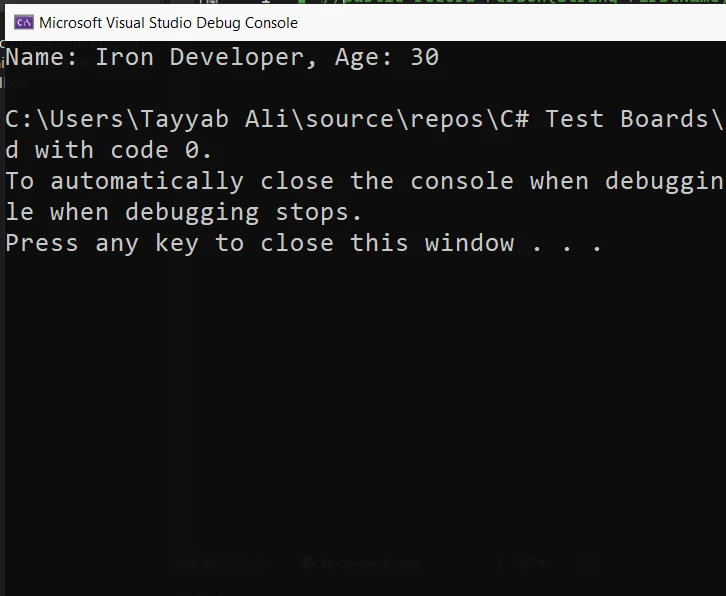
Tupel-Dekonstruktion
Die Tupel-Dekonstruktion ist eine bequeme Möglichkeit, Werte aus einem Tupel zu extrahieren und sie individuellen Variablen zuzuweisen. Diese Funktion ermöglicht es Ihnen, ein Tupel in seine Bestandteile in einer einzigen Anweisung zu zerlegen, was Ihren Code sauberer und lesbarer macht.
Beispiel
Hier erfahren Sie, wie Sie ein Tupel in C# dekonstruieren können:
using System;

public class Program
{
    public static void Main()
    {
        // Create an instance of the Book class
        var book = new Book
        {
            Title = "C# Programming",
            Author = "Jon Skeet",
            Pages = 300
        };

        // Deconstruct the book object to get properties directly
        var (title, author, pages) = DeconstructBook(book);

        // Output the deconstructed properties
        Console.WriteLine($"Title: {title}, Author: {author}, Pages: {pages}");
    }

    // Deconstructor method for a Book class
    private static (string title, string author, int pages) DeconstructBook(Book book)
    {
        return (book.Title, book.Author, book.Pages);
    }
}

public class Book
{
    public string Title { get; set; }
    public string Author { get; set; }
    public int Pages { get; set; }
}
using System;

public class Program
{
    public static void Main()
    {
        // Create an instance of the Book class
        var book = new Book
        {
            Title = "C# Programming",
            Author = "Jon Skeet",
            Pages = 300
        };

        // Deconstruct the book object to get properties directly
        var (title, author, pages) = DeconstructBook(book);

        // Output the deconstructed properties
        Console.WriteLine($"Title: {title}, Author: {author}, Pages: {pages}");
    }

    // Deconstructor method for a Book class
    private static (string title, string author, int pages) DeconstructBook(Book book)
    {
        return (book.Title, book.Author, book.Pages);
    }
}

public class Book
{
    public string Title { get; set; }
    public string Author { get; set; }
    public int Pages { get; set; }
}
Imports System
Public Class Program
Public Shared Sub Main()
' Create an instance of the Book class
Dim book As New Book With {
.Title = "C# Programming",
.Author = "Jon Skeet",
.Pages = 300
}
' Deconstruct the book object to get properties directly
'INSTANT VB TODO TASK: VB has no equivalent to C# deconstruction declarations:
var(title, author, pages) = DeconstructBook(book)
' Output the deconstructed properties
Console.WriteLine($"Title: {title}, Author: {author}, Pages: {pages}")
End Sub
' Deconstructor method for a Book class
Private Shared Function DeconstructBook(ByVal book As Book) As (title As String, author As String, pages As Integer)
Return (book.Title, book.Author, book.Pages)
End Function
End Class
Public Class Book
Public Property Title() As String
Public Property Author() As String
Public Property Pages() As Integer
End Class
Imports System

Public Class Program
	Public Shared Sub Main()
		' Create an instance of the Book class
		Dim book As New Book With {
			.Title = "C# Programming",
			.Author = "Jon Skeet",
			.Pages = 300
		}

		' Deconstruct the book object to get properties directly
'INSTANT VB TODO TASK: VB has no equivalent to C# deconstruction declarations:
		var(title, author, pages) = DeconstructBook(book)

		' Output the deconstructed properties
		Console.WriteLine($"Title: {title}, Author: {author}, Pages: {pages}")
	End Sub

	' Deconstructor method for a Book class
	Private Shared Function DeconstructBook(ByVal book As Book) As (title As String, author As String, pages As Integer)
		Return (book.Title, book.Author, book.Pages)
	End Function
End Class

Public Class Book
	Public Property Title() As String
	Public Property Author() As String
	Public Property Pages() As Integer
End Class
In diesem Beispiel enthält die Book Klasse drei Eigenschaften: Title, Author und Pages. Die DeconstructBook() Methode nimmt eine Instanz der Book-Klasse und gibt ein Tupel zurück, das die Werte dieser Eigenschaften enthält. Die Dekonstruktionsanweisung in der Main() Methode weist diese Werte dann den Variablen title, author und pages zu. Auf diese Weise können Sie leicht auf die einzelnen Werte zugreifen, ohne direkt auf das Book-Objekt zugreifen zu müssen.
Tiefes Eintauchen in die Mechanik von Deconstructor
Wichtige Funktionen und Verhalten
Dekonstruktoren bieten eine Möglichkeit, Informationen explizit aus einem Objekt zu extrahieren. Sie müssen explizit aufgerufen werden, um Daten abzurufen. Dies gewährleistet, dass die Informationen direkt und sofort zugänglich sind. Dekonstruktoren vereinfachen den Prozess, ein Objekt in seine Teile zu zerlegen. Sie sind besonders nützlich für Mustervergleich und die Extraktion von Werten.
Vererbung und Dekonstrukteure
Wenn eine Basisklasse einen Dekonstruktor hat, kann er in einer abgeleiteten Klasse erweitert oder überschrieben werden. Dies folgt der Vererbungskette und erlaubt die Anwendung von Erweiterungsmethoden, die den Dekonstruktionsprozess weiter anpassen können. Dies ist besonders nützlich, wenn die abgeleitete Klasse zusätzliche Eigenschaften enthält, die neben denen der Basisklasse extrahiert werden müssen.
IronPDF mit Deconstructors
IronPDF ist eine .NET-Bibliothek, die es einfach macht, PDF-Dateien mit C# zu erstellen, zu bearbeiten und zu verwalten. IronPDF verwendet eine Chrome-Rendering-Engine für diese Umwandlung. Es stellt sicher, dass die PDFs genau und scharf aussehen. Es erlaubt Entwicklern, sich auf die Gestaltung ihrer Inhalte in HTML zu konzentrieren, ohne sich über komplexe PDF-Erstellungsdetails Gedanken machen zu müssen. IronPDF unterstützt die direkte Umwandlung von HTML zu PDFs. Es kann auch Webformulare, URLs und Bilder in PDF-Dokumente umwandeln. Zum Bearbeiten können Sie Text, Bilder, Kopf- und Fußzeilen zu Ihren PDFs hinzufügen. Es ermöglicht Ihnen auch, Ihre PDFs mit Passwörtern und digitalen Signaturen zu sichern.
Codebeispiel
Der folgende Code zeigt, wie Sie IronPDF in C# verwenden könnten, um ein PDF aus HTML-Inhalt zu generieren und dann einen Dekonstruktor zu verwenden, um das resultierende PDF-Dokument für weitere Operationen wie das Lesen von Eigenschaften zu verarbeiten, ohne dass mehrere Methodenaufrufe oder temporäre Variablen erforderlich sind. Dies ist ein grundlegendes Nutzungsmuster, das den Erstellungs- und Dekonstruktionsaspekt hervorhebt:
using IronPdf;

public class PdfGenerator
{
    public static void Main()
    {
        // Set your License Key
        License.LicenseKey = "License-Key";

        // Create an instance of the PDF renderer
        var renderer = new ChromePdfRenderer();

        // Generate a PDF from HTML content
        var pdfDocument = renderer.RenderHtmlAsPdf("<h1>Hello, IronPDF!</h1>");

        // Deconstruct the PDF document to get properties directly
        var (pageCount, author) = DeconstructPdf(pdfDocument);

        // Output the deconstructed properties
        Console.WriteLine($"Page Count: {pageCount}, Author: {author}");
    }

    // Deconstructor method for a PdfDocument
    private static (int pageCount, string author) DeconstructPdf(PdfDocument document)
    {
        return (document.PageCount, document.MetaData.Author);
    }
}
using IronPdf;

public class PdfGenerator
{
    public static void Main()
    {
        // Set your License Key
        License.LicenseKey = "License-Key";

        // Create an instance of the PDF renderer
        var renderer = new ChromePdfRenderer();

        // Generate a PDF from HTML content
        var pdfDocument = renderer.RenderHtmlAsPdf("<h1>Hello, IronPDF!</h1>");

        // Deconstruct the PDF document to get properties directly
        var (pageCount, author) = DeconstructPdf(pdfDocument);

        // Output the deconstructed properties
        Console.WriteLine($"Page Count: {pageCount}, Author: {author}");
    }

    // Deconstructor method for a PdfDocument
    private static (int pageCount, string author) DeconstructPdf(PdfDocument document)
    {
        return (document.PageCount, document.MetaData.Author);
    }
}
Imports IronPdf
Public Class PdfGenerator
Public Shared Sub Main()
' Set your License Key
License.LicenseKey = "License-Key"
' Create an instance of the PDF renderer
Dim renderer = New ChromePdfRenderer()
' Generate a PDF from HTML content
Dim pdfDocument = renderer.RenderHtmlAsPdf("<h1>Hello, IronPDF!</h1>")
' Deconstruct the PDF document to get properties directly
'INSTANT VB TODO TASK: VB has no equivalent to C# deconstruction declarations:
var(pageCount, author) = DeconstructPdf(pdfDocument)
' Output the deconstructed properties
Console.WriteLine($"Page Count: {pageCount}, Author: {author}")
End Sub
' Deconstructor method for a PdfDocument
Private Shared Function DeconstructPdf(ByVal document As PdfDocument) As (pageCount As Integer, author As String)
Return (document.PageCount, document.MetaData.Author)
End Function
End Class
Imports IronPdf

Public Class PdfGenerator
	Public Shared Sub Main()
		' Set your License Key
		License.LicenseKey = "License-Key"

		' Create an instance of the PDF renderer
		Dim renderer = New ChromePdfRenderer()

		' Generate a PDF from HTML content
		Dim pdfDocument = renderer.RenderHtmlAsPdf("<h1>Hello, IronPDF!</h1>")

		' Deconstruct the PDF document to get properties directly
'INSTANT VB TODO TASK: VB has no equivalent to C# deconstruction declarations:
		var(pageCount, author) = DeconstructPdf(pdfDocument)

		' Output the deconstructed properties
		Console.WriteLine($"Page Count: {pageCount}, Author: {author}")
	End Sub

	' Deconstructor method for a PdfDocument
	Private Shared Function DeconstructPdf(ByVal document As PdfDocument) As (pageCount As Integer, author As String)
		Return (document.PageCount, document.MetaData.Author)
	End Function
End Class
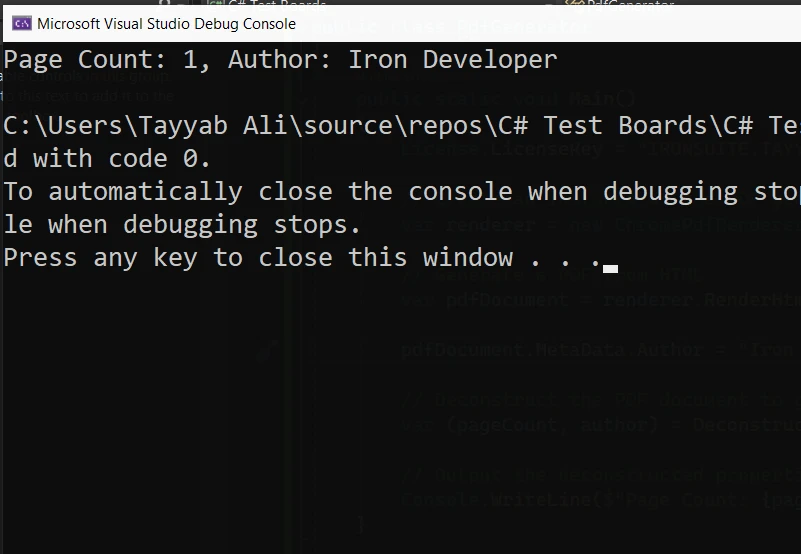
Dieses C#-Beispiel abstrahiert den Prozess des Abrufens von Eigenschaften eines PDF-Dokuments und veranschaulicht, wie Sie in praktischen Szenarien einen Dekonstruktor einsetzen können, um die Struktur Ihres Codes zu vereinfachen und die Lesbarkeit zu verbessern. Denken Sie daran, IronPDF unterstützt von Haus aus keine Dekonstruktoren; dies ist nur eine kundenspezifische Implementierung zu Demonstrationszwecken.
Abschluss
Zusammenfassend sind Dekonstruktoren in C# leistungsstarke Werkzeuge, die es Entwicklern ermöglichen, Daten innerhalb von Objekten effizient zu handhaben und zu manipulieren. Indem Sie verstehen, wie Sie Dekonstruktoren implementieren und verwenden, können Sie mit komplexen Daten effektiver umgehen und sicherstellen, dass alle Komponenten eines Objekts bei Bedarf zugänglich sind. Egal, ob Sie es mit einfachen oder komplexen Objekten zu tun haben, das Meistern von Dekonstruktoren wird Ihre Codierungseffizienz und -genauigkeit im Umgang mit Datenstrukturen erheblich verbessern.
Erkunden Sie IronPDF Preis- und Lizenzierungsoptionen beginnend bei $999.























