


C# Deconstructor(對於開發者的運行原理)

分解器 在C#中是幫助您將物件分解為多個值的方法。 這與解構子非常不同,解構子是用於在物件被垃圾回收前清理資源的。 分解器允許您輕鬆從物件中提取值。 理解分解器對於處理複雜資料結構並需要快速乾淨地存取物件部分的開發者非常有用。 我們將探討什麼是分解器及其在IronPDF程式庫中的使用。
什麼是分解器?
在C#中,分解器定義在類別內,專門用於將物件分解為多個部分。 您可以使用public void Deconstruct方法定義分解器。 此方法使用參數來返回物件的組件。 每個參數對應物件中的一個資料片段。 這必須與通常使用protected override void Finalize定義的解構子區分開來。
基本分解器範例
考慮一個簡單的Person類別。 此類別可以擁有將物件分解為姓名和年齡的分解器。 以下是您可以如何定義它:
public class Person
{
    public string Name { get; set; }
    public int Age { get; set; }

    // Deconstructor method to split Person object into its properties
    public void Deconstruct(out string name, out int age)
    {
        name = this.Name;
        age = this.Age;
    }
}
public class Person
{
public string Name { get; set; }
public int Age { get; set; }
// Deconstructor method to split Person object into its properties
public void Deconstruct(out string name, out int age)
{
name = this.Name;
age = this.Age;
}
}Public Class Person
Public Property Name() As String
Public Property Age() As Integer
' Deconstructor method to split Person object into its properties
Public Sub Deconstruct(<System.Runtime.InteropServices.Out()> ByRef name As String, <System.Runtime.InteropServices.Out()> ByRef age As Integer)
name = Me.Name
age = Me.Age
End Sub
End Class在上述範例中,Age屬性。 當您希望快速將這些值賦予變數時,這特別有用。
在程式碼中使用分解器
實際應用
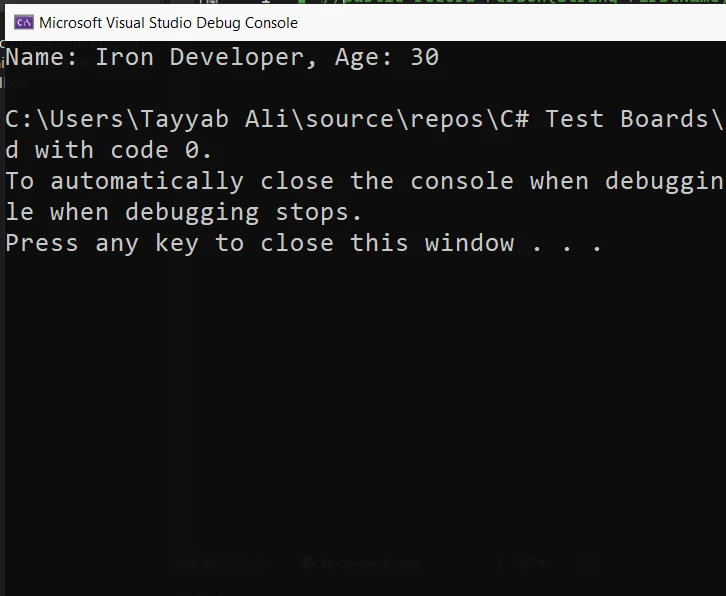
要使用分解器,通常採用元組解構語法。 以下是您如何為Person類別使用分解器:
public static void Main()
{
    // Create a new Person instance
    Person person = new Person { Name = "Iron Developer", Age = 30 };

    // Use the deconstructor to assign values to the tuple elements
    (string name, int age) = person;

    // Output the extracted values
    Console.WriteLine($"Name: {name}, Age: {age}");
}
public static void Main()
{
// Create a new Person instance
Person person = new Person { Name = "Iron Developer", Age = 30 };
// Use the deconstructor to assign values to the tuple elements
(string name, int age) = person;
// Output the extracted values
Console.WriteLine($"Name: {name}, Age: {age}");
}Public Shared Sub Main()
' Create a new Person instance
Dim person As New Person With {
.Name = "Iron Developer",
.Age = 30
}
' Use the deconstructor to assign values to the tuple elements
'INSTANT VB TODO TASK: VB has no equivalent to C# deconstruction declarations:
(String name, Integer age) = person
' Output the extracted values
Console.WriteLine($"Name: {name}, Age: {age}")
End Sub在此實例中,Age。 此方法在程式運行時隱式呼叫,簡化從物件提取資料的過程。
元組解構
元組解構是一種方便的方法來提取元組中的值並賦予單獨的變數。 此功能允許您在一句話中將元組拆分為其組成部分,使您的程式碼更清晰且更具可讀性。
範例
以下是您如何在C#中解構元組:
using System;

public class Program
{
    public static void Main()
    {
        // Create an instance of the Book class
        var book = new Book
        {
            Title = "C# Programming",
            Author = "Jon Skeet",
            Pages = 300
        };

        // Deconstruct the book object to get properties directly
        var (title, author, pages) = DeconstructBook(book);

        // Output the deconstructed properties
        Console.WriteLine($"Title: {title}, Author: {author}, Pages: {pages}");
    }

    // Deconstructor method for a Book class
    private static (string title, string author, int pages) DeconstructBook(Book book)
    {
        return (book.Title, book.Author, book.Pages);
    }
}

public class Book
{
    public string Title { get; set; }
    public string Author { get; set; }
    public int Pages { get; set; }
}
using System;
public class Program
{
public static void Main()
{
// Create an instance of the Book class
var book = new Book
{
Title = "C# Programming",
Author = "Jon Skeet",
Pages = 300
};
// Deconstruct the book object to get properties directly
var (title, author, pages) = DeconstructBook(book);
// Output the deconstructed properties
Console.WriteLine($"Title: {title}, Author: {author}, Pages: {pages}");
}
// Deconstructor method for a Book class
private static (string title, string author, int pages) DeconstructBook(Book book)
{
return (book.Title, book.Author, book.Pages);
}
}
public class Book
{
public string Title { get; set; }
public string Author { get; set; }
public int Pages { get; set; }
}Imports System
Public Class Program
Public Shared Sub Main()
' Create an instance of the Book class
Dim book As New Book With {
.Title = "C# Programming",
.Author = "Jon Skeet",
.Pages = 300
}
' Deconstruct the book object to get properties directly
'INSTANT VB TODO TASK: VB has no equivalent to C# deconstruction declarations:
var(title, author, pages) = DeconstructBook(book)
' Output the deconstructed properties
Console.WriteLine($"Title: {title}, Author: {author}, Pages: {pages}")
End Sub
' Deconstructor method for a Book class
Private Shared Function DeconstructBook(ByVal book As Book) As (title As String, author As String, pages As Integer)
Return (book.Title, book.Author, book.Pages)
End Function
End Class
Public Class Book
Public Property Title() As String
Public Property Author() As String
Public Property Pages() As Integer
End Class在此範例中,Pages。 DeconstructBook()方法接收一個Book類別的實例,返回包含這些屬性值的元組。 在pages。 這樣,您可以輕鬆存取單獨的值,而無需直接引用Book物件。
深入探討分解器機制
關鍵特性和行為
分解器提供了一種顯式提取物件資訊的方法。 必須顯式調用它們才能檢索資料。 這確保資訊可以直接且立即存取。 分解器簡化了將物件分解為其組成部分的過程。 它們對於模式匹配和值提取特別有用。
繼承與分解器
如果基類有分解器,則可以在派生類中擴展或覆蓋它。 這遵循繼承鏈,允許應用擴展方法,進一步自訂分解過程。 當派生類包含需要與從基類繼承的屬性一起提取的附加屬性時,這特別有用。
IronPDF與分解器
IronPDF是一個.NET程式庫,使得使用C#建立、編輯和管理PDF文件變得容易。 IronPDF使用Chrome渲染引擎進行此轉換。 它確保生成的PDF外觀準確且清晰,使開發者可以專注於設計HTML內容,而不必擔心複雜的PDF生成詳細資訊。 IronPDF支持直接將HTML轉換為PDF。 它還可以將Web表單、URL和圖像轉換為PDF文件。 編輯時,您可以向PDF新增文字、圖像、頁眉和頁腳。 它還允許您使用密碼和數位簽名來保護PDF。
程式碼範例
下面的程式碼顯示了如何在C#中使用IronPDF從HTML內容生成PDF,然後使用分解器來處理生成的PDF文件,用於進一步操作,比如在不需要多次方法調用或臨時變數的情況下讀取屬性。 這是一種基本的使用模式,強調生成和分解方面:
using IronPdf;

public class PdfGenerator
{
    public static void Main()
    {
        // Set your License Key
        License.LicenseKey = "License-Key";

        // Create an instance of the PDF renderer
        var renderer = new ChromePdfRenderer();

        // Generate a PDF from HTML content
        var pdfDocument = renderer.RenderHtmlAsPdf("<h1>Hello, IronPDF!</h1>");

        // Deconstruct the PDF document to get properties directly
        var (pageCount, author) = DeconstructPdf(pdfDocument);

        // Output the deconstructed properties
        Console.WriteLine($"Page Count: {pageCount}, Author: {author}");
    }

    // Deconstructor method for a PdfDocument
    private static (int pageCount, string author) DeconstructPdf(PdfDocument document)
    {
        return (document.PageCount, document.MetaData.Author);
    }
}
using IronPdf;
public class PdfGenerator
{
public static void Main()
{
// Set your License Key
License.LicenseKey = "License-Key";
// Create an instance of the PDF renderer
var renderer = new ChromePdfRenderer();
// Generate a PDF from HTML content
var pdfDocument = renderer.RenderHtmlAsPdf("<h1>Hello, IronPDF!</h1>");
// Deconstruct the PDF document to get properties directly
var (pageCount, author) = DeconstructPdf(pdfDocument);
// Output the deconstructed properties
Console.WriteLine($"Page Count: {pageCount}, Author: {author}");
}
// Deconstructor method for a PdfDocument
private static (int pageCount, string author) DeconstructPdf(PdfDocument document)
{
return (document.PageCount, document.MetaData.Author);
}
}Imports IronPdf
Public Class PdfGenerator
Public Shared Sub Main()
' Set your License Key
License.LicenseKey = "License-Key"
' Create an instance of the PDF renderer
Dim renderer = New ChromePdfRenderer()
' Generate a PDF from HTML content
Dim pdfDocument = renderer.RenderHtmlAsPdf("<h1>Hello, IronPDF!</h1>")
' Deconstruct the PDF document to get properties directly
'INSTANT VB TODO TASK: VB has no equivalent to C# deconstruction declarations:
var(pageCount, author) = DeconstructPdf(pdfDocument)
' Output the deconstructed properties
Console.WriteLine($"Page Count: {pageCount}, Author: {author}")
End Sub
' Deconstructor method for a PdfDocument
Private Shared Function DeconstructPdf(ByVal document As PdfDocument) As (pageCount As Integer, author As String)
Return (document.PageCount, document.MetaData.Author)
End Function
End Class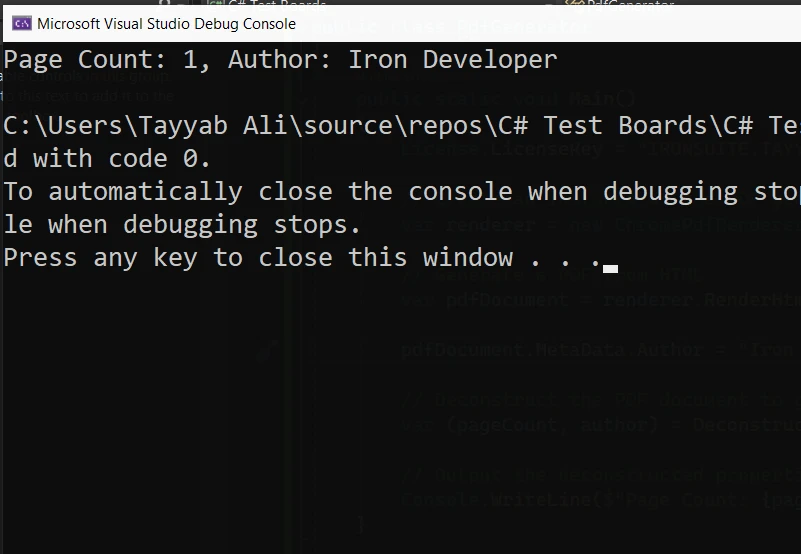
此C#範例抽象了從PDF文件中獲取屬性的過程,展示了如何在實際情境中使用分解器來簡化程式碼結構並提高可讀性。 請記住,IronPDF本身並不內建支持分解器; 這僅僅是出於演示目的的自定義實現。
結論
總之,在C#中,分解器是功能強大的工具,讓開發人員能夠有效地處理和操作物件內的資料。 通過理解如何實現和使用分解器,您可以更有效地管理複雜資料,確保物件的所有組件在需要時都能存取。 無論您處理的是簡單還是複雜的物件,掌握分解器將大大增強您管理資料結構的編碼效率和精確性。
探索IronPDF定價和授權選項,從$999開始。
常見問題
解構子如何增強 C# 中的資料管理?
C# 中的解構子允許開發者將物件分解為多個值,從而更容易存取和管理複雜資料結構的部分。它們利用 public void Deconstruct 方法來簡化值的提取。
C# 中的解構子與析構子有何不同?
解構子是用於從物件中提取值的方法,而析構子則用於在物件被垃圾回收前清理資源。解構子使用 public void Deconstruct 方法,而析構子使用 protected override void Finalize。
如何將解構子應用於 C# 中的 PDF 文件屬性?
您可以實現自定義解構子來簡化存取 PDF 文件的屬性,例如頁面數和作者,當使用像 IronPDF 這樣的程式庫時。這包括使用元組解構來更有效地處理 PDF 資料。
C# 中用於元組解構的語法是什麼?
C# 中的元組解構使用一種語法,允許您從元組中提取值並在一個簡潔而優雅的聲明中將它們分配給各個變數,增強了程式碼的可讀性。
解構子可以在 C# 中的派生類中繼承嗎?
是的,解構子可以在派生類中擴展或重寫,允許除了基類以外還可提取派生類特定的其他屬性。
如何在 C# 類中定義一個基本的解構子?
要在 C# 類中定義一個基本的解構子,您需要建立一個方法來將物件的屬性作為參數輸出。例如,在一個 'Person' 類中,一個解構子可能會輸出 'Name' 和 'Age' 屬性。
在 C# 中使用解構子的實際例子是什麼?
在一個 'Book' 類中使用解構子的實際例子,可以定義一個方法來返回 'Title'、'Author' 和 'Pages' 的元組,允許這些屬性輕鬆地解構為獨立的變數。
為什麼解構子對 C# 開發者有益?
解構子給 C# 開發者帶來了益處,因為它們增強了程式碼的清晰和效率,使得可以快速存取和處理物件的各部分。它們對於模式匹配和簡化從複雜物件中提取資料特別有用。
如何在 C# 中將 HTML 轉換為 PDF?
您可以使用IronPDF的RenderHtmlAsPdf方法將HTML字串轉換成PDF。您也可以使用RenderHtmlFileAsPdf將HTML文件轉換為PDF。










 免費開始
免費開始 免費開始
免費開始 預訂免費直播演示
















