using IronPdf;

// Disable local disk access or cross-origin requests
Installation.EnableWebSecurity = true;

// Instantiate Renderer
var renderer = new ChromePdfRenderer();

// Create a PDF from a HTML string using C#
var pdf = renderer.RenderHtmlAsPdf("<h1>Hello World</h1>");

// Export to a file or Stream
pdf.SaveAs("output.pdf");

// Advanced Example with HTML Assets
// Load external html assets: Images, CSS and JavaScript.
// An optional BasePath 'C:\site\assets\' is set as the file location to load assets from
var myAdvancedPdf = renderer.RenderHtmlAsPdf("<img src='icons/iron.png'>", @"C:\site\assets\");
myAdvancedPdf.SaveAs("html-with-assets.pdf");
using IronPdf;// Disable local disk access or cross-origin requestsInstallation.EnableWebSecurity = true;// Instantiate Renderervar renderer = new ChromePdfRenderer();// Create a PDF from a HTML string using C#var pdf = renderer.RenderHtmlAsPdf("<h1>Hello World</h1>");// Export to a file or Streampdf.SaveAs("output.pdf");// Advanced Example with HTML Assets// Load external html assets: Images, CSS and JavaScript.// An optional BasePath 'C:\site\assets\' is set as the file location to load assets fromvar myAdvancedPdf = renderer.RenderHtmlAsPdf("<img src='icons/iron.png'>", @"C:\site\assets\");myAdvancedPdf.SaveAs("html-with-assets.pdf");
PM >Install-Package IronPdf
Install-Package IronPdf
ENTWICKLER-UPDATES
C# try catch finally (Wie es für Entwickler funktioniert)
Die Fehlerbehandlung ist ein grundlegender Aspekt der robusten Anwendungsentwicklung. In C# sind die [try-catch-finally](https://learn.microsoft.com/en-us/dotnet/csharp/language-reference/statements/exception-handling-statements)-Blöcke leistungsstarke Werkzeuge, die sicherstellen, dass Ihre Anwendung unerwartete Situationen reibungslos handhaben kann, ohne abzustürzen. Effektive Fehlerbehandlung hilft nicht nur bei der Verwaltung von Laufzeitfehlern, sondern auch bei der Aufrechterhaltung der Stabilität und Zuverlässigkeit Ihrer Anwendungen.
[IronPDF](https://ironpdf.com) ist eine umfassende PDF-Bibliothek für .NET, die die Erstellung, Bearbeitung und Darstellung von PDFs vereinfacht. Bei der Integration von IronPDF in Ihre .NET-Projekte ist es entscheidend, zu verstehen, wie man Fehlerbehandlung effektiv einsetzt, um zuverlässige PDF-basierte Anwendungen zu erstellen. In diesem Artikel werden wir untersuchen, wie ein try-catch-finally-Statement in Ihren IronPDF-Projekten für eine bessere Ausnahmebehandlung implementiert werden kann und wie dies die Effizienz und Leistung Ihres PDF-Arbeitsbereichs verbessern kann.
## Understanding Try, Catch, and Finally in C#
### Was ist ein Try-Catch-Block?
In C# ermöglicht der **try-catch**-Block die Behandlung von Ausnahmen, die während der Ausführung Ihres Codes auftreten. Der try-Block-Abschnitt enthält den Code, der eine Ausnahme auslösen könnte, während der catch-Block die Ausnahme behandelt, falls eine auftritt. Diese Struktur ist unerlässlich, um Abstürze der Anwendung zu verhindern, indem Ausnahmen reibungslos behandelt und deren Weiterleitung im Aufrufstapel vermieden wird.
Der **try**-Block ist der Ort, an dem Sie jeglichen Code platzieren, der potenziell eine Ausnahme auslösen könnte. Dieser Block dient als Schutzmaßnahme, die es Ihnen ermöglicht, einen Codeabschnitt zu definieren, der auf Fehler überwacht werden soll. Wenn irgendein Teil des try-Blocks Ausnahmen auslöst, wird die Kontrolle sofort an den entsprechenden catch-Block übertragen.
Der **catch**-Block folgt auf den try-Block und wird verwendet, um Ausnahmen zu behandeln, die durch den Code des try-Blocks ausgelöst werden. Sie können mehrere catch-Blöcke einrichten, um verschiedene potenzielle Typen von Ausnahmen separat zu behandeln. Jeder catch-Block gibt den Typ der Ausnahme an, die er behandelt, und enthält den Code zur Verarbeitung der Ausnahme, wie das Protokollieren des Fehlers oder das Anzeigen einer benutzerfreundlichen Fehlermeldung.
```csharp
using IronPdf;
public static void Main(string[] args)
{
    try
    {
        // Create a PDF renderer using Chrome.
        ChromePdfRenderer renderer = new ChromePdfRenderer();
        // Render an HTML file as a PDF.
        var pdf = renderer.RenderHtmlFileAsPdf("Example.html");
        // Save the PDF to the specified file path.
        pdf.SaveAs("output.pdf");
    }
    catch (FileNotFoundException ex)
    {
        // Handle file not found exception
        Console.WriteLine("File not found: " + ex.Message);
    }
    catch (UnauthorizedAccessException ex)
    {
        // Handle unauthorized access exception
        Console.WriteLine("Error: Access to the file is denied. " + ex.Message);
    }
    catch (Exception ex)
    {
        // Handle any other exceptions
        Console.WriteLine("An unexpected error occurred: " + ex.Message);
    }
}
```
#### Beispiel für eine FileNotFoundException
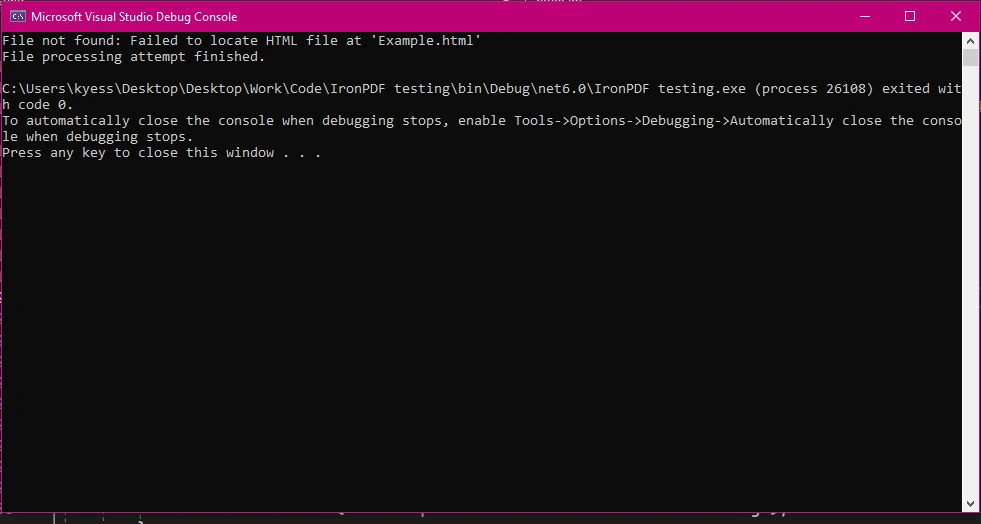
### Die Rolle des letzten Blocks
Der finally-Block wird verwendet, um Code auszuführen, der unabhängig davon ausgeführt werden muss, ob ein Ausnahmeobjekt ausgelöst wurde oder nicht. Dies wird typischerweise für die Bereinigung von Ressourcen verwendet, wie das Schließen von Dateiströmen oder Datenbankverbindungen, um sicherzustellen, dass diese Ressourcen ordnungsgemäß freigegeben werden. Der Code in einem finally-Block wird immer ausgeführt, wodurch er ideal für Aufgaben ist, die unabhängig davon durchgeführt werden müssen, was im try-Block passiert.
```csharp
public static void Main(string[] args)
{
try
{
// Example operation that throws an exception
int num = 10;
int result = num / 0;
}
catch (Exception ex)
{
// Handle division by zero exception
Console.WriteLine("Cannot divide by zero. " + ex.Message);
}
finally
{
// This finally block executes regardless of whether an exception was thrown
Console.WriteLine("Cleanup code runs here");
}
}
```
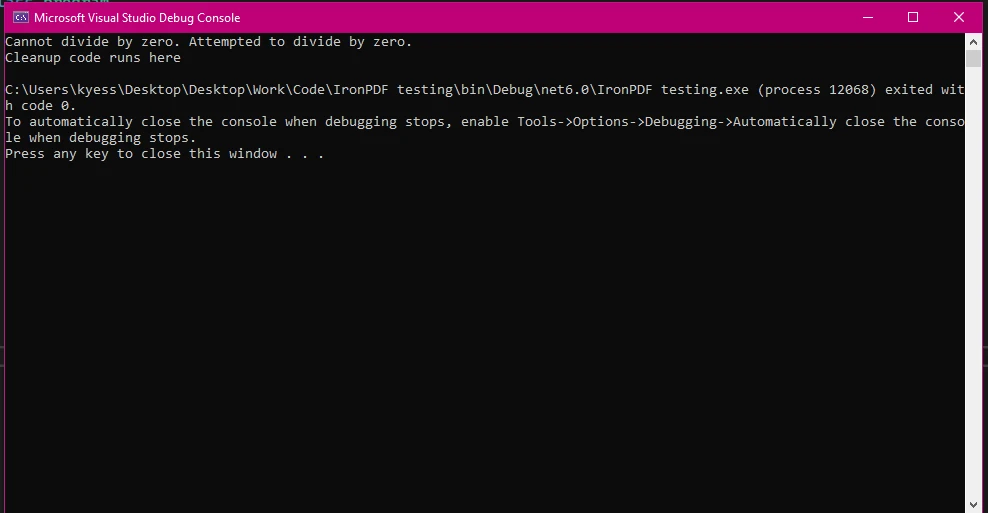
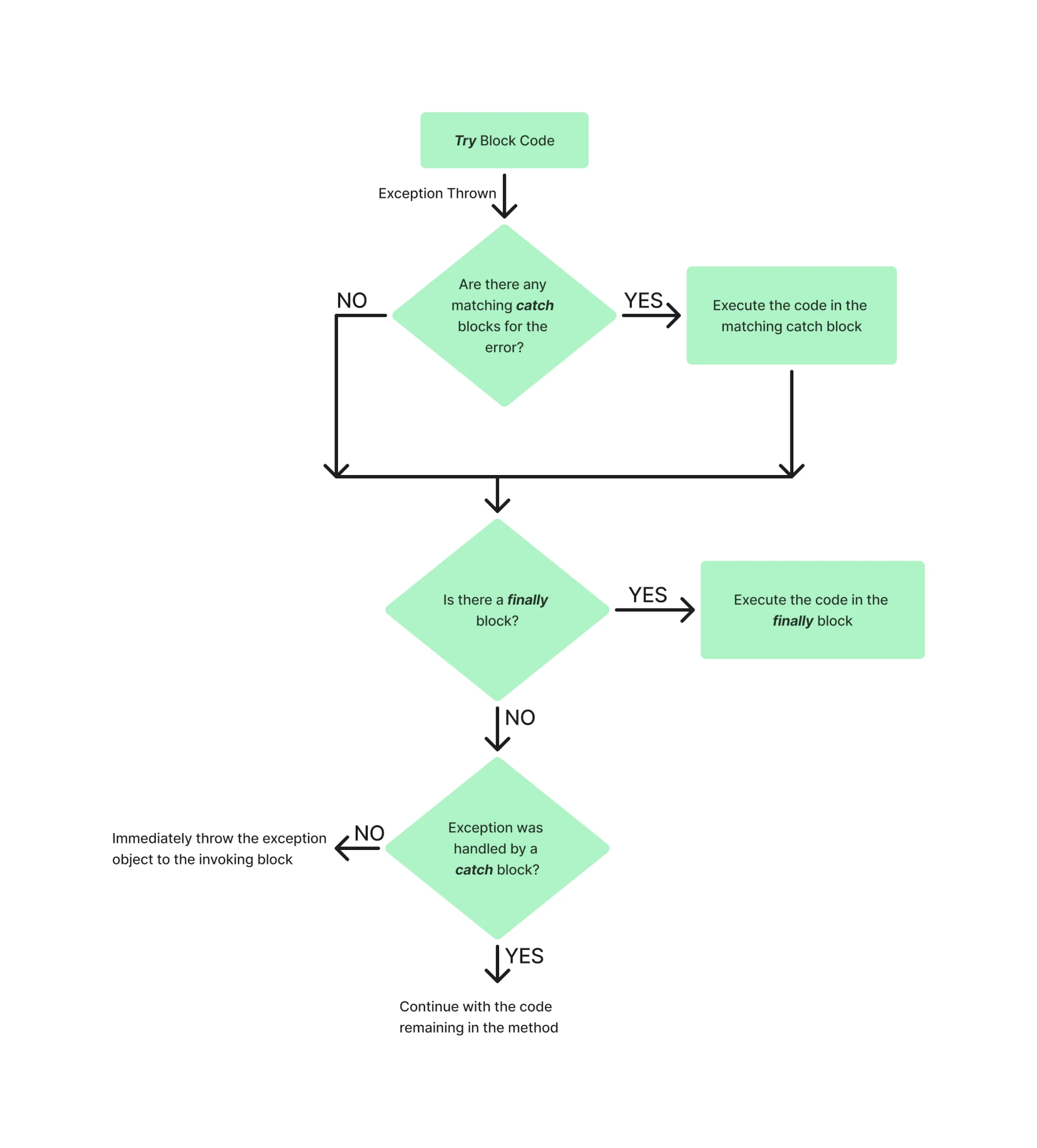
Ein Beispiel für den Ablauf des try-catch-finally-Blocks innerhalb eines Programms könnte so aussehen:
## Implementierung von Try-Catch-Finally mit IronPDF
### Einrichten von IronPDF in Ihrem Projekt
Um die [IronPDF-Library](https://www.nuget.org/packages/IronPdf/) in Ihren .NET-Projekten zu verwenden, müssen Sie sie zuerst über den NuGet-Paketmanager installieren. Eine Möglichkeit, dies zu tun, besteht darin, zu Werkzeuge > NuGet-Paketmanager > NuGet-Paketmanager für Lösungen zu navigieren und nach IronPDF zu suchen:
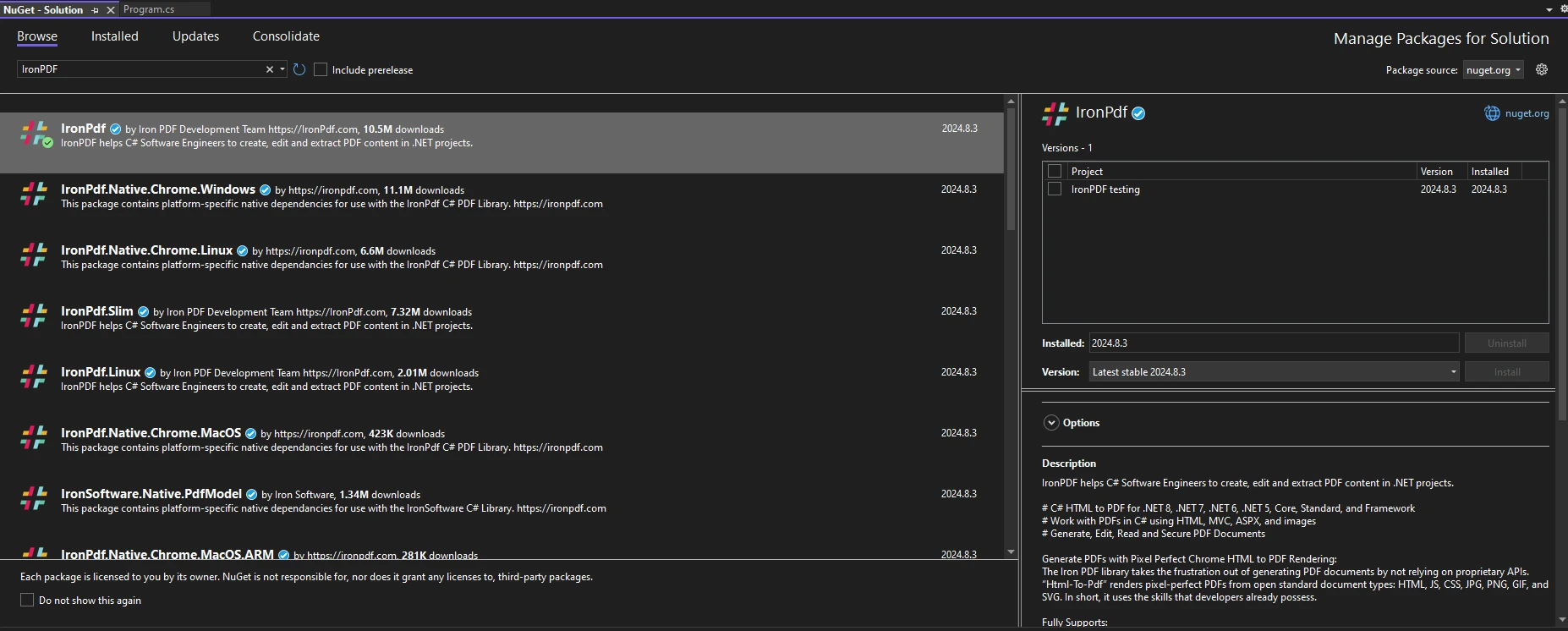
Oder alternativ den folgenden Befehl in der Paket-Manager-Konsole ausführen:
```shell
:ProductInstall
```
Um IronPDF in Ihrem Code zu verwenden, stellen Sie sicher, dass Sie die `using IronPdf` Anweisung am Anfang Ihrer Code-Datei platziert haben. Für eine ausführlichere Anleitung zur Einrichtung von IronPDF in Ihrer Umgebung sehen Sie sich bitte die [Erste Schritte](/docs/)-Seite an.
### Behandlung von Ausnahmen bei der PDF-Generierung
Wenn Sie mit IronPDF arbeiten, um PDFs zu erstellen, ist es entscheidend, verschiedene Ausnahmen zu antizipieren und zu behandeln, die während des Prozesses auftreten könnten. Eine ordnungsgemäße Implementierung von Ausnahmebehandlungs-Code verhindert nicht nur, dass Ihre Anwendung abstürzt, sondern bietet auch eine Möglichkeit, auf Fehler elegant zu reagieren, was die allgemeine Robustheit und Benutzererfahrung Ihrer Anwendung verbessert. So deklarieren Sie einen nullable boolean:
* **FileNotFoundException:** Diese Ausnahme tritt auf, wenn Sie versuchen, eine Datei mit IronPDF zu laden, die nicht auf dem angegebenen Dateipfad existiert. Eine Möglichkeit, dies zu handhaben, könnte die Verwendung von `File.Exists(path)` sein, um die Existenz der Datei zu überprüfen oder die Operation in einem if-Statement-Block einzuschließen, um zu überprüfen, ob die Datei existiert.
* **InvalidOperationException:** Dies tritt auf, wenn der Zustand des PDF-Dokuments für die aktuelle Operation ungültig ist. Zum Beispiel, wenn Sie versuchen, Operationen an einem PDF auszuführen, das nicht vollständig geladen oder gerendert ist.
* **UnauthorizedAccessException:** Diese Ausnahme tritt auf, wenn die Anwendung keine Berechtigung hat, auf die angegebene Datei oder das Verzeichnis zuzugreifen. Dies kann aufgrund restriktiver Datei-Berechtigungen oder beim Versuch, in eine schreibgeschützte Datei zu schreiben, passieren. Zum Beispiel, wenn Sie versuchen würden, Ausgabedateien in ein Verzeichnis zu schreiben, in dem die Anwendung keine Schreibberechtigungen hat.
Einige IronPDF-spezifische Ausnahme-Klassen umfassen:
* **IronPDFAssemblyVersionMismatchException:** Dies bezieht sich auf Fehler, die beim Laden von Assemblies während des IronPDF-Deployments auftreten.
* **IronPdfNativeException:** Dies stellt Fehler dar, die im IronPDF-native Code auftreten können.
* **IronPdfProductException:** Dies stellt alle Fehler dar, die während der IronPDF-Ausführung auftreten können.
```csharp
using IronPdf;
using IronPdf.Exceptions;
public static void Main(string[] args)
{
try
{
// Set the IronPDF license key
IronPdf.License.LicenseKey = "license-key";
// Create a PDF renderer
ChromePdfRenderer renderer = new ChromePdfRenderer();
// Generate PDF from HTML
var pdf = renderer.RenderHtmlAsPdf("<h1>Hello, World!</h1>");
// Save the PDF
pdf.SaveAs("output.pdf");
}
catch (IronPdfProductException ex)
{
// Handle PDF generation specific exceptions
Console.WriteLine("Error During IronPDF execution: " + ex.Message);
}
catch (Exception ex)
{
// Handle general exceptions
Console.WriteLine("An unexpected error occurred: " + ex.Message);
}
}
```
#### Ausgabe
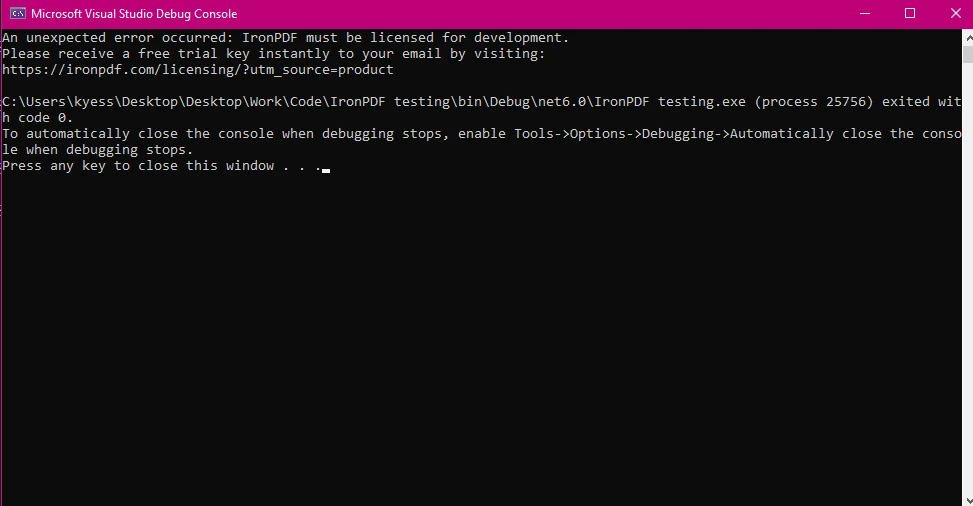
Ein Beispiel für die Ausnahmebehandlung mit IronPDF könnte sein, dass der Lizenzschlüssel falsch oder fehlt. In diesem Fall würde, wenn **IronPdfProductException** im Rahmen des Ausnahmebehandlungsprozesses verwendet wird, die entsprechende Fehlermeldung angezeigt.
### Aufräumen von Ressourcen mit dem Finally Block
In Szenarien, die Dateivorgänge oder Ressourcenmanagement umfassen, stellt der finally-Block sicher, dass alle Ressourcen angemessen freigegeben werden, selbst wenn während des Prozesses ein Fehler auftritt.
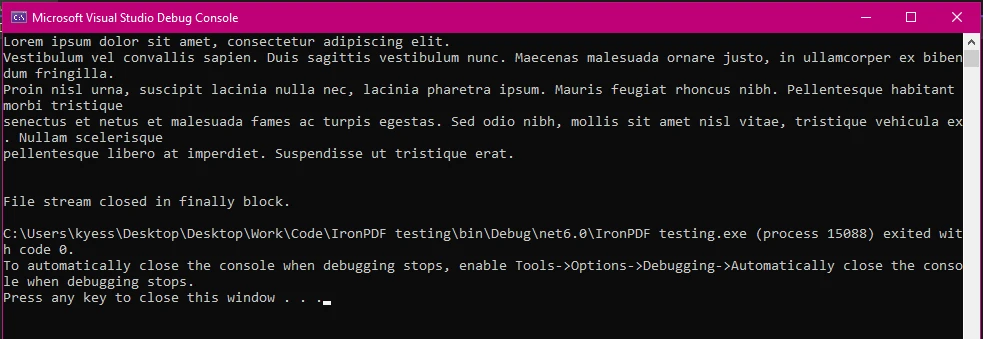
Beim Arbeiten mit Dateien ist es üblich, einen Dateistream zum Lesen oder Schreiben zu öffnen. Wenn während der Datei-Verarbeitung eine Ausnahme auftritt, kann das Nicht-Schließen des Streams die Datei gesperrt lassen oder andere Probleme verursachen. Der finally-Block stellt sicher, dass der Dateistream immer geschlossen wird und somit die Ressource freigegeben wird.
```csharp
public static void Main(string[] args)
{
FileStream fileStream = null;
try
{
ChromePdfRenderer renderer = new ChromePdfRenderer();
// Generate PDF from HTML
var pdf = renderer.RenderHtmlAsPdf("<h1>Hello, World!</h1>");
pdf.SaveAs("output.pdf");
pdfGenerated = true;
}
catch (IronPdf.Exceptions.IronPdfProductException ex)
{
// Handle PDF generation specific exceptions
Console.WriteLine("Error During IronPDF execution: " + ex.Message);
}
catch (Exception ex)
{
// Handle general exceptions to avoid any unhandled exception issues
Console.WriteLine("An unexpected error occurred: " + ex.Message);
}
finally
{
// Cleanup resources if necessary
if (fileStream != null)
{
fileStream.Close();
fileStream.Dispose();
}
}
}
```
#### Ausgabe von Finally Block Execution
## Gängige Szenarien für die Verwendung von Try-Catch-Finally mit IronPDF
### Behandlung von "File Not Found" und "Access Denied"-Fehlern
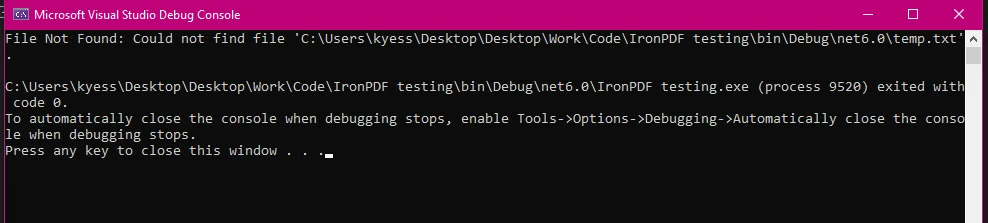
Bei der Arbeit mit Dateivorgängen in IronPDF ist es entscheidend, Ausnahmen wie **FileNotFoundException** und **UnauthorizedAccessException** zu behandeln. Diese Ausnahmen treten häufig auf, wenn Dateien fehlen oder Berechtigungen eingeschränkt sind. Eine ordnungsgemäße Behandlung dieser Ausnahmen ist entscheidend für die Aufrechterhaltung der Robustheit und Zuverlässigkeit Ihrer Anwendung, da sie häufig auftreten, wenn Probleme mit Dateipfaden, Verfügbarkeit oder Zugriffsberechtigungen bestehen.
```csharp
using IronPdf;
using System.IO;
using IronPdf.Exceptions;
public static void Main(string[] args)
{
try
{
// Generate PDF from an RTF file
ChromePdfRenderer renderer = new ChromePdfRenderer();
var pdf = renderer.RenderRtfFileAsPdf("filePath");
pdf.SaveAs("output.pdf");
}
catch (IronPdf.Exceptions.IronPdfProductException ex)
{
// Handle PDF generation specific exceptions
Console.WriteLine("Error During IronPDF execution: " + ex.Message);
}
catch (IOException ex)
{
int retries = 5;
int delay = 1000; // Delay in milliseconds
Console.WriteLine("IO Exception: " + ex.Message);
retries--;
if (retries > 0)
{
Console.WriteLine("File is in use. Retrying in " + delay + "ms...");
System.Threading.Thread.Sleep(delay);
}
else
{
Console.WriteLine("Failed to access the file after multiple attempts.");
}
}
catch (Exception ex)
{
// Handle general exceptions
Console.WriteLine("An unexpected error occurred: " + ex.Message);
}
finally
{
// Delete the temporary file
if (File.Exists("temp.txt"))
{
File.Delete("temp.txt");
Console.WriteLine("Cleanup Complete!");
}
}
}
```
#### Beispiel Output: FileNotFound
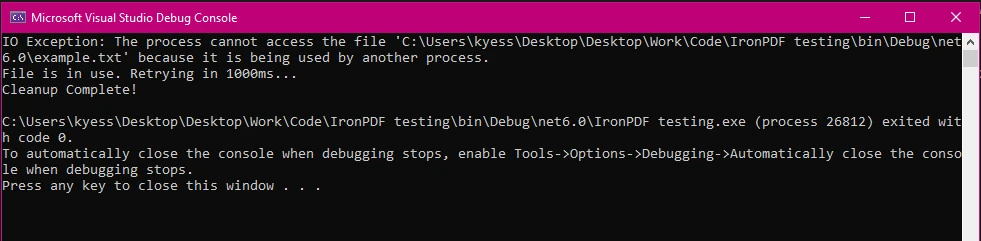
#### Beispielausgabe: IOException
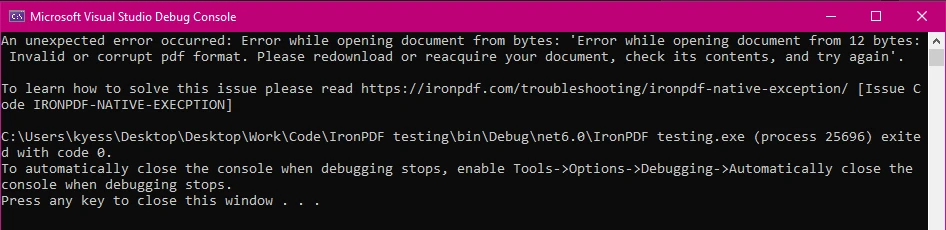
#### Beispielausgabe: Unerwarteter Fehler mit IronPdfNativeException
### Fangen und Protokollieren von PDF-Verarbeitungsfehlern
Das Protokollieren von Fehlern während der PDF-Verarbeitung ist für das Debuggen und Überwachen unerlässlich. Es ermöglicht Ihnen, detaillierte Informationen über auftretende Probleme zu erfassen, die für die Diagnose von Problemen und zur Verbesserung der Zuverlässigkeit Ihrer Anwendung von unschätzbarem Wert sein können.
```csharp
using IronPdf;
using IronPdf.Logging;
public static void Main(string[] args)
{
IronPdf.Logging.Logger.LogFilePath = "Default.log";
IronPdf.Logging.Logger.LoggingMode = IronPdf.Logging.Logger.LoggingModes.All;
try
{
ChromePdfRenderer renderer = new ChromePdfRenderer();
var pdf = renderer.RenderHtmlFileAsPdf("report.html");
pdf.SaveAs("output.pdf");
}
catch (Exception ex)
{
// Log the exception
IronSoftware.Logger.Log("PDF processing failed: " + ex.Message);
}
finally
{
Console.WriteLine("PDF processing attempt finished.");
}
}
```
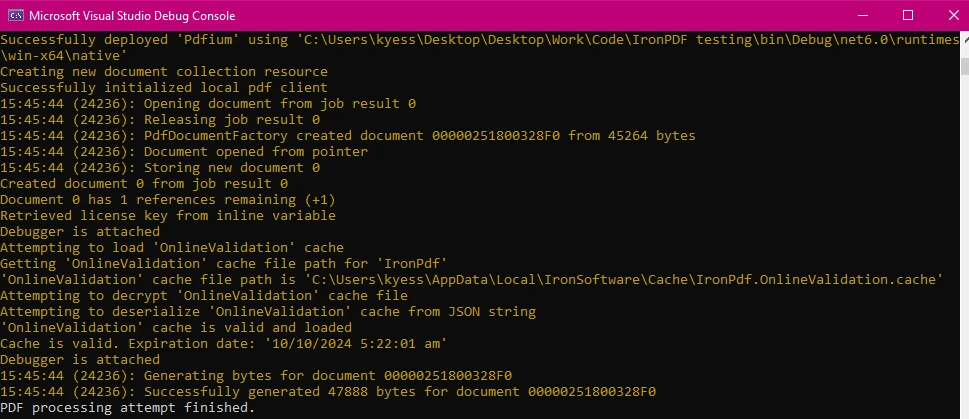
#### Konsolenausgabe
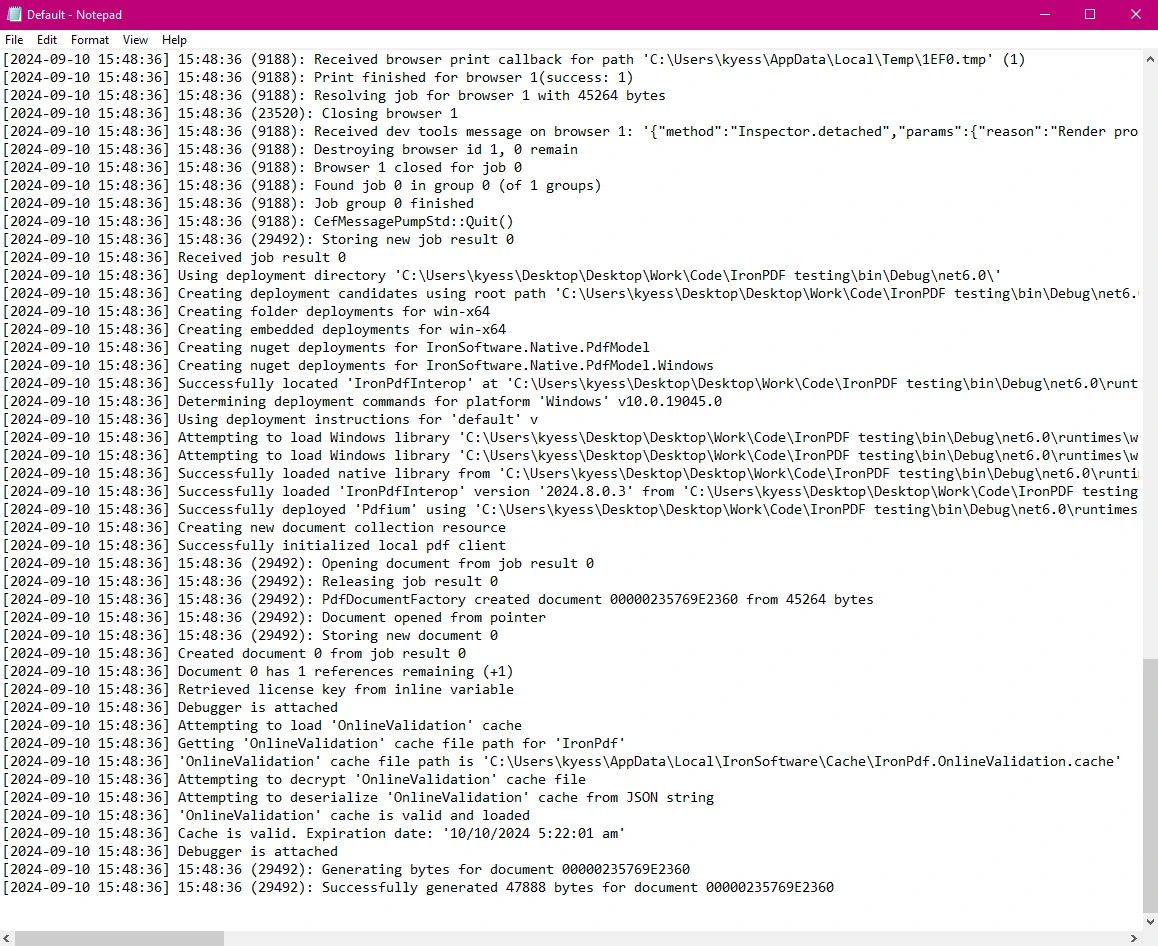
#### Protokollausgabe
### Bereinigung und Konsistenz nach Fehlern sicherstellen
Der finally-Block trägt dazu bei, die Konsistenz des Anwendungsstatus aufrechtzuerhalten, indem sichergestellt wird, dass alle Bereinigungsmaßnahmen auch nach einem Fehler ausgeführt werden. Durch das Hinzufügen eines Rollback-Mechanismus im finally-Block wird sichergestellt, dass, wenn ein Fehler während des PDF-Erstellungsprozesses auftritt, alle vorgenommenen Änderungen rückgängig gemacht werden und die Datenkonsistenz gewahrt bleibt.
```csharp
using IronPdf;
using System.IO;
using System;
using IronPdf.Exceptions;
public static void Main(string[] args)
{
string tempFilePath = "temp.txt";
bool pdfGenerated = false; // Flag to track if PDF generation was successful
string backupPdfPath = "backup.pdf";
try
{
File.WriteAllText(tempFilePath, "Temporary content for processing.");
ChromePdfRenderer renderer = new ChromePdfRenderer();
var pdf = renderer.RenderHtmlFileAsPdf("report.html");
pdf.SaveAs("output.pdf");
}
catch (IronPdf.Exceptions.IronPdfProductException ex)
{
Console.WriteLine("IronPDF error: " + ex.Message);
}
catch (IOException ex)
{
Console.WriteLine("IO Exception: " + ex.Message);
}
catch (Exception ex)
{
Console.WriteLine("An unexpected error occurred: " + ex.Message);
}
finally
{
Console.WriteLine("PDF processing attempt finished.");
// Delete the temporary file if it exists
if (File.Exists(tempFilePath))
{
File.Delete(tempFilePath);
Console.WriteLine("Temporary file deleted.");
}
// Rollback operations if PDF generation was not successful
if (!pdfGenerated)
{
if (File.Exists(backupPdfPath))
{
File.Delete(backupPdfPath);
Console.WriteLine("Rolled back: Backup PDF deleted.");
}
}
else
{
// Ensure the backup PDF is deleted after a successful save
if (File.Exists(backupPdfPath))
{
File.Delete(backupPdfPath); // Remove backup after successful save
Console.WriteLine("Backup PDF removed after successful save.");
}
}
}
}
```
### Zusammenbruch der Rollback-Logik
1. **Backup-Erstellung:**
- Das PDF wird zunächst an einem Sicherungsort gespeichert (`backupPdfPath`).
2. **Erfolgreiche Operation:**
- Wenn die PDF-Erstellung erfolgreich ist (`pdfGenerated = true`), wird das Sicherungs-PDF an den endgültigen Ausgabestandort verschoben.
3. **Rollback bei Scheitern:**
- Wenn eine Ausnahme auftritt und `pdfGenerated` weiterhin falsch bleibt, wird das Sicherungs-PDF im finally-Block gelöscht, um alle Teiländerungen rückgängig zu machen.
4. **Bereinigung:**
- Unabhängig vom Erfolg oder Misserfolg wird die temporäre Datei im finally-Block gelöscht, um sicherzustellen, dass keine übrig gebliebenen Dateien verbleiben.
Durch die Implementierung dieses Rollback-Mechanismus stellen Sie sicher, dass das Dateisystem in einem konsistenten Zustand bleibt, selbst wenn während des PDF-Erstellungsprozesses ein Fehler auftritt.
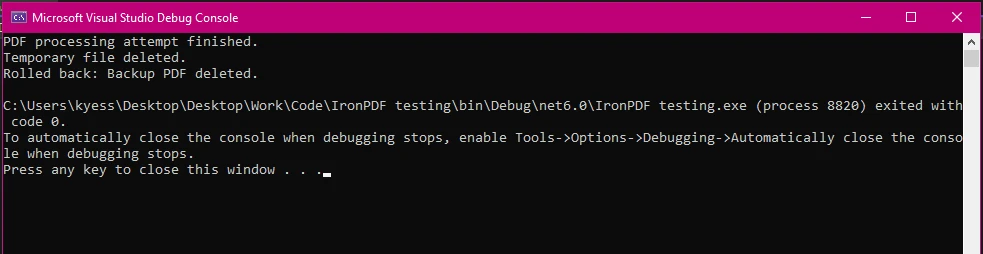
#### Ausgabe
## Vorteile der Verwendung von IronPDF für robuste Fehlerbehandlung
### Einfaches und intuitives API für die Ausnahmebehandlung
Die API von IronPDF ist darauf ausgelegt, die Fehlerbehandlung zu vereinfachen und es einfacher zu machen, Ausnahmen während komplexer PDF-Operationen zu verwalten. Im Vergleich zu anderen PDF-Bibliotheken bietet IronPDF einen einfacheren Ansatz zur Fehlerbehandlung und Ressourcen-Verwaltung. Die Möglichkeit, spezifische Ausnahmetypen wie **IronPdfProductException** und **IronPdfNativeException** zu definieren, erleichtert es, unerwartete Fehler oder Abstürze bei der Erstellung oder Bearbeitung von PDF-Dateien mit IronPDF zu vermeiden.
Zudem sind die von IronPDF ausgelösten Ausnahmen mit detaillierten Fehlermeldungen versehen, die Einblicke in das geben, was schiefgelaufen ist. Diese Klarheit hilft, Probleme effizienter zu diagnostizieren. Zum Beispiel könnte **IronPdfNativeException** auf Probleme mit nativen Komponenten hinweisen, während **IronPdfUnsupportedException** nicht unterstützte Funktionen oder Formate hervorhebt.
### Umfassende Unterstützung und Dokumentation
IronPDF bietet detaillierte Dokumentationen und Support-Ressourcen, die Entwicklern helfen, effektive Fehlerbehandlungspraktiken zu verstehen und zu implementieren. Diese umfassende Unterstützung ist wertvoll für die Fehlersuche und Optimierung von PDF-Operationen in .NET-Projekten.
IronPDF bietet:
* **Umfassende Dokumentation:** Umfangreiche und benutzerfreundliche Dokumentation, die alle Funktionen abdeckt.
* **24/5 Support:** Aktiver Ingenieur-Support ist verfügbar.
* **Videotutorials:** Schritt-für-Schritt-Videoguides sind auf YouTube verfügbar.
* **Community-Forum:** Engagierte Community für zusätzliche Unterstützung.
* **PDF-API-Referenz:** Bietet API-Referenzen, damit Sie das Beste aus unseren Tools herausholen können.
Für weitere Informationen, schauen Sie sich die umfangreiche [Dokumentation](/docs/) von IronPDF an.
### Lizenzierung
Wenn Sie IronPDF ausprobieren und seine große Auswahl an Funktionen erkunden möchten, können Sie dies dank des [kostenlosen Testzeitraums](trial-license) einfach tun. Mit einer schnellen Installation wird IronPDF in kürzester Zeit in Ihren PDF-Projekten einsatzbereit sein. Wenn Sie es weiterhin verwenden und die leistungsstarken Funktionen nutzen möchten, um Ihre PDF-Projekte zu verbessern, beginnen die [Lizenzen](trial-license) schon ab `$liteLicense`.
## Abschluss
Effektive Fehlerbehandlung mittels C#-try-catch-finally-Blöcken ist entscheidend für den Aufbau robuster Anwendungen, insbesondere bei der Arbeit mit Bibliotheken wie IronPDF. Indem Sie diese Mechanismen zur Fehlerbehandlung verstehen und implementieren, können Sie sicherstellen, dass Ihre PDF-Erstellungs- und Bearbeitungsprozesse zuverlässig und unempfindlich gegenüber unerwarteten Problemen sind.
[IronPDF](https://ironpdf.com) vereinfacht diesen Prozess mit seinem umfassenden und intuitiven [API](/object-reference/api/). Indem spezifische Ausnahmetypen wie [IronPdfProductException](/object-reference/api/IronPdf.Exceptions.IronPdfProductException.html), [IronPdfNativeException](/object-reference/api/IronPdf.Exceptions.IronPdfNativeException.html) und [IronPdfUnsupportedException](/object-reference/api/IronPdf.Exceptions.IronPdfUnsupportedException.html) angeboten werden, ermöglicht IronPDF es Entwicklern, Fehler präziser zu identifizieren und zu verwalten. Diese Spezifizität, kombiniert mit detaillierten Fehlermeldungen, hilft, den Debugging-Prozess zu rationalisieren und die Gesamtrobustheit Ihrer Anwendung zu verbessern.
Indem Sie die Fähigkeiten von IronPDF nutzen und bewährte Praktiken für die Fehlerbehandlung und das Ressourcenmanagement befolgen, können Sie sicherstellen, dass Ihre PDF-Operationen sowohl zuverlässig als auch robust sind, was zu einer stabileren und effizienteren Anwendung führt.
Die Fehlerbehandlung ist ein grundlegender Aspekt der robusten Anwendungsentwicklung. In C# sind die try-catch-finally-Blöcke leistungsstarke Werkzeuge, die sicherstellen, dass Ihre Anwendung unerwartete Situationen reibungslos handhaben kann, ohne abzustürzen. Effektive Fehlerbehandlung hilft nicht nur bei der Verwaltung von Laufzeitfehlern, sondern auch bei der Aufrechterhaltung der Stabilität und Zuverlässigkeit Ihrer Anwendungen.
IronPDF ist eine umfassende PDF-Bibliothek für .NET, die die Erstellung, Bearbeitung und Darstellung von PDFs vereinfacht. Bei der Integration von IronPDF in Ihre .NET-Projekte ist es entscheidend, zu verstehen, wie man Fehlerbehandlung effektiv einsetzt, um zuverlässige PDF-basierte Anwendungen zu erstellen. In diesem Artikel werden wir untersuchen, wie ein try-catch-finally-Statement in Ihren IronPDF-Projekten für eine bessere Ausnahmebehandlung implementiert werden kann und wie dies die Effizienz und Leistung Ihres PDF-Arbeitsbereichs verbessern kann.
Understanding Try, Catch, and Finally in C#
Was ist ein Try-Catch-Block?
In C# ermöglicht der try-catch-Block die Behandlung von Ausnahmen, die während der Ausführung Ihres Codes auftreten. Der try-Block-Abschnitt enthält den Code, der eine Ausnahme auslösen könnte, während der catch-Block die Ausnahme behandelt, falls eine auftritt. Diese Struktur ist unerlässlich, um Abstürze der Anwendung zu verhindern, indem Ausnahmen reibungslos behandelt und deren Weiterleitung im Aufrufstapel vermieden wird.
Der try-Block ist der Ort, an dem Sie jeglichen Code platzieren, der potenziell eine Ausnahme auslösen könnte. Dieser Block dient als Schutzmaßnahme, die es Ihnen ermöglicht, einen Codeabschnitt zu definieren, der auf Fehler überwacht werden soll. Wenn irgendein Teil des try-Blocks Ausnahmen auslöst, wird die Kontrolle sofort an den entsprechenden catch-Block übertragen.
Der catch-Block folgt auf den try-Block und wird verwendet, um Ausnahmen zu behandeln, die durch den Code des try-Blocks ausgelöst werden. Sie können mehrere catch-Blöcke einrichten, um verschiedene potenzielle Typen von Ausnahmen separat zu behandeln. Jeder catch-Block gibt den Typ der Ausnahme an, die er behandelt, und enthält den Code zur Verarbeitung der Ausnahme, wie das Protokollieren des Fehlers oder das Anzeigen einer benutzerfreundlichen Fehlermeldung.
using IronPdf;public static voidMain(string[] args){ try { // Create a PDF renderer using Chrome. ChromePdfRenderer renderer = new ChromePdfRenderer(); // Render an HTML file as a PDF. var pdf = renderer.RenderHtmlFileAsPdf("Example.html"); // Save the PDF to the specified file path. pdf.SaveAs("output.pdf"); } catch (FileNotFoundException ex) { // Handle file not found exceptionConsole.WriteLine("File not found: " + ex.Message); } catch (UnauthorizedAccessException ex) { // Handle unauthorized access exceptionConsole.WriteLine("Error: Access to the file is denied. " + ex.Message); } catch (Exception ex) { // Handle any other exceptionsConsole.WriteLine("An unexpected error occurred: " + ex.Message); }}
using IronPdf;
public static void Main(string[] args)
{
    try
    {
        // Create a PDF renderer using Chrome.
        ChromePdfRenderer renderer = new ChromePdfRenderer();
        // Render an HTML file as a PDF.
        var pdf = renderer.RenderHtmlFileAsPdf("Example.html");
        // Save the PDF to the specified file path.
        pdf.SaveAs("output.pdf");
    }
    catch (FileNotFoundException ex)
    {
        // Handle file not found exception
        Console.WriteLine("File not found: " + ex.Message);
    }
    catch (UnauthorizedAccessException ex)
    {
        // Handle unauthorized access exception
        Console.WriteLine("Error: Access to the file is denied. " + ex.Message);
    }
    catch (Exception ex)
    {
        // Handle any other exceptions
        Console.WriteLine("An unexpected error occurred: " + ex.Message);
    }
}
ImportsIronPdfPublicShared Sub Main(ByVal args() AsString)Try ' Create a PDF renderer using Chrome. Dim renderer As New ChromePdfRenderer() ' Render an HTML file as a PDF. Dim pdf = renderer.RenderHtmlFileAsPdf("Example.html") ' Save the PDF to the specified file path. pdf.SaveAs("output.pdf")Catch ex AsFileNotFoundException ' Handle file not found exceptionConsole.WriteLine("File not found: " & ex.Message)Catch ex AsUnauthorizedAccessException ' Handle unauthorized access exceptionConsole.WriteLine("Error: Access to the file is denied. " & ex.Message)Catch ex AsException ' Handle any other exceptionsConsole.WriteLine("An unexpected error occurred: " & ex.Message)EndTryEnd Sub
Imports IronPdf
Public Shared Sub Main(ByVal args() As String)
	Try
		' Create a PDF renderer using Chrome.
		Dim renderer As New ChromePdfRenderer()
		' Render an HTML file as a PDF.
		Dim pdf = renderer.RenderHtmlFileAsPdf("Example.html")
		' Save the PDF to the specified file path.
		pdf.SaveAs("output.pdf")
	Catch ex As FileNotFoundException
		' Handle file not found exception
		Console.WriteLine("File not found: " & ex.Message)
	Catch ex As UnauthorizedAccessException
		' Handle unauthorized access exception
		Console.WriteLine("Error: Access to the file is denied. " & ex.Message)
	Catch ex As Exception
		' Handle any other exceptions
		Console.WriteLine("An unexpected error occurred: " & ex.Message)
	End Try
End Sub
Beispiel für eine FileNotFoundException
Die Rolle des letzten Blocks
Der finally-Block wird verwendet, um Code auszuführen, der unabhängig davon ausgeführt werden muss, ob ein Ausnahmeobjekt ausgelöst wurde oder nicht. Dies wird typischerweise für die Bereinigung von Ressourcen verwendet, wie das Schließen von Dateiströmen oder Datenbankverbindungen, um sicherzustellen, dass diese Ressourcen ordnungsgemäß freigegeben werden. Der Code in einem finally-Block wird immer ausgeführt, wodurch er ideal für Aufgaben ist, die unabhängig davon durchgeführt werden müssen, was im try-Block passiert.
public static voidMain(string[] args){ try { // Example operation that throws an exception int num = 10; int result = num / 0; } catch (Exception ex) { // Handle division by zero exceptionConsole.WriteLine("Cannot divide by zero. " + ex.Message); } finally { // This finally block executes regardless of whether an exception was thrownConsole.WriteLine("Cleanup code runs here"); }}
public static void Main(string[] args)
{
    try
    {
        // Example operation that throws an exception
        int num = 10;
        int result = num / 0;
    }
    catch (Exception ex)
    {
        // Handle division by zero exception
        Console.WriteLine("Cannot divide by zero. " + ex.Message);
    }
    finally
    {
        // This finally block executes regardless of whether an exception was thrown
        Console.WriteLine("Cleanup code runs here");
    }
}
PublicShared Sub Main(ByVal args() AsString)Try ' Example operation that throws an exception Dim num AsInteger = 10 Dim result AsInteger = num \ 0Catch ex AsException ' Handle division by zero exceptionConsole.WriteLine("Cannot divide by zero. " & ex.Message)Finally ' This finally block executes regardless of whether an exception was thrownConsole.WriteLine("Cleanup code runs here")EndTryEnd Sub
Public Shared Sub Main(ByVal args() As String)
	Try
		' Example operation that throws an exception
		Dim num As Integer = 10
		Dim result As Integer = num \ 0
	Catch ex As Exception
		' Handle division by zero exception
		Console.WriteLine("Cannot divide by zero. " & ex.Message)
	Finally
		' This finally block executes regardless of whether an exception was thrown
		Console.WriteLine("Cleanup code runs here")
	End Try
End Sub
Ein Beispiel für den Ablauf des try-catch-finally-Blocks innerhalb eines Programms könnte so aussehen:
Implementierung von Try-Catch-Finally mit IronPDF
Einrichten von IronPDF in Ihrem Projekt
Um die IronPDF-Library in Ihren .NET-Projekten zu verwenden, müssen Sie sie zuerst über den NuGet-Paketmanager installieren. Eine Möglichkeit, dies zu tun, besteht darin, zu Werkzeuge > NuGet-Paketmanager > NuGet-Paketmanager für Lösungen zu navigieren und nach IronPDF zu suchen:
Oder alternativ den folgenden Befehl in der Paket-Manager-Konsole ausführen:
PM > Install-Package IronPdf
Install-Package IronPdf
Um IronPDF in Ihrem Code zu verwenden, stellen Sie sicher, dass Sie die using IronPdf Anweisung am Anfang Ihrer Code-Datei platziert haben. Für eine ausführlichere Anleitung zur Einrichtung von IronPDF in Ihrer Umgebung sehen Sie sich bitte die Erste Schritte-Seite an.
Behandlung von Ausnahmen bei der PDF-Generierung
Wenn Sie mit IronPDF arbeiten, um PDFs zu erstellen, ist es entscheidend, verschiedene Ausnahmen zu antizipieren und zu behandeln, die während des Prozesses auftreten könnten. Eine ordnungsgemäße Implementierung von Ausnahmebehandlungs-Code verhindert nicht nur, dass Ihre Anwendung abstürzt, sondern bietet auch eine Möglichkeit, auf Fehler elegant zu reagieren, was die allgemeine Robustheit und Benutzererfahrung Ihrer Anwendung verbessert. So deklarieren Sie einen nullable boolean:
FileNotFoundException: Diese Ausnahme tritt auf, wenn Sie versuchen, eine Datei mit IronPDF zu laden, die nicht auf dem angegebenen Dateipfad existiert. Eine Möglichkeit, dies zu handhaben, könnte die Verwendung von File.Exists(path) sein, um die Existenz der Datei zu überprüfen oder die Operation in einem if-Statement-Block einzuschließen, um zu überprüfen, ob die Datei existiert.
InvalidOperationException: Dies tritt auf, wenn der Zustand des PDF-Dokuments für die aktuelle Operation ungültig ist. Zum Beispiel, wenn Sie versuchen, Operationen an einem PDF auszuführen, das nicht vollständig geladen oder gerendert ist.
UnauthorizedAccessException: Diese Ausnahme tritt auf, wenn die Anwendung keine Berechtigung hat, auf die angegebene Datei oder das Verzeichnis zuzugreifen. Dies kann aufgrund restriktiver Datei-Berechtigungen oder beim Versuch, in eine schreibgeschützte Datei zu schreiben, passieren. Zum Beispiel, wenn Sie versuchen würden, Ausgabedateien in ein Verzeichnis zu schreiben, in dem die Anwendung keine Schreibberechtigungen hat.
Einige IronPDF-spezifische Ausnahme-Klassen umfassen:
IronPDFAssemblyVersionMismatchException: Dies bezieht sich auf Fehler, die beim Laden von Assemblies während des IronPDF-Deployments auftreten.
IronPdfNativeException: Dies stellt Fehler dar, die im IronPDF-native Code auftreten können.
IronPdfProductException: Dies stellt alle Fehler dar, die während der IronPDF-Ausführung auftreten können.
using IronPdf;using IronPdf.Exceptions;public static voidMain(string[] args){ try { // Set the IronPDF license keyIronPdf.License.LicenseKey = "license-key"; // Create a PDF renderer ChromePdfRenderer renderer = new ChromePdfRenderer(); // Generate PDF from HTML var pdf = renderer.RenderHtmlAsPdf("<h1>Hello, World!</h1>"); // Save the PDF pdf.SaveAs("output.pdf"); } catch (IronPdfProductException ex) { // Handle PDF generation specific exceptionsConsole.WriteLine("Error During IronPDF execution: " + ex.Message); } catch (Exception ex) { // Handle general exceptionsConsole.WriteLine("An unexpected error occurred: " + ex.Message); }}
using IronPdf;
using IronPdf.Exceptions;
public static void Main(string[] args)
{
    try
    {
        // Set the IronPDF license key
        IronPdf.License.LicenseKey = "license-key";
        // Create a PDF renderer
        ChromePdfRenderer renderer = new ChromePdfRenderer();
        // Generate PDF from HTML
        var pdf = renderer.RenderHtmlAsPdf("<h1>Hello, World!</h1>");
        // Save the PDF
        pdf.SaveAs("output.pdf");
    }
    catch (IronPdfProductException ex)
    {
        // Handle PDF generation specific exceptions
        Console.WriteLine("Error During IronPDF execution: " + ex.Message);
    }
    catch (Exception ex)
    {
        // Handle general exceptions
        Console.WriteLine("An unexpected error occurred: " + ex.Message);
    }
}
ImportsIronPdfImportsIronPdf.ExceptionsPublicShared Sub Main(ByVal args() AsString)Try ' Set the IronPDF license keyIronPdf.License.LicenseKey = "license-key" ' Create a PDF renderer Dim renderer As New ChromePdfRenderer() ' Generate PDF from HTML Dim pdf = renderer.RenderHtmlAsPdf("<h1>Hello, World!</h1>") ' Save the PDF pdf.SaveAs("output.pdf")Catch ex AsIronPdfProductException ' Handle PDF generation specific exceptionsConsole.WriteLine("Error During IronPDF execution: " & ex.Message)Catch ex AsException ' Handle general exceptionsConsole.WriteLine("An unexpected error occurred: " & ex.Message)EndTryEnd Sub
Imports IronPdf
Imports IronPdf.Exceptions
Public Shared Sub Main(ByVal args() As String)
	Try
		' Set the IronPDF license key
		IronPdf.License.LicenseKey = "license-key"
		' Create a PDF renderer
		Dim renderer As New ChromePdfRenderer()
		' Generate PDF from HTML
		Dim pdf = renderer.RenderHtmlAsPdf("<h1>Hello, World!</h1>")
		' Save the PDF
		pdf.SaveAs("output.pdf")
	Catch ex As IronPdfProductException
		' Handle PDF generation specific exceptions
		Console.WriteLine("Error During IronPDF execution: " & ex.Message)
	Catch ex As Exception
		' Handle general exceptions
		Console.WriteLine("An unexpected error occurred: " & ex.Message)
	End Try
End Sub
Ausgabe
Ein Beispiel für die Ausnahmebehandlung mit IronPDF könnte sein, dass der Lizenzschlüssel falsch oder fehlt. In diesem Fall würde, wenn IronPdfProductException im Rahmen des Ausnahmebehandlungsprozesses verwendet wird, die entsprechende Fehlermeldung angezeigt.
Aufräumen von Ressourcen mit dem Finally Block
In Szenarien, die Dateivorgänge oder Ressourcenmanagement umfassen, stellt der finally-Block sicher, dass alle Ressourcen angemessen freigegeben werden, selbst wenn während des Prozesses ein Fehler auftritt.
Beim Arbeiten mit Dateien ist es üblich, einen Dateistream zum Lesen oder Schreiben zu öffnen. Wenn während der Datei-Verarbeitung eine Ausnahme auftritt, kann das Nicht-Schließen des Streams die Datei gesperrt lassen oder andere Probleme verursachen. Der finally-Block stellt sicher, dass der Dateistream immer geschlossen wird und somit die Ressource freigegeben wird.
public static voidMain(string[] args){ FileStream fileStream = null; try { ChromePdfRenderer renderer = new ChromePdfRenderer(); // Generate PDF from HTML var pdf = renderer.RenderHtmlAsPdf("<h1>Hello, World!</h1>"); pdf.SaveAs("output.pdf"); pdfGenerated = true; } catch (IronPdf.Exceptions.IronPdfProductException ex) { // Handle PDF generation specific exceptionsConsole.WriteLine("Error During IronPDF execution: " + ex.Message); } catch (Exception ex) { // Handle general exceptions to avoid any unhandled exception issuesConsole.WriteLine("An unexpected error occurred: " + ex.Message); } finally { // Cleanup resources if necessary if (fileStream != null) { fileStream.Close(); fileStream.Dispose(); } }}
public static void Main(string[] args)
{
    FileStream fileStream = null;
    try
    {
        ChromePdfRenderer renderer = new ChromePdfRenderer();
        // Generate PDF from HTML
        var pdf = renderer.RenderHtmlAsPdf("<h1>Hello, World!</h1>");
        pdf.SaveAs("output.pdf");
        pdfGenerated = true;
    }
    catch (IronPdf.Exceptions.IronPdfProductException ex)
    {
        // Handle PDF generation specific exceptions
        Console.WriteLine("Error During IronPDF execution: " + ex.Message);
    }
    catch (Exception ex)
    {
        // Handle general exceptions to avoid any unhandled exception issues
        Console.WriteLine("An unexpected error occurred: " + ex.Message);
    }
    finally
    {
        // Cleanup resources if necessary
        if (fileStream != null)
        {
            fileStream.Close();
            fileStream.Dispose();
        }
    }
}
PublicShared Sub Main(ByVal args() AsString) Dim fileStream AsFileStream = NothingTry Dim renderer As New ChromePdfRenderer() ' Generate PDF from HTML Dim pdf = renderer.RenderHtmlAsPdf("<h1>Hello, World!</h1>") pdf.SaveAs("output.pdf") pdfGenerated = TrueCatch ex AsIronPdf.Exceptions.IronPdfProductException ' Handle PDF generation specific exceptionsConsole.WriteLine("Error During IronPDF execution: " & ex.Message)Catch ex AsException ' Handle general exceptions to avoid any unhandled exception issuesConsole.WriteLine("An unexpected error occurred: " & ex.Message)Finally ' Cleanup resources if necessary If fileStream IsNot Nothing Then fileStream.Close() fileStream.Dispose() End IfEndTryEnd Sub
Public Shared Sub Main(ByVal args() As String)
	Dim fileStream As FileStream = Nothing
	Try
		Dim renderer As New ChromePdfRenderer()
		' Generate PDF from HTML
		Dim pdf = renderer.RenderHtmlAsPdf("<h1>Hello, World!</h1>")
		pdf.SaveAs("output.pdf")
		pdfGenerated = True
	Catch ex As IronPdf.Exceptions.IronPdfProductException
		' Handle PDF generation specific exceptions
		Console.WriteLine("Error During IronPDF execution: " & ex.Message)
	Catch ex As Exception
		' Handle general exceptions to avoid any unhandled exception issues
		Console.WriteLine("An unexpected error occurred: " & ex.Message)
	Finally
		' Cleanup resources if necessary
		If fileStream IsNot Nothing Then
			fileStream.Close()
			fileStream.Dispose()
		End If
	End Try
End Sub
Ausgabe von Finally Block Execution
Gängige Szenarien für die Verwendung von Try-Catch-Finally mit IronPDF
Behandlung von "File Not Found" und "Access Denied"-Fehlern
Bei der Arbeit mit Dateivorgängen in IronPDF ist es entscheidend, Ausnahmen wie FileNotFoundException und UnauthorizedAccessException zu behandeln. Diese Ausnahmen treten häufig auf, wenn Dateien fehlen oder Berechtigungen eingeschränkt sind. Eine ordnungsgemäße Behandlung dieser Ausnahmen ist entscheidend für die Aufrechterhaltung der Robustheit und Zuverlässigkeit Ihrer Anwendung, da sie häufig auftreten, wenn Probleme mit Dateipfaden, Verfügbarkeit oder Zugriffsberechtigungen bestehen.
using IronPdf;using System.IO;using IronPdf.Exceptions;public static voidMain(string[] args){ try { // Generate PDF from an RTF file ChromePdfRenderer renderer = new ChromePdfRenderer(); var pdf = renderer.RenderRtfFileAsPdf("filePath"); pdf.SaveAs("output.pdf"); } catch (IronPdf.Exceptions.IronPdfProductException ex) { // Handle PDF generation specific exceptionsConsole.WriteLine("Error During IronPDF execution: " + ex.Message); } catch (IOException ex) { int retries = 5; int delay = 1000; // Delay in millisecondsConsole.WriteLine("IO Exception: " + ex.Message); retries--; if (retries > 0) {Console.WriteLine("File is in use. Retrying in " + delay + "ms...");System.Threading.Thread.Sleep(delay); } else {Console.WriteLine("Failed to access the file after multiple attempts."); } } catch (Exception ex) { // Handle general exceptionsConsole.WriteLine("An unexpected error occurred: " + ex.Message); } finally { // Delete the temporary file if (File.Exists("temp.txt")) {File.Delete("temp.txt");Console.WriteLine("Cleanup Complete!"); } }}
using IronPdf;
using System.IO;
using IronPdf.Exceptions;
public static void Main(string[] args)
{
    try
    {
        // Generate PDF from an RTF file
        ChromePdfRenderer renderer = new ChromePdfRenderer();
        var pdf = renderer.RenderRtfFileAsPdf("filePath");
        pdf.SaveAs("output.pdf");
    }
    catch (IronPdf.Exceptions.IronPdfProductException ex)
    {
        // Handle PDF generation specific exceptions
        Console.WriteLine("Error During IronPDF execution: " + ex.Message);
    }
    catch (IOException ex)
    {
        int retries = 5;
        int delay = 1000; // Delay in milliseconds
        Console.WriteLine("IO Exception: " + ex.Message);
        retries--;
        if (retries > 0)
        {
            Console.WriteLine("File is in use. Retrying in " + delay + "ms...");
            System.Threading.Thread.Sleep(delay);
        }
        else
        {
            Console.WriteLine("Failed to access the file after multiple attempts.");
        }
    }
    catch (Exception ex)
    {
        // Handle general exceptions
        Console.WriteLine("An unexpected error occurred: " + ex.Message);
    }
    finally
    {
        // Delete the temporary file
        if (File.Exists("temp.txt"))
        {
            File.Delete("temp.txt");
            Console.WriteLine("Cleanup Complete!");
        }
    }
}
ImportsIronPdfImportsSystem.IOImportsIronPdf.ExceptionsPublicShared Sub Main(ByVal args() AsString)Try ' Generate PDF from an RTF file Dim renderer As New ChromePdfRenderer() Dim pdf = renderer.RenderRtfFileAsPdf("filePath") pdf.SaveAs("output.pdf")Catch ex AsIronPdf.Exceptions.IronPdfProductException ' Handle PDF generation specific exceptionsConsole.WriteLine("Error During IronPDF execution: " & ex.Message)Catch ex AsIOException Dim retries AsInteger = 5 Dim delay AsInteger = 1000 ' Delay in millisecondsConsole.WriteLine("IO Exception: " & ex.Message) retries -= 1 If retries > 0 ThenConsole.WriteLine("File is in use. Retrying in " & delay & "ms...")System.Threading.Thread.Sleep(delay) ElseConsole.WriteLine("Failed to access the file after multiple attempts.") End IfCatch ex AsException ' Handle general exceptionsConsole.WriteLine("An unexpected error occurred: " & ex.Message)Finally ' Delete the temporary file IfFile.Exists("temp.txt") ThenFile.Delete("temp.txt")Console.WriteLine("Cleanup Complete!") End IfEndTryEnd Sub
Imports IronPdf
Imports System.IO
Imports IronPdf.Exceptions
Public Shared Sub Main(ByVal args() As String)
	Try
		' Generate PDF from an RTF file
		Dim renderer As New ChromePdfRenderer()
		Dim pdf = renderer.RenderRtfFileAsPdf("filePath")
		pdf.SaveAs("output.pdf")
	Catch ex As IronPdf.Exceptions.IronPdfProductException
		' Handle PDF generation specific exceptions
		Console.WriteLine("Error During IronPDF execution: " & ex.Message)
	Catch ex As IOException
		Dim retries As Integer = 5
		Dim delay As Integer = 1000 ' Delay in milliseconds
		Console.WriteLine("IO Exception: " & ex.Message)
		retries -= 1
		If retries > 0 Then
			Console.WriteLine("File is in use. Retrying in " & delay & "ms...")
			System.Threading.Thread.Sleep(delay)
		Else
			Console.WriteLine("Failed to access the file after multiple attempts.")
		End If
	Catch ex As Exception
		' Handle general exceptions
		Console.WriteLine("An unexpected error occurred: " & ex.Message)
	Finally
		' Delete the temporary file
		If File.Exists("temp.txt") Then
			File.Delete("temp.txt")
			Console.WriteLine("Cleanup Complete!")
		End If
	End Try
End Sub
Beispiel Output: FileNotFound
Beispielausgabe: IOException
Beispielausgabe: Unerwarteter Fehler mit IronPdfNativeException
Fangen und Protokollieren von PDF-Verarbeitungsfehlern
Das Protokollieren von Fehlern während der PDF-Verarbeitung ist für das Debuggen und Überwachen unerlässlich. Es ermöglicht Ihnen, detaillierte Informationen über auftretende Probleme zu erfassen, die für die Diagnose von Problemen und zur Verbesserung der Zuverlässigkeit Ihrer Anwendung von unschätzbarem Wert sein können.
using IronPdf;using IronPdf.Logging;public static voidMain(string[] args){IronPdf.Logging.Logger.LogFilePath = "Default.log";IronPdf.Logging.Logger.LoggingMode = IronPdf.Logging.Logger.LoggingModes.All; try { ChromePdfRenderer renderer = new ChromePdfRenderer(); var pdf = renderer.RenderHtmlFileAsPdf("report.html"); pdf.SaveAs("output.pdf"); } catch (Exception ex) { // Log the exceptionIronSoftware.Logger.Log("PDF processing failed: " + ex.Message); } finally {Console.WriteLine("PDF processing attempt finished."); }}
using IronPdf;
using IronPdf.Logging;
public static void Main(string[] args)
{
    IronPdf.Logging.Logger.LogFilePath = "Default.log";
    IronPdf.Logging.Logger.LoggingMode = IronPdf.Logging.Logger.LoggingModes.All;
    try
    {
        ChromePdfRenderer renderer = new ChromePdfRenderer();
        var pdf = renderer.RenderHtmlFileAsPdf("report.html");
        pdf.SaveAs("output.pdf");
    }
    catch (Exception ex)
    {
        // Log the exception
        IronSoftware.Logger.Log("PDF processing failed: " + ex.Message);
    }
    finally
    {
        Console.WriteLine("PDF processing attempt finished.");
    }
}
ImportsIronPdfImportsIronPdf.LoggingPublicShared Sub Main(ByVal args() AsString)IronPdf.Logging.Logger.LogFilePath = "Default.log"IronPdf.Logging.Logger.LoggingMode = IronPdf.Logging.Logger.LoggingModes.AllTry Dim renderer As New ChromePdfRenderer() Dim pdf = renderer.RenderHtmlFileAsPdf("report.html") pdf.SaveAs("output.pdf")Catch ex AsException ' Log the exceptionIronSoftware.Logger.Log("PDF processing failed: " & ex.Message)FinallyConsole.WriteLine("PDF processing attempt finished.")EndTryEnd Sub
Imports IronPdf
Imports IronPdf.Logging
Public Shared Sub Main(ByVal args() As String)
	IronPdf.Logging.Logger.LogFilePath = "Default.log"
	IronPdf.Logging.Logger.LoggingMode = IronPdf.Logging.Logger.LoggingModes.All
	Try
		Dim renderer As New ChromePdfRenderer()
		Dim pdf = renderer.RenderHtmlFileAsPdf("report.html")
		pdf.SaveAs("output.pdf")
	Catch ex As Exception
		' Log the exception
		IronSoftware.Logger.Log("PDF processing failed: " & ex.Message)
	Finally
		Console.WriteLine("PDF processing attempt finished.")
	End Try
End Sub
Konsolenausgabe
Protokollausgabe
Bereinigung und Konsistenz nach Fehlern sicherstellen
Der finally-Block trägt dazu bei, die Konsistenz des Anwendungsstatus aufrechtzuerhalten, indem sichergestellt wird, dass alle Bereinigungsmaßnahmen auch nach einem Fehler ausgeführt werden. Durch das Hinzufügen eines Rollback-Mechanismus im finally-Block wird sichergestellt, dass, wenn ein Fehler während des PDF-Erstellungsprozesses auftritt, alle vorgenommenen Änderungen rückgängig gemacht werden und die Datenkonsistenz gewahrt bleibt.
using IronPdf;using System.IO;using System;using IronPdf.Exceptions;public static voidMain(string[] args){ string tempFilePath = "temp.txt"; bool pdfGenerated = false; // Flag to track if PDF generation was successful string backupPdfPath = "backup.pdf"; try {File.WriteAllText(tempFilePath, "Temporary content for processing."); ChromePdfRenderer renderer = new ChromePdfRenderer(); var pdf = renderer.RenderHtmlFileAsPdf("report.html"); pdf.SaveAs("output.pdf"); } catch (IronPdf.Exceptions.IronPdfProductException ex) {Console.WriteLine("IronPDF error: " + ex.Message); } catch (IOException ex) {Console.WriteLine("IO Exception: " + ex.Message); } catch (Exception ex) {Console.WriteLine("An unexpected error occurred: " + ex.Message); } finally {Console.WriteLine("PDF processing attempt finished."); // Delete the temporary file if it exists if (File.Exists(tempFilePath)) {File.Delete(tempFilePath);Console.WriteLine("Temporary file deleted."); } // Rollback operations if PDF generation was not successful if (!pdfGenerated) { if (File.Exists(backupPdfPath)) {File.Delete(backupPdfPath);Console.WriteLine("Rolled back: Backup PDF deleted."); } } else { // Ensure the backup PDF is deleted after a successful save if (File.Exists(backupPdfPath)) {File.Delete(backupPdfPath); // Remove backup after successful saveConsole.WriteLine("Backup PDF removed after successful save."); } } }}
using IronPdf;
using System.IO;
using System;
using IronPdf.Exceptions;
public static void Main(string[] args)
{
    string tempFilePath = "temp.txt";
    bool pdfGenerated = false; // Flag to track if PDF generation was successful
    string backupPdfPath = "backup.pdf";
    try
    {
        File.WriteAllText(tempFilePath, "Temporary content for processing.");
        ChromePdfRenderer renderer = new ChromePdfRenderer();
        var pdf = renderer.RenderHtmlFileAsPdf("report.html");
        pdf.SaveAs("output.pdf");
    }
    catch (IronPdf.Exceptions.IronPdfProductException ex)
    {
        Console.WriteLine("IronPDF error: " + ex.Message);
    }
    catch (IOException ex)
    {
        Console.WriteLine("IO Exception: " + ex.Message);
    }
    catch (Exception ex)
    {
        Console.WriteLine("An unexpected error occurred: " + ex.Message);
    }
    finally
    {
        Console.WriteLine("PDF processing attempt finished.");
        // Delete the temporary file if it exists
        if (File.Exists(tempFilePath))
        {
            File.Delete(tempFilePath);
            Console.WriteLine("Temporary file deleted.");
        }
        // Rollback operations if PDF generation was not successful
        if (!pdfGenerated)
        {
            if (File.Exists(backupPdfPath))
            {
                File.Delete(backupPdfPath);
                Console.WriteLine("Rolled back: Backup PDF deleted.");
            }
        }
        else
        {
            // Ensure the backup PDF is deleted after a successful save
            if (File.Exists(backupPdfPath))
            {
                File.Delete(backupPdfPath); // Remove backup after successful save
                Console.WriteLine("Backup PDF removed after successful save.");
            }
        }
    }
}
ImportsIronPdfImportsSystem.IOImportsSystemImportsIronPdf.ExceptionsPublicShared Sub Main(ByVal args() AsString) Dim tempFilePath AsString = "temp.txt" Dim pdfGenerated AsBoolean = False ' Flag to track if PDF generation was successful Dim backupPdfPath AsString = "backup.pdf"TryFile.WriteAllText(tempFilePath, "Temporary content for processing.") Dim renderer As New ChromePdfRenderer() Dim pdf = renderer.RenderHtmlFileAsPdf("report.html") pdf.SaveAs("output.pdf")Catch ex AsIronPdf.Exceptions.IronPdfProductExceptionConsole.WriteLine("IronPDF error: " & ex.Message)Catch ex AsIOExceptionConsole.WriteLine("IO Exception: " & ex.Message)Catch ex AsExceptionConsole.WriteLine("An unexpected error occurred: " & ex.Message)FinallyConsole.WriteLine("PDF processing attempt finished.") ' Delete the temporary file if it exists IfFile.Exists(tempFilePath) ThenFile.Delete(tempFilePath)Console.WriteLine("Temporary file deleted.") End If ' Rollback operations if PDF generation was not successful IfNot pdfGenerated Then IfFile.Exists(backupPdfPath) ThenFile.Delete(backupPdfPath)Console.WriteLine("Rolled back: Backup PDF deleted.") End If Else ' Ensure the backup PDF is deleted after a successful save IfFile.Exists(backupPdfPath) ThenFile.Delete(backupPdfPath) ' Remove backup after successful saveConsole.WriteLine("Backup PDF removed after successful save.") End If End IfEndTryEnd Sub
Imports IronPdf
Imports System.IO
Imports System
Imports IronPdf.Exceptions
Public Shared Sub Main(ByVal args() As String)
	Dim tempFilePath As String = "temp.txt"
	Dim pdfGenerated As Boolean = False ' Flag to track if PDF generation was successful
	Dim backupPdfPath As String = "backup.pdf"
	Try
		File.WriteAllText(tempFilePath, "Temporary content for processing.")
		Dim renderer As New ChromePdfRenderer()
		Dim pdf = renderer.RenderHtmlFileAsPdf("report.html")
		pdf.SaveAs("output.pdf")
	Catch ex As IronPdf.Exceptions.IronPdfProductException
		Console.WriteLine("IronPDF error: " & ex.Message)
	Catch ex As IOException
		Console.WriteLine("IO Exception: " & ex.Message)
	Catch ex As Exception
		Console.WriteLine("An unexpected error occurred: " & ex.Message)
	Finally
		Console.WriteLine("PDF processing attempt finished.")
		' Delete the temporary file if it exists
		If File.Exists(tempFilePath) Then
			File.Delete(tempFilePath)
			Console.WriteLine("Temporary file deleted.")
		End If
		' Rollback operations if PDF generation was not successful
		If Not pdfGenerated Then
			If File.Exists(backupPdfPath) Then
				File.Delete(backupPdfPath)
				Console.WriteLine("Rolled back: Backup PDF deleted.")
			End If
		Else
			' Ensure the backup PDF is deleted after a successful save
			If File.Exists(backupPdfPath) Then
				File.Delete(backupPdfPath) ' Remove backup after successful save
				Console.WriteLine("Backup PDF removed after successful save.")
			End If
		End If
	End Try
End Sub
Zusammenbruch der Rollback-Logik
Backup-Erstellung:
Das PDF wird zunächst an einem Sicherungsort gespeichert (backupPdfPath).
Erfolgreiche Operation:
Wenn die PDF-Erstellung erfolgreich ist (pdfGenerated = true), wird das Sicherungs-PDF an den endgültigen Ausgabestandort verschoben.
Rollback bei Scheitern:
Wenn eine Ausnahme auftritt und pdfGenerated weiterhin falsch bleibt, wird das Sicherungs-PDF im finally-Block gelöscht, um alle Teiländerungen rückgängig zu machen.
Bereinigung:
Unabhängig vom Erfolg oder Misserfolg wird die temporäre Datei im finally-Block gelöscht, um sicherzustellen, dass keine übrig gebliebenen Dateien verbleiben.
Durch die Implementierung dieses Rollback-Mechanismus stellen Sie sicher, dass das Dateisystem in einem konsistenten Zustand bleibt, selbst wenn während des PDF-Erstellungsprozesses ein Fehler auftritt.
Ausgabe
Vorteile der Verwendung von IronPDF für robuste Fehlerbehandlung
Einfaches und intuitives API für die Ausnahmebehandlung
Die API von IronPDF ist darauf ausgelegt, die Fehlerbehandlung zu vereinfachen und es einfacher zu machen, Ausnahmen während komplexer PDF-Operationen zu verwalten. Im Vergleich zu anderen PDF-Bibliotheken bietet IronPDF einen einfacheren Ansatz zur Fehlerbehandlung und Ressourcen-Verwaltung. Die Möglichkeit, spezifische Ausnahmetypen wie IronPdfProductException und IronPdfNativeException zu definieren, erleichtert es, unerwartete Fehler oder Abstürze bei der Erstellung oder Bearbeitung von PDF-Dateien mit IronPDF zu vermeiden.
Zudem sind die von IronPDF ausgelösten Ausnahmen mit detaillierten Fehlermeldungen versehen, die Einblicke in das geben, was schiefgelaufen ist. Diese Klarheit hilft, Probleme effizienter zu diagnostizieren. Zum Beispiel könnte IronPdfNativeException auf Probleme mit nativen Komponenten hinweisen, während IronPdfUnsupportedException nicht unterstützte Funktionen oder Formate hervorhebt.
Umfassende Unterstützung und Dokumentation
IronPDF bietet detaillierte Dokumentationen und Support-Ressourcen, die Entwicklern helfen, effektive Fehlerbehandlungspraktiken zu verstehen und zu implementieren. Diese umfassende Unterstützung ist wertvoll für die Fehlersuche und Optimierung von PDF-Operationen in .NET-Projekten.
IronPDF bietet:
Umfassende Dokumentation: Umfangreiche und benutzerfreundliche Dokumentation, die alle Funktionen abdeckt.
24/5 Support: Aktiver Ingenieur-Support ist verfügbar.
Videotutorials: Schritt-für-Schritt-Videoguides sind auf YouTube verfügbar.
Community-Forum: Engagierte Community für zusätzliche Unterstützung.
PDF-API-Referenz: Bietet API-Referenzen, damit Sie das Beste aus unseren Tools herausholen können.
Für weitere Informationen, schauen Sie sich die umfangreiche Dokumentation von IronPDF an.
Lizenzierung
Wenn Sie IronPDF ausprobieren und seine große Auswahl an Funktionen erkunden möchten, können Sie dies dank des kostenlosen Testzeitraums einfach tun. Mit einer schnellen Installation wird IronPDF in kürzester Zeit in Ihren PDF-Projekten einsatzbereit sein. Wenn Sie es weiterhin verwenden und die leistungsstarken Funktionen nutzen möchten, um Ihre PDF-Projekte zu verbessern, beginnen die Lizenzen schon ab $999.
Abschluss
Effektive Fehlerbehandlung mittels C#-try-catch-finally-Blöcken ist entscheidend für den Aufbau robuster Anwendungen, insbesondere bei der Arbeit mit Bibliotheken wie IronPDF. Indem Sie diese Mechanismen zur Fehlerbehandlung verstehen und implementieren, können Sie sicherstellen, dass Ihre PDF-Erstellungs- und Bearbeitungsprozesse zuverlässig und unempfindlich gegenüber unerwarteten Problemen sind.
IronPDF vereinfacht diesen Prozess mit seinem umfassenden und intuitiven API. Indem spezifische Ausnahmetypen wie IronPdfProductException, IronPdfNativeException und IronPdfUnsupportedException angeboten werden, ermöglicht IronPDF es Entwicklern, Fehler präziser zu identifizieren und zu verwalten. Diese Spezifizität, kombiniert mit detaillierten Fehlermeldungen, hilft, den Debugging-Prozess zu rationalisieren und die Gesamtrobustheit Ihrer Anwendung zu verbessern.
Indem Sie die Fähigkeiten von IronPDF nutzen und bewährte Praktiken für die Fehlerbehandlung und das Ressourcenmanagement befolgen, können Sie sicherstellen, dass Ihre PDF-Operationen sowohl zuverlässig als auch robust sind, was zu einer stabileren und effizienteren Anwendung führt.
Jacob Mellor ist Chief Technology Officer bei Iron Software und ein visionärer Ingenieur, der Pionierarbeit in der C# PDF-Technologie leistet. Als der ursprüngliche Entwickler hinter der Kern-Codebasis von Iron Software hat er die Produktarchitektur des Unternehmens seit seiner Gründung geprägt und es zusammen mit CEO Cameron Rimington in ein Unternehmen mit mehr als 50 Mitarbeitern verwandelt, das die NASA, Tesla und globale Regierungsbehörden beliefert.



































