Bienvenido a nuestro tutorial sobre la práctica función Find de C#. Acabas de encontrar una característica poderosa que puede agilizar tu proceso de codificación. Así que, ya seas un programador experimentado o estés comenzando, este tutorial te guiará a través de todos los elementos para que puedas avanzar.
Los fundamentos de Find
En esencia, Find es una función que te permite localizar el primer elemento en una colección, matriz o lista que satisface un predicado específico. ¿Qué es un predicado, preguntas? En programación, un predicado es una función que prueba ciertas condiciones definidas para los elementos en una colección.
Ahora, profundicemos en un ejemplo de clase pública.
public class BikePart
{
    public string Id { get; set; } // Property to identify the bike part

    // Override the Equals method to specify how to compare two BikePart objects
    public override bool Equals(object obj)
    {
        if (obj == null || !(obj is BikePart))
            return false;

        return this.Id == ((BikePart)obj).Id;
    }

    // Override GetHashCode for hashing BikePart objects
    public override int GetHashCode()
    {
        return this.Id.GetHashCode();
    }

    // Override ToString to return a custom string representation of the object
    public override string ToString()
    {
        return "BikePart ID: " + this.Id;
    }
}
public class BikePart
{
    public string Id { get; set; } // Property to identify the bike part

    // Override the Equals method to specify how to compare two BikePart objects
    public override bool Equals(object obj)
    {
        if (obj == null || !(obj is BikePart))
            return false;

        return this.Id == ((BikePart)obj).Id;
    }

    // Override GetHashCode for hashing BikePart objects
    public override int GetHashCode()
    {
        return this.Id.GetHashCode();
    }

    // Override ToString to return a custom string representation of the object
    public override string ToString()
    {
        return "BikePart ID: " + this.Id;
    }
}
Public Class BikePart
Public Property Id() As String ' - Property to identify the bike part
' Override the Equals method to specify how to compare two BikePart objects
Public Overrides Function Equals(ByVal obj As Object) As Boolean
If obj Is Nothing OrElse Not (TypeOf obj Is BikePart) Then
Return False
End If
Return Me.Id = DirectCast(obj, BikePart).Id
End Function
' Override GetHashCode for hashing BikePart objects
Public Overrides Function GetHashCode() As Integer
Return Me.Id.GetHashCode()
End Function
' Override ToString to return a custom string representation of the object
Public Overrides Function ToString() As String
Return "BikePart ID: " & Me.Id
End Function
End Class
Public Class BikePart
	Public Property Id() As String ' -  Property to identify the bike part

	' Override the Equals method to specify how to compare two BikePart objects
	Public Overrides Function Equals(ByVal obj As Object) As Boolean
		If obj Is Nothing OrElse Not (TypeOf obj Is BikePart) Then
			Return False
		End If

		Return Me.Id = DirectCast(obj, BikePart).Id
	End Function

	' Override GetHashCode for hashing BikePart objects
	Public Overrides Function GetHashCode() As Integer
		Return Me.Id.GetHashCode()
	End Function

	' Override ToString to return a custom string representation of the object
	Public Overrides Function ToString() As String
		Return "BikePart ID: " & Me.Id
	End Function
End Class
En este código, BikePart es nuestra clase pública, y contiene una cadena pública ID para identificar cada parte de la bicicleta. Hemos sobrescrito el método ToString para imprimir el ID de la parte de la bicicleta de forma agradable, y también hemos sobrescrito los métodos Equals y GetHashCode con fines de comparación.
Empleando Find con predicados
Ahora que tenemos nuestra clase BikePart, podemos crear una lista de partes de bicicleta y usar Find para localizar partes específicas basándonos en sus IDs. Consideremos el siguiente ejemplo:
using System;
using System.Collections.Generic;

public static void Main()
{
    // Create a list of BikePart objects
    List<BikePart> bikeParts = new List<BikePart>
    {
        new BikePart { Id = "Chain Ring ID" },
        new BikePart { Id = "Crank Arm ID" },
        new BikePart { Id = "Regular Seat ID" },
        new BikePart { Id = "Banana Seat ID" },
    };

    // Define a predicate to find a BikePart with a specific ID
    Predicate<BikePart> findChainRingPredicate = (BikePart bp) => { return bp.Id == "Chain Ring ID"; };
    BikePart chainRingPart = bikeParts.Find(findChainRingPredicate);

    // Print the found BikePart's ID to the console
    Console.WriteLine(chainRingPart.ToString());
}
using System;
using System.Collections.Generic;

public static void Main()
{
    // Create a list of BikePart objects
    List<BikePart> bikeParts = new List<BikePart>
    {
        new BikePart { Id = "Chain Ring ID" },
        new BikePart { Id = "Crank Arm ID" },
        new BikePart { Id = "Regular Seat ID" },
        new BikePart { Id = "Banana Seat ID" },
    };

    // Define a predicate to find a BikePart with a specific ID
    Predicate<BikePart> findChainRingPredicate = (BikePart bp) => { return bp.Id == "Chain Ring ID"; };
    BikePart chainRingPart = bikeParts.Find(findChainRingPredicate);

    // Print the found BikePart's ID to the console
    Console.WriteLine(chainRingPart.ToString());
}
Imports System
Imports System.Collections.Generic
Public Shared Sub Main()
' Create a list of BikePart objects
Dim bikeParts As New List(Of BikePart) From {
New BikePart With {.Id = "Chain Ring ID"},
New BikePart With {.Id = "Crank Arm ID"},
New BikePart With {.Id = "Regular Seat ID"},
New BikePart With {.Id = "Banana Seat ID"}
}
' Define a predicate to find a BikePart with a specific ID
Dim findChainRingPredicate As Predicate(Of BikePart) = Function(bp As BikePart)
Return bp.Id = "Chain Ring ID"
End Function
Dim chainRingPart As BikePart = bikeParts.Find(findChainRingPredicate)
' Print the found BikePart's ID to the console
Console.WriteLine(chainRingPart.ToString())
End Sub
Imports System
Imports System.Collections.Generic

Public Shared Sub Main()
	' Create a list of BikePart objects
	Dim bikeParts As New List(Of BikePart) From {
		New BikePart With {.Id = "Chain Ring ID"},
		New BikePart With {.Id = "Crank Arm ID"},
		New BikePart With {.Id = "Regular Seat ID"},
		New BikePart With {.Id = "Banana Seat ID"}
	}

	' Define a predicate to find a BikePart with a specific ID
	Dim findChainRingPredicate As Predicate(Of BikePart) = Function(bp As BikePart)
		Return bp.Id = "Chain Ring ID"
	End Function
	Dim chainRingPart As BikePart = bikeParts.Find(findChainRingPredicate)

	' Print the found BikePart's ID to the console
	Console.WriteLine(chainRingPart.ToString())
End Sub
En este código, instanciamos cuatro objetos BikePart con IDs únicos. A continuación, creamos un predicado findChainRingPredicate que verifica si una parte de la bicicleta tiene el ID "Chain Ring ID". Finalmente, llamamos a Find en nuestra lista de partes de bicicleta utilizando el predicado que definimos e imprimimos el ID de la parte encontrada en la consola.
Comprensión del parámetro predicado
Podrías estar preguntándote sobre el parámetro Predicate match en nuestro método Find. Aquí es donde defines las condiciones bajo las cuales el método Find devuelve un elemento. En nuestro caso, queríamos que el método Find devolviera el primer elemento que coincida con el "Chain Ring ID".
Si ningún elemento satisface las condiciones definidas en tu predicado, el método Find devolverá un valor predeterminado. Por ejemplo, si estás trabajando con una matriz de enteros y tu predicado no encuentra una coincidencia, el método Find devolverá '0', el valor predeterminado para enteros en C#.
El principio de búsqueda lineal
Es esencial notar que la función Find realiza una búsqueda lineal a través de toda la matriz, lista o colección. Esto significa que comienza en el primer elemento y examina cada elemento siguiente en secuencia hasta que localiza la primera ocurrencia de un elemento que satisface el predicado.
En algunos casos, podrías querer localizar el último elemento que satisface el predicado en lugar del primero. Para este propósito, C# proporciona la función FindLast.
FindIndex y FindLastIndex
Así como Find te ayuda a localizar la primera ocurrencia de un elemento que coincide con tu predicado especificado, C# también proporciona los métodos FindIndex y FindLastIndex para brindarte los índices de los primeros y últimos elementos que coinciden con tus condiciones, respectivamente.
Probemos un ejemplo:
using System;
using System.Collections.Generic;

public static void Main()
{
    // Create a list of BikePart objects with an additional duplicate entry
    List<BikePart> bikeParts = new List<BikePart>
    {
        new BikePart { Id = "Chain Ring ID" },
        new BikePart { Id = "Crank Arm ID" },
        new BikePart { Id = "Regular Seat ID" },
        new BikePart { Id = "Banana Seat ID" },
        new BikePart { Id = "Chain Ring ID" }, // Added a second chain ring
    };

    // Define a predicate to find a BikePart with a specific ID
    Predicate<BikePart> findChainRingPredicate = (BikePart bp) => { return bp.Id == "Chain Ring ID"; };

    // Find the index of the first and last occurrence of the specified BikePart
    int firstChainRingIndex = bikeParts.FindIndex(findChainRingPredicate);
    int lastChainRingIndex = bikeParts.FindLastIndex(findChainRingPredicate);

    // Print the indices to the console
    Console.WriteLine($"First Chain Ring ID found at index: {firstChainRingIndex}");
    Console.WriteLine($"Last Chain Ring ID found at index: {lastChainRingIndex}");
}
using System;
using System.Collections.Generic;

public static void Main()
{
    // Create a list of BikePart objects with an additional duplicate entry
    List<BikePart> bikeParts = new List<BikePart>
    {
        new BikePart { Id = "Chain Ring ID" },
        new BikePart { Id = "Crank Arm ID" },
        new BikePart { Id = "Regular Seat ID" },
        new BikePart { Id = "Banana Seat ID" },
        new BikePart { Id = "Chain Ring ID" }, // Added a second chain ring
    };

    // Define a predicate to find a BikePart with a specific ID
    Predicate<BikePart> findChainRingPredicate = (BikePart bp) => { return bp.Id == "Chain Ring ID"; };

    // Find the index of the first and last occurrence of the specified BikePart
    int firstChainRingIndex = bikeParts.FindIndex(findChainRingPredicate);
    int lastChainRingIndex = bikeParts.FindLastIndex(findChainRingPredicate);

    // Print the indices to the console
    Console.WriteLine($"First Chain Ring ID found at index: {firstChainRingIndex}");
    Console.WriteLine($"Last Chain Ring ID found at index: {lastChainRingIndex}");
}
Imports System
Imports System.Collections.Generic
Public Shared Sub Main()
' Create a list of BikePart objects with an additional duplicate entry
Dim bikeParts As New List(Of BikePart) From {
New BikePart With {.Id = "Chain Ring ID"},
New BikePart With {.Id = "Crank Arm ID"},
New BikePart With {.Id = "Regular Seat ID"},
New BikePart With {.Id = "Banana Seat ID"},
New BikePart With {.Id = "Chain Ring ID"}
}
' Define a predicate to find a BikePart with a specific ID
Dim findChainRingPredicate As Predicate(Of BikePart) = Function(bp As BikePart)
Return bp.Id = "Chain Ring ID"
End Function
' Find the index of the first and last occurrence of the specified BikePart
Dim firstChainRingIndex As Integer = bikeParts.FindIndex(findChainRingPredicate)
Dim lastChainRingIndex As Integer = bikeParts.FindLastIndex(findChainRingPredicate)
' Print the indices to the console
Console.WriteLine($"First Chain Ring ID found at index: {firstChainRingIndex}")
Console.WriteLine($"Last Chain Ring ID found at index: {lastChainRingIndex}")
End Sub
Imports System
Imports System.Collections.Generic

Public Shared Sub Main()
	' Create a list of BikePart objects with an additional duplicate entry
	Dim bikeParts As New List(Of BikePart) From {
		New BikePart With {.Id = "Chain Ring ID"},
		New BikePart With {.Id = "Crank Arm ID"},
		New BikePart With {.Id = "Regular Seat ID"},
		New BikePart With {.Id = "Banana Seat ID"},
		New BikePart With {.Id = "Chain Ring ID"}
	}

	' Define a predicate to find a BikePart with a specific ID
	Dim findChainRingPredicate As Predicate(Of BikePart) = Function(bp As BikePart)
		Return bp.Id = "Chain Ring ID"
	End Function

	' Find the index of the first and last occurrence of the specified BikePart
	Dim firstChainRingIndex As Integer = bikeParts.FindIndex(findChainRingPredicate)
	Dim lastChainRingIndex As Integer = bikeParts.FindLastIndex(findChainRingPredicate)

	' Print the indices to the console
	Console.WriteLine($"First Chain Ring ID found at index: {firstChainRingIndex}")
	Console.WriteLine($"Last Chain Ring ID found at index: {lastChainRingIndex}")
End Sub
El Poder de FindAll
El método FindAll, como su nombre indica, recupera todos los elementos en la colección que satisfacen el predicado. Se utiliza cuando necesitas filtrar elementos basados en ciertas condiciones. El método FindAll devuelve una nueva Lista con todos los elementos coincidentes.
Aquí hay un ejemplo de código:
using System;
using System.Collections.Generic;

public static void Main()
{
    // Create a list of BikePart objects with an additional duplicate entry
    List<BikePart> bikeParts = new List<BikePart>
    {
        new BikePart { Id = "Chain Ring ID" },
        new BikePart { Id = "Crank Arm ID" },
        new BikePart { Id = "Regular Seat ID" },
        new BikePart { Id = "Banana Seat ID" },
        new BikePart { Id = "Chain Ring ID" }, // Added a second chain ring
    };

    // Define a predicate to find all BikeParts with a specific ID
    Predicate<BikePart> findChainRingPredicate = (BikePart bp) => { return bp.Id == "Chain Ring ID"; };

    // Use FindAll to get all matching BikePart objects
    List<BikePart> chainRings = bikeParts.FindAll(findChainRingPredicate);

    // Print the count and details of each found BikePart
    Console.WriteLine($"Found {chainRings.Count} Chain Rings:");
    foreach (BikePart chainRing in chainRings)
    {
        Console.WriteLine(chainRing.ToString());
    }
}
using System;
using System.Collections.Generic;

public static void Main()
{
    // Create a list of BikePart objects with an additional duplicate entry
    List<BikePart> bikeParts = new List<BikePart>
    {
        new BikePart { Id = "Chain Ring ID" },
        new BikePart { Id = "Crank Arm ID" },
        new BikePart { Id = "Regular Seat ID" },
        new BikePart { Id = "Banana Seat ID" },
        new BikePart { Id = "Chain Ring ID" }, // Added a second chain ring
    };

    // Define a predicate to find all BikeParts with a specific ID
    Predicate<BikePart> findChainRingPredicate = (BikePart bp) => { return bp.Id == "Chain Ring ID"; };

    // Use FindAll to get all matching BikePart objects
    List<BikePart> chainRings = bikeParts.FindAll(findChainRingPredicate);

    // Print the count and details of each found BikePart
    Console.WriteLine($"Found {chainRings.Count} Chain Rings:");
    foreach (BikePart chainRing in chainRings)
    {
        Console.WriteLine(chainRing.ToString());
    }
}
Imports System
Imports System.Collections.Generic
Public Shared Sub Main()
' Create a list of BikePart objects with an additional duplicate entry
Dim bikeParts As New List(Of BikePart) From {
New BikePart With {.Id = "Chain Ring ID"},
New BikePart With {.Id = "Crank Arm ID"},
New BikePart With {.Id = "Regular Seat ID"},
New BikePart With {.Id = "Banana Seat ID"},
New BikePart With {.Id = "Chain Ring ID"}
}
' Define a predicate to find all BikeParts with a specific ID
Dim findChainRingPredicate As Predicate(Of BikePart) = Function(bp As BikePart)
Return bp.Id = "Chain Ring ID"
End Function
' Use FindAll to get all matching BikePart objects
Dim chainRings As List(Of BikePart) = bikeParts.FindAll(findChainRingPredicate)
' Print the count and details of each found BikePart
Console.WriteLine($"Found {chainRings.Count} Chain Rings:")
For Each chainRing As BikePart In chainRings
Console.WriteLine(chainRing.ToString())
Next chainRing
End Sub
Imports System
Imports System.Collections.Generic

Public Shared Sub Main()
	' Create a list of BikePart objects with an additional duplicate entry
	Dim bikeParts As New List(Of BikePart) From {
		New BikePart With {.Id = "Chain Ring ID"},
		New BikePart With {.Id = "Crank Arm ID"},
		New BikePart With {.Id = "Regular Seat ID"},
		New BikePart With {.Id = "Banana Seat ID"},
		New BikePart With {.Id = "Chain Ring ID"}
	}

	' Define a predicate to find all BikeParts with a specific ID
	Dim findChainRingPredicate As Predicate(Of BikePart) = Function(bp As BikePart)
		Return bp.Id = "Chain Ring ID"
	End Function

	' Use FindAll to get all matching BikePart objects
	Dim chainRings As List(Of BikePart) = bikeParts.FindAll(findChainRingPredicate)

	' Print the count and details of each found BikePart
	Console.WriteLine($"Found {chainRings.Count} Chain Rings:")
	For Each chainRing As BikePart In chainRings
		Console.WriteLine(chainRing.ToString())
	Next chainRing
End Sub
Presentación de IronPDF
Un área crucial donde nuestro conocimiento del C# Find puede ser utilizado es la manipulación de contenido PDF usando IronPDF, una potente biblioteca C# para el procesamiento de PDF.
Supongamos que estamos trabajando con un documento PDF que contiene información sobre varias partes de bicicleta. A menudo, necesitamos localizar partes específicas dentro de este contenido. Aquí es donde IronPDF y el método C# Find se combinan para proporcionar una solución poderosa.
Primero, usaríamos IronPDF para extraer el texto de nuestro PDF y luego podemos usar el método Find o FindAll del que aprendimos anteriormente para localizar la parte específica en el texto extraído.
using IronPdf;
using System;
using System.Collections.Generic;
using System.Linq;

public class Program
{
    public static void Main()
    {
        // Load and extract text from a PDF document
        PdfDocument pdf = PdfDocument.FromFile(@"C:\Users\Administrator\Desktop\bike.pdf");
        string pdfText = pdf.ExtractAllText();

        // Split the extracted text into lines
        List<string> pdfLines = pdfText.Split('\n').ToList();

        // Define a predicate to find lines that contain a specific text
        Predicate<string> findChainRingPredicate = (string line) => { return line.Contains("Chain Ring ID"); };

        // Use FindAll to get all lines containing the specified text
        List<string> chainRingLines = pdfLines.FindAll(findChainRingPredicate);

        // Print the count and content of each found line
        Console.WriteLine($"Found {chainRingLines.Count} lines mentioning 'Chain Ring ID':");
        foreach (string line in chainRingLines)
        {
            Console.WriteLine(line);
        }
    }
}
using IronPdf;
using System;
using System.Collections.Generic;
using System.Linq;

public class Program
{
    public static void Main()
    {
        // Load and extract text from a PDF document
        PdfDocument pdf = PdfDocument.FromFile(@"C:\Users\Administrator\Desktop\bike.pdf");
        string pdfText = pdf.ExtractAllText();

        // Split the extracted text into lines
        List<string> pdfLines = pdfText.Split('\n').ToList();

        // Define a predicate to find lines that contain a specific text
        Predicate<string> findChainRingPredicate = (string line) => { return line.Contains("Chain Ring ID"); };

        // Use FindAll to get all lines containing the specified text
        List<string> chainRingLines = pdfLines.FindAll(findChainRingPredicate);

        // Print the count and content of each found line
        Console.WriteLine($"Found {chainRingLines.Count} lines mentioning 'Chain Ring ID':");
        foreach (string line in chainRingLines)
        {
            Console.WriteLine(line);
        }
    }
}
Imports IronPdf
Imports System
Imports System.Collections.Generic
Imports System.Linq
Public Class Program
Public Shared Sub Main()
' Load and extract text from a PDF document
Dim pdf As PdfDocument = PdfDocument.FromFile("C:\Users\Administrator\Desktop\bike.pdf")
Dim pdfText As String = pdf.ExtractAllText()
' Split the extracted text into lines
Dim pdfLines As List(Of String) = pdfText.Split(ControlChars.Lf).ToList()
' Define a predicate to find lines that contain a specific text
Dim findChainRingPredicate As Predicate(Of String) = Function(line As String) line.Contains("Chain Ring ID")
' Use FindAll to get all lines containing the specified text
Dim chainRingLines As List(Of String) = pdfLines.FindAll(findChainRingPredicate)
' Print the count and content of each found line
Console.WriteLine($"Found {chainRingLines.Count} lines mentioning 'Chain Ring ID':")
For Each line As String In chainRingLines
Console.WriteLine(line)
Next
End Sub
End Class
Imports IronPdf
Imports System
Imports System.Collections.Generic
Imports System.Linq

Public Class Program
    Public Shared Sub Main()
        ' Load and extract text from a PDF document
        Dim pdf As PdfDocument = PdfDocument.FromFile("C:\Users\Administrator\Desktop\bike.pdf")
        Dim pdfText As String = pdf.ExtractAllText()

        ' Split the extracted text into lines
        Dim pdfLines As List(Of String) = pdfText.Split(ControlChars.Lf).ToList()

        ' Define a predicate to find lines that contain a specific text
        Dim findChainRingPredicate As Predicate(Of String) = Function(line As String) line.Contains("Chain Ring ID")

        ' Use FindAll to get all lines containing the specified text
        Dim chainRingLines As List(Of String) = pdfLines.FindAll(findChainRingPredicate)

        ' Print the count and content of each found line
        Console.WriteLine($"Found {chainRingLines.Count} lines mentioning 'Chain Ring ID':")
        For Each line As String In chainRingLines
            Console.WriteLine(line)
        Next
    End Sub
End Class
En este código, hemos cargado un PDF, extraído el texto, lo hemos dividido en líneas, y luego usamos FindAll para localizar todas las líneas que mencionan 'Chain Ring ID'.
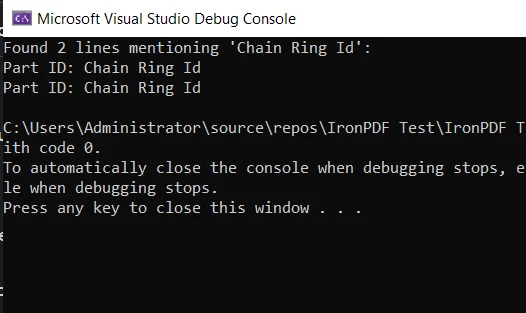
Este es un ejemplo básico de cómo el método Find puede ser usado junto con IronPDF en un escenario práctico. Demuestra la utilidad y versatilidad de C# junto con sus poderosas bibliotecas que ayudan a hacer tus tareas de programación más fáciles y eficientes.
Conclusión
En este tutorial, profundizamos en el método Find de C# y sus relativos, FindIndex, FindLastIndex y FindAll. Exploramos sus usos, examinamos algunos ejemplos de código, y descubrimos las circunstancias donde son más efectivos.
También nos adentramos en el mundo de la manipulación de PDF usando la biblioteca IronPDF. Asimismo, vimos una aplicación práctica de nuestro conocimiento del método Find al extraer y buscar contenido dentro de un documento PDF.
IronPDF ofrece una prueba gratuita de IronPDF, brindando una excelente oportunidad para explorar sus funcionalidades y determinar cómo puede beneficiar a tus proyectos en C#. Si decides seguir usando IronPDF después de la prueba, las licencias comienzan desde $999.























