Bienvenue dans notre tutoriel sur la fonction pratique Find de C#. Vous venez de découvrir une fonctionnalité puissante qui peut simplifier votre processus de codage. Ainsi, que vous soyez un codeur expérimenté ou que vous débutiez, ce tutoriel vous guidera à travers tous les éléments pour bien démarrer.
Les bases de Find
Au cœur, Find est une fonction qui vous permet de localiser le premier élément dans une collection, un tableau ou une liste qui satisfait un prédicat spécifié. Qu'est-ce qu'un prédicat, vous demandez-vous ? En programmation, un prédicat est une fonction qui teste certaines conditions définies pour les éléments dans une collection.
Passons maintenant à un exemple de classe publique.
public class BikePart
{
    public string Id { get; set; } // Property to identify the bike part

    // Override the Equals method to specify how to compare two BikePart objects
    public override bool Equals(object obj)
    {
        if (obj == null || !(obj is BikePart))
            return false;

        return this.Id == ((BikePart)obj).Id;
    }

    // Override GetHashCode for hashing BikePart objects
    public override int GetHashCode()
    {
        return this.Id.GetHashCode();
    }

    // Override ToString to return a custom string representation of the object
    public override string ToString()
    {
        return "BikePart ID: " + this.Id;
    }
}
public class BikePart
{
    public string Id { get; set; } // Property to identify the bike part

    // Override the Equals method to specify how to compare two BikePart objects
    public override bool Equals(object obj)
    {
        if (obj == null || !(obj is BikePart))
            return false;

        return this.Id == ((BikePart)obj).Id;
    }

    // Override GetHashCode for hashing BikePart objects
    public override int GetHashCode()
    {
        return this.Id.GetHashCode();
    }

    // Override ToString to return a custom string representation of the object
    public override string ToString()
    {
        return "BikePart ID: " + this.Id;
    }
}
Public Class BikePart
Public Property Id() As String ' - Property to identify the bike part
' Override the Equals method to specify how to compare two BikePart objects
Public Overrides Function Equals(ByVal obj As Object) As Boolean
If obj Is Nothing OrElse Not (TypeOf obj Is BikePart) Then
Return False
End If
Return Me.Id = DirectCast(obj, BikePart).Id
End Function
' Override GetHashCode for hashing BikePart objects
Public Overrides Function GetHashCode() As Integer
Return Me.Id.GetHashCode()
End Function
' Override ToString to return a custom string representation of the object
Public Overrides Function ToString() As String
Return "BikePart ID: " & Me.Id
End Function
End Class
Public Class BikePart
	Public Property Id() As String ' -  Property to identify the bike part

	' Override the Equals method to specify how to compare two BikePart objects
	Public Overrides Function Equals(ByVal obj As Object) As Boolean
		If obj Is Nothing OrElse Not (TypeOf obj Is BikePart) Then
			Return False
		End If

		Return Me.Id = DirectCast(obj, BikePart).Id
	End Function

	' Override GetHashCode for hashing BikePart objects
	Public Overrides Function GetHashCode() As Integer
		Return Me.Id.GetHashCode()
	End Function

	' Override ToString to return a custom string representation of the object
	Public Overrides Function ToString() As String
		Return "BikePart ID: " & Me.Id
	End Function
End Class
Dans ce code, BikePart est notre classe publique, et elle contient une chaîne publique ID pour identifier chaque pièce de vélo. Nous avons substitué la méthode ToString pour imprimer joliment l'ID de la pièce de vélo, et nous avons également substitué les méthodes Equals et GetHashCode à des fins de comparaison.
Utiliser Find avec des prédicats
Maintenant que nous avons notre classe BikePart, nous pouvons créer une liste de pièces de vélo et utiliser Find pour localiser des pièces spécifiques en fonction de leurs IDs. Considérons l'exemple suivant :
using System;
using System.Collections.Generic;

public static void Main()
{
    // Create a list of BikePart objects
    List<BikePart> bikeParts = new List<BikePart>
    {
        new BikePart { Id = "Chain Ring ID" },
        new BikePart { Id = "Crank Arm ID" },
        new BikePart { Id = "Regular Seat ID" },
        new BikePart { Id = "Banana Seat ID" },
    };

    // Define a predicate to find a BikePart with a specific ID
    Predicate<BikePart> findChainRingPredicate = (BikePart bp) => { return bp.Id == "Chain Ring ID"; };
    BikePart chainRingPart = bikeParts.Find(findChainRingPredicate);

    // Print the found BikePart's ID to the console
    Console.WriteLine(chainRingPart.ToString());
}
using System;
using System.Collections.Generic;

public static void Main()
{
    // Create a list of BikePart objects
    List<BikePart> bikeParts = new List<BikePart>
    {
        new BikePart { Id = "Chain Ring ID" },
        new BikePart { Id = "Crank Arm ID" },
        new BikePart { Id = "Regular Seat ID" },
        new BikePart { Id = "Banana Seat ID" },
    };

    // Define a predicate to find a BikePart with a specific ID
    Predicate<BikePart> findChainRingPredicate = (BikePart bp) => { return bp.Id == "Chain Ring ID"; };
    BikePart chainRingPart = bikeParts.Find(findChainRingPredicate);

    // Print the found BikePart's ID to the console
    Console.WriteLine(chainRingPart.ToString());
}
Imports System
Imports System.Collections.Generic
Public Shared Sub Main()
' Create a list of BikePart objects
Dim bikeParts As New List(Of BikePart) From {
New BikePart With {.Id = "Chain Ring ID"},
New BikePart With {.Id = "Crank Arm ID"},
New BikePart With {.Id = "Regular Seat ID"},
New BikePart With {.Id = "Banana Seat ID"}
}
' Define a predicate to find a BikePart with a specific ID
Dim findChainRingPredicate As Predicate(Of BikePart) = Function(bp As BikePart)
Return bp.Id = "Chain Ring ID"
End Function
Dim chainRingPart As BikePart = bikeParts.Find(findChainRingPredicate)
' Print the found BikePart's ID to the console
Console.WriteLine(chainRingPart.ToString())
End Sub
Imports System
Imports System.Collections.Generic

Public Shared Sub Main()
	' Create a list of BikePart objects
	Dim bikeParts As New List(Of BikePart) From {
		New BikePart With {.Id = "Chain Ring ID"},
		New BikePart With {.Id = "Crank Arm ID"},
		New BikePart With {.Id = "Regular Seat ID"},
		New BikePart With {.Id = "Banana Seat ID"}
	}

	' Define a predicate to find a BikePart with a specific ID
	Dim findChainRingPredicate As Predicate(Of BikePart) = Function(bp As BikePart)
		Return bp.Id = "Chain Ring ID"
	End Function
	Dim chainRingPart As BikePart = bikeParts.Find(findChainRingPredicate)

	' Print the found BikePart's ID to the console
	Console.WriteLine(chainRingPart.ToString())
End Sub
Dans ce code, nous instancions quatre objets BikePart avec des IDs uniques. Ensuite, nous créons un prédicat findChainRingPredicate qui vérifie si une pièce de vélo a l'ID "Chain Ring ID". Enfin, nous appelons Find sur notre liste de pièces de vélo en utilisant le prédicat que nous avons défini et nous imprimons l'ID de la pièce trouvée sur la console.
Comprendre le paramètre de prédicat
Vous vous demandez peut-être à propos du paramètre Predicate match dans notre méthode Find. C'est ici que vous définissez les conditions dans lesquelles la méthode Find retourne un élément. Dans notre cas, nous voulions que la méthode Find retourne le premier élément qui correspond à l'"ID Chain Ring".
Si aucun élément ne satisfait les conditions définies dans votre prédicat, la méthode Find retournera une valeur par défaut. Par exemple, si vous travaillez avec un tableau d'entiers et que votre prédicat ne trouve pas de correspondance, la méthode Find retournera '0', la valeur par défaut pour les entiers en C#.
Le principe de recherche linéaire
Il est essentiel de noter que la fonction Find effectue une recherche linéaire à travers l'ensemble du tableau, de la liste ou de la collection. Cela signifie qu'elle commence par le premier élément et inspecte chaque élément suivant dans l'ordre jusqu'à ce qu'elle localise la première occurrence d'un élément satisfaisant le prédicat.
Dans certains cas, vous pourriez vouloir localiser le dernier élément qui satisfait le prédicat au lieu du premier. À cette fin, C# fournit la fonction FindLast.
FindIndex et FindLastIndex
Tout comme Find vous aide à localiser la première occurrence d'un élément qui correspond à votre prédicat spécifié, C# fournit également les méthodes FindIndex et FindLastIndex pour vous donner les indices des premiers et derniers éléments qui correspondent à vos conditions, respectivement.
Essayons un exemple :
using System;
using System.Collections.Generic;

public static void Main()
{
    // Create a list of BikePart objects with an additional duplicate entry
    List<BikePart> bikeParts = new List<BikePart>
    {
        new BikePart { Id = "Chain Ring ID" },
        new BikePart { Id = "Crank Arm ID" },
        new BikePart { Id = "Regular Seat ID" },
        new BikePart { Id = "Banana Seat ID" },
        new BikePart { Id = "Chain Ring ID" }, // Added a second chain ring
    };

    // Define a predicate to find a BikePart with a specific ID
    Predicate<BikePart> findChainRingPredicate = (BikePart bp) => { return bp.Id == "Chain Ring ID"; };

    // Find the index of the first and last occurrence of the specified BikePart
    int firstChainRingIndex = bikeParts.FindIndex(findChainRingPredicate);
    int lastChainRingIndex = bikeParts.FindLastIndex(findChainRingPredicate);

    // Print the indices to the console
    Console.WriteLine($"First Chain Ring ID found at index: {firstChainRingIndex}");
    Console.WriteLine($"Last Chain Ring ID found at index: {lastChainRingIndex}");
}
using System;
using System.Collections.Generic;

public static void Main()
{
    // Create a list of BikePart objects with an additional duplicate entry
    List<BikePart> bikeParts = new List<BikePart>
    {
        new BikePart { Id = "Chain Ring ID" },
        new BikePart { Id = "Crank Arm ID" },
        new BikePart { Id = "Regular Seat ID" },
        new BikePart { Id = "Banana Seat ID" },
        new BikePart { Id = "Chain Ring ID" }, // Added a second chain ring
    };

    // Define a predicate to find a BikePart with a specific ID
    Predicate<BikePart> findChainRingPredicate = (BikePart bp) => { return bp.Id == "Chain Ring ID"; };

    // Find the index of the first and last occurrence of the specified BikePart
    int firstChainRingIndex = bikeParts.FindIndex(findChainRingPredicate);
    int lastChainRingIndex = bikeParts.FindLastIndex(findChainRingPredicate);

    // Print the indices to the console
    Console.WriteLine($"First Chain Ring ID found at index: {firstChainRingIndex}");
    Console.WriteLine($"Last Chain Ring ID found at index: {lastChainRingIndex}");
}
Imports System
Imports System.Collections.Generic
Public Shared Sub Main()
' Create a list of BikePart objects with an additional duplicate entry
Dim bikeParts As New List(Of BikePart) From {
New BikePart With {.Id = "Chain Ring ID"},
New BikePart With {.Id = "Crank Arm ID"},
New BikePart With {.Id = "Regular Seat ID"},
New BikePart With {.Id = "Banana Seat ID"},
New BikePart With {.Id = "Chain Ring ID"}
}
' Define a predicate to find a BikePart with a specific ID
Dim findChainRingPredicate As Predicate(Of BikePart) = Function(bp As BikePart)
Return bp.Id = "Chain Ring ID"
End Function
' Find the index of the first and last occurrence of the specified BikePart
Dim firstChainRingIndex As Integer = bikeParts.FindIndex(findChainRingPredicate)
Dim lastChainRingIndex As Integer = bikeParts.FindLastIndex(findChainRingPredicate)
' Print the indices to the console
Console.WriteLine($"First Chain Ring ID found at index: {firstChainRingIndex}")
Console.WriteLine($"Last Chain Ring ID found at index: {lastChainRingIndex}")
End Sub
Imports System
Imports System.Collections.Generic

Public Shared Sub Main()
	' Create a list of BikePart objects with an additional duplicate entry
	Dim bikeParts As New List(Of BikePart) From {
		New BikePart With {.Id = "Chain Ring ID"},
		New BikePart With {.Id = "Crank Arm ID"},
		New BikePart With {.Id = "Regular Seat ID"},
		New BikePart With {.Id = "Banana Seat ID"},
		New BikePart With {.Id = "Chain Ring ID"}
	}

	' Define a predicate to find a BikePart with a specific ID
	Dim findChainRingPredicate As Predicate(Of BikePart) = Function(bp As BikePart)
		Return bp.Id = "Chain Ring ID"
	End Function

	' Find the index of the first and last occurrence of the specified BikePart
	Dim firstChainRingIndex As Integer = bikeParts.FindIndex(findChainRingPredicate)
	Dim lastChainRingIndex As Integer = bikeParts.FindLastIndex(findChainRingPredicate)

	' Print the indices to the console
	Console.WriteLine($"First Chain Ring ID found at index: {firstChainRingIndex}")
	Console.WriteLine($"Last Chain Ring ID found at index: {lastChainRingIndex}")
End Sub
La puissance de FindAll
La méthode FindAll, comme son nom l'indique, récupère tous les éléments de la collection qui satisfont le prédicat. Elle est utilisée lorsque vous avez besoin de filtrer des éléments en fonction de certaines conditions. La méthode FindAll retourne une nouvelle liste avec tous les éléments correspondants.
Voici un exemple de code :
using System;
using System.Collections.Generic;

public static void Main()
{
    // Create a list of BikePart objects with an additional duplicate entry
    List<BikePart> bikeParts = new List<BikePart>
    {
        new BikePart { Id = "Chain Ring ID" },
        new BikePart { Id = "Crank Arm ID" },
        new BikePart { Id = "Regular Seat ID" },
        new BikePart { Id = "Banana Seat ID" },
        new BikePart { Id = "Chain Ring ID" }, // Added a second chain ring
    };

    // Define a predicate to find all BikeParts with a specific ID
    Predicate<BikePart> findChainRingPredicate = (BikePart bp) => { return bp.Id == "Chain Ring ID"; };

    // Use FindAll to get all matching BikePart objects
    List<BikePart> chainRings = bikeParts.FindAll(findChainRingPredicate);

    // Print the count and details of each found BikePart
    Console.WriteLine($"Found {chainRings.Count} Chain Rings:");
    foreach (BikePart chainRing in chainRings)
    {
        Console.WriteLine(chainRing.ToString());
    }
}
using System;
using System.Collections.Generic;

public static void Main()
{
    // Create a list of BikePart objects with an additional duplicate entry
    List<BikePart> bikeParts = new List<BikePart>
    {
        new BikePart { Id = "Chain Ring ID" },
        new BikePart { Id = "Crank Arm ID" },
        new BikePart { Id = "Regular Seat ID" },
        new BikePart { Id = "Banana Seat ID" },
        new BikePart { Id = "Chain Ring ID" }, // Added a second chain ring
    };

    // Define a predicate to find all BikeParts with a specific ID
    Predicate<BikePart> findChainRingPredicate = (BikePart bp) => { return bp.Id == "Chain Ring ID"; };

    // Use FindAll to get all matching BikePart objects
    List<BikePart> chainRings = bikeParts.FindAll(findChainRingPredicate);

    // Print the count and details of each found BikePart
    Console.WriteLine($"Found {chainRings.Count} Chain Rings:");
    foreach (BikePart chainRing in chainRings)
    {
        Console.WriteLine(chainRing.ToString());
    }
}
Imports System
Imports System.Collections.Generic
Public Shared Sub Main()
' Create a list of BikePart objects with an additional duplicate entry
Dim bikeParts As New List(Of BikePart) From {
New BikePart With {.Id = "Chain Ring ID"},
New BikePart With {.Id = "Crank Arm ID"},
New BikePart With {.Id = "Regular Seat ID"},
New BikePart With {.Id = "Banana Seat ID"},
New BikePart With {.Id = "Chain Ring ID"}
}
' Define a predicate to find all BikeParts with a specific ID
Dim findChainRingPredicate As Predicate(Of BikePart) = Function(bp As BikePart)
Return bp.Id = "Chain Ring ID"
End Function
' Use FindAll to get all matching BikePart objects
Dim chainRings As List(Of BikePart) = bikeParts.FindAll(findChainRingPredicate)
' Print the count and details of each found BikePart
Console.WriteLine($"Found {chainRings.Count} Chain Rings:")
For Each chainRing As BikePart In chainRings
Console.WriteLine(chainRing.ToString())
Next chainRing
End Sub
Imports System
Imports System.Collections.Generic

Public Shared Sub Main()
	' Create a list of BikePart objects with an additional duplicate entry
	Dim bikeParts As New List(Of BikePart) From {
		New BikePart With {.Id = "Chain Ring ID"},
		New BikePart With {.Id = "Crank Arm ID"},
		New BikePart With {.Id = "Regular Seat ID"},
		New BikePart With {.Id = "Banana Seat ID"},
		New BikePart With {.Id = "Chain Ring ID"}
	}

	' Define a predicate to find all BikeParts with a specific ID
	Dim findChainRingPredicate As Predicate(Of BikePart) = Function(bp As BikePart)
		Return bp.Id = "Chain Ring ID"
	End Function

	' Use FindAll to get all matching BikePart objects
	Dim chainRings As List(Of BikePart) = bikeParts.FindAll(findChainRingPredicate)

	' Print the count and details of each found BikePart
	Console.WriteLine($"Found {chainRings.Count} Chain Rings:")
	For Each chainRing As BikePart In chainRings
		Console.WriteLine(chainRing.ToString())
	Next chainRing
End Sub
Mettre IronPDF en scène
Un domaine crucial où notre connaissance de Find en C# peut être utilisée est la manipulation de contenu PDF avec IronPDF, une bibliothèque C# puissante pour le traitement des PDF.
Supposons que nous travaillions avec un document PDF contenant des informations sur différentes pièces de vélo. Souvent, nous devons localiser des pièces spécifiques dans ce contenu. C'est là que IronPDF et la méthode C# Find se combinent pour offrir une solution puissante.
Tout d'abord, nous utiliserions IronPDF pour extraire le texte de notre PDF et ensuite nous pouvons utiliser la méthode Find ou FindAll que nous avons apprise plus tôt pour localiser la partie spécifique dans le texte extrait.
using IronPdf;
using System;
using System.Collections.Generic;
using System.Linq;

public class Program
{
    public static void Main()
    {
        // Load and extract text from a PDF document
        PdfDocument pdf = PdfDocument.FromFile(@"C:\Users\Administrator\Desktop\bike.pdf");
        string pdfText = pdf.ExtractAllText();

        // Split the extracted text into lines
        List<string> pdfLines = pdfText.Split('\n').ToList();

        // Define a predicate to find lines that contain a specific text
        Predicate<string> findChainRingPredicate = (string line) => { return line.Contains("Chain Ring ID"); };

        // Use FindAll to get all lines containing the specified text
        List<string> chainRingLines = pdfLines.FindAll(findChainRingPredicate);

        // Print the count and content of each found line
        Console.WriteLine($"Found {chainRingLines.Count} lines mentioning 'Chain Ring ID':");
        foreach (string line in chainRingLines)
        {
            Console.WriteLine(line);
        }
    }
}
using IronPdf;
using System;
using System.Collections.Generic;
using System.Linq;

public class Program
{
    public static void Main()
    {
        // Load and extract text from a PDF document
        PdfDocument pdf = PdfDocument.FromFile(@"C:\Users\Administrator\Desktop\bike.pdf");
        string pdfText = pdf.ExtractAllText();

        // Split the extracted text into lines
        List<string> pdfLines = pdfText.Split('\n').ToList();

        // Define a predicate to find lines that contain a specific text
        Predicate<string> findChainRingPredicate = (string line) => { return line.Contains("Chain Ring ID"); };

        // Use FindAll to get all lines containing the specified text
        List<string> chainRingLines = pdfLines.FindAll(findChainRingPredicate);

        // Print the count and content of each found line
        Console.WriteLine($"Found {chainRingLines.Count} lines mentioning 'Chain Ring ID':");
        foreach (string line in chainRingLines)
        {
            Console.WriteLine(line);
        }
    }
}
Imports IronPdf
Imports System
Imports System.Collections.Generic
Imports System.Linq
Public Class Program
Public Shared Sub Main()
' Load and extract text from a PDF document
Dim pdf As PdfDocument = PdfDocument.FromFile("C:\Users\Administrator\Desktop\bike.pdf")
Dim pdfText As String = pdf.ExtractAllText()
' Split the extracted text into lines
Dim pdfLines As List(Of String) = pdfText.Split(ControlChars.Lf).ToList()
' Define a predicate to find lines that contain a specific text
Dim findChainRingPredicate As Predicate(Of String) = Function(line As String) line.Contains("Chain Ring ID")
' Use FindAll to get all lines containing the specified text
Dim chainRingLines As List(Of String) = pdfLines.FindAll(findChainRingPredicate)
' Print the count and content of each found line
Console.WriteLine($"Found {chainRingLines.Count} lines mentioning 'Chain Ring ID':")
For Each line As String In chainRingLines
Console.WriteLine(line)
Next
End Sub
End Class
Imports IronPdf
Imports System
Imports System.Collections.Generic
Imports System.Linq

Public Class Program
    Public Shared Sub Main()
        ' Load and extract text from a PDF document
        Dim pdf As PdfDocument = PdfDocument.FromFile("C:\Users\Administrator\Desktop\bike.pdf")
        Dim pdfText As String = pdf.ExtractAllText()

        ' Split the extracted text into lines
        Dim pdfLines As List(Of String) = pdfText.Split(ControlChars.Lf).ToList()

        ' Define a predicate to find lines that contain a specific text
        Dim findChainRingPredicate As Predicate(Of String) = Function(line As String) line.Contains("Chain Ring ID")

        ' Use FindAll to get all lines containing the specified text
        Dim chainRingLines As List(Of String) = pdfLines.FindAll(findChainRingPredicate)

        ' Print the count and content of each found line
        Console.WriteLine($"Found {chainRingLines.Count} lines mentioning 'Chain Ring ID':")
        For Each line As String In chainRingLines
            Console.WriteLine(line)
        Next
    End Sub
End Class
Dans ce code, nous avons chargé un PDF, extrait le texte, l'avons divisé en lignes, puis utilisé FindAll pour localiser toutes les lignes mentionnant 'Chain Ring ID'.
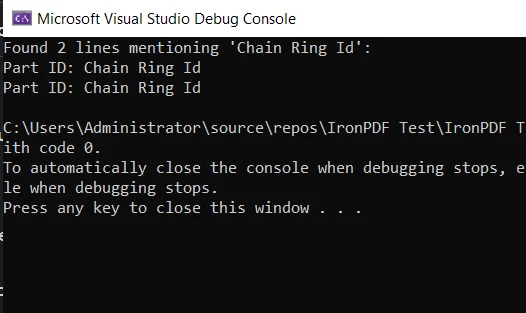
Ceci est un exemple basique de comment la méthode Find peut être utilisée avec IronPDF dans un scénario pratique. Il démontre l'utilité et la polyvalence de C# ainsi que ses bibliothèques puissantes qui facilitent et rendent vos tâches de programmation plus efficaces.
Conclusion
Dans ce tutoriel, nous avons exploré en profondeur la méthode C# Find et ses proches, FindIndex, FindLastIndex et FindAll. Nous avons exploré leurs utilisations, discuté de quelques exemples de code et mis en lumière les circonstances dans lesquelles elles sont les plus efficaces.
Nous avons également exploré le monde de la manipulation PDF en utilisant la bibliothèque IronPDF. De même, nous avons vu une application pratique de notre connaissance de la méthode Find dans l'extraction et la recherche de contenu dans un document PDF.
IronPDF propose un essai gratuit d'IronPDF, offrant une excellente occasion d'explorer ses fonctionnalités et de déterminer comment elle peut profiter à vos projets en C#. Si vous décidez de continuer à utiliser IronPDF après l'essai, les licences commencent à partir de $999.























