


C# Find (Como funciona para desenvolvedores)

Bem-vindo ao nosso tutorial sobre a prática função Find em C#. Você acaba de descobrir um recurso poderoso que pode agilizar seu processo de codificação. Portanto, seja você um programador experiente ou esteja apenas começando, este tutorial irá guiá-lo por todos os elementos necessários para você começar.
O básico do Find
No seu cerne, Find é uma função que permite localizar o primeiro elemento em uma coleção, array ou lista que satisfaça um predicado especificado. O que é um predicado, você pergunta? Em programação, um predicado é uma função que testa determinadas condições definidas para elementos em uma coleção.
Agora, vamos analisar um exemplo de classe pública.
public class BikePart
{
    public string Id { get; set; } // Property to identify the bike part

    // Override the Equals method to specify how to compare two BikePart objects
    public override bool Equals(object obj)
    {
        if (obj == null || !(obj is BikePart))
            return false;

        return this.Id == ((BikePart)obj).Id;
    }

    // Override GetHashCode for hashing BikePart objects
    public override int GetHashCode()
    {
        return this.Id.GetHashCode();
    }

    // Override ToString to return a custom string representation of the object
    public override string ToString()
    {
        return "BikePart ID: " + this.Id;
    }
}
public class BikePart
{
public string Id { get; set; } // Property to identify the bike part
// Override the Equals method to specify how to compare two BikePart objects
public override bool Equals(object obj)
{
if (obj == null || !(obj is BikePart))
return false;
return this.Id == ((BikePart)obj).Id;
}
// Override GetHashCode for hashing BikePart objects
public override int GetHashCode()
{
return this.Id.GetHashCode();
}
// Override ToString to return a custom string representation of the object
public override string ToString()
{
return "BikePart ID: " + this.Id;
}
}Public Class BikePart
Public Property Id() As String ' - Property to identify the bike part
' Override the Equals method to specify how to compare two BikePart objects
Public Overrides Function Equals(ByVal obj As Object) As Boolean
If obj Is Nothing OrElse Not (TypeOf obj Is BikePart) Then
Return False
End If
Return Me.Id = DirectCast(obj, BikePart).Id
End Function
' Override GetHashCode for hashing BikePart objects
Public Overrides Function GetHashCode() As Integer
Return Me.Id.GetHashCode()
End Function
' Override ToString to return a custom string representation of the object
Public Overrides Function ToString() As String
Return "BikePart ID: " & Me.Id
End Function
End ClassNeste código, BikePart é nossa classe pública, e contém uma string pública ID para identificar cada parte da bicicleta. Sobrescrevemos o método ToString para imprimir o ID da parte da bicicleta de forma agradável e também sobrescrevemos os métodos Equals e GetHashCode para fins de comparação.
Utilizando a função Find com predicados
Agora que temos nossa classe BikePart, podemos criar uma lista de partes da bicicleta e usar Find para localizar partes específicas baseando-se em seus IDs. Vejamos o seguinte exemplo:
using System;
using System.Collections.Generic;

public static void Main()
{
    // Create a list of BikePart objects
    List<BikePart> bikeParts = new List<BikePart>
    {
        new BikePart { Id = "Chain Ring ID" },
        new BikePart { Id = "Crank Arm ID" },
        new BikePart { Id = "Regular Seat ID" },
        new BikePart { Id = "Banana Seat ID" },
    };

    // Define a predicate to find a BikePart with a specific ID
    Predicate<BikePart> findChainRingPredicate = (BikePart bp) => { return bp.Id == "Chain Ring ID"; };
    BikePart chainRingPart = bikeParts.Find(findChainRingPredicate);

    // Print the found BikePart's ID to the console
    Console.WriteLine(chainRingPart.ToString());
}
using System;
using System.Collections.Generic;
public static void Main()
{
// Create a list of BikePart objects
List<BikePart> bikeParts = new List<BikePart>
{
new BikePart { Id = "Chain Ring ID" },
new BikePart { Id = "Crank Arm ID" },
new BikePart { Id = "Regular Seat ID" },
new BikePart { Id = "Banana Seat ID" },
};
// Define a predicate to find a BikePart with a specific ID
Predicate<BikePart> findChainRingPredicate = (BikePart bp) => { return bp.Id == "Chain Ring ID"; };
BikePart chainRingPart = bikeParts.Find(findChainRingPredicate);
// Print the found BikePart's ID to the console
Console.WriteLine(chainRingPart.ToString());
}Imports System
Imports System.Collections.Generic
Public Shared Sub Main()
' Create a list of BikePart objects
Dim bikeParts As New List(Of BikePart) From {
New BikePart With {.Id = "Chain Ring ID"},
New BikePart With {.Id = "Crank Arm ID"},
New BikePart With {.Id = "Regular Seat ID"},
New BikePart With {.Id = "Banana Seat ID"}
}
' Define a predicate to find a BikePart with a specific ID
Dim findChainRingPredicate As Predicate(Of BikePart) = Function(bp As BikePart)
Return bp.Id = "Chain Ring ID"
End Function
Dim chainRingPart As BikePart = bikeParts.Find(findChainRingPredicate)
' Print the found BikePart's ID to the console
Console.WriteLine(chainRingPart.ToString())
End SubNeste código, instanciamos quatro objetos BikePart com IDs únicos. Em seguida, criamos um predicado findChainRingPredicate que verifica se uma parte da bicicleta tem o ID "Chain Ring ID". Finalmente, chamamos Find em nossa lista de partes da bicicleta usando o predicado que definimos e imprimimos o ID da parte encontrada no console.
Entendendo o parâmetro predicado
Você pode estar se perguntando sobre o parâmetro Predicate match em nosso método Find. É aqui que você define as condições sob as quais o método Find retorna um elemento. No nosso caso, queríamos que o método Find retornasse o primeiro elemento que correspondesse ao "Chain Ring ID".
Se nenhum elemento satisfizer as condições definidas no seu predicado, o método Find retornará um valor padrão. Por exemplo, se você estiver trabalhando com um array de inteiros e seu predicado não encontrar uma correspondência, o método Find retornará '0', o valor padrão para inteiros em C#.
O princípio da busca linear
É importante notar que a função Find realiza uma busca linear por todo o array, lista ou coleção. Isso significa que começa no primeiro elemento e inspeciona cada elemento seguinte em sequência até localizar a primeira ocorrência de um elemento que satisfaça o predicado.
Em alguns casos, você pode querer localizar o último elemento que satisfaz o predicado em vez do primeiro. Para este propósito, C# fornece a função FindLast.
FindIndex e FindLastIndex
Assim como Find ajuda a localizar a primeira ocorrência de um elemento que corresponde ao seu predicado especificado, C# também fornece métodos FindIndex e FindLastIndex para fornecer os índices dos primeiros e últimos elementos que correspondem às suas condições, respectivamente.
Vejamos um exemplo:
using System;
using System.Collections.Generic;

public static void Main()
{
    // Create a list of BikePart objects with an additional duplicate entry
    List<BikePart> bikeParts = new List<BikePart>
    {
        new BikePart { Id = "Chain Ring ID" },
        new BikePart { Id = "Crank Arm ID" },
        new BikePart { Id = "Regular Seat ID" },
        new BikePart { Id = "Banana Seat ID" },
        new BikePart { Id = "Chain Ring ID" }, // Added a second chain ring
    };

    // Define a predicate to find a BikePart with a specific ID
    Predicate<BikePart> findChainRingPredicate = (BikePart bp) => { return bp.Id == "Chain Ring ID"; };

    // Find the index of the first and last occurrence of the specified BikePart
    int firstChainRingIndex = bikeParts.FindIndex(findChainRingPredicate);
    int lastChainRingIndex = bikeParts.FindLastIndex(findChainRingPredicate);

    // Print the indices to the console
    Console.WriteLine($"First Chain Ring ID found at index: {firstChainRingIndex}");
    Console.WriteLine($"Last Chain Ring ID found at index: {lastChainRingIndex}");
}
using System;
using System.Collections.Generic;
public static void Main()
{
// Create a list of BikePart objects with an additional duplicate entry
List<BikePart> bikeParts = new List<BikePart>
{
new BikePart { Id = "Chain Ring ID" },
new BikePart { Id = "Crank Arm ID" },
new BikePart { Id = "Regular Seat ID" },
new BikePart { Id = "Banana Seat ID" },
new BikePart { Id = "Chain Ring ID" }, // Added a second chain ring
};
// Define a predicate to find a BikePart with a specific ID
Predicate<BikePart> findChainRingPredicate = (BikePart bp) => { return bp.Id == "Chain Ring ID"; };
// Find the index of the first and last occurrence of the specified BikePart
int firstChainRingIndex = bikeParts.FindIndex(findChainRingPredicate);
int lastChainRingIndex = bikeParts.FindLastIndex(findChainRingPredicate);
// Print the indices to the console
Console.WriteLine($"First Chain Ring ID found at index: {firstChainRingIndex}");
Console.WriteLine($"Last Chain Ring ID found at index: {lastChainRingIndex}");
}Imports System
Imports System.Collections.Generic
Public Shared Sub Main()
' Create a list of BikePart objects with an additional duplicate entry
Dim bikeParts As New List(Of BikePart) From {
New BikePart With {.Id = "Chain Ring ID"},
New BikePart With {.Id = "Crank Arm ID"},
New BikePart With {.Id = "Regular Seat ID"},
New BikePart With {.Id = "Banana Seat ID"},
New BikePart With {.Id = "Chain Ring ID"}
}
' Define a predicate to find a BikePart with a specific ID
Dim findChainRingPredicate As Predicate(Of BikePart) = Function(bp As BikePart)
Return bp.Id = "Chain Ring ID"
End Function
' Find the index of the first and last occurrence of the specified BikePart
Dim firstChainRingIndex As Integer = bikeParts.FindIndex(findChainRingPredicate)
Dim lastChainRingIndex As Integer = bikeParts.FindLastIndex(findChainRingPredicate)
' Print the indices to the console
Console.WriteLine($"First Chain Ring ID found at index: {firstChainRingIndex}")
Console.WriteLine($"Last Chain Ring ID found at index: {lastChainRingIndex}")
End SubO Poder de FindAll
O método FindAll, como o nome sugere, recupera todos os elementos na coleção que satisfaçam o predicado. É utilizado quando você precisa filtrar elementos com base em determinadas condições. O método FindAll retorna uma nova Lista com todos os elementos correspondentes.
Aqui está um exemplo de código:
using System;
using System.Collections.Generic;

public static void Main()
{
    // Create a list of BikePart objects with an additional duplicate entry
    List<BikePart> bikeParts = new List<BikePart>
    {
        new BikePart { Id = "Chain Ring ID" },
        new BikePart { Id = "Crank Arm ID" },
        new BikePart { Id = "Regular Seat ID" },
        new BikePart { Id = "Banana Seat ID" },
        new BikePart { Id = "Chain Ring ID" }, // Added a second chain ring
    };

    // Define a predicate to find all BikeParts with a specific ID
    Predicate<BikePart> findChainRingPredicate = (BikePart bp) => { return bp.Id == "Chain Ring ID"; };

    // Use FindAll to get all matching BikePart objects
    List<BikePart> chainRings = bikeParts.FindAll(findChainRingPredicate);

    // Print the count and details of each found BikePart
    Console.WriteLine($"Found {chainRings.Count} Chain Rings:");
    foreach (BikePart chainRing in chainRings)
    {
        Console.WriteLine(chainRing.ToString());
    }
}
using System;
using System.Collections.Generic;
public static void Main()
{
// Create a list of BikePart objects with an additional duplicate entry
List<BikePart> bikeParts = new List<BikePart>
{
new BikePart { Id = "Chain Ring ID" },
new BikePart { Id = "Crank Arm ID" },
new BikePart { Id = "Regular Seat ID" },
new BikePart { Id = "Banana Seat ID" },
new BikePart { Id = "Chain Ring ID" }, // Added a second chain ring
};
// Define a predicate to find all BikeParts with a specific ID
Predicate<BikePart> findChainRingPredicate = (BikePart bp) => { return bp.Id == "Chain Ring ID"; };
// Use FindAll to get all matching BikePart objects
List<BikePart> chainRings = bikeParts.FindAll(findChainRingPredicate);
// Print the count and details of each found BikePart
Console.WriteLine($"Found {chainRings.Count} Chain Rings:");
foreach (BikePart chainRing in chainRings)
{
Console.WriteLine(chainRing.ToString());
}
}Imports System
Imports System.Collections.Generic
Public Shared Sub Main()
' Create a list of BikePart objects with an additional duplicate entry
Dim bikeParts As New List(Of BikePart) From {
New BikePart With {.Id = "Chain Ring ID"},
New BikePart With {.Id = "Crank Arm ID"},
New BikePart With {.Id = "Regular Seat ID"},
New BikePart With {.Id = "Banana Seat ID"},
New BikePart With {.Id = "Chain Ring ID"}
}
' Define a predicate to find all BikeParts with a specific ID
Dim findChainRingPredicate As Predicate(Of BikePart) = Function(bp As BikePart)
Return bp.Id = "Chain Ring ID"
End Function
' Use FindAll to get all matching BikePart objects
Dim chainRings As List(Of BikePart) = bikeParts.FindAll(findChainRingPredicate)
' Print the count and details of each found BikePart
Console.WriteLine($"Found {chainRings.Count} Chain Rings:")
For Each chainRing As BikePart In chainRings
Console.WriteLine(chainRing.ToString())
Next chainRing
End SubIntegrando o IronPDF ao cenário
Uma área crucial onde nosso conhecimento de C# Find pode ser utilizado é a manipulação de conteúdo de PDF usando o IronPDF, uma poderosa biblioteca C# para processamento de PDF.
Suponha que estejamos trabalhando com um documento PDF contendo informações sobre várias peças de bicicleta. Frequentemente, precisamos localizar partes específicas dentro desse conteúdo. É aqui que o IronPDF e o método Find do C# se combinam para fornecer uma solução poderosa.
Primeiro, usaríamos IronPDF para extrair o texto do nosso PDF e então podemos usar o método Find ou FindAll que aprendemos anteriormente para localizar a parte específica no texto extraído.
using IronPdf;
using System;
using System.Collections.Generic;
using System.Linq;

public class Program
{
    public static void Main()
    {
        // Load and extract text from a PDF document
        PdfDocument pdf = PdfDocument.FromFile(@"C:\Users\Administrator\Desktop\bike.pdf");
        string pdfText = pdf.ExtractAllText();

        // Split the extracted text into lines
        List<string> pdfLines = pdfText.Split('\n').ToList();

        // Define a predicate to find lines that contain a specific text
        Predicate<string> findChainRingPredicate = (string line) => { return line.Contains("Chain Ring ID"); };

        // Use FindAll to get all lines containing the specified text
        List<string> chainRingLines = pdfLines.FindAll(findChainRingPredicate);

        // Print the count and content of each found line
        Console.WriteLine($"Found {chainRingLines.Count} lines mentioning 'Chain Ring ID':");
        foreach (string line in chainRingLines)
        {
            Console.WriteLine(line);
        }
    }
}
using IronPdf;
using System;
using System.Collections.Generic;
using System.Linq;
public class Program
{
public static void Main()
{
// Load and extract text from a PDF document
PdfDocument pdf = PdfDocument.FromFile(@"C:\Users\Administrator\Desktop\bike.pdf");
string pdfText = pdf.ExtractAllText();
// Split the extracted text into lines
List<string> pdfLines = pdfText.Split('\n').ToList();
// Define a predicate to find lines that contain a specific text
Predicate<string> findChainRingPredicate = (string line) => { return line.Contains("Chain Ring ID"); };
// Use FindAll to get all lines containing the specified text
List<string> chainRingLines = pdfLines.FindAll(findChainRingPredicate);
// Print the count and content of each found line
Console.WriteLine($"Found {chainRingLines.Count} lines mentioning 'Chain Ring ID':");
foreach (string line in chainRingLines)
{
Console.WriteLine(line);
}
}
}Imports Microsoft.VisualBasic
Imports IronPdf
Imports System
Imports System.Collections.Generic
Imports System.Linq
Public Class Program
Public Shared Sub Main()
' Load and extract text from a PDF document
Dim pdf As PdfDocument = PdfDocument.FromFile("C:\Users\Administrator\Desktop\bike.pdf")
Dim pdfText As String = pdf.ExtractAllText()
' Split the extracted text into lines
Dim pdfLines As List(Of String) = pdfText.Split(ControlChars.Lf).ToList()
' Define a predicate to find lines that contain a specific text
Dim findChainRingPredicate As Predicate(Of String) = Function(line As String)
Return line.Contains("Chain Ring ID")
End Function
' Use FindAll to get all lines containing the specified text
Dim chainRingLines As List(Of String) = pdfLines.FindAll(findChainRingPredicate)
' Print the count and content of each found line
Console.WriteLine($"Found {chainRingLines.Count} lines mentioning 'Chain Ring ID':")
For Each line As String In chainRingLines
Console.WriteLine(line)
Next line
End Sub
End ClassNeste código, carregamos um PDF, extraímos o texto, dividimos em linhas e então usamos FindAll para localizar todas as linhas que mencionam 'Chain Ring ID'.
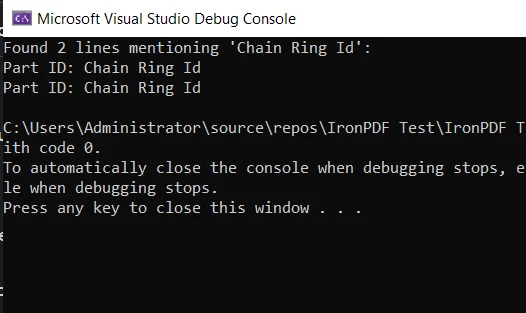
Este é um exemplo básico de como o método Find pode ser usado juntamente com IronPDF em um cenário prático. Isso demonstra a utilidade e a versatilidade do C#, juntamente com suas poderosas bibliotecas que ajudam a tornar suas tarefas de programação mais fáceis e eficientes.
Conclusão
Neste tutorial, mergulhamos fundo no método Find em C# e seus parentes, FindIndex, FindLastIndex, e FindAll. Exploramos suas aplicações, analisamos alguns exemplos de código e descobrimos as circunstâncias em que são mais eficazes.
Também nos aventuramos no mundo da manipulação de PDFs usando a biblioteca IronPDF . Da mesma forma, vimos uma aplicação prática do nosso conhecimento do método Find na extração e busca de conteúdo dentro de um documento PDF.
O IronPDF oferece um período de IronPDF gratuito, proporcionando uma excelente oportunidade para explorar suas funcionalidades e determinar como ele pode beneficiar seus projetos em C#. Se você decidir continuar usando IronPDF após o teste, as licenças começam a partir de $999.
Perguntas frequentes
Como a função Find do C# funciona para os desenvolvedores?
A função `find` do C# permite que os desenvolvedores localizem o primeiro elemento em uma coleção, matriz ou lista que satisfaça condições específicas definidas por um predicado. Esse recurso é útil para agilizar o processo de codificação.
O que é um predicado e como ele é usado em C#?
Um predicado em C# é um delegado que representa um método com uma condição específica. Ele é usado em métodos como Find para testar cada elemento em uma coleção, retornando aqueles que atendem aos critérios.
Posso usar o método Find com uma classe personalizada em C#?
Sim, você pode usar o método Find com uma classe personalizada definindo um predicado que corresponda aos critérios de pesquisa dos elementos da classe, como encontrar um objeto com um valor de propriedade específico.
O que acontece se nenhum elemento corresponder aos critérios do método Find?
Se nenhum elemento corresponder aos critérios especificados pelo predicado no método Find, ele retorna um valor padrão, como null para tipos de referência ou 0 para tipos de valor.
Quais são as diferenças entre Find e FindAll em C#?
O método Find retorna o primeiro elemento que corresponde ao predicado, enquanto FindAll retorna uma lista de todos os elementos que satisfazem as condições do predicado.
Quais as diferenças entre os métodos FindIndex e FindLastIndex?
FindIndex retorna o índice do primeiro elemento que corresponde ao predicado, enquanto FindLastIndex retorna o índice do último elemento que corresponde aos critérios.
Como posso integrar uma biblioteca PDF com o C# Find para pesquisa de texto?
Ao utilizar uma biblioteca de PDFs, você pode extrair texto de PDFs e usar o método "Localizar" para procurar conteúdo específico dentro do texto, tornando-o eficaz para o processamento de documentos.
É possível pesquisar elementos por suas propriedades usando a função Find?
Sim, você pode definir um predicado com base nas propriedades de um elemento para pesquisar critérios específicos, como localizar um objeto com um ID ou atributo específico.
Quão eficiente é o método Find para grandes conjuntos de dados?
O método Find realiza uma busca linear, verificando cada elemento em sequência. Embora seja simples, pode não ser o mais eficiente para coleções muito grandes devido à sua complexidade O(n).
Quais são os benefícios que uma biblioteca PDF oferece para desenvolvedores C#?
Uma biblioteca PDF oferece recursos robustos de manipulação de PDFs, permitindo que os desenvolvedores extraiam, manipulem e pesquisem facilmente o conteúdo de PDFs usando C#, aumentando assim a eficiência das tarefas relacionadas a documentos.










 Comece GRATUITAMENTE
 Comece GRATUITAMENTE
 Agende uma demonstração ao vivo gratuita





 Não é necessário cartão de crédito nem criação de conta.










