




更新日 2026年4月23日
Microsoft.Extensions.AIを使用した .NET での LLM 統合の簡素化
AI はソフトウェア開発を変革していますが、.NET への大規模言語モデル (LLM) の統合はこれまで複雑でした。IronPdf.AI を使用して AI 統合をさらに進め、OpenAI を活用した PDF 解析、データ抽出、およびコンテンツの要約を .NET アプリケーションにもたらします。
詳しく読む

C# の便利な Find 関数についてのチュートリアルへようこそ。 コードを書くプロセスを効率化できる強力な機能に出会ったばかりです。 したがって、経験豊富なコーダーであれ、初めての方であれ、このチュートリアルはすべての要素を案内してくれます。
基本的に、Find は、指定された条件を満たすコレクション、配列、またはリスト内の最初の要素を見つけるための関数です。 述語って何ですか? プログラミングにおいて、述語はコレクション内の要素に対して定義された特定の条件をテストする関数です。
それでは、公開クラスの例を見てみましょう。
public class BikePart
{
    public string Id { get; set; } // Property to identify the bike part

    // Override the Equals method to specify how to compare two BikePart objects
    public override bool Equals(object obj)
    {
        if (obj == null || !(obj is BikePart))
            return false;

        return this.Id == ((BikePart)obj).Id;
    }

    // Override GetHashCode for hashing BikePart objects
    public override int GetHashCode()
    {
        return this.Id.GetHashCode();
    }

    // Override ToString to return a custom string representation of the object
    public override string ToString()
    {
        return "BikePart ID: " + this.Id;
    }
}Public Class BikePart
Public Property Id() As String ' - Property to identify the bike part
' Override the Equals method to specify how to compare two BikePart objects
Public Overrides Function Equals(ByVal obj As Object) As Boolean
If obj Is Nothing OrElse Not (TypeOf obj Is BikePart) Then
Return False
End If
Return Me.Id = DirectCast(obj, BikePart).Id
End Function
' Override GetHashCode for hashing BikePart objects
Public Overrides Function GetHashCode() As Integer
Return Me.Id.GetHashCode()
End Function
' Override ToString to return a custom string representation of the object
Public Overrides Function ToString() As String
Return "BikePart ID: " & Me.Id
End Function
End Classこのコードでは、BikePart がパブリッククラスであり、それは各バイク部品を識別するためのパブリックな文字列 ID を持っています。 バイク部品の ID をきれいに印刷するために ToString メソッドをオーバーライドし、比較のために Equals および GetHashCode メソッドもオーバーライドしました。
私たちの BikePart クラスができたので、バイク部品のリストを作成し、その ID に基づいて特定の部品を見つけるために Find を使用できます。 次の例を考えてみましょう。
using System;
using System.Collections.Generic;

public static void Main()
{
    // Create a list of BikePart objects
    List<BikePart> bikeParts = new List<BikePart>
    {
        new BikePart { Id = "Chain Ring ID" },
        new BikePart { Id = "Crank Arm ID" },
        new BikePart { Id = "Regular Seat ID" },
        new BikePart { Id = "Banana Seat ID" },
    };

    // Define a predicate to find a BikePart with a specific ID
    Predicate<BikePart> findChainRingPredicate = (BikePart bp) => { return bp.Id == "Chain Ring ID"; };
    BikePart chainRingPart = bikeParts.Find(findChainRingPredicate);

    // Print the found BikePart's ID to the console
    Console.WriteLine(chainRingPart.ToString());
}Imports System
Imports System.Collections.Generic
Public Shared Sub Main()
' Create a list of BikePart objects
Dim bikeParts As New List(Of BikePart) From {
New BikePart With {.Id = "Chain Ring ID"},
New BikePart With {.Id = "Crank Arm ID"},
New BikePart With {.Id = "Regular Seat ID"},
New BikePart With {.Id = "Banana Seat ID"}
}
' Define a predicate to find a BikePart with a specific ID
Dim findChainRingPredicate As Predicate(Of BikePart) = Function(bp As BikePart)
Return bp.Id = "Chain Ring ID"
End Function
Dim chainRingPart As BikePart = bikeParts.Find(findChainRingPredicate)
' Print the found BikePart's ID to the console
Console.WriteLine(chainRingPart.ToString())
End Subこのコードでは、ユニークな ID を持つ4つの BikePart オブジェクトをインスタンス化します。 次に、バイク部品が"Chain Ring ID"を持っているかを確認するプレディケート findChainRingPredicate を作成します。 最後に、定義したプレディケートを使用してバイク部品のリストで Find を呼び出し、見つかった部品の ID をコンソールに印刷します。
私たちの Find メソッドにおける Predicate match パラメータについて疑問に思うかもしれません。 これは、Find メソッドが要素を返す条件を定義する場所です。 私たちの場合、Find メソッドが"Chain Ring ID"に一致する最初の要素を返すことを望みました。
プレディケートで定義された条件を満たす要素がない場合、Find メソッドはデフォルトの値を返します。 例えば、整数の配列を扱っていて、プレディケートが一致を見つけない場合、Find メソッドは C# の整数のデフォルト値である '0' を返します。
重要なのは、Find 関数が配列、リスト、またはコレクション全体で線形検索を行うことです。 これは最初の要素から始まり、次の各要素を順番に調べて、述語を満たす最初の要素の出現を見つけるまで続きます。
場合によっては、述語を満たす最初の要素ではなく、最後の要素を見つけたいことがあります。 この目的のために、C# は FindLast 関数を提供します。
FindIndex と FindLastIndex指定した条件に一致する要素の最初の出現箇所を見つけるのに Find が役立つように、C# もまた、条件に一致する最初と最後の要素のインデックスを提供する FindIndex および FindLastIndex メソッドを提供します。
例を試してみましょう:
using System;
using System.Collections.Generic;

public static void Main()
{
    // Create a list of BikePart objects with an additional duplicate entry
    List<BikePart> bikeParts = new List<BikePart>
    {
        new BikePart { Id = "Chain Ring ID" },
        new BikePart { Id = "Crank Arm ID" },
        new BikePart { Id = "Regular Seat ID" },
        new BikePart { Id = "Banana Seat ID" },
        new BikePart { Id = "Chain Ring ID" }, // Added a second chain ring
    };

    // Define a predicate to find a BikePart with a specific ID
    Predicate<BikePart> findChainRingPredicate = (BikePart bp) => { return bp.Id == "Chain Ring ID"; };

    // Find the index of the first and last occurrence of the specified BikePart
    int firstChainRingIndex = bikeParts.FindIndex(findChainRingPredicate);
    int lastChainRingIndex = bikeParts.FindLastIndex(findChainRingPredicate);

    // Print the indices to the console
    Console.WriteLine($"First Chain Ring ID found at index: {firstChainRingIndex}");
    Console.WriteLine($"Last Chain Ring ID found at index: {lastChainRingIndex}");
}Imports System
Imports System.Collections.Generic
Public Shared Sub Main()
' Create a list of BikePart objects with an additional duplicate entry
Dim bikeParts As New List(Of BikePart) From {
New BikePart With {.Id = "Chain Ring ID"},
New BikePart With {.Id = "Crank Arm ID"},
New BikePart With {.Id = "Regular Seat ID"},
New BikePart With {.Id = "Banana Seat ID"},
New BikePart With {.Id = "Chain Ring ID"}
}
' Define a predicate to find a BikePart with a specific ID
Dim findChainRingPredicate As Predicate(Of BikePart) = Function(bp As BikePart)
Return bp.Id = "Chain Ring ID"
End Function
' Find the index of the first and last occurrence of the specified BikePart
Dim firstChainRingIndex As Integer = bikeParts.FindIndex(findChainRingPredicate)
Dim lastChainRingIndex As Integer = bikeParts.FindLastIndex(findChainRingPredicate)
' Print the indices to the console
Console.WriteLine($"First Chain Ring ID found at index: {firstChainRingIndex}")
Console.WriteLine($"Last Chain Ring ID found at index: {lastChainRingIndex}")
End SubFindAll の力名前が示すように、FindAll メソッドはプレディケートを満たすコレクション内のすべての要素を取得します。 特定の条件に基づいて要素をフィルタリングする必要がある場合に使用されます。 FindAll メソッドは一致するすべての要素を含む新しいリストを返します。
以下がコード例です:
using System;
using System.Collections.Generic;

public static void Main()
{
    // Create a list of BikePart objects with an additional duplicate entry
    List<BikePart> bikeParts = new List<BikePart>
    {
        new BikePart { Id = "Chain Ring ID" },
        new BikePart { Id = "Crank Arm ID" },
        new BikePart { Id = "Regular Seat ID" },
        new BikePart { Id = "Banana Seat ID" },
        new BikePart { Id = "Chain Ring ID" }, // Added a second chain ring
    };

    // Define a predicate to find all BikeParts with a specific ID
    Predicate<BikePart> findChainRingPredicate = (BikePart bp) => { return bp.Id == "Chain Ring ID"; };

    // Use FindAll to get all matching BikePart objects
    List<BikePart> chainRings = bikeParts.FindAll(findChainRingPredicate);

    // Print the count and details of each found BikePart
    Console.WriteLine($"Found {chainRings.Count} Chain Rings:");
    foreach (BikePart chainRing in chainRings)
    {
        Console.WriteLine(chainRing.ToString());
    }
}Imports System
Imports System.Collections.Generic
Public Shared Sub Main()
' Create a list of BikePart objects with an additional duplicate entry
Dim bikeParts As New List(Of BikePart) From {
New BikePart With {.Id = "Chain Ring ID"},
New BikePart With {.Id = "Crank Arm ID"},
New BikePart With {.Id = "Regular Seat ID"},
New BikePart With {.Id = "Banana Seat ID"},
New BikePart With {.Id = "Chain Ring ID"}
}
' Define a predicate to find all BikeParts with a specific ID
Dim findChainRingPredicate As Predicate(Of BikePart) = Function(bp As BikePart)
Return bp.Id = "Chain Ring ID"
End Function
' Use FindAll to get all matching BikePart objects
Dim chainRings As List(Of BikePart) = bikeParts.FindAll(findChainRingPredicate)
' Print the count and details of each found BikePart
Console.WriteLine($"Found {chainRings.Count} Chain Rings:")
For Each chainRing As BikePart In chainRings
Console.WriteLine(chainRing.ToString())
Next chainRing
End SubC#のFind知識を活用できる重要な分野は、IronPDFという強力なC#ライブラリを使用したPDFコンテンツの操作です。
様々なバイク部品に関する情報を含むPDFドキュメントを扱っているとします。 しばしば、このコンテンツ内で特定の部品を見つける必要があります。 IronPDFとC# Findメソッドが組み合わさって、強力な解決策を提供します。
最初に、IronPDF を使用して PDF からテキストを抽出し、その後、抽出されたテキスト内の特定の部分を見つけるために以前学んだ Find または FindAll メソッドを使用できます。
using IronPdf;
using System;
using System.Collections.Generic;
using System.Linq;

public class Program
{
    public static void Main()
    {
        // Load and extract text from a PDF document
        PdfDocument pdf = PdfDocument.FromFile(@"C:\Users\Administrator\Desktop\bike.pdf");
        string pdfText = pdf.ExtractAllText();

        // Split the extracted text into lines
        List<string> pdfLines = pdfText.Split('\n').ToList();

        // Define a predicate to find lines that contain a specific text
        Predicate<string> findChainRingPredicate = (string line) => { return line.Contains("Chain Ring ID"); };

        // Use FindAll to get all lines containing the specified text
        List<string> chainRingLines = pdfLines.FindAll(findChainRingPredicate);

        // Print the count and content of each found line
        Console.WriteLine($"Found {chainRingLines.Count} lines mentioning 'Chain Ring ID':");
        foreach (string line in chainRingLines)
        {
            Console.WriteLine(line);
        }
    }
}Imports IronPdf
Imports System
Imports System.Collections.Generic
Imports System.Linq
Public Class Program
Public Shared Sub Main()
' Load and extract text from a PDF document
Dim pdf As PdfDocument = PdfDocument.FromFile("C:\Users\Administrator\Desktop\bike.pdf")
Dim pdfText As String = pdf.ExtractAllText()
' Split the extracted text into lines
Dim pdfLines As List(Of String) = pdfText.Split(ControlChars.Lf).ToList()
' Define a predicate to find lines that contain a specific text
Dim findChainRingPredicate As Predicate(Of String) = Function(line As String) line.Contains("Chain Ring ID")
' Use FindAll to get all lines containing the specified text
Dim chainRingLines As List(Of String) = pdfLines.FindAll(findChainRingPredicate)
' Print the count and content of each found line
Console.WriteLine($"Found {chainRingLines.Count} lines mentioning 'Chain Ring ID':")
For Each line As String In chainRingLines
Console.WriteLine(line)
Next
End Sub
End Classこのコードでは、PDF をロードし、テキストを抽出し、行に分割し、FindAll を使用して"Chain Ring ID"に言及しているすべての行を見つけました。
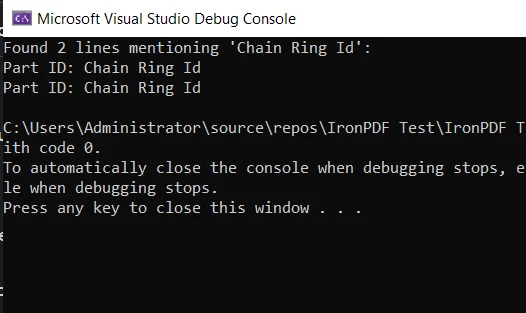
これは、Find メソッドが IronPDF と共に実用的なシナリオでどのように使用されるかの基本的な例です。 これは、C#とその強力なライブラリを使用して、プログラミングタスクをより簡単かつ効率的にするためのユーティリティと多様性を示しています。
このチュートリアルでは、C# の Find メソッドとその関連する FindAll について詳しく掘り下げました。 それらの使用法を探り、いくつかのコード例を探索し、それらが最も効果的な状況を明らかにしました。
また、IronPDFライブラリを使用したPDF操作の世界にも一歩踏み出しました。 同様に、PDF ドキュメント内のコンテンツの抽出と検索における Find メソッド知識の実際の応用を見ました。
IronPDFはIronPDFの無料トライアルを提供しており、その機能を探求し、C#プロジェクトにどのように役立つかを確認する絶好の機会を提供しています。 トライアル後に IronPDF の使用を続けることを決めた場合、ライセンスは $999 から始まります。

ジェイコブ・メラーはIron Softwareの最高技術責任者(CTO)であり、C# PDFテクノロジーを開拓する先見的なエンジニアです。Iron Softwareのコアコードベースを支えるオリジナル開発者として、彼は創業以来、会社の製品アーキテクチャを形成し、CEOのCameron Rimingtonとともに、会社をNASA、Tesla、および世界的な政府機関にサービスを提供する50人以上の会社に変えました。1999年にロンドンで最初のソフトウェアビジネスを開業し、2005年に最初 for .NETコンポーネントを作成した後、Microsoftのエコシステム全体で複雑な問題を解決することを専門としました。



IronPDF はIRONSUITEの一部です
オフィス文書向けの.NET API製品10個

PDFがHTMLのように見える必要があるとき、迅速に。












