


C# Reverse String (Cómo Funciona para Desarrolladores)

La manipulación de cadenas es un aspecto fundamental de la programación, y una tarea común es invertir una cadena de entrada. En C#, hay varias formas de realizar esta tarea, como usar un bucle while, cada una con sus ventajas, desventajas y casos de mejor uso. En este artículo, exploraremos varios métodos para invertir una cadena o un arreglo de caracteres en C#, junto con ejemplos de código para diferentes escenarios y casos límite. Además, presentaremos una destacada biblioteca de generación de PDF llamada IronPDF de Iron Software.
1. Uso de funciones incorporadas
C# proporciona varias funciones integradas para la manipulación de cadenas, y una de ellas es Array.Reverse(), que puede usarse para invertir un arreglo de caracteres o un arreglo de tipo char que representa una cadena. Aquí hay un ejemplo de código del método de inversión:
public class Program
{
    // Main method: entry point of the program
    public static void Main()
    {
        string original = "Awesome IronPDF"; // String variable
        char[] charArray = original.ToCharArray(); // Convert string to character array
        Array.Reverse(charArray); // Reverse the character array
        string reversed = new string(charArray); // Create a new reversed string
        Console.WriteLine(reversed); // Output: FDPnorIemosewA
    }
}
public class Program
{
// Main method: entry point of the program
public static void Main()
{
string original = "Awesome IronPDF"; // String variable
char[] charArray = original.ToCharArray(); // Convert string to character array
Array.Reverse(charArray); // Reverse the character array
string reversed = new string(charArray); // Create a new reversed string
Console.WriteLine(reversed); // Output: FDPnorIemosewA
}
}Option Strict On
Public Class Program
' Main method: entry point of the program
Public Shared Sub Main()
Dim original As String = "Awesome IronPDF" ' String variable
Dim charArray As Char() = original.ToCharArray() ' Convert string to character array
Array.Reverse(charArray) ' Reverse the character array
Dim reversed As String = New String(charArray) ' Create a new reversed string
Console.WriteLine(reversed) ' Output: FDPnorIemosewA
End Sub
End ClassVentajas
- Código simple y conciso.
- Utiliza funciones integradas, reduciendo la necesidad de implementación personalizada.
Desventajas
- Requiere convertir la cadena a un arreglo de caracteres, lo que consume memoria adicional.
- No es adecuado para escenarios donde el rendimiento es crítico.
2. Usando un StringBuilder
Otro enfoque para invertir una cadena en C# es utilizando la clase StringBuilder, que proporciona operaciones eficientes de manipulación de cadenas. Aquí se muestra cómo se puede usar StringBuilder para invertir una cadena:
public class Program
{
    // Main method: entry point of the program
    public static void Main()
    {
        string someText = "Awesome IronPDF"; // String variable
        StringBuilder sb = new StringBuilder(); // Create a StringBuilder instance
        for (int i = someText.Length - 1; i >= 0; i--)
        {
            sb.Append(someText[i]); // Append characters in reverse order
        }
        string reversed = sb.ToString(); // Convert StringBuilder to string
        Console.WriteLine(reversed); // Output: FDPnorIemosewA
    }
}
public class Program
{
// Main method: entry point of the program
public static void Main()
{
string someText = "Awesome IronPDF"; // String variable
StringBuilder sb = new StringBuilder(); // Create a StringBuilder instance
for (int i = someText.Length - 1; i >= 0; i--)
{
sb.Append(someText[i]); // Append characters in reverse order
}
string reversed = sb.ToString(); // Convert StringBuilder to string
Console.WriteLine(reversed); // Output: FDPnorIemosewA
}
}Imports System
Imports System.Text
Public Class Program
' Main method: entry point of the program
Public Shared Sub Main()
Dim someText As String = "Awesome IronPDF" ' String variable
Dim sb As New StringBuilder() ' Create a StringBuilder instance
For i As Integer = someText.Length - 1 To 0 Step -1
sb.Append(someText(i)) ' Append characters in reverse order
Next
Dim reversed As String = sb.ToString() ' Convert StringBuilder to string
Console.WriteLine(reversed) ' Output: FDPnorIemosewA
End Sub
End ClassVentajas
- Uso eficiente de la memoria, especialmente para cadenas grandes.
- Adecuado para escenarios donde el rendimiento es crucial.
Desventajas
- Requiere iteración manual sobre los caracteres de la cadena original.
- Ligeramente más verboso en comparación con el uso de funciones integradas.
3. Enfoque recursivo
También se puede usar un enfoque recursivo para invertir una cadena en C#. Este método implica intercambiar recursivamente caracteres desde ambos extremos de la cadena hasta que la cadena completa esté invertida. Aquí hay una implementación:
public class Program
{
    // Main method: entry point of the program
    public static void Main()
    {
        string someText = "Awesome IronPDF"; // Random string
        string reversed = ReverseString(someText); // Reverse a string
        Console.WriteLine(reversed); // Output: FDPnorIemosewA
    }

    // Recursive method to reverse a string
    public static string ReverseString(string str)
    {
        if (str.Length <= 1)
            return str;
        return ReverseString(str.Substring(1)) + str[0]; // Recursive call and string concatenation
    }
}
public class Program
{
// Main method: entry point of the program
public static void Main()
{
string someText = "Awesome IronPDF"; // Random string
string reversed = ReverseString(someText); // Reverse a string
Console.WriteLine(reversed); // Output: FDPnorIemosewA
}
// Recursive method to reverse a string
public static string ReverseString(string str)
{
if (str.Length <= 1)
return str;
return ReverseString(str.Substring(1)) + str[0]; // Recursive call and string concatenation
}
}Option Strict On
Public Class Program
' Main method: entry point of the program
Public Shared Sub Main()
Dim someText As String = "Awesome IronPDF" ' Random string
Dim reversed As String = ReverseString(someText) ' Reverse a string
Console.WriteLine(reversed) ' Output: FDPnorIemosewA
End Sub
' Recursive method to reverse a string
Public Shared Function ReverseString(ByVal str As String) As String
If str.Length <= 1 Then
Return str
End If
Return ReverseString(str.Substring(1)) & str(0) ' Recursive call and string concatenation
End Function
End ClassVentajas
- Código elegante y conciso.
- Puede ser útil en escenarios donde se prefiera o requiera la recursión.
Desventajas
- Puede resultar en desbordamiento de pila para cadenas extremadamente largas debido a las llamadas a funciones recursivas.
- Menos eficiente en comparación con los enfoques iterativos, especialmente para cadenas grandes.
Casos prácticos
Al invertir cadenas, es esencial considerar casos límite para garantizar la robustez y corrección. Algunos casos límite a considerar incluyen:
- Cadena vacía: Manejo de escenarios donde la cadena de entrada está vacía.
- Cadena nula: manejo de escenarios donde la cadena de entrada es nula.
- Cadenas con caracteres especiales: garantizar que los caracteres especiales se manejen correctamente durante la inversión.
Generar documento PDF usando el método de inversión de cadena en C
IronPDF se destaca en la conversión de HTML a PDF, asegurando la preservación precisa de los diseños y estilos originales. Es perfecto para crear PDFs a partir de contenido basado en la web como informes, facturas y documentación. Con soporte para archivos HTML, URLs y cadenas HTML en bruto, IronPDF produce fácilmente documentos PDF de alta calidad.
using IronPdf;

class Program
{
    // Main method: entry point of the program
    static void Main(string[] args)
    {
        var renderer = new ChromePdfRenderer(); // Create a PDF renderer

        // 1. Convert HTML String to PDF
        var htmlContent = "<h1>Hello, IronPDF!</h1><p>This is a PDF from an HTML string.</p>";
        var pdfFromHtmlString = renderer.RenderHtmlAsPdf(htmlContent); // Render HTML to PDF
        pdfFromHtmlString.SaveAs("HTMLStringToPDF.pdf"); // Save the PDF file

        // 2. Convert HTML File to PDF
        var htmlFilePath = "path_to_your_html_file.html"; // Specify the path to your HTML file
        var pdfFromHtmlFile = renderer.RenderHtmlFileAsPdf(htmlFilePath); // Render HTML file to PDF
        pdfFromHtmlFile.SaveAs("HTMLFileToPDF.pdf"); // Save the PDF file

        // 3. Convert URL to PDF
        var url = "http://ironpdf.com"; // Specify the URL
        var pdfFromUrl = renderer.RenderUrlAsPdf(url); // Render URL to PDF
        pdfFromUrl.SaveAs("URLToPDF.pdf"); // Save the PDF file
    }
}
using IronPdf;
class Program
{
// Main method: entry point of the program
static void Main(string[] args)
{
var renderer = new ChromePdfRenderer(); // Create a PDF renderer
// 1. Convert HTML String to PDF
var htmlContent = "<h1>Hello, IronPDF!</h1><p>This is a PDF from an HTML string.</p>";
var pdfFromHtmlString = renderer.RenderHtmlAsPdf(htmlContent); // Render HTML to PDF
pdfFromHtmlString.SaveAs("HTMLStringToPDF.pdf"); // Save the PDF file
// 2. Convert HTML File to PDF
var htmlFilePath = "path_to_your_html_file.html"; // Specify the path to your HTML file
var pdfFromHtmlFile = renderer.RenderHtmlFileAsPdf(htmlFilePath); // Render HTML file to PDF
pdfFromHtmlFile.SaveAs("HTMLFileToPDF.pdf"); // Save the PDF file
// 3. Convert URL to PDF
var url = "http://ironpdf.com"; // Specify the URL
var pdfFromUrl = renderer.RenderUrlAsPdf(url); // Render URL to PDF
pdfFromUrl.SaveAs("URLToPDF.pdf"); // Save the PDF file
}
}Imports IronPdf
Friend Class Program
' Main method: entry point of the program
Shared Sub Main(ByVal args() As String)
Dim renderer = New ChromePdfRenderer() ' Create a PDF renderer
' 1. Convert HTML String to PDF
Dim htmlContent = "<h1>Hello, IronPDF!</h1><p>This is a PDF from an HTML string.</p>"
Dim pdfFromHtmlString = renderer.RenderHtmlAsPdf(htmlContent) ' Render HTML to PDF
pdfFromHtmlString.SaveAs("HTMLStringToPDF.pdf") ' Save the PDF file
' 2. Convert HTML File to PDF
Dim htmlFilePath = "path_to_your_html_file.html" ' Specify the path to your HTML file
Dim pdfFromHtmlFile = renderer.RenderHtmlFileAsPdf(htmlFilePath) ' Render HTML file to PDF
pdfFromHtmlFile.SaveAs("HTMLFileToPDF.pdf") ' Save the PDF file
' 3. Convert URL to PDF
Dim url = "http://ironpdf.com" ' Specify the URL
Dim pdfFromUrl = renderer.RenderUrlAsPdf(url) ' Render URL to PDF
pdfFromUrl.SaveAs("URLToPDF.pdf") ' Save the PDF file
End Sub
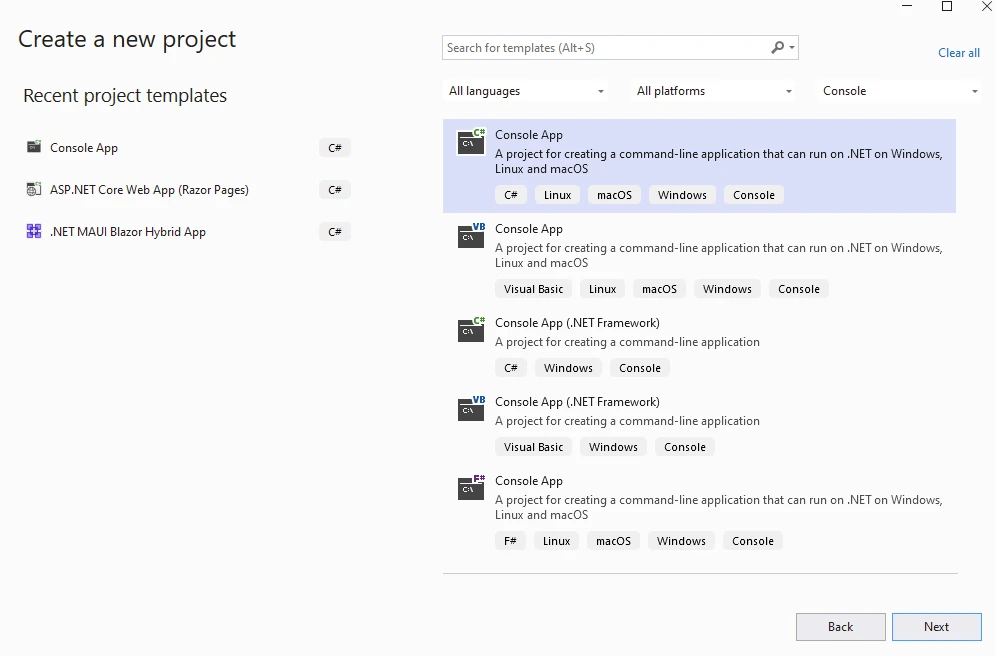
End ClassComienza creando una aplicación de consola desde Visual Studio.
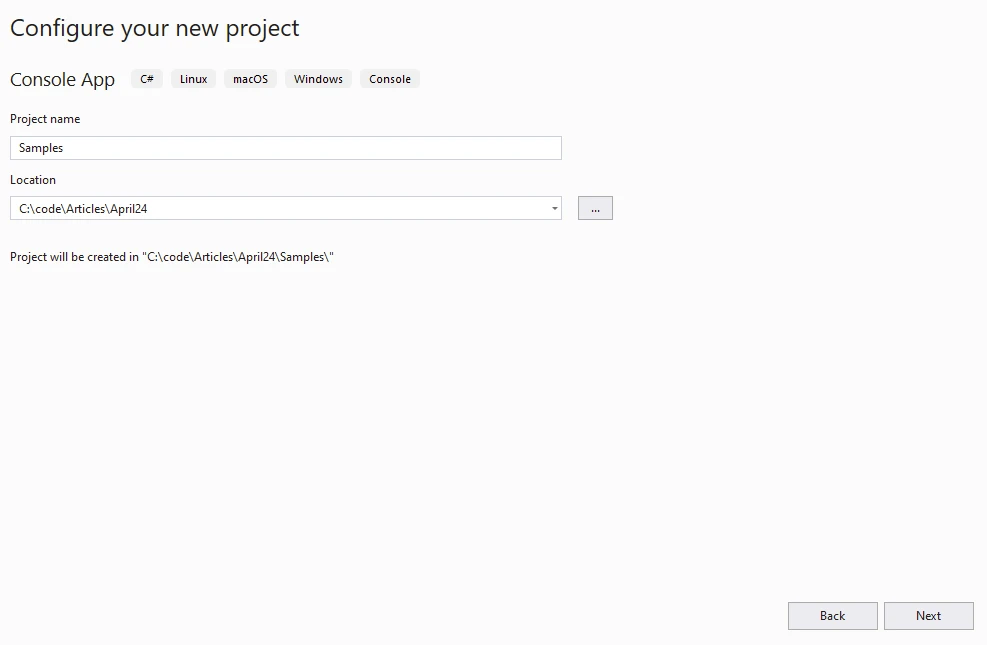
Proporciona el nombre y la ubicación del proyecto.
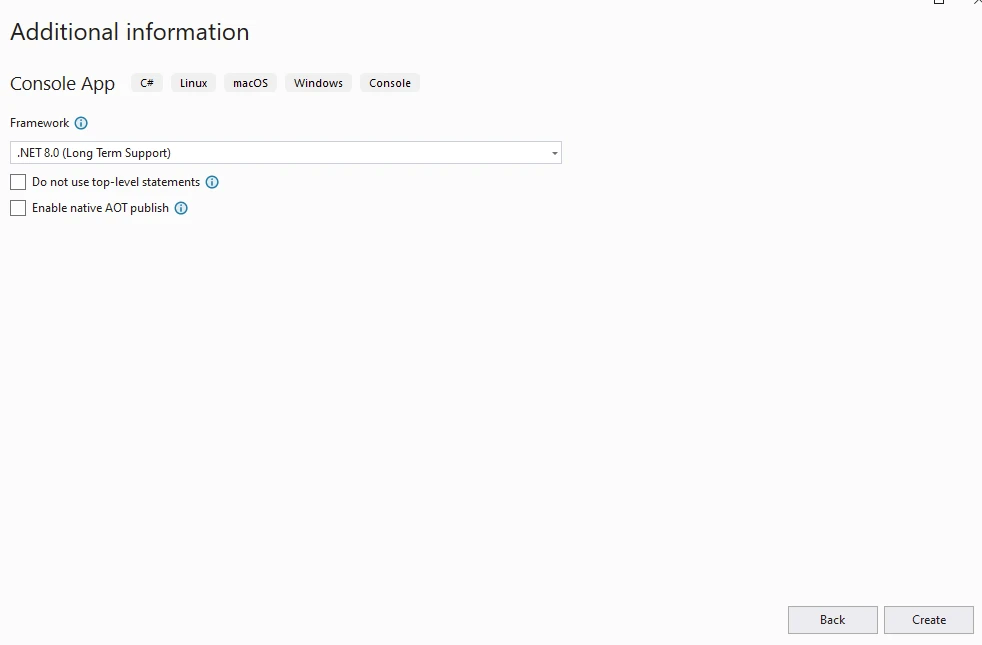
Selecciona la versión de .NET.
Instala IronPDF en el proyecto creado.
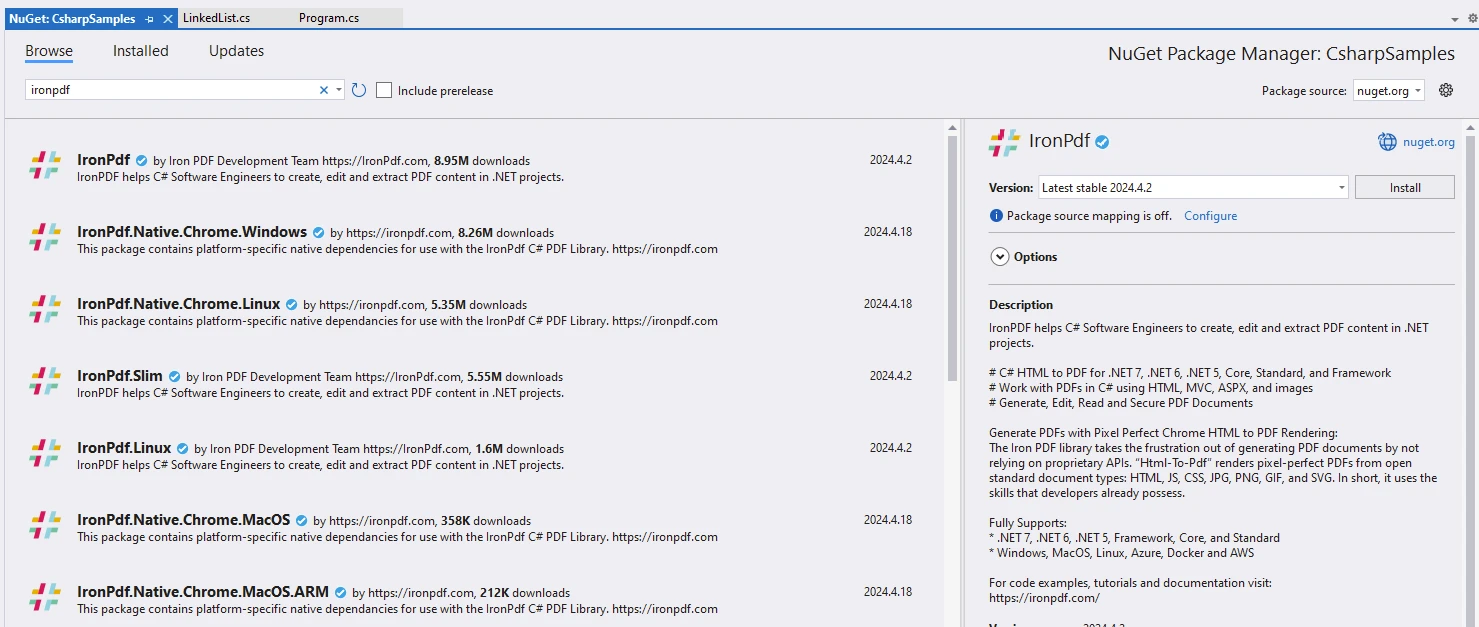
También se puede hacer usando la línea de comandos a continuación.
dotnet add package IronPdf --version 2024.4.2
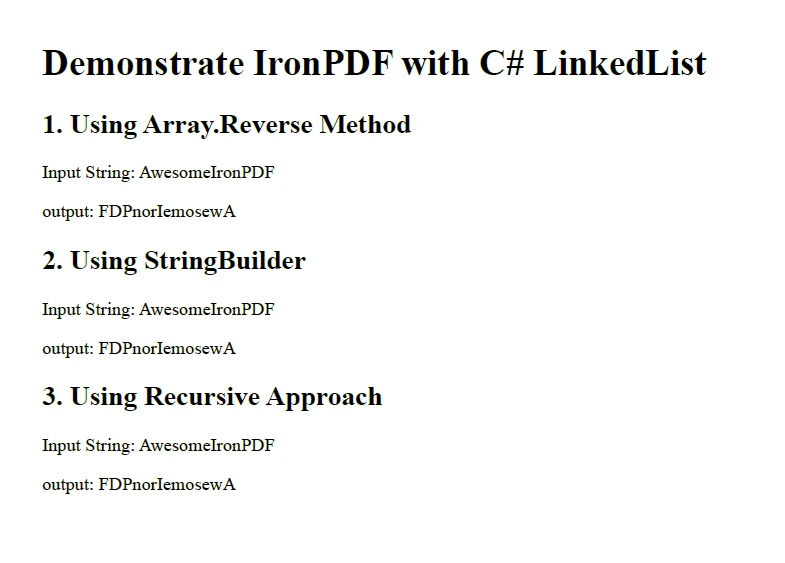
Escribe el código a continuación para demostrar la Inversión de Texto.
public class Program
{
    // Main method: entry point of the program
    public static void Main()
    {
        var content = "<h1>Demonstrate IronPDF with C# LinkedList</h1>";
        content += "<h2>1. Using Array.Reverse Method</h2>";
        string someText = "Awesome IronPDF"; // New string variable
        content += $"<p>Input String: {someText}</p>";
        char[] charArray = someText.ToCharArray(); // Convert string to character array
        Array.Reverse(charArray); // Reverse the character array
        string reversed1 = new string(charArray); // Create a new reversed string
        Console.WriteLine(reversed1); // Output: FDPnorIemosewA
        content += $"<p>Output: {reversed1}</p>";
        content += "<h2>2. Using StringBuilder</h2>";
        StringBuilder sb = new StringBuilder(); // Create a StringBuilder instance
        content += $"<p>Input String: {someText}</p>";
        for (int i = someText.Length - 1; i >= 0; i--)
        {
            sb.Append(someText[i]); // Append characters in reverse order
        }
        string reversed2 = sb.ToString(); // Convert StringBuilder to string
        Console.WriteLine(reversed2); // Output: FDPnorIemosewA
        content += $"<p>Output: {reversed2}</p>";
        content += "<h2>3. Using Recursive Approach</h2>";
        content += $"<p>Input String: {someText}</p>";
        string reversed3 = ReverseString(someText); // Reverse a string
        Console.WriteLine(reversed3); // Output: FDPnorIemosewA
        content += $"<p>Output: {reversed3}</p>";
        // Create Renderer
        var renderer = new ChromePdfRenderer(); // Create a PDF renderer
        // Create a PDF from HTML string
        var pdf = renderer.RenderHtmlAsPdf(content); // Render HTML to PDF
        // Save to a file or Stream
        pdf.SaveAs("reverseString.pdf"); // Save the PDF file
    }

    // Recursive method to reverse a string
    public static string ReverseString(string str)
    {
        if (str.Length <= 1)
            return str;
        return ReverseString(str.Substring(1)) + str[0]; // Recursive call and string concatenation
    }
}
public class Program
{
// Main method: entry point of the program
public static void Main()
{
var content = "<h1>Demonstrate IronPDF with C# LinkedList</h1>";
content += "<h2>1. Using Array.Reverse Method</h2>";
string someText = "Awesome IronPDF"; // New string variable
content += $"<p>Input String: {someText}</p>";
char[] charArray = someText.ToCharArray(); // Convert string to character array
Array.Reverse(charArray); // Reverse the character array
string reversed1 = new string(charArray); // Create a new reversed string
Console.WriteLine(reversed1); // Output: FDPnorIemosewA
content += $"<p>Output: {reversed1}</p>";
content += "<h2>2. Using StringBuilder</h2>";
StringBuilder sb = new StringBuilder(); // Create a StringBuilder instance
content += $"<p>Input String: {someText}</p>";
for (int i = someText.Length - 1; i >= 0; i--)
{
sb.Append(someText[i]); // Append characters in reverse order
}
string reversed2 = sb.ToString(); // Convert StringBuilder to string
Console.WriteLine(reversed2); // Output: FDPnorIemosewA
content += $"<p>Output: {reversed2}</p>";
content += "<h2>3. Using Recursive Approach</h2>";
content += $"<p>Input String: {someText}</p>";
string reversed3 = ReverseString(someText); // Reverse a string
Console.WriteLine(reversed3); // Output: FDPnorIemosewA
content += $"<p>Output: {reversed3}</p>";
// Create Renderer
var renderer = new ChromePdfRenderer(); // Create a PDF renderer
// Create a PDF from HTML string
var pdf = renderer.RenderHtmlAsPdf(content); // Render HTML to PDF
// Save to a file or Stream
pdf.SaveAs("reverseString.pdf"); // Save the PDF file
}
// Recursive method to reverse a string
public static string ReverseString(string str)
{
if (str.Length <= 1)
return str;
return ReverseString(str.Substring(1)) + str[0]; // Recursive call and string concatenation
}
}Imports System
Imports System.Text
Imports IronPdf
Public Class Program
' Main method: entry point of the program
Public Shared Sub Main()
Dim content As String = "<h1>Demonstrate IronPDF with C# LinkedList</h1>"
content &= "<h2>1. Using Array.Reverse Method</h2>"
Dim someText As String = "Awesome IronPDF" ' New string variable
content &= $"<p>Input String: {someText}</p>"
Dim charArray As Char() = someText.ToCharArray() ' Convert string to character array
Array.Reverse(charArray) ' Reverse the character array
Dim reversed1 As String = New String(charArray) ' Create a new reversed string
Console.WriteLine(reversed1) ' Output: FDPnorIemosewA
content &= $"<p>Output: {reversed1}</p>"
content &= "<h2>2. Using StringBuilder</h2>"
Dim sb As New StringBuilder() ' Create a StringBuilder instance
content &= $"<p>Input String: {someText}</p>"
For i As Integer = someText.Length - 1 To 0 Step -1
sb.Append(someText(i)) ' Append characters in reverse order
Next
Dim reversed2 As String = sb.ToString() ' Convert StringBuilder to string
Console.WriteLine(reversed2) ' Output: FDPnorIemosewA
content &= $"<p>Output: {reversed2}</p>"
content &= "<h2>3. Using Recursive Approach</h2>"
content &= $"<p>Input String: {someText}</p>"
Dim reversed3 As String = ReverseString(someText) ' Reverse a string
Console.WriteLine(reversed3) ' Output: FDPnorIemosewA
content &= $"<p>Output: {reversed3}</p>"
' Create Renderer
Dim renderer As New ChromePdfRenderer() ' Create a PDF renderer
' Create a PDF from HTML string
Dim pdf = renderer.RenderHtmlAsPdf(content) ' Render HTML to PDF
' Save to a file or Stream
pdf.SaveAs("reverseString.pdf") ' Save the PDF file
End Sub
' Recursive method to reverse a string
Public Shared Function ReverseString(ByVal str As String) As String
If str.Length <= 1 Then
Return str
End If
Return ReverseString(str.Substring(1)) & str(0) ' Recursive call and string concatenation
End Function
End ClassResultado
Licencia (prueba disponible para IronPDF)
La biblioteca IronPDF requiere una licencia para ejecutar aplicaciones. Se puede encontrar más información en la página de Información de Licencias de IronPDF.
Se puede obtener una licencia de prueba en la página de Licencia de Prueba de IronPDF.
Pega la clave en el archivo appSettings.json a continuación.
{
  "IronPdf.License.LicenseKey": "The Key Goes Here"
}
Conclusión
Invertir una cadena en C# es una tarea común de programación con varios enfoques y consideraciones. Ya sea que prefiera funciones integradas, StringBuilder, o métodos recursivos, cada enfoque tiene sus ventajas, desventajas y mejores casos de uso. Al comprender estos métodos y considerar casos límite, puedes invertir efectivamente cadenas en C# de una manera que se adapte a tus requisitos específicos. Elige el método que mejor se ajuste a tus requisitos según el rendimiento, el uso de memoria y el manejo de caracteres especiales.
Con la biblioteca IronPDF para operaciones PDF en C#, los desarrolladores pueden adquirir habilidades avanzadas para desarrollar aplicaciones modernas.
Preguntas Frecuentes
¿Cómo puedo invertir una cadena en C# usando funciones incorporadas?
Puedes revertir una cadena en C# usando el método Array.Reverse(). Convierte la cadena a un arreglo de caracteres, aplica Array.Reverse(), y luego conviértelo de nuevo a cadena.
¿Cuáles son los beneficios de usar StringBuilder para invertir cadenas en C#?
Usar StringBuilder para invertir cadenas en C# ofrece mejor eficiencia de memoria y rendimiento, especialmente al tratar con cadenas grandes. Permite un mayor control sobre la manipulación de caracteres.
¿Puedo convertir cadenas invertidas en PDFs en C#?
Sí, puedes convertir cadenas invertidas en PDFs usando IronPDF. Después de invertir la cadena, puedes incorporarla en contenido HTML y generar un PDF utilizando los métodos de renderizado de IronPDF.
¿Cuál es el papel de IronPDF en las aplicaciones de C#?
IronPDF permite a los desarrolladores convertir HTML, URL o cadenas HTML en documentos PDF de alta calidad en aplicaciones C#, lo que lo hace adecuado para crear informes profesionales, facturas y más.
¿Cómo manejo casos extremos al invertir cadenas en C#?
Al invertir cadenas en C#, considera casos extremos como cadenas vacías o nulas y cadenas con caracteres especiales para asegurar un manejo adecuado y robustez.
¿Cuáles son algunos escenarios comunes de solución de problemas al generar PDFs en C#?
Escenarios comunes de solución de problemas incluyen asegurar la correcta conversión de HTML a PDF, gestionar el uso de memoria y manejar estructuras o estilos complejos. IronPDF proporciona herramientas robustas para abordar estos problemas.
¿Cómo puedo instalar IronPDF en un proyecto C#?
IronPDF se puede instalar en un proyecto de C# usando el administrador de paquetes NuGet con el comando: dotnet add package IronPDF --version 2024.4.2.
¿Es necesario tener una licencia para usar IronPDF en producción?
Sí, se requiere una licencia para usar IronPDF en producción. Se puede utilizar una licencia de prueba para fines de evaluación antes de comprar una licencia completa.
¿Cuáles son las ventajas de usar un enfoque recursivo para la inversión de cadenas en C#?
Aunque el enfoque recursivo puede invertir cadenas en C# de manera elegante, es menos eficiente para cadenas largas y puede llevar a errores de desbordamiento de pila.
¿Cómo puedo asegurar una salida de PDF de alta calidad en aplicaciones C#?
Para asegurar una salida de PDF de alta calidad en aplicaciones C#, usa IronPDF para convertir contenido HTML bien estructurado en PDFs, preservando estilos y diseños efectivamente.










 Comience gratis
 Comience gratis
 Reserve demostración en vivo gratis
















